

- Introduction – Why Smart CRM Triggers Matter
- Quick Summary – CRM Workflow Triggers
- What’s New – New “Has Changed” Operators
- What’s Changed – From Filters to Events
- Why This Matters – Precision Over Guesswork
- How to Use It: Set Up Smarter CRM Workflow Triggers
- Pro Tips – Smart Ways to Use This Update
- What This Means – Cleaner Automations, Better Performance
- FAQ – Common Questions About This Update
- Conclusion – This Update Stops Workflow Chaos
Introduction – Why Smart CRM Triggers Matter
Ever had a workflow fire… for no good reason? You’re trying to assign a lead, and boom, emails fire, tags get added, follow-ups go out. All because someone updated a note or tweaked a tag. It’s chaos. And it’s a problem every GHL agency eventually runs into.
That’s why this update is a game-changer.
GoHighLevel has upgraded the Opportunity Changed trigger inside workflows. With two powerful new operators, Has Changed and Has Changed To, you can now fire automations only when a specific field changes. Not every time someone breathes on an opportunity.
This means your CRM workflow triggers are about to get a whole lot smarter.
If you’ve been burned by duplicate emails, confusing status updates, or messy lead stages… you’re going to want to read this one.

GoHighLevel’s new CRM workflow trigger logic lets you fire workflows only when a specific field changes, no more false alarms. The “Has Changed” and “Has Changed To” operators give you cleaner, more precise automations without breaking existing setups.
Quick Summary – CRM Workflow Triggers
Purpose: This GHL update enhances the Opportunity Changed trigger by introducing “Has Changed” and “Has Changed To” operators, giving users true event-based workflow control.
Why It Matters: Previously, workflows would fire every time anything changed on an opportunity, even irrelevant updates. Now, you can trigger actions only when a specific field is actually updated.
What You Get: Precision control over workflow triggers using Standard or Custom Fields, without altering your existing automations. Includes new options for tighter logic and fewer false firings.
Time To Complete: About 5–10 minutes to set up in any workflow. No rebuilding required for existing triggers.
Difficulty Level: Beginner to Intermediate, Perfect for any GHL user managing Opportunity-based workflows.
Key Outcome: Cleaner, smarter, and more reliable CRM workflow triggers that only fire when meaningful changes happen.
What’s New – New “Has Changed” Operators
The Opportunity Changed trigger inside GoHighLevel workflows just got a serious upgrade.
Until now, this trigger was basic. You could filter by fields, like “Pipeline = Sales” or “Assigned To = John”, but the workflow would fire every time any update happened to the opportunity. That meant even something as small as adding a note or adjusting a value could accidentally fire your entire automation again. Not cool.
Automate marketing, manage leads, and grow faster with GoHighLevel.

Now, you’ve got two brand-new operators to choose from:
- Has Changed: Fires the workflow only when the selected field actually changes (regardless of the new value).
- Has Changed To: Fires the workflow only when the selected field changes to a specific value.
And it works for both Standard and Custom fields, so whether you’re tracking lead status, owner assignment, budget range, or custom sales flags, you can now build precision workflows that only trigger when the right conditions are met.
This update might look small on the surface, but it changes everything about how you structure automation logic in GHL.
What’s Changed – From Filters to Events
Before this update, the Opportunity Changed trigger was more of a filter than a true event detector. You told it what conditions to look for, like “Stage = Proposal Sent”, and it would fire any time something happened to that opportunity that still matched that condition.
The problem? It didn’t matter what changed.
Update a note? Trigger fired.
Adjust lead value? Trigger fired.
Move a task around? Yep, trigger fired again.
That meant a ton of messy automations getting re-fired for no real reason. You ended up with duplicate emails, double tagging, misfired CRM Workflow Triggers, and a whole bunch of headaches you didn’t sign up for.
Now, that’s changed.
With “Has Changed” and “Has Changed To,” GoHighLevel has shifted this trigger from passive filtering to active event tracking.
Instead of asking “Does this opportunity currently have these values?” GHL now asks: “Did this specific value change in this update?”
That’s a massive difference.
Instead of just checking what’s already there, your automations now respond to real-time changes as they happen.
Why This Matters – Precision Over Guesswork
If you’re serious about automation, you know this already:
Bad triggers = bad workflows.
When your triggers fire off too often, or for the wrong reasons, you end up with:
- Duplicate messages
- Broken logic
- Confused leads
- Manual cleanup nightmares
Think about assigning a lead to John and watching the automation run as expected. Then someone adds a note, and it runs again. Change a value? It runs again. No one even touched the assignee field.
It’s not just a time-waster. It throws off your reports, creates chaos in your system, and leaves your customers wondering what’s going on.
With the new Has Changed To operator, that entire mess disappears.
Now you can say: “Only fire this automation when the Assigned To field changes to John.”
And ignore every other minor update that doesn’t matter.
You get:
- Cleaner logic (less manual tweaking)
- Smarter engagement (more relevant messaging)
- Fewer surprises (you’re not triggering based on guesswork)
This one tweak instantly improves the stability, speed, and predictability of your CRM workflow triggers inside GHL. And it gives you a lot more control over your automations, especially if you’re scaling with multiple pipelines, reps, or lead stages.
How to Use It: Set Up Smarter CRM Workflow Triggers
Tired of CRM Workflow Triggers firing just because someone sneezed on an opportunity record? This update solves that by letting you trigger automations only when specific fields actually change. You can update any existing CRM Workflow Triggers or build new ones using the new “Has Changed” logic in just a few steps.
Step 01 – Access the Workflow Builder
1.1 From your GHL account, go to the left-side Main Menu.
1.2 Click on Automation > Workflows.

Step 02 – Create or Open a Workflow
2.1 Click +Create Workflow to start fresh, or open an existing one you want to fix.

Step 03 – Add an Opportunity Changed Trigger
3.1 At the top of your workflow, click + Add Trigger.
3.2 Choose Opportunity Changed from the list of available triggers.
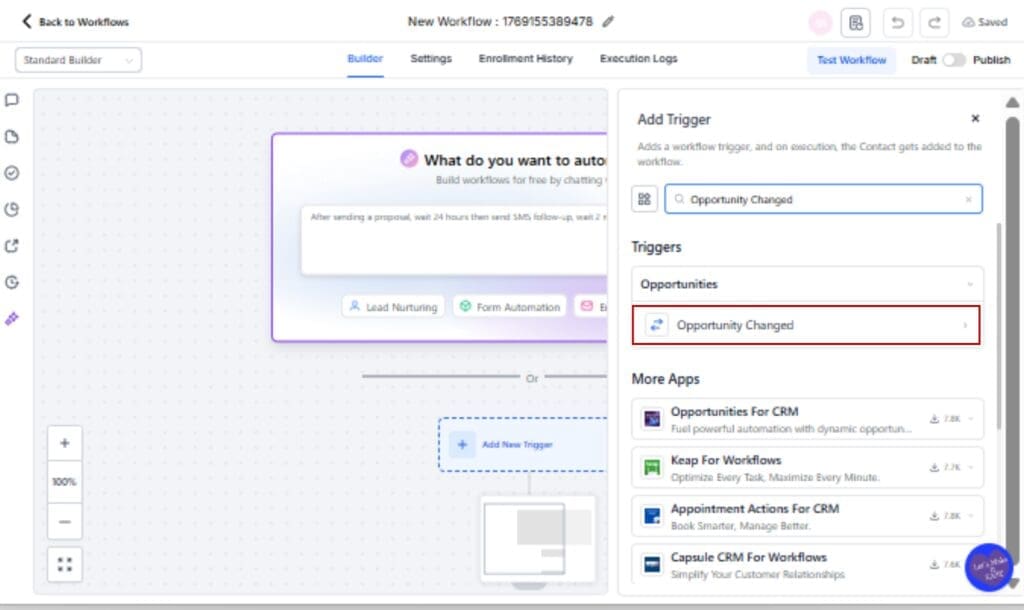
Step 04 – Select the Field You Want to Monitor
4.1 In the trigger setup, find the Field dropdown.
4.2 Select a Standard (like Assigned To) or Custom Field that you want to track.

Step 05 – Choose the New Operator
5.1 Under Operator, select either:
- Has Changed – to fire when the field changes to anything new, or
- Has Changed To – to fire only when the field changes to a specific value.

Step 06 – Set the Value (Only for “Has Changed To”)
6.1 If using “Has Changed To,” enter the specific value you’re watching for.
6.2 For example, set “Assigned To” = “John” if that’s the trigger event you care about.

Step 07 – Finish Building the Workflow
7.1 Add your actions, send an email, notify a rep, change pipeline stage, etc.
7.2 Click Save.

Step 08 – Test Before You Go Live
8.1 Clone the workflow so you can safely test the changes first.
8.2 Adjust anything that seems off before putting it into use.

That’s it. You’ve just built a smarter, tighter CRM Workflow Triggers that only fires when something actually changes, no more trigger spam.
Pro Tips – Smart Ways to Use This Update
Now that you’ve got the new trigger logic in your toolbox, let’s talk strategy. Because “Has Changed” isn’t just a tech upgrade, it’s a way to finally get your CRM Workflow Triggers running like a well-oiled machine.
Here’s how to put it to work like a pro:
Use “Has Changed To” for Stage-Based Actions
If you’re sending nurture emails when a lead hits a new stage, don’t trigger it just because someone updated the record. Only send the message when that lead actually moves from “New” to “Qualified.”
Stop CRM Workflow Triggers Spam From Repeated Edits
When your sales reps update an opportunity with notes or change small details, you don’t want to fire a welcome email again. With “Has Changed,” the trigger won’t run unless that specific field was touched.
Detect Reassignments with Precision
Need to know when a lead moves from one rep to another? Use “Assigned To – Has Changed” to fire alerts, route tasks, or kick off re-onboarding sequences only when it matters.
Clean Up Your CRM Workflow Triggers Logic
This is your moment to simplify. Instead of stacking a dozen filters or nested if/else branches, use one clean “Has Changed To” trigger. Less clutter. More clarity.
Combine With Conditional Logic
Looking to tighten things up even more? Try combining these new trigger options with conditions like tags or form activity for hyper-targeted automations.
Bonus: Audit & Test Your Existing CRM Workflow Triggers
Now’s a good time to look back at your CRM Workflow Triggers. If anything’s triggering too often or acting weird, this update gives you the tools to clean it up.
This update isn’t just about control, it’s about trust. You can finally trust your automations to fire only when the change is real.
What This Means – Cleaner Automations, Better Performance
This update isn’t just a quality-of-life improvement, it’s a shift in how you can think about automation inside GoHighLevel.
Here’s what it unlocks for your agency:
Fewer Errors, Less Cleanup
No more sifting through logs trying to figure out why a CRM Workflow Triggers fired 12 times for the same opportunity. Now, if the data didn’t change, the automation won’t either. Simple as that.
Confidence in CRM Workflow Triggers Accuracy
You can finally trust that an email, SMS, or task is triggered because the right field changed, not just because someone sneezed on the record. That means cleaner logs, less debugging, and better accountability across your team.
Improved Lead Experience
This change means your messages go out when they should, not over and over again. Your leads stay interested instead of irritated, and your follow-ups feel more on point.
Scalability Without the Headaches
As your business grows, so does your automation complexity. This update helps you scale CRM Workflow Triggers with more confidence. You won’t have to constantly tweak filters or rebuild logic just to keep things working right.
At the end of the day, GoHighLevel just gave every agency builder and CRM Workflow Triggers nerd a superpower: event-driven logic that actually respects your workflow design.
FAQ – Common Questions About This Update
Conclusion – This Update Stops Workflow Chaos
Workflows are supposed to save time, not waste it.
But until now, GoHighLevel’s Opportunity Changed trigger fired off way too often. You had to tiptoe around edits, worry about automation loops, and constantly fix things that shouldn’t have broken.
Now? That’s over.
With Has Changed and Has Changed To, you finally get the kind of precise, event-based CRM workflow triggers that pro-level automation deserves. You can fire actions only when it matters, when a value actually changes.
Whether you’re assigning leads, updating stages, or reacting to sales shifts, this is the update that gives you full control without the mess.
It’s clean. It’s smart. It’s GHL leveling up your automation game, just how it should be.
Scale Your Business Today.
Streamline your workflow with GoHighLevel’s powerful tools.


