

- Email AI Beta 2.0 for Faster, Smarter, On-Brand Email Execution
- Quick Summary – Email AI Builder at a Glance
- What’s New in Email AI Builder Beta 2.0
- What Changed From the Previous Email AI Version
- Why This Update Matters for Agencies
- How to Use Email AI Builder Beta 2.0 Step by Step
- Pro Tips for Better Email AI Builder Results
- Frequently Asked Questions About Email AI Builder
- What This Means for Scaling Email Marketing
- Results Agencies Can Expect
- Final Thoughts and Next Steps
Email AI Beta 2.0 for Faster, Smarter, On-Brand Email Execution
Email AI Builder Changes the Game
Email AI Builder fixes a problem agencies deal with every week. Writing emails takes longer than it should, staying on brand is harder than it sounds, and small edits pile up fast. When you manage multiple clients, even basic email campaigns can slow your team down.
Email creation usually breaks at the start or at the finish. You either stare at a blank screen or spend too much time cleaning up copy that does not match the brand. Email AI Builder inside GoHighLevel helps solve both by giving teams a clear starting point and better guidance from the first draft.
With Email AI Beta 2.0, the tool goes beyond simple content generation. It applies Brand Board rules, supports reference emails, and uses Assist Mode to guide better prompts. The AI explains its choices, saves every version, and gives agencies more control with less effort.

Email AI Builder helps agencies create faster, more consistent, on-brand emails inside GoHighLevel by combining guided prompts, brand intelligence, and conversational AI into one streamlined workflow.
Quick Summary – Email AI Builder at a Glance
Purpose: This update improves how agencies create emails by making Email AI Builder faster, more guided, and more brand-aware inside GoHighLevel.
Why It Matters: Email creation often slows teams down, and this update reduces revisions, improves consistency, and removes guesswork during execution.
What You Get: You get guided prompting, automatic Brand Board application, reference-based layouts, conversational editing, and full version history.
Time to Complete: Most agencies can enable Email AI Builder and create their first email in under 15 minutes.
Difficulty Level: The setup and usage are beginner-friendly and require no advanced technical skills.
Key Outcome: Agencies can launch emails faster while staying on brand and maintaining better control over quality and workflow.
What’s New in Email AI Builder Beta 2.0
Email AI Builder now gives agencies a much stronger starting point. One of the biggest updates is the ability to build emails from a reference. You can share a preview URL or an image of an email you like, and the AI recreates that layout directly inside the editor. This makes it easier to adapt proven designs without rebuilding them from scratch.
Assist Mode is another major improvement. Instead of guessing what to type into a prompt, you get guided help that improves the quality of the output. Email AI Builder helps shape better prompts so the AI understands tone, structure, and intent more clearly. This reduces trial and error and cuts down on back-and-forth edits.
Automate marketing, manage leads, and grow faster with GoHighLevel.

Brand Board integration is also deeper in this release. Brand rules are applied automatically when you start, not after the fact. Fonts, colors, voice, and style are considered from the first draft. This helps teams stay consistent across campaigns, even when different people are creating emails. The overall experience is more conversational and controlled. The AI explains what it is doing, lets you edit through a simple back-and-forth, and saves every version automatically. With undo, redo, and version history built in, Email AI Builder makes it easier to move fast without worrying about losing work.
What Changed From the Previous Email AI Version
The earlier version of Email AI was useful, but it often depended on guesswork. You had to know what to ask, how to phrase it, and how to fix results that did not quite fit the brand. It could create content, but it did not always understand layout intent or brand rules right away.
Email AI Builder improves that process by adding more guidance from the start. Assist Mode helps shape clearer prompts, so the AI understands tone and structure before writing begins. Brand Board rules are also applied automatically during creation, which means fewer adjustments after the email is generated.
The workflow is now easier to manage and safer to use. With saved versions, undo, and redo, teams can test ideas without losing progress. Email AI Builder supports iteration instead of forcing quick decisions, which makes it better suited for real agency work.
Why This Update Matters for Agencies
Email AI Builder matters because agency time is limited. Every extra revision, brand fix, or layout tweak adds up fast when you manage multiple clients. This update reduces that friction by helping teams create usable emails faster without lowering quality or consistency.
For agencies, brand control is often the hardest part of scaling. Email AI Builder applies Brand Board rules from the start, so emails stay aligned even when different team members are involved. Assist Mode also helps junior staff create better drafts without constant oversight, which makes delegation easier.
This update also gives agencies more confidence in execution. With saved versions and simple iteration, teams can test ideas without risk. Email AI Builder supports faster delivery while keeping standards high, which helps agencies focus more on strategy and results instead of cleanup work.
How to Use Email AI Builder Beta 2.0 Step by Step
Email AI Builder works directly inside GoHighLevel’s Email Marketing tools. You do not need new workflows, external tools, or complex setup. Once enabled, you can start using it inside templates or existing campaigns.
Step 1.0 – Access the Settings Area in GoHighLevel
- Go to the left-hand sidebar, look all the way to the bottom.
1.1 Click on the gear icon ⚙️ labeled “Settings.”
- You’ll now be in the main Settings dashboard, where you can access:
- Business Info
- Billing
- My Staff
- Phone System
- Labs
- and more.
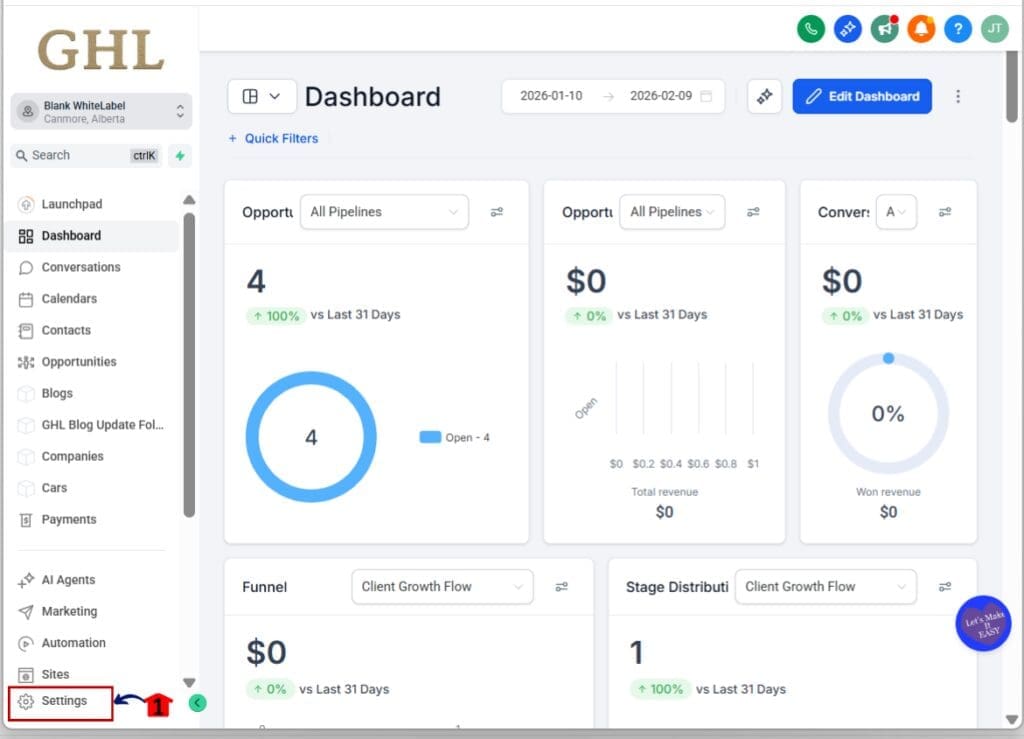
1.2 Click into the Labs
- This is where you toggle on new update features
1.3 Look for Email AI
1.4 Toggle it ON
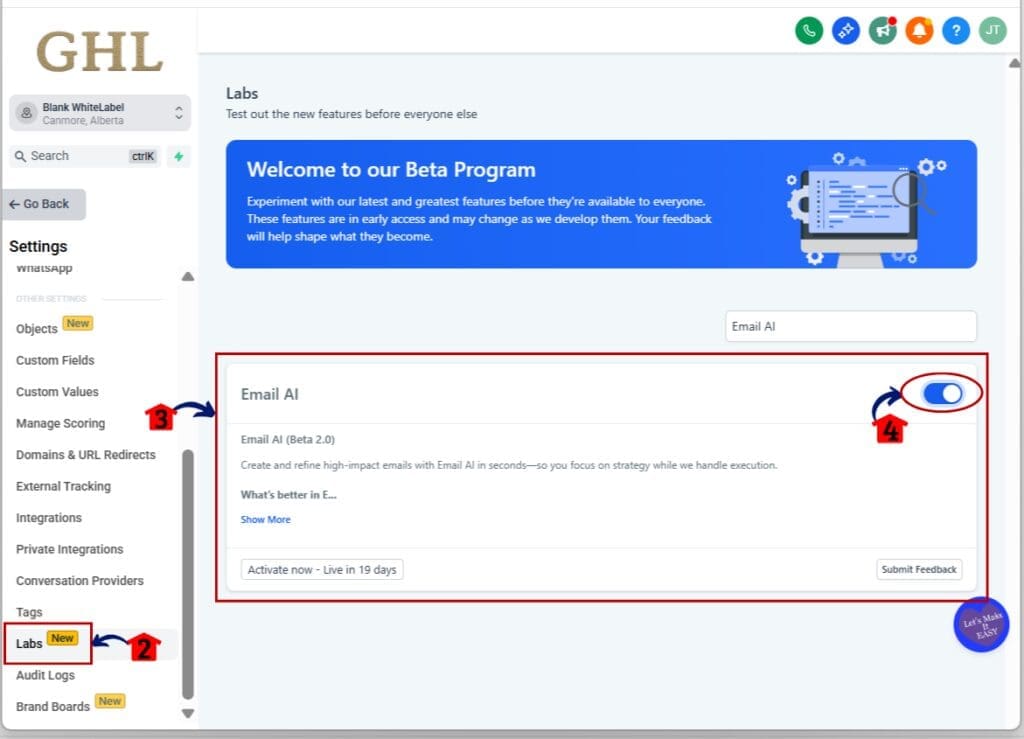
- Once enabled, the feature becomes available inside Email Marketing for that sub-account.
Step 02: Open Email AI Builder from Templates or Campaigns
- You can use Email AI Builder when creating new emails or editing existing ones.
2.1 Go to Marketing
2.2 Click on the Email tab
2.3 Click on Templates tab
2.4 Select Build with AI beside New button
2.5 The Email AI Builder panel will open inside the editor

- This keeps email creation in the same workspace your team already uses.
Step 03: Start with Assist Mode and Brand Board Setting
- Assist Mode helps guide the AI so you get better output faster.
3.1 Click on Assist tab
3.2 Start with your Brand Board guidelines
3.3 Fill in your Business Name, Business Niche, Target Audience, Goal of this Email and What are you offering
3.4 Confirm tone, style, and intent before generating content
- Email AI Builder applies brand rules automatically, so layout and voice are aligned from the first draft.
3.5 Click on Generate button to generate your email.
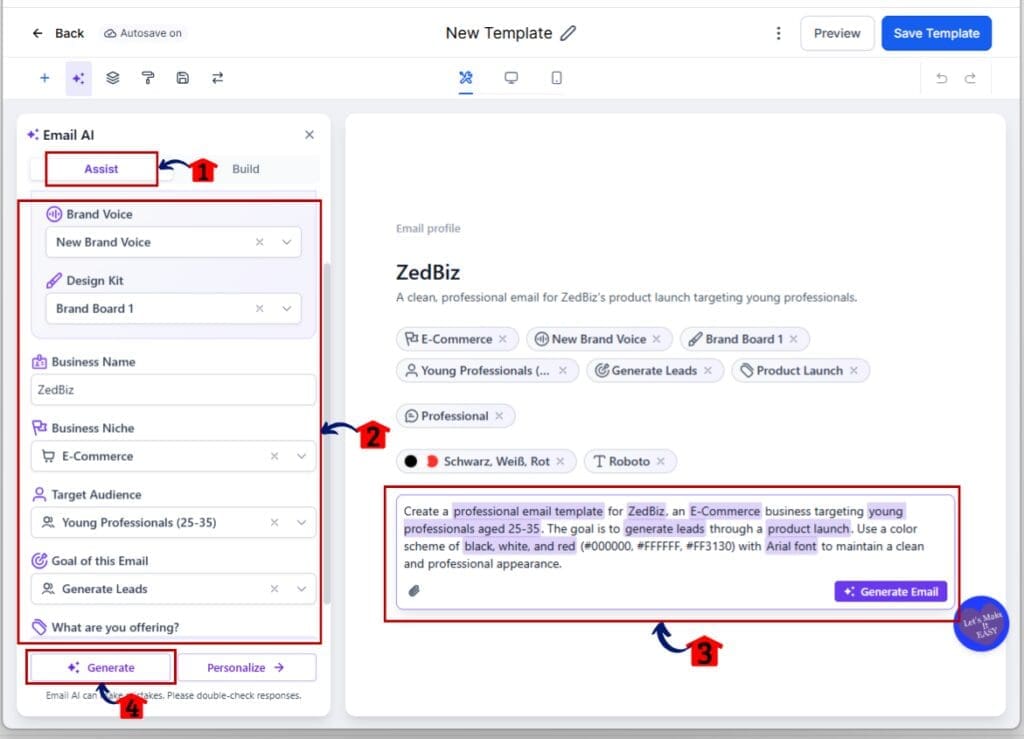
Step 04: Use References to Guide Layout and Structure
- You can guide the AI using examples instead of starting from scratch.
4.1 Paste a preview URL of an email you like or Click on the attachment icon to upload an image
- A pop up selection will appear
4.2 Click on Upload File or Add from Media Library
4.3 Click on Generate Email button
4.4 Adjust branding or content as needed using simple prompts
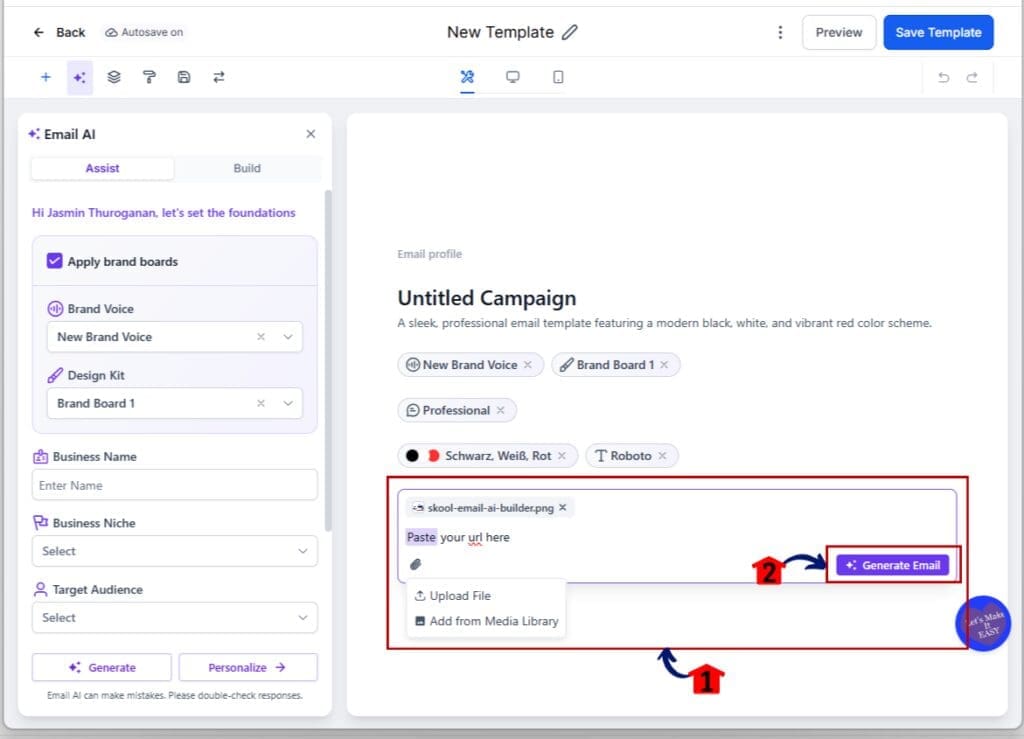
- This is useful when adapting proven designs to new clients or campaigns.
Step 05: Edit, Refine, and Save with Confidence
- Once the email is generated, editing stays conversational and controlled.
5.1 Ask the AI to refine copy, adjust tone, or improve clarity
5.2 Use undo and redo to move between versions
5.3 Review saved versions and keep the one you want

- Email AI Builder saves every generation, so you can test ideas without risk.
That’s it. Email AI Builder Beta 2.0 helps teams move faster, stay on brand, and iterate safely inside GoHighLevel. You create, adjust, and finalize emails with more clarity and less manual effort.
Pro Tips for Better Email AI Builder Results
Email AI Builder works best when you give it clear direction up front. Start by reviewing your Brand Board before generating anything. When brand voice, colors, and fonts are already defined, the AI produces stronger drafts with fewer fixes later. This saves time and keeps output consistent across campaigns.
Using references is another smart move. When you share a preview URL or image of an email you already like, Email AI Builder understands layout and structure faster. This is especially helpful when adapting proven designs for new clients or offers. Clear examples reduce guesswork and improve first drafts.
Finally, use the conversation and version history to your advantage. Ask the AI to explain changes, refine tone, or simplify copy instead of rewriting everything yourself. With saved versions, you can test ideas without pressure. Email AI Builder supports steady improvement, not rushed decisions.
Frequently Asked Questions About Email AI Builder
What This Means for Scaling Email Marketing
Email AI Builder makes scaling email marketing more predictable. When teams can create emails faster without losing brand control, campaign timelines become easier to manage. This helps agencies launch more campaigns without adding pressure or extra staff.
Consistency also improves as teams grow. Email AI Builder applies Brand Board rules and guided prompts from the start, so output stays aligned even when multiple people are involved. This reduces review cycles and makes it easier to onboard new team members without slowing things down.
Most importantly, Email AI Builder shifts focus back to strategy. Less time is spent fixing drafts or rebuilding layouts, and more time is spent planning offers, testing messaging, and improving results. For agencies that want to scale without chaos, this update supports cleaner workflows and steadier growth.
Results Agencies Can Expect
Email AI Builder helps agencies reduce the time it takes to create and launch emails. First drafts come together faster, and fewer revisions are needed to get them ready to send. This makes timelines more predictable and removes delays caused by back-and-forth edits.
Agencies can also expect stronger consistency across campaigns. Because Email AI Builder applies brand rules and guided prompts from the start, emails look and sound more aligned. This improves quality control, especially when multiple team members are creating content for different clients.
Over time, teams gain more confidence in execution. Email AI Builder supports testing, iteration, and improvement without risk. With saved versions and clear workflows, agencies can focus less on fixing emails and more on delivering results that support growth.
Final Thoughts and Next Steps
Email AI Builder brings email creation closer to how agencies actually work. It removes unnecessary friction, improves consistency, and gives teams clearer control over the final result. Instead of fighting tools or fixing drafts, teams can focus on getting campaigns out the door with confidence.
This update is not about replacing strategy or creative thinking. It is about supporting execution so good ideas move faster. With guided prompts, brand awareness, and version control, Email AI Builder fits into real workflows without forcing change or extra training.
If you have not tested Email AI Builder yet, now is the right time. Enable it in Agency Labs, try it inside a real campaign, and let your team use it in day-to-day work. The more you use it, the more value you will get from cleaner workflows and better use of time.
Scale Your Business Today.
Streamline your workflow with GoHighLevel’s powerful tools.


