- Why Task Notifications Were Getting Ignored
- Quick Summary – Task Notifications at a Glance
- What’s New with Smarter Task Notifications
- How Task Notifications Worked Before This Update
- Why Task Notifications Impact Focus More Than You Think
- How to Use Smarter Task Notifications in GoHighLevel
- Pro Tips to Get More Value from Task Notifications
- Task Notifications FAQ: What Users Ask Most
- What Smarter Task Notifications Mean for Agencies
- Results You Can Expect from Smarter Task Notifications
- Why Smarter Task Notifications Are a Big Win
Why Task Notifications Were Getting Ignored
If you’ve ever opened your inbox or phone just to see a daily task notification with nothing inside it, you know the feeling. Another alert. Another interruption. Nothing to act on. Over time, that kind of noise trains you to ignore notifications altogether, and that’s a problem when real work actually shows up.
Inside GoHighLevel, task notifications are supposed to keep you on track. Follow-ups. Due items. Overdue reminders. But when those alerts fire even when there are zero tasks, they stop being helpful and start becoming background static. Agencies feel this pain fast, especially when juggling multiple locations, clients, and internal tasks.
This update finally cuts out the nonsense. If there are no tasks to handle, GoHighLevel won’t bug you about it. No due tasks. No overdue items. No pointless notification. Just less noise and more room to focus.
It’s a tiny toggle, but it changes how you work. When notifications only show up for real tasks, you pay attention. You don’t auto-dismiss them anymore. They actually mean something again.

Smarter task notifications help GoHighLevel users cut inbox clutter, reduce distractions, and only get alerted when real work exists, not empty reminders.
Quick Summary – Task Notifications at a Glance
Purpose: This update improves task notifications by stopping daily alerts when there are no due or overdue tasks, reducing unnecessary interruptions.
Why It Matters: Empty task notifications train users to ignore alerts. Smarter task notifications restore trust by only showing up when action is required.
What You Get: Cleaner inboxes and mobile notifications, fewer distractions, and task reminders that actually mean something.
Time to Complete: Less than one minute to enable inside your GoHighLevel profile settings.
Difficulty Level: Very easy. No workflows, automations, or technical setup required.
Key Outcome: You stay focused on real work while GoHighLevel stays quiet when there’s nothing to do.
What’s New with Smarter Task Notifications
GoHighLevel has added a simple but powerful improvement to task notifications that solves a daily frustration most users never bothered to complain about. You can now stop daily task summaries from being sent when there are zero tasks due or overdue. No more “nothing to see here” alerts clogging your inbox or lighting up your phone.
This update introduces a new toggle inside your personal notification settings. When enabled, GoHighLevel checks whether you actually have tasks that require attention before sending the daily due and overdue task summary. If there’s nothing waiting for you, the notification never gets sent. That’s it. No extra setup. No complex rules.
Automate marketing, manage leads, and grow faster with GoHighLevel.

The key win here is relevance. Task notifications are no longer sent just because the clock says it’s time. They’re sent because there’s real work to act on. That shift alone makes every notification more valuable and easier to trust.
This applies to daily task summaries, not one-off task activity. When tasks exist, notifications still behave exactly as expected. You’ll still be alerted about due items and overdue tasks. The difference is that silence now means you’re actually clear, not that the system forgot to tell you something.
For agencies and teams living inside GoHighLevel all day, this is the kind of update that quietly improves productivity without changing workflows. Fewer distractions. Cleaner inboxes. More focus on work that actually moves things forward.
How Task Notifications Worked Before This Update
Before this update, task notifications followed a fixed routine. Every day, GoHighLevel sent a due and overdue task summary whether or not you actually had tasks waiting. Even if your task list was completely empty, the notification still showed up. Same alert. Same timing. Zero value.
It sounds fine at first. But in practice, it taught users to ignore task notifications completely. If alerts don’t usually mean “do this now,” your brain treats them like noise.
What’s important here is what didn’t change. GoHighLevel didn’t remove task notifications. It didn’t reduce visibility of due or overdue work. And it didn’t force a new behavior on users. Instead, it added a layer of intelligence and choice.
Now, task notifications are conditional. If you have tasks due or overdue, the system behaves exactly as it always has. You get the summary. You get the reminder. Nothing breaks. Nothing disappears. But when your task list is clean, GoHighLevel stays quiet.
This also isn’t a global or agency-wide change being pushed on everyone. It’s a user-level preference. Each person decides whether they want silence when there’s nothing to do or if they prefer daily confirmations regardless of task status.
That distinction matters. This update respects different work styles while fixing a long-standing annoyance for users who value focus and signal over constant noise.
Why Task Notifications Impact Focus More Than You Think
Notifications are supposed to help you act. But when they fire without a reason, they do the opposite. They interrupt your day, break concentration, and slowly train you to ignore everything that pops up. That’s exactly what was happening with daily task notifications that showed up empty.
Focus is fragile. When a notification pops up, you decide almost instantly if it’s worth opening. If the last few didn’t matter, you don’t even think about it. You just clear it and move on.
Smarter task notifications fix that trust problem. When GoHighLevel only sends alerts when tasks actually exist, every notification carries weight. Silence becomes a good sign. It means you’re caught up, not that something failed in the background.
For agency owners, this matters even more. You’re already juggling conversations, pipelines, calendars, automations, and client messages. Reducing one more unnecessary interruption creates mental space to focus on decisions that actually grow the business.
This also improves response speed. When a task notification does come through, you’re far more likely to open it, review it, and act immediately. Fewer alerts leads to faster execution, not slower.
At its core, this update isn’t about notifications. It’s about protecting attention. And in a system as busy as GoHighLevel, attention is one of the most valuable resources you have.
How to Use Smarter Task Notifications in GoHighLevel
If you’ve ever checked a task notification only to find nothing there, this update fixes that annoyance instantly. Smarter task notifications make sure GoHighLevel only taps you on the shoulder when there’s actual work waiting. The setup is quick, personal, and doesn’t affect anyone else on your team. There’s no workflow to build and no automation to touch. This is a simple user-level setting you can enable in under a minute.
Step 01 – Open Your Profile Settings
1.1 Log into your GoHighLevel account.
1.2 Click Settings from the main menu.
1.3 Select My Profile.

Step 02 – Go to Notification Settings
2.1 Inside your profile, click on Notifications.
2.2 Scroll until you find the Task Notifications section.

Step 03 – Enable Smarter Task Notifications
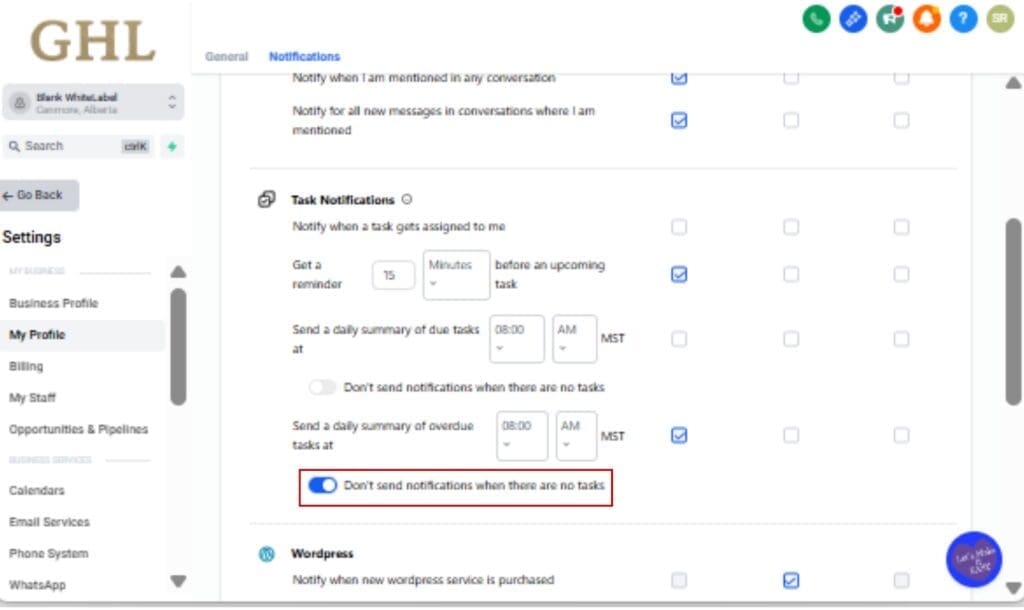
3.1 Locate the option labeled “Don’t send notifications when there are no tasks.”
3.2 Toggle this setting ON.
Step 04 – Understand How It Works
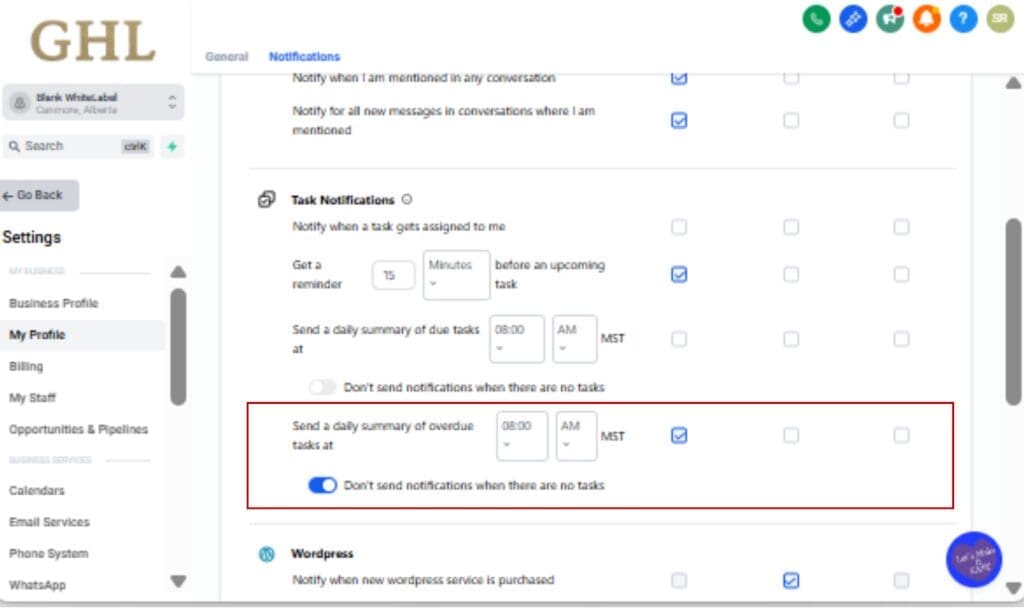
4.1 If you have due or overdue tasks, GoHighLevel will send your normal daily task notification.
4.2 If you have zero tasks, no notification is sent at all.
4.3 Nothing else changes. You won’t miss real tasks or overdue reminders.
Step 05 – Optional: Let Your Team Choose
5.1 This setting is user-specific, not global.
5.2 Each team member can decide whether they want daily confirmations or only action-based alerts.
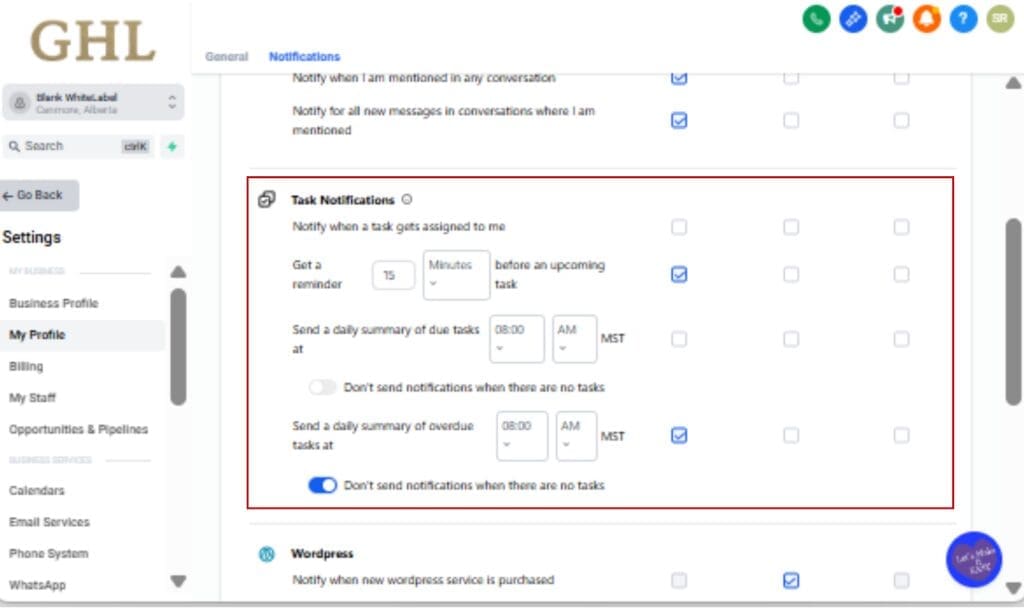
That’s it. No extra rules. No automation logic. Just cleaner task notifications that only show up when something actually needs your attention.
Pro Tips to Get More Value from Task Notifications
This works best when your task list isn’t a mess. The update cuts the noise, but how you use tasks is what really decides whether notifications help or just sit there.
Not everything needs to be a task. If there’s nothing to do or follow up on, skip it. Once tasks mean real work, notifications make more sense.
Second, use due dates consistently. Tasks without due dates don’t help much and can pile up silently. When every task has a clear due date, your daily task notifications stay accurate and actionable. This makes the “no tasks” silence even more meaningful when it happens.
If you’re running multiple locations, don’t force everyone into the same setup. Let each person decide. Some folks only want alerts when there’s work. Others like a daily check-in.
Get in the habit of closing out completed tasks. It doesn’t take long, but it keeps your list from lying to you. A clean list means fewer pointless alerts.
Less noise doesn’t mean less responsibility. The work is still there. The difference is you actually notice it when an alert shows up.
Task Notifications FAQ: What Users Ask Most
What Smarter Task Notifications Mean for Agencies
For agencies, notification noise isn’t just annoying. It’s expensive. Every unnecessary alert chips away at focus, slows response time, and creates bad habits around ignoring reminders. Smarter task notifications quietly solve that problem without forcing new systems or retraining your team.
The biggest win is consistency. When task notifications only show up when there’s real work, they become trustworthy again. Team members stop assuming alerts are meaningless and start responding faster when they appear. That alone improves follow-through across sales, fulfillment, and account management.
This update also respects different roles inside an agency. Account managers juggling multiple clients often want action-only alerts. Operations or admin roles may still prefer daily confirmation. Because this setting is user-level, you don’t have to pick one approach for everyone. Each person can match notifications to how they work best.
For agency owners, this reduces micromanagement. You don’t need to remind staff to “watch their tasks” when the system only speaks up when action is required. Less chasing. Fewer Slack pings. Cleaner accountability.
It also scales well. As teams grow, notification fatigue grows with them. Smarter task notifications prevent that problem from compounding as you add users, locations, and clients inside GoHighLevel.
This isn’t flashy at all. It just makes the system feel less chaotic. And once distractions drop, results usually improve on their own.
Results You Can Expect from Smarter Task Notifications
Once smarter task notifications are enabled, the impact shows up fast. Not in flashy dashboards or reports, but in how your day feels when you’re actually getting work done. Fewer interruptions. Cleaner signal. Better response when it matters.
The first result most users notice is a quieter inbox and phone. When there are no tasks due or overdue, there’s no daily reminder telling you what you already know. That silence creates clarity. You stop scanning notifications out of habit and start trusting them again.
The second result is faster action. When a task notification does come through, it stands out. You open it. You review it. You act on it. That shift alone improves follow-up speed across sales, support, and account management without changing a single workflow.
You’ll also notice better task discipline. Knowing that a clean task list means no alerts reinforces good habits. Teams naturally start closing completed tasks and assigning due dates properly because the system rewards clean behavior with less noise.
For agencies, this results in fewer missed follow-ups and less internal chasing. Managers don’t need to remind people to “check tasks” as often because notifications only show up when there’s something to handle. Accountability becomes system-driven instead of manual.
In the end, things just feel quieter. You’re not reacting to empty alerts all day, and more time goes toward actual client work.
Why Smarter Task Notifications Are a Big Win
Not every GoHighLevel update needs to be loud to be valuable. Smarter task notifications are a perfect example of a quiet improvement that makes the platform easier to live in every single day. By removing alerts that don’t require action, GoHighLevel helps you protect focus instead of constantly fighting distractions.
There’s no learning curve here. Tasks behave the same. Notifications just stop firing for no reason, which is honestly what most people want.
Small changes like this pile up in a good way. Cleaner notifications mean people stay sharper and follow through faster without burning out.
Take a minute and flip the setting on if you haven’t already. When there’s nothing to do, it stays quiet. When there is, you’ll know.
Scale Your Business Today.
Streamline your workflow with GoHighLevel’s powerful tools.