- See Who Deleted What in Your Page Builder and Take Back Control of Funnels, Websites, and Templates
- Quick Summary – Builder Audit Logs at a Glance
- What’s New With Builder Audit Logs
- What Gets Logged When Assets Are Deleted
- Why Builder Audit Logs Matter for Agencies
- How to Access Builder Audit Logs in GoHighLevel
- What This Means for Your Business Operations
- Frequently Asked Questions About Builder Audit Logs
- Conclusion – Builder Audit Logs Give You Control
See Who Deleted What in Your Page Builder and Take Back Control of Funnels, Websites, and Templates
Builder Audit Logs just solved one of the most frustrating problems inside GoHighLevel. You log in. A section is missing. A global template is gone. A universal element vanished. And nobody knows what happened. Builder Audit Logs now give you clear visibility into deleted assets inside the Page Builder. If a Section Template, Global Section, Universal Section, Element Template, or Universal Element Template gets deleted, GoHighLevel logs it. That means you can finally see what was removed, when it happened, and who did it.
This works across Funnels, Websites, Stores, and Webinars. Before this update, deleted builder assets could disappear without a clear trace. Now, every deletion creates a “Deleted” audit entry with the asset name and asset ID. No more guessing. No more rebuilding from scratch without answers. If you run an agency, manage VAs, or resell GHL in SaaS mode, this is a big deal. Because when shared assets get removed, funnels break. Pages look wrong. Clients notice. Builder Audit Logs give you accountability, visibility, and control — all inside your existing Settings → Audit Logs area. And that’s a serious operational upgrade.
Builder Audit Logs give you clear visibility into deleted templates, sections, and elements inside GoHighLevel. You’ll know exactly what was removed, when it happened, and who did it — so nothing disappears without a trace.
Quick Summary – Builder Audit Logs at a Glance
Purpose:
Builder Audit Logs give you visibility into deleted templates, sections, and elements inside your GoHighLevel Page Builder so nothing disappears without a record.
Why It Matters:
When shared assets get deleted in Funnels, Websites, Stores, or Webinars, you can instantly see what was removed, when it happened, and who did it. That saves time and prevents internal confusion.
What You Get:
You get clear Deleted log entries that include the asset name, asset ID, timestamp, and user details inside Settings → Audit Logs.
Time To Complete:
It takes less than 2 minutes to access the Audit Logs page and filter for Deleted actions.
Difficulty Level:
Beginner friendly. If you can navigate to Settings, you can review Builder Audit Logs.
Key Outcome:
You gain operational control and accountability inside your GHL environment, especially when managing teams or white-label sub-accounts.
What’s New With Builder Audit Logs
Here’s exactly what GoHighLevel added.
Any time a key saved builder asset is deleted, the system now creates an audit log entry.
Automate marketing, manage leads, and grow faster with GoHighLevel.

That’s it. Simple. Powerful.
Builder Audit Logs now trigger when the following assets are deleted:
• Section Templates
• Global Sections
• Universal Sections
• Element Templates
• Universal Element Templates
And this works across:
• Funnels
• Websites
• Stores
• Webinars
So no matter where your builder assets live, deletions are now tracked.
This is not version history.
It doesn’t restore your asset automatically.
What it does is give you visibility.
When one of these saved assets gets deleted, GHL creates a “Deleted” action entry inside Audit Logs. That entry includes:
• The asset name
• The asset ID
• The timestamp
• The user who performed the action
That last one matters.
Because in growing agencies, multiple team members touch the same templates. A VA might clean something up. A designer might reorganize assets. Someone might think a template is unused.
And suddenly something important is gone.
Before Builder Audit Logs, you were guessing.
Now you can confirm exactly what happened in seconds.
This update doesn’t change how you build pages.
It changes how you manage risk.
And that’s a big operational shift for serious agencies.
What Gets Logged When Assets Are Deleted
Let’s break down exactly what Builder Audit Logs capture.
When a tracked builder asset gets deleted, GoHighLevel creates a clear “Deleted” entry inside your Audit Logs.
That entry includes:
• The Asset Name
• The Asset ID
• The Action Type (Deleted)
• The Timestamp
• The User Who Performed the Action
That’s the key information you need.
The asset name tells you what was removed.
The asset ID gives you a unique reference number tied to that exact template or section.
This matters more than most people realize.
If you’re working with support, restoring from snapshots, or rebuilding something from documentation, that asset ID can help you confirm exactly which saved asset was affected.
The timestamp tells you when it happened.
So if a funnel broke Tuesday afternoon, you can check logs around that time.
No more digging through random changes hoping to spot the issue.
And because you can filter by user, you can quickly identify who made the deletion.
Not to point fingers.
But to understand what happened.
In real agency environments, deletions are usually accidental. Someone assumes a section isn’t being used. Someone cleans up what looks like “duplicate” templates.
Builder Audit Logs give you clarity instead of chaos.
It turns “Who deleted this?!” into “Okay, here’s what happened.”
And that alone saves hours.
Why Builder Audit Logs Matter for Agencies
If you’re a solo user, this is helpful.
If you run an agency, this is critical.
Builder Audit Logs add accountability to your Page Builder environment.
When multiple team members work inside Funnels, Websites, Stores, or Webinars, things get messy. Templates evolve. Sections get reused. Universal elements power multiple pages.
One deletion can ripple across dozens of assets.
Now you can see exactly when something was removed and who removed it.
That changes everything.
Here’s why Builder Audit Logs matter in real-world agency operations:
They prevent silent damage.
A deleted global section won’t disappear without a trace anymore.
They reduce internal friction.
Instead of guessing or blaming, you check the logs.
They protect shared template libraries.
Universal Sections and Element Templates often power multiple client accounts. Now you can monitor deletions with clarity.
They improve team training.
If a new VA deletes the wrong template, you can identify the action quickly and coach them properly.
They strengthen white-label SaaS delivery.
If you resell GoHighLevel, your sub-account users may be building inside shared environments. Visibility helps protect your ecosystem.
Builder Audit Logs don’t just track deletions.
They protect operational integrity.
And in growing agencies, operational integrity is everything.
Because rebuilding assets wastes time.
Explaining broken funnels to clients costs trust.
But quickly identifying what happened? That builds confidence.
How to Access Builder Audit Logs in GoHighLevel
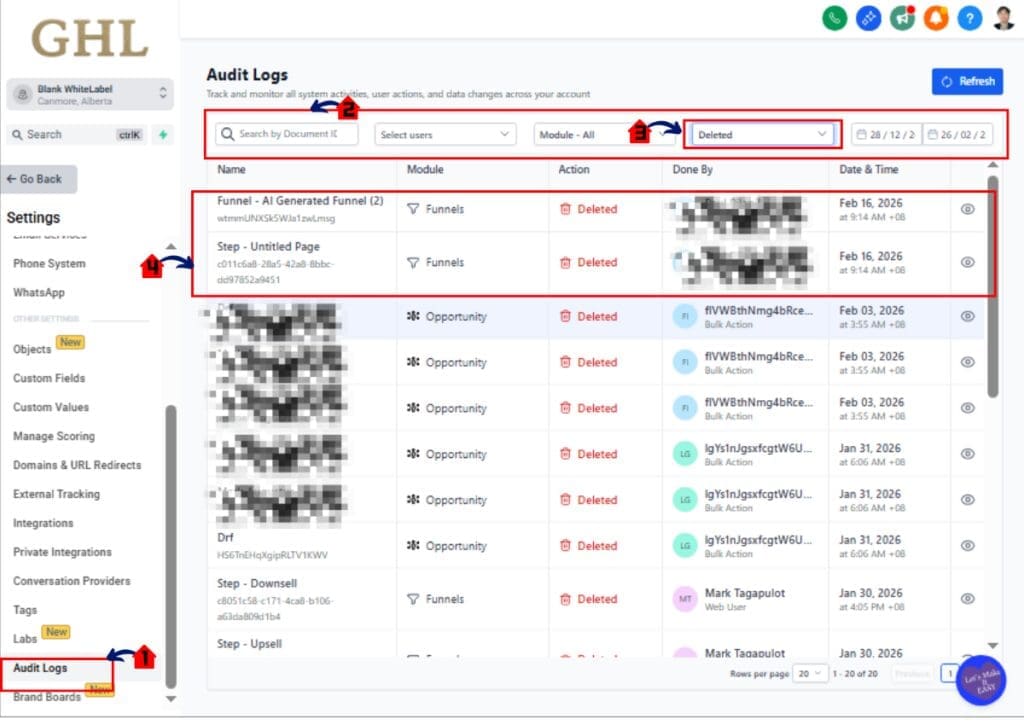
Builder Audit Logs are located inside the Settings area of your sub-account. You are not changing anything inside the Page Builder itself. You are simply reviewing recorded actions inside the Audit Logs page. This process allows you to filter, search, and review deleted builder assets quickly.
Here are the steps to access and review Builder Audit Logs inside GoHighLevel:
• Access the Settings area
• Open the Audit Logs page
• Filter by Deleted actions
• Search by user (optional)
• Review asset details and timestamps
To start make sure you are logged in to your GoHighLevel sub-account.
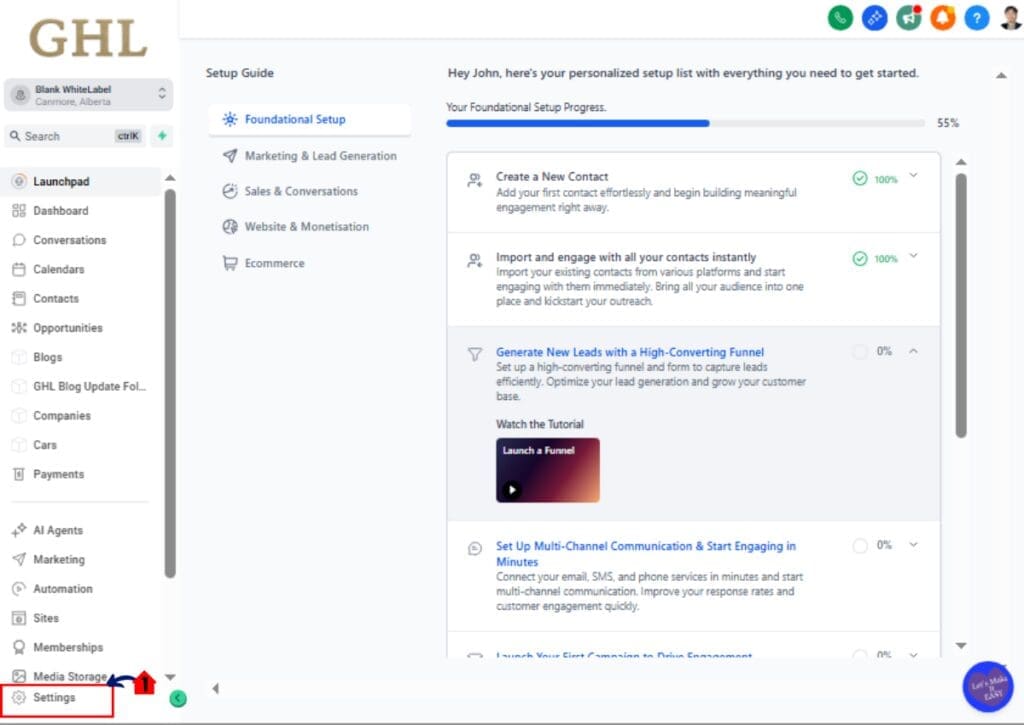
Step 01 – Access the Settings area in GoHighLevel
- Go to the bottom of the Main Menu on the left-hand sidebar.
1.1 Click the Settings gear icon ⚙️
• This opens the main Settings dashboard
• You will now see Business Info, Billing, My Staff and other configuration options
Step 02 – Open the Audit Logs page
2.1 Click Audit Logs in the Settings menu
• The Audit Logs page will load
• You will see a list of recorded system actions
• Each entry shows Action Type, User, Date, and Details
2.2 Locate the Filter option at the top of the Audit Logs page
• Clicking this opens filtering options
2.3 Select Action filter
• Choose Deleted from the dropdown
• This narrows results to deleted items only
2.4 Review filtered results
- You can now see which deleted actions were performed by that user
- This is helpful when troubleshooting missing templates
- The Asset ID can be used for documentation or support
- The Timestamp helps you match issues to specific timeframes
- The User field shows who performed the deletion
If you do not see any entries:
• Confirm the filter is not excluding results
• Adjust the date range if available
• Remove filters and reload the page
Builder Audit Logs do not restore deleted assets automatically.
They provide visibility so you can take the correct next step.
Pro Tips for Using Builder Audit Logs Effectively
Builder Audit Logs are simple on the surface.
But if you use them strategically, they become a powerful operational tool.
Here’s how to get the most out of them.
Use Builder Audit Logs before rebuilding anything
If a section disappears, don’t immediately rebuild it.
Check the Audit Logs first.
You may discover it was deleted five minutes ago by mistake. That context saves time and frustration.
Pair Builder Audit Logs with Staff Permissions
If you notice repeated accidental deletions, review your team’s permissions.
Limit who can delete Global Sections or Universal Elements.
Audit visibility plus controlled permissions creates a safer builder environment.
Train new VAs with this system
When onboarding a new team member, show them where Audit Logs live.
Explain that deletions are tracked.
This isn’t about fear.
It’s about awareness and accountability.
Document Asset IDs for important templates
For mission-critical Universal Sections, keep a small internal record of asset names and IDs.
If something gets removed, you’ll know exactly what was affected.
Check logs during client troubleshooting
If a client says, “My funnel looks different,” don’t guess.
Open Builder Audit Logs and check recent Deleted actions.
You’ll look like a pro when you identify the cause in seconds.
Use Snapshots as a backup strategy
Audit Logs show you what happened.
Snapshots help you restore structure if needed.
Together, they create a safety net for agencies managing multiple sub-accounts.
Builder Audit Logs aren’t flashy.
But they quietly protect your build environment.
And that’s the kind of feature serious operators appreciate.
What This Means for Your Business Operations
Builder Audit Logs are not just a technical feature.
They are an operational upgrade.
If you run an agency, you are not just building funnels. You are managing systems, people, and client expectations.
And systems need visibility.
Here’s what Builder Audit Logs change for your business.
You reduce downtime
When a Universal Section disappears, it can break multiple pages.
Instead of spending hours troubleshooting layouts, you check the logs and identify the exact moment it was deleted.
That cuts recovery time dramatically.
You increase internal accountability
In growing teams, mistakes happen.
Audit visibility removes confusion.
Instead of “I didn’t touch that,” you have clarity.
And clarity keeps your team focused on solutions instead of blame.
You protect client assets
If you white-label GoHighLevel or manage multiple sub-accounts, shared templates are valuable.
Builder Audit Logs help ensure those shared assets don’t vanish unnoticed.
That protects your reputation.
You operate like a serious agency
Small operators rebuild blindly.
Serious agencies check systems, review logs, and diagnose issues properly.
Builder Audit Logs give you that professional edge.
You build trust with clients
When something changes on a live funnel, clients want answers.
Now you can provide them.
“Here’s what happened. It was deleted at 2:14 PM. We’ve corrected it.”
That level of precision builds confidence.
Builder Audit Logs don’t just show deletions.
They support better leadership, better workflows, and better delivery.
And when your operations are tighter, your growth becomes easier.
Real-World Agency Scenario Example
Let’s make this practical.
You run a small agency.
You use Universal Sections for things like:
• Headers
• Footers
• Testimonials
• Call-to-action blocks
These are reused across multiple funnels and client pages.
One afternoon, a client messages you.
“Hey… the footer looks broken on my sales page.”
You open the funnel.
The footer is gone.
Now normally, this turns into detective mode.
Who touched it?
Was it edited?
Was it replaced?
Did someone clean up templates?
Instead of guessing, you go to Settings → Audit Logs.
You filter by Deleted.
And there it is.
A Universal Section was deleted at 1:42 PM.
You click the entry.
It shows:
• Asset Name
• Asset ID
• Deleted
• The User
• The Exact Timestamp
You now know:
• What was deleted
• When it happened
• Who deleted it
You check with your VA.
They were cleaning up unused sections and assumed it was safe to remove.
No drama. No blame.
You restore the structure from a Snapshot or rebuild the saved section quickly.
Problem solved in minutes.
Now compare that to before Builder Audit Logs.
You might have:
• Rebuilt from scratch
• Wasted an hour troubleshooting
• Questioned multiple team members
• Looked uncertain in front of the client
Builder Audit Logs turn chaos into clarity.
And clarity saves time.
In agencies, time equals margin.
Frequently Asked Questions About Builder Audit Logs
Conclusion – Builder Audit Logs Give You Control
Builder Audit Logs may not look flashy.
But they solve a real problem inside GoHighLevel.
When Section Templates, Global Sections, or Universal Elements get deleted, you now have visibility. You can see what was removed, when it happened, and who did it.
That’s operational control.
Instead of guessing why a funnel changed, you check the logs. Instead of rebuilding blindly, you confirm the action. Instead of internal confusion, you get clarity.
For agencies managing teams, VAs, or white-label sub-accounts, Builder Audit Logs add a layer of protection that was missing before.
- They reduce downtime.
- They increase accountability.
- They protect shared assets.
And most importantly, they help you run a tighter ship.
This is one of those quiet updates that serious operators will appreciate immediately.
If you haven’t checked it yet, log into your sub-account right now and go to:
Settings → Audit Logs
Filter by Deleted and see what’s been happening inside your builder environment.
You might learn something useful.
The team here at GHL Growth Garage is always watching for updates like this that improve how agencies operate inside GoHighLevel. Check back often for more step-by-step guides designed to keep your systems sharp and your workflows clean.
Now I want to hear from you.
Have you ever had a template mysteriously disappear inside GHL?
And will Builder Audit Logs change how you manage your team?
Let me know.
Scale Your Business Today.
Streamline your workflow with GoHighLevel’s powerful tools.