- Let smart timing do the work. GHL now sends emails when each person is most likely to open or reply
- Quick Summary – Send Time Optimization Essentials
- Why Send Time Optimization Matters
- What Send Time Optimization Actually Does
- What Changed in the Email Scheduler
- Why Send Time Optimization Saves You Time and Gets Better Results
- How to Turn On Send Time Optimization in GHL
- Make the Most of Send Time Optimization
- What Send Time Optimization Changes for Your Strategy
- Frequently Asked Questions About Send Time Optimization
- Final Thoughts on Send Time Optimization
Let smart timing do the work. GHL now sends emails when each person is most likely to open or reply
Why Send Time Optimization Matters
Send time optimization is the missing piece in most email strategies. You might have a solid message, a clear call to action, and a great offer. But if your email lands at the wrong time, it often gets ignored.
That’s the problem GHL just solved. Instead of asking you to guess when to send, GHL now uses AI to figure it out. It looks at each contact’s past behavior and picks the best time to deliver your message. You just choose the window, and the platform handles the rest.
This means your emails show up when people are most likely to open and reply. No more sending at random and hoping it works. Just smarter timing that fits how your audience actually behaves.
If your goal is better open rates and more replies, it all starts with timing. Now, you don’t have to guess.

GHL’s send time optimization helps you stop guessing. It sends each email when the person is most likely to open or reply, so you get more results without more effort.
Quick Summary – Send Time Optimization Essentials
Purpose: This GHL feature helps you send emails when each contact is most likely to engage, based on their past behavior.
Why It Matters: Email campaigns perform better when timing matches the contact’s habits. This removes the guesswork from scheduling.
What You Get: Automatic, AI-driven send time optimization that adjusts timing for each recipient within a window you choose.
Time to Complete: Setting it up takes less than 2 minutes during the normal email scheduling process.
Difficulty Level: Very easy. No extra tools or setup required. Just check a box and choose a time window.
Key Outcome: Better open rates, more replies, and stronger results from every email you send.
Why Send Time Optimization Matters
Send time optimization is how you stop wasting good emails. If your message lands when someone’s not checking their inbox, it gets buried. It doesn’t matter how well you write it.
That’s why GHL now includes send time optimization built right into your email scheduler. It uses AI to track when each contact usually opens or replies. Then it sends your email at the best time within the window you choose.
Automate marketing, manage leads, and grow faster with GoHighLevel.

With send time optimization, every email has a better shot at being seen, opened, and acted on. No more guessing. No more sending to everyone at the same time and hoping it works.
If your open rates are dropping, or replies feel slow, the problem might not be your content. It might just be your timing. Send time optimization fixes that.
What Send Time Optimization Actually Does
Send time optimization in GHL helps you send smarter, not harder. Instead of blasting emails at one fixed time, it picks the best time for each person based on their past behavior.
Here’s how it works. You set a window, like 24 or 48 hours. GHL’s AI looks at when each contact has opened or replied to emails before. Then it schedules your message for the time they’re most likely to engage.
Send time optimization means your message shows up when it matters. One person might get it at 8 AM. Another might see it at 7 PM. Either way, the timing fits their habits, not yours.
If GHL doesn’t have enough data for someone, the email still sends right away. So you’re not missing anyone.
Right now, send time optimization only works if you’re using LC Email or Mailgun. If you’re using a different provider or have 2-way sync on, it won’t show up yet.
What Changed in the Email Scheduler
The email scheduler inside GHL now gives you a new option. Instead of picking one fixed time for everyone, you can turn on send time optimization. It’s right there when you go to schedule your email.
You still choose the start and end of your delivery window. But once you enable send time optimization, GHL takes over from there. It checks each contact’s engagement history and finds the best time to send within that window.
The rest works just like before. You can send a one-time campaign or schedule emails inside a workflow. The only difference is, timing gets smarter.
If GHL doesn’t have enough data for a contact, no problem. It just sends the email right away so they don’t miss it.
This feature is designed to blend into your current process without adding steps. So, you get better results with less effort.
Why Send Time Optimization Saves You Time and Gets Better Results
Send time optimization solves a simple problem. You never know the right time to send an email. What works for one person might not work for another. If you guess wrong, your email gets lost.
That’s why GHL added send time optimization. It studies each contact’s email habits and picks the time they’re most likely to open or reply. You choose the window. GHL handles the rest.
For agency owners, this means fewer missed chances. You don’t have to test different times or run separate sends. Send time optimization does the work and gets better results.
It also gives you a clear value to show your clients. Every message gets delivered at the right time for each person. That helps with open rates and replies, and it shows your agency is focused on real performance.
Send time optimization fits into the way you already work. Turn it on. Let it run. See what changes.
How to Turn On Send Time Optimization in GHL
Send time optimization is built right into the email scheduling screen. There’s no extra tool to install or setting to unlock. You just need to know where to find the new checkbox and how to use it properly.
This guide walks you through the exact steps to activate send time optimization for any email campaign or workflow in GHL.
Here’s how to get started:
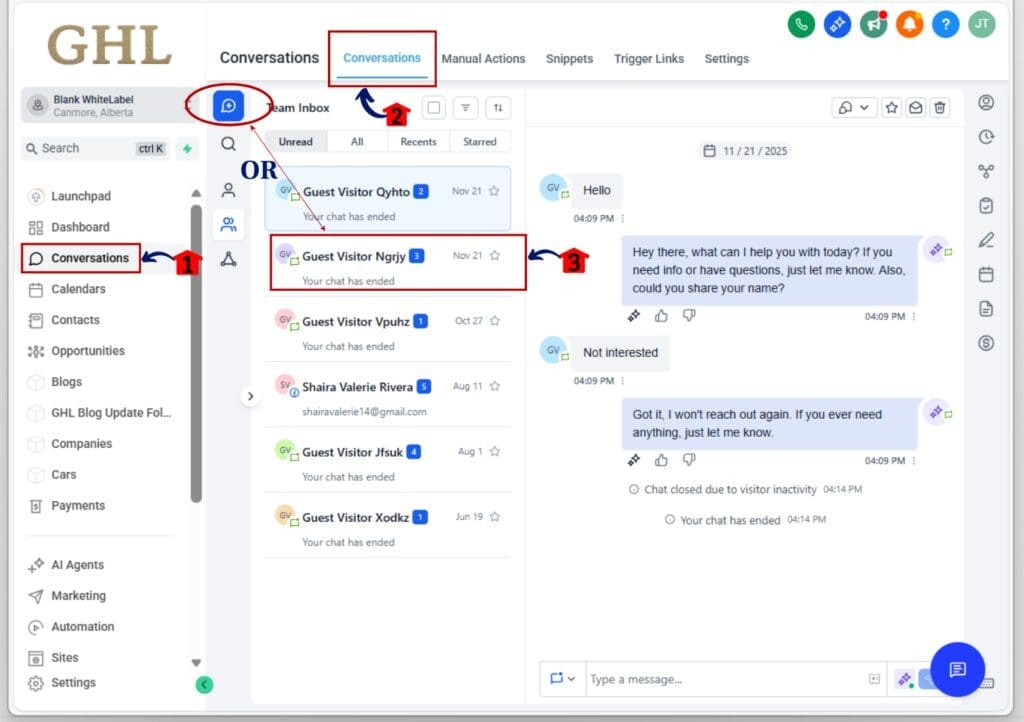
Step 01: Access the Main Left Hand Menu in GoHighLevel
- The Main Menu on the Left side of your screen has all the main areas that you work in when using GHL
1.1 Click on the Conversations Menu Item.
- Access the ‘Conversations’ section of GoHighLevel
1.2 Open or create conversation
- Make sure your message is ready to send. Then move to the scheduling step.
Step 02: Activate Send Time Optimization
- The new smart timing setting is now available in conversation.
2.1 Type your message on the message box in the conversation
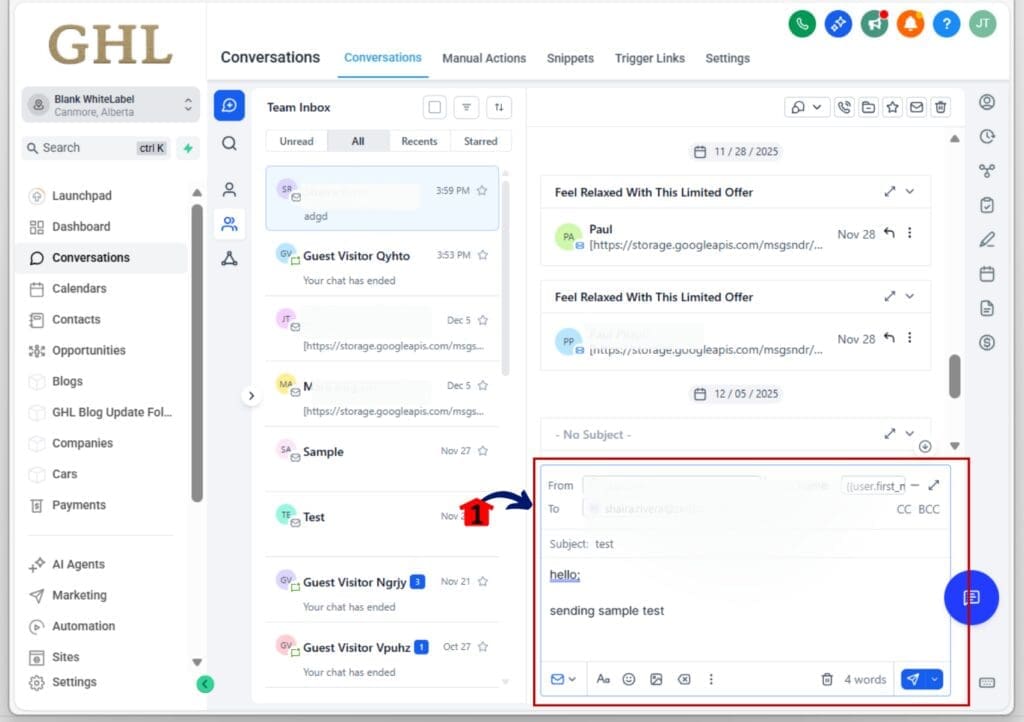
- Look for where you’d normally choose a send date and time.
2.2 Click on the small arrow button beside the send button
- This will pop up sub menu where you can select AI Schedule
2.3 Click on the AI Schedule
- This will open new window

Step 03: Edit Preferred Send Time
3.1 Click on the Edit button to edit the preferred hours.
- this will open a pop-up window where you can select the preferred send time optimization

- Choose the number of hours GHL can use to pick the best send time (example: 48 hours).
3.2 Click to select the preferred send time optimization
3.3 After Selecting the preferred time Click on the Next button

3.4 Click on the Send with AI Optimization button
3.5 Finish and schedule
- Once set, GHL will use send time optimization to send at the best time for each contact based on past behavior.

Things to Remember:
- This feature only works if your email provider is LC Email or Mailgun.
- It does not support 2-way sync accounts.
- If there isn’t enough data on a contact, the system sends the email right away.
That’s it. Just turn it on, pick your window, and let GHL handle the timing.
Make the Most of Send Time Optimization
Send time optimization is simple, but a few smart moves can make it work even better for you.
Start with a 48-hour window. This gives send time optimization enough room to find when each person is most active. If the window is too short, the system has less data to work with.
Use send time optimization on warm contacts. If people haven’t opened an email in a while, there isn’t much to go on. The feature works best when your list is active and has a history of opens or replies.
In workflows, apply send time optimization to important emails. You don’t have to use it everywhere. Pick the steps where timing matters most, like follow-ups or offers.
After sending, check your results. Compare open rates and replies with your past campaigns. You should start to see improvements once send time optimization has enough data to do its job.
And finally, remember that timing helps, but it’s not magic. Good content still matters. Send time optimization helps your message land at the right time. The rest is up to you.
What Send Time Optimization Changes for Your Strategy
Send time optimization shifts how we think about email timing. Instead of guessing what works best for everyone, you let the data decide for each person.
This helps your emails feel more personal, even if you’re sending them at scale. One contact gets it in the morning. Another sees it in the evening. It all depends on what works best for them.
That kind of timing used to take a lot of manual work. Now it’s built right into GHL. Send time optimization does the work in the background while you focus on building better content and stronger offers.
It also shows where marketing is headed. Tools like send time optimization help you connect better with people without needing to add more to your plate. Less guessing. More results.
If you’ve been sending emails at one set time for everyone, now is a good time to shift. With send time optimization, you don’t just send smarter you start thinking smarter too.
Frequently Asked Questions About Send Time Optimization
Final Thoughts on Send Time Optimization
Send time optimization is a simple tool that makes a big difference. It helps your emails show up at the right time, so more people open and reply. You don’t need to change how you write or send. You just need to turn it on.
For agencies and marketers, this means less guessing and better results. You save time, and your emails work harder. Send time optimization takes what you already do and makes it more effective.
It’s also one less thing to manage. No need to test different send times or segment lists by timezone. GHL looks at the data and does the timing for you.
If you’ve been frustrated by low open rates or poor replies, send time optimization gives you a way to improve without more work. It fits right into your current process and starts working right away.
Good email timing is hard to get right on your own. Send time optimization makes it easier. Try it, watch what happens, and decide if it’s right for your list.
Scale Your Business Today.
Streamline your workflow with GoHighLevel’s powerful tools.