- Add tip support to orders using GHL's API
- Quick Summary – API Tipping Feature Overview
- API Tipping Feature Now Live in GHL
- What the API Tipping Feature Updates
- Why the API Tipping Feature Matters
- How to Use the API Tipping Feature
- Pro Tips for Using the API Tipping Feature
- What’s Coming for GHL Tipping Features
- FAQs About the API Tipping Feature
- Start Using the API Tipping Feature Now
Add tip support to orders using GHL’s API
GoHighLevel now supports tipping during checkout through its new API tipping feature. This update lets developers and agencies pass tip amounts into the Orders API, giving businesses a simple way to collect tips on products and services. It is designed to work across all standard GHL payment layers, including order totals, transaction records, and receipts.
This change matters for agencies working with service-based businesses or local clients who rely on customer tips. Instead of asking for tips manually or using third-party tools, they can now include it right in the checkout flow. It adds more flexibility without changing pricing or payment logic.
The feature works through the Payment Summary API and updates the total amount automatically. Tips are also tracked in reporting and included in exported CSVs, so everything stays consistent.
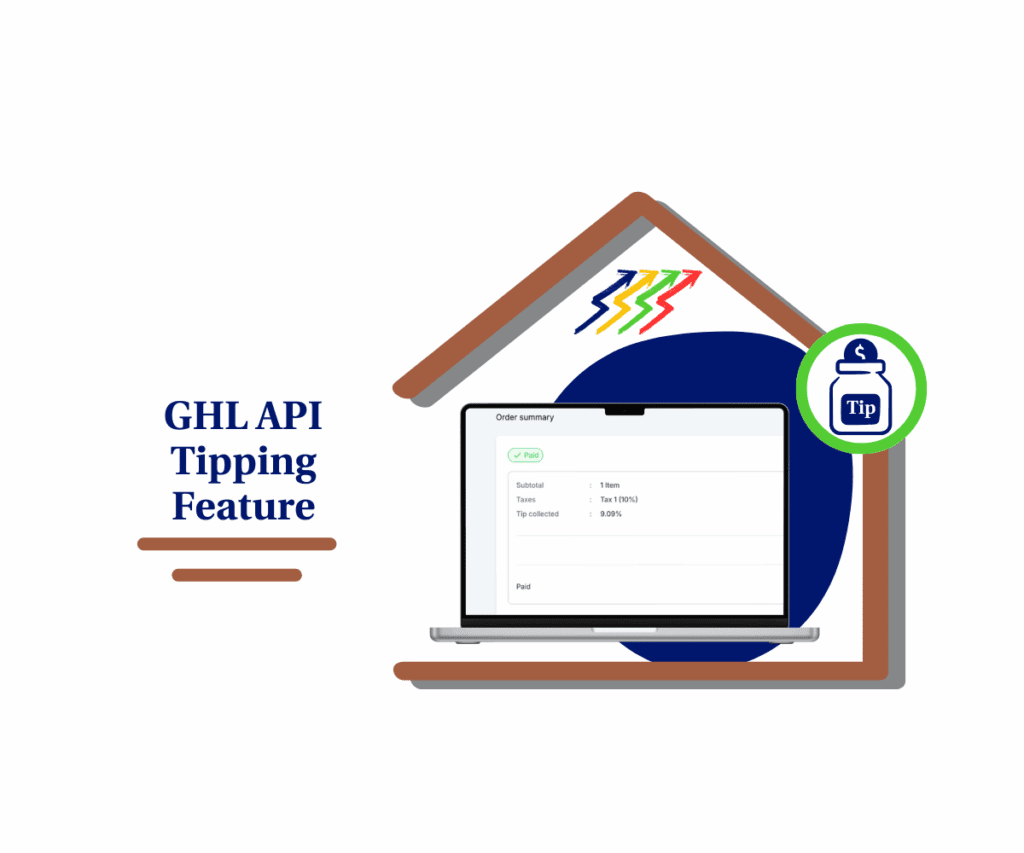
The new API tipping feature in GoHighLevel lets businesses collect tips during checkout using the Orders API. This gives them more payment flexibility and a clearer view of revenue across their transactions.
Quick Summary – API Tipping Feature Overview
Purpose: This update adds a new API tipping feature that lets businesses include tip amounts during checkout using the Payment Summary API.
Why It Matters: It gives businesses a simple way to collect tips without changing their pricing, while also keeping payment records and reports accurate.
What You Get: Support for tipAmount in the API, with tip values now showing in receipts, transactions, order details, and CSV exports.
Time to Complete: Most developers can add the tipping field in under an hour using existing API endpoints.
Difficulty Level: Straightforward for any developer familiar with GHL’s Orders API and JSON requests.
Key Outcome: Businesses can start collecting tips during checkout and track those amounts across their full payment system.
API Tipping Feature Now Live in GHL
GoHighLevel has released a new way for businesses to collect tips through its Orders API. With the new API tipping feature, developers can now pass a tip amount during checkout using the Payment Summary API. Once the value is added, the platform calculates it as part of the total payment.
This update is focused on the backend. There is no visual tipping option in the checkout yet, but that will be added in a future release. Right now, the tip can be sent directly through API calls, which makes it ideal for teams building custom checkout pages or integrations.
Automate marketing, manage leads, and grow faster with GoHighLevel.

Here is what the current release includes:
- A new field in the Payment Summary API to pass tip amounts
- The tip is automatically added to the final payment total
- Tip values now appear in receipts, transaction records, and order summaries
- Invoices will only show the tip if the amount is greater than zero
- The API checks for errors like missing or invalid tip data and flags them clearly
The goal here is to make tipping part of the regular checkout process without needing extra tools. It helps agencies and businesses offer more flexibility to their customers while keeping reporting clean and consistent.
What the API Tipping Feature Updates
The new API tipping feature in GoHighLevel is more than just an input field. It also improves how tips are handled across key parts of the platform. Once a tip amount is passed through the API, it shows up in all the right places for both the customer and the business.
Here is what has been updated:
- Receipts and Order Summaries: When a tip is added and greater than zero, it appears clearly on the receipt and in the order details. If no tip is included, nothing shows. This keeps the layout clean.
- Transaction Records: Tip amounts are now visible in the transaction details. This only applies when tipping is turned on at the checkout level.
- CSV Exports: A new “Tip Amount” column has been added to the Orders export. It shows the exact amount tipped when the order was placed. The Transactions export already had this field, so nothing changes there.
Invoices follow the same rules they always have. If the tip is zero, nothing is shown. If the tip is above zero, it is displayed.
These updates help agencies and teams track tips without digging through different reports. Everything is now in one place and tied directly to each order or payment.
Why the API Tipping Feature Matters
Tipping is a common way for customers to show appreciation, especially for service-based businesses. Until now, GoHighLevel did not offer a built-in method to collect tips at checkout. The new API tipping feature changes that by letting developers pass tip amounts directly into the Orders API.
This update gives agencies more control and flexibility when building out payment flows. Instead of relying on manual workarounds or third-party tools, tipping can now be handled inside GHL using standard API calls.
Here is why this matters:
- Customers can leave a tip during checkout, without extra steps
- Agencies do not need to change pricing to support optional tips
- Tip data is recorded with the order and shows up in reports, receipts, and exports
- It improves revenue tracking by including tips in the total payment amount
Adding this feature helps businesses stay professional while giving their customers more ways to support them. It also prepares the platform for future updates, including front-end controls and tipping presets.
How to Use the API Tipping Feature
Using the API tipping feature in GoHighLevel is a simple process for developers. The goal is to pass a tip amount through the Payment Summary API, so it gets added to the total during checkout.
This feature does not require any new setup in the UI. It is handled entirely through the API. Here is how to get it working:
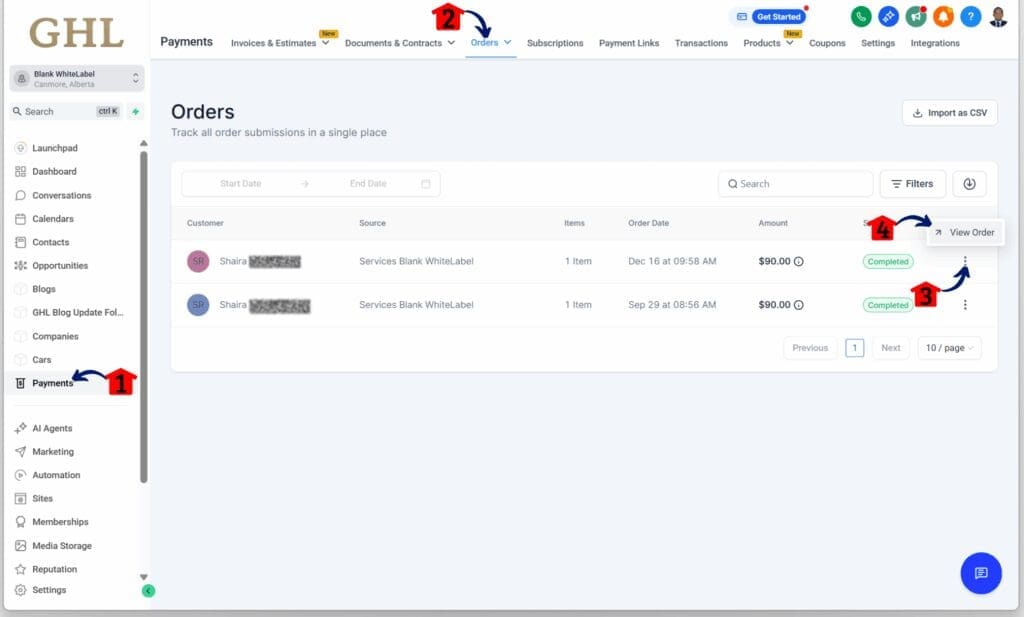
Step 01 – Access the Main Menu in GoHighLevel
- The main menu on the left side of your screen includes all the main areas you work in when using GoHighLevel (GHL).
1.1 Click on the Payments menu item to access the Order section.
- You’ll now be in the Payments section, where you can access the Order tab from the top menu.
1.2 Click the Order tab.
1.3 Click the More Options button for the selected order.
- This button is shown as a three-dot icon, and it will display additional options, including View Order.
1.4 Click the View Order option.
Step 02 – Review the Order Details
- You should now be viewing the order details for the selected order.
2.1 Check and confirm the tips collected.
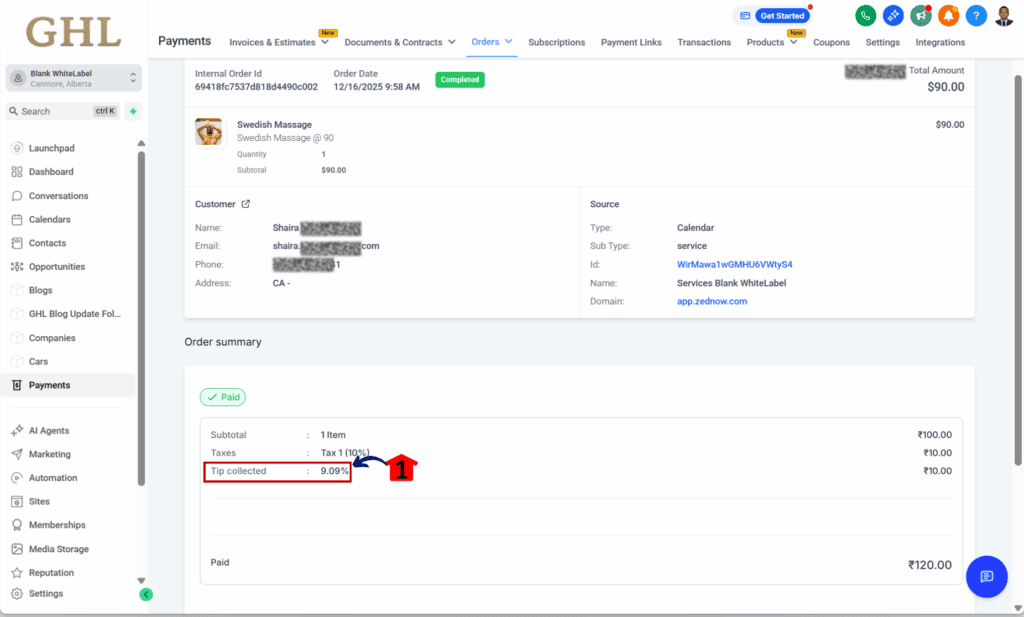
Pro Tips for Using the API Tipping Feature
Now that the API tipping feature is available in GoHighLevel, there are a few practical ways agencies and developers can start using it. The setup is simple, but the impact can be big, especially for businesses that rely on tips as part of their income.
Here are some helpful tips to make the most of this feature:
- Use tipping for personal services. This works well for clients who provide coaching, consulting, or anything with a human touch. Adding tipping to those checkout flows gives customers a way to say thanks.
- Offer simple tipping options. Since this is a backend feature, you control how it looks on the front end. You can set fixed tip amounts or let customers enter their own. Make it easy to choose.
- Avoid price increases. Tips let your clients earn more without raising prices. That is helpful if they work in a space where small changes can affect sales.
- Include tips in client reporting. Show clients how much they have earned in tips by using the new column in the Orders CSV. It is a simple way to track extra revenue without building custom reports.
- Prepare for future updates. The visual checkout tip settings are coming soon. If you build around the API now, it will be easier to switch to the new controls later.
Agencies who start using the API tipping feature now will be in a better spot when GoHighLevel rolls out more tipping options in the future.
What’s Coming for GHL Tipping Features
The API tipping feature is live now, but GoHighLevel is already working on the next set of updates. These new options will make tipping easier to use, especially for users who are not working with custom API setups.
Here is what is coming soon:
- Predefined tip percentages. Users will be able to set default tip amounts like 10, 15, or 20 percent. This makes it easier for customers to choose a tip without typing in a number.
- Tip selection built into the checkout. GHL plans to add tipping directly into the payment element. Once that’s live, users will not need custom forms to collect tips.
- Better tipping reports. More data tools are on the way. Businesses will be able to track how often tips are added and how much they bring in over time.
- More control over how tipping looks. There will be settings for where tipping appears during checkout and how it is shown. This will help keep the design clean and match the brand.
These updates will make the API tipping feature more useful for a wider range of users. Agencies that set it up now will be ready to switch over once the visual tools become available.
FAQs About the API Tipping Feature
These are some common questions about how the API tipping feature works in GoHighLevel.
Start Using the API Tipping Feature Now
The new API tipping feature gives GoHighLevel users a practical way to collect tips during checkout. It works through the Payment Summary API and adds the tip to the total payment. The tip amount also shows up in receipts, transaction records, and exports.
For agencies and developers, it is a simple update that can bring more value to clients, especially those offering services. There is no need for extra tools or custom logic to manage tips. Just pass the tipAmount in the API request and the system takes care of the rest.
GoHighLevel plans to add more options soon, like front-end controls and preset tip levels. But the current setup is ready to use and works well for any team building custom checkouts.
Setting this up now is a smart move. It adds flexibility, improves reporting, and helps your clients earn more without changing their prices.
Scale Your Business Today.
Streamline your workflow with GoHighLevel’s powerful tools.