- Fresh, Ready-to-Use Designs for Funnels, Websites, Ads, and More Now Live in Your GHL Account
- Quick Summary – Website Funnel Templates at a Glance
- What’s New – Templates by Category
- Why This Matters – Save Time, Look Better, Launch Faster
- How to Use – Finding and Deploying These Templates
- Pro Tips – Get the Most from These Templates
- Real-World Results – What You Can Expect
- Final Thoughts – Start With a Template, Finish With Results
Fresh, Ready-to-Use Designs for Funnels, Websites, Ads, and More Now Live in Your GHL Account
GHL Just Dropped 19 New Templates
GoHighLevel just added 19 new website funnel templates to help you build faster and skip the blank page. These templates cover everything from full websites and sales funnels to ad creatives, social media posts, and a new industry-specific snapshot.
Instead of starting from zero, you can plug these into your GHL account and have something live today.
No fluff. No overthinking. Just clear layouts you can tweak for your brand or your client.
GHL just made life easier with 19 new website funnel templates. These ready-to-use designs help you build websites, funnels, and ad campaigns without starting from scratch.
If you’ve been putting off a launch or waiting on graphics, this update gives you what you need to get moving.
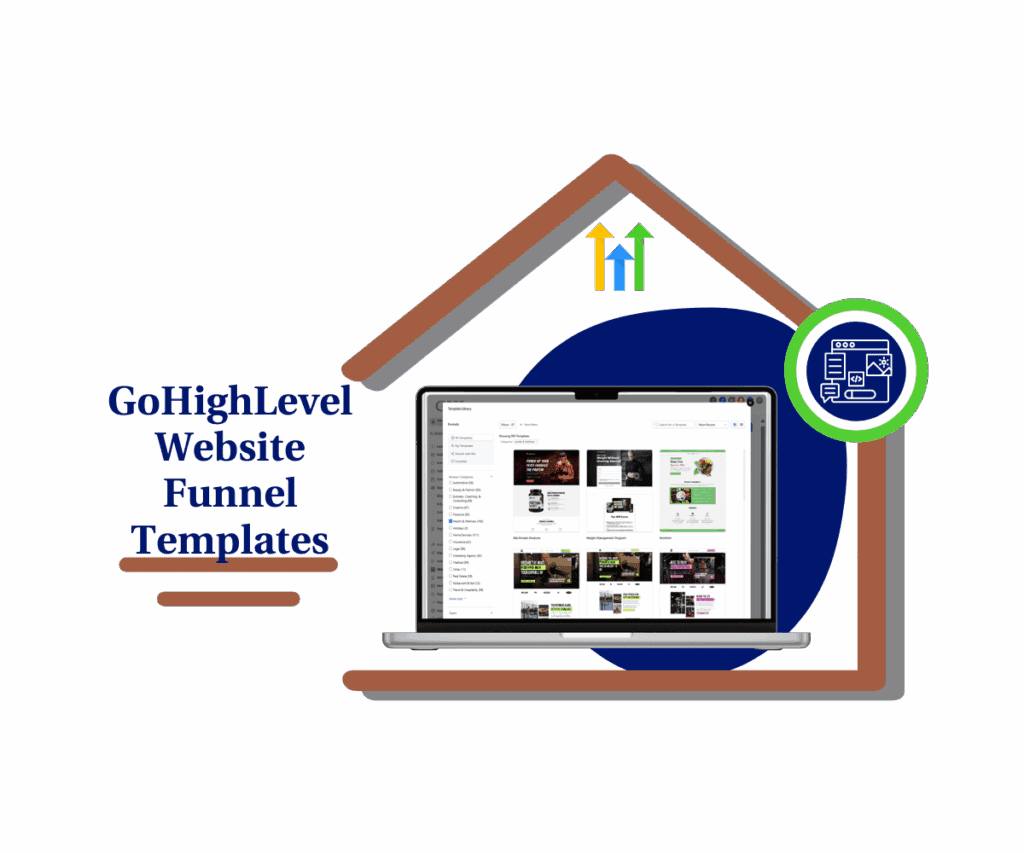
GHL just made life easier with 19 new website funnel templates. These ready-to-use designs help you build websites, funnels, and ad campaigns without starting from scratch.
Quick Summary – Website Funnel Templates at a Glance
Purpose: GoHighLevel released 19 new website funnel templates to help users launch faster and improve project quality without starting from scratch.
Why It Matters: These templates reduce setup time, improve design consistency, and give agencies a faster way to build high-quality client assets.
What You Get: New templates for websites, funnels, ads, social posts, a full RV Rental snapshot, and ready-to-use layouts built for real industries.
Time to Complete: Most templates can be customized and published within a few hours, depending on how much editing you need.
Difficulty Level: Beginner-friendly. No design skills or coding is needed. Everything is already inside your GHL account.
Key Outcome: You save time, stay consistent, and move from idea to live funnel faster using pre-built website funnel templates.
What’s New – Templates by Category
Here’s what’s new in your GHL account right now. All of these website funnel templates are ready to use and built for real-world industries.
Website Template
Automate marketing, manage leads, and grow faster with GoHighLevel.

- Medical (1): A clean layout made for clinics and private practices. It’s easy to customize and looks professional right out of the box.
Funnel Templates
- Marketing Agency (2): Use these to collect leads, book calls, or send clients through your onboarding process.
- General (1): A flexible option that works for all kinds of service businesses.
Store Template
- Apparel (1): Designed for online shops. Great for showing off products and making it simple to buy.
- Social Media Templates
- Beauty & Fashion (2)
- Business Coaching & Consulting (2)
- Creative (2)
- Financial (2)
- Health & Wellness (2)
- Ten total templates you can plug into the Social Planner and post today. Each one looks sharp and fits the voice of the niche it’s built for.
Facebook Ad Template
- Travel & Hospitality (1): A strong visual format that’s great for promoting stays, experiences, or seasonal offers.
Google Ad Templates
- Chiropractic
- Local Art Gallery
- Realtor
- Banquet Hall
- Bed & Breakfast
- These are set up with smart copy blocks and layouts so you can launch without wasting hours tweaking.
Snapshot
- RV Rental Agency: Comes with pre-built pages, automation, and settings. Ideal for a fast setup or demo.
Each of these templates is already in your GHL library. You don’t need to install anything. Just open it, make a few tweaks, and go live.
Why This Matters – Save Time, Look Better, Launch Faster
Using templates is one of the simplest ways to move faster without losing quality. With these new website funnel templates, you don’t have to start from nothing or waste hours deciding where to put things.
Everything’s laid out for you in a way that works. You just make a few edits and it’s ready to go.
This helps you get projects live sooner. That’s a win whether you’re working on your own site or building for a client.
It also helps your work look more professional. Clean design builds trust, and these templates make that part easy.
If you’re running an agency, this means faster delivery and fewer back-and-forth revisions. If you’re flying solo, it means spending less time messing with layouts and more time doing what matters.
You already have the templates in your GHL account. Open one, update the text and images, and publish.
Getting a site or funnel live shouldn’t take forever. These templates make sure it doesn’t.
How to Use – Finding and Deploying These Templates
This update gives you a full set of website funnel templates across sites, funnels, ads, social media, and more. You don’t need any outside tools or coding skills. Everything is already available inside your GHL account.
Here’s how to find and start using the new templates step by step:
Step 01: Access the Main Left Hand Menu in GoHighLevel
- The Main Menu on the Left side of your screen has all the main areas that you work in when using GHL
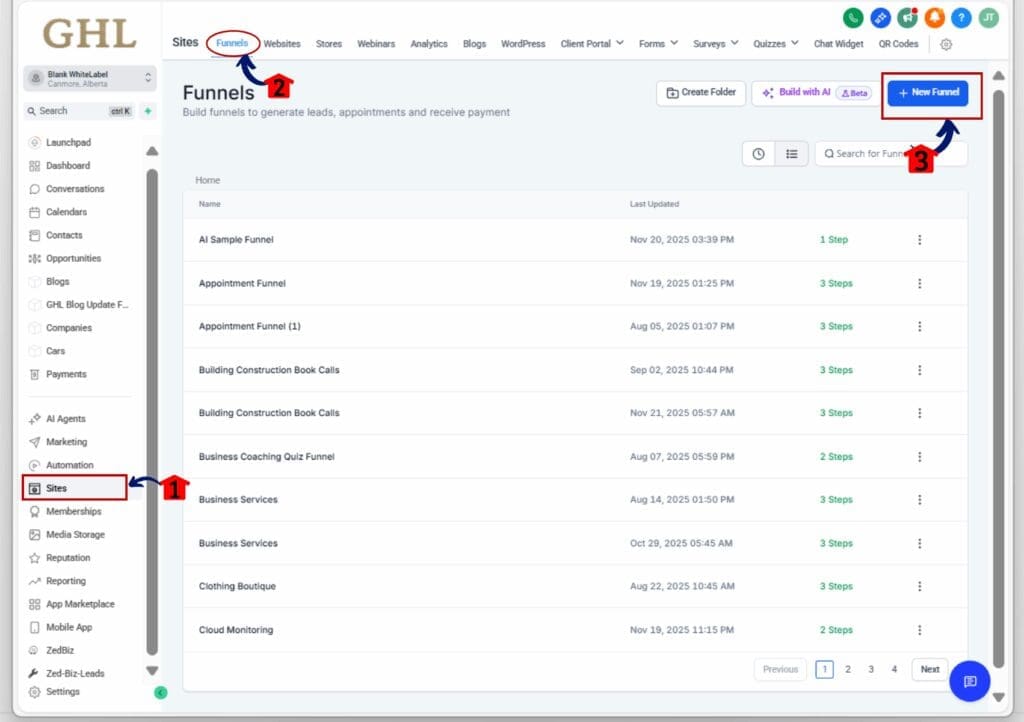
1.1 Click on the Sites Menu Item.
- Access the ‘Sites’ section of GoHighLevel
- Choose what you need: a funnel, form, survey, or website. For email templates, go to the Marketing tab. If you’re looking for ads or social content, head to the appropriate tools. Snapshots live under Accounts.
1.2 Click on the Funnels option (for this walkthrough).
- This brings up your funnels dashboard.
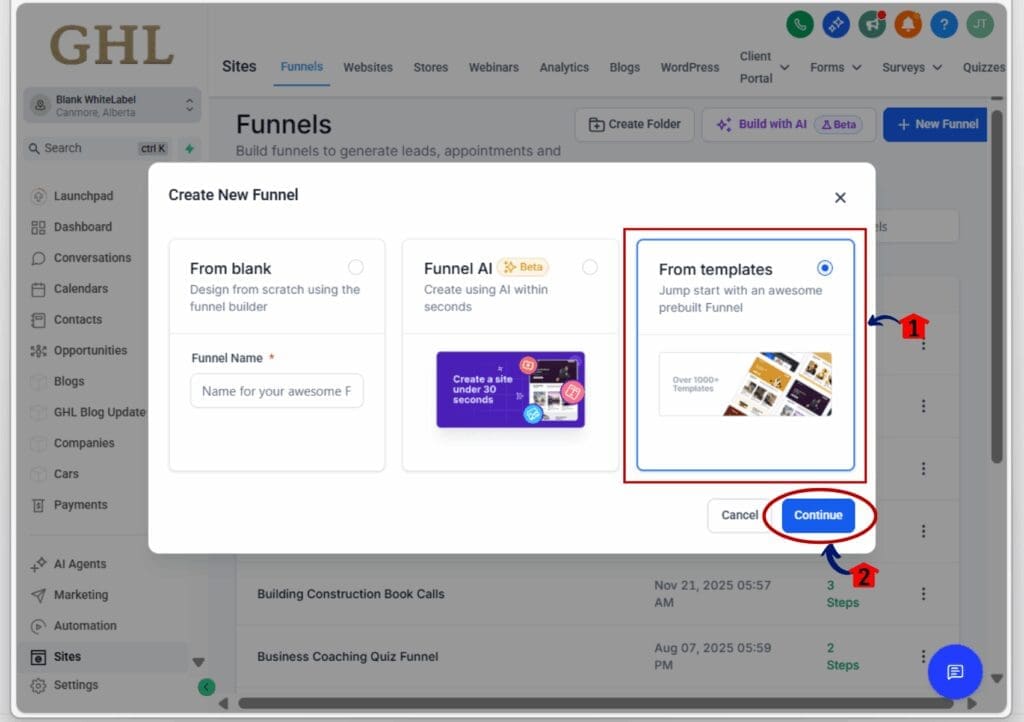
1.3 Click ‘New Funnel’ button
- A pop-up window will appear with template options.
Step 02: Use the Template Library
- Once the window pops up, you’re ready to explore.
2.1 Choose “Start from Template.”
- This unlocks the library of built-in options.
2.2 Click Continue to browse the full library.
Step 03: Search by Category or Niche
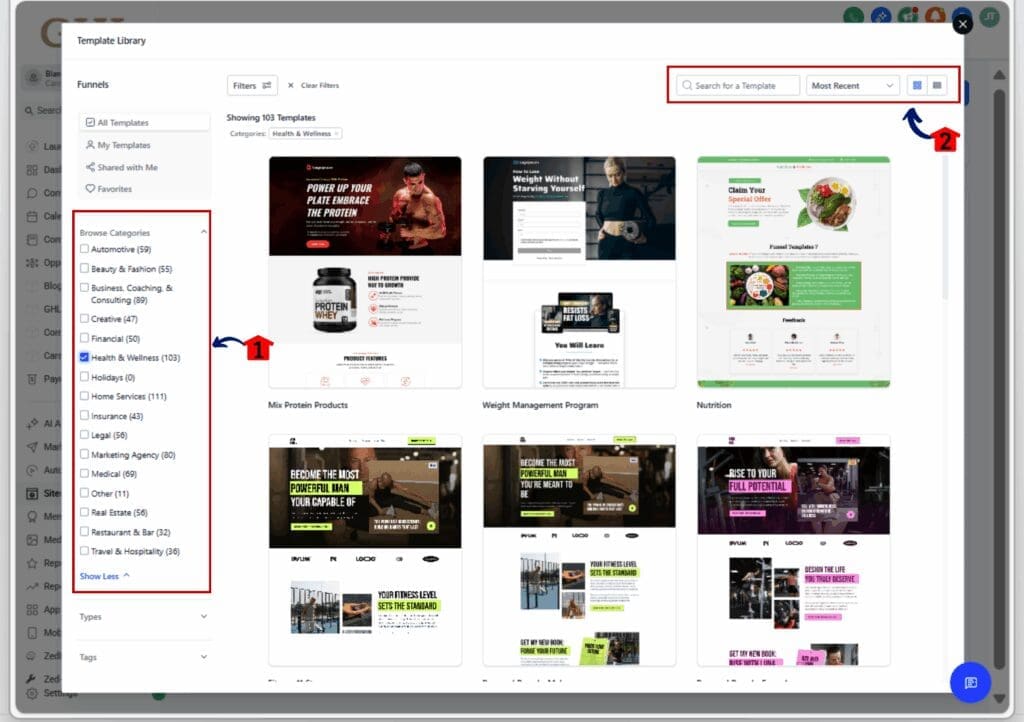
- Find what fits your business or client project.
3.1 Use filters or type into the search bar.
- You can search by industry like “Real Estate,” “Health,” “Coaching,” or “Agency.”
3.2 Choose your view.
- Use Grid View for full visuals or List View to scan titles faster.
Step 04: Preview and Select a Template
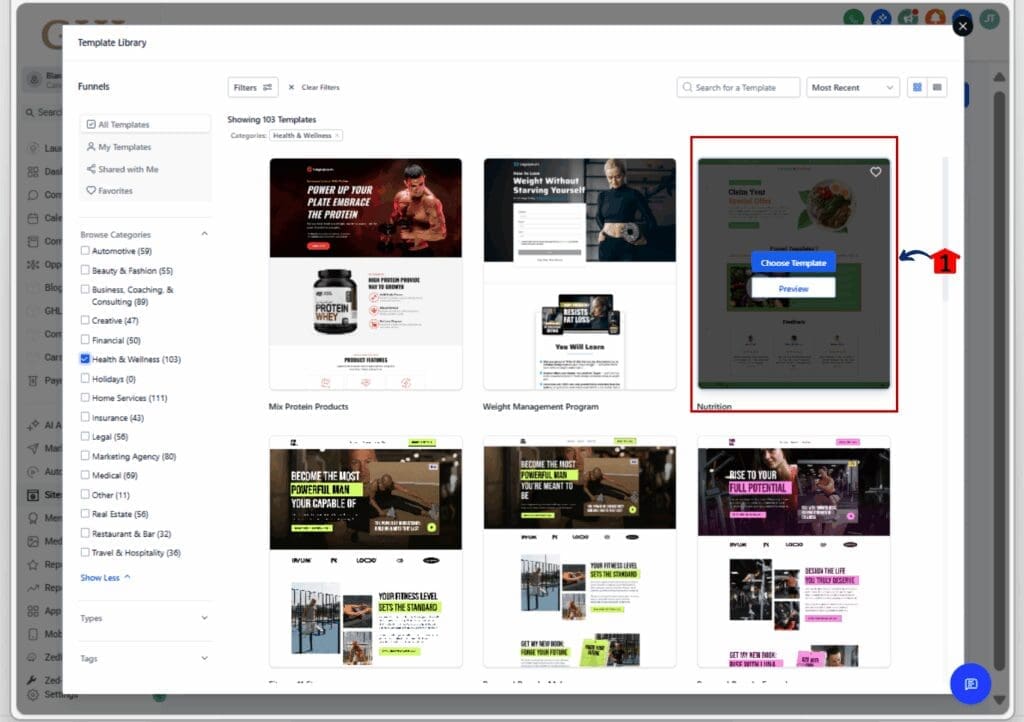
4.1 Click Preview to see the full layout.
- You’ll get a full-page walkthrough of each funnel or form.
4.2 Switch between device previews.
- Check mobile, tablet, and desktop layouts to make sure it looks clean across screens.
4.3 Click Choose Template to add it.
- The template will be loaded into your workspace, ready to edit.

Step 05: Customize and Publish
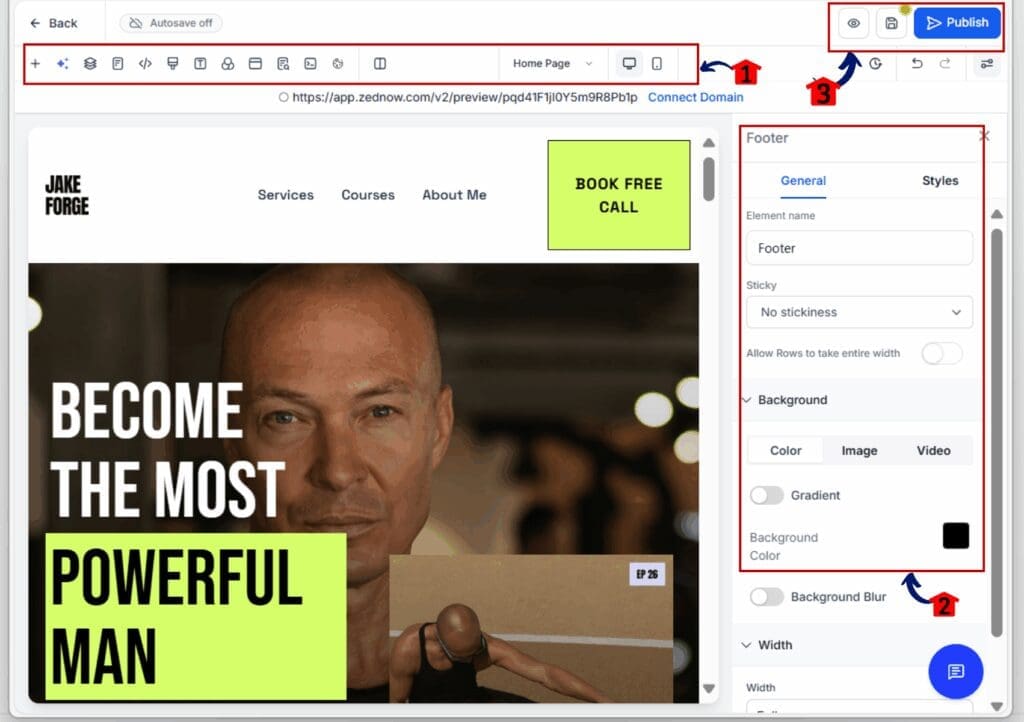
5.1 Change the text, colors, logos, and images.
- Use the Branding tab or Global Sections to save time.
5.2 Click Save and then Publish.
- Your new funnel, site, or asset is now live.
These steps work the same across funnels, websites, social content, and ads. Whether you’re launching a new offer or helping a client get set up, these website funnel templates give you a head start.
Pro Tips – Get the Most from These Templates
These website funnel templates aren’t just time-savers. They’re tools to help you move faster, stay consistent, and keep projects simple. Here’s how to make the most of them:
Start with a template that’s close enough
- Pick something that fits about 80 percent of your project. Then tweak the details. You’ll get things done quicker without having to build from scratch.
Pair ad templates with funnel pages
- If you’re using a Facebook or Google ad template, connect it to a funnel that matches the look and message. It keeps the user experience smooth and improves conversions.
Turn your custom layout into a repeatable template
- Once you’ve cleaned up a funnel or site for your brand, save it. Use it again for the next client or offer. This keeps your builds fast and consistent.
Use snapshots to speed up client onboarding
- The new snapshot isn’t just a page layout. It includes forms, automations, and other assets that save you time when setting up a new account.
Give your team a simple starting point
- Templates help your team stay on track. If someone’s building a new funnel, have them start from one that already fits your brand style.
You don’t need to use templates exactly as they are. The value comes from having a solid place to start. Edit what you need, skip what you don’t, and go live without getting stuck.
Real-World Results – What You Can Expect
When you use website funnel templates in your workflow, you get more than a time-saver. You get results that show up in the real world.
Launch projects faster
- With website funnel templates already set up in your GHL account, you can start fast and go live sooner. No more waiting days just to build a landing page.
Stay consistent across client work
- Templates help you create a clean layout every time. Whether you’re building one site or ten, your work looks steady and reliable.
Spend less time fixing design
- These website funnel templates are already structured to convert. You won’t waste hours dragging blocks around or wondering where the headline should go.
Look more professional
- When your landing pages and funnels follow a solid design, it builds trust. Good design tells people you know what you’re doing.
Focus on what matters most
- The less time you spend on layouts, the more time you can spend on your offer, your follow-up, and your results.
Get better outcomes without starting from scratch
- The real win with website funnel templates is momentum. You can build, test, and launch faster and that gives you more chances to win.
These aren’t just pretty layouts. They’re tools that help you work smarter and deliver faster. Use them right, and they’ll make a real difference.
Frequently Asked Questions About Website Funnel Templates
These answers cover the basics, but the best way to learn is by jumping in. Open a website funnel template, test it out, and see how it fits into your workflow.
Final Thoughts – Start With a Template, Finish With Results
The new website funnel templates are built to help you move quicker and avoid the usual slowdowns.
You don’t have to start every project from scratch. With these website funnel templates already in your GHL account, you can get a solid layout in place fast. That means fewer delays and more time to focus on the content that really matters.
If you’ve been stuck trying to make things look right or figuring out where to start, now you don’t have to. Pick a website funnel template that fits your project, make a few changes, and publish.
These templates give you a better way to launch. Clean design, clear layout, and a faster path from idea to live page.
Whether you’re working on your own site or building for a client, the right website funnel template can save you time and help you get better results.
So take the next step. Open one today and see how far it gets you.
Scale Your Business Today.
Streamline your workflow with GoHighLevel’s powerful tools.