- GHL Form Upsell Funnel
- Quick Summary – Form Upsell Funnel Essentials
- What’s New – One-Click Upsells in GHL Forms
- What’s Changed – The Old Way vs The New Way
- Why This Matters – More Sales, Less Drop-Off
- How to Use Form Upsell Funnel in GHL
- Pro Tips – Optimize Your Funnel Flow
- FAQs – Common Questions About Form Upsell Funnel
- Final Thoughts – A Quick Win for Funnel Builders
GHL Form Upsell Funnel
Want to make more money from your Form Upsell Funnel without adding more pages, extra steps, or extra work?
The new Order Form Upsell update in GoHighLevel just changed the game. You can now offer upsells directly within your funnel forms, no re-entering customer info, no redirecting users to another page, and no complicated setup. Just smooth, native one-click offers built right into your form flow.
It doesn’t look flashy, but this update packs a serious punch. If you’re looking to grow your funnel profits without piling on complexity, this one’s for you.
Whether you’re selling digital products, coaching, or services, this update lets you build smarter, faster, higher-converting sales funnels with almost no extra effort.

With GHL’s new form upsell funnel feature, you can now offer one-click product add-ons without forcing customers through extra steps, making it easier than ever to increase your average order value and reduce checkout friction.
Quick Summary – Form Upsell Funnel Essentials
Purpose: GoHighLevel’s new Order update lets you add one-click upsells directly into your funnel forms, boosting sales without extra steps or pages.
Why It Matters: This removes friction from the checkout process, allowing you to increase average order value while keeping customers in a smooth, conversion-friendly flow.
What You Get: Native upsell buttons, order summary integration, and seamless product stacking, all built into your existing GHL form and funnel setup.
Time To Complete: You can implement a form upsell funnel in under 15 minutes using GHL’s drag-and-drop builder, no code required.
Difficulty Level: Beginner-friendly for funnel builders, yet powerful enough for advanced agency workflows and upsell strategies.
Key Outcome: Higher funnel conversions and revenue per lead, without the tech headaches, bloat, or user drop-off that used to come with upsells.
What’s New – One-Click Upsells in GHL Forms
GoHighLevel’s new update lets you add a one-click upsell directly into your funnel flow using native forms. No more jumping between pages or re-entering customer info. Now, the upsell logic lives inside the form and button setup, fully integrated and frictionless.
Here’s what you can now do:
Automate marketing, manage leads, and grow faster with GoHighLevel.

- Add an upsell offer right after the initial product form in your funnel.
- Let users accept the offer with just one click, no new form, no resubmission.
- Combine this with both normal product sales and bump offers (just note: a bump only works with a normal product).
- Display everything in one clean order summary before the final checkout.
This only works if you’re using the form directly inside your funnel, not as an embed. Just drag it in natively and you’re set.
Surveys aren’t supported just yet, but for forms, this feature is live and ready.
This small tweak unlocks big gains for any funnel that sells multiple offers or bundles. One step, two products, no drop-off. Clean, fast, and effective.
What’s Changed – The Old Way vs The New Way
Before this update, adding an upsell to your funnel was… clunky.
Before this update, adding an upsell meant building a whole new page and sometimes a second form. And if the buyer had to retype their info? Game over.
Here’s how it used to work:
- Step 1: Initial purchase form
- Step 2: Redirect to an upsell page
- Step 3: Reconfirm details or add to cart
- Step 4: Final summary or checkout
It was multiple clicks, multiple chances for them to say “meh” and exit.
Now?
GHL’s Order upsell makes this all one clean process:
- Step 1: Form with primary product
- Step 2: Next step has a simple “Add this too?” upsell button
- Step 3: Order summary auto-updates, done
No extra fields. No data re-entry. No slowdowns.
It’s the kind of conversion-focused feature smart marketers will build entire funnels around. Less friction, more purchases.
Why This Matters – More Sales, Less Drop-Off
Every extra step in your funnel is a chance to lose a sale. This update removes one of the biggest points of friction, requiring users to re-enter their info or jump to another page just to accept an Form Upsell Funnel.
With Order Form Upsell Funnel inside GHL forms, you’re keeping the customer in one smooth flow:
- No redirects.
- No reloads.
- No friction.
That matters. A lot.
This feature gives you a dead-simple way to increase average order value (AOV) without lifting your ad budget or rebuilding your funnel strategy. You’re offering a highly relevant, low-resistance product right after the buyer’s made a decision. That’s when they’re most primed to say “yes.”
For agencies running client funnels, this is an instant win:
- Helps you hit higher ROAS goals.
- Delivers measurable results with minimal dev work.
- Adds a strategic layer to funnel builds that clients will love.
If you’re not using it, you’re literally leaving money on the table. It’s that powerful.
How to Use Form Upsell Funnel in GHL
Want to add one-click Form Upsell Funnel to your funnels without creating extra pages or forms? This feature makes it easy to increase your average order value with almost zero friction. Just follow these steps to get it live inside your GoHighLevel funnel.
Step 01 – Build Your Product Form
1.1 From the left menu, go to Sites > Forms > Builder.
1.2 Click + Create Form, or edit an existing one.
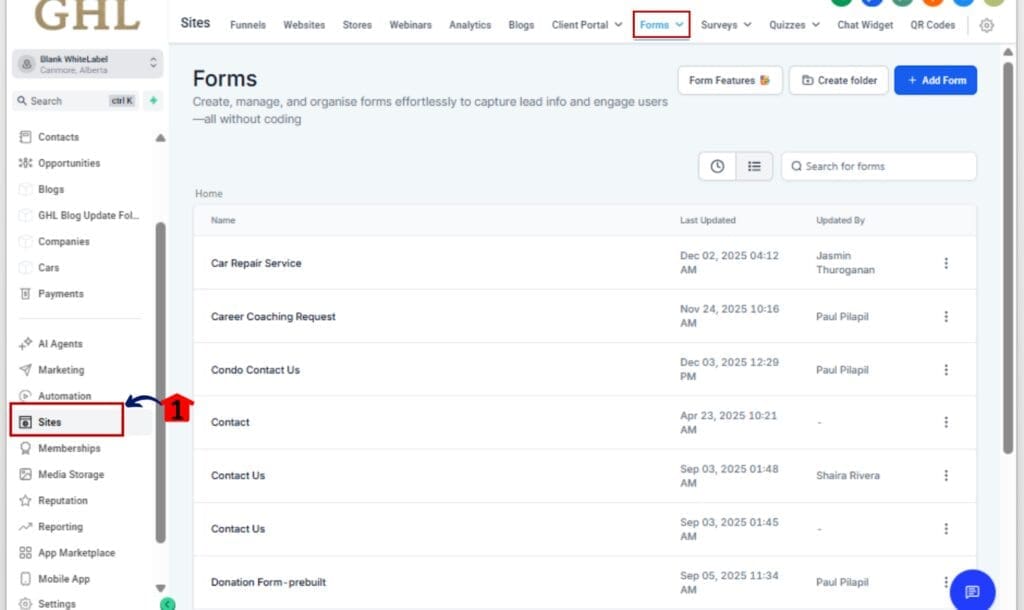
1.3 Drag in the Sell Product element from the right-side panel.
1.4 Set the product details (Product ID, price, etc.).
1.5 Click Save and name your form clearly (e.g., “Main Product Order Form”).

Step 02 – Add the Form to a Funnel Step
2.1 Go to Sites > Funnels and open your funnel.
2.2 Select the funnel step where the form should appear.

2.3 Drag in the Form element and choose your saved form.
2.4 Important: Use it as a native element, don’t use embed code.

Step 03 – Add the Upsell Product in the Next Step
3.1 Create or select the next funnel step (after the form).
3.2 Drag in a Button from the builder panel.
3.3 Under Button Action, choose “Upsell Product.”
3.4 Select your upsell product from the list.
3.5 Style the button (optional: use urgency or benefit-driven copy).

Step 04 – Test the Funnel Flow
4.1 Click Preview to test your funnel live.

4.2 Submit the form and click the upsell button.
4.3 Confirm that the order summary reflects both products with no form reloads or data loss.

That’s it. You’ve just set up a native, one-click Form Upsell Funnel inside your GHL funnel using forms, no dev required.
Pro Tips – Optimize Your Funnel Flow
Trying to boost your funnel revenue without turning people off? Here’s how to get the most out of Form Upsell Funnel without making it feel pushy.
01 – Lead With Value, Not Pressure
Don’t blindside people with a weird offer. Keep it tied to the original product, like a smart add-on or next step, not a left-field suggestion.
02 – Keep It Simple
This is a one-click upsell. Don’t overcomplicate it. Use short, clear copy on your button like:
- “Yes, add this to my order!”
- “Get the upgrade for just $19!”
- “Include the bonus training”
Clarity sells.
03 – Use Scarcity for Urgency
Add urgency to your upsell step with phrases like:
- “Only available during this checkout”
- “One-time offer—won’t show again”
This increases the take rate without needing complex timers.
04 – Bump + Upsell = Smart Stack
You can pair a bump offer on the initial product form with a one-click Form Upsell Funnel on the next step. It’s like a mini profit stack that’s invisible to the user but powerful on your bottom line.
05 – Split Test Your Offers
Use funnel variations to test different upsell products, button text, and pricing. Sometimes a $9 mini-guide converts better than a $49 add-on.
06 – Add an Order Summary to Every Step
Always show what the customer’s getting. The Order Summary builds trust and reinforces the value of both offers.
Use these pro moves and your funnel won’t just look clean, it’ll convert like crazy.
FAQs – Common Questions About Form Upsell Funnel
Final Thoughts – A Quick Win for Funnel Builders
The Order Form Upsell Funnel update isn’t flashy, but it’s a quiet killer when it comes to increasing your funnel performance.
With just one form, one button, and one click, you can turn single-product funnels into multi-offer machines, without adding complexity, clutter, or conversion loss.
If you’re an agency, this is a no-brainer upgrade to roll out for clients:
- More revenue per funnel
- No dev work or third-party tools
- Fast setup with instant results
And if you’re building funnels for your own offers? This feature pays for itself in one good campaign.
It’s simple. It’s seamless. It works.So go fire it up in your next GHL funnel, and watch your average order value climb.
Scale Your Business Today.
Streamline your workflow with GoHighLevel’s powerful tools.