- Introduction – See Your Social Media Analytics at a Glance
- Quick Summary – Social Media Analytics Overview
- What’s New – Social Media Widgets in Dashboard
- What’s Changed – Centralized Social Analytics
- Why This Matters – Faster Insights, Smarter Reporting
- How to Use It: Add Social Media Analytics to Your Dashboard
- Pro Tips – Power-Use the Social Planner Widgets
- What This Means – Built for Scale and Expansion
- Results You Can Expect – Instant Wins for Your Agency
- FAQs – What You Need to Know
- Conclusion – Make Social Media Analytics Reporting Work
Introduction – See Your Social Media Analytics at a Glance
If you’re still jumping between tabs or exporting reports just to check Social Media Analytics performance, you’re wasting time. Agencies have needed a better way to track Social Media Analytics metrics, and now it’s finally here.
You can now track your Social Media Analytics stats, like reach, posts, and followers, right from the GHL dashboard. No switching tabs, no extra logins. It’s all in one place alongside your sales and CRM data.
Doesn’t matter if you’re running one client or a full roster, this makes it way easier to stay on top of social performance.

With social media analytics built directly into your dashboard, agencies can finally see performance at a glance, saving time, improving reporting, and scaling insights across all clients.
Quick Summary – Social Media Analytics Overview
Purpose: This update brings high-level social media metrics directly into your GoHighLevel dashboard using new Social Planner widgets.
Why It Matters: Agencies can finally view social KPIs like reach, posts, and followers without leaving the platform, saving time and improving client reporting.
What You Get: Aggregated data widgets with filters for platform, account, and date range, plus group-by options and numeric displays.
Time to Complete: Less than 5 minutes to set up your first widget layout on any dashboard.
Difficulty Level: Beginner-friendly. No coding or advanced configuration required.
Key Outcome: Real-time social insights built into GHL dashboards, with full compatibility for Snapshots, Templates, and Custom Reports.
What’s New – Social Media Widgets in Dashboard
GoHighLevel’s new Social Planner widgets are designed to give you instant visibility into your social performance, right from your dashboard.
These widgets display aggregated social metrics so you don’t have to pull reports or switch tools. You can now track:
Automate marketing, manage leads, and grow faster with GoHighLevel.

- Total Posts
- Likes
- Comments
- Shares
- Impressions
- Reach
- Followers
Even better? These widgets are fully customizable. You can filter your metrics by:
- Platform (Facebook, Instagram, etc.)
- Social Account
- Date Range
Need to organize your view? No problem. Group your data by:
- Date
- Platform
- Social Account
The widgets support numeric displays, so you can spotlight key metrics like follower growth or total reach. And they’re built on a scalable /reporting endpoint, meaning more metrics and insights are coming soon.
They’re also compatible with:
- Dashboard widgets
- Custom Reports
- Snapshots
- Templates
This is not just a visual upgrade, it’s a whole new layer of reporting power built for growth.
What’s Changed – Centralized Social Analytics
Before this update, Social Media Analytics reporting in GoHighLevel lived inside the Social Planner tab, useful, but tucked away. That meant extra clicks, multiple tabs, and limited visibility unless you were digging in on purpose.
Now? Social media analytics are front and center.
You can drop these widgets directly onto your main dashboard alongside your pipeline stats, revenue numbers, call tracking, and appointment data. This brings social insights into your daily workflow without extra steps.
Here’s what’s different now:
- No more platform-hopping between Social Planner and Dashboard views.
- One dashboard, full picture, see social alongside sales and service KPIs.
- Widget-based setup lets you mix and match data views for each client or campaign.
Handling several accounts at once? This takes a load off. Now you can build dashboards that highlight the numbers that actually matter to each client.
Why This Matters – Faster Insights, Smarter Reporting
Let’s be honest, checking social stats usually means clicking through five tabs and downloading spreadsheets nobody looks at.
This update changes the game by giving agencies and clients real-time visibility into what’s working (and what’s not) on social, without the mess.
Here’s why that matters:
- Faster decisions –Checking your social numbers every day means you’ll spot what’s working, and what’s not, before it turns into a bigger problem.
- Client confidence – Clients love seeing their growth. With social widgets on their dashboard, they get transparency without needing a report walkthrough.
- Less reporting overhead – Less time stuck in PowerPoint, more time dialing in campaigns that work.
- Better strategy alignment – Social metrics live alongside lead gen and sales data, so you can spot correlations between content and conversions.
By tying all your key data sources together inside GoHighLevel, you’re not just saving time, you’re making smarter moves. And your clients will notice.
How to Use It: Add Social Media Analytics to Your Dashboard
If you’ve ever scrambled to pull Social Media Analytics numbers for a client or had to log into five different platforms just to see performance trends, you already know the pain. Now you don’t have to.Need to keep tabs on social performance? Just add the new Social Planner widgets to any dashboard. You’ll see important stats like reach and engagement without bouncing between tools.
Step 01 – Go to the Dashboard You Want to Edit
1.1 Open up GoHighLevel and log into the agency or sub-account you’re working on.
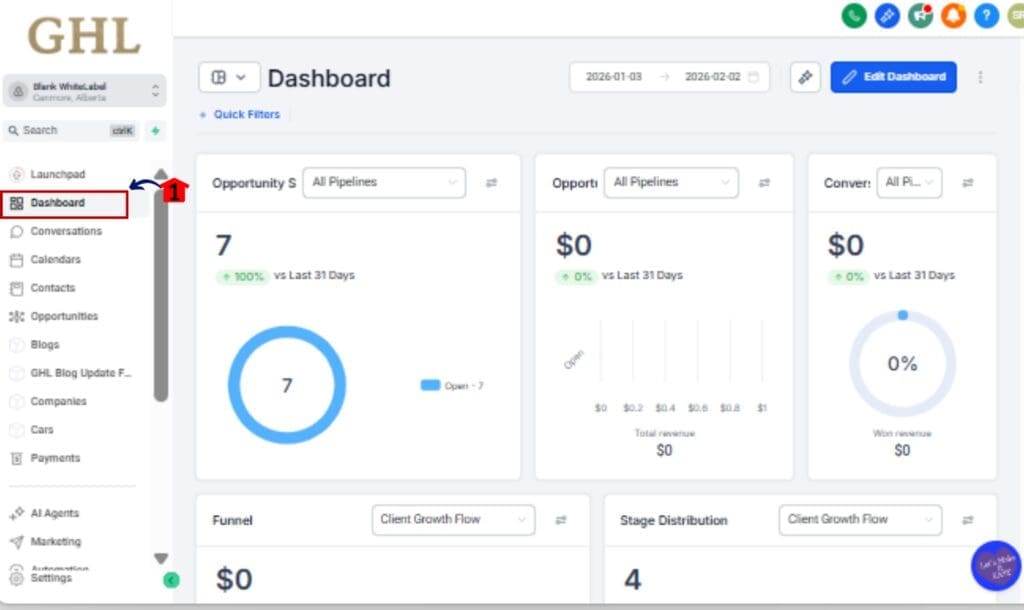
1.2 Click “Dashboard” in the main menu on the left side.
Step 02 – Enter Widget Customization Mode
2.1 Look up at the top right and click “Edit Dashboard”
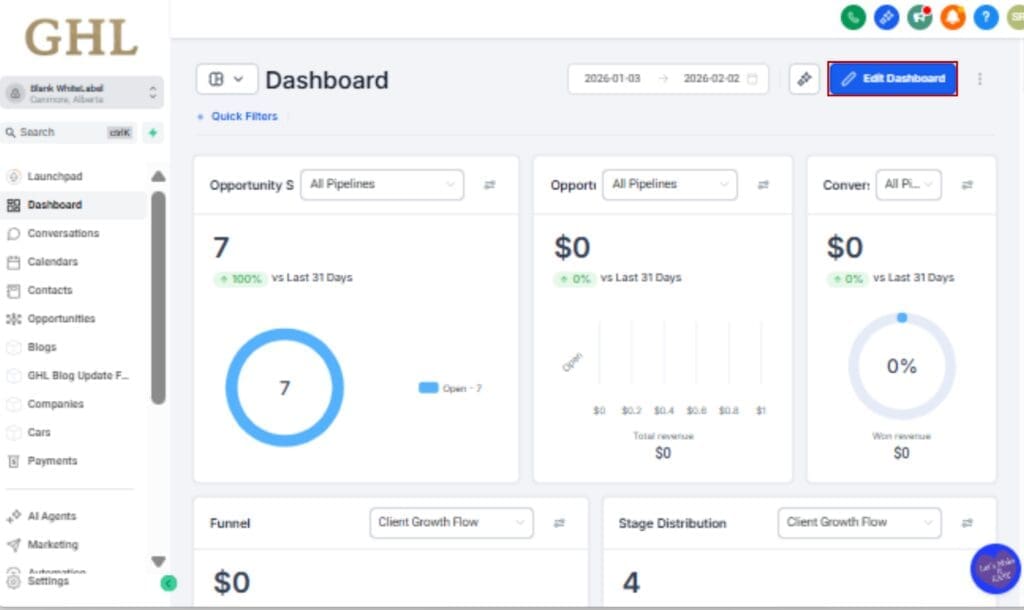
2.2 That opens the tool that lets you drag and drop whatever widgets you want.
Step 03 – Find & Add Social Planner Widgets
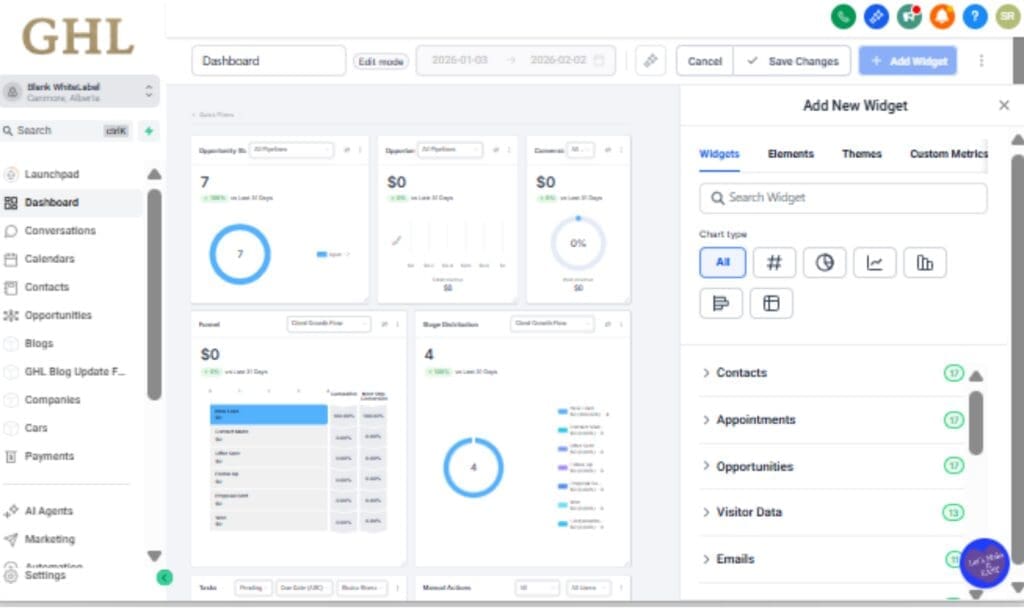
3.1 Scroll or search for the Social Planner section.
3.2 Just drag the metrics you want, like Followers, Posts, or Reach, into your dashboard layout.
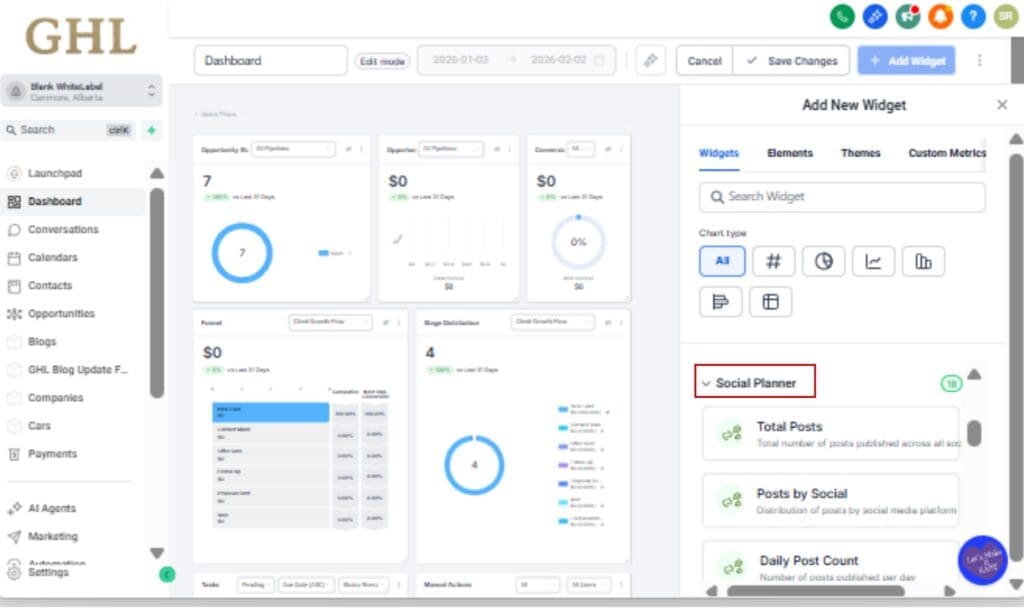
Step 04 – Configure Your Metrics and Filters
4.1 Pick what each widget should display, like posts, likes, or comments.
4.2 Then, use filters to zero in on the platform, specific account, or date range you want to focus on.

Step 05 – Apply Groupings to Segment Data
5.1 Choose how to sort your data, by account, platform, or date, using the Group By dropdown.
5.2 This gives you a cleaner view and helps you notice shifts in performance.

Step 06 – Save and Deploy Across Dashboards or Snapshots
6.1 Click Save to finalize your widget layout.
6.2 Optional:
• Clone this dashboard for other accounts
• Save it as a Snapshot to reuse across client locations
• Use it in Custom Reports or Templates

That’s it. Your Social Media Analytics now live where they should, front and center on the dashboard.
Pro Tips – Power-Use the Social Planner Widgets
You’ve added the widgets. Now let’s turn them into a true reporting weapon.
Here are a few pro tips to level up your dashboard game with the new Social Planner widgets:
1. Use Date Grouping to Spot Trends
Group your widget by date and look at the last 30 days. You’ll get a quick sense of what’s gaining traction and what’s falling off.
2. Customize Per Client for Killer Reports
Create dashboard layouts tailored to each client’s goals. One might care about followers and reach; another might want comments and shares. Build once, reuse forever by cloning or templating your layout.
3. Combine With Sales Widgets for ROI Clarity
Put social widgets next to funnel conversion, appointment bookings, or revenue widgets. Now you can track engagement alongside actual business outcomes, and make smarter campaign decisions.
4. Snapshot Your Reporting Template
Turn your dashboard + widgets into a Snapshot. This gives you a reusable social reporting system you can deploy for new clients or niche offers in seconds.
5. Ditch Manual Reports for Good
Teach your clients how to read these widgets. Once they can check their social stats on their own dashboard, you can stop building 20-slide reports no one opens. Freedom unlocked.
What This Means – Built for Scale and Expansion
This update isn’t just about widgets, it’s about a long-term shift in how GHL handles reporting and Social Media Analytics.
The new Social Planner widgets are powered by a unified, scalable /reporting API, which means this is just the beginning. The architecture is built to grow, and here’s what that means for you:
1. Future-Proof Reporting Infrastructure
This isn’t just a quick feature drop. It’s the start of something bigger, more data options, smarter layouts, and deeper control coming soon.
2. Unified Social Media Analytics Across Tools
Since everything runs on the same system, you’ll soon be able to combine these widgets with other tools like Funnels, Appointments, and Workflows in one place.
3. Easier Scaling for Agencies
Want to roll this out across 20 or 200 accounts? No problem. With full support for Snapshots and Templates, you can deploy consistent, professional social dashboards in minutes.
4. Reliable, Consistent Metrics
No more wondering if your numbers match. These widgets pull clean, aggregated data that matches your Social Planner analytics. Fewer questions from clients, more trust in the data.
This release shows GHL’s commitment to turning the dashboard into a true control center for your agency, not just a place to check login activity.
Results You Can Expect – Instant Wins for Your Agency
These new social analytics widgets aren’t just nice-to-have, they deliver fast, tangible improvements to your daily workflow, client communication, and agency scalability.
Here’s what you’ll notice right away:
1. More Time Saved Every Week
Say goodbye to juggling tabs and exporting spreadsheets. Your social stats now live where you actually work.
2. Stronger Client Relationships
Clients love seeing their progress. With social KPIs front and center, they stay informed and engaged, without needing you to explain everything.
3. Better Strategic Decisions
Live data makes it simple to see top-performing posts, notice patterns early, and make smarter moves without the lag.
4. Faster Onboarding and Social Media Analytics Setup
You can now templatize your social dashboard setup using Snapshots. What used to take an hour per client now takes two clicks.
5. More Trust in the Numbers
Since this data flows from a single source of truth (the Social Reporting API), you can stop second-guessing or double-checking between tools.
In short: this update makes your agency look sharper, respond faster, and operate smarter, with zero extra work.
FAQs – What You Need to Know
Conclusion – Make Social Media Analytics Reporting Work
Social media analytics are no longer buried in spreadsheets or locked inside another app. With these new Social Planner widgets, you get high-level performance insights right where they belong, on your dashboard.
This isn’t just another shiny feature. It’s a meaningful step toward smarter, faster, and more scalable Social Media Analytics inside GoHighLevel.
You now have the power to:
- Show clients their wins in real-time
- Cut hours of manual Social Media Analytics work
- Align social performance with sales, leads, and outcomes
Whether you’re running a boutique agency or scaling across hundreds of sub-accounts, this update gives you the visibility and control you’ve needed all along.
Start using the Social Planner widgets today, and finally bring your social data home to the GHL dashboard.
Scale Your Business Today.
Streamline your workflow with GoHighLevel’s powerful tools.