- Post to Threads from inside GoHighLevel now
- Quick Summary – Threads Social Scheduling Essentials
- Why Threads Social Scheduling Matters for Agencies
- What’s New in GHL Social Planner
- How to Connect Threads to GHL Social Planner
- Pro Tips for Posting on Threads with GHL
- What This Means for Agencies
- FAQs About Threads and GHL
- Use Threads to Boost Reach Early
Post to Threads from inside GoHighLevel now
GoHighLevel has officially added Threads social scheduling to the Social Planner. This means users can now create, schedule, and publish content to Threads without leaving the GHL platform. It’s a simple update with a big impact, giving agencies one more tool to manage their clients’ social content in one place.
Threads, backed by Meta, is quickly becoming a key player in online conversations. For agencies already using GoHighLevel to handle Instagram, Facebook, and other platforms, adding Threads to the mix helps maintain consistency and saves time.
With Threads social scheduling now built into GoHighLevel, agencies can post text, images, and video to Threads directly from the Social Planner. This helps boost visibility, saves time, and gives clients a head start on one of the fastest-growing platforms out there.
Quick Summary – Threads Social Scheduling Essentials
Purpose: This update adds Threads social scheduling to GoHighLevel, letting users plan and publish Threads posts without using another tool.
Why It Matters: Threads is still new and growing. Agencies that get in early can help clients stand out before the space gets crowded.
What You Get: You can connect Threads, write posts, schedule them, use auto-posting features, and save drafts right in the Social Planner.
Time To Complete: It takes about five minutes to connect Threads through your Instagram login and start posting.
Difficulty Level: Beginner. If you’ve used the Social Planner before, this will feel familiar.
Key Outcome: Agencies can manage Threads alongside other platforms and give clients more reach with less work.
Why Threads Social Scheduling Matters for Agencies
Threads is Meta’s take on short-form, text-first updates. It launched fast and is still growing. For agencies using GoHighLevel, this is a good time to help clients show up early on a new platform.
Adding Threads social scheduling into the GHL workflow lets users manage content across platforms without extra logins or switching tools. It’s built for agencies that value speed, simplicity, and results.
Automate marketing, manage leads, and grow faster with GoHighLevel.

Here’s why Threads is worth using now:
- It’s early. Less competition means your clients’ content has a better shot at being seen.
- It’s familiar. Threads is tied to Instagram, so the setup and audience feel easy to work with.
- It’s simple. Text-first content is fast to write and doesn’t need a polished graphic every time.
- It fits into GHL. You can plan and post Threads content alongside Facebook, Instagram, and others inside the Social Planner.
Agencies don’t need to change their whole system to start using Threads. With this update, it fits right into what they’re already doing.
What’s New in GHL Social Planner
GoHighLevel has added Threads to the Social Planner. This means users can now manage Threads social scheduling the same way they handle Facebook, Instagram, and other platforms inside GHL.
Here’s what the update includes:
- Connect a Threads account using your Instagram login
- Write and format posts with the Social Planner composer
- Add text, images, or short videos to each post
- Choose how to schedule:
- Review Flow
- Review Flow
- RSS Auto-posting
- Category Queue
- CSV Upload
This update doesn’t change how the planner works. It simply gives agencies one more place to publish content. If you’re already using GHL for other platforms, Threads now fits into the same process.
How to Connect Threads to GHL Social Planner
Setting up Threads inside GoHighLevel is simple. If you’ve connected other platforms in the Social Planner before, this will feel familiar. The process only takes a few steps and uses your Instagram login.
To connect Threads and start using Threads social scheduling in GHL:
Step 01 – Access the Main Menu in GoHighLevel
- The main menu on the left side of your screen includes all the main areas you work in when using GoHighLevel (GHL).
1.1 Click on the Marketing menu item to access the Social Planner section.
- You’ll now be in the Marketing section, where you can access the Social Planner tab from the top menu.
1.2 Click the Social Planner tab.
1.3 Click the + Social button.

Step 02 – Connect the Threads Social Scheduling Tool
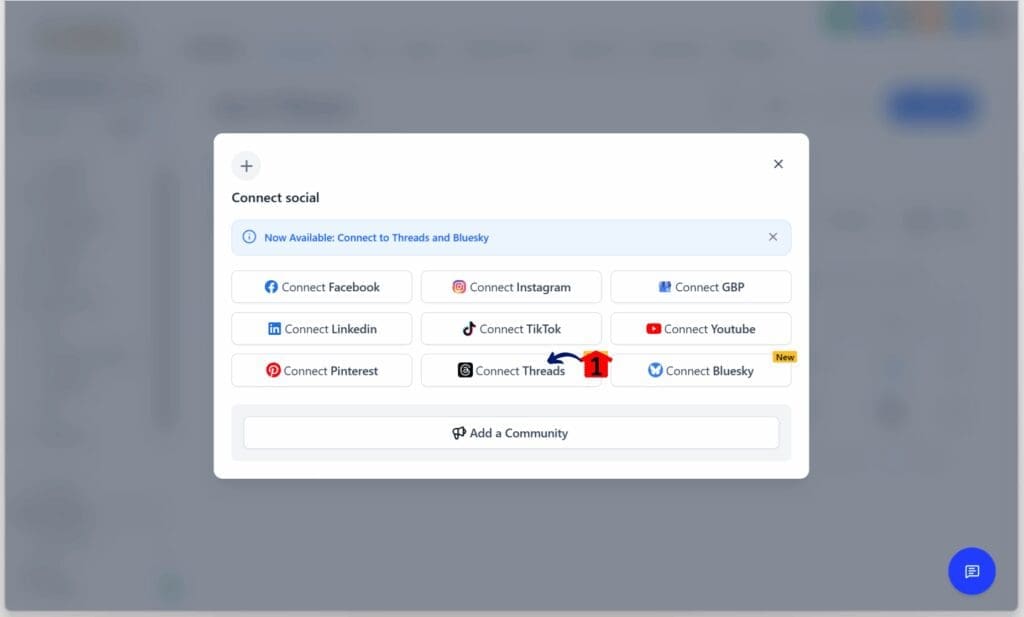
- A popup appears with several tools, including the Threads Social Scheduling App.
2.1 Click the Connect Threads button.
Step 03 – Log In to Threads
- A new window appears and shows the Threads login page.
3.1 Type the Threads login credentials.
- Then follow the login steps to access the account.

Step 04 – Add the Threads Profile
- After finishing the login process, the user is returned to the GHL Social Planner setup.
4.1 Choose the Threads profile and click the Add button.
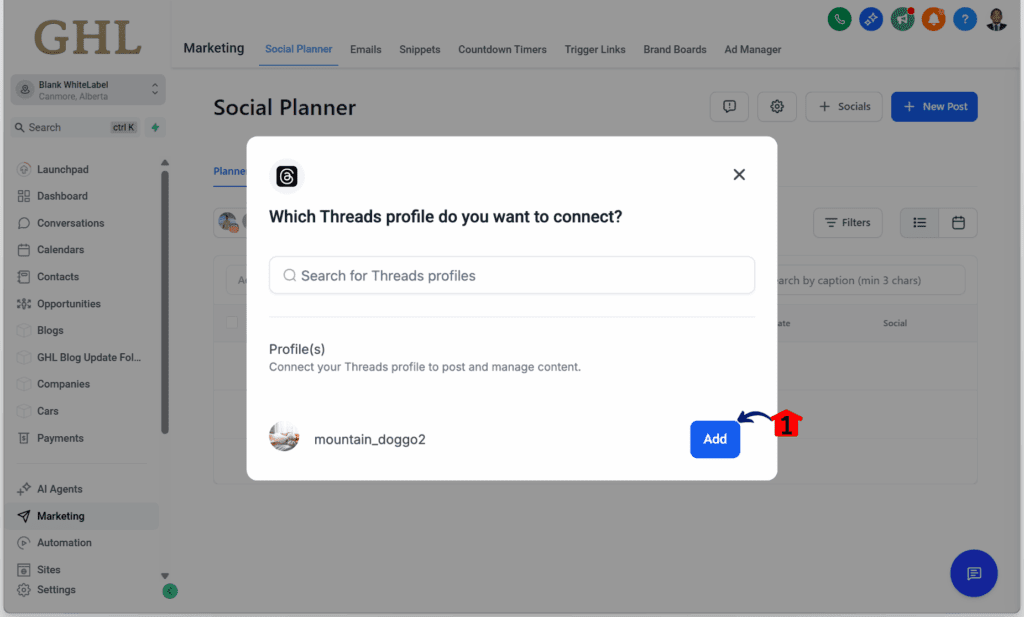
Once the account is connected, Threads will appear alongside your other social platforms. From there, you can start creating and scheduling posts just like you do for Instagram or Facebook.
No need to log into Threads separately. Once it’s set up, it’s ready to use inside GHL.
Pro Tips for Posting on Threads with GHL
Threads is a little different from other platforms. It’s more casual and text-based, so your usual posts might need a few small tweaks. With Threads social scheduling now available in GoHighLevel, it’s a good time to test what works and adjust as needed.
Here are a few simple tips to get better results:
- Keep posts short and direct. Threads works best with quick thoughts. One or two lines is often all you need.
- Use a relaxed tone. The platform feels more like a chat than a press release.
- Ask for responses. Posts that invite replies can help start conversations.
- Set up Category Queues. These keep your Threads feed active without needing to post manually every day.
- Test different posting times. See what times give you the best engagement.
- Stay consistent. A few posts a week will help build momentum over time.
Agencies using GoHighLevel can apply these tips right inside the Social Planner. Since it supports Threads alongside other platforms, it’s easy to manage your full content plan without switching tools.
What This Means for Agencies
The addition of Threads to the Social Planner gives agencies a simple way to support another growing platform. It fits into the same system they already use, so there’s no need to change how teams plan or post.
With Threads social scheduling now built into GoHighLevel, agencies can offer more without adding more tools.
Here’s why this update helps:
- Threads can be managed alongside other platforms like Facebook or Instagram
- Teams can use the same scheduling tools they already know
- Clients stay active on a new platform with little extra work
- Threads posts can be added into existing content calendars
For agencies, this is one more way to deliver results without adding pressure to the workflow. It helps clients stay visible in more places while keeping operations lean and easy to manage.
FAQs About Threads and GHL
Adding Threads to the Social Planner is simple, but a few common questions come up. Here are some quick answers to help users and teams get started with Threads social scheduling inside GoHighLevel.
These answers should help teams and clients start using Threads without confusion. Since it runs through the same Social Planner, the learning curve stays low.
Use Threads to Boost Reach Early
Threads is growing fast, and GoHighLevel users now have a simple way to be part of it. With Threads social scheduling added to the Social Planner, agencies can post content without needing a new system or another login.
Everything runs through the same dashboard. Teams can use the tools they already know to create, schedule, and publish content to Threads, right alongside Facebook and Instagram.
This update gives agencies an easy way to offer more value. It helps clients show up early on a platform that’s gaining attention. With just a few extra posts each week, clients can stay ahead while the space is still open.
Now is a good time to get started.
Scale Your Business Today.
Streamline your workflow with GoHighLevel’s powerful tools.