- GHL keeps YouTube accounts connected with auto-refresh tokens
- Quick Summary – YouTube Token Refresh Overview
- What’s New: GHL Syncs YouTube Tokens Automatically
- What Changed: Behind-the-Scenes OAuth Integration
- Why This Matters: Stop Worrying About Expired Connections
- Where to Confirm the YouTube Token Refresh Update
- Quick Tips: Keeping Your YouTube Flow Error-Free
- FAQs: Common Questions About YouTube Token Refresh
- GHL Handles the Tech So You Can Focus on Content
GHL keeps YouTube accounts connected with auto-refresh tokens
Yes, GoHighLevel now supports automatic YouTube token refresh. That means users no longer need to reconnect their YouTube account every 30 days. The platform now handles it in the background using Google’s OAuth system. This keeps things running smoothly inside the Social Planner.
Previously, the token used to expire after a month. If it wasn’t refreshed manually, scheduled posts would fail without warning. For anyone managing content across multiple channels or clients, this caused serious disruption and extra work.
The latest update fixes that problem for good. YouTube stays connected in GHL with no user action needed. It’s a small change, but it makes a big difference for reliability.
GHL now automates YouTube token refresh, removing the need for monthly reconnections. This means fewer failed posts, less hassle, and nonstop publishing flow. Just connect once and stay live.
Quick Summary – YouTube Token Refresh Overview
Purpose: This update adds automatic YouTube token refresh to GoHighLevel, so users no longer need to reconnect their accounts every month.
Why It Matters: Expired tokens caused posts to fail without notice. Now, GHL refreshes the token in the background, which keeps YouTube connected.
What You Get: A more reliable posting experience, fewer disruptions, and one less thing to manage.
Time to Complete: Takes under five minutes to check if your YouTube account is linked. Nothing more is needed after that.
Difficulty Level: Very simple. No changes required if your YouTube account is already connected.
Key Outcome: YouTube stays connected in GHL through automatic token refresh, with no manual work needed.
What’s New: GHL Syncs YouTube Tokens Automatically
GoHighLevel now handles YouTube token refresh automatically. Instead of expiring every 30 days, the connection between YouTube and GHL stays active by following Google’s OAuth system. This keeps things running without users needing to step in.
Here’s what’s different:
Automate marketing, manage leads, and grow faster with GoHighLevel.

- Tokens are refreshed in the background without any manual action.
- YouTube accounts no longer disconnect every month.
- As long as the Google account stays valid, the link stays live.
- Users don’t need to change anything in their setup.
Before this update, users often found out their token expired only after a post failed to publish. Now, GHL keeps that connection alive quietly in the background. The Social Planner continues posting without missing a beat.
This change won’t be obvious at first glance, but it makes YouTube posting much more stable.
What Changed: Behind-the-Scenes OAuth Integration
GoHighLevel made one key change behind the scenes. It upgraded how YouTube accounts stay connected. In the past, the system used a basic token that expired every 30 days. If users didn’t reconnect it in time, their scheduled posts would fail without warning.
Now, GHL uses Google’s OAuth lifecycle to manage that token automatically. This new method keeps the account connected without any manual steps.
Here’s how the new system works:
- The YouTube token refreshes on its own using Google’s OAuth process.
- GHL checks the token and renews it in the background.
- As long as the user’s Google account stays valid, the connection stays active.
This change improves both stability and security. It means fewer post failures and less time spent fixing broken links. Users can now trust the YouTube token refresh process to just work.
Why This Matters: Stop Worrying About Expired Connections
This update matters because it fixes a problem that used to waste time and cause confusion. Before the change, YouTube tokens in GoHighLevel expired every 30 days. When they did, the connection would drop and posts would stop publishing. Users often didn’t know anything was wrong until after content failed.
With automatic YouTube token refresh now built into GHL, that issue is off the table. The system keeps your YouTube account connected without needing any input from you.
This helps in a few key ways:
- Users don’t have to remember to reconnect their account every month.
- Scheduled posts stay on track and publish without interruption.
- There’s less risk of losing content due to a silent connection failure.
For anyone running regular YouTube campaigns or managing client accounts, this kind of reliability makes a big difference. It gives users one less thing to check and one more reason to trust the Social Planner.
Where to Confirm the YouTube Token Refresh Update
This update doesn’t require any new steps. The YouTube token refresh in GoHighLevel now runs in the background. If your YouTube account is already connected, the system will take care of the rest.
Still, it’s worth checking that everything is set up right. Here’s a quick guide:
Step 01 – Access the Main Menu in GoHighLevel
- The main menu on the left side of your screen includes all the main areas you work in when using GoHighLevel (GHL).
1.1 Click on the Marketing menu item to access the Social Planner section.
- You’ll now be in the Marketing section, where you can access the Social Planner tab from the top menu.
1.2 Click the Social Planner tab.
1.3 Click Social Planner Settings.
- This button has a gear icon.

Step 02 – Review the Social Planner Setup
- The user should now be in the Social Planner settings where they can manage connected social media accounts.
2.1 Click the YouTube section in the Social Integration list.
2.2 Check and confirm that the connected YouTube account now shows an infinite validity period.
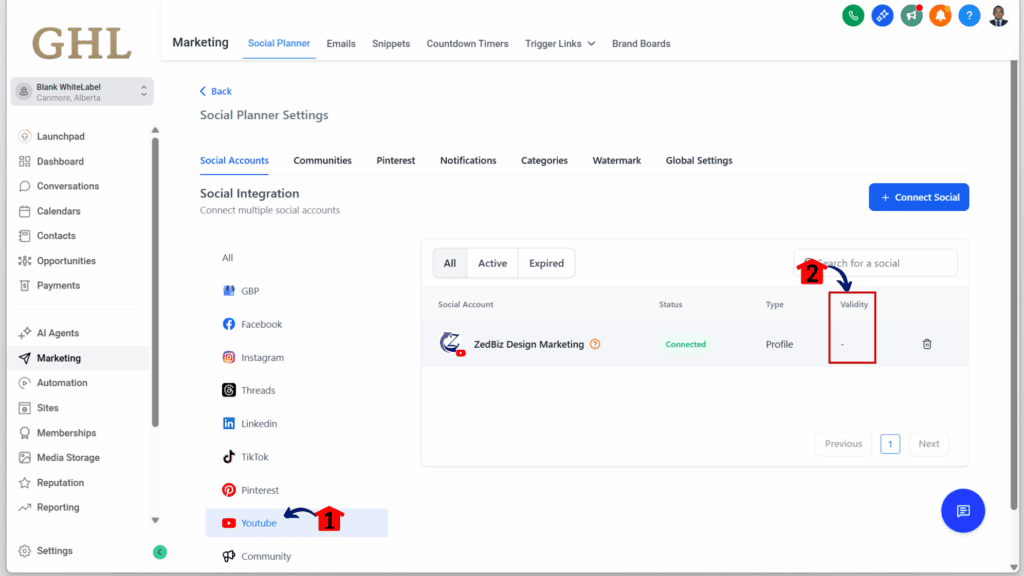
Once your YouTube account is connected, the token refresh runs quietly in the background. It’s simple and saves time. GHL keeps things working so you can focus on your content.
Quick Tips: Keeping Your YouTube Flow Error-Free
The YouTube token refresh in GoHighLevel now runs on its own, but there are still a few best practices that can help keep your posts running smoothly. A little attention now and then can save time and prevent issues later.
Here are some simple ways to keep things in check:
- Look at your connection every so often. Even with auto-refresh, things like password changes or new security settings on your Google account can still break the link.
- Don’t remove permissions in your Google settings. If GHL loses access, it cannot refresh your YouTube token or publish posts.
- Label your posts clearly. This makes it easier to manage YouTube content, especially if you’re working with multiple clients.
- Pay attention to error notices. If something fails, GHL usually gives a clear reason in the Social Planner.
- Reconnect manually if needed. If something interrupts the refresh process, you can always disconnect and reauthorize your YouTube account.
Following these tips helps you keep your YouTube publishing stable without much effort. GHL is doing more in the background now, but a quick check now and then still goes a long way.
FAQs: Common Questions About YouTube Token Refresh
Even with the new system in place, it’s normal to have a few questions. Here are some of the most common ones about how YouTube token refresh works inside GoHighLevel.
GHL Handles the Tech So You Can Focus on Content
This YouTube token refresh update in GoHighLevel fixes a common issue without adding more steps for the user. That alone makes it a solid improvement.
No more checking calendars to remember when a token will expire. No more digging through settings to reconnect a YouTube account. With this change, GHL handles the connection behind the scenes so posts go out as planned.
For agencies or anyone running regular video content, that kind of reliability matters. It keeps the focus on strategy and content, not fixing broken links.
The goal is simple: connect once and let it run. That’s what this update delivers.
Scale Your Business Today.
Streamline your workflow with GoHighLevel’s powerful tools.