

- Schedule workflows daily, weekly, or hourly
- Quick Summary – Workflow Scheduler at a Glance
- What’s New in the Workflow Scheduler
- Time-Based Workflows, No Contacts Needed
- Why the Workflow Scheduler Matters
- How to Use the Workflow Scheduler
- Pro Tips for Using Workflow Scheduler
- What This Means for You and Your Team
- Common Questions About Workflow Scheduler
- Start Automating on Your Schedule
Schedule workflows daily, weekly, or hourly
GoHighLevel now lets users trigger workflows by time. That means automations can run hourly, daily, or weekly without needing a contact to start them. The new workflow scheduler trigger solves a long-standing gap in the GHL automation system. It gives users the power to set specific times for workflows to run, just like traditional schedulers in other platforms.
Before this update, users often had to patch together delay steps or use outside tools to get time-based actions working. It wasn’t ideal. Many agencies just avoided it because the setup was clunky or unreliable. Now, that’s no longer the case. This trigger is built right into workflows and is easy to configure with clear options.
The real value is in its flexibility. You can schedule updates every morning, refresh Airtable data every few hours, or run weekly reports. And none of it depends on a contact doing something first.
With the new GHL workflow scheduler, users can run automations on exact time intervals like every day at 9 AM or every Friday at 4 PM. It works without contact triggers and supports advanced setups like skipping weekends or stopping after a certain date. This update makes it much easier to automate internal tasks, reports, or reminders without using workarounds.
Quick Summary – Workflow Scheduler at a Glance
Purpose: The workflow scheduler lets users start automations based on time instead of contact activity. It is built for routine tasks that need to run on a set schedule.
Why It Matters: This update makes it easier to run workflows without stacking delays or using outside tools. Users now have a cleaner way to manage time-based automation inside GoHighLevel.
What You Get: Options to run workflows every few hours, daily, weekly, or with advanced settings. Features include skipping weekends and stopping after a chosen date.
Time to Complete: It takes about 5 to 10 minutes to set up a scheduler and test it.
Difficulty Level: Most users will find it easy to use. The advanced schedule option is best for those who are comfortable with custom settings.
Key Outcome: Users can build more reliable workflows that run on time, with less setup and fewer skipped steps.
What’s New in the Workflow Scheduler
GoHighLevel just added a new way to trigger automations, and it’s a big deal. The new workflow scheduler gives users the option to start workflows based on time, not just contact activity. This means automations can now run on a set schedule without relying on forms, tags, or incoming messages.
Inside the workflow builder, there is now a Scheduler trigger. It comes with simple presets that let users choose how often a workflow runs. It could be every few hours, every day at a certain time, or even just once on a specific date. For more advanced users, there is also a custom option using cron expressions.
Automate marketing, manage leads, and grow faster with GoHighLevel.

Here are the main scheduling options:
- Every X hours, like every 6 hours
- Daily at a fixed time, such as 9:00 AM
- Weekly or monthly, like the second Friday of each month
- One-time runs, based on a specific date and time
- Custom cron-style rules for full control
GoHighLevel also added helpful features like a skip weekends setting and a stop date so workflows do not run forever. There is a preview tool as well that shows the next five scheduled runs. This helps avoid mistakes before going live.
The workflow scheduler in GHL now makes it possible to automate daily tasks, weekly reports, or hourly syncs. It works with no contact required and helps agencies build cleaner, more reliable automations.
Time-Based Workflows, No Contacts Needed
The biggest change with the new workflow scheduler is how it runs workflows without using a contact. In most GHL workflows, a contact is needed to start the process. That might be from a form submission, a tag, or a message reply. This trigger works differently.
The scheduler starts the workflow based only on time. There is no contact attached to the trigger. Because of that, some actions will not run. But instead of breaking, the system handles it smoothly.
Here is what users will see when using the scheduler:
- Contact-only actions are skipped. This includes anything that needs a contact record, like sending a text or updating a contact field.
- Skipped steps are clearly marked. In the execution log, users will see a message explaining that the step was skipped because no contact was present.
- All other steps run normally. Webhooks, Slack messages, Google Sheets updates, and internal tasks will still work without issue.
The workflow builder also shows some helpful updates:
- The system tracks and displays the last time the workflow ran.
- Users can check if the scheduler is active at a glance.
- There is a “Check Schedule” button that shows the next five run times based on the setup.
These changes give users more control over their systems. The workflow scheduler now makes it possible to build reliable, time-based automation without relying on any user action.
Why the Workflow Scheduler Matters
The new workflow scheduler in GoHighLevel is more than just a trigger. It solves a real problem that many users have worked around for years. Before this update, scheduling a workflow meant using delay steps, temporary tags, or outside tools. It worked, but it was messy.
Now there is a built-in way to run workflows on a schedule without relying on contacts or hacks.
Here is why this update is important:
- No contact required. Automations can now run based on time alone, without needing someone to take action first.
- Less clutter in your workflows. Without fake delays or manual triggers, the setup is easier to read and manage.
- Runs on time, every time. The scheduler follows your account’s timezone and does exactly what you tell it to.
- More control. You can choose when it starts, when it ends, and if it should skip weekends.
This is especially useful for agencies running internal processes, reminders, or reports. Now they can set it and trust that it will run when needed.
The workflow scheduler helps users build stronger automations with fewer steps and fewer issues.
How to Use the Workflow Scheduler
The workflow scheduler in GoHighLevel is built to be easy to set up. It works like any other trigger inside a workflow, but instead of reacting to contacts, it runs on time. Here’s how to set it up step by step.
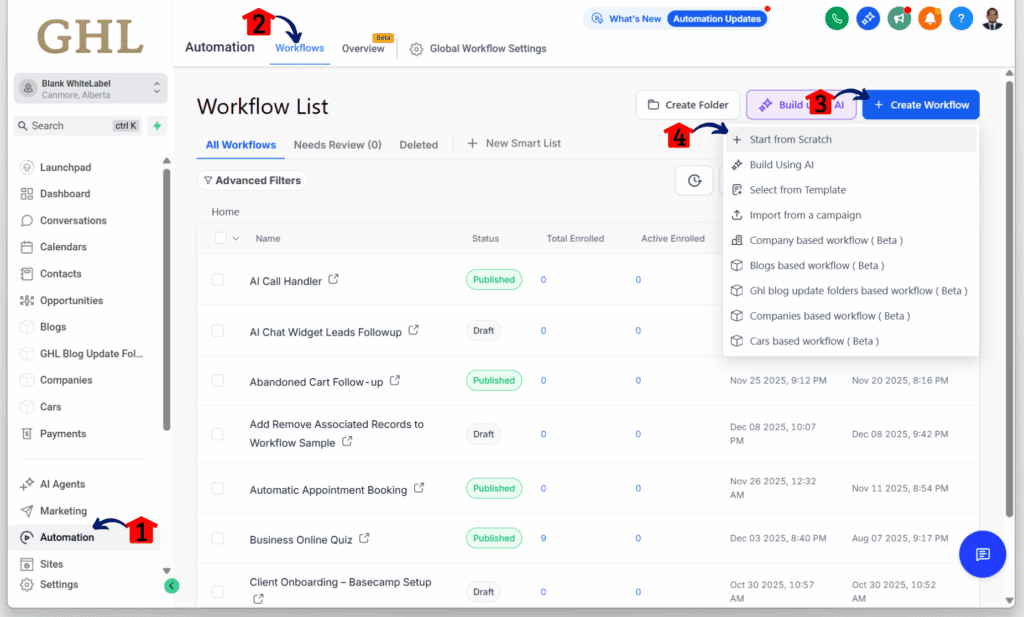
Step 01 – Access the Main Menu in GoHighLevel
- The main menu on the left side of your screen includes all the main areas you work in when using GoHighLevel (GHL).
1.1 Click on the Automation menu item to access the Workflows section.
- You’ll now be in the Automation section, where you can access the Workflows tab from the top menu.
1.2 Click the Workflows tab.
1.3 Click any existing workflow.
1.3 Click + Create Workflow.
1.4 Choose the Start from Scratch option.
Step 02: Add a Scheduler Trigger to Your Workflow
- You should now be inside the workflow editor.
2.1 Click the Add New Trigger button.
2.2 Type Scheduler in the search bar.
- The Scheduler trigger element should appear in the search results.
2.3 Add the Scheduler element.

Step 03: Configure the Scheduler Settings
- The Scheduler configuration slider should appear.
3.1 Add filters and set the schedule.
3.2 Set the advanced settings based on your goal.
3.3 Click the Save Trigger button when you are done.
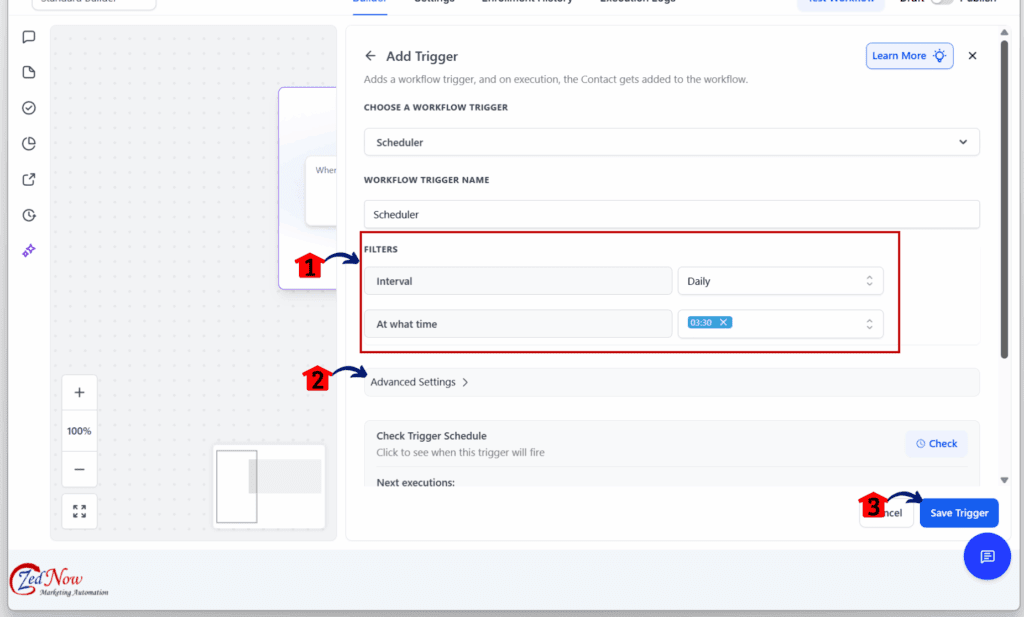
The workflow scheduler makes it easy to set up daily tasks, weekly alerts, or hourly syncs. No contact is required, and there’s no need to stack delay steps or use outside tools.
Pro Tips for Using Workflow Scheduler
The workflow scheduler in GoHighLevel gives users more control over when automations run. Once the basics are in place, a few simple adjustments can help make it even more useful. These tips can save time, cut out manual work, and keep things running smoothly.
- Keep your data in sync. Set up a workflow to run every few hours and update an Airtable base or Google Sheet. This is a good way to keep systems aligned without someone needing to trigger it manually.
- Send team updates each morning. Use the daily option to post reminders or updates to Slack. It can include to-do lists, appointments, or any other details your team needs to start the day.
- Automate weekly tasks. If you send reports to clients every Friday or post updates internally each Monday, use the weekly schedule. Pick the exact time and day that fits your routine.
- Use advanced mode when needed. If your schedule is more complex, try the cron-style setting. It gives full control over specific times and days, including patterns like every third Thursday or twice a day.
- Watch the logs. Since the scheduler runs without a contact, some steps may be skipped. The logs show this clearly, so it’s easy to double-check that everything is working.
- Keep actions simple and contact-free. Use tools like webhooks, internal notifications, or Google Sheets. These work well with the scheduler and help avoid skipped steps.
These tips help users get more out of the workflow scheduler. It is a simple tool, but with a few smart choices, it can handle many of the tasks that used to need outside tools or manual steps.
What This Means for You and Your Team
The workflow scheduler in GoHighLevel changes how teams manage automation. It gives users the power to run workflows based on time, without needing a contact to start things. That alone is a big shift.
This update helps cut down on extra steps. Many users were building workarounds just to make something run on a daily or weekly schedule. Now that can be handled with a single trigger. No more fake delays or outside tools.
Here are a few ways this can help:
- Set up workflows to run each morning with reminders or reports.
- Keep data updated across platforms without waiting for a trigger.
- Handle weekly tasks or client updates without manual steps.
- Build quiet backend processes that just run when needed.
Agencies with many clients or sub-accounts will find this helpful. It lets them create cleaner systems that run on time and are easier to manage.
The workflow scheduler helps users stay focused on what matters. It reduces clutter and gives more control over when things happen. That makes it a solid tool for anyone working to improve their automation setup.
Common Questions About Workflow Scheduler
The workflow scheduler is a new way to trigger automations in GoHighLevel, and it works differently than other triggers. These questions come up often, especially for teams using it for the first time.
These answers should help most users feel confident when using the workflow scheduler. It is simple to set up once you know how it works.
Start Automating on Your Schedule
The new workflow scheduler in GoHighLevel gives users a better way to run automations. Instead of waiting for a contact to take action, you can now start workflows based on a set time. That makes it easier to manage routine tasks and keep things running on schedule.
This update removes the need for workarounds. There is no need to use delay steps or outside tools just to run something every day or week. The scheduler is built in, and it works with the same tools you already use.
Agencies and teams can use it for internal updates, syncing data, or handling regular reminders. It is a simple way to stay organized without adding more steps.
Anyone using GoHighLevel for backend tasks or time-based actions should try it. Once set up, the workflow runs on time and with less chance of errors.
The workflow scheduler is a solid improvement. It brings more control, better timing, and a cleaner way to build automations that work in the background.
Scale Your Business Today.
Streamline your workflow with GoHighLevel’s powerful tools.


