- Fix wrong contact links in GHL Affiliate Manager
- Quick Summary – Affiliate Contact Reassignment Snapshot
- What Admins Can Now Do
- How the Feature Works
- Why Affiliate Reassignment Matters
- How to Use the Reassignment Tool
- Tips for Managing Contact Conflicts
- Benefits for Agencies and Admins
- Results From Using Contact Reassignment
- FAQ on Affiliate Contact Reassignment
- Get Started With Contact Reassignment
Fix wrong contact links in GHL Affiliate Manager
Affiliate contact reassignment in GoHighLevel fixes a key problem: when two or more CRM contacts share the same email, the affiliate can get linked to the wrong one. This causes incorrect tracking, broken automation, and messy reports.
Until now, admins couldn’t do much about it. Duplicate emails across products led to confusion, and affiliate data often got tied to the wrong person. That made it harder to trust reports or trigger the right follow-ups.
This update gives admins a clear solution. A new tool lets them pick the correct CRM contact and relink it to the right affiliate. It only takes a few clicks, and the changes update instantly.
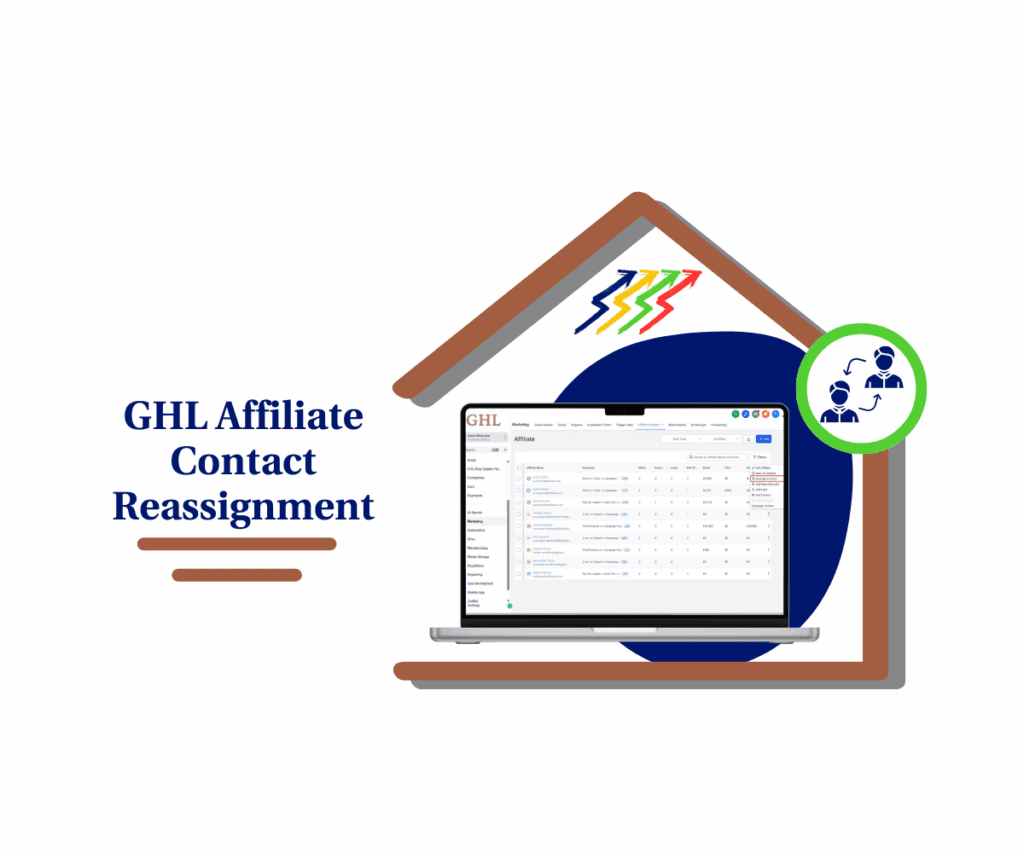
For agencies, this means better control, cleaner contact data, and more accurate results. GoHighLevel now lets admins reassign affiliate contacts across products when emails are duplicated. This update improves tracking, automation, and data accuracy with proper affiliate contact reassignment.
Quick Summary – Affiliate Contact Reassignment Snapshot
Purpose: GoHighLevel now lets admins reassign affiliate contact links when multiple contacts share the same email. This helps clean up CRM issues fast.
Why It Matters: Bad links between affiliates and contacts can mess up reports, automations, and payouts. This update gives admins a simple way to fix that.
What You Get: A direct tool inside GoHighLevel to choose the right CRM contact for each affiliate. No need to merge or delete anything.
Time to Complete: Takes just a few clicks. Most updates are done in under five minutes.
Difficulty Level: Easy. If you can manage contacts, you can do this.
Key Outcome: Better data, cleaner tracking, and fewer mistakes with affiliate contact reassignment.
What Admins Can Now Do
With this update, GoHighLevel gives admins direct control over affiliate contact reassignment. It’s a practical fix for a common issue that happens when multiple contacts share the same email. In those cases, affiliates could end up linked to the wrong CRM contact, and there was no way to correct it—until now.
Admins can now step in and make the change manually.
Automate marketing, manage leads, and grow faster with GoHighLevel.

Here’s what the new feature allows:
- See every CRM contact that uses the same email address
- Pick the correct contact to link to the affiliate
- Reassign the connection without merging or deleting records
- Let GoHighLevel automatically update tracking, reports, and automations
Once reassigned, the system takes care of everything in the background. It updates the affiliate-to-contact connection and keeps all reporting accurate from that point forward.
This feature is available across GoHighLevel, including within Affiliate Manager and any tools that share CRM data. It’s a clean and simple way to manage affiliate contact reassignment without breaking anything.
How the Feature Works
GoHighLevel didn’t just add a way to change affiliate contact links. They also made sure it works the right way behind the scenes. This update gives admins more control without risking broken data or extra cleanup.
Here’s what’s different now:
- The system shows every contact that shares the same email. You can easily see which one is linked to the affiliate and which one should be.
- Admins can pick the correct contact and reassign it with a few clicks.
- GoHighLevel automatically updates tracking, workflows, and reports using the new contact.
- Each contact stays separate in the CRM. There’s no merging or deleting.
- Built-in checks help prevent mistakes, like linking to an inactive or missing contact.
This setup supports clean affiliate contact reassignment while protecting your CRM data. Even if the same email appears across different products, the system keeps everything stable.
For admins managing multiple tools and campaigns inside GoHighLevel, this makes a real difference. It’s a simple fix that keeps reporting and automation on track.
Why Affiliate Reassignment Matters
When the wrong CRM contact is linked to an affiliate, things break. Reports become unreliable, commissions go to the wrong person, and automations don’t hit the right lead. These issues may seem small at first but can pile up quickly.
This usually happens when multiple contacts share the same email. It’s common across GoHighLevel products, especially when agencies run campaigns in different accounts or tools. Without a way to control the link, affiliates often get tied to the wrong contact by default.
Affiliate contact reassignment solves that problem.
Here’s why it matters:
- Reports pull the right data and reflect the correct contact
- Attribution becomes more accurate and easier to trust
- Automations work as intended without targeting the wrong person
- Support teams spend less time troubleshooting mismatches
For agency owners, this is about maintaining clean data and clear results. When clients rely on affiliate tracking, even small errors can impact revenue and trust.
Now, with this update, admins can fix issues fast. No workarounds. No confusion. Just a simple tool to keep affiliate contact links correct.
How to Use the Reassignment Tool
The new affiliate contact reassignment tool in GoHighLevel is easy to use. It helps admins connect the right CRM contact to the right affiliate without needing to delete or merge records.
Here is a step-by-step process to follow:
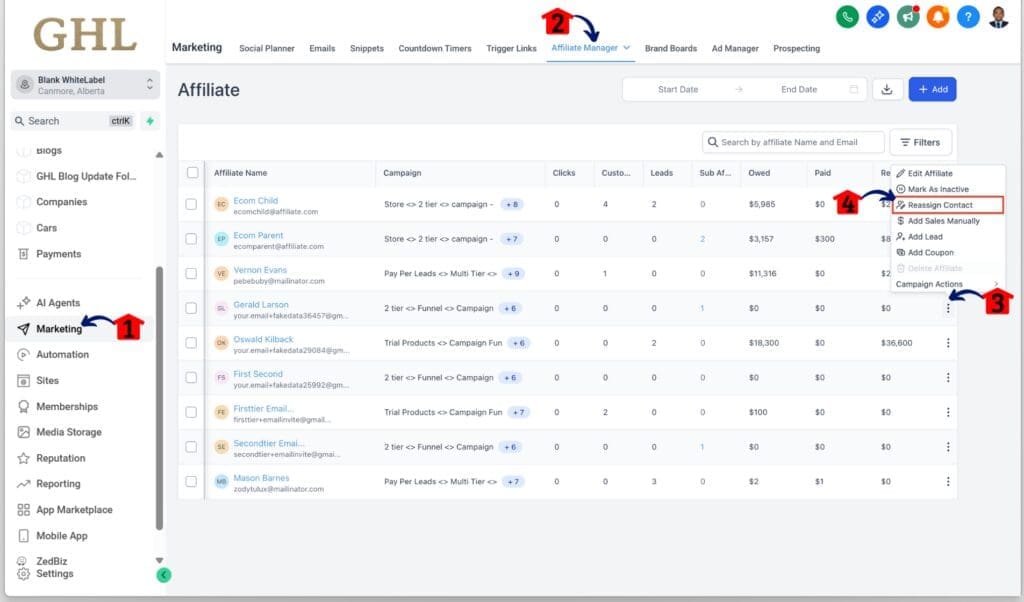
Step 01 – Access the Main Menu in GoHighLevel
- The main menu on the left side of your screen includes all the main areas you work in when using GoHighLevel (GHL).
1.1 Click on the Marketing menu item to access the Affiliate Manager section.
- You’ll now be in the Marketing section, where you can access the Affiliate Manager tab from the top menu.
1.3 Click the More Options icon for the affiliate you want to reassign.
- The More Options icon is shown as a three-dot button.
- Clicking this button will display several options, including the Reassign Contact option.
1.4 Click the Reassign Contact option.
Step 02 – Reassign the Contact
- The Reassign Contact pop-up window will appear.
2.1 Select the contact you want to reassign.
2.2 Click the Confirm button.

Admins do not need to worry about data being overwritten or automations breaking. This tool handles the change smoothly while keeping each CRM contact separate.
Affiliate contact reassignment is useful when running multiple campaigns, working across products, or dealing with data from different lead sources. It helps keep contact links clean and tracking accurate.
Tips for Managing Contact Conflicts
The affiliate contact reassignment feature in GoHighLevel makes it easier to clean up mismatches. Still, a few simple habits can help avoid contact issues before they start.
Here are some practical tips to keep things running smoothly:
- Use Smart Lists to find duplicates. Set up a Smart List that filters contacts by email. This helps spot records that share the same email address, which is where most conflicts begin.
- Tag any contact you reassign. Add a tag like “reassigned-affiliate” to keep a record of changes. This makes it easier to find those contacts later if something needs to be double-checked.
- Review reports after updates. After reassigning a contact, take a minute to check your affiliate reports and automations. Make sure everything reflects the new connection.
- Avoid reusing the same email in different sub-accounts. If you work across multiple products or accounts, try to keep each contact email unique. That helps reduce confusion when contacts enter the system from different sources.
- Prepare for future bulk tools. GoHighLevel may roll out bulk reassignment options soon. Keeping your data clean now will save time later.
Affiliate contact reassignment works best when contact data is clean and organized. These small steps can help agencies avoid bigger problems with tracking, payouts, or automations.
Benefits for Agencies and Admins
Affiliate contact reassignment helps agencies take control of something that used to be a guessing game. When the wrong CRM contact gets linked to an affiliate, it throws off more than just a report. It creates confusion that affects payouts, workflows, and client trust.
This update puts the control back in the hands of admins.
Here’s what this change really means:
- Admins can fix contact mismatches without needing support
- Affiliates stay linked to the right person, even across different products
- Reports pull accurate data from the correct CRM contact
- Workflows fire based on the real contact, not a duplicate
- Agencies can show clean data to clients without extra explanation
When the affiliate system works like it should, agencies can focus on growth instead of fixing problems. A clean CRM also means less time digging through records and more time on what matters.
GoHighLevel now makes it easier to manage contact data without breaking things. This update may seem small, but for teams juggling many campaigns, it’s a valuable fix.
Results From Using Contact Reassignment
Using affiliate contact reassignment in GoHighLevel leads to better data and smoother operations. When the right contact is linked to the right affiliate, things just work the way they should.
Here’s what users can expect after making the switch:
- Cleaner contact records. Duplicate emails no longer cause confusion. The correct CRM contact stays linked, which keeps your contact list organized.
- Reports that make sense. Data lines up with actual activity. Reports reflect the right contact, so teams can trust what they see.
- Automations that stay on track. Workflows run without hitting the wrong person. This helps avoid errors that come from mismatched contact links.
- Less time spent fixing errors. Admins can stop hunting down issues caused by bad links. That means fewer support headaches and more time to focus on growth.
- Stronger confidence in results. Clean data builds trust with clients and your team. When affiliate tracking is reliable, it’s easier to make decisions and scale campaigns.
Small updates like this may not seem exciting at first, but they often save the most time. Affiliate contact reassignment keeps things working behind the scenes so teams can focus on what matters.
FAQ on Affiliate Contact Reassignment
These questions cover the most common concerns and help admins feel confident using the new tool. The goal is to make affiliate contact reassignment easy and clear from the start.
Get Started With Contact Reassignment
Affiliate contact reassignment in GoHighLevel gives admins a simple way to fix one of the most common CRM issues. When the same email is used across different contacts, it can throw off reports, automations, and payouts. Now there’s a way to clean that up.
Admins can choose which contact gets linked to an affiliate. Once saved, GoHighLevel updates the connection behind the scenes. No need to merge records or fix things by hand.
This feature helps agencies keep contact data accurate, especially when running campaigns across multiple tools or products. It also cuts down on support issues and gives teams better visibility into how affiliate data is tracked.
If you haven’t used it yet, now is a good time to check your contact list. Make sure affiliates are tied to the right CRM contact. A few minutes of cleanup today can prevent hours of work later.
Scale Your Business Today.
Streamline your workflow with GoHighLevel’s powerful tools.