- How to Use GHL’s Blog Post AI to Write, Edit, Optimize & Publish Faster Than Ever
- Quick Summary – AI Blog Generator at a Glance
- What Is the AI Blog Generator in GoHighLevel?
- Why the AI Blog Generator Matters for Agencies
- How to Use the AI Blog Generator in GoHighLevel
- Real-World Agency Wins Using the AI Blog Generator
- Frequently Asked Questions About the AI Blog Generator
- Final Thoughts on the AI Blog Generator
How to Use GHL’s Blog Post AI to Write, Edit, Optimize & Publish Faster Than Ever
The AI Blog Generator inside GoHighLevel makes content creation simple and fast. You can now generate complete blog posts in minutes without leaving the platform. This AI Blog Generator builds your outline, headings, SEO title, meta description, full paragraphs, and even images in one smooth process. No more switching between tools.
Inside Sites → Blogs, click “Create with AI” and choose Assist Mode or Build Mode. The system creates structured, readable, SEO-ready content instantly. You can edit tone, adjust length, regenerate sections, translate languages, and publish — all inside the blog editor. For agencies, this means faster production, lower costs, and consistent publishing across client accounts. Just enable Blog AI inside Labs and you’re ready to go.
The AI Blog Generator inside GoHighLevel lets agencies create fully written, SEO-optimized blog posts in minutes—without using external AI tools. It speeds up content production, improves consistency, and helps you scale blog publishing across clients.
Quick Summary – AI Blog Generator at a Glance
Purpose: This guide shows you how to use the AI Blog Generator inside GoHighLevel to create complete, SEO-ready blog posts in minutes.
Why It Matters: The AI Blog Generator removes the need for outside writing tools and helps you publish faster without increasing workload.
What You Get: You learn how to enable Blog AI in Labs, generate posts using Assist Mode or Build Mode, edit content, optimize SEO metadata, and publish directly inside GHL.
Time to Complete: Most users can generate and publish a blog post in under 15 minutes once the feature is enabled.
Difficulty Level: Beginner to Intermediate. If you can navigate Sites and Settings inside GoHighLevel, you can use this feature.
Key Outcome: You gain a scalable system for consistent blog publishing that saves time, lowers content costs, and supports long-term SEO growth.
What Is the AI Blog Generator in GoHighLevel?
The AI Blog Generator in GoHighLevel is a built-in content creation tool inside the Blog Editor. It allows you to generate full blog posts without using outside software. Everything happens inside Sites → Blogs.
When you click “Create with AI,” you get two options. You can use Assist Mode or Build Mode.
Automate marketing, manage leads, and grow faster with GoHighLevel.

Assist Mode works from a simple topic. You enter a headline or idea, and the system creates a full outline, headings, subheadings, SEO title, meta description, keywords, paragraphs, and AI-generated images. It is designed for speed and structure.
Build Mode gives you more control. You enter a custom prompt, and the AI writes content based on your instructions. This is ideal for niche industries, brand voice control, or specific messaging.
The AI Blog Generator keeps everything inside one workflow. You can generate content, edit it, improve tone, adjust length, swap images, translate languages, and publish — all from one screen.
For agencies, this means fewer tools, fewer logins, and faster content production.
Assist Mode vs Build Mode in the AI Blog Generator
The AI Blog Generator gives you two ways to create content. Each mode serves a different purpose.
Assist Mode is built for speed. You enter a topic, and the system creates a complete blog post for you. It builds the outline, headings, SEO metadata, full paragraphs, and images. This is the best choice when you need structured content fast. It works well for SEO blogs, local business content, and monthly content plans.
Build Mode gives you more control. You write a custom prompt and tell the AI exactly what you want. You can define tone, style, audience, and direction. This mode is great for niche industries, branded messaging, or creative campaigns.
Both options live inside the AI Blog Generator. You do not need outside tools. You simply choose the mode that fits your goal.
If you want speed, choose Assist Mode.
If you want control, choose Build Mode.
Most agencies will use both.
Smart Editing Tools Inside the AI Blog Generator
The AI Blog Generator does more than just write content. It also helps you improve and refine it without leaving the editor.
Once your blog is generated, you can click on any paragraph and regenerate it. If something feels off, you can rewrite it in seconds. You can also adjust the tone, improve clarity, or change the length. This makes it easy to match your client’s voice.
Images are flexible too. You can replace, regenerate, or delete AI-generated images with one click. If the image style does not fit the brand, you can change it instantly.
There is also language translation. This helps agencies working with multilingual clients. You can create content in one language and convert it quickly.
You can even reference URLs and images while editing. This helps improve SEO and content depth.
The AI Blog Generator keeps everything inside one clean workflow. Write, refine, and publish from the same screen.
Why the AI Blog Generator Matters for Agencies
The AI Blog Generator is not just a writing tool. It is a growth tool for agencies.
Content takes time. Hiring writers costs money. Managing revisions slows everything down. The AI Blog Generator removes those roadblocks. You can now create full blog posts in minutes instead of hours.
This means faster turnaround for clients.
It also means you can offer blog services without adding more staff. One team member can now handle multiple accounts with ease. That makes scaling much simpler.
Consistency is another big win. Many businesses struggle to publish content every month. With the AI Blog Generator, you can build a steady publishing system. That helps improve SEO and build authority.
You also reduce tool costs. No more paying for separate AI writing software.
For agencies running multiple sub-accounts, this feature becomes even more powerful. You can produce SEO blogs at scale, across many clients, without increasing workload.
That is leverage.
How to Use the AI Blog Generator in GoHighLevel
The AI Blog Generator allows you to create complete blog posts directly inside your Blog Editor. In this section, you will enable the feature in Labs, access the Blog area, generate content using AI, customize it, and publish your post.
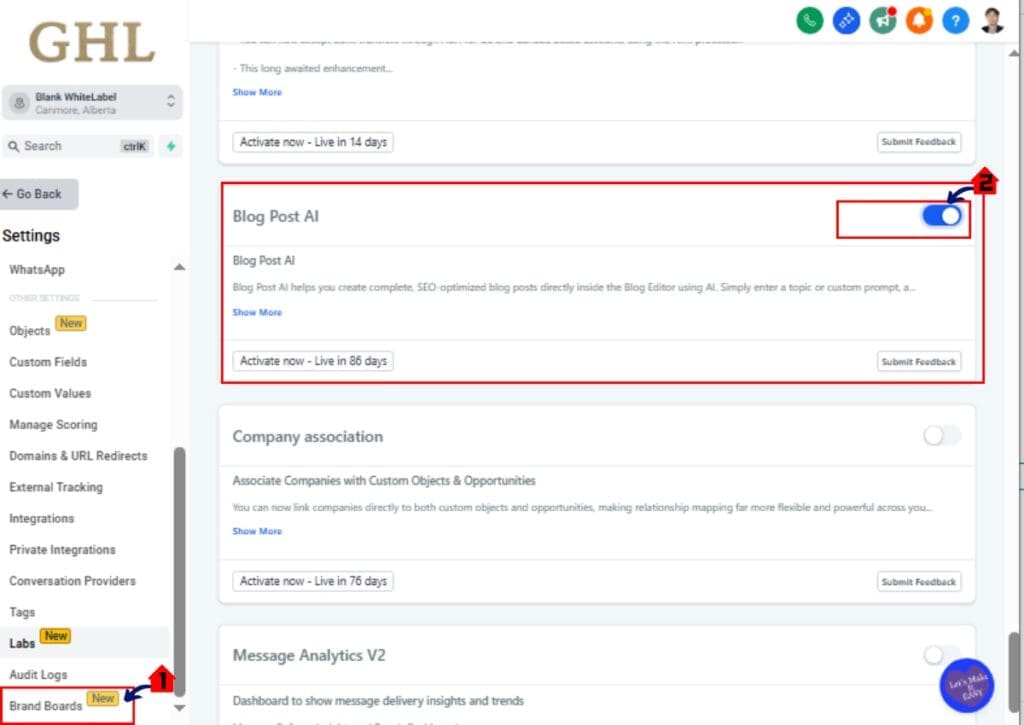
This feature must be enabled inside Labs before you can use it.
Here are the steps to use the AI Blog Generator inside GoHighLevel:
- Access the Settings area in GoHighLevel
- Enable the Blog AI feature in Labs
- Access the Blogs section in Sites
- Create a new Blog Post
- Launch the Create with AI tool
- Choose Assist Mode or Build Mode
- Generate the Blog Content
- Edit and Customize the Blog Post
- Save or Publish the Blog Post
To start make sure you are logged in to your GoHighLevel sub-account.
Step 01 – Access the Settings area in GoHighLevel
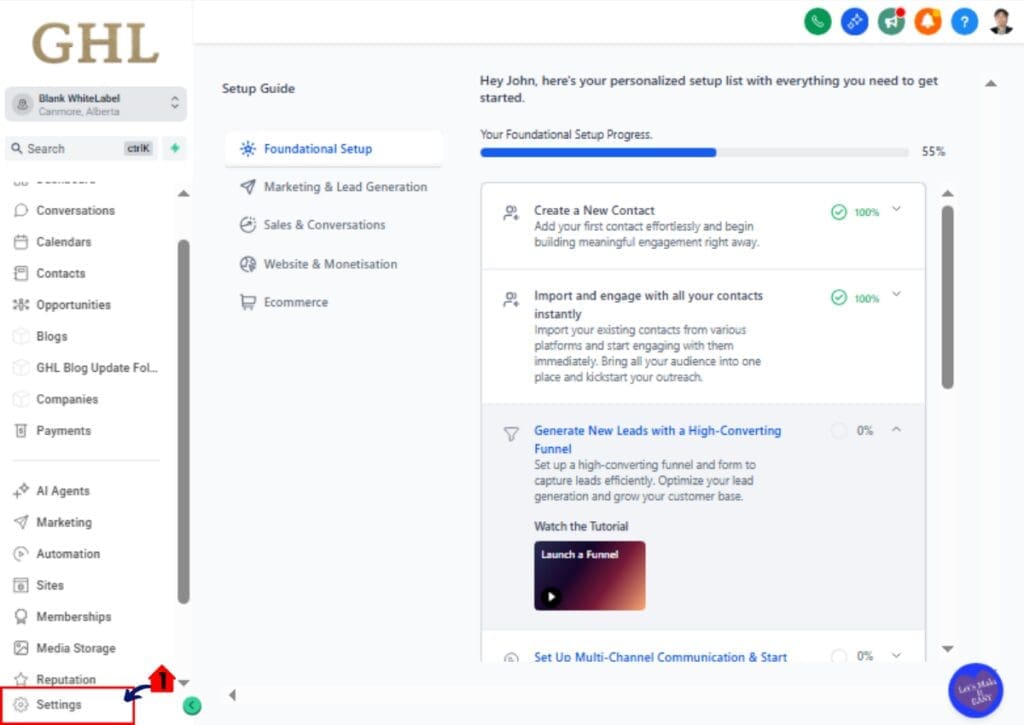
- Go to the bottom of the Main Menu on the left-hand sidebar.
1.1 Click the gear icon ⚙️ labeled Settings.
- This opens the Settings dashboard Page.
- You will see Business Info, Billing, My Staff, Labs and more.
Step 02 – Enable the Blog AI feature in Labs
2.1 Click Labs inside the Settings dashboard.
- The Labs Page displays experimental and new features.
2.2 Locate the Blog AI toggle.
- If it is OFF, switch it ON.
- When enabled, the toggle will change state to active.
If Blog AI is already enabled, move to the next step.
Step 03 – Access the Blogs section in Sites
- The Main Menu on the left side of your screen has all the main areas that you work in when using GHL.
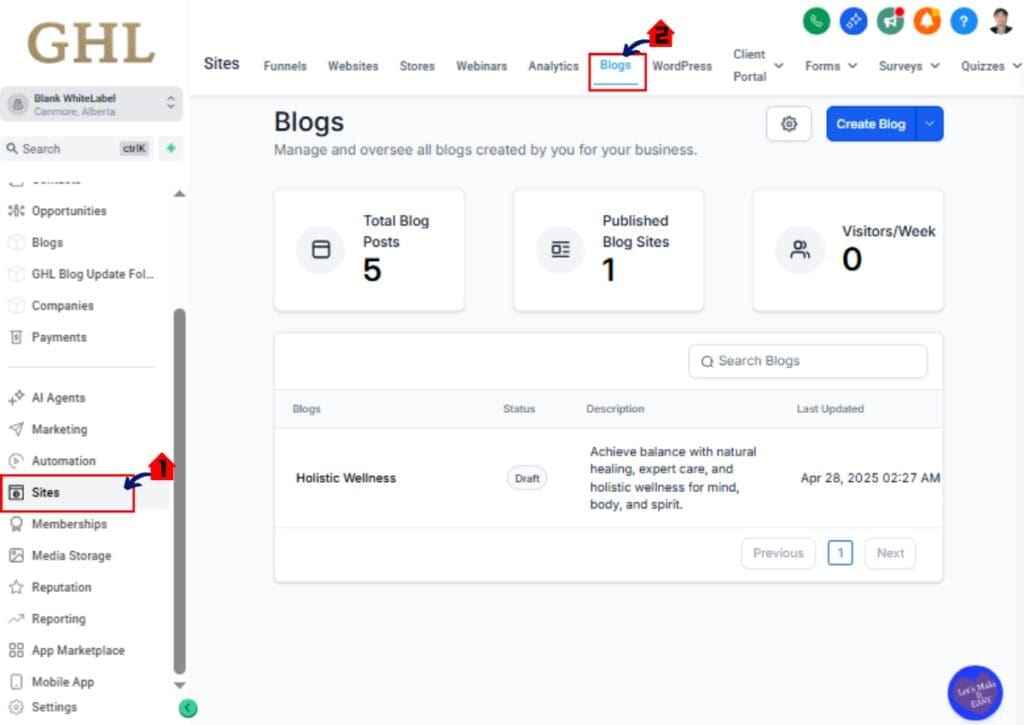
3.1 Click Sites main menu item.
- Inside the Sites section you will find Websites, Funnels, Blogs and more.
3.2 Click Blogs in the top menu.
- This opens the Blogs Page.
- You will see a list of your existing blog posts if any are created.
- If none exist, you will see a blank blog view.
Step 04 – Create a new Blog Post
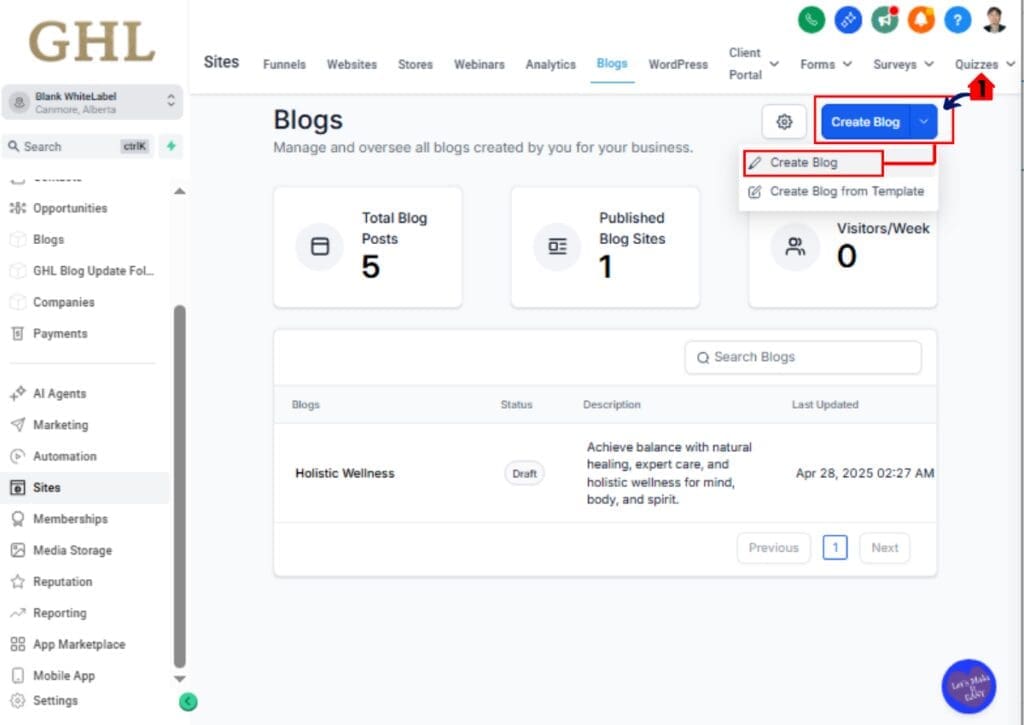
4.1 Click the Create Blog Post button.
- This opens the Blog Editor Page.
- You will see options to manually write or use AI.
Step 05 – Launch the Create with AI tool
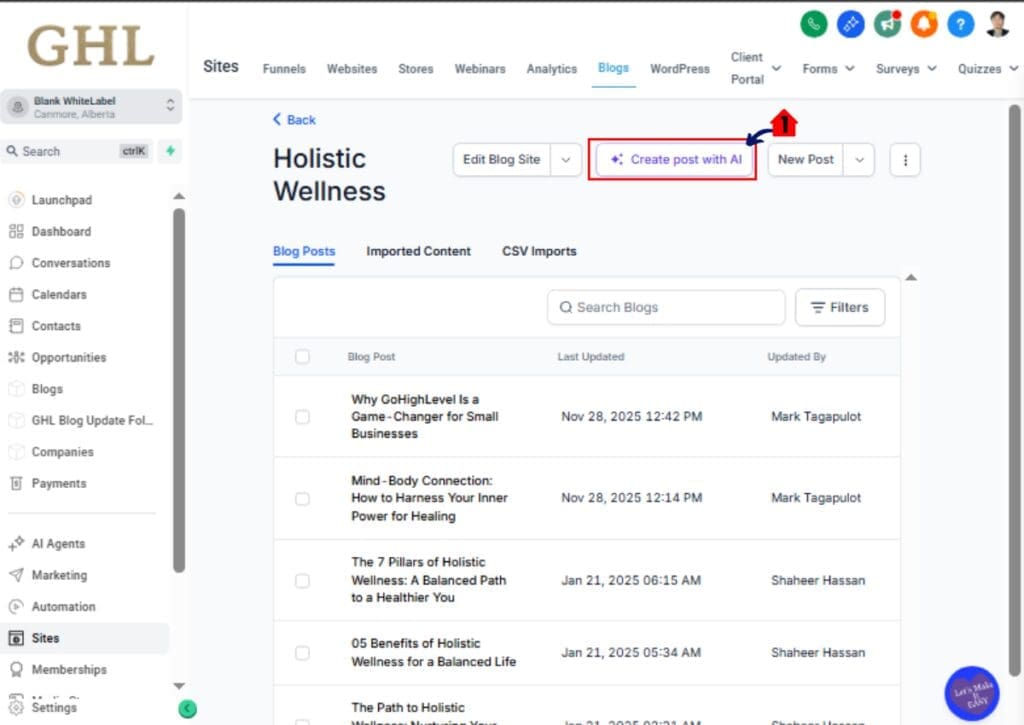
5.1 Inside the Blog Editor, click Create with AI.
- A full-screen AI creation Section will open.
- You will see options for Assist Mode and Build Mode.
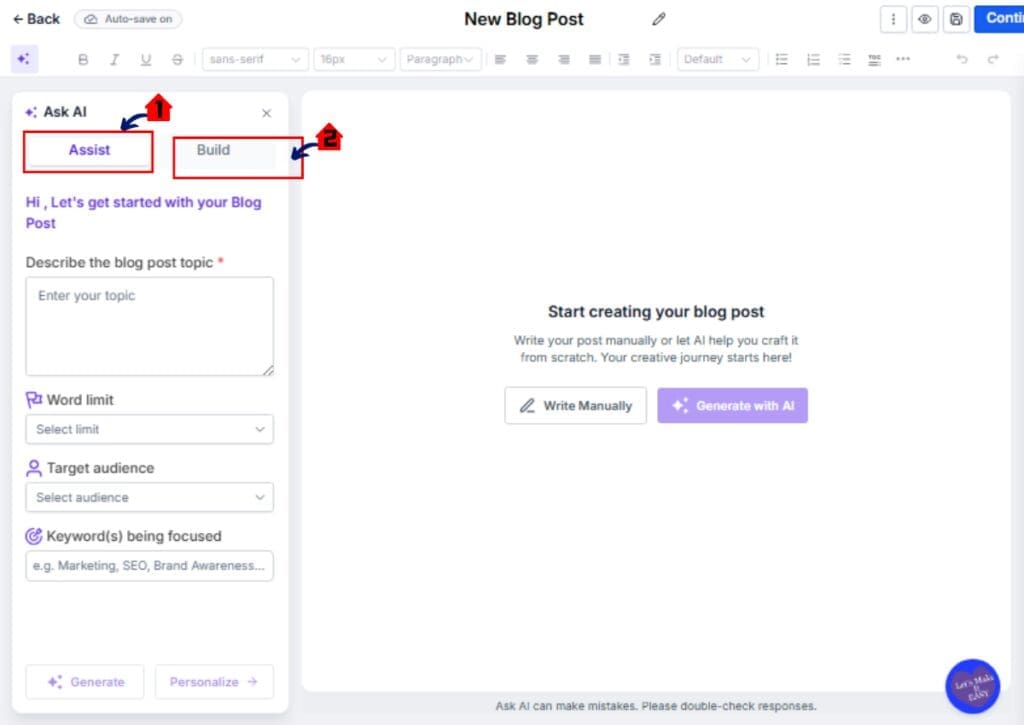
Step 06 – Choose Assist Mode or Build Mode
6.1 Select Assist Mode if you want topic-based generation.
- You will enter a simple blog topic.
- The system will build the outline, headings, SEO metadata, paragraphs and images.
OR
6.2 Select Build Mode if you want custom prompt control.
- Enter a detailed prompt.
- Define tone, audience, or writing style if needed.
Step 07 – Generate the Blog Content
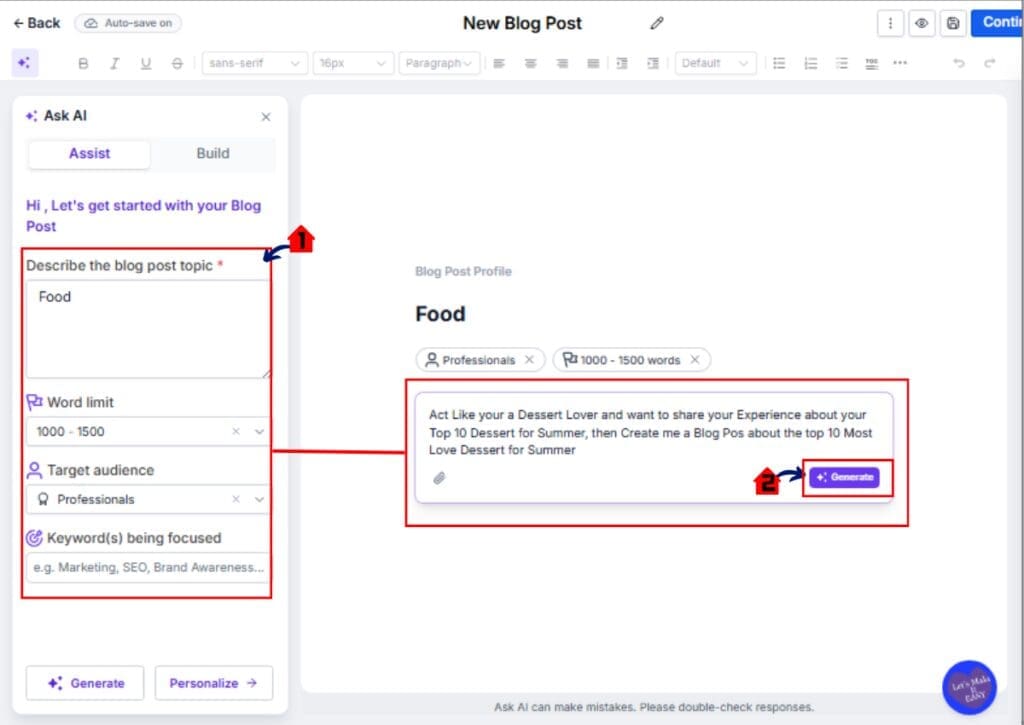
7.1 Enter your Topic or Prompt into the input field.
- Input the Topic, Post Length, Keywords ETC
7.2 Click Generate.
- The AI Blog Generator will create:
• Outline
• Headings
• SEO Title
• Meta Description
• Full Paragraphs
• AI Images - The content will load directly into the Blog Editor.
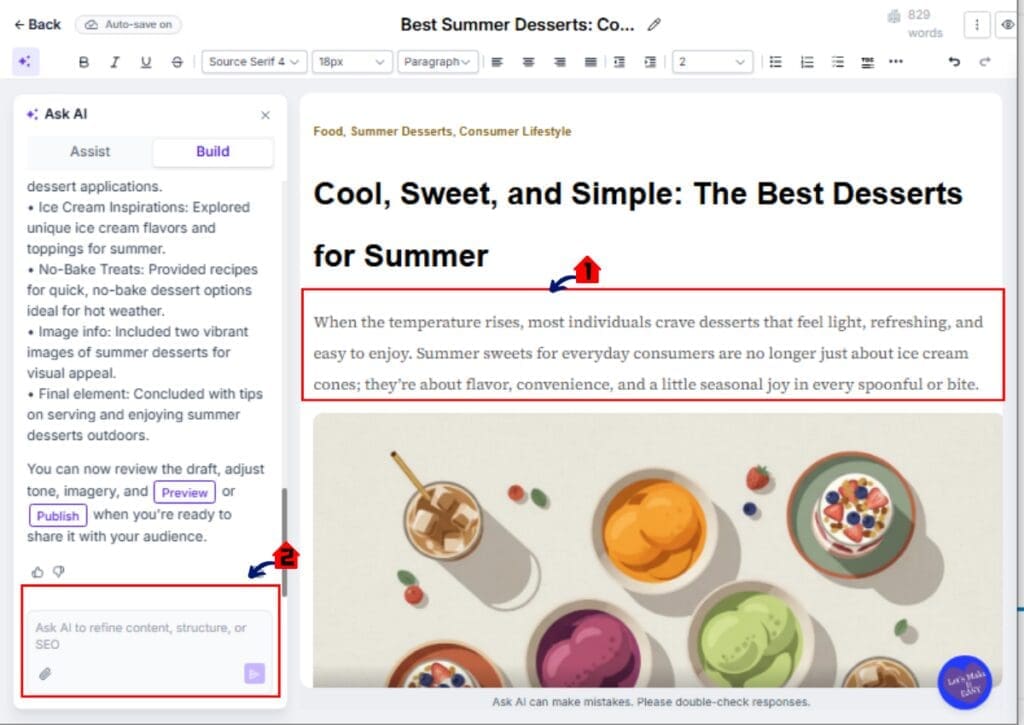
Step 08 – Edit and Customize the Blog Post
8.1 Click inside any paragraph to edit manually.
8.2 Use the regenerate option if needed.
- You can improve tone.
- You can change clarity.
- You can adjust paragraph length.
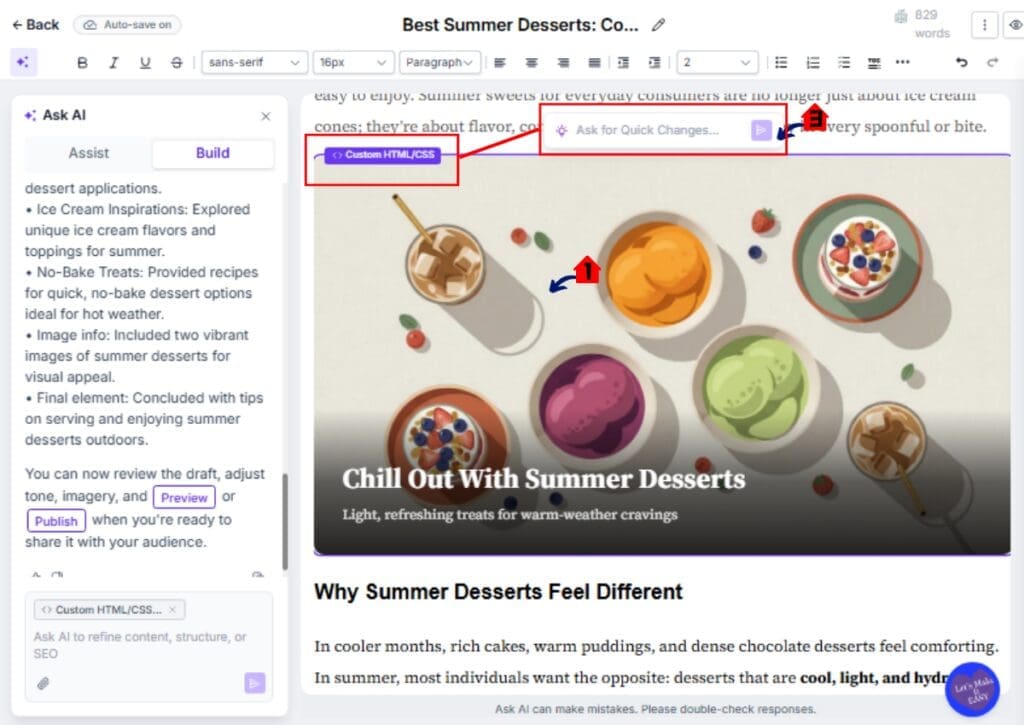
8.3 Click on images to replace or regenerate them.
8.4 Review the SEO Title and Meta Description fields.
- Adjust keywords if needed.
- Ensure your focus phrase appears naturally.
Step 09 – Save or Publish the Blog Post
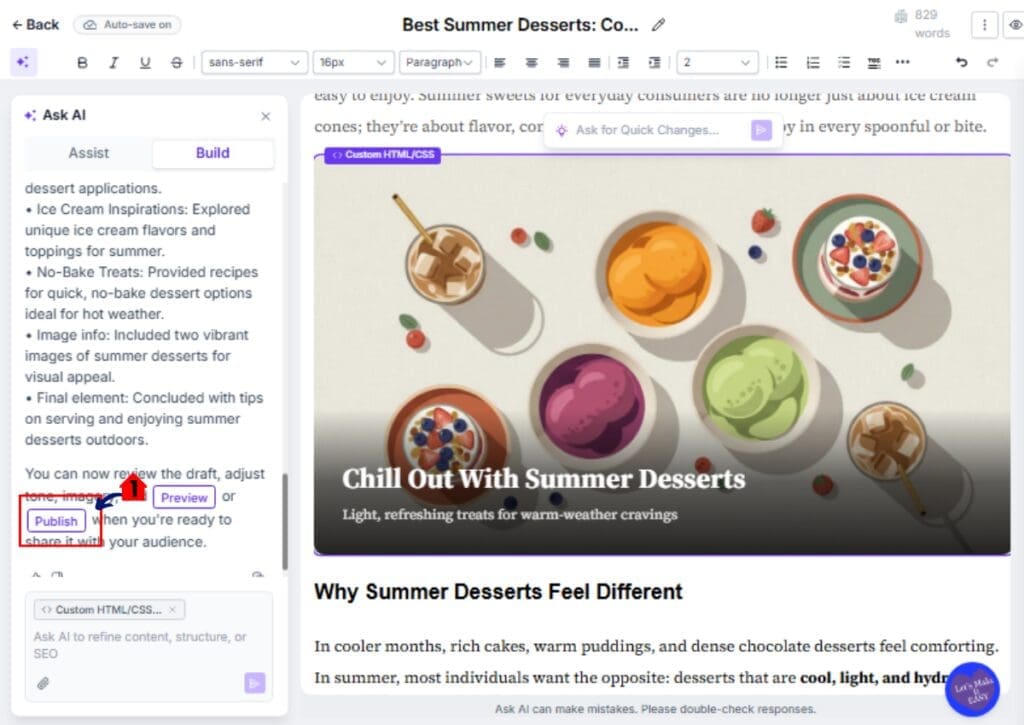
9.1 Click Publish to make the blog post live.
- The post will become publicly visible on your Website.
Pro Tips to Maximize the AI Blog Generator
The AI Blog Generator is powerful, but how you use it makes a big difference. Small adjustments can improve your results fast.
First, give better inputs. If you use Assist Mode, be specific with your topic. Instead of “roofing tips,” write “roof maintenance tips for winter in Canada.” Specific topics create stronger SEO structure.
If you use Build Mode, write clear prompts. Define the audience. Define the tone. Define the goal. The more direction you give, the better the output.
Always review your SEO Title and Meta Description. Make sure your main keyword appears naturally. Do not rely only on the default version.
Use internal links. Add links to service pages, funnels, or related blog posts inside your GHL account. This helps SEO and conversions.
Replace generic AI images with branded visuals when needed. This keeps your content aligned with client identity.
Finally, never publish without reviewing the content. The AI Blog Generator saves time, but your final review protects quality.
Real-World Agency Wins Using the AI Blog Generator
The AI Blog Generator is not just about writing faster. It helps you build new services and increase revenue.
If you run a marketing agency, you can now offer monthly SEO blog packages without hiring extra writers. One team member can create multiple blog posts across different sub-accounts in a single day.
For local businesses, you can create location-based SEO blogs quickly. Think “plumber in Dallas” or “dental care tips in Toronto.” The AI Blog Generator helps you scale this across cities and niches.
You can also use it to build authority. Publish educational posts that answer common client questions. This improves search rankings and builds trust.
Another smart move is content repurposing. Take a workflow guide, service page, or FAQ and turn it into a full blog post. Then use that blog as part of an email campaign or social content plan.
Agencies that publish consistently win more traffic. The AI Blog Generator makes that consistency realistic.
Frequently Asked Questions About the AI Blog Generator
Final Thoughts on the AI Blog Generator
The AI Blog Generator inside GoHighLevel is more than a writing shortcut. It is a content system built directly into your website workflow.
You can go from idea to published blog post in minutes. No switching tools. No copying and pasting. No extra software costs.
For agencies, this changes the game. You can offer blog services at scale. You can publish consistently. You can build authority faster. The AI Blog Generator gives you speed without losing control.
But remember this. AI is a tool. Your strategy still matters. Choose the right topics. Use clear keywords. Add internal links. Review before you publish.
If you have not enabled Blog AI in Labs yet, now is the time. Test it. Create one post. See how fast it works.
And if you want more practical GoHighLevel feature guides like this, check back with the team here at GHL Growth Garage for the next update.
Have you tried the AI Blog Generator yet? How are you using it in your agency?
Scale Your Business Today.
Streamline your workflow with GoHighLevel’s powerful tools.