- Manage, tag, and schedule Bluesky content in GHL
- Quick Summary – Bluesky Scheduling Tool Overview
- Post directly to Bluesky inside GHL
- GHL expands Social Planner reach
- Early Bluesky presence builds brand
- Connect and start scheduling Bluesky posts
- Tagging, timing, and media advice for Bluesky
- Future-ready social strategy with GHL
- Simpler workflow and better visibility
- Common questions about Bluesky and GHL
- Try Bluesky posting today inside GHL
Manage, tag, and schedule Bluesky content in GHL
GoHighLevel just added a Bluesky scheduling tool inside the Social Planner. That means users can now create, schedule, and post to Bluesky directly from the same dashboard they already use for Facebook, LinkedIn, Instagram, and Threads.
This update gives marketers and agencies a chance to get in early on a growing platform without adding another app to their workflow. GHL users can log in with their Bluesky handle and app password, add up to four images or a video, tag users, and publish with just a few clicks.
There’s no need to bounce between tabs or tools. Everything happens inside the GHL planner, so scheduling content is faster and easier.
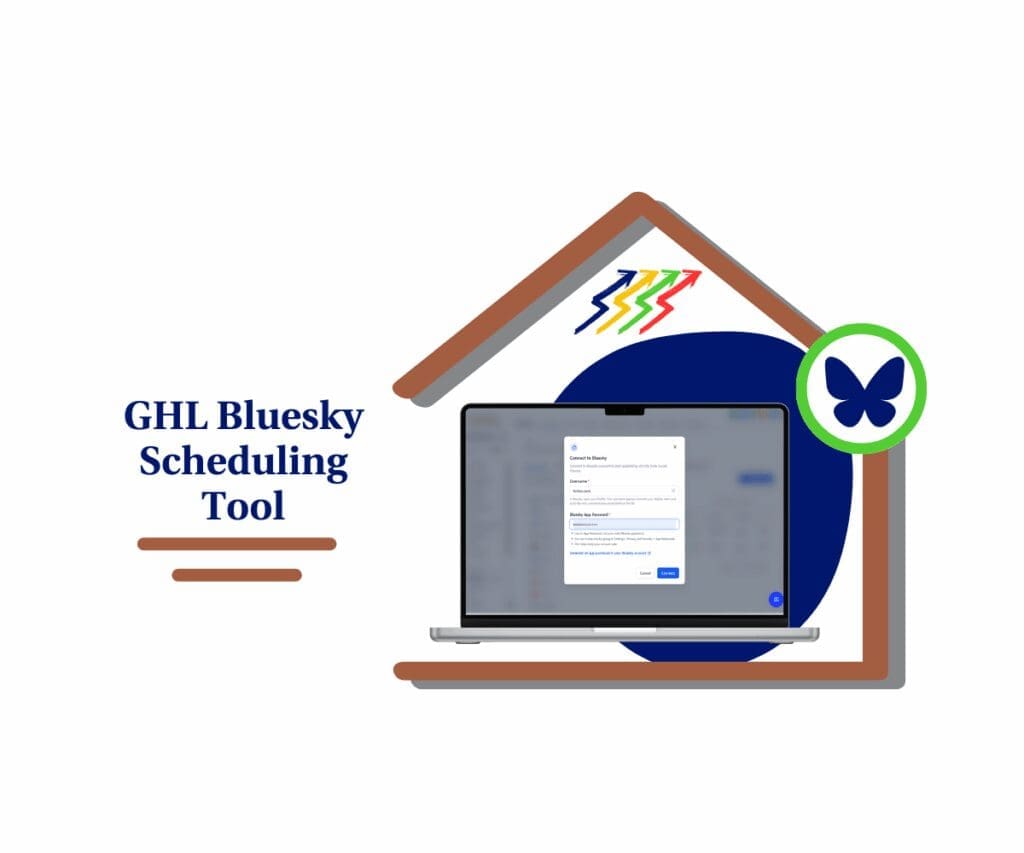
With GHL’s new Bluesky scheduling tool, users can create, tag, and publish posts without switching platforms. It makes early brand growth on Bluesky simple and efficient.
Quick Summary – Bluesky Scheduling Tool Overview
Purpose: This update adds Bluesky support inside GoHighLevel’s Social Planner so users can post without leaving their dashboard.
Why It Matters: Bluesky is growing fast and still has low competition. It gives users a chance to reach new audiences early without changing how they work.
What You Get: A built-in Bluesky scheduling tool that lets users tag people, upload media, and automate posts using the same tools they already know.
Time to Complete: Connecting a Bluesky account takes just a few minutes if the app password is ready.
Difficulty Level: Simple. If you have posted to any other platform inside GHL, this will feel familiar.
Key Outcome: Users can post to the Bluesky Scheduling Tool directly from GoHighLevel and stay ahead without adding another tool.
Post directly to Bluesky inside GHL
The Bluesky scheduling tool is now part of the GoHighLevel Social Planner. This means users can post to Bluesky without leaving the GHL dashboard.
Once connected, users can manage Bluesky posts just like they would for Facebook or Instagram. It keeps things simple and saves time.
Automate marketing, manage leads, and grow faster with GoHighLevel.

Here’s what’s included in the update:
- Connect to Bluesky using your handle and an app password
- Write posts with up to 300 characters
- Add up to four images or one video
- Tag other Bluesky users by their handle
- Save posts as drafts or publish them right away
- Automate posts using:
- Review Flow
- RSS Auto-posting
- Category Queues
- CSV Upload
All of these tools now work inside the same planner where users already manage other platforms. There’s nothing new to learn, and everything stays in one place.
GHL expands Social Planner reach
The GoHighLevel Social Planner now includes Bluesky Scheduling Tool as a supported platform. This update gives users a way to post and schedule Bluesky content alongside other networks without needing extra tools.
Until now, users could manage Facebook, Instagram, LinkedIn, and Threads. With Bluesky added to the mix, GoHighLevel gives users five channels in one place. That makes content planning easier and more complete.
The Bluesky scheduling tool works with the same features already built into Social Planner. There’s no need to learn anything new.
Here’s what’s different now:
- Bluesky is now listed in the same Social Planner as other networks
- Users can schedule and automate Bluesky posts just like they do with Facebook or LinkedIn
- Automation tools like RSS feeds, queues, and CSV uploads work with Bluesky too
- There’s no need to manage Bluesky from a separate tab or tool
This update gives users a better way to reach new audiences while keeping their workflow simple.
Early Bluesky presence builds brand
Bluesky is still new, but it is starting to pick up speed. The platform is attracting users who care about open networks and better conversations. For agencies and businesses, this is a smart time to start showing up.
Most brands are not on Bluesky yet. That means less noise and more chances to be seen. It is rare to find a platform where you can still stand out without having to fight for attention.
By using the Bluesky scheduling tool inside GHL, users can take that step early. There is no need to change how they already plan content. It works with the same calendar, same automations, and the same posting flow.
Here’s why it matters:
- Lower competition makes it easier to get noticed
- Early users often become trusted voices in growing spaces
- Agencies can offer Bluesky content as part of their service
- GHL makes posting simple so there is no extra work
This update helps users build on a new platform without making things more complicated.
Connect and start scheduling Bluesky posts
The Bluesky scheduling tool in GoHighLevel works like the rest of the Social Planner. Once the account is connected, posting to Bluesky is just a normal part of the workflow.
Here’s how to set it up and start posting:
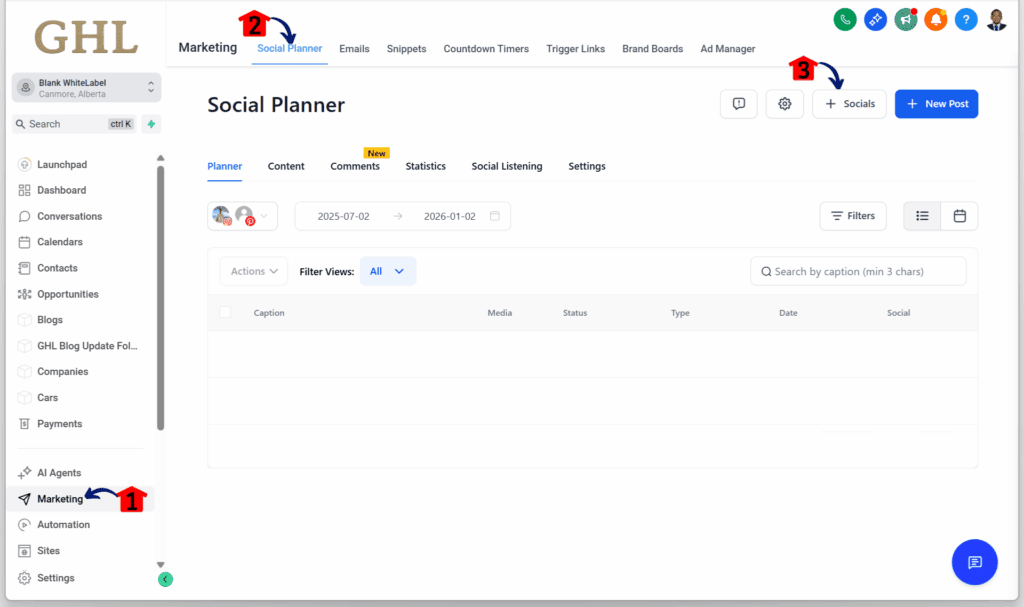
Step 01 – Access the Main Menu in GoHighLevel
- The main menu on the left side of your screen includes all the main areas you work in when using GoHighLevel (GHL).
1.1 Click on the Marketing menu item to access the Social Planner section.
- You’ll now be in the Marketing section, where you can access the Social Planner tab from the top menu.
1.2 Click the Social Planner tab.
1.3 Click the + Social icon.
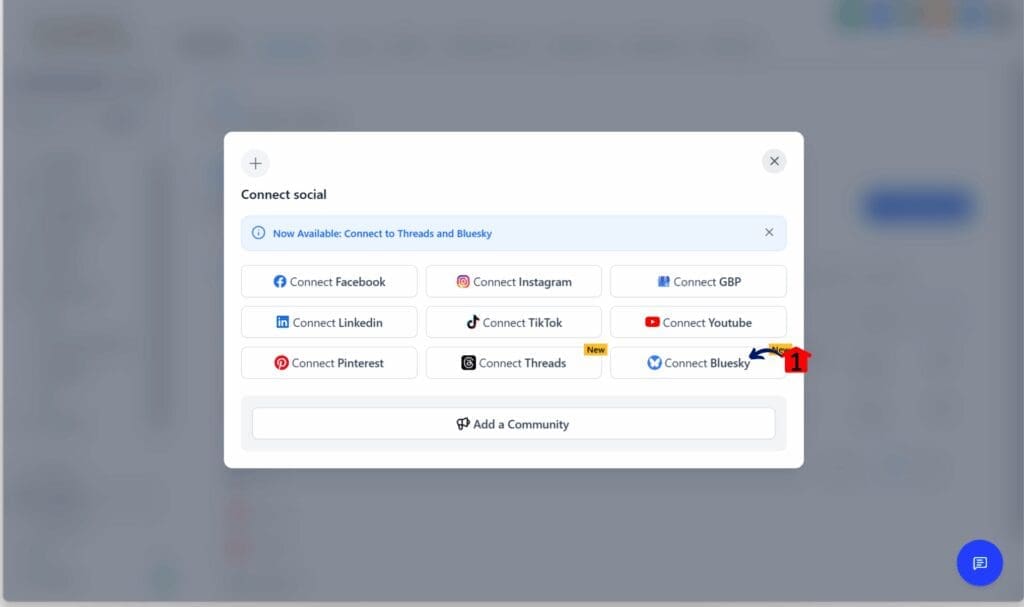
Step 02 – Connect Your Bluesky Account
- The Connect Social popup should appear along with the list of apps you can integrate.
2.1 Click the Connect Bluesky button.
- You should be asked for your username and Bluesky App Password.
Step 03 – Get Your Bluesky Username
- Log in to your Bluesky Scheduling Tool account in another window and open your Bluesky profile.
3.1 Copy your username and remove the “@” symbol.
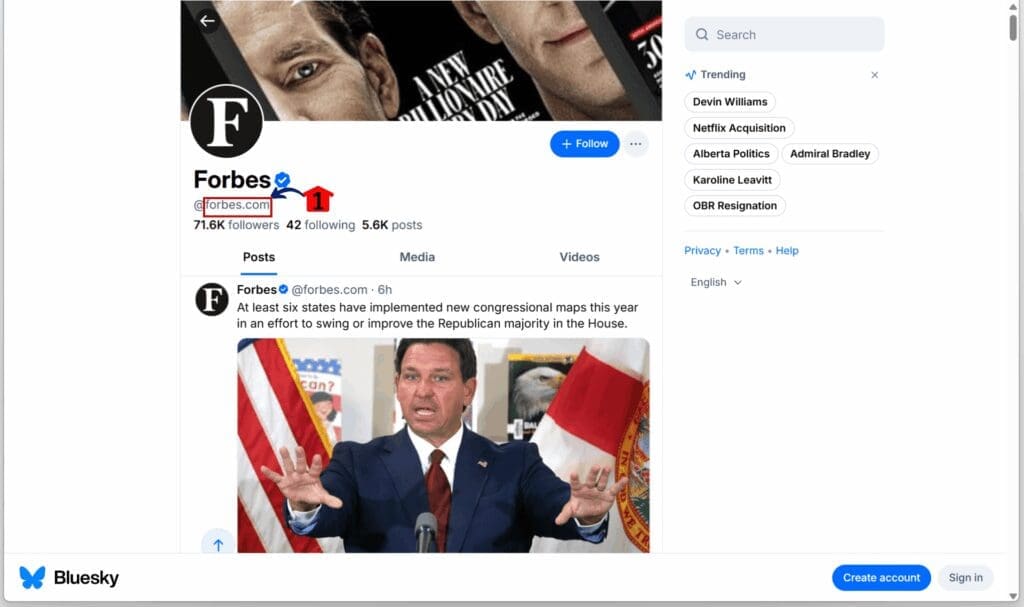
Step 04 – Generate Your Bluesky App Password
- Navigate to Settings, then go to Privacy and Security.
4.1 Click App Password to generate a new password.
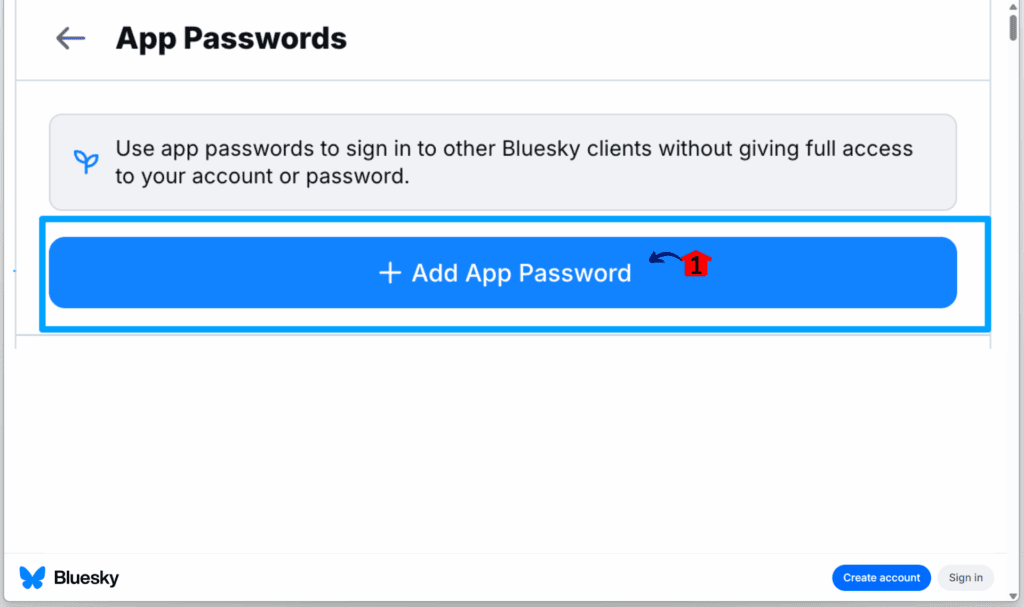
Step 05 – Complete the Integration Setup
- Go back to your Bluesky integration popup in GoHighLevel.
5.1 Enter your username and app password, then click the Connect button.
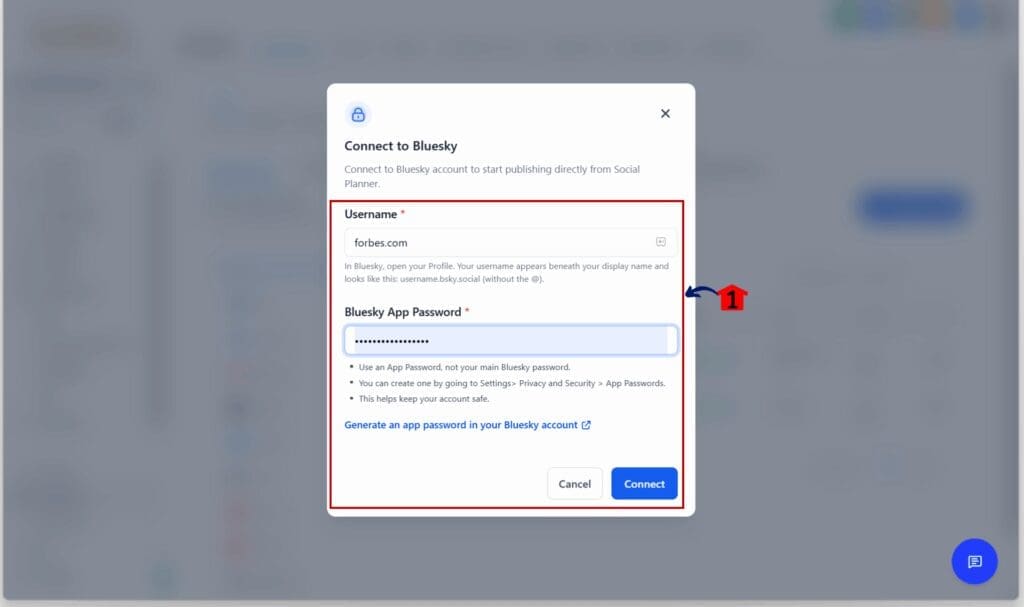
Once connected, this Bluesky Scheduling Tool is treated like any other platform in the planner. No special steps or new process. It’s a simple way to stay active where your audience is starting to show up.
Tagging, timing, and media advice for Bluesky
The Bluesky scheduling tool in GoHighLevel makes posting easy. But a few small adjustments can help users get better results, especially if they are new to the platform.
Here are some simple tips that work well on Bluesky Scheduling Tool:
- Tag carefully. When tagging other users, use the full handle exactly as it appears. Bluesky handles work like usernames, so one wrong letter means the tag won’t connect.
- Use photos or video whenever possible. A post with visuals often gets more attention than plain text. Bluesky allows four images or one video per post. Use this space to share quotes, show products, or highlight key ideas.
- Keep it short and clear. With a 300-character limit, there’s room to say something useful without dragging it out. Say what matters first. If more info is needed, add a link to a full post or page.
- Try different times to see what works. Bluesky users don’t always follow the same patterns as other platforms. Posting in the afternoon might work better than the morning. Test a few time slots and see what gets the most interaction.
- Use the tools that keep content moving. Review Flow and Category Queues are built into the planner and help users stay on schedule. These tools can help maintain a steady presence without daily check-ins.
These tips keep the focus on what works. The key is to stay consistent and post content that fits the Bluesky crowd.
Future-ready social strategy with GHL
The new Bluesky scheduling tool shows that GoHighLevel is thinking ahead. While Bluesky is still growing, it is building a strong base of users who want a different kind of social network. That makes it a good place to build brand visibility early.
This update gives GHL users a chance to try something new without adding more work. Bluesky now fits into the same Social Planner as Facebook, LinkedIn, Instagram, and Threads. There is no need to learn a new process or use another tool.
For agencies, it is also a chance to offer Bluesky posting as a service. Many clients are curious about these newer platforms but are not sure where to start. With GHL, it takes just a few clicks.
Here’s what this means in practice:
- GHL users can try Bluesky while it is still wide open
- Agencies can stand out by offering something different
- Teams can manage all platforms from one calendar
- There is less guessing and more doing
Social media is changing. This update helps GHL users stay ahead without making things harder.
Simpler workflow and better visibility
Adding the Bluesky scheduling tool to GoHighLevel helps users get more done without changing how they work. It keeps the posting process simple and puts everything in one place.
Users can now schedule Bluesky posts from the same planner they already use for Facebook and Instagram. That means less time switching between tools and more time focused on the content itself.
Here are a few results users can expect:
- A faster, cleaner way to post across all platforms
- A consistent process that cuts down on mistakes
- More visibility on Bluesky while competition is still low
- An easy way to add value for clients who want something new
Automation tools like Category Queues and Review Flow also help users stay on track. The Bluesky Scheduling Tool becomes easier to plan ahead and stay consistent, which often leads to better engagement.
This is a practical update that gives users real options without extra steps.
Common questions about Bluesky and GHL
Getting started with the Bluesky scheduling tool inside GoHighLevel is pretty simple, but it is normal to have a few questions. Here are some straight answers to help make things easier.
Try Bluesky posting today inside GHL
The Bluesky scheduling tool gives GoHighLevel users a simple way to post to a growing platform without changing how they work. It fits into the same Social Planner used for Facebook, Instagram, LinkedIn, and Threads.
This update is useful for anyone looking to build a presence early on Bluesky. It also helps agencies offer something new to clients who want to stay ahead of trends.
There is no need to learn a new system or manage another login. Just connect your Bluesky account, write your post, and choose when it should go live.
It is already part of the tools GHL users know. Now is a good time to put it to use.
Scale Your Business Today.
Streamline your workflow with GoHighLevel’s powerful tools.