

- How to Use Fathom Workflow Automation in GoHighLevel to Trigger AI Summaries, Assign Tasks, and Send Smart Follow-Ups Automatically
- Quick Summary – Fathom Workflow Automation Overview
- What Is Fathom Workflow Automation in GoHighLevel?
- Why Fathom Workflow Automation Matters for Agencies
- How to Set Up Fathom Workflow Automation in GoHighLevel
- What Fathom Workflow Automation Means for Your Business
- Frequently Asked Questions About Fathom Workflow Automation
- Stop Letting Meetings Go to Waste with Fathom Workflow Automation
How to Use Fathom Workflow Automation in GoHighLevel to Trigger AI Summaries, Assign Tasks, and Send Smart Follow-Ups Automatically
Fathom Workflow Automation turns every meeting into action inside GoHighLevel. Instead of letting recordings sit untouched, you can now trigger workflows the moment a call is processed. That means transcripts, AI summaries, tasks, and follow-ups happen automatically.Most agencies lose momentum after a sales call. Notes get missed. Tasks are delayed. Follow-ups are forgotten. That costs time and revenue.
With Fathom Workflow Automation, your meetings become part of your automation engine. When a recording is ready, GoHighLevel can pull the transcript, extract key insights, and launch the next steps without manual work.This guide will show you how to connect Fathom, trigger workflows from recordings, and build AI-powered follow-up systems that run in the background.
Fathom Workflow Automation lets you convert every meeting into automated follow-ups, task assignments, and internal alerts inside GoHighLevel. No more missed action items. No more manual notes. Just clean, AI-powered automation that scales your agency.
Quick Summary – Fathom Workflow Automation Overview
Purpose: This update allows you to trigger workflows from meeting recordings and automatically turn transcripts and summaries into follow-ups, tasks, and internal notifications.
Why It Matters: It removes manual note-taking and follow-up delays, helping agencies move faster and operate more consistently.
What You Get: A New Recording trigger plus premium actions like Fetch Transcript and Fetch Summary that connect Fathom meetings directly to GoHighLevel workflows.
Time To Complete: 10–20 minutes to connect Fathom and build your first automation.
Difficulty Level: Beginner to Intermediate depending on how advanced your AI and workflow setup is.
Key Outcome: Meetings become automated systems that drive follow-ups, task creation, and CRM updates without manual effort.
What Is Fathom Workflow Automation in GoHighLevel?
Fathom Workflow Automation connects your meeting recordings to your GoHighLevel workflows. When a call is recorded and processed in Fathom, it can now trigger automation inside GHL.
That is the big shift.
Automate marketing, manage leads, and grow faster with GoHighLevel.

Instead of manually reviewing calls, you can let workflows take over.
Here’s what was added inside GoHighLevel:
- New Recording Trigger
Fires when a Fathom meeting recording is created and processed.
Includes metadata like recording ID, meeting details, and transcript. - List Recordings Action
Pulls available recordings from the connected Fathom account. - Fetch Transcript Action
Retrieves the full meeting transcript so you can use it in AI steps. - Fetch Summary Action
Pulls the AI-generated meeting summary for faster automation.
These are premium workflow actions. They are billed per execution.
Fathom Workflow Automation allows you to take meeting data and turn it into follow-ups, tasks, internal alerts, or CRM updates automatically.
Meetings no longer stop at conversation.
They become workflow triggers.
Why Fathom Workflow Automation Matters for Agencies
Most agencies run on calls.
Sales calls.
Onboarding calls.
Strategy sessions.
Client updates.
But here’s the problem.
After the meeting ends, everything depends on someone taking notes and following through. That creates delays. It also creates mistakes.
Fathom Workflow Automation removes that weak link.
Now the process looks like this:
Meeting → Recording → Trigger → AI → Action
Instead of hoping someone sends the follow-up, the system does it. Instead of manually creating tasks, they are generated automatically. Instead of digging through transcripts, AI extracts what matters.
This is powerful for:
- Agency owners who want tighter operations
- Sales teams who need fast follow-ups
- Account managers juggling multiple clients
- Coaches running high-volume calls
- VAs managing backend systems
The biggest benefit is speed.
When follow-ups happen faster, close rates improve. When tasks are clear, fulfillment improves. When nothing gets missed, clients notice.
Fathom Workflow Automation turns conversations into systems.
And systems scale.
How to Set Up Fathom Workflow Automation in GoHighLevel
Fathom Workflow Automation is set up inside the Automation area of your GoHighLevel sub-account. You will connect your Fathom account, create a workflow, add the New Recording trigger, and then attach transcript or summary actions to power your automation.
Here are the steps to set up Fathom Workflow Automation inside GoHighLevel:
- Access the Automation section
- Open the Workflows page
- Create a new Workflow
- Add the New Recording trigger
- Connect your Fathom account
- Add Transcript or Summary actions
- Add follow-up or task automation steps
To start make sure you are logged in to your GoHighLevel sub-account.
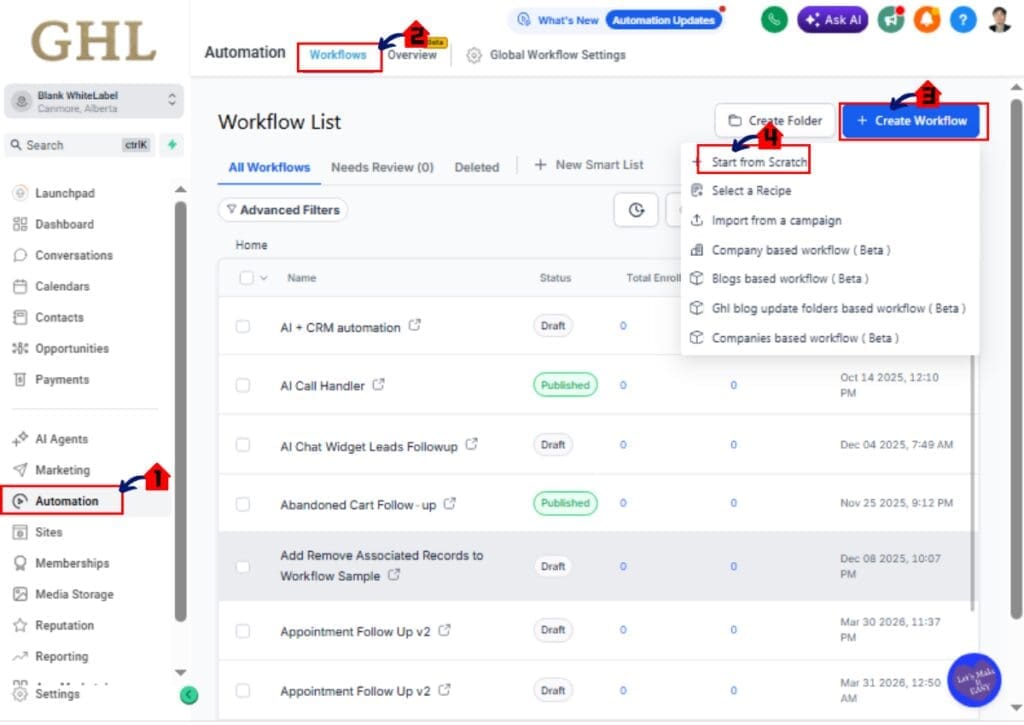
Step 01 – Access the Workflows page of GoHighLevel
The Main Menu on the Left side of your screen has all the main areas that you work in when using GHL.
1.1 Click Automation main menu item
- Inside the Automation section you will find Overview, Workflows, and Global Workflow Settings
- The Automation Overview Page may load by default
1.2 Click Workflows in the top menu if the Workflow List page is not showing
- The Workflows Page displays all existing workflows
- You can organize workflows into folders
- You can create new workflows manually or using Build Using AI
1.3 Click the Create Workflow button
- This opens the Workflow Builder setup screen
- You will see options to start from scratch or use templates
1.4 Select Start From Scratch
- The Workflow Builder canvas opens
- You will now select a Trigger
Step 02 – Add the New Recording Trigger
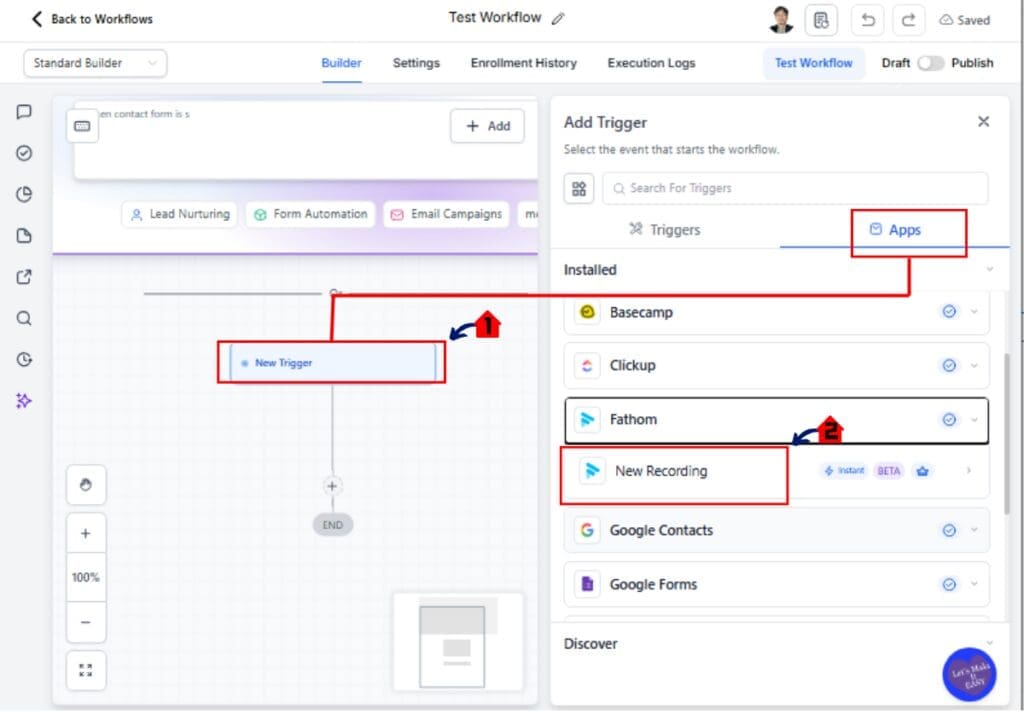
2.1 Click Add Trigger
- The Trigger configuration panel opens
- Click “Apps”
2.2 Search for “Fathom” in the trigger search bar
- The New Recording trigger will appear
- Select New Recording
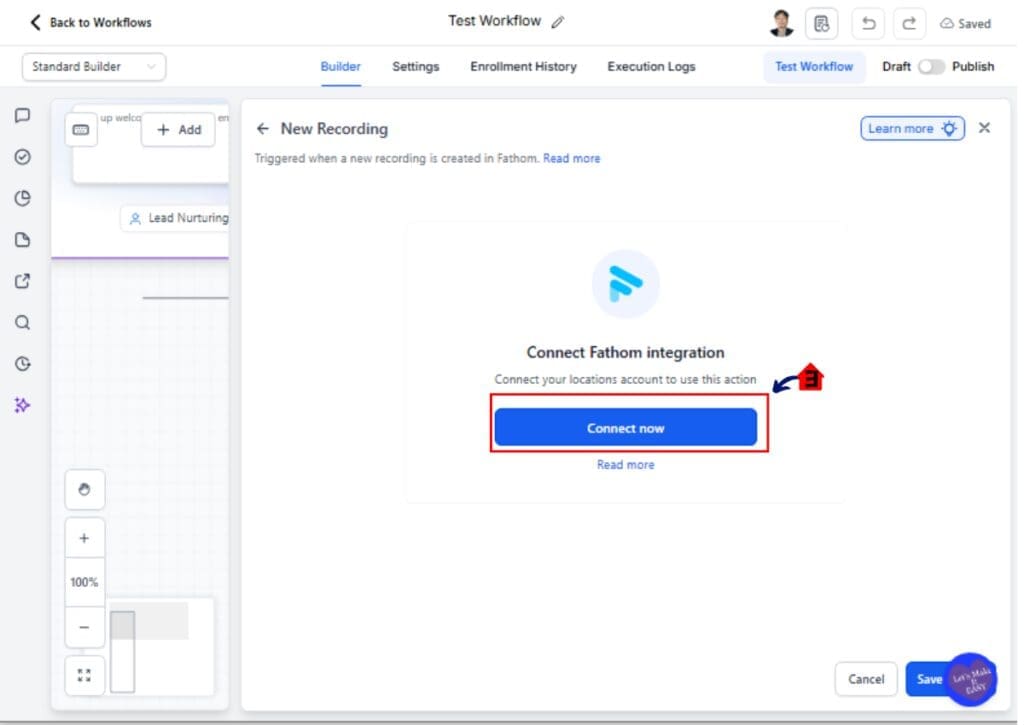
2.3 Click Connect Now if your Fathom account is not connected
- A pop-up window opens
- Log into your Fathom account
- Authorize the integration
If already connected:
- The trigger configuration panel will load immediately
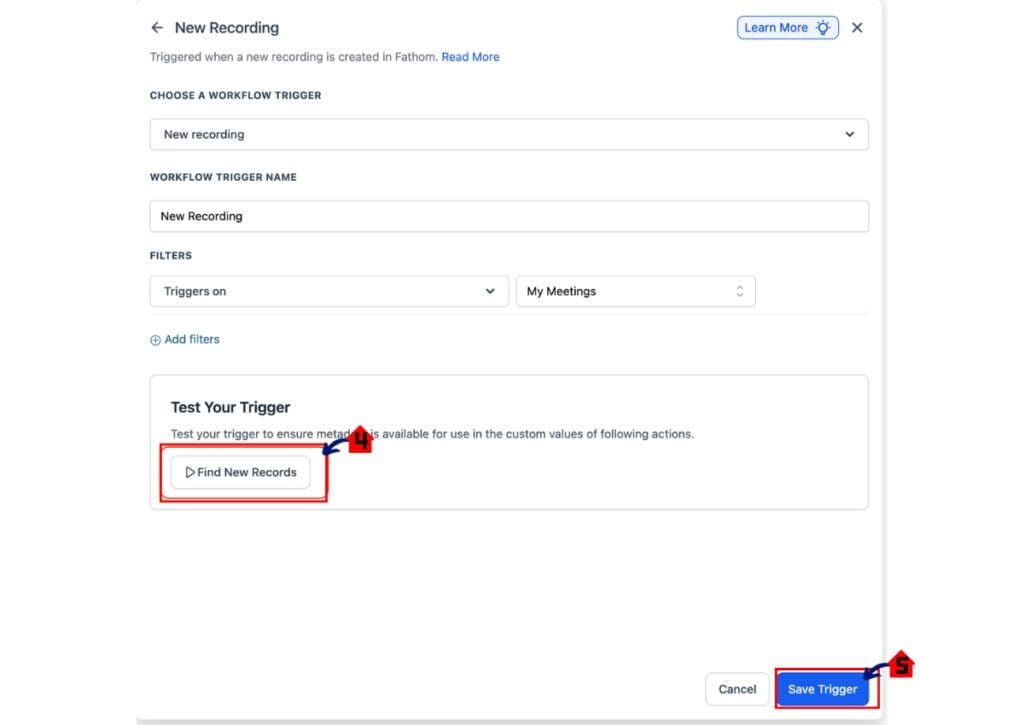
2.4 Click Test Trigger
- The system will check for recent processed recordings
- You should see “Trigger Test Successful” if recordings exist
- If no recordings are found, ensure a meeting has been processed in Fathom
2.5 Click Save Trigger
The workflow is now set to fire when a Fathom recording is processed.
[Include Screenshot of Trigger setup panel. Red Garage Arrow 1 points to Add Trigger. Red Garage Arrow 2 points to New Recording trigger. Red Garage Arrow 3 points to Test Trigger button]
Step 03 – Add Transcript or Summary Action
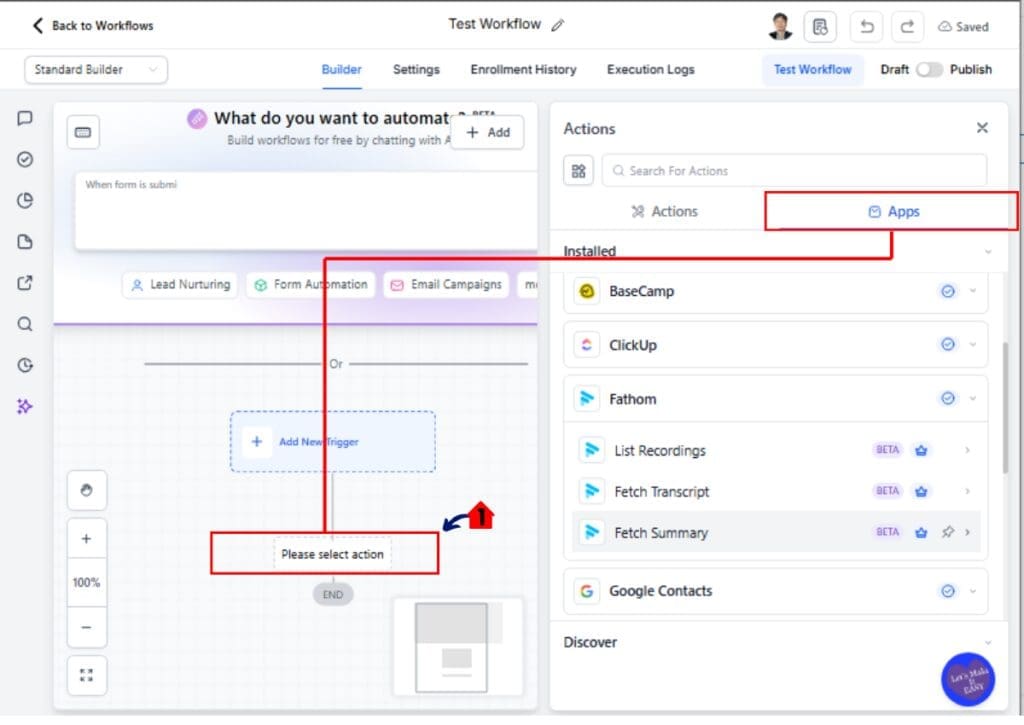
3.1 Click the + icon below the trigger
- The action selection panel opens
- Click “App”
3.2 Search for “Fathom”
- Select either Fetch Transcript or Fetch Summary
Use Fetch Transcript if:
- You want the full meeting conversation
- You plan to use AI to extract detailed insights
Use Fetch Summary if:
- You want a condensed AI-generated overview
- You want faster and lighter automation
3.3 Configure the action
- The Recording ID will auto-map from the trigger
- Confirm the dynamic field is correctly inserted
3.4 Click Save Action
Your workflow now has meeting data available for automation.
Step 04 – Add AI or Follow-Up Automation
4.1 Click the + icon below the Fathom action
- Select an AI action such as Content AI or Email action
4.2 Insert the Transcript or Summary variable into your AI prompt
- Example prompt:
“Extract all action items from this transcript and format them as a task list.”
4.3 Add a follow-up step
- Choose Send Email
- Personalize using contact fields
- Insert AI-generated output
4.4 Click Save
Your workflow now converts meetings into automated follow-ups or tasks.
Pro Tips to Maximize Fathom Workflow Automation
Fathom Workflow Automation is powerful. But like any automation tool, it works best when you set it up smart.
Here are practical ways to get the most from it:
- Use Fetch Summary when possible
- It costs less processing than full transcripts
- It keeps workflows lighter and faster
- Only use full Fetch Transcript when you need deep AI extraction
- For objection handling
- Competitor tracking
- Detailed task breakdowns
- Always test your New Recording trigger
- Recordings must be fully processed in Fathom
- If testing fails, wait a few minutes and try again
- Map contacts using participant email
- Mapping is not automatic
- Use email fields inside your workflow to match records
- Add a short delay if needed
- This ensures transcript processing is complete
- Monitor premium action usage
- These actions are billed per execution
- Avoid unnecessary workflow loops
Small adjustments prevent big automation problems.
Set it once. Test it twice. Then let it run.
What Fathom Workflow Automation Means for Your Business
Fathom Workflow Automation changes how your agency handles meetings.
Before this update, meetings created work. Now they trigger systems.
Instead of relying on someone to write notes and remember tasks, the workflow does it for you. The transcript is pulled in. The summary is created. AI extracts action items. Follow-ups go out fast.
That speed matters.
When prospects receive follow-ups right after a call, your close rate improves. When tasks are created instantly, your team moves faster. When nothing falls through the cracks, clients trust you more.
This also keeps your CRM clean.
You can tag competitors mentioned in calls. You can update opportunities. You can notify your team automatically. Everything connects back to GoHighLevel.
The real win is consistency.
Meetings become predictable automation steps. That means fewer mistakes and more scale.
Fathom Workflow Automation helps you build systems that grow with you instead of slowing you down.
Frequently Asked Questions About Fathom Workflow Automation
Stop Letting Meetings Go to Waste with Fathom Workflow Automation
Meetings should create momentum. Not more manual work.
Fathom Workflow Automation turns every recorded call into structured action inside GoHighLevel. Transcripts are pulled in. Summaries are created. AI extracts tasks. Follow-ups are sent. Your team gets notified.
All without chasing notes.
This update removes friction from your sales and fulfillment process. It helps you respond faster. It keeps your CRM cleaner. It makes your agency more consistent.
And consistency builds scale.
If you are already using Workflows inside GHL, this is an easy win. Set up one automation. Start with a simple follow-up sequence. Then expand into task creation and competitor tracking.
The team here at GHL Growth Garage is excited about this one because it moves agencies closer to full automation maturity.
Try Fathom Workflow Automation inside your sub-account today.
Have you built your first meeting-to-automation workflow yet?
Scale Your Business Today.
Streamline your workflow with GoHighLevel’s powerful tools.


