- Review changes fast with GHL's new Audit Logs design
- Quick Summary – Agency Audit Logs Breakdown
- The Real-World Impact on Your Agency
- Practical Application About the Agency Audit Logs Update
- Enabling the Enhanced Agency Audit Logs Experience
- Pro Tips for Mastering the Enhanced Agency Audit Logs
- Frequently Asked Questions About the Agency Audit Logs Update
- Final Thoughts on Agency Audit Logs
Review changes fast with GHL’s new Audit Logs design
The new update for Agency Audit Logs directly addresses a common frustration: the slow, clunky process of investigating changes inside the platform. For professionals managing high-volume client accounts, efficiency is key. Every time a team member makes a change, the system records it, but accessing that information used to require tedious page reloads. This is where time and valuable attention were often lost.
The Audit Logs are the critical accountability tool for any agency. They provide an undeniable record of who did what and when, from deleting a custom field to changing a workflow step. An expert knows this record is vital for troubleshooting, maintaining security, and settling internal disputes. However, the previous interface could be slow, interrupting the flow of a crucial investigation.
GHL identified a key workflow challenge and delivered a major improvement. The Agency Audit Logs have been fully rebuilt using the GHL New Design System. This redesign replaces the old full-page refresh with instant drawer views and keyboard navigation. The result is a cleaner, more intuitive interface that makes administrative tasks faster and more efficient.
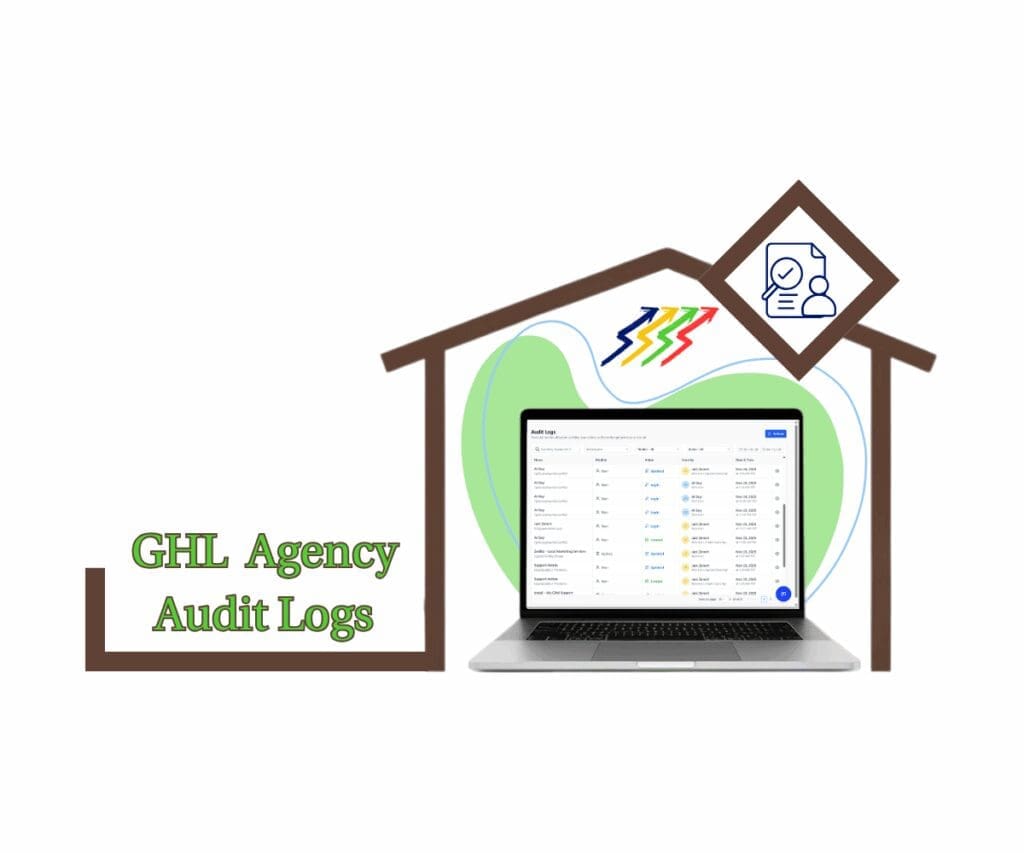
With the Agency Audit Logs update, agencies get a faster, more reliable way to track activity. Navigation is smoother, details are instantly available, and audits run efficiently, giving teams more time to focus on what matters.
Quick Summary – Agency Audit Logs Breakdown
Purpose The main purpose is to give the user a clean, fast experience when reviewing Agency Audit Logs.
Why it Matters This change dramatically reduces the time needed to troubleshoot issues and track down who made a system change.
What You Get Users receive a modern interface that features instant details in a side drawer and simple keyboard navigation.
Time to Complete Switching this feature on inside the Agency Labs section will take a professional less than two minutes.
Difficulty Level This is an easy, low-effort setting adjustment that requires absolutely no technical expertise.
Key Outcome The result is that your team can achieve faster issue resolution and enjoy improved efficiency across administrative tasks.
The Real-World Impact on Your Agency
This update is more than just a visual refresh. It directly affects both the speed and cost of running an agency. Every minute a team member spends struggling with a slow system is time taken away from revenue-generating work. The new interface for Agency Audit Logs is designed to reduce that lost administrative time.
The true impact of this upgrade shows up across key areas of daily operations:
Automate marketing, manage leads, and grow faster with GoHighLevel.

- Time Savings for Staff: Previously, checking a log entry required a full page reload. The new drawer view delivers details instantly. For teams reviewing many entries, this turns minutes of waiting into focused, immediate work.
- Faster Troubleshooting: The cleaner layout and instant navigation simplify tracking changes. Staff can filter, browse, and verify updates quickly, resolving client issues or internal errors with far less stress.
- Clear Accountability: When confirmation is needed, it is essential to know who made a change and when. The fast-access, easy-to-read Agency Audit Logs provide undeniable proof, making it simple to document and verify critical actions.
- Consistent User Experience: Built on the New Design System, the Audit Logs interface aligns with the platform’s modern look and high performance. This ensures smoother workflows and a more professional experience for the entire team.
Practical Application About the Agency Audit Logs Update
The practical value of this update becomes clear the very first time a client reports an unexpected issue. Think about a standard problem: A client contacts support claiming a critical workflow stopped sending emails the day before.
In the old system, your support staff would open the Audit Logs, click the entry, wait for the page to reload, read the detail, and then repeat this slow process until the issue was found. This could easily take five to ten minutes just to pinpoint the change.
The updated Agency Audit Logs make tracking client activity fast and simple. Teams can filter logs and scroll through recent actions with keyboard arrows. Clicking on any entry immediately opens a drawer with full details, like User X editing Workflow Y at 1:45 PM. Problems are spotted, verified, and resolved in minutes, turning a slow, manual process into a streamlined workflow.
Enabling the Enhanced Agency Audit Logs Experience
For the agency owner, managing security and accountability is a high-priority task. This new update provides a significant performance upgrade when reviewing system history. The feature does not change what is recorded in your logs. It only changes how you view them, swapping out the slow, full-page refreshes for a much faster Drawer View and useful keyboard navigation. This change is designed to shave administrative time off every client review and troubleshooting session you perform.
Here are the step-by-step instructions on where to find and activate this necessary update:
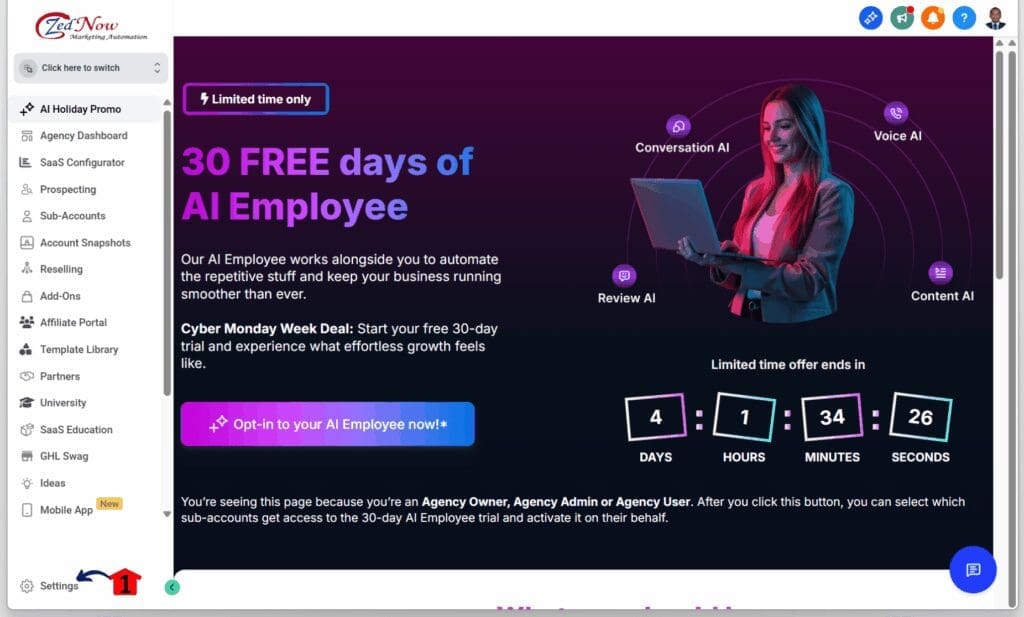
Step 01 – Access the Settings Area in GoHighLevel
- Go to the left-hand sidebar, look all the way to the bottom.
1.1 Click on the gear icon ⚙️ labeled Settings.
- You’ll now be in the main Settings dashboard, where you can access:
- My Profile
- Company
- Team
- Billing
- and more.
Step 02 – Review Audit Logs in Agency Settings
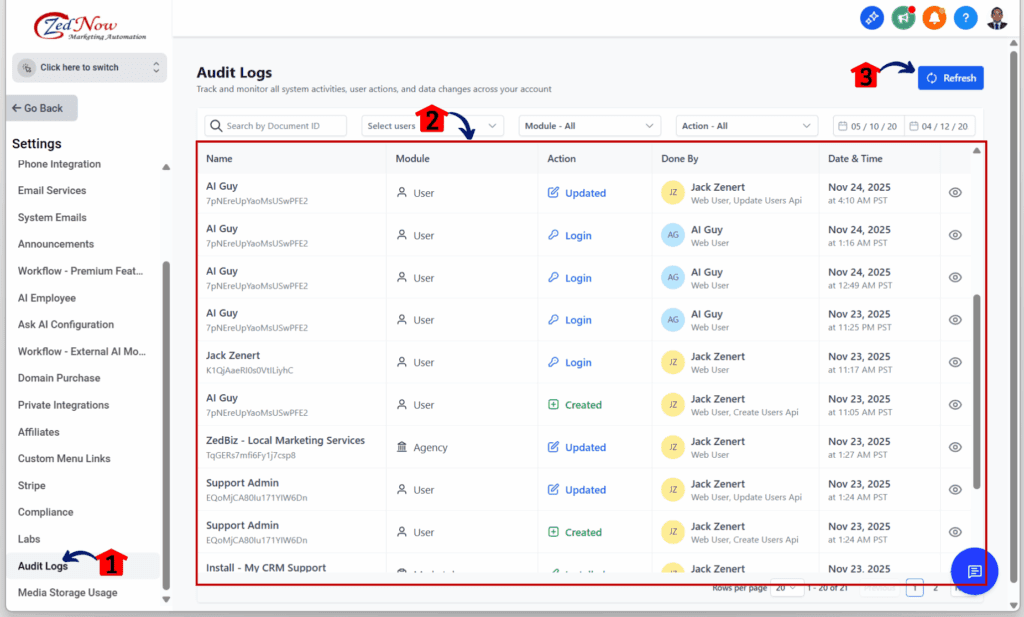
- You should now be in the Agency Settings.
2.1 Click Audit Logs.
- This is located below the Labs section and above the Media Storage Usage option.
2.2 You should now see an improved list of system activities, user actions, and data changes across all sub-accounts.
2.3 Click the Refresh button to update the activity list.
Pro Tips for Mastering the Enhanced Agency Audit Logs
For the professional user, this update is about more than just speed; it is about leveraging the system for tighter management and security. Here are a few “Pro Tips” to maximize the efficiency and accountability you get from the new Agency Audit Logs:
- Use the Keyboard for Power. Professionals should move past clicking with the mouse.
- Filter by User Before Time. If you are trying to confirm a system change, always filter the logs to a specific user first, especially if you know who was working on the account.
- Implement Security Check Audits. Make a weekly or monthly “security spot check” using the new system part of your routine.
- Train Staff on the New Interface. The feature is simple, but ensure your team knows to avoid clicking the browser’s back button after viewing a log detail.
Frequently Asked Questions About the Agency Audit Logs Update
Final Thoughts on Agency Audit Logs
The upgrade to the Agency Audit Logs is a perfect example of an update that quietly but significantly improves the quality of life for every professional using GHL. It is a necessary step toward building a more consistent, high-performance platform. By moving away from slow, clunky page refreshes to instant drawer views, GHL has delivered a powerful tool for faster accountability and simpler troubleshooting.
An efficient agency is a profitable agency. Do not delay in claiming these simple efficiency gains. Take the two minutes right now to navigate to your Agency Labs, search for “Enhanced Audit Logs Experience,” and switch the toggle On. See for yourself how quickly this small change frees up valuable administrative time.
What other GHL sections are you hoping to see updated with the new design system next? Let us know what you think in the comments!
Scale Your Business Today.
Streamline your workflow with GoHighLevel’s powerful tools.