- AI Workflow Builder Now Generates Workflows Faster
- Quick Summary – AI Workflow Builder
- Here are this weeks HighLevel Updates
- AI Workflow Builder Generates Workflows in 28 Seconds
- AI Workflow Builder Generation Pipeline Improved
- AI Workflow Builder Is Now Faster Than Manual Setup
- How to Use the AI Workflow Builder in GHL
- AI Workflow Builder Tips for Better Automation
- AI Workflow Builder FAQs in GoHighLevel
- AI Workflow Builder Results You Can Expect
- AI Workflow Builder Makes Automation Faster in GHL
AI Workflow Builder Now Generates Workflows Faster
Before this update, generating automations with the AI Workflow Builder in GoHighLevel was helpful, but it wasn’t always instant. Creating a workflow with AI typically took close to a minute while the system processed the request and assembled the triggers, actions, and conditions.
For agencies building automations frequently, that wait time added up. While AI still saved time compared to building workflows manually, users often had to pause while the AI Workflow Builder generated the final automation structure.
GoHighLevel has now significantly improved that experience.
The AI Workflow Builder now generates workflows in under 28 seconds on average. Previously, generation times were closer to 60 seconds, so this update cuts workflow creation time by more than half. That means users can move from idea to automation much faster inside GHL.
What makes this update even more important is that the improvement doesn’t affect workflow quality. The AI still generates the same accurate workflow structures as before. The only difference is speed. Behind the scenes, GoHighLevel optimized the entire generation pipeline so workflows can be assembled much faster.
What changed:
The AI Workflow Builder now generates workflows about 52% faster. Average generation time has dropped from roughly 60 seconds to under 28 seconds, and the improvement applies to both template prompts and custom user prompts.
Who this is for:
Agencies building automation systems for clients, marketers who frequently create new workflows, teams testing automation strategies, and any GoHighLevel user who wants the fastest way to generate workflows inside GHL.
What we’ll demonstrate:
How the faster AI Workflow Builder works, what improvements were made to workflow generation speed, how to enable the feature in Settings → Labs → Company, and how agencies can start creating automations faster using AI inside GoHighLevel.
The latest GoHighLevel Changelog includes several other GHL feature updates that round out your daily workflow:
- Audit Logs for Deleted Builder Assets
- All-in-One Chat widget support in Customer Replied trigger
- Rich Text Editor Now Available for Service Descriptions! (Services v2)
- Client Portal & Communities – Password & Magic Link updates
- ✨ Multi-Date Selection for Date-Specific Hours (Meetings & Rentals)
- Send prospects directly to your pipelines
- Documents & Contracts: Staff Selection in Templates
- Invoices, Estimates: Open in new tab
Keep reading for much more on all these updates and a deep dive into the AI Builder feature!
Quick Summary – AI Workflow Builder
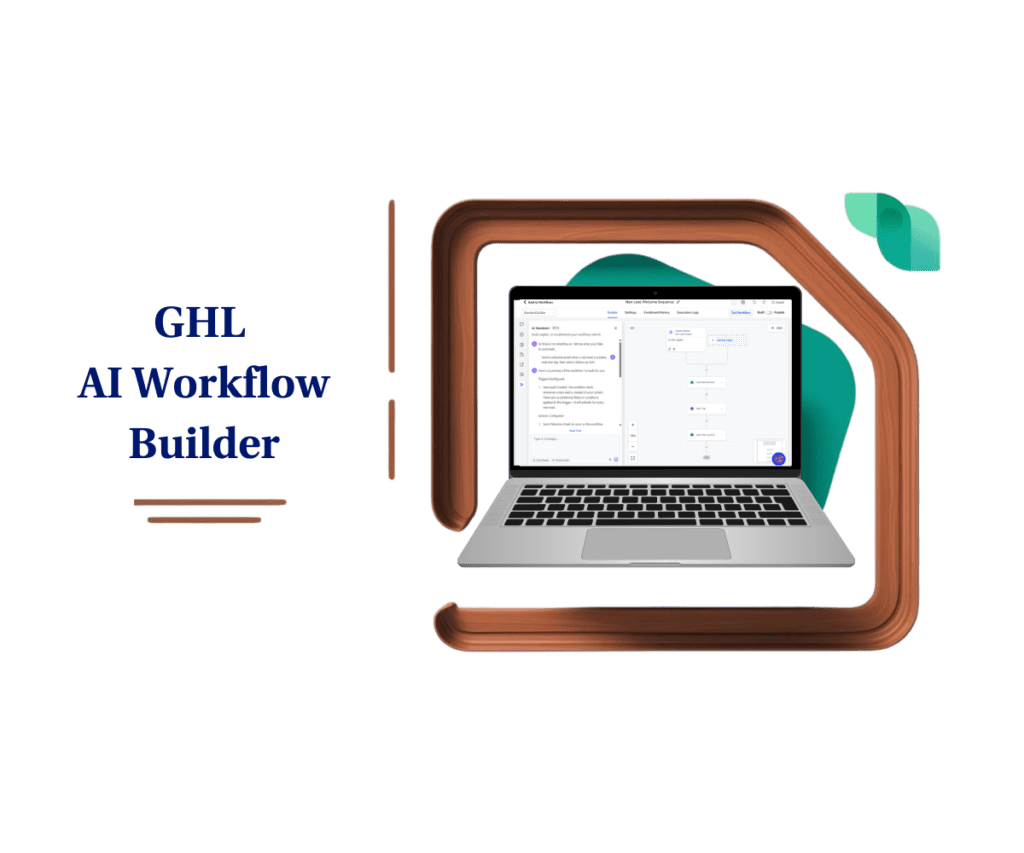
Purpose: This update improves the speed of the AI Workflow Builder in GoHighLevel, allowing users to generate full automation workflows significantly faster using AI instead of manual setup.
Why It Matters: Automation creation is a core part of running campaigns inside GHL. Faster workflow generation helps agencies and marketers move from idea to deployment much more quickly.
What You Get: Workflows now generate in under 28 seconds on average, representing a 52% reduction in generation time while maintaining the same workflow accuracy and structure.
Time to Complete: Generating a workflow with the AI Workflow Builder typically takes less than 30 seconds, making it one of the fastest ways to create automations inside GoHighLevel.
Difficulty Level: Beginner friendly. Users only need to describe the automation they want, and the AI Workflow Builder generates the workflow structure automatically.
Key Outcome: Agencies and marketers can build, test, and launch automations faster, making AI the quickest method for creating workflows in GoHighLevel.
Here are this weeks HighLevel Updates
Audit Logs for Deleted Builder Assets
- What it does:
Tracks and records when builder assets like funnels, pages, emails, or other builder elements are deleted. This gives admins a clear audit trail of who removed assets and when the deletion happened. - Where in GHL:
Settings → Audit Logs - Impact:
Improves account accountability and troubleshooting. Agencies can quickly identify accidental deletions or team mistakes and understand when assets were removed. - Who it’s great for:
Agencies with large teams, admins managing multiple users, and businesses that need better activity tracking and accountability.
Automate marketing, manage leads, and grow faster with GoHighLevel.

All-in-One Chat Widget Support in Customer Replied Trigger
- What it does:
Allows workflows to trigger when customers reply through the All-in-One Chat widget, with filtering by chat type and widget configuration. - Where in GHL:
Automation → Workflows → Customer Replied Trigger - Impact:
Makes chat automation far more precise by letting users control which chat source triggers workflows. - Who it’s great for:
Businesses using website chat widgets, agencies managing multiple chat widgets for clients, and support teams running live chat conversations.
Rich Text Editor Now Available for Service Descriptions (Services v2)
- What it does:
Adds a rich text editor to service descriptions so users can format text using headings, bold text, lists, and styling. - Where in GHL:
Payments → Products → Services (Services v2) - Impact:
Improves the appearance and readability of service listings, helping businesses present offers more professionally. - Who it’s great for:
Coaches, consultants, agencies, and businesses selling services who want better formatted service descriptions and clearer offers.
Client Portal & Communities – Password & Magic Link Updates
- What it does:
Enhances login options by improving password access and magic link authentication for Client Portal and Communities users. - Where in GHL:
Client Portal / Communities → Login & Access settings - Impact:
Improves login flexibility and user access security while making it easier for members to access portals. - Who it’s great for:
Businesses running membership portals, client dashboards, or online communities inside GoHighLevel.
Multi-Date Selection for Date-Specific Hours (Meetings & Rentals)
- What it does:
Allows users to select multiple dates at once when configuring date-specific availability hours for calendars. - Where in GHL:
Calendars → Availability Settings → Date Specific Hours - Impact:
Saves time when configuring custom availability across multiple days instead of setting each date individually. - Who it’s great for:
Businesses offering appointments, bookings, or rental scheduling, especially those managing event schedules or seasonal availability.
Send Prospects Directly to Your Pipelines
- What it does:
Allows prospects to be automatically sent into a pipeline opportunity when they take specific actions, streamlining lead tracking. - Where in GHL:
Opportunities / Pipelines → Automation & lead capture workflows - Impact:
Speeds up lead management by ensuring prospects instantly appear in sales pipelines without manual entry. - Who it’s great for:
Sales teams, agencies managing lead funnels, and businesses that rely heavily on pipeline-based sales processes.
Documents & Contracts – Staff Selection in Templates
- What it does:
Lets users assign or select specific staff members directly within document or contract templates. - Where in GHL:
Payments → Documents & Contracts → Template Settings - Impact:
Improves workflow efficiency by automatically linking contracts with the correct staff member responsible for the deal or client. - Who it’s great for:
Agencies, service businesses, and teams that use contracts or agreements tied to specific team members.
Invoices & Estimates – Open in New Tab
- What it does:
Adds the option to open invoices and estimates in a new browser tab instead of replacing the current page. - Where in GHL:
Payments → Invoices & Estimates - Impact:
Improves workflow navigation and productivity by allowing users to review invoices without losing their current page. - Who it’s great for: Businesses managing multiple invoices, finance teams, and agencies handling client billing.
AI Workflow Builder Generates Workflows in 28 Seconds
The biggest improvement in this update is simple but powerful: the AI Workflow Builder in GoHighLevel now generates workflows significantly faster than before.
On average, workflow generation now takes under 28 seconds. Previously, creating a workflow with AI could take around 60 seconds depending on the prompt and the complexity of the automation being generated. With this update, generation speed has improved by 52.8%, cutting the waiting time by more than half.
If you’re building automations regularly, this speed boost is easy to notice. What used to take about a minute now takes less than half that, so you can move through workflow creation much quicker inside GHL.
Another important detail is that this speed improvement applies to both template prompts and custom prompts. Whether you’re using a pre-built AI prompt or writing your own instructions, the AI Workflow Builder now processes requests faster and assembles the workflow more quickly.
Internal testing confirmed the performance improvement across a consistent set of automation prompts. The results showed a clear reduction in generation time while maintaining the same level of workflow accuracy and structure.
In some cases, workflows can even generate in under 18 seconds in real time, depending on the prompt and the number of actions required in the automation. This means the AI Workflow Builder is now fast enough to keep up with rapid experimentation when testing automation ideas.
If you’re managing a lot of client automations, this saves you a good chunk of time. Instead of waiting on workflows to load, your team can jump straight into refining and improving them.
AI Workflow Builder Generation Pipeline Improved
This update focuses on speed, but the real improvements happened behind the scenes. GoHighLevel optimized how the AI Workflow Builder processes and builds workflows.
Before, generating a workflow involved multiple steps—understanding the prompt, selecting triggers and actions, building the structure, and loading it into the editor. Each step added a bit of delay.
Now that process runs more efficiently. Workflows are assembled faster and appear sooner inside GHL.
They tested this using the same prompts before and after the update. The result? Faster generation, with no change in workflow quality.
That’s the important part—nothing about the logic or accuracy has changed. You’re getting the same workflows, just quicker.
For regular users, this makes the AI Workflow Builder feel much more responsive. You can generate and test automations without the usual wait.
AI Workflow Builder Is Now Faster Than Manual Setup
Speed plays a bigger role in automation than most people expect. When you’re building workflows regularly, those extra seconds and minutes add up.
Before, the AI Workflow Builder helped speed things up, but there was still a wait. Generating a workflow could take close to a minute, which wasn’t ideal when you were trying to move quickly.
Now workflows generate in under 30 seconds, and that changes the experience. You can go from idea to workflow without losing momentum.
For agencies, this means faster builds across multiple client accounts. Less waiting, more doing.
It also helps newer users get started. Instead of learning everything upfront, they can describe what they want and let the system build it.
Plus, testing becomes easier. You can try different workflow ideas without slowing down.
Overall, it makes the AI Workflow Builder one of the fastest ways to create automations in GoHighLevel.
How to Use the AI Workflow Builder in GHL
The AI Workflow Builder must be enabled in Labs before you can start generating automations. After activation, you can create workflows by entering a prompt, allowing GHL to build the structure for you.
Below are the steps to enable the feature, open the workflow builder, generate a workflow, and finalize it for use inside your account.
- Open the Workflow Builder and Build Using AI.
- Enter Your Automation Prompt in AI Builder.
- Let the AI Generate the Workflow.
- Review the Generated Workflow and Publish the Workflow.
This new update is still in GHL Labs, therefore before using this process, please turn on the Workflow AI Builder lab for your sub-account. Go to your Agency View, open Settings, click Labs, find Workflow AI Builder, and activate the feature.
To start make sure you are logged in to your GoHighLevel sub-account.
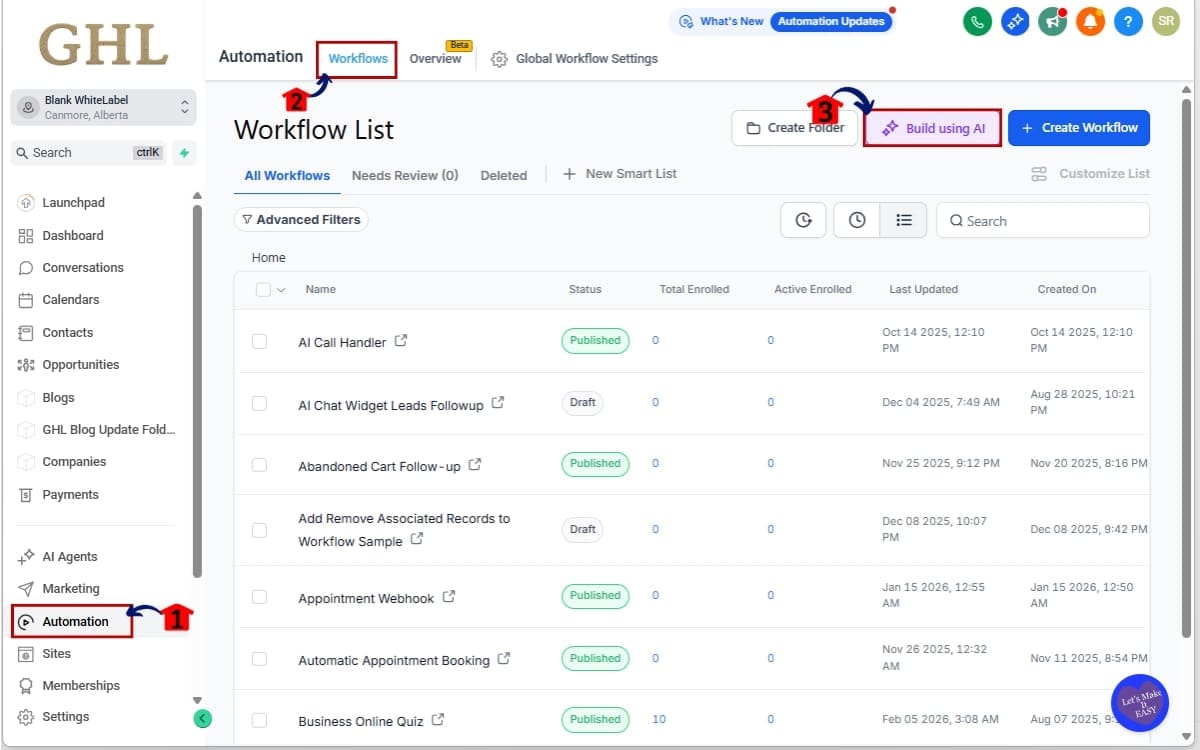
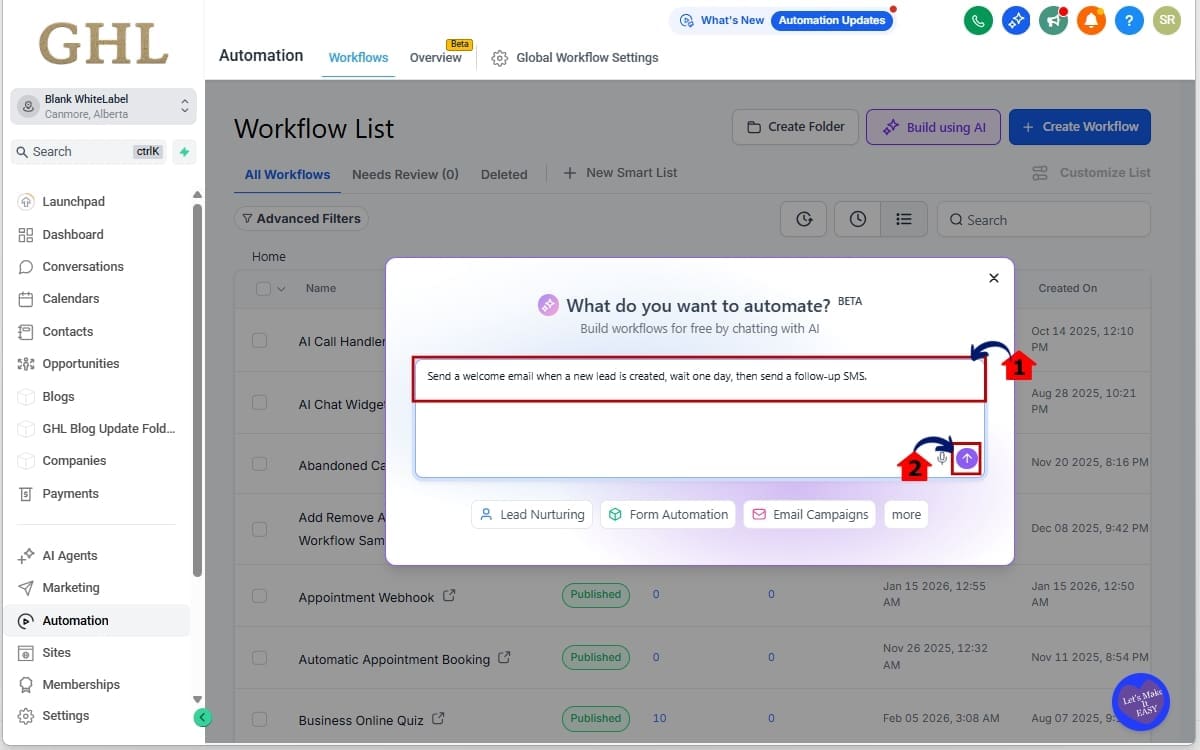
Step 01 – Open the Workflow Builder and Build Using AI
- This step takes you to the workflow area and launches the AI builder so you can start creating automations using prompts instead of manual setup.
1.1 From the left menu, go to Automation.
- This section is basically your hub for automations in GoHighLevel—workflows, triggers, and all your campaign logic live here.
1.2 Click Workflows to open the workflow management page.
- Use this section to manage your workflows, whether you’re editing existing ones or creating new automations.
1.3 Click Build Using AI.
- This opens the AI Workflow Builder, where you can generate a full workflow by simply describing what you want.
Step 02 – Enter Your Automation Prompt in AI Builder
- This is where you explain your automation idea to the AI in plain text.
2.1 Describe the automation you want to create.
- The more specific you are with what you want to happen, the better the AI can put the workflow together.
Example:
“Send a welcome email when a new lead is created, wait one day, then send a follow-up SMS.”
2.2 Click the submit button.
- This sends your prompt to the AI Workflow Builder so it can generate the full workflow automatically.
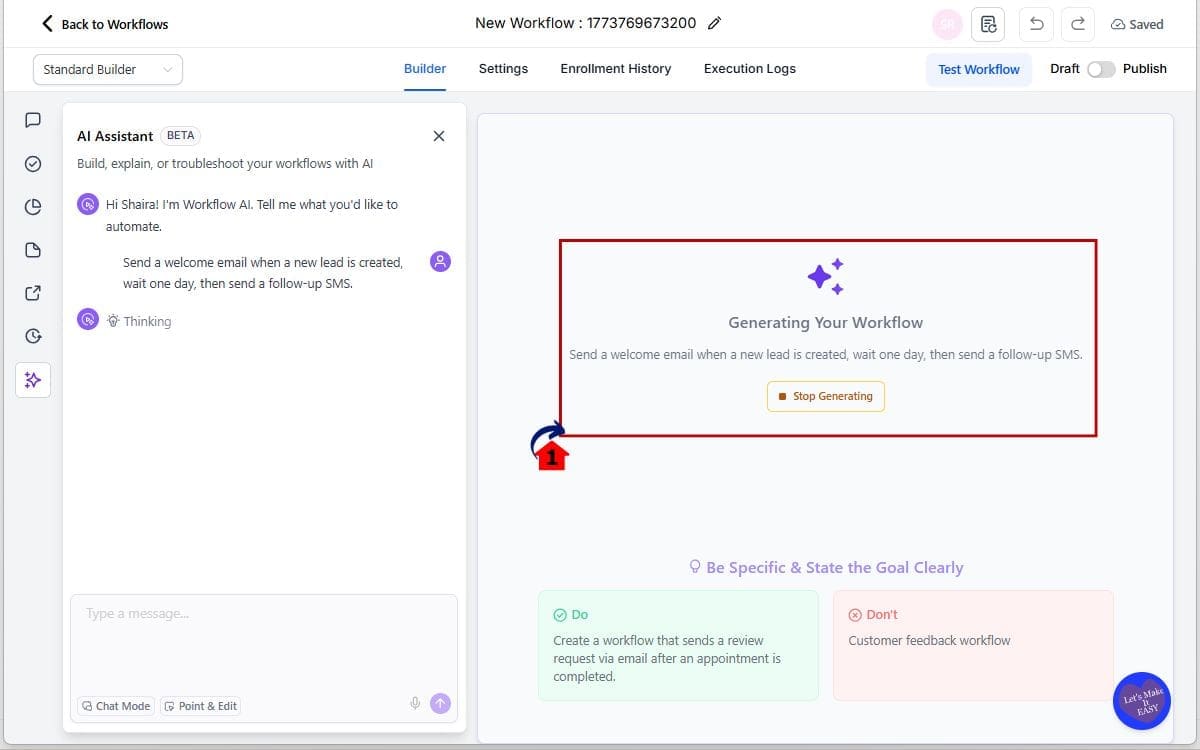
Step 03 – Let the AI Generate the Workflow
- This is where the system builds your workflow from the prompt you provided.
3.1 The AI Workflow Builder creates the full setup, including triggers, actions, and delays.
- It usually takes under 30 seconds, and then the workflow appears ready for review.
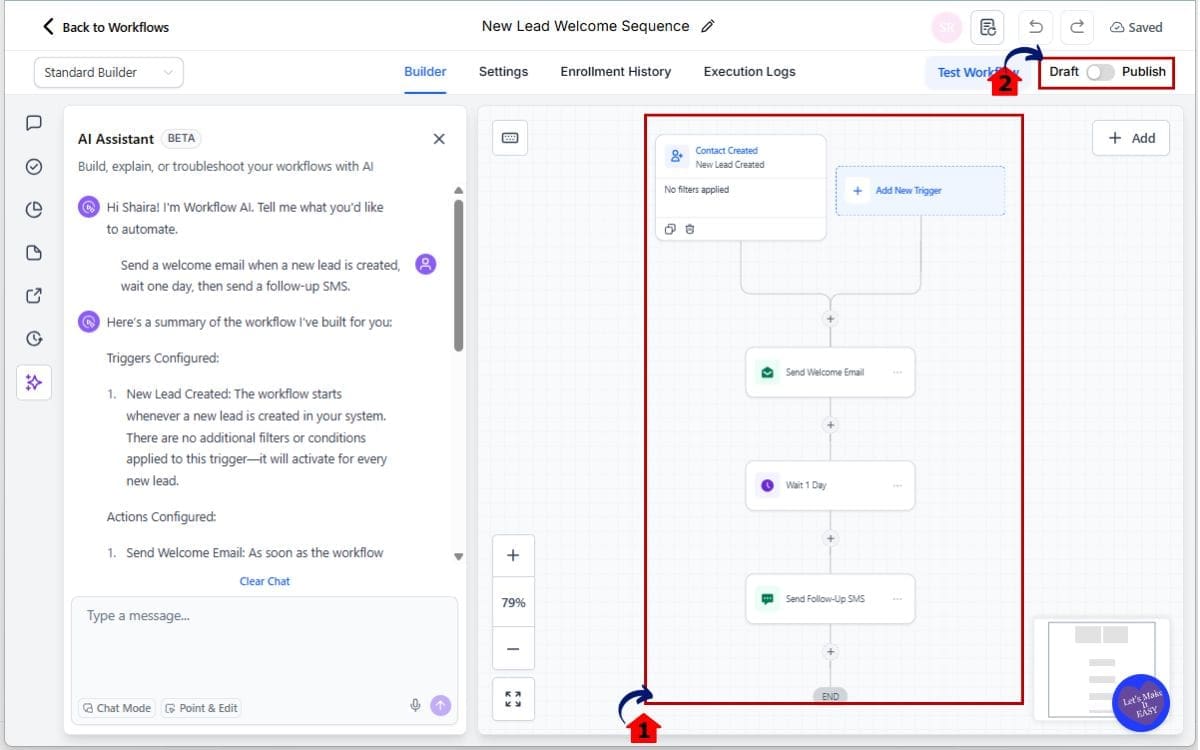
Step 04 – Review the Generated Workflow and Publish the Workflow
- This step lets you confirm the AI built the workflow correctly before making it live in your account.
4.1 Look over the workflow the AI created.
- Check the steps and timing to make sure it matches what you had in mind, and adjust anything if needed.
4.2 Hit Publish when you’re ready.
- This turns the workflow on so it can start running automatically.
That’s it. Your automation can now be generated and deployed in seconds using the AI Workflow Builder inside GoHighLevel.
AI Workflow Builder Tips for Better Automation
The AI Workflow Builder is fast now, but the output still depends on how you describe things. If your prompt is too vague, the workflow might need more fixing after.
Here are a few things that help:
- Start with a clear idea
Have a rough plan before you type anything in.
- Add a bit of detail
The AI does better when you explain what should happen and when.
- Don’t expect it to be final
You’ll still need to tweak things after it generates.
- Try a couple versions
Since it’s quick, it’s easy to test different setups.
- Run a test first
Just make sure everything works before turning it on.
The speed update mainly makes it easier to experiment without slowing yourself down.
AI Workflow Builder FAQs in GoHighLevel
AI Workflow Builder Results You Can Expect
The faster AI Workflow Builder update in GoHighLevel may seem like a simple speed improvement, but the impact on daily workflow creation can be significant. When automation generation happens faster, it allows users to move more quickly from planning an automation to launching it.
One of the biggest results users will notice is faster workflow development. Instead of waiting close to a minute for each automation to generate, workflows now appear in under 28 seconds on average. This makes it easier to build multiple automations in a short amount of time.
For agencies managing several client accounts, this improvement can save hours over the course of a week. Teams often create onboarding automations, lead follow-ups, appointment reminders, nurture campaigns, and internal notifications. With the faster AI Workflow Builder, these automations can be generated much more quickly.
Another benefit is faster experimentation. Marketing teams frequently test different automation strategies to improve conversions or engagement. When workflows generate faster, it becomes easier to try different automation ideas without slowing down the workflow creation process.
The update also improves the experience for new GoHighLevel users. Instead of learning every trigger, action, and condition inside the workflow builder right away, beginners can describe what they want the automation to do and let the AI Workflow Builder generate the structure for them.
Overall, this update helps position AI as the fastest way to create automations inside GoHighLevel, allowing users of all skill levels to build workflows more efficiently.
AI Workflow Builder Makes Automation Faster in GHL
The latest update to the AI Workflow Builder in GoHighLevel focuses on one thing: speed. By reducing workflow generation time from roughly 60 seconds to under 28 seconds, GHL has made automation creation significantly faster for users across the platform.
For agencies and marketers who build automations regularly, this improvement helps remove one of the small delays that can slow down workflow development. Instead of waiting for a workflow to generate, you can now move quickly from describing an automation to reviewing and launching it.
The update also reinforces the growing role of AI inside GoHighLevel. The AI Workflow Builder is no longer just a beginner-friendly tool for users who are learning automation. With faster generation times, it’s quickly becoming one of the most efficient ways for experienced users to build workflows as well.
Agencies can now prototype automation ideas faster, test workflow strategies more quickly, and deploy new automations across client accounts with less time spent on setup. When combined with manual editing and optimization, the AI-generated workflows can dramatically speed up automation development.
Since the feature is currently available inside Settings → Labs → Company, it’s worth enabling if you haven’t already explored it. With the new speed improvements, the AI Workflow Builder is positioned to become one of the fastest ways to create automations inside GoHighLevel.
As GoHighLevel continues improving AI-driven tools, features like this will likely play an even bigger role in how agencies build and manage automations in the future.
Scale Your Business Today.
Streamline your workflow with GoHighLevel’s powerful tools.