- Introduction – QR Code Design Just Got an Upgrade
- Quick Summary – QR Code Design Essentials
- What’s New – QR Code Padding Reduced for a Cleaner Look
- What Changed – Subtle Visual Enhancement, Systemwide
- Why It Matters – Your QR Codes Just Got More Professional
- How to Use the New QR Code Design in GHL
- Pro Tips – Make the Most of the New QR Code Design
- FAQ – What You Need to Know About the QR Code Update
- What This Means for You – Small Fix, Big Win
- Conclusion – Sharper Codes, Stronger Impressions
Introduction – QR Code Design Just Got an Upgrade
GHL just gave your QR codes a slick little upgrade, and you don’t have to lift a finger.
If you’re using QR codes in print materials, landing pages, or storefront displays, you’ll notice they look crisper and cleaner than ever. That’s because GoHighLevel has reduced the padding around logos in all QR codes across the platform.
It’s a small design tweak with big visual impact, and it applies to every QR code, new and old. No settings to adjust. No regeneration required. Just a smoother, more professional appearance baked right in.
So if you care about presentation, and your brand deserves to look polished, this one’s for you.

With this update, GHL has improved QR code design across the board, giving every code, new or old, a cleaner, more professional appearance. No extra steps needed.
Quick Summary – QR Code Design Essentials
Purpose: To enhance the visual appearance of QR codes systemwide.
Why It Matters: Cleaner QR codes improve branding and professionalism instantly.
What You Get: A tighter, more balanced logo presentation inside every QR code.
Time to Complete: None, the update is live and automatic.
Difficulty Level: Zero setup required.
Key Outcome: More professional-looking QR codes that require no action to use.
What’s New – QR Code Padding Reduced for a Cleaner Look
GHL just cleaned up the way logos sit inside your QR codes.
They’ve reduced the empty space around them, so now your codes look sharper and more balanced, no weird gaps, no awkward floating.
Automate marketing, manage leads, and grow faster with GoHighLevel.

Whether you’re printing them on a product or a flyer, they blend in better with your brand. And yep, it’s already done.
What Changed – Subtle Visual Enhancement, Systemwide
This isn’t a feature you need to activate or configure, GoHighLevel rolled it out across the board.
Every single QR code generated on the platform, past or present, now uses the updated logo padding rules. That means even if you created a QR code six months ago, it’ll now display with the cleaner design the next time it’s rendered or downloaded.
Nothing’s changed under the hood, your QR codes still scan perfectly and work like they always have. They just look cleaner now.
Nothing about your workflow changes, except now your stuff just looks more put together.
Why It Matters – Your QR Codes Just Got More Professional
People notice the little things, especially in marketing. That’s why even a small tweak like this QR code update can make a real difference.
Your QR code is more than a link, it’s often the first branded thing a potential lead sees. If your logo’s floating with too much space around it, it looks off. The new design change solves that by pulling everything together more smoothly.
It’s especially helpful for agencies using white-label GHL features. Whether you’re selling QR code access as part of a funnel package or embedding them into client materials, you can now deliver something that looks as premium as it performs.
You don’t have to redo anything. The update is already applied to all your QR codes, past and future.
This is design done right: subtle, seamless, and smart.
How to Use the New QR Code Design in GHL
The extra space around QR code logos has been trimmed down for a tighter, more professional layout. This update is live across all codes, old and new. Here’s how to create one in seconds:
Step 01 – Go to Funnels or Websites
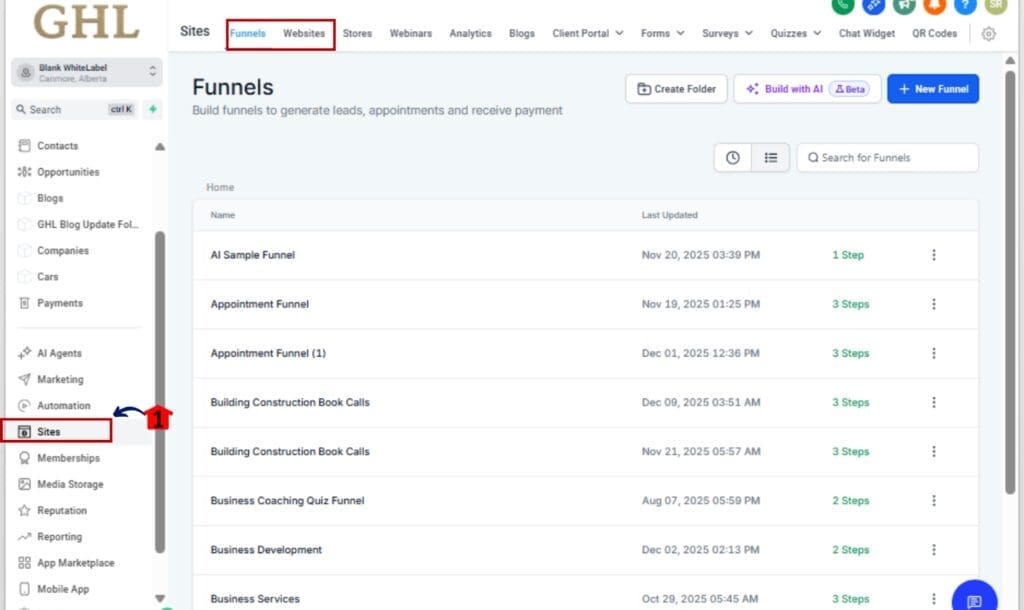
1.1 From your GHL home screen, find and click “Sites” in the menu.
1.2 Choose whether you want to work inside Funnels or Websites.
Step 02 – Open the Page Editor
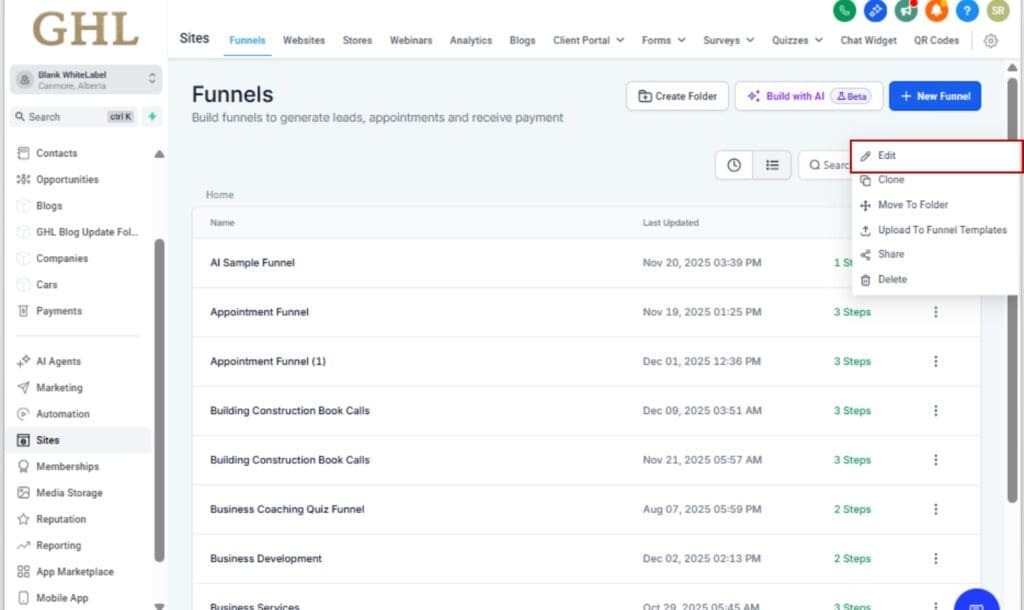
2.1 Select a specific funnel step or web page.
2.2 Click “Edit Page” to launch the drag-and-drop builder.
Step 03 – Add a QR Code Element
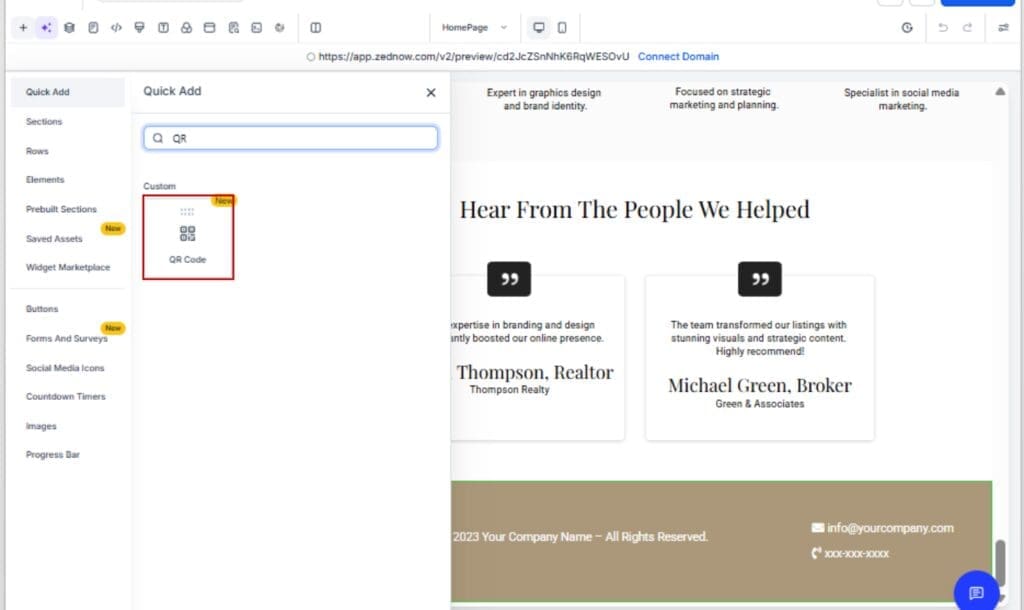
3.1 Use the builder tools to place the QR Code on your page wherever it fits best.
3.2 Enter the URL it should link to, anything from a product to a scheduling page.
Step 04 – Add Your Logo (Optional)
4.1 In the QR code settings, upload your logo.
4.2 The updated padding will automatically apply, giving your logo a tighter, cleaner fit.
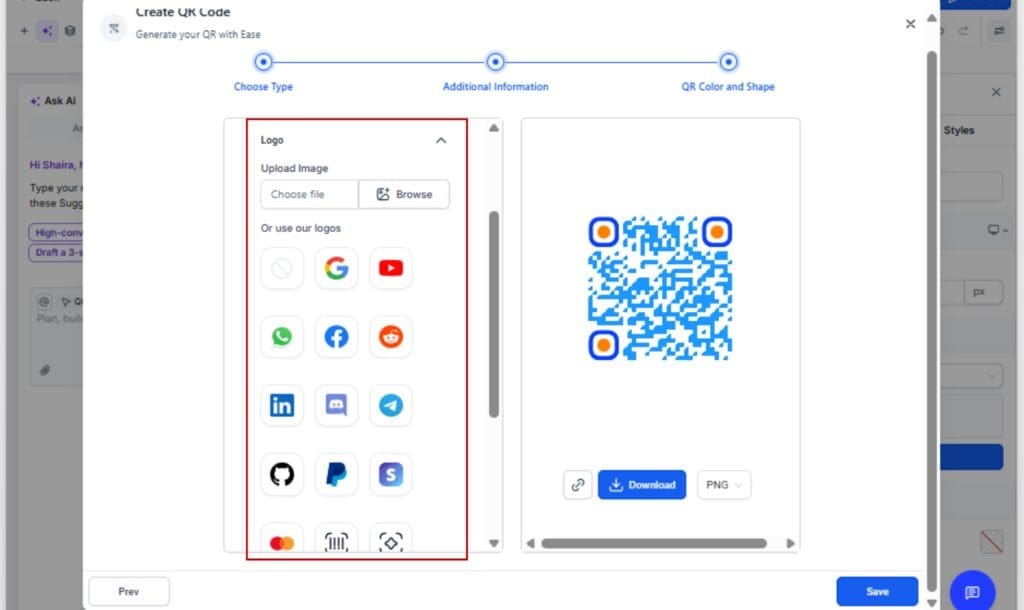
Step 05 – Save and Download (If Needed)
5.1 Click Save to keep the changes.
5.2 You can also download the QR code for use in print or offline materials, logo padding included.

That’s it. Your QR codes are now cleaner and sharper by default, no hacks, no workarounds, just better design built right into GHL.
Pro Tips – Make the Most of the New QR Code Design
The new layout opens up better branding opportunities, here’s how to take full advantage.
Use QR Codes in High-Visibility Spots
Stick them on anything printed, menus, direct mail, product boxes, posters. The updated layout helps your codes blend in better, even when you’re working with limited room.
Leverage Branding Consistency
Upload your agency or client logo into each QR code so it matches your overall look and feel. With the reduced padding, it now feels integrated, not just floating in a box.
Pair with a Call to Action
Don’t just drop a code, add text nearby that tells people exactly what to do:
“Scan to Book,” “Get 10% Off,” or “View Menu.” A clear CTA next to a crisp QR code gets more scans.
Download in High Resolution
If you’re putting QR codes on posters, signs, or anything big, download them in SVG or PNG to keep the quality clean and clear.
Combine with Dynamic URLs or UTM Tracking
Want to measure performance? Use a UTM-tagged link with your QR Code Design so GHL’s reporting shows you what’s working.
With these tips, you’re not just using QR Code Design, you’re turning them into conversion tools that look the part.
FAQ – What You Need to Know About the QR Code Update
What This Means for You – Small Fix, Big Win
Not every improvement needs to be big to matter. This one boosts your brand’s look behind the scenes, with no effort required from you.
When you’re working with clients, especially in a white-label setup, they expect things to look top-tier. This update helps you deliver that, no matter where your QR Code Design show up.
The reduced logo padding gives your marketing materials a sharper edge, literally and visually. And since it applies to both new and existing codes, it’s a no-effort win that upgrades your entire library of assets.
Your competitors won’t notice what changed. Your clients will just think everything you touch looks polished and pro.That’s the kind of “invisible improvement” that builds trust and keeps clients coming back.
Conclusion – Sharper Codes, Stronger Impressions
You didn’t have to ask for it. You didn’t have to enable it. But now it’s here, your QR Code Design are cleaner, crisper, and more polished than ever.
This small update to QR code design may not make headlines, but it does make your materials look more premium. And in a world where design speaks volumes, that matters.
Whether you’re generating codes for lead capture, event check-ins, printed menus, or packaging, GHL’s got your back with better-looking QR Code Design out of the box.
So go ahead, scan one. It just feels sharper.
Scale Your Business Today.
Streamline your workflow with GoHighLevel’s powerful tools.