- Introduction: Smarter Calendar Availability Logic
- Quick Summary – Calendar Availability Logic
- What’s New: Smarter Slot Availability Logic
- What’s Changed: Old vs. New Calendar Availability Logic
- Why This Matters: Better Accuracy, Less Friction
- How to Use Smarter Calendar Availability Logic
- Pro Tips & Quick Wins for Smarter Booking
- What This Means for You
- FAQ: Smarter Slot Calendar Availability Logic
- Conclusion: Use Every Slot to Its Fullest
Introduction: Smarter Calendar Availability Logic
Ever had a calendar slot show as “fully booked” even though there was room for more appointments? Yeah, that’s been a headache for a lot of GHL users.
The problem came down to how GHL used to handle overlapping appointments. One custom time booking could block multiple slots entirely, even if those slots still had room. It was like closing down a whole restaurant table just because one person sat across two chairs.
Now that’s been fixed.
GHL’s latest update rolls out smarter calendar availability logic that calculates Calendar Availability Logic based on real capacity, not just overlap. Whether a client books via the public widget or you book them manually in the appointment modal, the system now only subtracts from the slot count. No more full blocks unless the slot’s actually full.
This update isn’t flashy, but it’s powerful. Especially if your calendar fills up fast.

This update fixes the frustrating overblocking problem by introducing smarter calendar availability logic. Now your appointments reflect real-time Calendar Availability Logic across all calendar types, so you can book more clients without clutter or confusion.
Quick Summary – Calendar Availability Logic
Purpose: This GHL update improves how overlapping appointments impact your availability, helping you get the most out of every calendar slot.
Why It Matters: Previously, overlapping appointments would fully block all touched time slots, even when there was still capacity. Now, only 1 booking count is subtracted per overlapping slot.
What You Get: A smarter, more accurate scheduling system that reflects real-time availability in both internal and public bookings.
Time To Complete: No setup needed, it’s automatic. Just double-check your calendar’s slot duration and capacity settings.
Difficulty Level: Beginner, zero technical skills required.
Key Outcome: You’ll prevent false “unavailable” blocks, maximize your appointment volume, and create a smoother experience for both staff and clients.
What’s New: Smarter Slot Availability Logic
The new logic behind GHL’s calendar system changes how overlapping appointments affect Calendar Availability Logic. Before, even a single appointment that crossed into multiple time slots would block them all. Now, it only subtracts one count from each slot it touches.
Here’s what’s changed:
Automate marketing, manage leads, and grow faster with GoHighLevel.

- Instead of fully blocking a slot when an appointment overlaps it, GHL now reduces the slot’s capacity by 1.
- A slot only becomes unavailable once its actual appointment limit is reached, not just because it was partially touched.
- This logic works regardless of how a booking is made, internally by a user or externally by a client via the widget.
This smarter logic is now fully rolled out and applies to all calendar types:
- Personal Calendars
- Round Robin Calendars
- Event Calendars
It also powers both:
- The internal appointment modal (manual/custom booking)
- The public-facing booking widget (self-scheduling)
Whether someone’s booking through your funnel or your staff is adding appointments behind the scenes, the system now handles Calendar Availability Logic the same way, clearly and fairly.
This may seem like a small change, but it’s a huge improvement for high-traffic calendars that rely on every minute.
What’s Changed: Old vs. New Calendar Availability Logic
Before this update, GHL calendars weren’t exactly smart about overlapping time slots. If an appointment spanned across multiple slots, even if it was just one person, it used to block all the slots it touched.
That meant lost booking opportunities. Even when your calendar technically had room, it showed “unavailable.” Not great for business.
Here’s a breakdown of the old vs. new logic:
Old Behavior:
- An appointment from 10:15–10:45 would span two 15-minute slots: 10:00–10:30 and 10:30–11:00.
- It basically blocked both slots, even if there was still room.
- Even if the slots allowed 5 appointments, the system treated the overlap like a full house.
New Behavior:
- That same 10:15–10:45 appointment now only subtracts 1 count from each slot it touches.
- If your slot allows 5 appointments, there are still 4 spots left.
- Slots are only blocked once real capacity is hit.
This change makes your calendar behave like it should, not based on how many slots were touched, but how many actual bookings are in play. It’s like upgrading from a light switch to a dimmer, way more control and flexibility.
Now, the same rules apply no matter where the booking happens, inside the app or through the public widget. What shows on your calendar is actually what’s available.
Why This Matters: Better Accuracy, Less Friction
For agencies and appointment-based businesses, every slot matters. If your calendar says you’re full, but you’re not, you’re losing money, time, and trust.
That’s exactly what this update solves.
With smarter calendar availability logic, your system now reflects true Calendar Availability Logic based on capacity, not just overlapping times. That means more chances to book, more accuracy for your team, and fewer frustrated clients hitting “no times available” when you still had space.
Here’s why this change is a big deal:
- Maximizes Booking Efficiency
You can take on more appointments without cramming your calendar. This is a big win for busy operations like medspas, fitness studios, coaching teams, and similar setups. - Stops Premature Slot Blocking
Just because a slot is touched by a longer appointment doesn’t mean it’s full. This logic finally respects that reality. - Consistent Logic Across the Board
Whether the appointment is booked by a client on the widget or by your team using the manual modal, GHL now uses the exact same logic. - Improves Client Experience
Nothing kills conversions like fake scarcity. Clients will only see unavailable times when they’re truly unavailable.
This update may not have flashy buttons or new UI screens, but under the hood, it makes GHL way more intelligent about how your time is used.
How to Use Smarter Calendar Availability Logic
If your calendar’s been blocking slots too aggressively, this update is your fix. GHL’s new calendar availability logic lets appointments overlap time slots without fully blocking them, giving you more flexibility and accurate booking control. Here’s how to see it in action and make sure your calendar is set up to take full advantage.
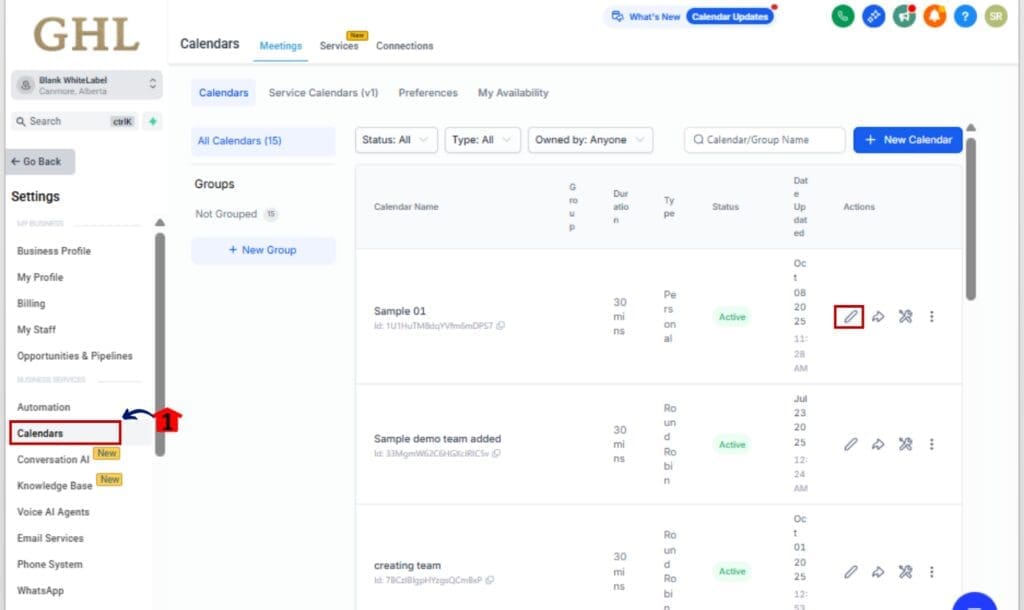
Step 01 – Open Your Calendar Settings
1.1 Go to the left-hand Main Menu in your GHL account.
1.2 Click Calendars under the “Calendars” or “Appointments” section.
1.3 Select the calendar you want to edit.
Step 02 – Check Slot Duration and Capacity
2.1 Adjust the time slot length in your settings (say, 15 minutes per slot).
2.2 Then enter how many appointments each slot should accept (maybe 5 at a time).
2.3 Save your changes.
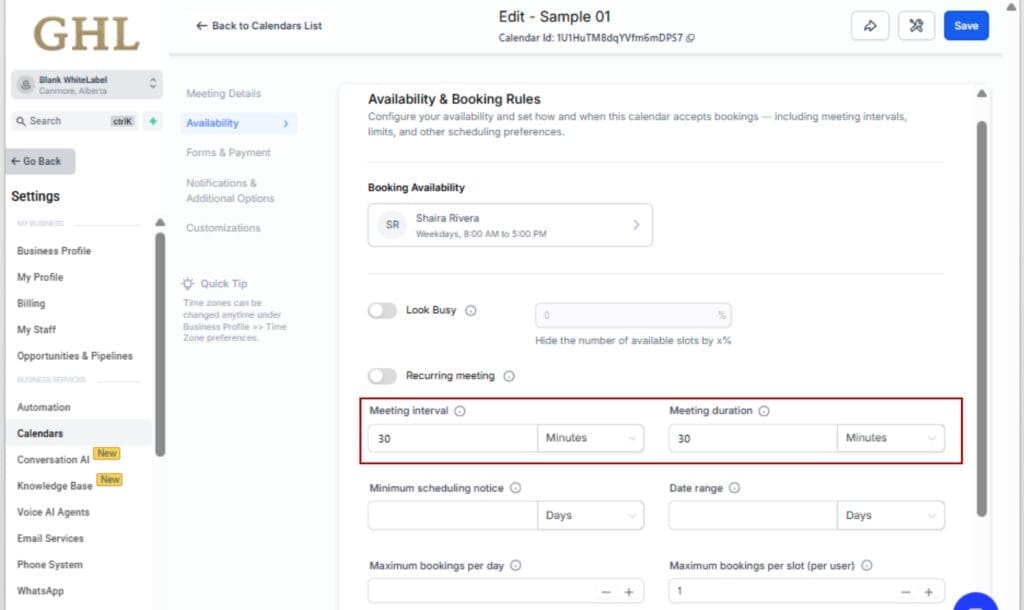
Want more precision? Shrinking your time slots to 5 or 10 minutes gives you finer control over how bookings stack.
Step 03 – Test Manual Appointment Booking
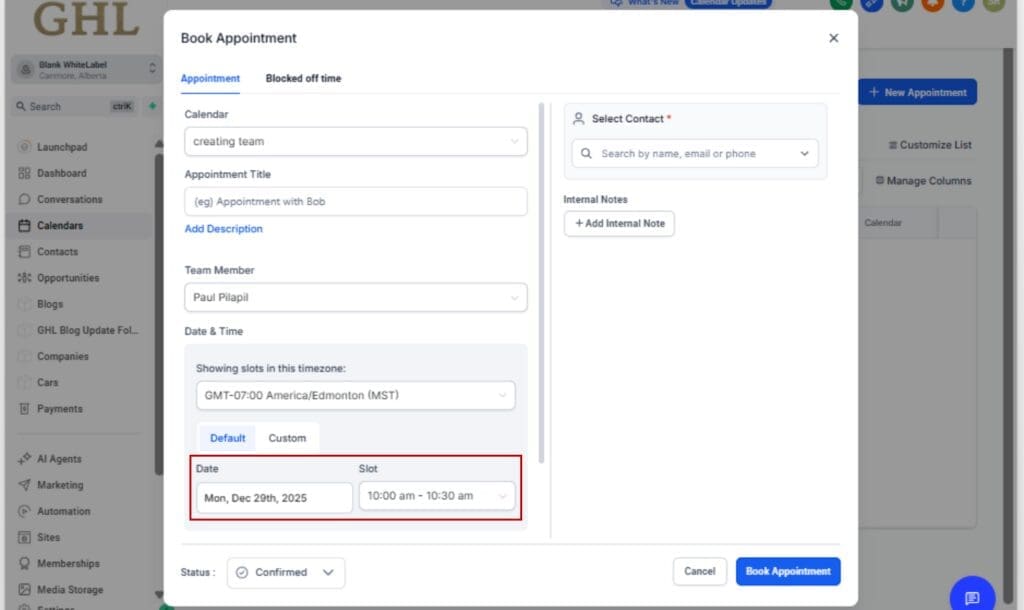
3.1 Open your calendar from the Appointments menu.
3.2 Select “+ Appointment” to schedule something manually.
3.3 Enter a time span that touches two blocks, 10:00 to 10:30 works well.
3.4 Watch how each overlapping slot now subtracts 1, instead of blocking them.
Step 04 – Use Across Any Calendar Type
4.1 This smart logic works the same on:
- Personal Calendars
- Round Robin Calendars
- Event Calendars
4.2 No need to configure it differently, just make sure your slot capacity is defined properly.
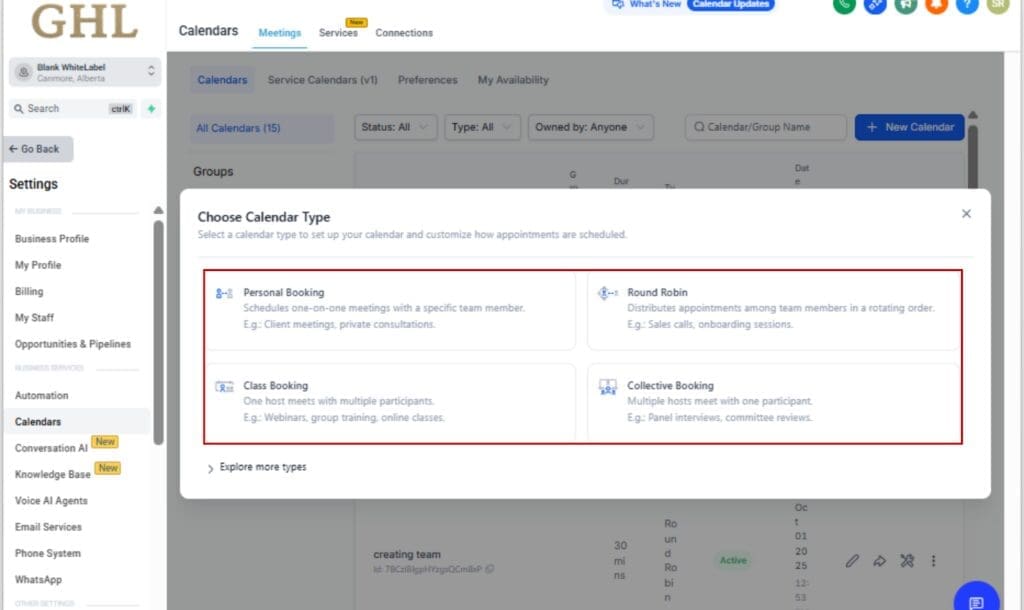
That’s it. Your calendar now plays smarter, not harder. No more false “unavailable” slots. Just clean, accurate, optimized booking.
Pro Tips & Quick Wins for Smarter Booking
Now that you’ve got smarter logic working behind the scenes, here’s how to get even more mileage from your GHL calendar setup:
Use Tight Slot Intervals
If you want to fine-tune how your calendar handles overlaps, consider shortening your slot intervals to 5 or 10 minutes, it helps make better use of open times.
Set Accurate Capacity per Slot
Double-check your calendar settings. If your slot allows 5 bookings, make sure that’s set explicitly. This new logic depends on accurate capacity to avoid false “full” blocks.
Pair With Round Robin for Team Efficiency
Got a team sharing the load? Use Round Robin calendars to spread appointments and combine it with smarter slot logic. You’ll increase volume without overwhelming anyone.
Use for Walk-Ins, Pop-Ups, and High-Demand Days
For busy places like barbershops, coaching teams, or clinics, this change gives your calendar breathing room, so you’re not losing bookings you could’ve taken.
Combine With Workflows
Use appointment-based triggers in your workflows now that slots are more precise. Trigger reminders, confirmations, or internal Slack/WhatsApp notifications right after booking.
Educate Your Team
Let your staff know this logic is live, so they don’t assume a slot is blocked just because it’s touched by another booking. Internal awareness = smoother scheduling.
What This Means for You
This update is more than a technical fix, it’s a win for your calendar, your team, and your bottom line.
Here’s the real impact for GHL users:
More Bookings, Less Hassle
You can now fit more appointments into the same timeframe without the system cutting you off too early. Every slot gets used to its true capacity.
Better Visibility for Clients
No more confusing “Unavailable” messages when you know you have room. Your clients see real, open times, and that means more bookings on autopilot.
Fewer Calendar Headaches
This logic reduces double-booking complaints, missed opportunities, and the need for workaround hacks.
Smarter Scheduling = More Revenue
Making better use of each time slot helps you stay available without burning out your team. More bookings, less hassle.
This is exactly the kind of quiet, behind-the-scenes upgrade that creates serious wins for appointment-driven businesses.
FAQ: Smarter Slot Calendar Availability Logic
Conclusion: Use Every Slot to Its Fullest
With this update, GHL just got a lot smarter about how your time is handled. Instead of blocking multiple slots because of one overlapping appointment, your calendar now does what it should, subtracts capacity only where needed.
No setup needed, this update is already active on all your calendars, whether you’re booking manually or using the public widget.
What you should do:
- Review your slot durations and capacity settings
- Educate your team so they know what’s changed
- Start maximizing Calendar Availability Logic without the mess
This might not be a flashy feature, but it’s one of those subtle changes that can save hours of frustration and unlock more revenue potential from the calendar you’re already using.
Smarter logic. Fewer blocks. More bookings.
That’s the power of better Calendar Availability Logic.
Scale Your Business Today.
Streamline your workflow with GoHighLevel’s powerful tools.