

- See how GHL now detects AI Studio websites in Prospecting audits.
- Quick Summary – Website Technology Detection at a Glance
- What’s New with Website Technology Detection
- Why Website Technology Detection Matters
- How to Use Website Technology Detection in GHL
- Pro Tips for Better Website Technology Detection
- What Website Technology Detection Means for Your Business
- Frequently Asked Questions About Website Technology Detection
- Better Website Technology Detection in GHL
See how GHL now detects AI Studio websites in Prospecting audits.
GHL Website Technology Detection Gets Smarter
Website Technology Detection in GHL just got better. Prospecting can now spot websites built with LeadConnector AI Studio.
The Website Hosting section already checks platforms like WordPress, Webflow, Wix, Squarespace, Framer, and LeadConnector. AI Studio is now part of that list too.
This gives agencies better website data before a sales call. It can also help you find rebuild, upgrade, or migration needs faster.

GHL Website Technology Detection now gives you a clearer view of how a prospect’s site was built. That means better audit data and more confidence when spotting website upgrade or migration opportunities.
Quick Summary – Website Technology Detection at a Glance
Purpose: This update improves Website Technology Detection in GHL Prospecting by adding LeadConnector AI Studio to the Website Hosting audit.
Why It Matters: Agencies get a clearer view of how a prospect’s website is built, which can help make audit reports and sales conversations more useful.
What You Get: GHL can now detect WordPress, LeadConnector, LeadConnector AI Studio, Webflow, Wix, Squarespace, and Framer in the Website Hosting section.
Time To Complete: No setup is needed because AI Studio detection is enabled by default.
Difficulty Level: Easy. You only need to change the setting if you want to remove AI Studio from the audit.
Key Outcome: Better Website Technology Detection gives you more useful prospect data and can help you spot website rebuild, migration, or improvement opportunities with more confidence.
What’s New with Website Technology Detection
GHL Website Technology Detection can now find websites built with LeadConnector AI Studio.
The Website Hosting section already checks several popular platforms. These include WordPress, LeadConnector, Webflow, Wix, Squarespace, and Framer.
Automate marketing, manage leads, and grow faster with GoHighLevel.

AI Studio is now included too. If a prospect uses it, GHL can show that in the Marketing Audit Report.
Why Website Technology Detection Matters
Website Technology Detection gives you useful context before you contact a prospect. You can see what platform the website uses before the sales call starts.
That helps you ask better questions. It can also help you spot rebuild, upgrade, or migration needs faster.
The audit gives your team one more useful detail. You can use that data to guide the conversation and focus on what the prospect may actually need.
How to Use Website Technology Detection in GHL
Website Technology Detection is managed inside the Prospecting settings in GoHighLevel. In this guide, you’ll learn how to open the Prospecting settings, find the Website Hosting options, and manage LeadConnector AI Studio detection.
Here are the steps we will follow:
- Open Prospecting Settings in GHL.
- Manage AI Studio Website Detection.
To start, make sure you are logged in to the correct GoHighLevel agency account.
Step 01 – Open Prospecting Settings in GHL
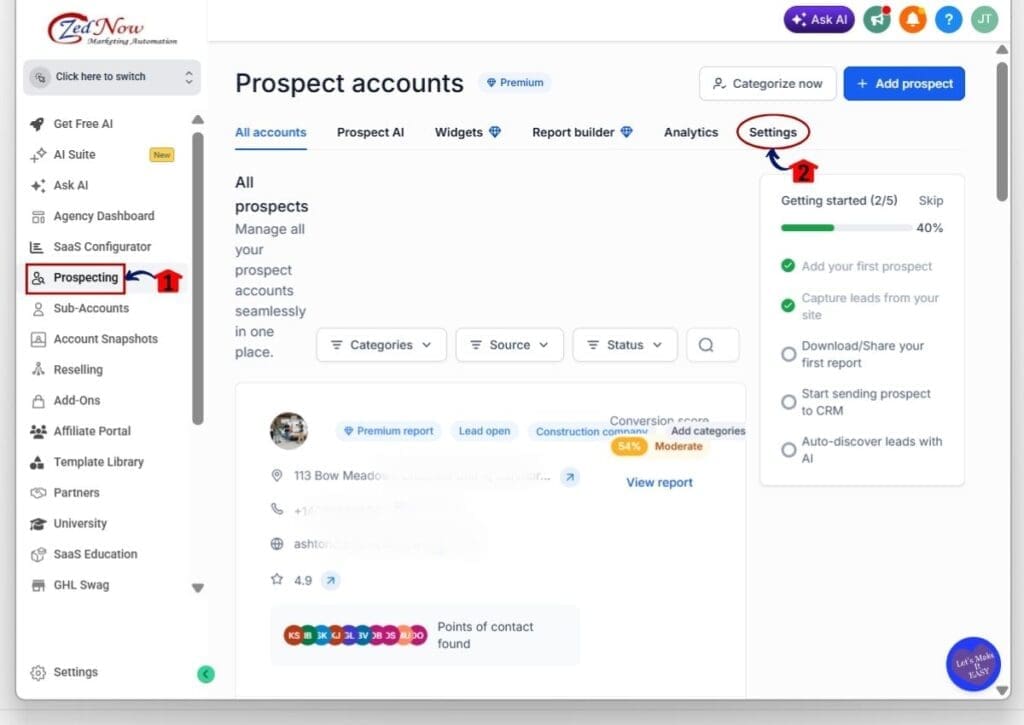
- The main menu on the left side of your screen includes the main areas you can access in GoHighLevel.
1.1 Click Prospecting in the left-hand menu.
- The Prospect Accounts area will open.
1.2 Click Settings in the top menu.
- The Prospecting settings page will open.
- This is where you can control what information is included in your Marketing Audit Reports.
Step 02 – Manage AI Studio Website Detection
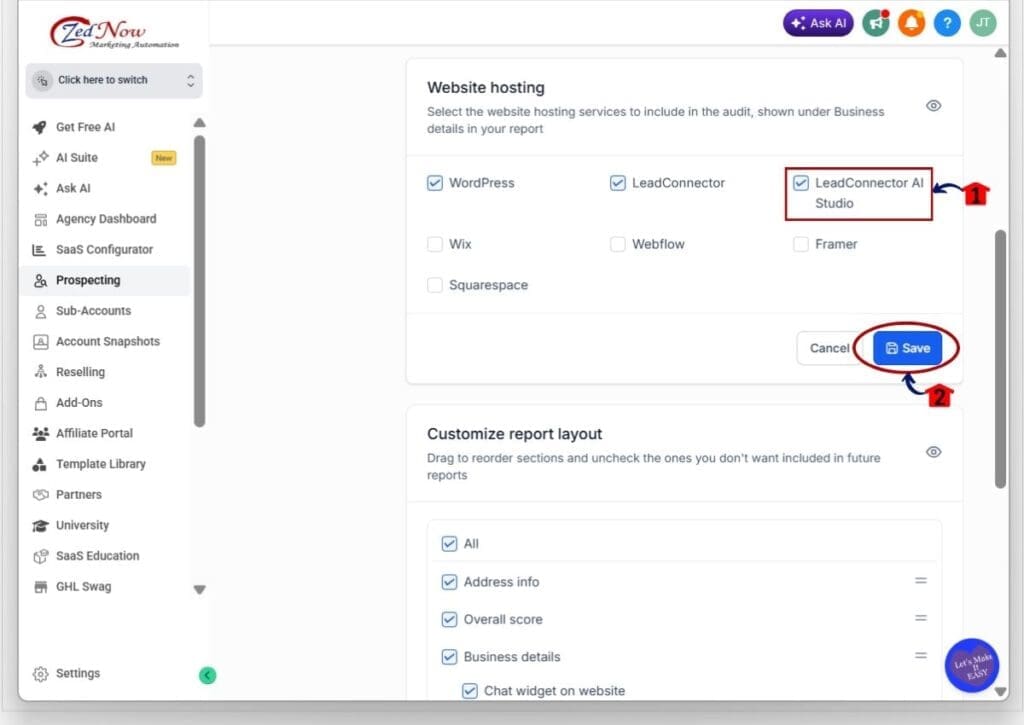
- The Website Hosting section lets you choose which website platforms GHL will include in the audit.
2.1 Find the Website Hosting section.
- You will see the available website platforms listed in this area.
- These include WordPress, LeadConnector, LeadConnector AI Studio, Wix, Webflow, Framer, and Squarespace.
2.2 Find LeadConnector AI Studio.
- LeadConnector AI Studio is selected by default.
- Leave the box checked if you want GHL to detect AI Studio websites in Prospecting audits.
- Uncheck the box if you do not want AI Studio included in the Website Hosting audit.
2.3 Click Save.
- Your updated Website Hosting settings will be saved.
- Future Marketing Audit Reports will follow the options you selected.
Once saved, GHL will use your selected Website Technology Detection settings when running Prospecting audits. For most agencies, keeping AI Studio enabled will give you a more complete view of the technology behind a prospect’s website.
Pro Tips for Better Website Technology Detection
Use Website Technology Detection as a guide, not the whole sales pitch. The website platform gives you useful context, but it does not tell the full story.
Look at the site itself too. Check the design, speed, layout, and user experience. Then use the platform data to support your questions.
In most cases, it makes sense to keep AI Studio detection turned on. More website data can help you find better opportunities and make stronger sales calls.
What Website Technology Detection Means for Your Business
Website Technology Detection can help your team prepare before speaking with a prospect. You can see what platform the website uses and get a better idea of its setup.
That can make your sales calls more focused. If a site looks old or hard to use, you may find a good rebuild or upgrade opportunity.
The main benefit is simple. Better website data helps you ask better questions and make better decisions.
Frequently Asked Questions About Website Technology Detection
Better Website Technology Detection in GHL
Website Technology Detection in GHL Prospecting now includes LeadConnector AI Studio. This gives you a better view of how a prospect’s website is built.
AI Studio detection is turned on by default. In most cases, it makes sense to leave it on. It gives you more useful website data when you review a prospect.
The main benefit is simple. Better data helps you ask better questions and spot website opportunities faster.
Are you using Website Technology Detection in your GHL Prospecting audits yet?
Scale Your Business Today.
Streamline your workflow with GoHighLevel’s powerful tools.


