- Open invoices and estimates in a new tab to edit faster without losing filters, search results, or your place in the list.
- Quick Summary – Invoice Management Workflow Essentials
- What’s New in the Invoice Management Workflow
- Why This Invoice Management Workflow Matters
- How to Use the Invoice Management Workflow Upgrade
- Pro Tips to Optimize Your Invoice Management Workflow
- What This Means for Your Invoice Management Workflow
- Results from a Stronger Invoice Management Workflow
- Frequently Asked Question about Invoice Management Workflow
- Upgrade Your Invoice Management Workflow Today
Open invoices and estimates in a new tab to edit faster without losing filters, search results, or your place in the list.
A Better Invoice Management Workflow in GHL
Invoice Management Workflow in GHL just got a simple but powerful upgrade. If you manage multiple invoices, you know how frustrating it is to lose your place after editing one. You scroll, click into an invoice, make changes, then go back and have to find your spot all over again. That small break in focus slows you down more than you think.
Now you can open any invoice or estimate in a new tab directly from the three dot menu. Your filtered list stays exactly where it was. Your search results stay intact. You can review and edit freely without resetting your view. This small change makes your Invoice Management Workflow feel smoother and more controlled.
For agencies handling client billing every week, this matters. When you review invoices in batches, speed and focus are everything. Keeping your place means fewer clicks, fewer mistakes, and less wasted time. It is a practical update that improves how you work inside GHL every day.

This update upgrades your Invoice Management Workflow in GHL by letting you open invoices and estimates in a new tab, so you can edit faster, manage multiple clients, and never lose your filters or scroll position again.
Quick Summary – Invoice Management Workflow Essentials
Purpose: This update improves your Invoice Management Workflow by allowing you to open invoices and estimates in a new browser tab while keeping your filtered list in place.
Why It Matters: Losing your scroll position and filters during billing sessions slows down your team. This feature removes that friction and keeps your workflow steady.
What You Get: You can edit multiple invoices or estimates without resetting your view, which makes batch reviews faster and more organized inside GHL.
Time to Complete: It takes less than a minute to start using this feature since it is built directly into the existing three-dot menu.
Difficulty Level: Beginner friendly. No setup, no configuration, and no training required.
Key Outcome: A cleaner Invoice Management Workflow that saves time, reduces small errors, and helps your agency manage billing with more control.
What’s New in the Invoice Management Workflow
The Invoice Management Workflow now includes a simple option called Edit in a new tab. You will find it inside the three dot menu beside any invoice or estimate. With one click, the invoice opens in a separate browser tab, while your original invoice list stays exactly where it is.
This works for both invoices and estimates inside Payments. You can review details, make edits, adjust pricing, or update status without touching your filtered list. When you close the tab, your original screen is still organized the way you left it. No reset. No extra searching.
Automate marketing, manage leads, and grow faster with GoHighLevel.

It may seem small, but this update improves how your Invoice Management Workflow flows from one task to the next. Instead of jumping back and forth inside the same window, you can manage multiple records cleanly and stay focused on the job in front of you.
Why This Invoice Management Workflow Matters
Invoice Management Workflow is not just about features. It is about how smoothly you move through your work. When you manage billing for several clients, you often review invoices in batches. If your screen resets every time you edit one, you lose your place and your rhythm. That may seem minor, but over a week, it adds up.
This update keeps your filtered list exactly where you left it. You can open an invoice in a new tab, make your changes, close it, and continue reviewing the rest without starting over. Your Invoice Management Workflow becomes steady and predictable. You stay focused on the task instead of fighting the interface.
For agencies, steady systems matter. Clean processes reduce errors and speed up billing cycles. When your team can review multiple invoices without losing their spot, work moves faster and feels more controlled. This is a practical improvement that supports how real agencies operate inside GHL every day.
How to Use the Invoice Management Workflow Upgrade
Invoice Management Workflow improvements are handled directly inside Payments in your GHL sub-account. You are not changing how invoices work. You are using a new option that opens an invoice or estimate in a separate tab, so you can edit without losing your place in the list.
Here are the steps to use the Edit in a new tab option to improve your Invoice Management Workflow in GoHighLevel.
- Access the Invoices & Estimates page inside GHL Payments
- Open an invoice or estimate using Edit in a new tab
- Edit the invoice and save your changes
To start make sure you are logged in to your GoHighLevel sub-account.
Step 01: Access the Invoices & Estimates page inside GHL Payments
- The Main Menu on the Left side of your screen has all the main areas that you work in when using GHL.
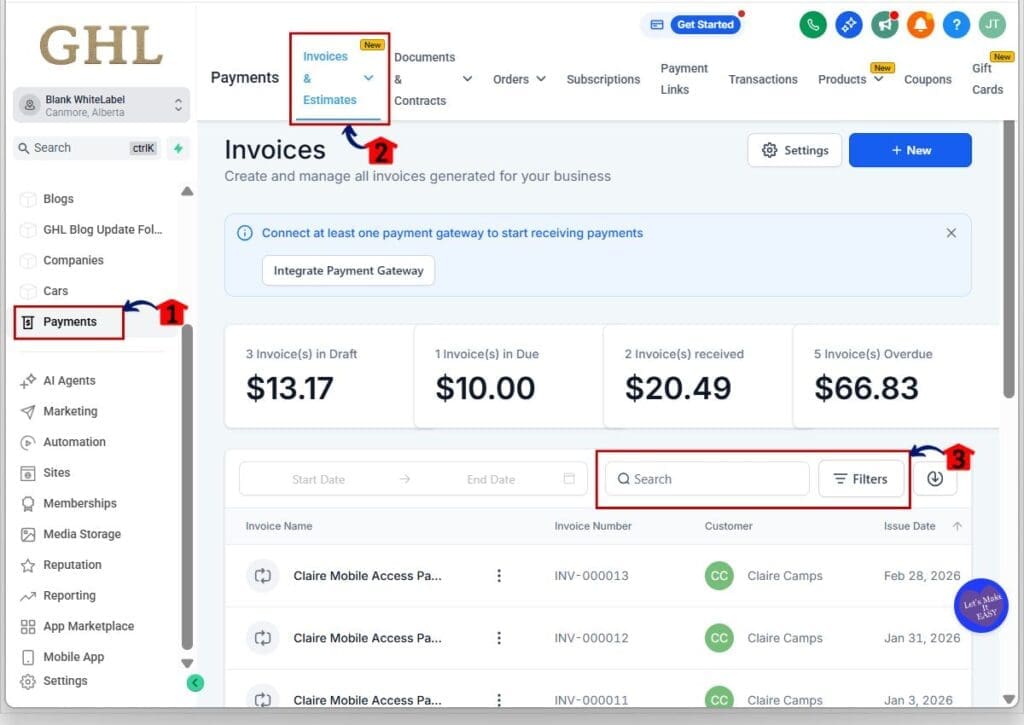
1.1 Click on the Payments in the main left hand menu.
- This opens the Payments area where your billing tools live.
1.2 Click the Invoices & Estimates tab.
- This loads your full list of invoices and estimates.
1.3 Apply filters or use search to narrow the list.
- This helps you keep your Invoice Management Workflow organized before you start editing.
Step 02: Open an invoice or estimate using Edit in a new tab
- In this step, you will open the record in a separate browser tab while keeping your list view in place.
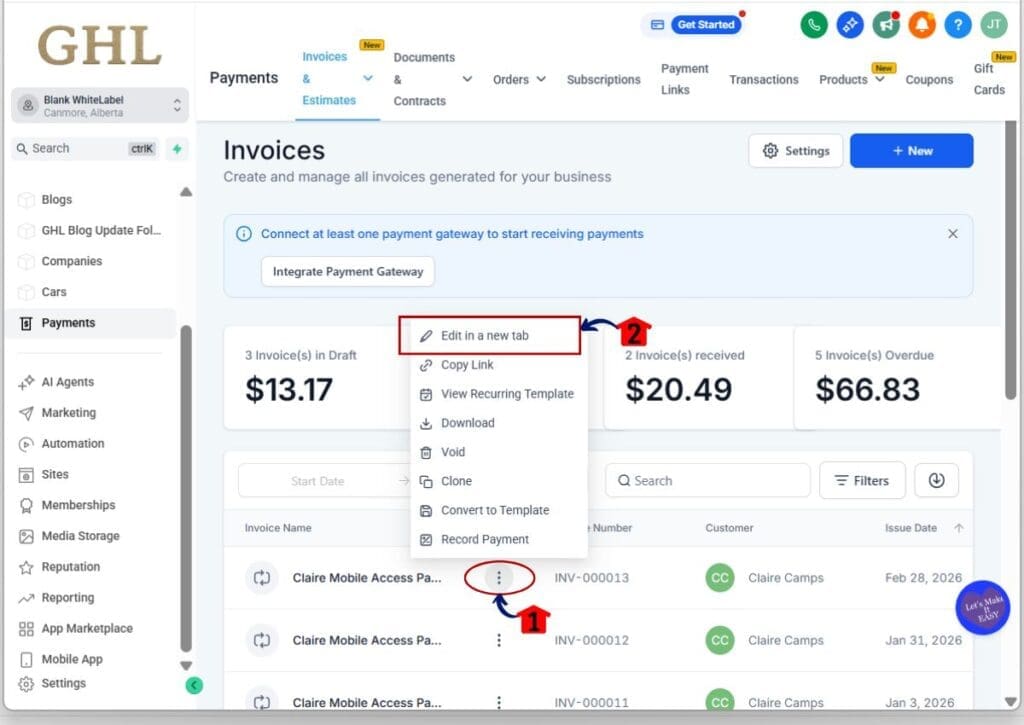
2.1 In the Invoices & Estimates list, find the invoice or estimate you want to update, then click the 3-dot menu beside it.
- This opens the action menu for that specific record.
- Your current filters and search results stay active in the list.
2.2 Select Edit in a new tab.
- The invoice or estimate opens in a separate browser tab.
- Your original invoice list remains open and unchanged in the first tab.
Step 03: Edit the invoice and save your changes
- Now you will make updates in the new tab, then return to the list without losing your place.
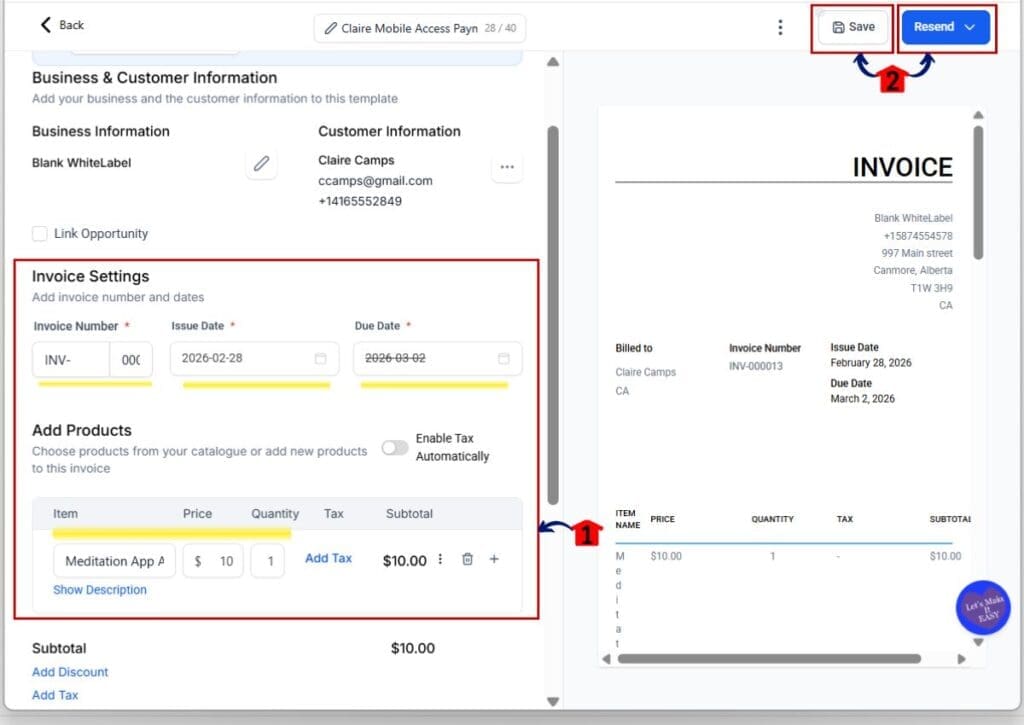
3.1 Make your updates in the invoice editor.
- Update items like pricing, invoice number, issue date, due date, or line items as needed.
3.2 Click Save & Resend to store your changes.
- Click Save to apply your updates without sending anything to the contact.
- Click Save & Resend to apply your updates and resend the invoice to the contact.
- Use Save for internal edits. Use Save & Resend when the client needs the updated invoice.
3.3 Close the browser tab when you are finished.
- You return to the original Invoices & Estimates list tab.
3.4 Continue reviewing the next invoice from the same list view.
- Your scroll position, filters, and search stay intact, keeping your Invoice Management Workflow steady.
That is the full process. A few clicks and you can review multiple invoices without losing your place or breaking your focus.
Pro Tips to Optimize Your Invoice Management Workflow
Invoice Management Workflow becomes even stronger when you use this feature with intention. Opening invoices in new tabs is helpful on its own, but the real benefit comes when you pair it with clean review habits. A few simple adjustments can help you move faster and stay organized.
First, apply filters before opening multiple invoices. Sort by status, client name, or date. This keeps your Invoice Management Workflow structured before you begin editing. When you open several invoices in separate tabs, you will already know they belong to the same group or review session.
Second, review invoices in batches instead of one at a time throughout the day. Set aside focused time to check estimates, confirm totals, and update statuses. Keep your main invoice list open as your control center. Open each invoice in a new tab, make changes, close it, and move to the next. This keeps your workflow steady and reduces small mistakes that happen when you jump between tasks.
These small habits turn a helpful feature into a reliable system. Over time, your Invoice Management Workflow will feel smoother, more controlled, and easier to manage as your agency grows.
What This Means for Your Invoice Management Workflow
Invoice Management Workflow improvements like this make a real difference for agencies. When you manage billing for several clients, speed and clarity matter. Small delays add up over a week. This update removes one of those delays and gives you better control over how you review invoices.
For agency owners, this means fewer interruptions during billing sessions. You can move through invoices in order without losing your place. That keeps your process steady and reduces the risk of skipping an invoice or reviewing the same one twice. Your Invoice Management Workflow becomes more reliable, which helps your team stay aligned.
For growing agencies, structure is everything. Clean systems allow you to scale without adding confusion. When your billing process runs smoothly, approvals happen faster and cash flow improves. This update supports a more organized workflow inside GHL and helps your operations feel more professional.
Results from a Stronger Invoice Management Workflow
Invoice Management Workflow improvements often show up in small but meaningful ways. The first result you will notice is speed. You spend less time scrolling, searching, and reapplying filters. That saved time adds up quickly, especially when you review invoices in batches.
You will also notice better focus. When your list stays in place, your work session feels steady. You move from one invoice to the next without breaking your rhythm. A consistent Invoice Management Workflow reduces small errors and helps you stay clear on what has already been reviewed.
Over time, this creates a smoother billing process. Faster reviews lead to quicker approvals and fewer delays in sending invoices. For agencies, that means more reliable cash flow and less admin stress. It is a simple feature, but the operational benefit becomes clear the more you use it.
Frequently Asked Question about Invoice Management Workflow
Invoice Management Workflow updates often raise a few quick questions. Below are the most common ones agencies ask.
Upgrade Your Invoice Management Workflow Today
Invoice Management Workflow works best when it feels steady and easy to manage. This update may look small, but it removes a common point of frustration. You no longer have to lose your place every time you edit an invoice. That alone makes your work session smoother.
When you handle billing inside GHL, focus matters. Opening invoices and estimates in a new tab keeps your filtered list in place. Your Invoice Management Workflow stays organized while you move from one record to the next. Less backtracking means fewer mistakes and less wasted time.
Use this feature the next time you review invoices. Keep your main list open, edit in a new tab, and work through your billing with more control. Simple improvements like this help your agency run cleaner systems without adding complexity.
Scale Your Business Today.
Streamline your workflow with GoHighLevel’s powerful tools.