

- Introduction – GHL Client Content Approval Overview
- Quick Summary – Client Content Approval
- Here are this weeks HighLevel Updates
- What Changed From the Old Approval Process
- Why Client Content Approval Matters for Agencies
- How to Use GHL Client Content Approval
- Pro Tips to Maximize Client Content Approval
- What This Means for Your Business
- Real-Time Application for Agencies
- Frequently Asked Questions About Client Content Approval
- Conclusion – GHL Client Content Approval Made Simple
Introduction – GHL Client Content Approval Overview
Client Content Approval inside GHL just became frictionless. Before this update, clients needed a login to approve social posts. That meant passwords. Access confusion. Extra onboarding steps. And constant “I can’t get in” messages.
Agencies worked around it. Screenshots in Slack. Approval threads in email. Manual confirmations. Rescheduling posts by hand. It worked. But it wasn’t scalable. Now GHL removes logins completely from the approval process.
Instead of sending portal access, you generate a secure magic link. Your client clicks the link, enters the password, reviews the post, and approves or rejects it instantly.
No account required. No backend access. No friction.Clean access. Clean approval.
What It Does: Instead of dragging clients into the dashboard, you just send them a link. That link shows the post exactly as it will publish — media, caption, schedule, platform, and your notes. Whether it’s one post or twenty, it’s all there. They review it. They decide.
Reviewers can sign off, request edits with notes, move the publish date, or clear an entire batch at once. The system updates in real time.
Each link is secured with a password and won’t stay active forever. After 30 days, it times out. You can always renew it, cancel it, or adjust its validity from your link management screen.
Impact: You no longer have to deal with clients getting stuck behind login screens. There’s less confusion, fewer “where do I click?” messages, and no more screenshot approval chains slowing things down. Campaigns simply move faster.
Approvals are now external, secure, and fully controlled from inside GHL. Less admin. Fewer delays. More predictable publishing.
For agencies managing multiple accounts, that’s a serious operational upgrade.
Who This Is For: This is for agencies managing social content at scale. For VAs scheduling weekly batches of posts. For account managers chasing client approvals. For SaaS agencies offering white-labeled social media management. And for any GHL user tired of waiting on login-based approvals.
This may look like a simple convenience feature. It’s not. It’s a Client Content Approval system upgrade.
Quick Summary – Client Content Approval
Purpose
This update introduces a secure, login-free Client Content Approval system inside GHL Social Planner using magic links and password protection.
Why It Matters
It removes friction from the approval process, eliminates portal login issues, and speeds up campaign launches for agencies managing social content.
What You Get
You get secure magic link approvals, bulk approve and reject actions, post rescheduling, rich previews, and a centralized Manage Links dashboard for full control.
Time to Complete
Generating and sending an approval link takes less than two minutes once your posts are drafted.
Difficulty Level
Beginner-friendly. If you can schedule a post in Social Planner, you can use Client Content Approval.
Key Outcome
Faster approvals, cleaner workflows, and a scalable client collaboration system that reduces admin time and improves operational efficiency.
Here are this weeks HighLevel Updates
New QR Code Styling Options: Shapes, Borders, and Rim Text
What it does:
Lets you stop using boring QR codes. You can now tweak the shape, style the border, and add text around the edge.
Where in GHL:
Accessible via Sites → QR Codes and within QR tools embedded in Funnel and Website builders.
Automate marketing, manage leads, and grow faster with GoHighLevel.

Impact:
Improves visual presentation and brand alignment while increasing scan appeal.
Best suited for:
Agencies that care about branding, small businesses running local promotions, online stores, and teams pushing QR campaigns.
Collapse & Resize Pipeline Stages in Kanban View
What it does:
Lets you hide pipeline stages you’re not actively using and adjust column widths so your board fits the way you work.
Where in GHL:
Inside Opportunities when you’re viewing your pipeline in Kanban mode.
Impact:
No more dragging your screen forever just to find the deals that matter.
Best suited for:
Owners running multi-stage pipelines, reps working deals every day, and anyone fed up with a messy board.
Notes Just Got Smarter for the Contacts Page
What it does:
Upgrades the notes area so it’s easier to write, review, and keep things organized inside a contact record.
Where in GHL:
Found directly within each contact’s profile under Notes.
Impact:
Makes it simpler to see what’s been discussed and who added what — without digging through clutter.
Best suited for:
Teams collaborating on accounts and businesses that document every client touchpoint.
New Asana Actions in Workflows – Find Project & Find Section
What it does:
Lets your workflow check what already exists in Asana before adding anything new.
Where in GHL:
Go to Workflows, add an action, and choose the Asana integration.
Impact:
No more duplicate projects. No more messy task boards. Just cleaner automation.
Best suited for:
Operations teams and agencies that rely on Asana to manage client delivery.
Email AI + Knowledge Base Integration
- What it does:
Allows Email AI to reference your Knowledge Base for smarter, more accurate responses. - Where in GHL:
Found in Conversations → Email composer with AI enabled and Knowledge Base settings under AI configuration. - Impact:
Smarter email suggestions that understand your business and help you reply quicker. - Best suited for:
Support teams, agencies managing inboxes, and businesses scaling communication with AI.
Dialer: Auto-Minimize, Pin & Drag
- What it does:
Lets you auto-minimize the dialer during calls, pin it in place, and drag it anywhere on screen. - Where in GHL:
Found in Conversations → Dialer. - Impact:
Cleaner workspace and easier multitasking during sales or support calls. - Best suited for:
Sales teams, outbound callers, appointment setters, and agencies making daily calls.
Schema Markup Using AI
- What it does:
Generates structured schema markup automatically using AI for SEO enhancement. - Where in GHL:
Found in Sites → Website or Funnel settings within AI or SEO sections. - Impact:
Improves search visibility without manual coding. - This works well for:
Teams building websites that need stronger search visibility, from agencies to small local businesses.
What Changed From the Old Approval Process
Before this change, approving content meant logging into the portal. Clients needed usernames, passwords, and the right permissions just to review one post. And if they weren’t familiar with the dashboard? Things slowed down quickly.
Clients forgot passwords. They landed in the wrong section. They didn’t have proper permissions. Agencies ended up troubleshooting access instead of launching campaigns. To avoid the hassle, many teams worked around the system altogether. They sent screenshots in Slack. They pasted captions into emails. They asked clients to reply “approved.” They manually tracked confirmations and updated posts afterward.
It worked. But it wasn’t clean. It wasn’t controlled. And it definitely wasn’t scalable.
Now the approval process has shifted from internal access to controlled external access. Instead of requiring a login, you generate a secure magic link. The client clicks the link, enters the password, sees the full post preview, and approves, rejects, or reschedules instantly. Every action syncs directly back into Social Planner without manual updates.
This is more than a convenience upgrade. It removes onboarding friction. It eliminates access confusion. It reduces dependency on portal training. And it creates a professional, streamlined Client Content Approval workflow that agencies can confidently scale.
The system moved from “log in and figure it out” to “click and approve.” That shift changes everything.
Why Client Content Approval Matters for Agencies
Client Content Approval is not just a feature. It is a workflow control system.
When approvals are slow, everything slows down. Campaign launches get delayed. Scheduled posts miss their timing. Teams waste hours chasing confirmations. What should take minutes stretches into days.
That is not a marketing problem. That is an operations problem.
With the new Client Content Approval system inside GHL, agencies remove one of the biggest friction points in social media management. Clients no longer need onboarding sessions just to approve posts. They do not need dashboard training. They do not need to remember where anything lives inside the platform.
They click a link. They review. They decide. Done.
When you’re juggling a dozen or more accounts, small improvements turn into big time savings. A VA can send one link instead of chasing approvals all week. Your account manager isn’t buried in Slack trying to confirm what’s approved. And SaaS agencies can keep client access clean without opening up the backend.
It also improves professionalism. When your approval system feels clean and controlled, clients trust your process more. When they can see previews, scheduled times, and notes in one clear interface, confidence increases. Fewer questions. Fewer misunderstandings. And fewer delays.
This update turns Client Content Approval from a login-based task into a frictionless collaboration system. That means faster launches, cleaner workflows, and more scalable operations.
For growing agencies, that is not a small improvement. That is infrastructure.
How to Use GHL Client Content Approval
Generating and managing approval links happens entirely inside Social Planner in your GHL sub-account. You will access Social Planner, select the posts that need review, create a secure approval link, and send it to your client. You will also learn how to manage active links from the Manage Links dashboard.
Before starting, make sure you have the proper user permissions, since only authorized users can generate approval links. Follow the steps below to set up and control Client Content Approval correctly.
- Access the Main Left Hand Menu in GoHighLevel.
- Select the Post(s) That Require Approval and Generate the Approval Link.
- Generate the Shareable Link and Set Password Options.
- Share the Approval Link With Your Client.
- Client Reviews and Takes Action.
- Approve the Post Through the Link.
To start, make sure you are logged in to your GoHighLevel sub-account.
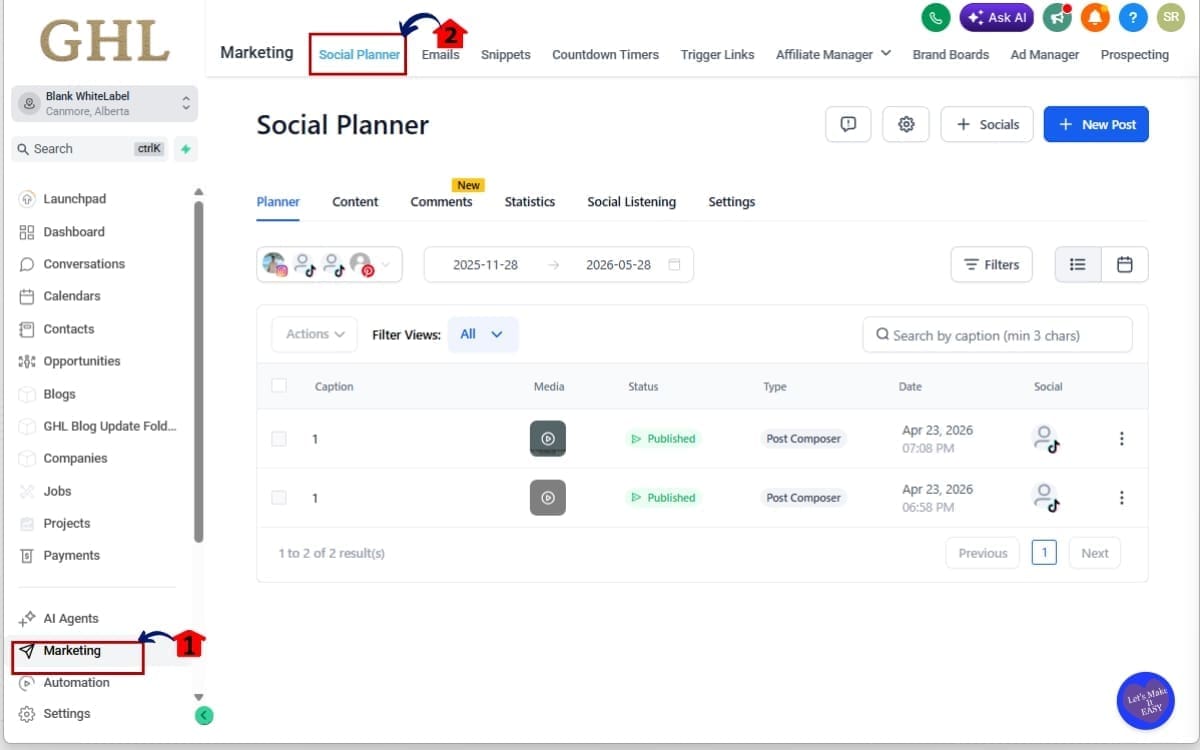
Step 01 – Access the Main Left Hand Menu in GoHighLevel
- The Main Menu on the left side of your screen contains all primary working areas inside GHL.
1.1 Click on the Marketing menu item.
- This opens the Marketing section of your sub-account.
1.2 Click on Social Planner.
- You will now be inside Social Planner where your scheduled and draft posts are displayed.
Step 02 – Select the Post(s) That Require Approval and Generate the Approval Link
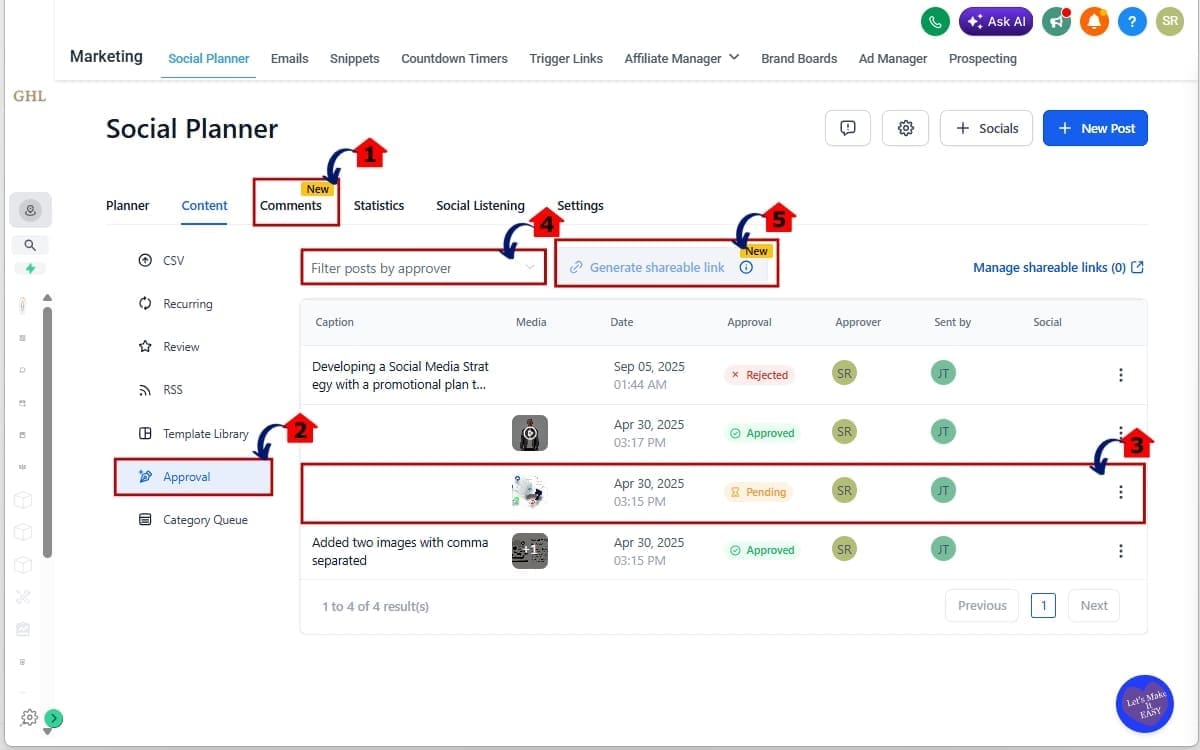
- In this step, you will select the post or posts that need client review and create a secure approval link. This link allows your client to review and take action without logging into GHL.
2.1 Go to Content in Social Planner
- Open the Content tab where your draft and scheduled posts are listed.
2.2 Click Approval
- Select the Approval option to start creating an external review link.
2.3 Select the Post That Needs Approval
- Choose the post (or multiple posts) you want approved.
2.4 Select the Approver From the Dropdown Menu
- Choose the client or stakeholder who will review the content.
2.5 Click Generate Approval Link
- A secure, password-protected link will be created instantly for sharing.
Step 03 – Generate the Shareable Link and Set Password Options
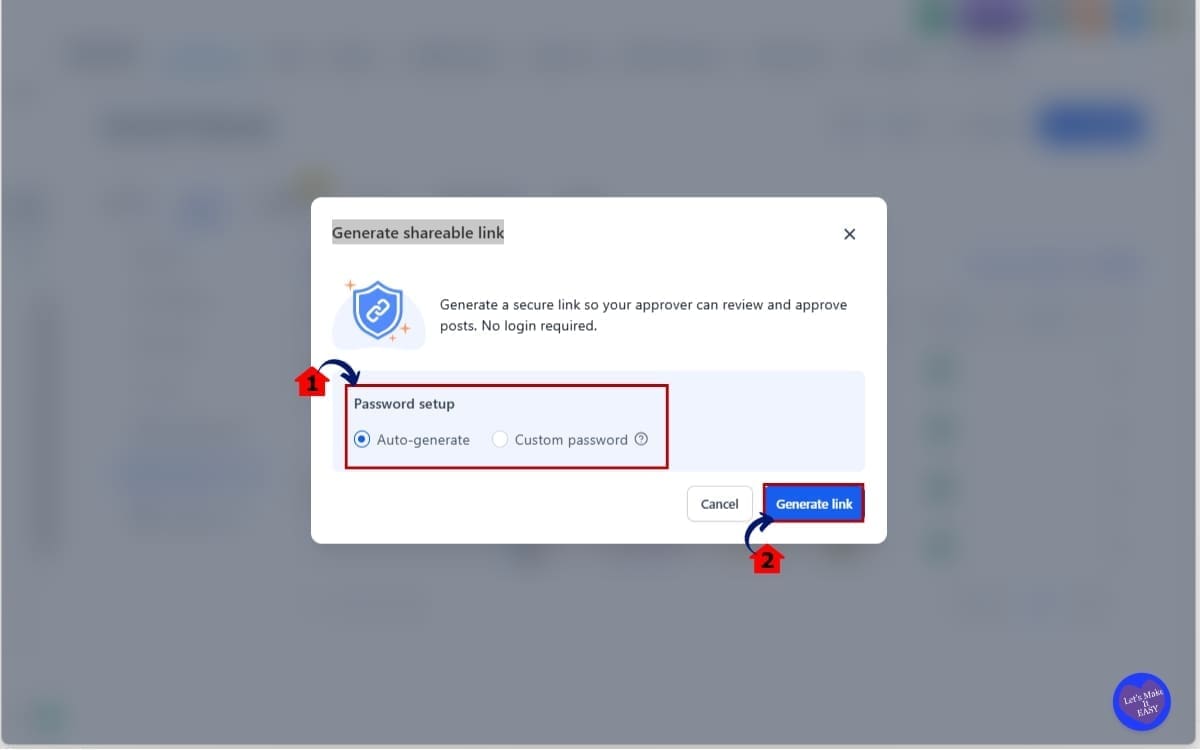
- In this step, you will secure the approval link before sending it to your client. You can use the system-generated password or create your own.
3.1 Choose Password Settings
- Select the auto-generated password for quick setup Or enter a custom password to share with your client.
3.2 Click Generate
- The approval link will be finalized and ready to copy and share securely.
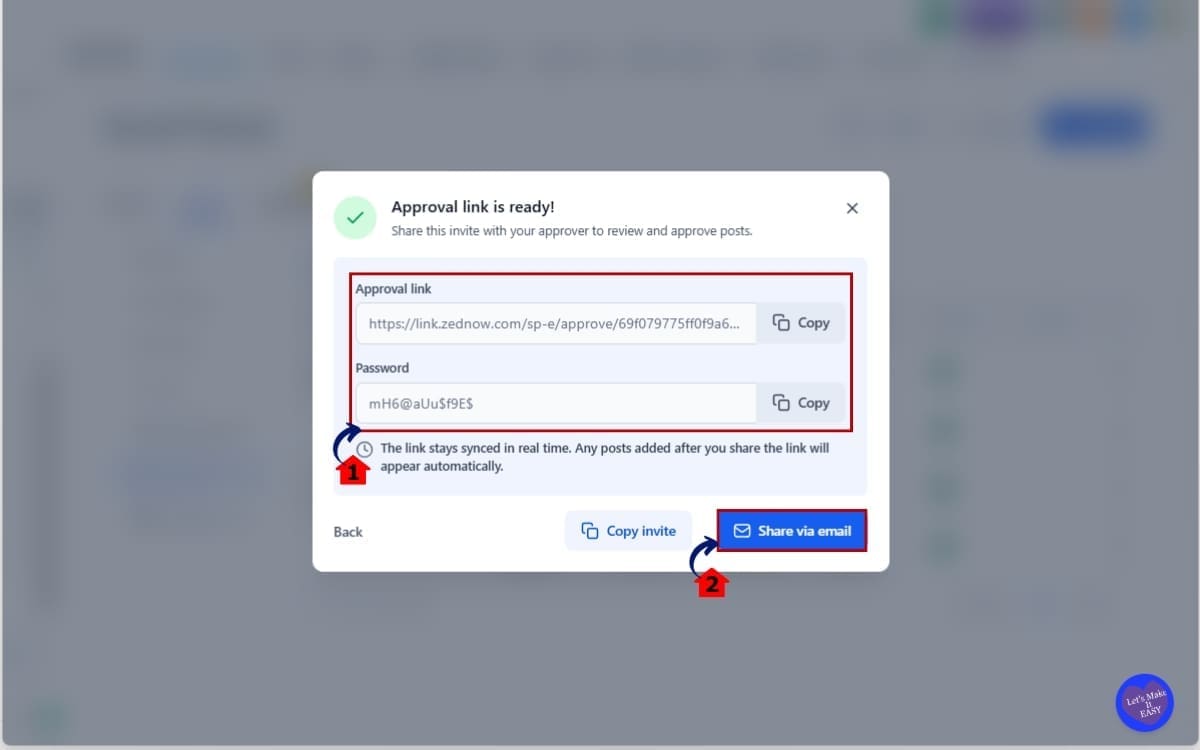
Step 04 – Share the Approval Link With Your Client
- In this step, you will copy the approval link and send it directly to your client or stakeholder for review.
4.1 Click Copy Invite
- This copies the secure approval link so you can paste it into your preferred communication channel.
4.2 Click Share via Email
- This opens the option to send the approval link directly through email from within the platform.
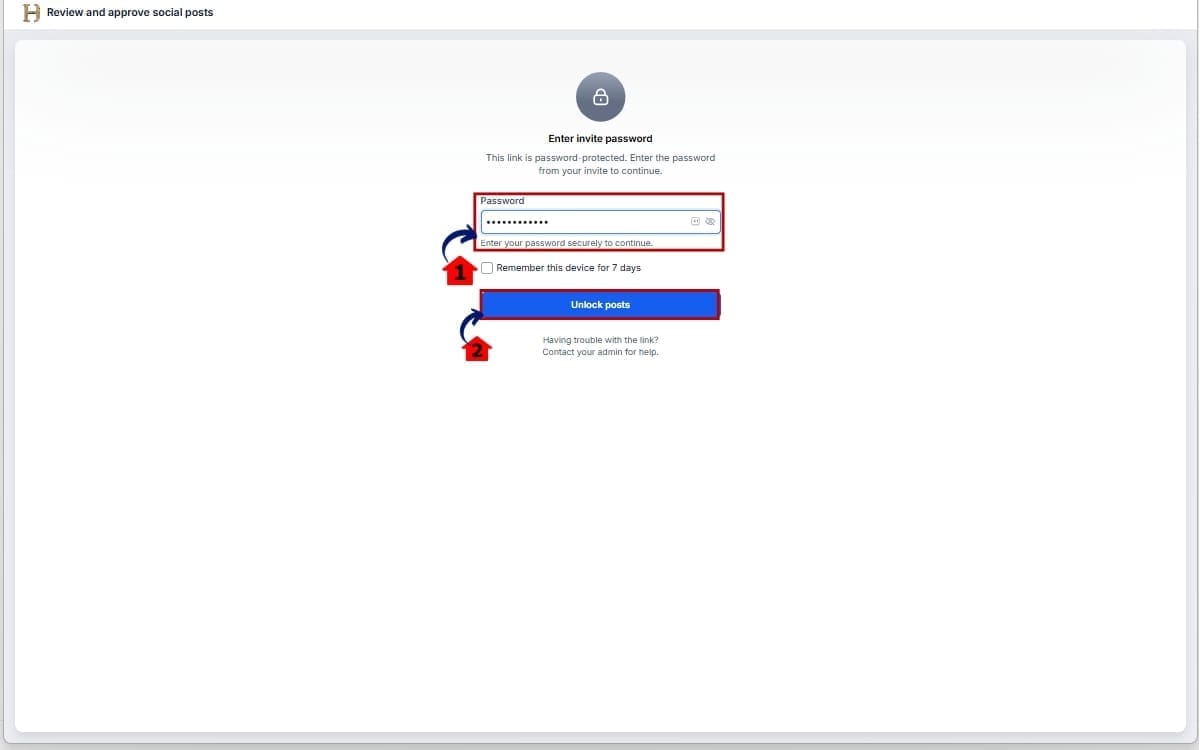
Step 05 – Client Reviews and Takes Action
- In this step, your client accesses the approval link and unlocks the content for review.
5.1 Type the Password
- Enter the password provided to securely access the approval page.
5.2 Click Unlock Post
- This opens the post preview so the client can review, approve, reject, or reschedule the content.
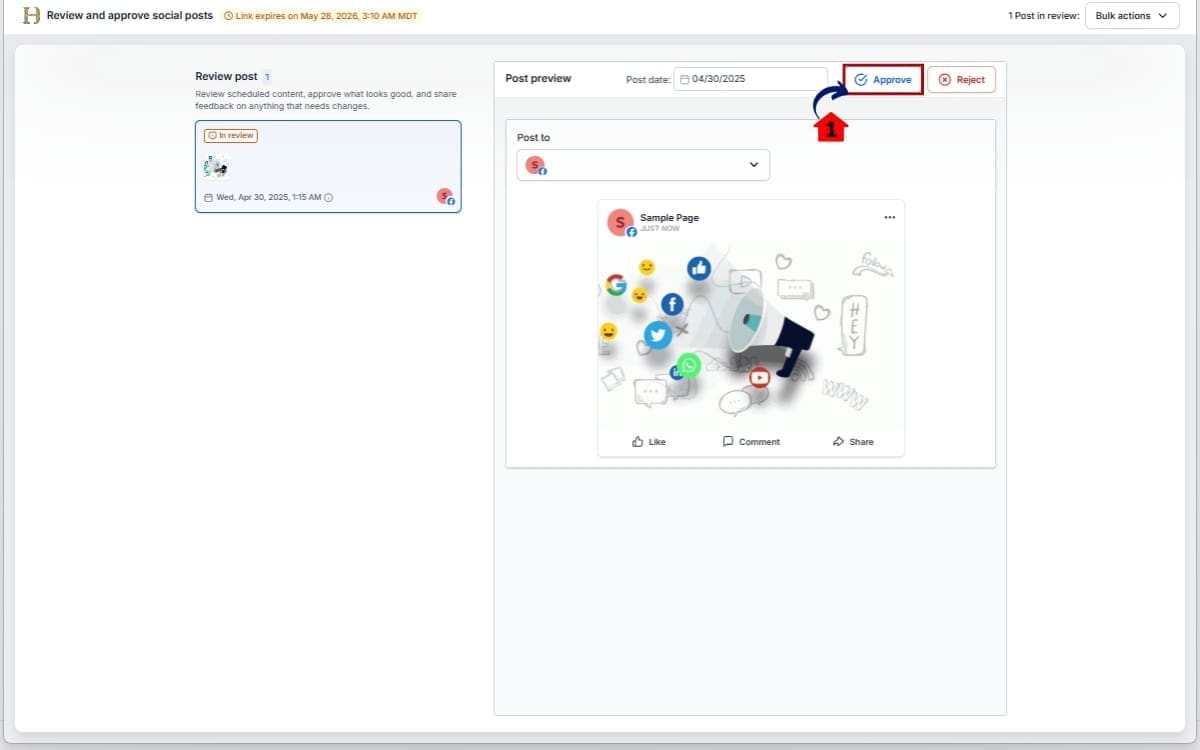
Step 06 – Approve the Post Through the Link
- In this step, the client reviews the content and confirms approval directly from the shared link.
6.1 Click Approve
- Once approved, the post status updates instantly inside Social Planner, and the change is reflected in real time.
This entire Client Content Approval process is designed to be simple, secure, and scalable. No login dependency. No manual confirmation tracking. Just controlled external approvals synced directly into GHL.
Pro Tips to Maximize Client Content Approval
This feature is simple on the surface. But used correctly, it becomes a serious operational advantage.
Here is how to get the most out of the new Client Content Approval system inside GHL.
Use Bulk Approvals for Monthly Batches
Batch your posts? Send one approval link and be done with it. Clients can clear the whole set at once instead of clicking through them one by one. That alone can save serious time.
Add Clear Creator Notes
Always include context in the creator notes section before generating the approval link. Explain campaign goals, hashtags, or timing logic. When clients understand the intent, they approve faster. Clear notes reduce unnecessary revision cycles.
Set Internal Approval Deadlines
Technically, links are good for 30 days. Realistically, you don’t want approvals taking weeks. A two- or three-day review window keeps everything moving and avoids deadline pressure.
Limit Who Can Generate Links
Only give approval link permissions to trusted staff. This keeps the Client Content Approval process controlled and avoids confusion from duplicate links being sent. Think of it like access control.
Revoke Links When Campaigns Change
If strategy shifts or content is updated significantly, revoke the old link and generate a new one. This ensures clients are always reviewing the correct version. Avoid sending outdated approval links.
Do Not Wait Until Publish Day
Send approval links well before scheduled publish time. If clients request edits, you want buffer time to revise and reschedule without rushing.
Use It as a Sales Feature
If you run a white-labeled or SaaS agency, position this as part of your premium workflow. “Secure external approvals with no login required” sounds far more professional than “We’ll email you screenshots.” Clients notice process maturity.
Build It Into Your SOP
Update your standard operating procedures to include:
- Draft posts
- Internal review
- Generate approval link
- Track status
- Final publish
When Client Content Approval becomes part of your documented workflow, scaling becomes easier. This is not just a new button inside Social Planner. It is a cleaner operational system.
What This Means for Your Business
Client Content Approval is no longer a small admin task in your workflow. It is now a competitive advantage.
When approvals move faster, campaigns launch faster. That means your clients see results sooner. It also means your internal team spends less time chasing responses and more time building strategy. Think about the compound effect.
If you manage 15 clients and save even 20 minutes per approval cycle, that is hours recovered every single week. Hours your team can reinvest into optimization, reporting, upsells, or new client onboarding.
This also improves client perception. When your approval system feels clean, secure, and organized, clients trust your process more. They see structure. They see professionalism. They see that you are not improvising with screenshots and email threads. That builds retention.
For SaaS agencies, this is even bigger. You can now offer a structured Client Content Approval workflow without giving clients backend access. That reduces support tickets, reduces training time, and keeps your system secure. Less access. More control.
Operationally, this removes one of the most common friction points in social media management. No more “I forgot my login.” No more “Where do I find the post?” No more last-minute approval chaos.
Instead, you have:
- Secure external access
- Clear preview visibility
- Instant sync inside GHL
- Full link management control
This is how scalable agencies operate. Not by working harder. But by removing friction at every stage of the process.
And Client Content Approval was one of the biggest friction points in social scheduling. Now it is not.
Real-Time Application for Agencies
Let’s make this practical. Imagine you run a social media retainer service. Every month, your team prepares 20 posts per client. Before this update, you might send screenshots in Slack or email drafts back and forth. Tracking approvals becomes messy fast.
Now the workflow looks different. Your VA drafts all 20 posts inside Social Planner. Your internal team reviews them. Then you generate one Client Content Approval link and send it to the client.
The client opens one link. They review everything in one clean interface. They click Approve All. Done. That entire approval cycle can happen in minutes instead of days.
Here’s another scenario.You manage multiple brands and schedule content two weeks in advance. A client wants to tweak publishing time for a promotional post. Instead of asking your team to reschedule it manually, the client adjusts the time directly inside the approval view.
It syncs instantly. No middleman.
If you run a SaaS agency, this is a quiet but important upgrade. You can include approvals as part of your process without ever opening up the backend. Clients review content, but they don’t see your settings or internal systems.
That reduces risk. It reduces confusion. It reduces support tickets.
And for agencies scaling beyond 30+ accounts, removing login-based approvals eliminates one of the most common bottlenecks in operations.
Less friction. Faster publishing. More predictable workflows. This is not just a social media convenience feature. It is a process upgrade.
Frequently Asked Questions About Client Content Approval
Conclusion – GHL Client Content Approval Made Simple
Client Content Approval inside GHL is no longer tied to logins, portal access, or messy email threads. It is now clean, secure, and external.
With magic link approvals, bulk actions, password protection, and full link management, agencies finally have a streamlined way to handle social media approvals without friction. No more chasing passwords. No more screenshot confirmations. No more guessing whether something was approved.
This update improves speed. It improves control. And it improves scalability.
If you manage social content for clients, this is the kind of infrastructure upgrade that compounds over time. Faster approvals mean faster publishing. Faster publishing means better campaign timing. Better timing leads to better results.
And better results lead to long-term client retention. This is how modern agencies operate. Not by adding more steps. But by removing unnecessary ones.
If you have not tested the new Client Content Approval flow yet, go into Social Planner and generate your first approval link today. Build it into your workflow. Add it to your SOP. Make it part of your client onboarding process.
You will feel the difference immediately. Have you tried the new Client Content Approval system yet? How has it improved your workflow so far?
And as always, check back to the GHL Growth Garage blog for more practical GoHighLevel feature guides designed to help you scale smarter.
Scale Your Business Today.
Streamline your workflow with GoHighLevel’s powerful tools.


