

- Stop suspicious leads before they waste SMS and email sends.
- Quick Summary – Chat Widget Spam at a Glance
- What’s New with Chat Widget Spam Protection
- Why Chat Widget Spam Protection Matters
- How to Enable Chat Widget Spam Protection in GoHighLevel
- Quick Tips for Chat Widget Spam Protection
- What Chat Widget Spam Protection Means for Your Business
- Frequently Asked Questions About Chat Widget Spam Protection
- Better Control Over Chat Widget Spam
Stop suspicious leads before they waste SMS and email sends.
Chat Widget Spam Protection in GHL
Chat Widget Spam can quickly turn into wasted SMS sends, extra email costs, and messy contact lists. GoHighLevel now has built-in spam protection for Chat Widgets to help catch suspicious submissions before they trigger more follow-up.
The feature works in the background, so real visitors do not have to deal with CAPTCHA, extra fields, or added steps. When GHL flags a suspicious submission, it keeps the contact in your CRM and adds the chat_widget_high_volume_flag tag for review.
You can also choose to pause SMS, email, or both for flagged contacts. That gives you a simple way to control Chat Widget Spam, protect your sender reputation, and still keep possible real leads in the system.
Chat Widget Spam Protection gives you more control over suspicious leads without making real visitors jump through extra steps. It can help reduce wasted SMS and email sends while keeping flagged contacts in GHL for review.
Quick Summary – Chat Widget Spam at a Glance
Purpose: Chat Widget Spam Protection helps GHL detect suspicious or high-volume Chat Widget submissions before they trigger unnecessary follow-up.
Why It Matters: It can reduce wasted SMS and email sends while helping protect your sender reputation.
What You Get: You can tag suspicious contacts for review, pause SMS, pause email, or pause both channels.
Time To Complete: Most users can review and set up the feature in a few minutes for each Chat Widget.
Difficulty Level: Easy. The settings are built into the Chat Widget builder and do not require extra tools.
Key Outcome: You get more control over Chat Widget Spam without adding CAPTCHA or extra steps for real visitors.
What’s New with Chat Widget Spam Protection
Chat Widget Spam is now easier to manage because GHL can detect suspicious or high-volume submissions in the background. The visitor experience stays the same, with no CAPTCHA, extra fields, or added verification steps.
Instead of deleting a flagged lead, GoHighLevel keeps the contact in your CRM and adds the chat_widget_high_volume_flag tag. You can then choose what happens next by using one of four settings: Tag Only, Pause SMS, Pause Email, or Pause Both.
Automate marketing, manage leads, and grow faster with GoHighLevel.

The feature is set up for each Chat Widget, so you can control protection based on how that widget is used. Existing widgets have Spam Protection turned off by default, while new widgets have it turned on with Pause Both selected.
Why Chat Widget Spam Protection Matters
Chat Widget Spam can cause more problems than a messy contact list. If fake submissions trigger your workflows, GHL may start sending SMS and email messages to bad contact details. That can increase costs and create failed sends that may hurt your sender reputation.
This update gives you a way to slow that down without blocking every suspicious lead. Instead of deleting the contact, GoHighLevel keeps it in your CRM so your team can review it first. That matters when a real lead gets caught during a traffic spike or a busy campaign.
For agencies, this can be especially useful across client accounts that rely on automated follow-up. You can reduce wasted sends, keep better control of your contact data, and still give legitimate leads a chance to be reviewed.
How to Enable Chat Widget Spam Protection in GoHighLevel
Chat Widget Spam Protection in GoHighLevel helps you control what happens when GHL detects a suspicious or high-volume submission. You can keep the contact for review and choose whether to pause SMS, email, or both.
Here are the steps we will follow:
- Open the Chat Widget you want to update.
- Turn On Chat Widget Spam Protection.
To start, make sure you are logged in to the correct GoHighLevel sub-account.
Step 01 – Open the Chat Widget You Want to Update
- The main menu on the left side of your screen includes the main areas you use in GoHighLevel.
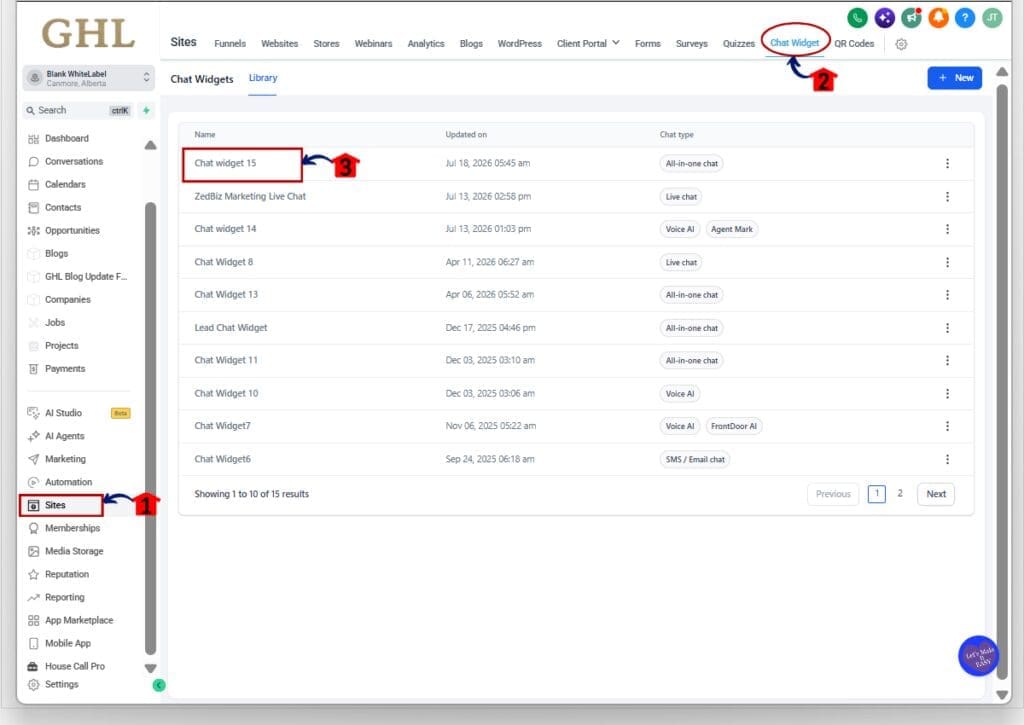
1.1 Click Sites.
- This opens the Sites area in your GHL sub-account.
1.2 Click Chat Widget in the top menu.
- The Chat Widgets section will open.
- You will see the widgets already saved inside the sub-account.
1.3 Click the Chat Widget you want to update.
- In this example, we are opening Chat widget 15.
- This opens the Chat Widget builder where you can access its settings.
Step 02 – Turn On Chat Widget Spam Protection
- Once the Chat Widget builder opens, you can access the Spam Protection controls from the Chat window settings.
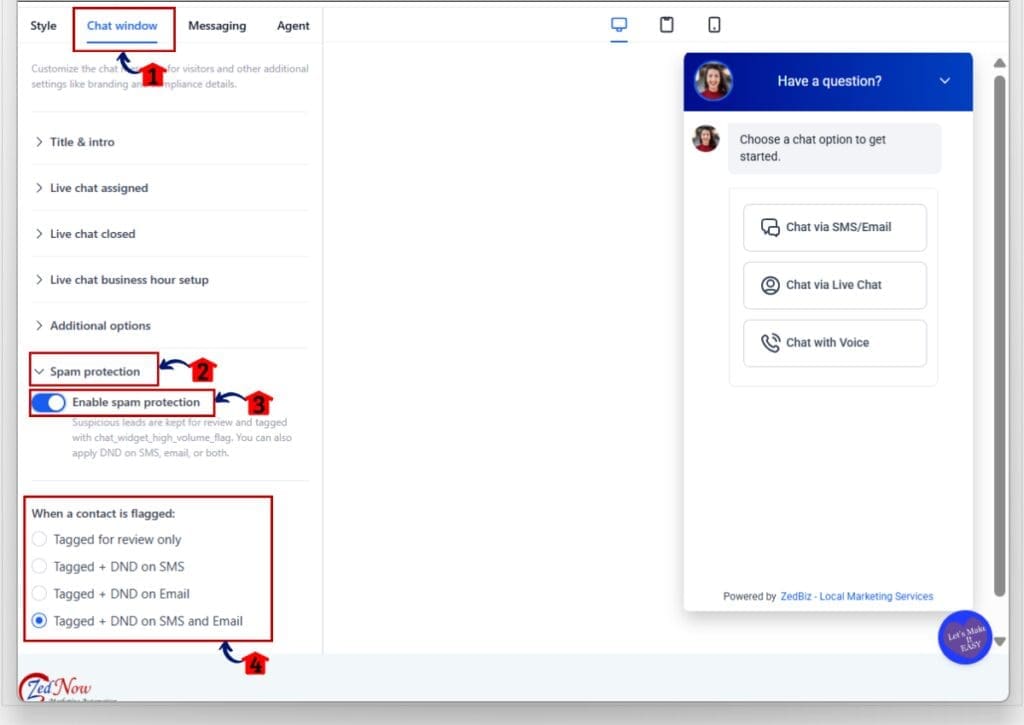
2.1 Click the Chat window at the top of the builder.
- This opens the settings used to control the visitor chat experience and other Chat Widget options.
2.2 Find and open Spam protection.
- The Spam Protection settings will expand in the left-hand panel.
- This is where you control how GHL handles suspicious Chat Widget submissions.
2.3 Turn on Enable spam protection.
- GoHighLevel will now check for suspicious or high-volume submissions in the background.
- Flagged contacts are kept in the CRM and tagged with chat_widget_high_volume_flag.
2.4 Choose what happens when a contact is flagged.
You can select one of four options:
- Tagged for review only
- GHL adds the tag so your team can review the contact.
- SMS and email are not paused.
- Tagged + DND on SMS
- The contact is tagged.
- SMS messaging is paused for that contact.
- Tagged + DND on Email
- The contact is tagged.
- Email messaging is paused for that contact.
- Tagged + DND on SMS and Email
- The contact is tagged.
- Both SMS and email messaging are paused.
Choose the option that fits how your Chat Widget leads are followed up inside GHL.
Your Chat Widget Spam Protection is now configured. Suspicious contacts can stay in your CRM for review while GHL limits the messaging channels you selected.
Quick Tips for Chat Widget Spam Protection
Chat Widget Spam Protection is simple to set up, but a few small choices can make it work better for your account.
- Use Tagged + DND on SMS and Email if new Chat Widget leads normally enter automated follow-up right away.
- Use Tagged for review only if your team wants to check suspicious leads before stopping any messages.
- Review flagged contacts on a regular basis so real leads do not sit untouched for too long.
- Check the contact activity before removing DND. This helps you see what action GHL took and which channel was affected.
- Remember that each Chat Widget has its own Spam Protection setting. Review every widget you use, especially across client sub-accounts.
- If you expect a major traffic spike from a launch, event, or campaign, review the setting first. You can temporarily turn Spam Protection off and switch it back on later.
The main goal is simple. Stop bad traffic from triggering unnecessary messages, but keep enough control to review anything that may still be a real lead.
What Chat Widget Spam Protection Means for Your Business
Chat Widget Spam Protection gives you a cleaner way to handle suspicious leads before they start costing you money. If a spam attack creates a large number of fake contacts, your workflows may start sending SMS and email messages to bad phone numbers or email addresses.
With the new controls, GHL can flag those contacts and pause the channels you choose. That can help reduce wasted message sends, lower the chance of repeated delivery failures, and protect your sender reputation.
For agencies, this is especially useful when you manage several client accounts. You can set the right protection level for each Chat Widget based on how that client follows up with leads. The contact still stays in the CRM, so your team can review it before deciding what to do next.
The end result is more control, less cleanup, and fewer unnecessary messages sent to suspicious contacts.
Frequently Asked Questions About Chat Widget Spam Protection
Better Control Over Chat Widget Spam
Chat Widget Spam Protection gives GHL users a simple way to deal with suspicious submissions without making the process harder for real visitors.
You can keep flagged contacts in the CRM, review them later, and choose whether GHL should pause SMS, email, or both. That can help cut down on wasted sends and reduce the risk of bad contact data affecting your sender reputation.
If you already use Chat Widgets, it is worth checking each one and choosing the protection setting that fits your follow-up process. A few minutes of setup now can save a lot of cleanup later.
Scale Your Business Today.
Streamline your workflow with GoHighLevel’s powerful tools.


