

- Explore the latest GoHighLevel template additions for funnels, ads, social posts, WhatsApp messages, surveys, and snapshots.
- Quick Summary – GHL Template Release at a Glance
- What’s New in This GHL Template Release?
- New Funnel and Survey Templates
- New Social Media Templates
- New Facebook, Google, and LinkedIn Ad Templates
- 52 New WhatsApp Message Templates
- New Gym Snapshot
- How to Find and Use the New GHL Funnel Template
- Pro Tips for Using the New Templates
- Results You Can Expect
- Frequently Asked Questions about Template Release
- A Faster Way to Build Client Campaigns
Explore the latest GoHighLevel template additions for funnels, ads, social posts, WhatsApp messages, surveys, and snapshots.
GHL Template Release
The latest GHL template release gives agencies and marketers more ready-made assets to work with across funnels, ads, social posts, WhatsApp, surveys, and snapshots. That means less time starting from a blank page and more time getting campaigns built, reviewed, and launched.
This update adds new templates for several industries, including finance, real estate, home services, health and wellness, restaurants, automotive, creative services, and more. The biggest part of the release is the 52 new WhatsApp message templates, with both English and Spanish versions for a wide range of businesses.
You’ll also find new Facebook, Google, and LinkedIn ad templates, eight new social templates, a new financial funnel, a new marketing agency survey, and a new Gym snapshot. For agencies managing several clients, this GHL template release gives you a practical head start while still leaving plenty of room to customize each asset for the client.
This GHL template release gives agencies and marketers a faster way to launch campaigns without starting from scratch. With new templates across ads, social, WhatsApp, funnels, surveys, and snapshots, you can cut setup time and get client campaigns moving quicker.
Quick Summary – GHL Template Release at a Glance
Purpose: This update gives GoHighLevel users more ready-made templates for funnels, surveys, social posts, ads, WhatsApp messages, and snapshots.
Why It Matters: The new templates can help agencies and marketers spend less time building from scratch and more time customizing campaigns for each client.
What You Get: The release includes new funnel and survey templates, eight social templates, new Facebook, Google, and LinkedIn ad templates, 52 WhatsApp message templates, and a new Gym snapshot.
Time To Complete: You can review and start using a template in a few minutes, but the final setup time will depend on how much branding, copy, and campaign customization you need.
Difficulty Level: Beginner-friendly. Most templates are easy to preview, select, edit, and adapt inside GoHighLevel.
Key Outcome: You get a faster starting point for client campaigns while still keeping full control over the message, design, offer, and final setup.
What’s New in This GHL Template Release?
This GHL template release adds a solid mix of new assets for everyday marketing work. You now have more ready-made options for funnels, surveys, social posts, paid ads, WhatsApp messages, and snapshots, which can make it easier to get campaigns moving without building everything from scratch.
GoHighLevel added one new financial funnel, one new survey template for marketing agencies, and eight new social templates across travel, creative, restaurant, and automotive niches. There are also fresh Facebook, Google, and LinkedIn ad templates for industries like real estate, home services, finance, health and wellness, insurance, and business coaching.
Automate marketing, manage leads, and grow faster with GoHighLevel.

The biggest part of this GHL template release is the 52 new WhatsApp message templates in English and Spanish. GoHighLevel also added a new Gym snapshot for the health and wellness niche. The main benefit is simple: more useful starting points, less setup work, and faster campaign builds for agencies and their clients.
New Funnel and Survey Templates
This GHL template release also adds a new financial funnel and a new survey template for marketing agencies. Both give you a ready-made starting point, so you can spend less time building the basic layout and more time adjusting the message, offer, and follow-up.
The financial funnel can work well for services such as mortgage companies, financial advisors, or investment firms. The new survey template is useful for agencies that need to collect lead details, qualify prospects, or gather information before a call or campaign.
The best way to use these templates is to treat them as a framework, not a finished product. Update the copy, branding, questions, and calls to action so they match the client and the campaign goal.
New Social Media Templates
This GHL template release also brings eight new social templates across travel, creative, restaurant, and automotive niches. That gives agencies a quicker way to build social content without starting every post from a blank canvas.
The new options include examples for businesses such as automotive dealerships, gelaterias, graphic designers, and travel writers. These templates can help you shape a cleaner content plan while still giving you room to change the visuals, captions, and calls to action.
The smart move is to use them as a base, not a finished post. Match the design to the client’s brand, adjust the message to fit the offer, and make sure the content sounds like the business it represents.
New Facebook, Google, and LinkedIn Ad Templates
This GHL template release also adds fresh ad templates for Facebook, Google, and LinkedIn. The new options cover a useful mix of industries, including real estate, restaurants, home services, health and wellness, finance, insurance, creative services, and business coaching.
For Facebook, the update includes templates for a licensed real estate agent and a steakhouse. Google Ads now include options for landscape design, mental health, financial investing, dance schools, and author coaching. LinkedIn templates cover services such as government contracting, packaging design, commercial collections, fleet insurance, surety bonds, email marketing, and property tax consulting.
These templates can save time when you need a strong starting point for a client campaign. Just make sure you adjust the offer, headline, audience, and call to action before launch so the ad fits the business and the goal.
52 New WhatsApp Message Templates
The biggest part of this GHL template release is the addition of 52 new WhatsApp message templates. They cover a wide range of industries, including automotive, beauty, coaching, finance, home services, legal, medical, real estate, restaurants, travel, insurance, and marketing agencies.
Each set includes English and Spanish versions, which makes this update useful for agencies that serve bilingual markets. You can use these templates as a starting point for lead follow-up, appointment reminders, service updates, promotions, and other client communication.
The key is to keep the message relevant to the business and the audience. Update the wording, offer, and call to action before using any template, so it feels natural and matches the client’s brand.
New Gym Snapshot
This GHL template release also includes a new Gym snapshot for the health and wellness niche. It gives agencies a faster starting point when setting up a gym or fitness client inside GoHighLevel.
Instead of building the account from the ground up, you can use the snapshot as a base and then adjust the branding, offers, messaging, and workflows to fit the client. That can help cut down setup time, especially if you work with more than one business in the fitness space.
The best approach is to treat the snapshot like a framework. Review each part before launch, remove anything the client does not need, and make sure the setup matches how their business actually works.
How to Find and Use the New GHL Funnel Template
One of the easiest ways to put this GHL template release to work is to start with the new funnel templates. You can open the Funnel Template Library, filter the available designs, preview the template, and then customize it inside the funnel builder.
Here are the steps we will follow:
- Open the Funnels area.
- Choose a Funnel Template.
- Browse and filter the Template Library.
- Preview and choose the template.
- Customize and publish the funnel.
To start, make sure you are logged in to the correct GoHighLevel sub-account.
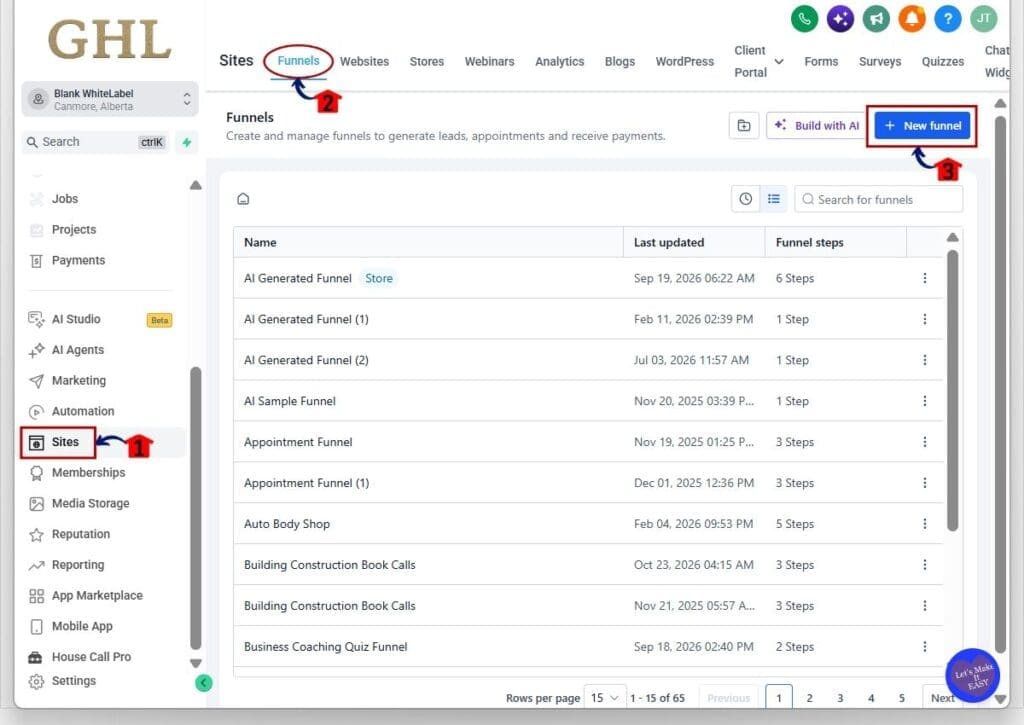
Step 01 – Open the Funnels Area
- Funnel templates are found inside the Sites section of your GoHighLevel sub-account.
1.1 Click Sites from the main left-hand menu.
- This opens the main Sites area in GoHighLevel.
1.2 Click Funnels from the top menu.
- This opens the Funnels section where you can view your existing funnels.
1.3 Click + New funnel in the top-right corner.
- This opens the options for creating a new funnel.
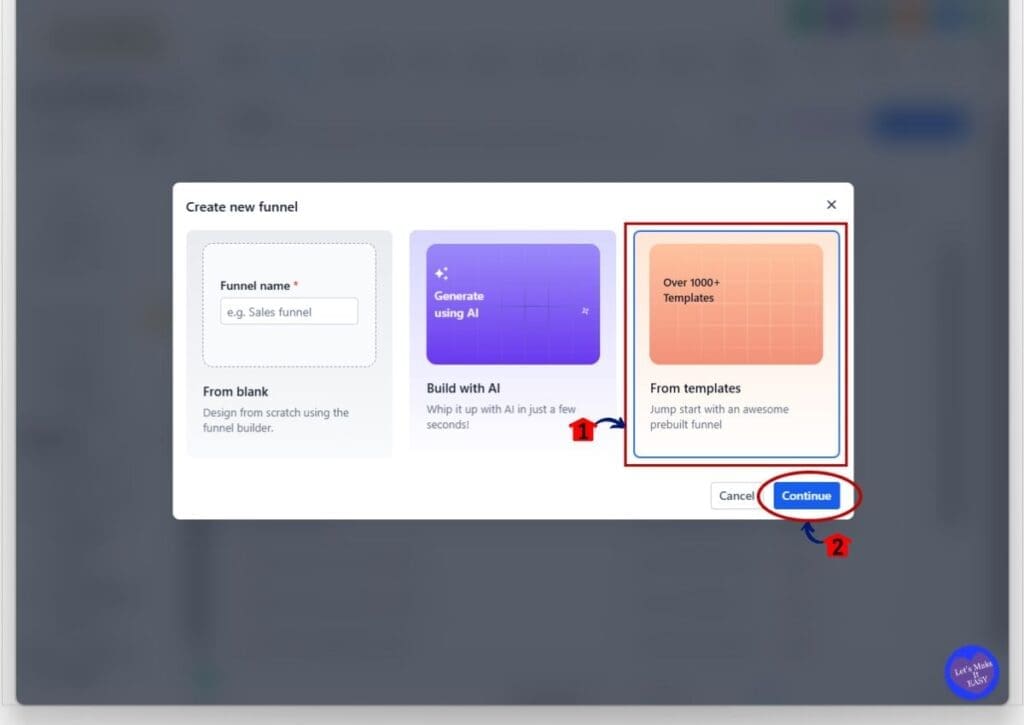
Step 02 – Choose a Funnel Template
- GoHighLevel gives you several ways to start a new funnel.
2.1 Select From templates.
- This option lets you start with one of the ready-made funnel designs in the Template Library.
2.2 Click Continue.
- GoHighLevel will open the Funnel Template Library so you can browse the available designs.
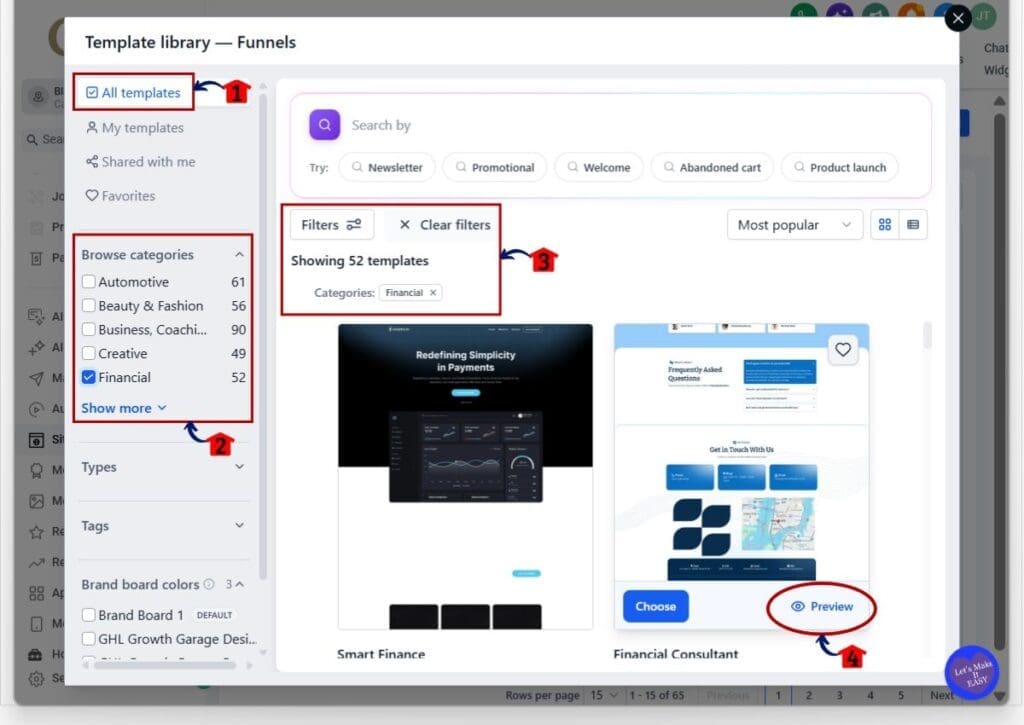
Step 03 – Browse and Filter the Template Library
- The Funnel Template Library gives you several ways to narrow down the available options.
3.1 Select All templates from the left-hand menu.
- This lets you browse the full collection of available funnel templates.
3.2 Use Browse categories to choose the type of business or industry you want.
- For this GHL template release, you can select the Financial category to find the new financial funnel options.
3.3 Review the active filters.
- GoHighLevel will show which category or filters are currently applied.
- You can also use the search bar, template types, tags, and other filters to narrow the results.
3.4 Click Preview on a template you want to review.
- This lets you see the full funnel design before adding it to your account.
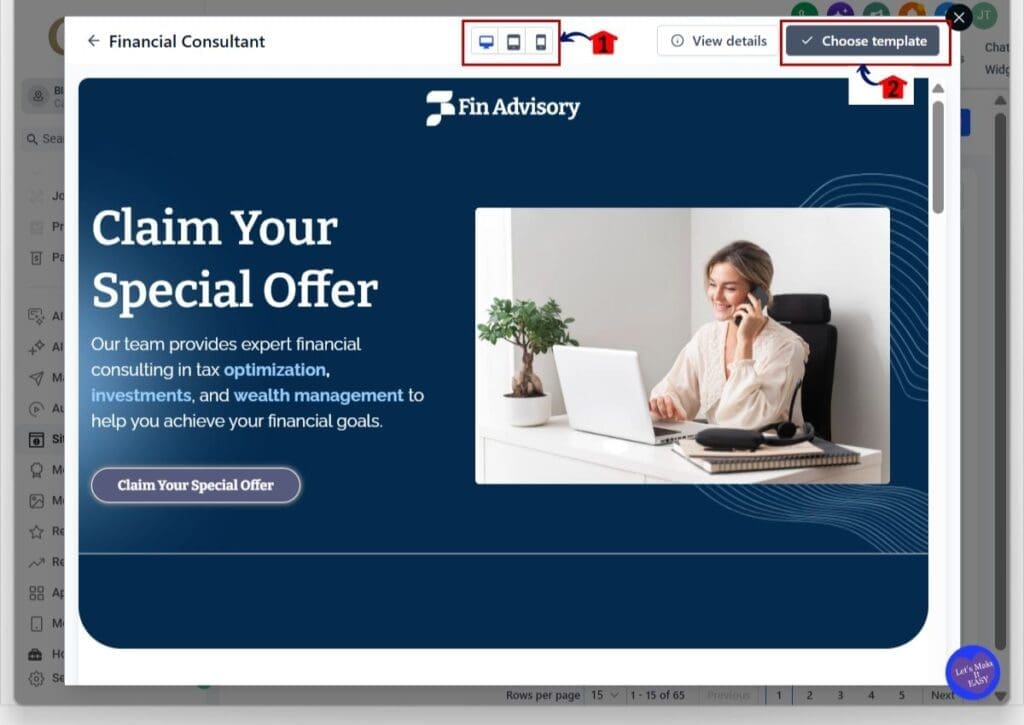
Step 04 – Preview and Choose the Template
- The preview screen lets you check the design before you commit to using it.
4.1 Review the template on different screen sizes.
- Use the desktop, tablet, and mobile icons at the top of the preview.
- This helps you see how the funnel looks on different devices.
4.2 Click Choose template when you are happy with the design.
- GoHighLevel will add the template to your sub-account so you can begin editing it.
Step 05 – Customize and Publish the Funnel
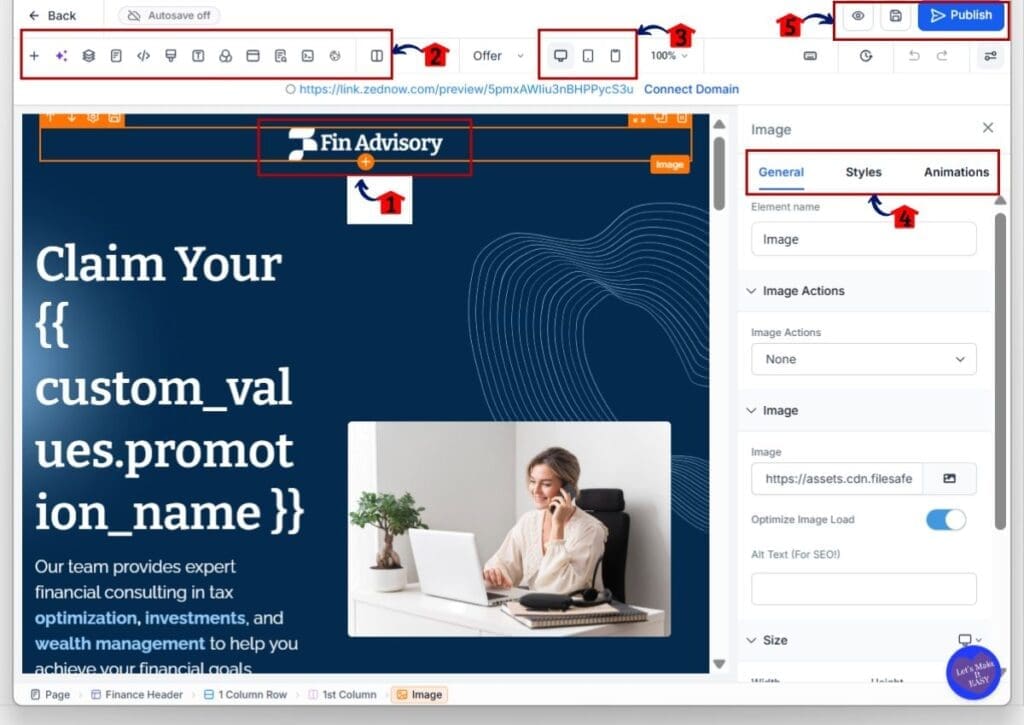
- Once the template opens in the funnel builder, you can change the design to match your business or client.
5.1 Click any section or element you want to edit.
- You can update text, images, buttons, forms, and other parts of the funnel.
5.2 Use the builder tools at the top of the page.
- These tools let you add or manage page elements, sections, custom code, and other funnel features.
5.3 Use the desktop, tablet, and mobile controls to check the page layout.
- Review the funnel on each device size before publishing.
5.4 Use the settings panel on the right to adjust the selected element.
- Depending on the element, you can update the content, style, spacing, actions, and other settings.
5.5 Preview and save your changes.
- Use the preview option to check the finished page before it goes live.
- Save your work as you make changes.
5.6 Click Publish when the funnel is ready.
- Before publishing, make sure the branding, copy, links, forms, and calls to action are correct.
The new funnel template gives you a solid starting point, but it should still be customized before you launch it. Update the design and messaging so it fits the actual business, offer, and audience.
Pro Tips for Using the New Templates
The best way to get more value from this GHL template release is to treat each template as a starting point, not a finished campaign. Before you publish anything, update the branding, images, copy, offer, and contact details so the asset fits the actual business.
Keep the changes simple and focused. Match the template to the client’s niche, remove anything they do not need, and make sure every button, form, link, and call to action works as expected. If you are using the same template for several clients, create a clean base version first so future setups are faster.
It is also worth testing different versions when the template is used for ads, funnels, or social posts. Small changes to headlines, images, and offers can make a big difference, so do not assume the default version will be the best performer.
Results You Can Expect
This GHL template release can help cut down the time it takes to build common marketing assets. Instead of starting from scratch, you can begin with a ready-made layout and focus on the parts that matter most, like the offer, message, branding, and campaign setup.
For agencies, that can make client onboarding and campaign launches easier. A real estate client may need an ad and funnel, while a gym may need a snapshot, social content, and follow-up messages. Having more ready-made options gives you a faster way to build the first version and then shape it around the client.
The main result is better efficiency. You still need to review and customize each asset, but you spend less time on basic setup and more time improving the campaign itself.
Frequently Asked Questions about Template Release
A Faster Way to Build Client Campaigns
This GHL template release gives agencies and marketers more ready-made options across funnels, surveys, social posts, ads, WhatsApp messages, and snapshots. The main benefit is simple: you can start faster, then spend your time shaping the asset around the client instead of building everything from zero.
The new WhatsApp templates, ad templates, social designs, funnel, survey, and Gym snapshot all give you more flexibility when working across different niches. Just remember that every template still needs a proper review before it goes live. Update the branding, copy, offers, links, and calls to action so the final version fits the business.
If you work with several clients, this update can make setup and campaign building much easier. Which part of this GHL template release do you think you’ll use first?
Scale Your Business Today.
Streamline your workflow with GoHighLevel’s powerful tools.


