

- A clean, fast way to build and preview your courses
- Quick Summary – Course Builder Update Overview
- What’s New in the Course Builder Update
- Why This Update Matters
- How to Enable the New Course Builder
- How to Use the New Course Creation Wizard
- Editing Experience – Big Window and Course Map
- Performance and Usability Boosts
- Pro Tips for Course Creators
- What This Means for Agencies
- FAQs About the Course Builder Update
- It's Time to Use this Update
A clean, fast way to build and preview your courses
Yes, the course builder update in GoHighLevel is now live. It brings a faster, more reliable, and easier way to build online courses. The update replaces the older, slower version that many users found frustrating. Instead of relying on iFrames, the new builder runs natively inside GHL, giving users a much smoother experience.
For agencies that offer coaching, digital products, or memberships, this change matters. Building a course inside GoHighLevel used to take extra time and clicks. Now, it’s faster to get in, set things up, and publish. The interface is cleaner. Everything loads quicker. And the layout actually makes sense.
This update is currently in Labs and ready to turn on. Agencies and course creators will notice the difference right away.

The new GHL course builder update gives course creators a faster, cleaner, and smarter way to build online programs. From a full-screen editor to drag-and-drop tools, this update removes friction and boosts performance using a native UI system.
Quick Summary – Course Builder Update Overview
Purpose: The new course builder update gives GoHighLevel users a simpler way to create and manage courses from start to finish.
Why It Matters: It cuts down on load times, reduces clicks, and makes the editor easier to use. That helps agencies move faster and look more professional.
What You Get: A full-screen editor, drag-and-drop Course Map, faster load speeds, and a guided setup to help you launch in minutes.
Time to Complete: Setup takes about 10 minutes from toggle to ready-to-build.
Difficulty Level: Beginner-friendly. No tech experience required.
Key Outcome: Users can build courses faster, update them with less effort, and give clients or students a better experience.
What’s New in the Course Builder Update
The latest course builder update in GoHighLevel is more than just a new look. It changes how users build and manage online courses by focusing on speed, clarity, and simplicity.
The platform now feels easier to navigate. Visual elements like buttons, modals, and forms are all designed to work together. This makes it easier to move through the builder without getting stuck or lost.
Automate marketing, manage leads, and grow faster with GoHighLevel.

Here’s what users will notice right away:
- A clean and modern layout. Everything looks more consistent. It’s easier to understand where things are and what to do next.
- No more iFrames. The builder now runs natively, which means faster clicks, fewer bugs, and a smoother experience overall.
- Full-screen editing. The editor now takes up the whole screen. That gives users more space to focus on the course content without distractions.
- Side-by-side Course Map. Users can now drag lessons, edit modules, and manage layout without switching between pages.
- Simple 3-step course setup. Start a new course by adding the title, thumbnail, and pricing. The builder takes care of the rest.
- Ready-to-use templates. When starting from scratch, the builder adds sample lessons, modules, and even a certificate to help users get moving faster.
This GoHighLevel course builder update removes the clutter and gives creators a better way to build and manage their content.
Why This Update Matters
The new course builder update in GoHighLevel is more than just a redesign. It solves a few problems that course creators and agencies have faced for a while.
The older version was slow to load and hard to work with. This update gives users a better way to build, edit, and launch online courses inside GHL. It feels easier and more stable, which matters when you’re working on tight timelines or managing multiple clients.
Here’s why this version makes a difference:
- Less time spent on setup. The builder works faster and is more responsive. Users can build courses with fewer steps and less back-and-forth.
- Better layout for learners. The new design looks cleaner on the front end. That makes it easier for students to follow along and stay engaged.
- Built-in support for different pricing types. Creators can choose between free, one-time, or subscription models without using extra tools or workarounds.
- Easier to white-label. The updated design system uses consistent colors, spacing, and fonts. This makes it easier for agencies to offer clean, branded course portals.
This update helps both creators and end users. It makes course building feel less like a task and more like a smooth part of the process.
How to Enable the New Course Builder
The latest course builder update in GoHighLevel is not turned on by default. To try it, users need to switch it on inside their settings. It only takes a few steps.
Here is the process:
- Log into your GoHighLevel account.
- Go to Settings on either the agency or sub-account level.
- Open the Labs section.
- Look for the toggle labeled Courses Studio 2.0.
- Click to enable it.
- Refresh the page or log out and back in.
Once it’s turned on, the new course builder will show up when you create or edit a course. It works inside the existing system, so you don’t need to install anything else.
If needed, users can always switch back to the previous version by turning off the same toggle.
This update is available to all users with no upgrade required.
How to Use the New Course Creation Wizard
One of the best parts of the new course builder update in GoHighLevel is how easy it is to get started. The new wizard takes users through a simple three-step process to launch a course with less setup.
Here’s how it works:
Step 01 – Access the Main Menu in GoHighLevel
- The main menu on the left side of your screen includes all the main areas you work in when using GoHighLevel (GHL).
1.1 Click on the Memberships menu item to access the Courses section.
- You’ll now be in the Memberships section, where you can access the Courses tab from the top menu.
1.2 Hover over the Courses tab.
1.3 Click the Dashboards option.
- You will now see the updated layout of the GoHighLevel course dashboard.

Step 02 – Navigate to the Products Area
- You should now be inside the GoHighLevel dashboard.
2.1 Hover over the Courses tab again.
2.2 Click the Products option.
- You should now see the updated layout of your course previews.

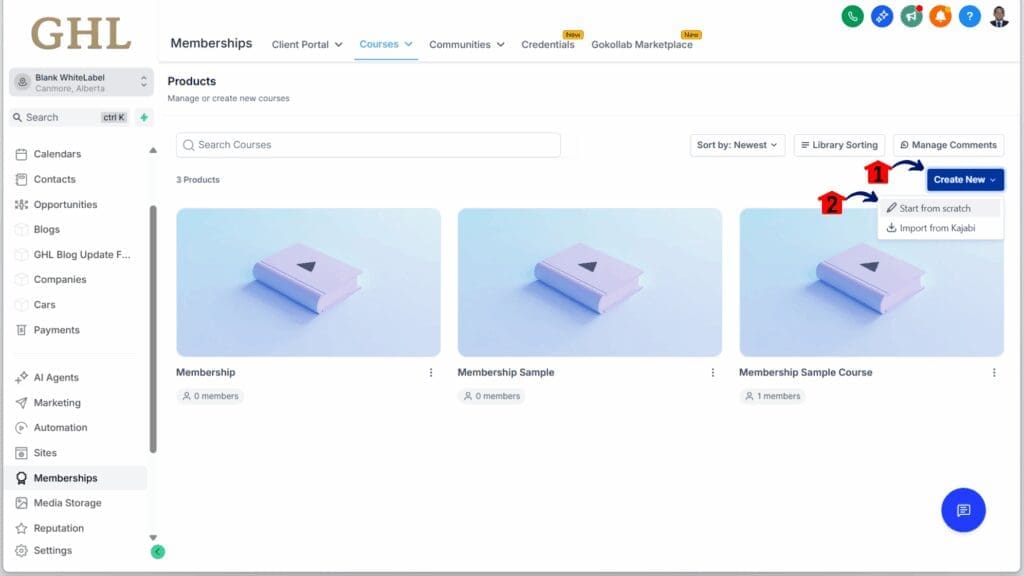
Step 03 – Start a New Course
- You should now be in the course dashboard.
3.1 Click the Create New button.
- A dropdown will appear with two options, including the Start From Scratch option.
3.2 Click the Start From Scratch option.
Step 04 – Review the Course Editor
- You should now be in the course creation editor.
4.1 Review the new interface that lets you create a course.

Step 05 – Return to Your Course List
- You can now return to your Courses products.
5.1 Click any existing course.

Step 06 – Review the Updated Course Layout
- You should now be on the dashboard for that specific course.
6.1 You should see the updated layout of your course, including modules, quizzes, and other items.

Once those three steps are done, the system creates a basic structure with placeholder lessons, a sample module, and even a certificate.
It’s a quick way to get moving. Instead of starting with a blank screen, users have a working layout they can edit or replace as needed.
Editing Experience – Big Window and Course Map
This course builder update in GoHighLevel changes the way users edit and manage course content. The old method felt limited, especially for those working on larger programs. The new layout fixes that.
Now, when you open a course, the editor fills the screen. It gives more space to work and keeps everything in view. The Course Map stays on the left side, so users always know where they are and what comes next.
Here is what that looks like in practice:
- See the full course at a glance. Modules and lessons are listed clearly. Click on any item to jump straight into editing without leaving the page.
- Move things around with ease. Just drag and drop lessons or entire sections into place. It updates right away, no loading screen needed.
- Stay in one view while editing. Instead of switching between tabs, everything happens in a single window. That means fewer clicks and faster updates.
This change gives users a clearer view of their content. It helps reduce mistakes and makes editing feel more straightforward. The new layout is one of the most noticeable improvements in the entire course builder update.
Performance and Usability Boosts
This course builder update makes GoHighLevel feel faster and more reliable. That matters when you’re building out lessons, changing modules, or updating offers during a launch.
In the past, pages took a while to load. That’s no longer the case. Now, most course sections open in under a second. That may seem like a small change, but over time it makes a big difference.
Here are a few updates behind the speed:
- Smart loading: GoHighLevel now uses caching and lazy loading. This means only what you need shows up, so the platform moves quicker.
- No iFrames: Removing iFrames reduced loading problems. The course builder now runs inside the main app, so things respond faster and more smoothly.
- Better design structure: The builder now follows set design rules for spacing, colors, and fonts. That makes everything easier to read and keeps the layout clean.
These updates focus on small things that improve the overall experience. The course builder update helps users spend more time building and less time waiting.
Pro Tips for Course Creators
This course builder update makes GoHighLevel more useful for anyone building digital courses. The new layout is simple, but knowing a few best practices can make the process even smoother.
Here are a few practical tips:
- Use the starter content. Every new course comes with sample lessons, modules, and a certificate. Instead of deleting them, use them as a layout guide. Adjust what you need, and build from there.
- Add a custom certificate. The built-in option works fine, but a branded version looks better for your students. It only takes a few clicks to upload one.
- Connect workflows. Link your course to automation. Tag students, send email reminders, or unlock bonuses based on progress. This helps keep people active and moving through the course.
- Preview while building. The live preview is a good way to catch mistakes early. Check how each lesson looks before you move on.
- Use the Course Map to stay organized. Move things around as needed. A clear structure helps both the creator and the learner.
The tools are all there. These tips help you use the course builder update in a way that keeps things efficient and easy to manage.
What This Means for Agencies
For agencies using GoHighLevel, this course builder update brings a few clear wins. It helps teams deliver cleaner, faster results and gives clients a better first impression.
Here’s how it makes a difference:
- Improves client experience. When clients see the updated course area, it feels more polished. A modern layout and faster load times show that your agency takes quality seriously.
- Faster course delivery. The improved tools help teams build and update courses without getting stuck in the process. That keeps projects moving.
- Makes upselling easier. When the platform looks better and works better, it’s easier to offer extra services like paid training, automation, or white-label options.
- Cuts down on support time. A more stable editor means clients need less help. That frees up your team to focus on bigger tasks.
This update helps agencies work more efficiently and present their services with confidence. The course builder update gives teams the tools they need to build and sell courses without the usual friction.
FAQs About the Course Builder Update
Here are some quick answers to common questions about the new course builder update in GoHighLevel.
This GoHighLevel course builder update improves how users create and manage content without disrupting what they’ve already built.
It’s Time to Use this Update
This course builder update in GoHighLevel is a clear improvement over the older version. It doesn’t try to add flashy features. It focuses on fixing what needed to work better.
The builder now opens faster, looks cleaner, and gives users more room to edit and organize. The new setup wizard, Course Map, and full-screen editor are simple changes that have a big impact.
Here’s a quick recap:
- Building a course takes fewer steps
- Editing content feels smoother
- The layout is easier to follow and looks more professional
For anyone offering coaching, training, or client education, this is worth turning on. The update is already available in Labs and ready to use.
This GoHighLevel course builder update helps users save time, reduce frustration, and deliver a better experience to their audience.
Scale Your Business Today.
Streamline your workflow with GoHighLevel’s powerful tools.


