

- Stop junk leads at the source—filter inbound calls and texts automatically inside GoHighLevel Workflows.
- Quick Summary – Inbound Call Automation
- What’s New – Inbound Direction Support in DND Workflows
- What’s Changed – More Granular Control in Workflows
- Why This Matters – Stop Junk Leads & Bad Data
- How to Use It – Build Inbound Spam Filtering in Workflows
- Pro Tips – Smarter DND Automation Ideas
- What This Means – Clean CRM, Cleaner Results
- Conclusion – Automation That Finally Works Both Ways
Stop junk leads at the source—filter inbound calls and texts automatically inside GoHighLevel Workflows.
Let’s face it—junk calls are a buzzkill. You’ve got workflows to automate follow-up, nurture leads, and keep your pipeline clean… but until now, there was one big gap. Inbound messages—especially spammy calls and texts—kept sneaking past your filters. They’d show up in your CRM, clutter your contacts, and even trigger workflows that waste your time and inflate your reporting.
That’s a problem. But now, GoHighLevel just delivered a smart solution. You can finally automate Do Not Disturb (DND) settings for inbound communications inside workflows. That means no more junk calls creating fake contacts. No more SMS spam slipping into your automations. Inbound call automation is officially here—and it’s a game changer. In this post, we’ll walk you through what’s new, how it works, and how to use it to stop spam before it even hits your pipeline.

With GoHighLevel’s new inbound call automation, you can now block spam calls and filter junk SMS messages before they hit your pipeline. This gives agencies better contact quality, cleaner reporting, and full control over inbound communication automation.
Quick Summary – Inbound Call Automation
Purpose:
To give GoHighLevel users the power to automatically filter out spammy inbound calls and texts using updated DND controls in workflows.
Why It Matters:
This update finally lets you stop junk contacts from ever entering your CRM or triggering automations, saving time, resources, and reporting accuracy.
What You Get:
New “Inbound” direction settings in both Contact DND Triggers and Enable/Disable DND Actions inside workflows.
Time to Complete:
About 10–15 minutes to update existing workflows or set up a new one with inbound DND rules.
Difficulty Level:
Easy – requires basic familiarity with GHL Workflows.
Key Outcome:
Cleaner contact lists, fewer spam leads, and better control over who triggers your automations.
What’s New – Inbound Direction Support in DND Workflows
Until now, the DND (Do Not Disturb) tools inside GoHighLevel workflows were outbound-only. That meant you could stop texts, calls, or emails from going out—but you had no control over what was coming in.
Now you do.
Automate marketing, manage leads, and grow faster with GoHighLevel.

With the latest update, you can set DND rules specifically for inbound communication—including calls and SMS. This change gives you precision control over what gets into your CRM in the first place.
Here’s what’s new:
- Direction Control has been added to both:
- The Contact DND Trigger
- The Enable/Disable DND Action
- You can now choose between:
- Inbound
- Outbound
- Inbound DND applies to ALL inbound channels, including:
- Phone calls
- Text messages
This new capability is simple but powerful. It means you can build workflows that automatically block or filter inbound spam, rather than letting those messages trigger follow-ups, create bogus contacts, or disrupt your pipeline.
Inbound DND support is live now, and you’ll see the new “Direction” dropdown in both the trigger and the action settings in your workflows.
What’s Changed – More Granular Control in Workflows
The core DND tools in GHL workflows are the Contact DND Trigger and the Enable/Disable DND Action. These let you monitor when a contact is added to DND—or place them into DND mode based on logic in your automation.
Before this update, though, you had no choice but to apply DND to all outbound messages. And that’s where the problem started: inbound spam still came through, created records, and triggered follow-ups. Not ideal.
With this update, you now have fine-tuned control thanks to the new Direction setting.
Here’s what changed:
- Both the Contact DND trigger and the Enable/Disable DND action now include a Direction dropdown
- You can select:
- Inbound (NEW)
- Outbound (Default setting)
What does this mean in practice?
- You can trigger automations based on inbound DND activity, not just outbound.
- You can automatically block inbound communications—calls or texts—using a workflow.
- And best of all, existing workflows stay exactly the same. If you don’t change anything, they continue working as outbound-only DND tools by default.
This is an additive change that upgrades your automation without breaking anything already live.
Why This Matters – Stop Junk Leads & Bad Data
If you’ve ever opened your CRM and seen random names, strange numbers, or empty contacts clogging up your Smart Lists—you already know the pain this solves.
Here’s the deal: Inbound spam doesn’t just annoy you—it costs you.
Every spam call that creates a junk contact:
- Wastes your workflow credits
- Pollutes your reporting
- Triggers unneeded automations
- Creates false pipeline opportunities
That’s not just bad data—it’s bad business.
Inbound DND automation helps you fight that fire automatically. It ensures that spammy inbound messages never activate your workflows or create bloated contact lists again.
Now, instead of reacting to the problem manually, you can:
- Stop the contact from being messaged
- Prevent new junk opportunities
- Avoid adding bad leads to Smart Lists or nurture campaigns
For agencies running lead gen at scale, this can be a massive win for clean CRM hygiene, better segmentation, and clearer reporting.
You’re not just automating your messages anymore. You’re automating who even gets to trigger them.
How to Use It – Build Inbound Spam Filtering in Workflows
This new inbound DND support isn’t just for show—it’s dead simple to use. In just a few clicks, you can upgrade your existing workflows or build new ones to automatically block spammy inbound calls or texts.
Here’s exactly how to set it up inside your GoHighLevel account:
Step 1.0 – Access the Main Left Hand Menu in GoHighLevel
- The Main Menu on the Left side of your screen has all the main areas that you work in when using GHL
1.1 Click on the Automation Menu Item.
- Access the ‘Automation’ section of GoHighLevel
- You’ll now be in the ‘Automation’ section of GHL, where you can access the WorkFlow section from the top menu:
1.2 Click on the ‘Workflow’ menu link.
1.3 Click Create Workflow
- Create Workflow and Start from scratch
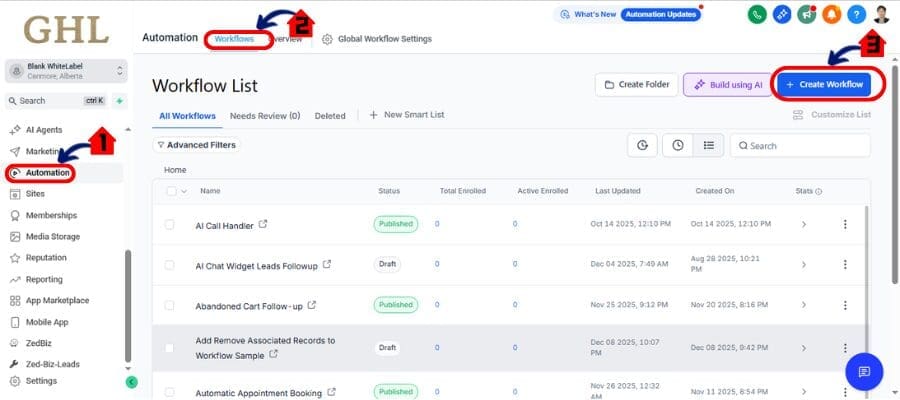
Step 02 – Add DND Trigger
2.1 Inside any workflow, click “Add Trigger”
- Add DND Trigger
- Set the Direction to Inbound
- Place this action after a condition, trigger, or filter (e.g., if a call comes from a known spam number or no contact info is found)
- Save your workflow and test it live

Where you’ll see the results:
- Head to a contact’s profile
- Click on the “DND” tab
- You’ll now see DND entries showing direction: Inbound for calls or SMS
Pro Tip: Use this to block incoming messages from contacts missing basic info (like email or name), especially if they hit your number via Google or a public ad.
This makes your automations proactive instead of reactive—and that’s the real win.
Pro Tips – Smarter DND Automation Ideas
Want to go beyond the basics? Good—because this new inbound DND feature has some seriously clever uses when paired with other GoHighLevel tools.
Here’s how to get the most out of it:
1. Combine With Smart Lists to Identify Patterns
- Build a Smart List that flags contacts missing key data (no name, no email, etc.)
- See which ones have DND = Inbound active
- Use this list to refine your filters and automation conditions
2. Create “Allow Lists” for Known Contacts
- Use conditional logic in your workflows:
- If contact has tag “VIP” or “Client” → skip DND
- If unknown or no tags → enable inbound DND
- This way, real leads always get through, and spam is silently shut down
3. Tag Suspicious Contacts for Manual Review
- Trigger a Slack notification or internal note when inbound DND is enabled
- This lets your team quickly audit edge cases or adjust filters over time
4. Use It With Call Tracking Campaigns
- Route calls from specific tracking numbers through workflows that auto-apply inbound DND unless they pass verification filters
- Useful for PPC, local SEO, or billboard tracking lines that get hit with spam
5. Automate Cleanup with Bulk Actions
- Add tags like “DND_Inbound_Auto” to flagged contacts
- Then use bulk actions to archive, remove opportunities, or delete them entirely on a schedule
This isn’t just about blocking noise—it’s about protecting your systems from being triggered by the wrong people. You’re taking control of who gets in and who doesn’t—automatically.
What This Means – Clean CRM, Cleaner Results
When you stop spam at the source, everything else runs smoother.
GoHighLevel’s new inbound DND control doesn’t just block junk—it improves the entire quality of your CRM. No more fake names. No more bogus opportunities. No more leads that make you question your data.
Here’s what that means for your agency:
- Cleaner contact lists – Less clutter, more real prospects
- Smarter workflows – Only legit leads trigger automations
- Stronger reporting – No skewed conversion rates from spam contacts
- Better segmentation – You can trust your Smart Lists again
- Faster follow-up – Your team wastes zero time on “dead” leads
It’s a small setting with massive downstream impact.
And the best part? You don’t have to overhaul your current workflows. Just add this inbound filter where needed, and your automations become twice as intelligent—with half the noise.
Inbound call automation isn’t just about convenience—it’s about precision. And now, GoHighLevel gives you that power.
Conclusion – Automation That Finally Works Both Ways
For too long, workflows in GoHighLevel were great at sending—but not so great at screening.
That’s changed.
With the new inbound DND control, you now have two-way automation power. You can decide who gets in and who gets left out—before they clutter your CRM, trigger workflows, or mess up your pipeline.
No more manual cleanup. No more chasing fake leads. Just smarter, cleaner, automated filtering that protects your systems and your sanity.
If you’re running lead-gen, sales, or client intake at scale—this update is a must-use.
Log in, update your workflows, and start filtering out inbound spam today.
It’s not just automation. It’s protection.
Scale Your Business Today.
Streamline your workflow with GoHighLevel’s powerful tools.


