- Better load times and smoother reports without changing how you work.
- Quick Summary – Dashboard Performance Optimization Essentials
- Backend Upgrades for Dashboard Performance Optimization
- Smarter Backend for Dashboard Performance Optimization
- Why Dashboard Performance Optimization Helps Your Workflow
- How to Use GHL's Dashboard Performance Optimization
- Quick Tips to Boost Dashboard Performance Optimization
- Frequently Asked Questions About Dashboard Performance Optimization
- What Dashboard Performance Optimization Means for You
- What to Expect From Dashboard Performance Optimization
- Dashboard Performance Optimization Is Already Working
Better load times and smoother reports without changing how you work.
Dashboard Performance Optimization in GHL
Dashboard performance optimization in GHL just got a big boost. This update focuses on speed, cutting out the lag that used to slow you down.
There are no new buttons to learn. Nothing changes in how you build or save. But you will feel the difference. Dashboards and custom reports now load faster, respond quicker, and keep up when you’re clicking through filters or switching tabs.
This kind of dashboard performance optimization doesn’t require any setup. It’s already live and working behind the scenes. All you need to do is keep building like you always have only now, it runs smoother.
This update improves dashboard performance optimization inside GHL. You’ll notice faster load times, smoother reports, and fewer slowdowns while you work.
Quick Summary – Dashboard Performance Optimization Essentials
Purpose: This update improves dashboard performance optimization in GHL by making dashboards and reports load faster and respond more smoothly.
Why It Matters: Less lag means faster work. It helps agencies and teams get through daily tasks without waiting on slow load times.
What You Get: Smarter backend behavior, quicker filter response, and better performance across dashboards and custom reports.
Time to Complete: No setup needed. These updates are already live and working behind the scenes.
Difficulty Level: None. The improvements are automatic and require no action from users.
Key Outcome: A smoother, faster GHL experience every time you use dashboards or reports.
Backend Upgrades for Dashboard Performance Optimization
GHL just rolled out a set of backend updates focused on dashboard performance optimization. These changes make dashboards and custom reports run faster without changing how you use them.
In dashboards, widget APIs now load only when you add something new. That cuts out the extra calls that used to slow things down. If you cancel an edit, save a dashboard without changes, or update a widget with no new data, GHL skips the unnecessary work. Even quick filters across modules respond better now.
Automate marketing, manage leads, and grow faster with GoHighLevel.

Dashboard performance optimization also shows up in how GHL loads data. Instead of running API calls one at a time, many now run at the same time. That makes dashboards mount faster and feel more responsive.
Custom reports got a speed bump too. When switching between report pages, GHL no longer reloads old data. Things like users, pipelines, and currency symbols now load only when needed inside the builder view. That keeps the list view cleaner and quicker.
All of these changes support better dashboard performance optimization across the platform. Less waiting, fewer delays, and smoother work for you.
Smarter Backend for Dashboard Performance Optimization
Before this update, dashboard performance optimization in GHL was not as strong as it could be. Even small actions, like opening a drawer or switching tabs, would trigger backend calls. Sometimes those calls weren’t needed, but they still slowed things down.
Now, GHL is smarter about what it does in the background. If you cancel an edit or save a dashboard without making changes, it skips the extra steps. If there is no new data, there is no new load.
Custom reports work better too. Switching between pages used to reload old data. That’s gone. Now, only the data you need for the current page gets pulled in.
One of the biggest wins for dashboard performance optimization is how API calls are handled. They used to run one after another. Now, many of them run simultaneously That means your dashboards load quicker and feel more responsive.
The tools haven’t changed, but the speed has. These backend upgrades help GHL run smoother so you can work faster.
Why Dashboard Performance Optimization Helps Your Workflow
If you build reports or manage dashboards in GHL often, you know how slow things can feel when data stacks up. Waiting for widgets to load or filters to apply can drag out even simple tasks. That’s where dashboard performance optimization makes a real difference.
With fewer delays and faster loading, you spend less time waiting and more time doing. This matters most when you’re working with larger accounts or pulling in data from multiple places. A few seconds saved here and there adds up fast.
For agencies, this means smoother handoffs to clients and better reporting meetings. You can move through dashboards without stalls, click through reports without lags, and make edits without the platform getting in the way.
Dashboard performance optimization also helps your team. Everyone works a little faster and with fewer headaches when the system keeps up.
It’s not flashy. But speed is one of the most valuable updates GHL can give you.
How to Use GHL’s Dashboard Performance Optimization
The dashboard performance optimization update works behind the scenes. You don’t need to install anything or update settings. But here’s how to see the improvements in action during your normal work.
Step 01: Access the Main Left Hand Menu in GoHighLevel
- The Main Menu on the Left side of your screen has all the main areas that you work in when using GHL
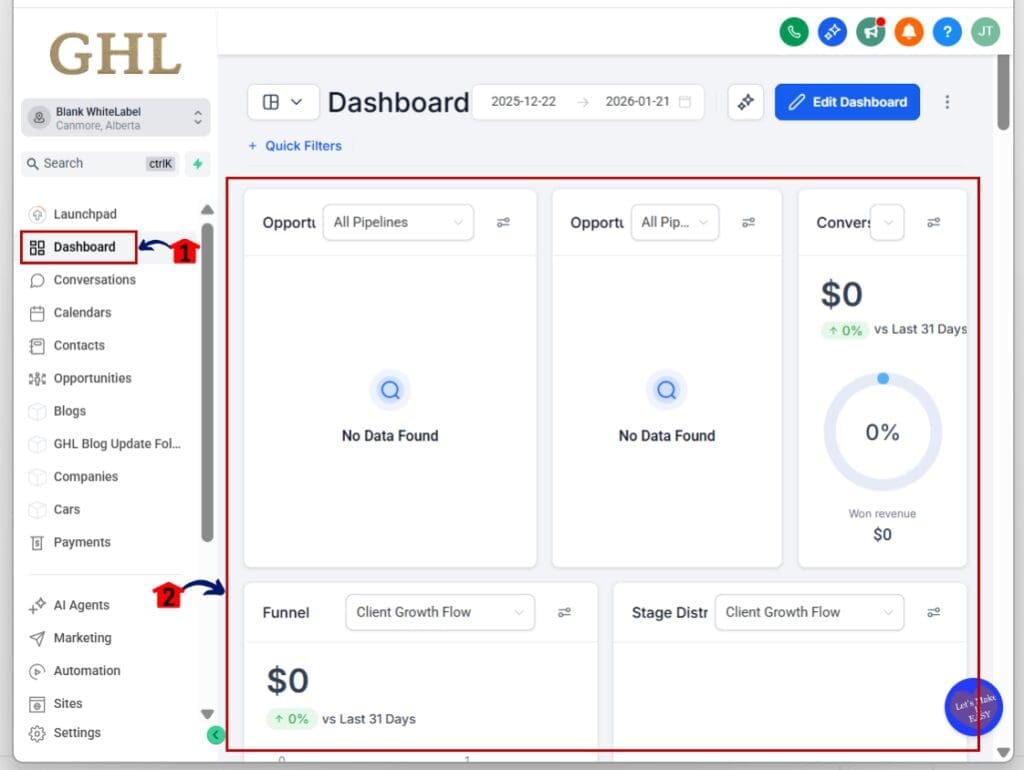
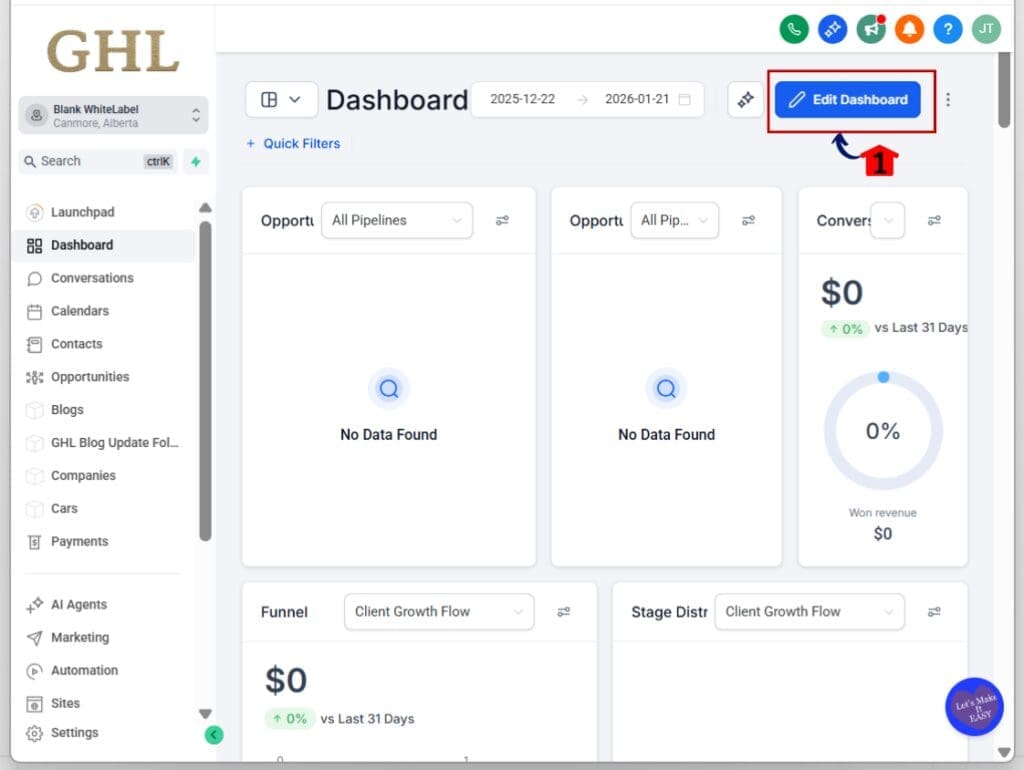
1.1 Click on the Dashboard Menu Item.
- Access the ‘Dashboard’ section of GoHighLevel
- This shows your existing dashboards and lets you open or create a new one.
1.2 Open a dashboard with multiple widgets.
- The more widgets you have, the more you’ll feel the performance gains.
1.3 Pay attention to load time.
- GHL now loads many backend calls in parallel, so dashboards open faster.
Step 02: Apply Quick Filters
- Using filters used to create noticeable lag in dashboards.
2.1 Click on + quick filter.
- A pop-up option will appear
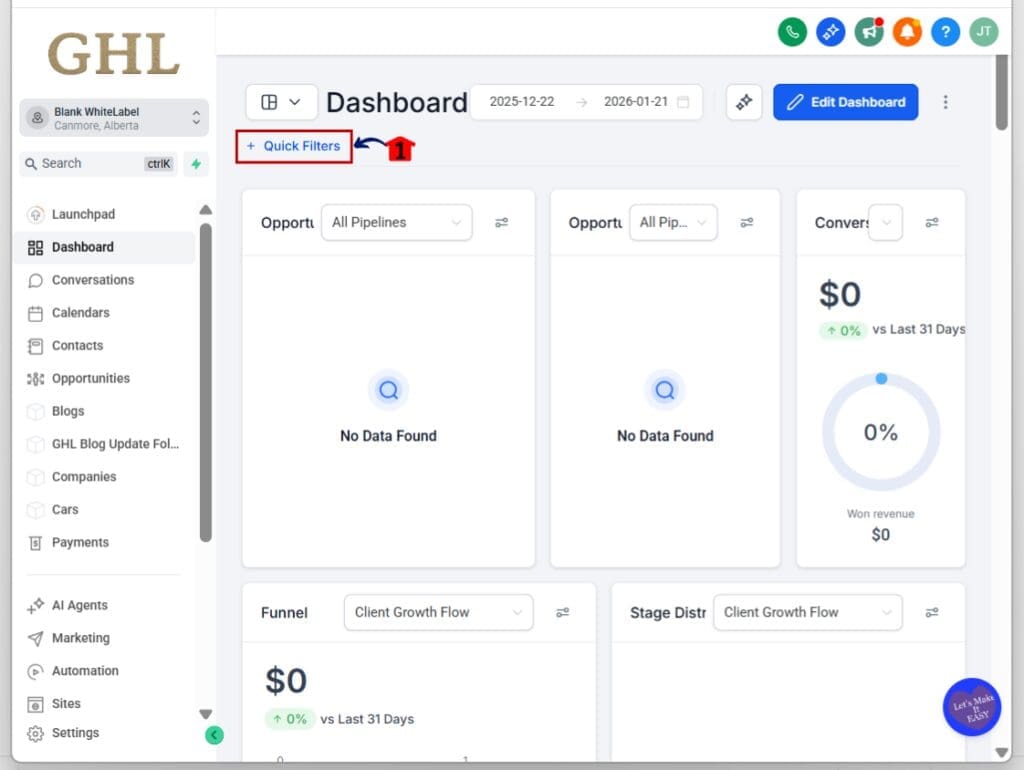
2.2 Click Add Quick Filters button
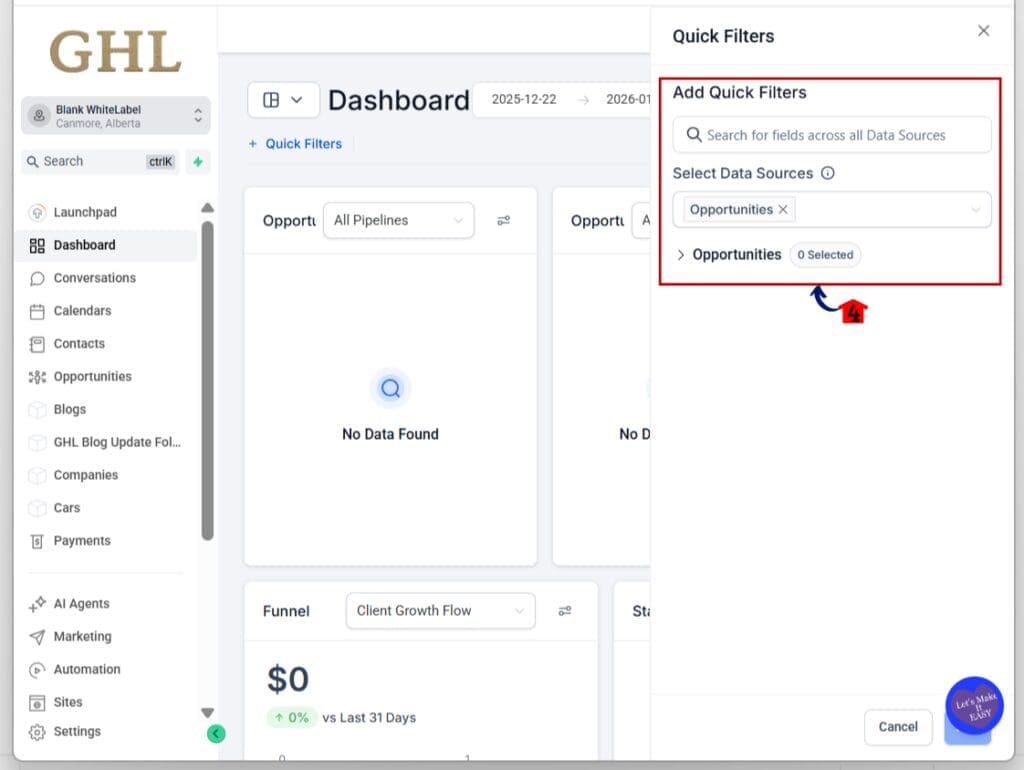
- A new pop-up option will appear for quick filter
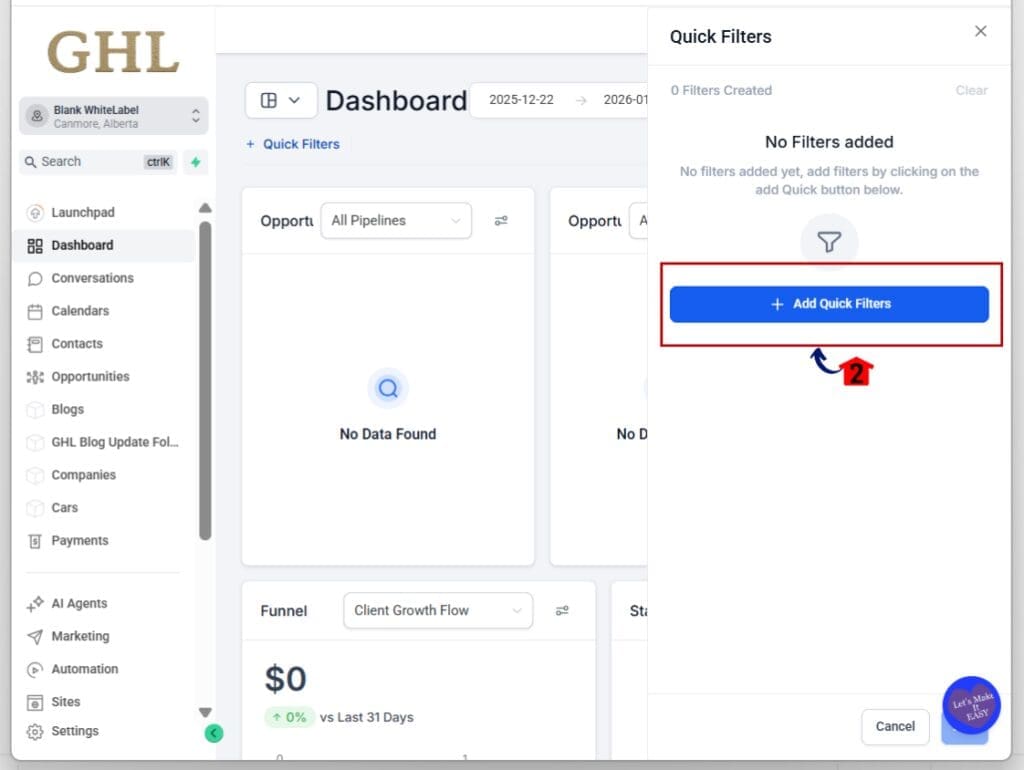
2.3 Add Quick Filters like filter by contact type, funnel stage, tags, or other criteria.
- You can also select a data source
2.4 Notice the faster response.
- The filter applies without delay, even across different modules.
Step 03: Edit and Save a Dashboard
3.1 Make a small change to a widget or layout by editing the Dashboard.
- If you save without real edits, the system skips backend calls.
3.2 Try saving without any changes.
- The dashboard still saves, but GHL avoids doing extra work in the background.
3.3 Cancel a change and exit the editor.
- Nothing gets loaded again unless something actually changed.
Step 04: Use GHL as Usual
- There’s no change to your workflow just less waiting.
4.1 Build, edit, or review reports and dashboards as needed.
4.2 You’ll feel smoother performance with fewer slowdowns.
That’s it. GHL’s dashboard performance optimization is active and running. You just use the platform the way you always have, and it now moves a little quicker with every click.
Quick Tips to Boost Dashboard Performance Optimization
Dashboard performance optimization in GHL is already working behind the scenes. But a few small changes in how you use the platform can help you notice the speed even more.
Tip 01: Open dashboards you used to avoid
- If a dashboard was too slow before, it may run faster now. With improved backend speed, GHL handles more data with less delay. Try opening those dashboards again.
Tip 02: Add more widgets with confidence
- Dashboard performance optimization allows more widgets to load at once. This means you can build detailed dashboards without worrying about load times.
Tip 03: Use quick filters more often
- Filters used to slow things down, especially across multiple modules. With the new improvements, you can apply filters without delay. Dashboard performance optimization keeps everything moving.
Tip 04: Don’t stress about saving edits
- If you save a dashboard but nothing has changed, GHL now skips extra steps in the background. You still get the save, but without the wait. This is another win for dashboard performance optimization.
Tip 05: Build reports in the right view
- Inside the custom report builder, data loads only when you need it. GHL now keeps list view light and loads user details only in builder mode. This change supports faster dashboard performance optimization across reports too.
These tips help you get the most out of the updates already in place. You don’t need to change your process just work as you normally do and let GHL handle the speed behind the scenes.
Frequently Asked Questions About Dashboard Performance Optimization
GHL did the heavy lifting here. You just keep building dashboards and reports as usual and enjoy the speed boost that comes with it.
What Dashboard Performance Optimization Means for You
Dashboard performance optimization in GHL is about doing more with less wait. It takes the same dashboards and reports you already use and makes them faster behind the scenes.
If you run reports for clients, this means less time watching load bars and more time reviewing the data. Switching tabs, opening filters, or saving dashboards now feels smoother and more direct.
For your team, it means fewer slowdowns during the day. Tasks that used to lag or stall now move quicker. That’s real time saved across your agency.
Dashboard performance optimization also means GHL is focusing on speed where it counts. No new features. No new learning curve. Just a better experience from the tools you already rely on.
The system does the work for you. You just keep building and let the speed speak for itself.
What to Expect From Dashboard Performance Optimization
With dashboard performance optimization now live in GHL, you’ll notice faster responses across your regular workflow. The results may not be flashy, but they save time and reduce friction.
You can expect dashboards to load faster, especially if they include several widgets or filters. The platform now handles those background tasks in parallel, which means less waiting.
Custom reports will feel more responsive too. Switching between pages or opening the builder view no longer slows things down. It keeps you moving through data without hitting the brakes.
Teams that work in multiple accounts will see the biggest gains. When you’re building reports, managing dashboards, or editing views for clients, the smoother performance adds up quickly.
Dashboard performance optimization makes the work feel lighter. It’s not a big shift, but it’s one that makes every click count.
Dashboard Performance Optimization Is Already Working
Dashboard performance optimization in GHL is live and running. You don’t have to change anything or learn a new process. Just keep using dashboards and reports like you always have.
You’ll feel the difference in the small things. Pages open faster. Filters respond quicker. Saving edits doesn’t drag. These moments add up and make your work feel smoother.
This kind of update may not grab your attention at first, but it improves your workflow every day. It’s about less waiting and more doing.
So keep building. Keep reporting. And know that dashboard performance optimization is there to back you up, every step of the way.
Scale Your Business Today.
Streamline your workflow with GoHighLevel’s powerful tools.