

- GHL now supports up to 100 messages per bot—finally solving the drop-off problem in long AI chat flows.
- Quick Summary – Chatbot Message Limit Breakdown
- What’s New – Increased Chatbot Message Limit
- Why It Matters – Dropped Chats Were Killing Automation
- How It Works – The Update Under the Hood
- How to Use It – Update Your Message Cap (Optional)
- What This Means – AI Bot Automation Just Got Stronger
- Conclusion – Small Change, Big Automation Win
GHL now supports up to 100 messages per bot—finally solving the drop-off problem in long AI chat flows.
If you’ve ever built a lead-gen flow in GoHighLevel and watched a chatbot freeze mid-conversation… you’re not alone. Until recently, GHL bots had a frustrating limit: just 25 messages per chat. Once that cap hit, the bot would stop responding—no warning, no recovery. For agencies relying on AI bots to qualify leads, answer FAQs, or guide users through multi-step forms, this was a silent killer. Conversations would just drop. Leads would bounce. And your team? Stuck doing manual cleanup.
Now, there’s a fix. GoHighLevel has officially raised the message cap for bots from 25 to 100. That’s 4X more room for your bots to work smarter, longer, and without interruptions. Whether you’re using prompt-based bots or form-driven flows, this change kicks in automatically—and it’s a game-changer for automation reliability. Let’s break down what changed, why it matters, and how to make the most of it.

With the new 100-message chatbot limit in GHL, your bots can now handle longer, smarter conversations without stopping short. This upgrade boosts automation reliability, reduces admin headaches, and supports more complex AI-driven flows.
Quick Summary – Chatbot Message Limit Breakdown
Purpose:
This update increases the chatbot message cap in GHL from 25 to 100 messages per conversation, solving a major limitation in automated chats.
Why It Matters:
Bots were previously hitting the cap and dropping mid-conversation, which caused lost leads and broken workflows. Now they can handle longer flows without interruption.
What You Get:
An automatic upgrade to all Prompt-based and Form-based bots that allows up to 100 messages per chat. No setup required.
Time To Complete:
Less than 2 minutes if you want to customize your message limit.
Difficulty Level:
Beginner-friendly—no technical experience needed.
Key Outcome:
Longer, smoother, and more reliable chatbot conversations that reduce admin tasks and improve automation performance at scale.
What’s New – Increased Chatbot Message Limit
GoHighLevel just quietly rolled out one of the most impactful bot upgrades in months: the max number of messages a bot can send in a single conversation has been raised from 25 to 100.
This new limit applies to both Prompt-based bots and Form-based bots—so whether you’re building smart flows with dynamic questions or guiding users through embedded forms, your bots can now go the distance.
Automate marketing, manage leads, and grow faster with GoHighLevel.

Before this update, many users were hitting the 25-message ceiling without even realizing it. The result? The bot would just stop replying, and leads would assume the chat was broken. That created friction, confusion, and dropped opportunities.
Now with the 100-message limit:
- Conversations can go deeper without manual handoffs.
- Complex qualification or support flows can run end-to-end.
- AI bots feel more human and reliable in real-time exchanges.
And the best part? You don’t need to turn anything on. The new limit applies automatically to all eligible bots—no migration, no extra setup.
Why It Matters – Dropped Chats Were Killing Automation
Before this update, thousands of conversations were ending abruptly every day. Literally—over 5,000 chats per day were hitting the 25-message limit and stalling out. That’s not just annoying—it’s costly.
Imagine you’ve got a chatbot qualifying leads, walking users through options, or handling basic support. It’s working beautifully… until it hits that invisible wall. Suddenly, the conversation stops cold. The lead thinks the bot broke. You think the lead ghosted. And now your team has to jump in manually to recover it—if they even notice in time.
That’s not scalable.
With the new 100-message limit, bots can now carry out full conversations without breaking. That means:
- Fewer drop-offs in the middle of high-value chats.
- Less admin intervention to chase cold leads or resume flows.
- Better trust with users who expect AI to “just work.”
It’s a small config change with a massive ripple effect—especially for agencies running high-volume funnels or complex qualification workflows. This update keeps bots online longer, which keeps your business running smoother.
How It Works – The Update Under the Hood
Here’s the beauty of this update: it doesn’t require any technical setup. The increased limit is already live across GoHighLevel for all Prompt-based and Form-based bots.
The default behavior has simply changed. Before, your bot would hit a hard stop at 25 messages. Now, it can keep going—up to 100 messages per conversation. The logic, flow, and automation in your existing bots stay exactly the same. The only difference is the new upper limit.
Want to tweak the limit manually? You can.
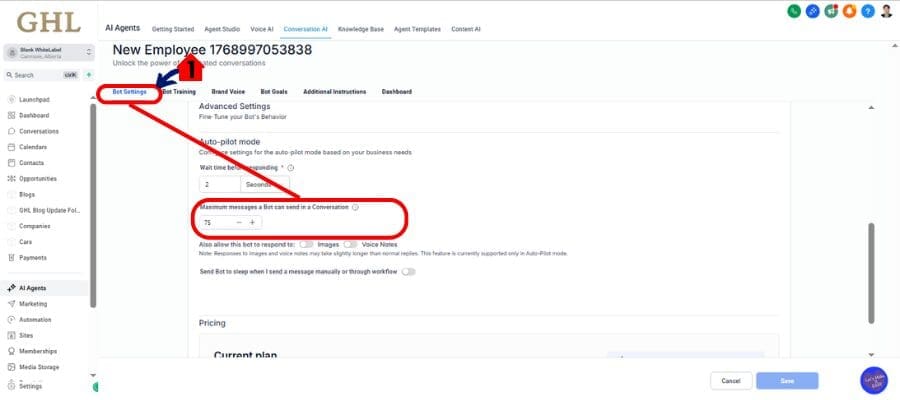
Just head to your Bot Settings and find the field labeled “Maximum messages a Bot can send in a Conversation.” You can now set any number from 1 to 100 based on your flow’s complexity.
Quick Recap:
- Default is now 100 messages.
- You can set a lower custom limit if needed.
- This applies only to Prompt-based and Form-based bots.
- No code, no migration, just more breathing room for your bots.
That’s it. Smooth, silent, and scalable.
How to Use It – Update Your Message Cap (Optional)
Want full control over how chatty your bot gets? You can manually configure the message cap in just a few clicks.
Here’s how to do it:
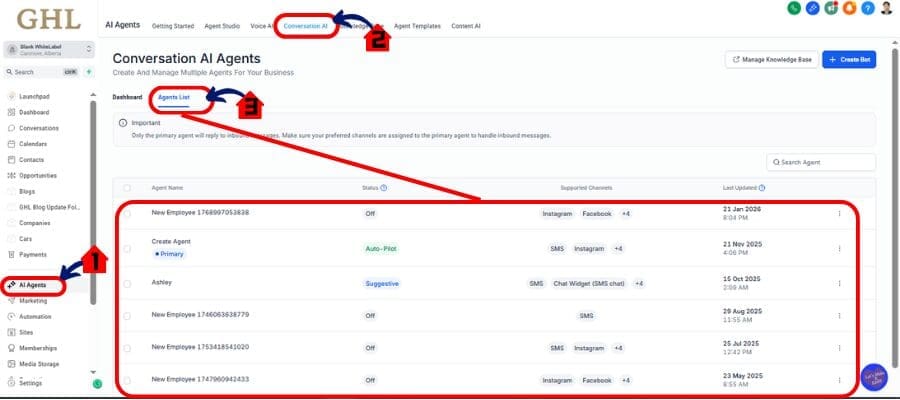
Step 01 – Access the Main Left Hand Menu in GoHighLevel
- The Main Menu on the Left side of your screen has all the main areas that you work in when using GHL
1.1 Click on the Ai Agents Menu Item.
- Access the ‘Ai Agents’ section of GoHighLevel
- You’ll now be in the ‘Ai Agents’ section of GHL, where you can access the “Conversation Ai” section from the top menu:
1.2 Click on the ‘Conversation Ai’ menu link.
1.3 Click Agent List
- Choose any agent in your list to try update
Step 02 – Access Agent
2.1 Click Bot Setings
- Click Settings and scroll down to check this new update
- Set “Maximum messages a Bot can send in a Conversation” You can set the message before 25 message only but now you can set it up to 100
Pro Tip:
Leave it at 100 unless you have a very specific reason to limit the flow (e.g., survey fatigue, shorter lead forms). The increased limit ensures your bots can handle more complex interactions without cutting off early.
Pro Tips – Optimizing Long Bot Conversations
Just because you can send 100 messages doesn’t mean you should.
Longer conversations give bots room to breathe—but they also demand more structure. Here’s how to make the most of the new limit without overwhelming your users (or your system):
1. Structure Your Flows for Clarity
Don’t ramble. Break the conversation into clear sections: welcome, qualify, capture, route. Make sure each part has a purpose and leads somewhere.
2. Use Smart Branching
Leverage conditions or form-based logic to guide users down the shortest relevant path. Not every user needs to go through 80 messages.
3. Add Fallbacks for Stalled Chats
If the user doesn’t respond after a few steps, redirect or pause with a smart message. “Still there?” beats dead silence.
4. Review Your Bot Logs Regularly
Use the conversation history to see where most drop-offs happen—even with the new limit. Adjust accordingly.
5. Don’t Treat Bots Like Humans
Be direct, to the point, and action-driven. Bots aren’t here to chit-chat—they’re here to get results.
This update gives you more freedom—but also more responsibility. Make your bots helpful, not overwhelming.
What This Means – AI Bot Automation Just Got Stronger
This isn’t just a technical tweak—it’s a foundational upgrade for how agencies can scale with AI.
By raising the message cap to 100, GoHighLevel has opened the door for more resilient, flexible, and conversion-driven bot experiences. Your bots can now handle:
- Multi-step qualification without breaking.
- Long-form lead capture across different verticals.
- Smart support triaging and FAQs in real time.
- Complex flows that previously needed a human handoff.
This means fewer manual touchpoints. Fewer lost leads. And way more confidence that your automation will finish the job.
Whether you’re running dozens of workflows per day or scaling a white-labeled SaaS offering for clients, this update strengthens your infrastructure without adding friction.
It’s like giving your AI employee a longer attention span—and more power to do what it was hired to do.
Conclusion – Small Change, Big Automation Win
At first glance, increasing a message cap from 25 to 100 might not sound like a game-changer.
But in the world of automated conversations, it’s massive.
This simple upgrade fixes one of the most frustrating limitations GHL users faced: bot conversations that just… stopped. Now, your AI bots can carry out full, uninterrupted chats—from start to sale or support—without breaking flow.
No code. No learning curve. Just better, longer, smarter conversations.
If you’re running chatbots inside GoHighLevel, take a few minutes to revisit your flows. See where they were getting cut off. Review drop-offs. Then let your bots stretch out and do more with this new 100-message limit.
It’s one of those small updates that can have a huge impact—especially if you’re serious about scaling your automation game.
Scale Your Business Today.
Streamline your workflow with GoHighLevel’s powerful tools.


