

- New GHL update brings lightning-fast editing to Funnels, Websites, Blogs & more
- Quick Summary – Page Builder Shortcuts at a Glance
- What’s New – Keyboard Shortcuts Now in the Page Builder
- What’s Changed – Navigation, Editing, and Speed Improvements
- Why It Matters – Save Time, Reduce Clicks, Improve Focus
- How To Use – Accessing and Using Shortcuts in Funnels, Websites, etc.
- What This Means – Efficiency Boost for Daily Agency Workflows
- Conclusion – GHL Just Made Page Building a Whole Lot Smoother
New GHL update brings lightning-fast editing to Funnels, Websites, Blogs & more
If you’ve ever built a funnel, landing page, or website inside GoHighLevel, you know how fast things can go from focused to frustrating. One minute you’re in the zone, the next you’re playing whack-a-mole with menus and mouse clicks.
Now imagine building that same page—but 3x faster—without lifting your fingers from the keyboard. That’s what just landed in the GHL Page Builder. The new keyboard shortcuts update changes how fast (and how smoothly) you can create, edit, and navigate your pages. From Funnels to Blogs, you can now blaze through your builds like a pro—no mouse marathon required. And the best part? It works everywhere the Page Builder lives.

The new keyboard shortcuts in GoHighLevel’s Page Builder help you build pages faster, edit with precision, and streamline your workflow—without changing how anything works today. If you’re tired of clicking around, it’s time to work smarter with keyboard shortcuts.
Quick Summary – Page Builder Shortcuts at a Glance
Purpose:
This update introduces full keyboard shortcut support inside the GHL Page Builder to dramatically speed up page creation and editing.
Why It Matters:
Agencies and power users can now save time, reduce clicks, and stay in flow while building or editing Funnels, Websites, Blogs, and more.
What You Get:
A full set of global shortcuts for saving, publishing, navigating, editing text, and opening builder panels—all accessible with Shift + /.
Time to Complete:
Less than 2 minutes to learn the basics, and under 10 minutes to master the top 5 shortcuts.
Difficulty Level:
Beginner-friendly. No setup required—just hit the keys and go.
Key Outcome:
Faster builds, better precision, and less mental fatigue for daily page creation inside GHL.
What’s New – Keyboard Shortcuts Now in the Page Builder
GoHighLevel just added a major speed boost to your page building experience: full keyboard shortcut support across every Page Builder environment.
Here’s what’s now live:
Automate marketing, manage leads, and grow faster with GoHighLevel.

- Press
Shift + /at any time in the builder to open a shortcut cheat sheet - Works in Funnels, Websites, Blogs, Webinars, Stores, and Notes
- Access common commands without touching your mouse
This update isn’t just a cute convenience. It’s a power tool.
With shortcuts, you can now:
- Save, undo, redo, preview, and publish with lightning speed
- Open important panels (like Layers, Settings, Quick Add, or Custom Code)
- Navigate between elements, parent containers, and entire sections
- Add blank sections and format text with bold, italic, or links on the fly
This feature makes you feel like you’ve unlocked an “advanced mode” for building pages in GHL. Everything stays familiar—just 10x faster.
What’s Changed – Navigation, Editing, and Speed Improvements
Before this update, building a page in GHL meant lots of clicking—click to open settings, click to add sections, click to preview, click to publish. Over time, those clicks add up. They interrupt your flow, especially when you’re deep in design or tweaking a live page.
Now with keyboard shortcuts, the friction is gone.
Here’s how things have changed:
- Navigation: Move between elements, sections, and containers without touching your mouse. It’s precision control for even the most complex layouts.
- Editing: Format text like a pro—bold, italic, underline, add links—just like you would in Google Docs or Notion.
- Panels: Open Layers, Custom Code, Settings, or Quick Add with a single keystroke instead of digging through menus.
- Workflow: Save, undo, redo, preview, and publish instantly—no more hunting for buttons.
Shortcuts don’t just make things faster—they make your brain work less. You stay focused on building, not on where to click next.
Why It Matters – Save Time, Reduce Clicks, Improve Focus
Let’s be real—building pages isn’t just about dragging and dropping blocks. It’s about staying in the creative zone long enough to finish something great. That’s where keyboard shortcuts come in.
This update isn’t just about speed—it’s about flow.
- Less clicking means less context switching. Every time you stop to grab the mouse or hunt for a button, you lose a little momentum. Shortcuts keep your hands on the keyboard and your brain on the build.
- It helps you stay focused. When your layout gets complicated, moving between containers and nested elements with shortcuts makes a huge difference.
- Perfect for power users. Agencies building dozens of pages a week will save hours with even basic shortcut use.
Even better? Nothing’s been removed. If you still prefer using the mouse, everything works the same. This feature just gives you an edge—especially when deadlines are tight and edits need to happen fast.
How To Use – Accessing and Using Shortcuts in Funnels, Websites, etc.
Using the new keyboard shortcuts in GHL is dead simple—and once you try them, you won’t want to go back.
Here’s how to get started:
Step 1.0 – Access the Main Left Hand Menu in GoHighLevel
- The Main Menu on the Left side of your screen has all the main areas that you work in when using GHL
- 1.1 Click on the Sites Menu Item.
- Access the ‘Site’ section of GoHighLevel
- You’ll now be in the Site’ section of GHL, where you can access the Funnels section from the top menu:
1.2 Click on the ‘Funnel’ menu link.
Click Funnel or Website Tab to test this Update
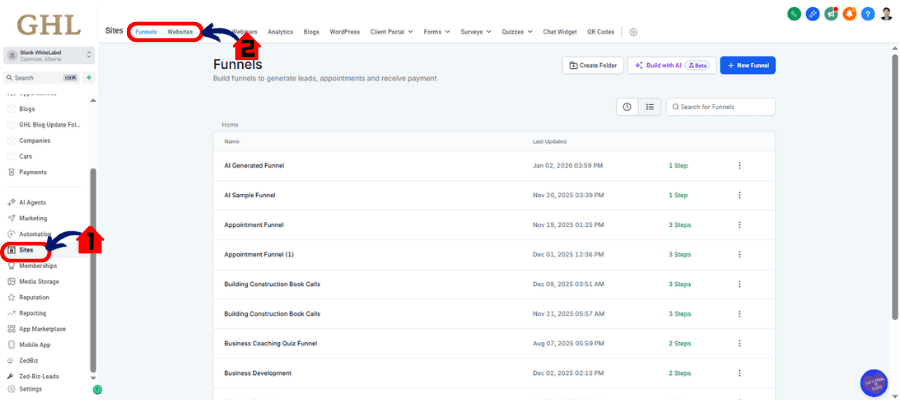
Step 02 – Open Page Builder
2.1 Choose Funnel
- Choose any Funnel that you have to try this update
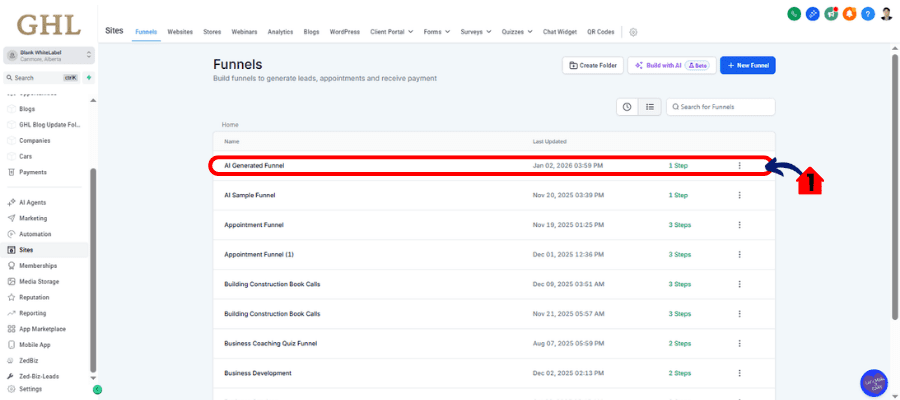
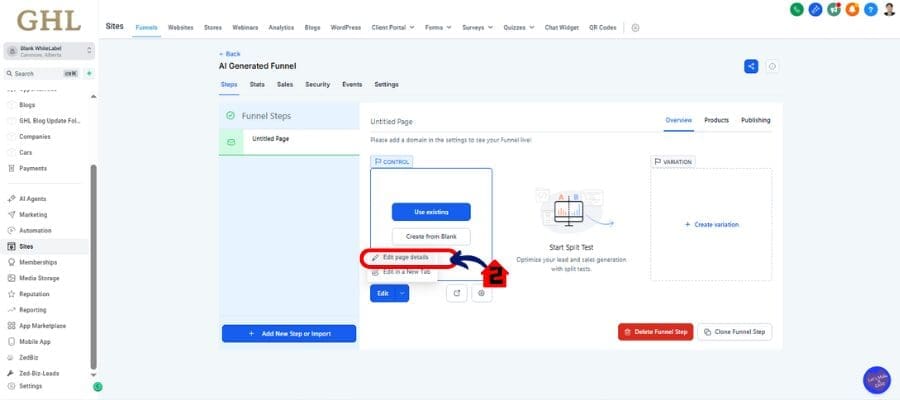
2.2 Edit Page
- Edit any page to the Funnel that you choose to open the page Builder
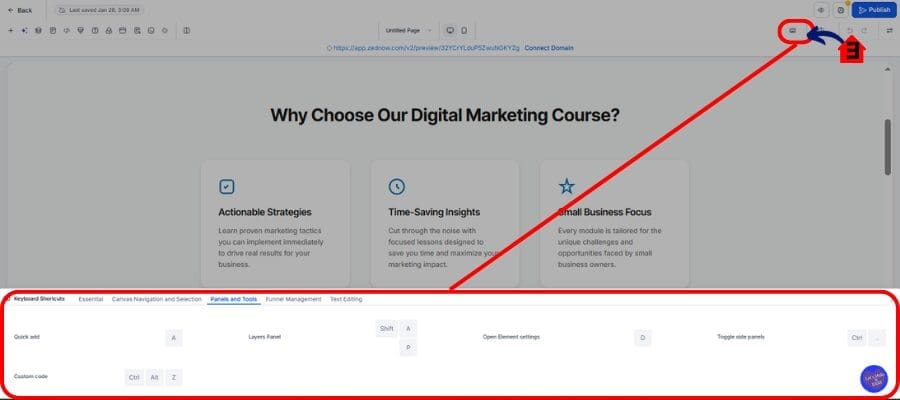
2.3 Click Keyboard Icon
- Click the Keyboard Icon to view the keyboard shortcuts
- Anywhere inside the Page Builder, just hit
Shift + /(that’s Shift and the question mark key). - A full overlay will pop up showing all available shortcuts.
- This works in Funnels, Websites, Webinars, Blogs, Notes, and even Stores.
Master the Core Commands
Here are the ones you’ll use every day:
Cmd/Ctrl + S— Save your work instantlyCmd/Ctrl + Z— UndoCmd/Ctrl + YorCmd/Ctrl + Shift + Z— RedoCmd/Ctrl + P— Preview pageCmd/Ctrl + Shift + P— Publish page
Build Without Breaking Flow
- Press
Ato open the Quick Add panel - Press
Lto toggle Layers - Press
Cto jump to Custom Code - Use arrow keys to move between elements, then Enter to edit
Format Text Like a Pro
- Highlight text and press
Cmd/Ctrl + Bfor bold Cmd/Ctrl + Ifor italicCmd/Ctrl + Kto insert a linkCmd/Ctrl + Shift + Kto add a hyperlink
Add Structure Fast
- Press
Shift + Sto add a blank section—no drag/drop required
Whether you’re tweaking button spacing or building from scratch, shortcuts like these let you move fast, stay focused, and build better.
Pro Tips – Maximize Workflow with Advanced Shortcut Combos
If you’re serious about speed, this is where the keyboard shortcuts go from “cool” to “can’t live without.”
Here are a few power-user moves to take things up a notch:
1. Save + Preview on Repeat
- Hit
Cmd/Ctrl + Sto save, then immediatelyCmd/Ctrl + Pto preview. - Do this after every major edit to stay in sync with your live design.
2. Rapid Section Editing
- Press
Lto open the Layers panel. - Use arrow keys to jump between elements.
- Tap
Enterto start editing instantly. - No more scrolling up and down trying to find that rogue text box.
3. One-Tap Access to Hidden Panels
Cfor Custom Code panelAfor Quick AddSfor Settings
Keep those three in muscle memory and you’ll fly through edits.
4. Text Formatting on the Fly
- Instead of reaching for formatting icons, just select your text and hit:
Cmd/Ctrl + Bfor boldCmd/Ctrl + Ifor italicCmd/Ctrl + Kto insert a link
This makes writing and refining copy inside the builder way faster.
5. Train Your Team
- Take five minutes during onboarding to show your team the top 5 shortcuts.
- Bonus: Print them out or link to a Notion doc.
- Your designers, editors, and VAs will thank you.
With even a handful of shortcuts memorized, your workflow gets faster, smoother, and way more fun.
What This Means – Efficiency Boost for Daily Agency Workflows
This isn’t just a small UI tweak—keyboard shortcuts in GoHighLevel are a straight-up productivity upgrade for any team building on the platform.
For agencies, speed is everything.
- Deadlines? Tighter than ever.
- Clients? Always asking for “just one more tweak.”
- Teams? Balancing dozens of projects.
This update gives your builders, designers, and even your junior VAs a serious speed advantage. Less time clicking means more time creating.
And because these shortcuts work across Funnels, Websites, Blogs, and even Notes, your whole operation gets more efficient. Whether you’re updating a launch funnel or cleaning up a blog layout, you’ll move faster without changing anything in your process.
Even better? You don’t need to train your team to adopt a new system. Just hit Shift + / to discover the shortcuts and start flying.
It’s a no-risk, all-reward update for teams who care about speed and precision.
Expected Results – Faster Turnaround, Cleaner Builds, Less Burnout
Once you start using keyboard shortcuts, the impact shows up fast—and not just in your page speed.
Here’s what you can expect:
1. Faster Turnaround Times
- Teams can build and ship pages faster—whether it’s a 3-page funnel or a full site redesign.
- Less mouse-clicking means fewer distractions and more output.
2. Cleaner, More Consistent Pages
- Navigating sections and containers with precision leads to tighter layouts and fewer mistakes.
- No more accidental edits or missed elements when scrolling through complex builds.
3. Happier, Less Burned-Out Teams
- Repetitive clicking is mentally draining. Shortcuts reduce the cognitive load.
- Your builders can stay in the zone longer, with fewer interruptions.
4. Better Scaling for High-Volume Agencies
- If your agency builds pages for clients daily, this adds up—fast.
- Even saving 2–3 minutes per page can mean hours of time back each week.
5. Easier QA and Collaboration
- It’s easier to review and tweak pages on the fly.
- Teams can edit and iterate faster without slowing down the feedback loop.
Whether you’re flying solo or managing a team of designers, these gains are real—and they compound every day you use them.
Conclusion – GHL Just Made Page Building a Whole Lot Smoother
GoHighLevel didn’t reinvent the Page Builder with this update—but they made it way more powerful.
By introducing keyboard shortcuts across Funnels, Websites, Blogs, and more, GHL just gave agencies a speed boost that feels like a secret weapon.
You don’t need to learn new software. You don’t need to change how you build. You just need to hit Shift + /, learn a few keys, and start working smarter.
So if you’re still building with clicks alone, it’s time to upgrade.
Jump into your next project, try a few shortcuts, and see how much faster your workflow becomes. You’ll never look at page building the same way again.
Scale Your Business Today.
Streamline your workflow with GoHighLevel’s powerful tools.


