

- Clean up your pipeline in less time while keeping the option to restore anything you delete
- Quick Summary – Bulk Delete Opportunities Essentials
- What’s new in GHL
- Bulk delete opportunities is no longer a slow, risky process
- Why bulk delete opportunities matters for your pipeline
- How to Use Bulk Delete Opportunities in GHL
- Smart ways to use bulk delete opportunities in GHL
- What bulk delete opportunities means for your workflow
- What to expect when you use bulk delete opportunities
- Frequently Asked Questions about bulk delete opportunities
- Why bulk delete opportunities should be part of your routine
Clean up your pipeline in less time while keeping the option to restore anything you delete
Why pipeline cleanup matters
Bulk delete opportunities is now possible inside GHL, and it’s a big deal for anyone managing a busy pipeline. If you’ve ever had to clear out old deals one at a time, you know how painful that process can be.
A cluttered pipeline slows everything down. It makes it harder to see real progress, clogs up your reports, and adds confusion for the team. Most people put off the cleanup because it’s time-consuming and there’s always the fear of deleting the wrong thing.
That’s exactly why GHL added the bulk delete opportunities feature. You can now clean up your pipeline in one go and restore anything you delete within 60 days. No more one-by-one clicks. No more stress about losing good data. This update gives you a faster, safer way to manage your deals and that means more focus on what actually drives results.

The new bulk delete opportunities feature in GHL makes it easier to clean up your pipeline without losing anything important. You can remove deals in batches and restore them later if needed.
Quick Summary – Bulk Delete Opportunities Essentials
Purpose: This update lets you remove multiple opportunities at once and restore them later inside GHL.
Why It Matters: It saves time and reduces risk by giving you a safer way to clean up your pipeline.
What You Get: Bulk delete tools with restore options, real-time tracking, and full action history.
Time to Complete: Most cleanups take under 10 minutes.
Difficulty Level: Easy for any user with access to the Opportunities tab.
Key Outcomes: Faster pipeline management, fewer errors, and more control over your CRM data.
What’s new in GHL
The bulk delete opportunities feature is now available in GHL Labs. You can use it to remove multiple deals at once without the hassle of deleting them one by one. It’s a much faster way to clean up your pipeline.
With bulk delete opportunities, GHL also gives you a way to undo your actions. If you make a mistake or need to bring back deleted deals, you can restore them from the Bulk Actions page. You have 60 days to recover them, which gives you plenty of time to catch anything that was removed by accident.
Automate marketing, manage leads, and grow faster with GoHighLevel.

You’ll also see a full history of every bulk delete or restore. GHL shows who ran the action, when it happened, and how many records were affected. It even flags any that didn’t go through. That level of detail helps keep your team informed and your data safe.Bulk delete opportunities don’t slow you down either. Once you start the process, it runs in the background so you can keep working without interruption.
Bulk delete opportunities is no longer a slow, risky process
Before the bulk delete opportunities feature, cleaning up a pipeline in GHL meant going deal by deal. It was slow, easy to mess up, and most teams just avoided it. When you’re working with hundreds of stale or outdated deals, that kind of manual work becomes a real problem.
Now, bulk delete opportunities gives you a better way. You can select as many deals as you need, confirm the delete, and let GHL process it all in the background. It runs without slowing you down, so you can keep working while the cleanup finishes on its own.
GHL also added something the old system never had: a way to take it back. Every time you bulk delete opportunities, that action is logged. You can go into the Bulk Actions page, see what was removed, and restore those opportunities with one click as long as the related contact is still in the system.
You also get a full record of who deleted what, when it happened, and what succeeded or failed. That kind of tracking gives your team more clarity and more confidence in how your pipeline is managed.
Why bulk delete opportunities matters for your pipeline
Bulk delete opportunities gives you a cleaner way to manage your deals. When your pipeline is full of old records, it gets harder to focus on the work that actually brings in sales. Too many teams let the clutter build up just because cleanup takes too long.
This feature solves that. You can bulk delete opportunities in a few clicks and move on with your day. If something gets deleted by mistake, you can bring it back within 60 days. That makes cleanup safer and faster.
It also brings clarity. GHL logs every bulk delete, so you can see who ran it, when it happened, and how many records were affected. No guessing. No back-and-forth between team members trying to figure out what happened.Bulk delete opportunities help you keep your CRM organized without worrying about what might get lost.
How to Use Bulk Delete Opportunities in GHL
The new bulk delete opportunities feature is located inside the Subaccount view under Labs. Once enabled, you can use it to remove deals in batches and restore them if needed. No extra setup required.
Here’s how to bulk delete opportunities safely inside GHL:
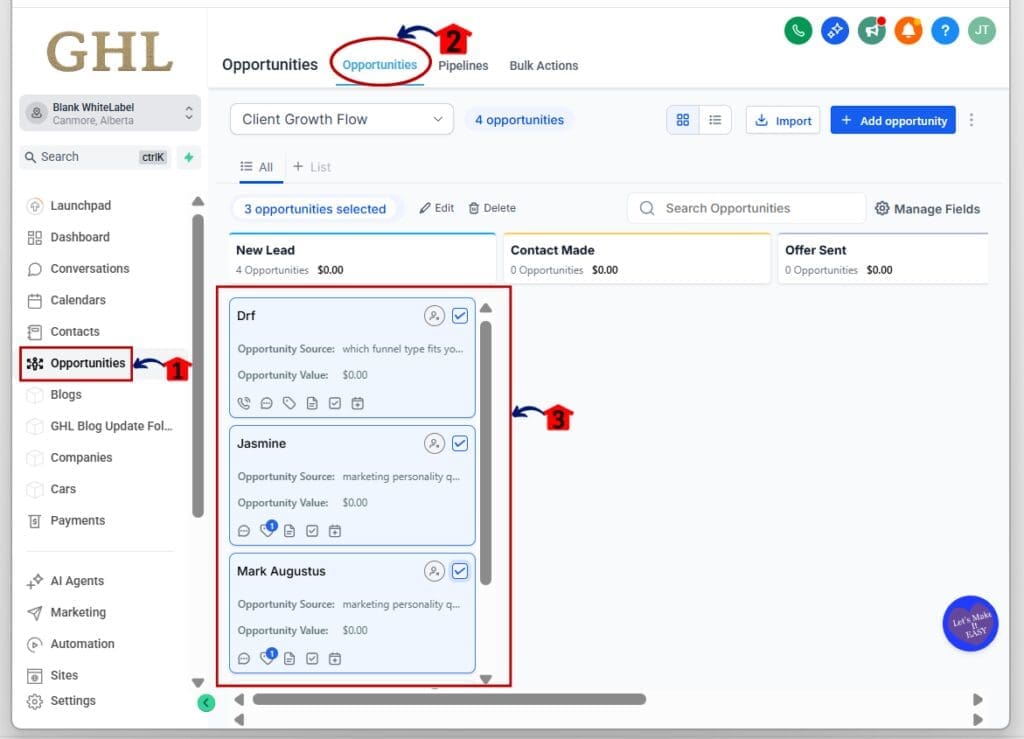
Step 01: Access the Main Left Hand Menu in GoHighLevel
- The Main Menu on the Left side of your screen has all the main areas that you work in when using GHL
1.1 Click on the Opportunities Menu Item.
- Access the ‘Opportunities’ section of GoHighLevel
- This is where you can add, edit, or customize the opportunities dashboard
1.2 Use checkboxes to select multiple deals
- Go through the list and select the opportunities you want to delete.
Step 02: Delete the Selected Opportunities
- Once selected, you can remove them all at once.
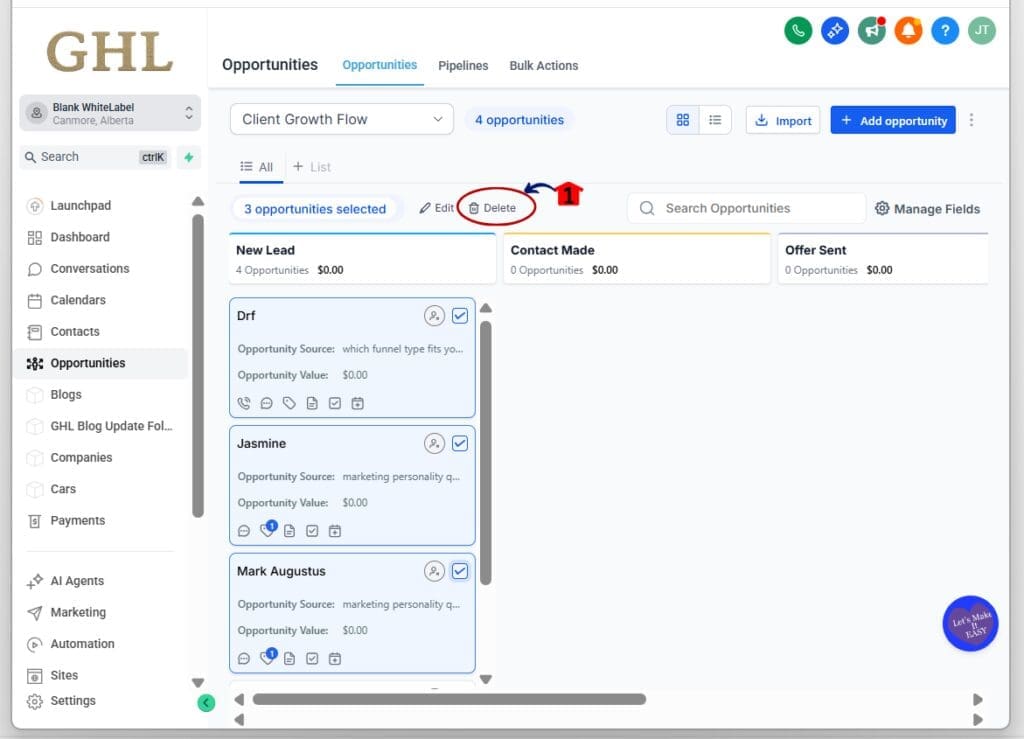
2.1 Click the Delete button at the top
- A confirmation window will appear.
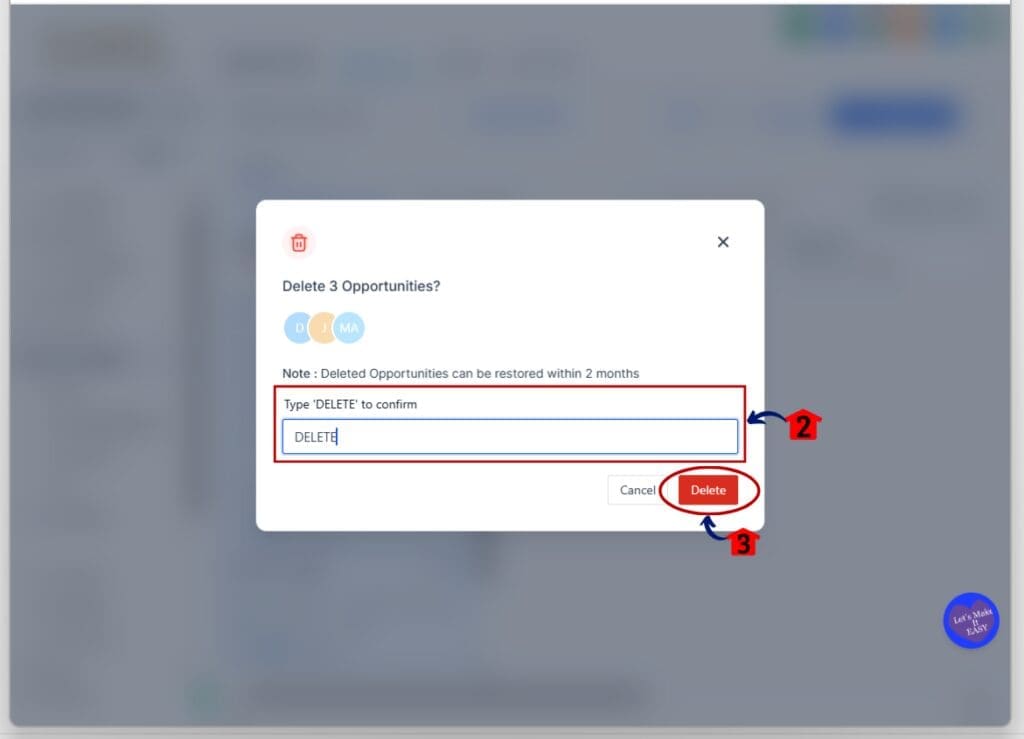
2.2 Type DELETE in all caps to confirm
- This is a safety step to avoid accidental deletion.
2.3 Click Delete button
Step 03: Let GHL Process the Bulk Delete
- The system will handle the deletion in the background.
3.1 Continue working while GHL runs the delete job
- There’s no need to wait. GHL handles it asynchronously.

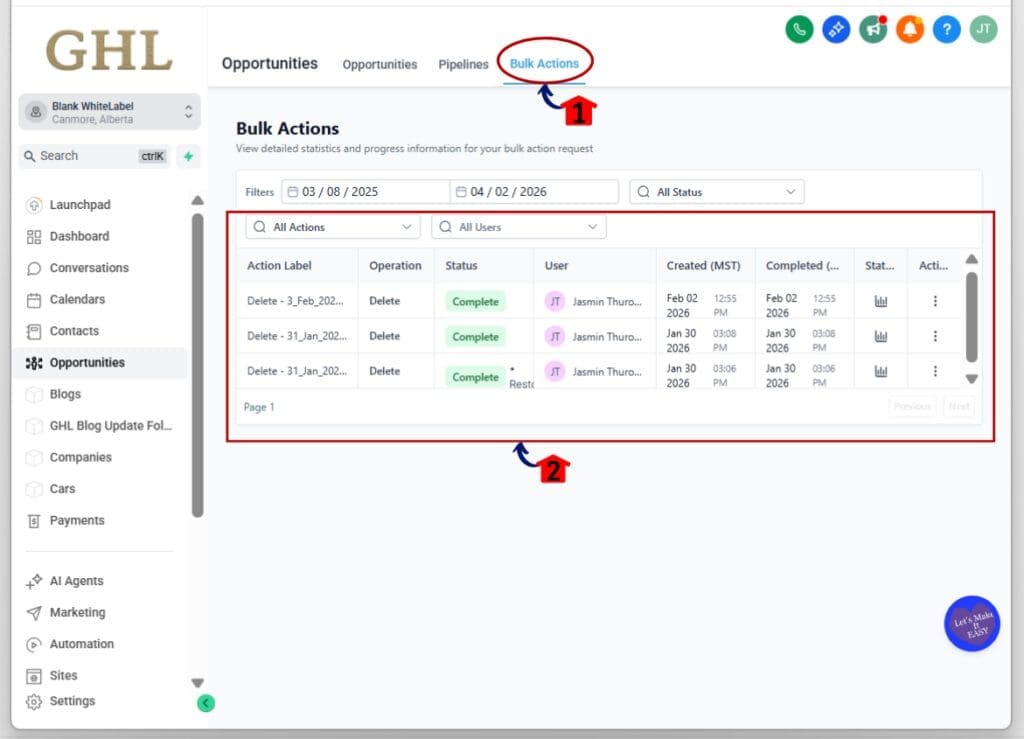
Step 04: Track the Status of the Bulk Delete
- You can view progress and results in one place.
4.1 Click on the Bulk Actions menu
- This shows a list of all recent bulk jobs.
4.2 Locate your delete job and check its status
- You’ll see how many deals were removed and if any failed.
Step 05: Restore Deleted Opportunities if Needed
- Changed your mind or deleted the wrong deals? You can bring them back.
5.1 Click the three dots next to the delete action
- A dropdown menu will appear.
5.2 Click Restore
- GHL will attempt to recover the opportunities you deleted.
5.3 Important: You cannot restore an opportunity if the contact it was linked to has also been deleted.

Smart ways to use bulk delete opportunities in GHL
Bulk delete opportunities give you a faster way to clean up your pipeline, but it’s still worth taking a few extra steps to avoid mistakes.
Filter before you delete
- Always filter your deals first. Use tags, pipeline stages, or date ranges to narrow your list. This keeps you from deleting deals that might still be active.
Tag deals before deleting
- If you’re planning a big cleanup, tag those opportunities first. This makes it easier to track what you removed and helps you find them again if you need to restore them later.
Remember the 60-day rule
- You can only restore deleted opportunities for up to 60 days. After that, they’re gone. Make sure your team knows the deadline.
Do not delete contacts simultaneously
- Bulk delete opportunities will not work if the contact is also deleted. If the contact is gone, the opportunity can’t be restored. Keep that in mind if you’re cleaning up both at once.
Work in small batches
- Instead of deleting everything at once, try doing smaller groups. It keeps things organized and lets you fix problems faster if anything goes wrong.
Use Smart Lists to spot cleanup targets
- Smart Lists help you find and group stale deals automatically. It’s a good habit to save filters you can use again every month for routine cleanup.
Using bulk delete opportunities this way will keep your pipeline clean without losing control.
What bulk delete opportunities means for your workflow
Bulk delete opportunities gives your team a better way to manage deals in GHL. You can clean up your pipeline faster and still keep control of your data. That means less time clicking through old records and more time working on deals that matter.
This update takes the stress out of cleanup. You no longer have to worry about deleting the wrong opportunity. You can bulk delete opportunities with confidence, knowing you can bring them back within 60 days.
It also helps your team stay on the same page. GHL logs every action. You can see who deleted what and when. That kind of clarity makes cleanup feel like part of the process, not a risky job to avoid.
When you bulk delete opportunities, you’re not just removing clutter. You’re creating space for better focus, faster reports, and cleaner data across the board.
What to expect when you use bulk delete opportunities
When you start using bulk delete opportunities, your pipeline becomes easier to work with. Old deals that used to sit around and slow things down are gone in minutes. The whole system feels lighter and more organized.
You get faster load times and a clearer view of your active deals. No more guessing if something is still in play or just sitting there from months ago. Bulk delete opportunities help you focus on what matters right now.
Mistakes are also easier to fix. If you delete the wrong deal, you can restore it within 60 days. That takes the pressure off and makes cleanup feel safe.This update isn’t flashy, but it’s solid. Bulk delete opportunities make your work easier, your data cleaner, and your team more confident in the tools they’re using.
Frequently Asked Questions about bulk delete opportunities
Why bulk delete opportunities should be part of your routine
If your pipeline is cluttered, bulk delete opportunities give you a better way to manage it. You can clean out old deals, keep your data accurate, and still have the option to restore anything you need later.
This update removes the guesswork. You know what was deleted, who did it, and how to bring it back if needed. That makes it easier for teams to stay on track and avoid costly mistakes.
Using bulk delete opportunities regularly helps keep your pipeline clean without slowing you down. It saves time, reduces confusion, and gives you more control over how your CRM works.Whether you’re cleaning up once a week or once a quarter, bulk delete opportunities is a tool that helps you work smarter inside GHL.
Scale Your Business Today.
Streamline your workflow with GoHighLevel’s powerful tools.


