

- AI Workflow Builder Speed Just Changed Everything
- Quick Summary – AI Workflow Builder Essentials
- AI Workflow Builder Now Generates in Seconds
- AI Workflow Builder Performance Upgrade
- Why AI Workflow Builder Speed Matters
- How to Use the AI Workflow Builder
- Pro Tips for AI Workflow Builder Power Users
- AI Workflow Builder Speed Update FAQ
- AI Workflow Builder Is Just Getting Started
- Results from a Faster AI Workflow Builder
- AI Workflow Builder Speed Is the New Standard
AI Workflow Builder Speed Just Changed Everything
Nobody likes waiting on AI.
You click generate… and then you wait. And wait. And stare at a loading spinner wondering if it’s working.
That tiny delay? It kills momentum.
When you’re building automations inside GoHighLevel, speed matters. Especially if it’s your first time using the AI workflow builder. That first interaction needs to feel powerful. Instant. Impressive.
Now it does.
The AI workflow builder inside GHL can now generate workflows from placeholder prompts in under 5–10 seconds. That means your first build feels immediate. No awkward pause. No second-guessing. Just instant automation.
And here’s the bigger deal, this isn’t just about shaving off a few seconds.
It’s about adoption.
When the AI workflow builder responds instantly, users trust it. They experiment more. They build more. They actually use it instead of abandoning it halfway through setup.
That first “wow” moment matters. Especially for agencies onboarding new clients or showing AI capabilities live on a call.
The loading spinner is gone. The speed is here. And this is just the beginning.

The AI workflow builder now cranks out workflows in under 10 seconds, so you can build instantly, test ideas faster, and actually enjoy that first AI experience inside GoHighLevel.
Quick Summary – AI Workflow Builder Essentials
Purpose: This update improves the AI workflow builder generation speed, allowing workflows to be created in under 5–10 seconds from placeholder prompts.
Why It Matters: Faster generation removes friction from the first-time AI experience, increases adoption, and makes live client demos smoother and more impressive.
What You Get: Near-instant workflow drafts, improved experimentation speed, and a more responsive AI workflow builder inside GoHighLevel.
Time to Complete: Enabling the feature takes less than two minutes inside Settings → Labs.
Difficulty Level: Beginner-friendly. No technical setup required beyond toggling the feature on.
Key Outcome: Faster workflow creation, increased automation output, and a stronger first impression of GHL’s AI capabilities.
AI Workflow Builder Now Generates in Seconds
Here’s the upgrade in plain English:
The AI workflow builder now generates workflows from placeholder prompts in under 5–10 seconds.
Automate marketing, manage leads, and grow faster with GoHighLevel.

That’s it.
But also… that’s huge.
Before, there was noticeable latency during generation. It wasn’t broken. It worked. But there was enough delay to make first-time users hesitate.
Now?
You click generate, and the workflow appears almost instantly.
This improvement is specifically optimized for placeholder prompts right now. That means when you’re testing, exploring, or running your first build, you get immediate output.
No spinning wheel. No wondering if it froze. No awkward silence during client demos.
Just instant structure.
And that changes how people experience the feature.
Instead of feeling like they’re “trying an AI experiment,” users feel like they’re using a powerful AI workflow builder that actually responds in real time.
That psychological shift matters.
When something feels fast, it feels intelligent. It feels polished. It feels ready
.And that’s exactly the experience GHL is pushing toward with this update.
AI Workflow Builder Performance Upgrade
So what actually changed under the hood?
The AI workflow builder didn’t get a new interface. It didn’t get new buttons. It didn’t get a flashy redesign.
It got faster.
This update improves generation latency for placeholder prompts, reducing build time to under 5–10 seconds. That’s a backend performance upgrade, not a cosmetic tweak.
And backend upgrades are the ones that matter long-term.
Previously, workflow generation could take long enough to interrupt your thought process. You’d start building with momentum… and then pause while the AI caught up.
Now, the AI workflow builder keeps pace with you.
When it responds instantly, you don’t overthink it. You click, you adjust, you test. The whole process feels lighter and way more intuitive.
This is phase one.
Right now, the speed boost is focused on placeholder prompts. But the team is actively working on reducing generation latency across all prompts, not just the default ones.
That means broader speed improvements are coming.
In other words, this isn’t a one-time optimization.
It’s the foundation for faster AI automation across the board.
Why AI Workflow Builder Speed Matters
Speed isn’t just a convenience.
It’s adoption.
When someone tries the AI workflow builder for the first time, they’re deciding, in seconds, whether this is powerful… or just another tool they won’t use.
If it feels slow, clunky, or delayed, they hesitate.
If it feels instant, responsive, and intelligent?
They lean in.
This update transforms the first-time user experience inside GoHighLevel. Instead of watching a loading spinner, users immediately see a structured automation take shape. That instant feedback creates trust.
And trust drives usage.
For agencies, this is even bigger.
Imagine being on a live strategy call with a client. You say, “Let’s build your follow-up automation right now.” You type a placeholder prompt into the AI workflow builder… and within seconds, a draft workflow appears.
That’s impressive.
No awkward pause. No filler conversation while it loads. No “hang on, it’s thinking.”
Just action.
Faster builds also encourage experimentation. When there’s no waiting penalty, users test more variations. They tweak more prompts. They explore more automation paths.
Speed removes friction.
And in automation, friction is what stops people from building at scale.
This isn’t about shaving five seconds off a process.
It’s about removing hesitation from AI adoption inside GHL.
How to Use the AI Workflow Builder
The AI Workflow Builder must be enabled in your account before you can use it to generate workflows. Once activated, you can access it inside the Workflow Builder and create a draft automation in seconds.
The steps below show you exactly where to enable the feature and how to generate your first AI-built workflow inside GoHighLevel.
- Enable AI Workflow Builder in Labs.
Step 01 – Enable AI Workflow Builder in Labs
1.1 From your GHL account, go to the Main Menu on the left.
1.2 Click Settings.
1.3 Select Labs.
1.4 Set Feature Type to Company.
1.5 Locate Workflow AI Builder and toggle it ON.

Step 02 – Access the Workflow Builder
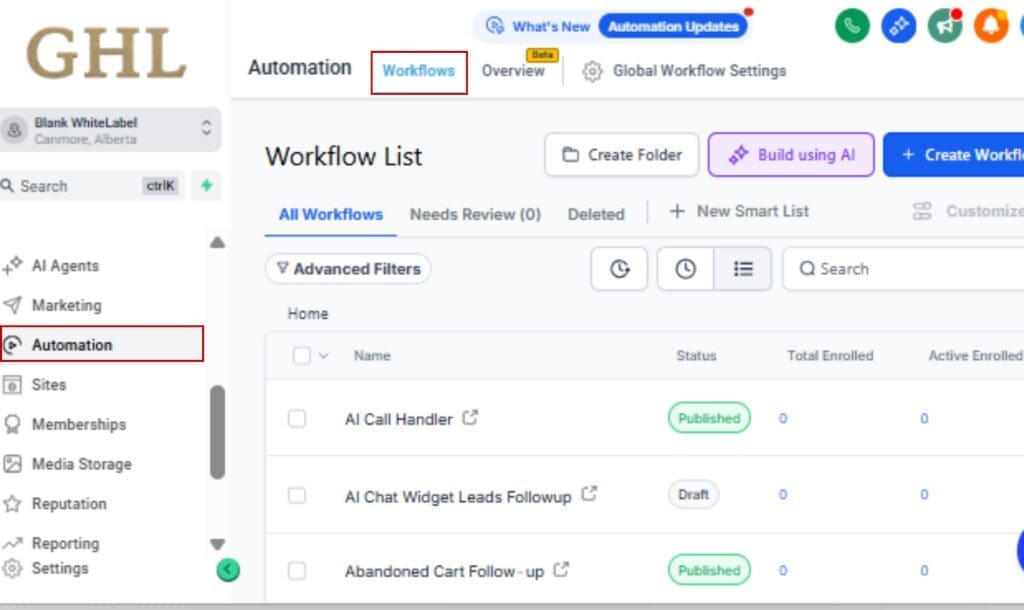
2.1 From the Main Menu, click Automation.
2.2 Select Workflows.
Step 03 – Create or Open a Workflow
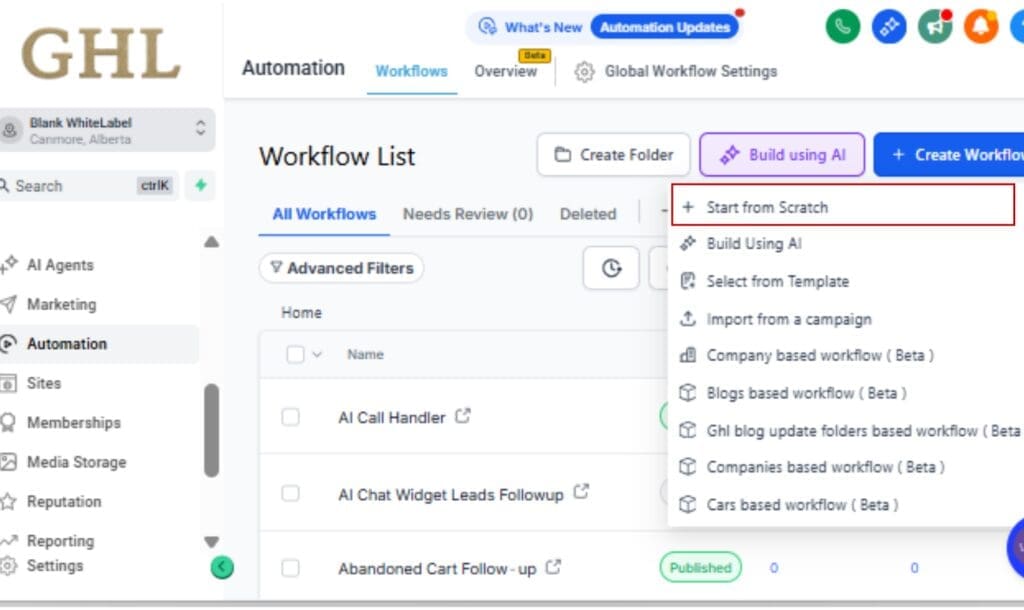
3.1 Click + Create Workflow to start a new automation.
3.2 Or open an existing workflow where you want to use AI to generate steps.
Step 04 – Launch the AI Workflow Builder
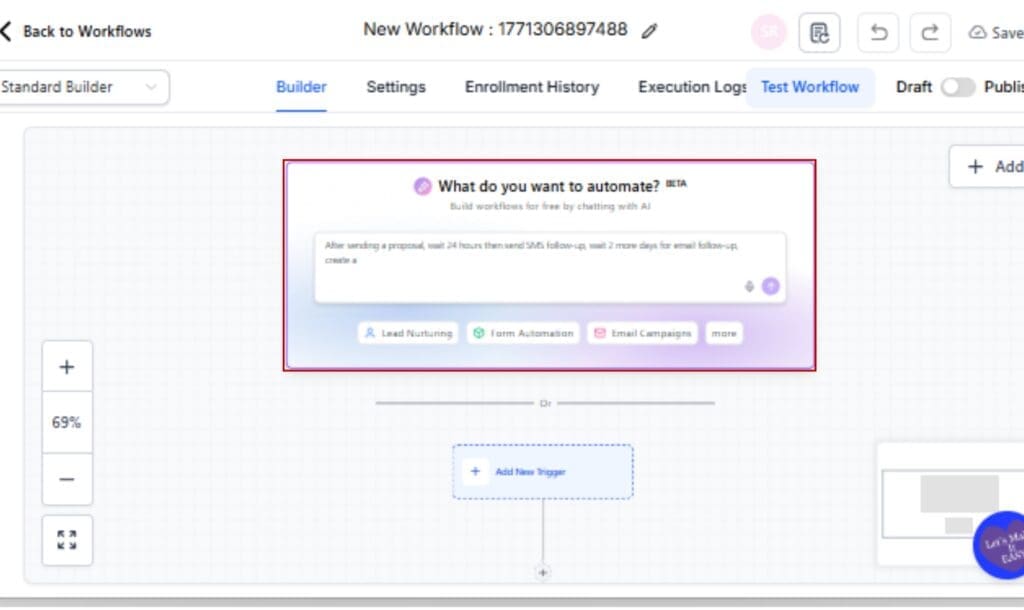
4.1 Inside the workflow setup screen, select the AI Workflow Builder option.
4.2 Choose a placeholder prompt to generate your workflow structure.
Step 05 – Generate the Workflow
5.1 Click Generate.
5.2 Wait 5–10 seconds while the AI workflow builder creates your automation draft.

Step 06 – Review and Customize
6.1 Review the generated trigger and action steps.
6.2 Edit messaging, timing delays, or conditions as needed.
6.3 Add or remove workflow actions to fit your exact strategy.

Step 07 – Save and Test Your Workflow
7.1 Click Save.
7.2 Run a test contact through the workflow to confirm everything fires correctly.

That’s it. You now have a fully structured automation draft built in seconds, ready for refinement and launch.
Pro Tips for AI Workflow Builder Power Users
Now that the AI workflow builder generates workflows in seconds, you can use it differently.
Faster speed isn’t just convenience. It changes strategy.
Here’s how smart agencies are going to use this.
Use It Live on Client Calls
Instead of explaining what you could build, build it.
On a strategy call, ask the client about their follow-up process. Then open the AI workflow builder and generate a draft in real time. In under 10 seconds, you’ve got a structured automation to review together.
That creates authority.
It shows execution, not theory.
Use It to Speed Up Snapshot Creation
Building snapshots used to mean manually structuring multiple nurture sequences. Now, generate draft workflows instantly, refine them, and add them to your snapshot.
You can prototype faster.
You can iterate faster.
You can build scalable automation libraries.
Generate First, Polish Second
Don’t try to engineer perfection from scratch.
Use the AI workflow builder to generate a rough structure first. Then:
- Improve copy.
- Adjust delays.
- Add branching logic.
- Personalize messaging.
Speed is now your advantage. Drafts cost almost nothing in time.
Test Multiple Variations
Because generation is fast, you can test multiple placeholder prompts.
Try different angles:
- Short nurture sequence.
- Long-form education sequence.
- Aggressive follow-up.
- Soft-touch re-engagement.
Compare outputs. Choose the best. Refine it.
Faster generation means experimentation is cheap.
And experimentation leads to better-performing automations.
Train Your Team to Use It
If you run an agency, this is onboarding gold.
Instead of teaching new hires how to structure workflows from zero, teach them how to:
- Generate.
- Analyze.
- Optimize.
That’s a much shorter learning curve.
The AI workflow builder becomes a training accelerator, not just a production tool.
AI Workflow Builder Speed Update FAQ
AI Workflow Builder Is Just Getting Started
This update isn’t flashy.
It doesn’t come with fireworks or a new dashboard.
But it signals something important.
GoHighLevel is investing in AI infrastructure, not just AI features.
There’s a big difference.
Anyone can launch an AI tool. Not everyone optimizes it for performance, scalability, and real-world usage. Improving the speed of the AI workflow builder shows that GHL isn’t treating AI like a gimmick.
They’re treating it like a core engine.
Faster generation means higher usage. Higher usage means better feedback loops. Better feedback loops lead to stronger AI outputs over time.
That’s how real AI platforms evolve.
It also tells agencies something else:
AI Builder isn’t a side project.
It’s becoming central to how automations are built inside GHL.
This speed improvement is phase one. Broader latency reductions across all prompts are already in progress. That means what feels fast today could feel even faster soon.
When a platform focuses on infrastructure, users win long term.
And if you’re building automation systems for clients, long-term performance matters more than short-term hype.
The AI workflow builder is getting faster now, and that’s a strong sign of where things are heading.
Results from a Faster AI Workflow Builder
When something gets faster, people use it more.
That’s the first result.
With the upgraded AI workflow builder, you can expect less hesitation and more execution. Instead of thinking twice before clicking “Generate,” you just do it.
And that changes behavior.
Here’s what that looks like in real life:
More Workflows Built Per Session
When generation takes seconds instead of dragging, users build more automations in a single sitting. They test ideas. They refine. They iterate.
Speed increases output.
Faster Client Onboarding
Agencies can now generate draft nurture sequences almost instantly during onboarding calls. That shortens setup time and increases perceived value.
Clients see progress immediately.
Reduced Friction for New Users
The first-time AI workflow builder experience now feels polished. That smooth first interaction increases confidence in the platform.
Confidence leads to adoption.
More Experimentation
When time cost drops, experimentation rises.
You can test multiple placeholder prompts, compare workflow structures, and refine your automation strategy without feeling like you’re wasting time.
Less Waiting. More Building.
That’s the real outcome.
The AI workflow builder becomes something you actively use, not something you try once and forget.
And when AI becomes part of your daily workflow process, automation scales faster.
AI Workflow Builder Speed Is the New Standard
This update might look simple on paper.
“Faster generation.”
But in practice? It changes how people build.
The AI workflow builder now delivers workflows in under 5–10 seconds. That means no more staring at a loading spinner. No more broken momentum. No more hesitation during live demos or onboarding calls.
Just instant structure.
And instant structure builds confidence.
Confidence leads to experimentation. Experimentation leads to better automations. Better automations lead to better results for your clients.
That’s the chain reaction.
More importantly, this isn’t a one-off tweak. It’s a signal. GoHighLevel is improving the performance layer of its AI workflow builder — not just adding surface-level features.
Speed improvements for placeholder prompts are already live.
Broader latency reductions across all prompts are coming.
Haven’t turned it on yet? Here’s where to find it:
Settings → Labs → Feature Type: Company → Toggle ON Workflow AI Builder.
Turn it on.
Test it.
Generate something.
Because when AI feels instant, you actually use it.
And when you use it, you build faster.
This is what momentum looks like.
Scale Your Business Today.
Streamline your workflow with GoHighLevel’s powerful tools.


