

- Save hours, capture more leads, and scale client results using powerful GoHighLevel automation workflows.
- Quick Summary – Automation Workflows at a Glance
- What Makes a Powerful Automation Workflow
- Pro Tips for Building Better Automation Workflows
- What This Means for Your Agency
- Frequently Asked Questions About Automation Workflows
- Conclusion – Start Using Automation Workflows Today
Save hours, capture more leads, and scale client results using powerful GoHighLevel automation workflows.
Automation workflows are one of the most powerful tools inside GoHighLevel. When used well, automation workflows can save agencies hours of work every week. Many agencies still handle follow-ups, reminders, and lead responses by hand. That might work when you only have a few clients. But as your agency grows, manual work quickly becomes a problem. Leads wait too long for a reply. Follow-ups get missed. Opportunities fall through the cracks.Automation solves this.
Inside GoHighLevel, automation workflows can send messages, reminders, and notifications automatically. The system responds to leads instantly and keeps conversations moving without your team doing the work. This means faster response times and better results for your clients. In this guide, you will discover 10 automation workflows every agency should build for clients. These simple workflows help capture leads, improve follow-ups, and keep your client campaigns running smoothly.
These automation workflows help agencies eliminate manual follow-ups and scale client campaigns faster inside GoHighLevel. By implementing the right automation workflows, you can capture leads instantly, nurture prospects automatically, and improve client results without adding more work to your team.
Quick Summary – Automation Workflows at a Glance
Purpose: This guide shows agencies how to build practical automation workflows inside GoHighLevel to improve lead management, follow-ups, and client communication without adding manual work.
Why It Matters: Many businesses lose leads because they respond too slowly or forget to follow up. Automation workflows solve this problem by sending messages, reminders, and notifications automatically, which helps agencies deliver better results for clients.
What You Get: You learn ten proven automation workflows that agencies can deploy for almost any client. These include lead response systems, appointment reminders, review requests, re-engagement campaigns, and client onboarding automations.
Time to Complete: Most of these workflows can be built in less than thirty minutes once you understand the triggers and actions in the GoHighLevel workflow builder.
Difficulty Level: Beginner to Intermediate. GoHighLevel uses a visual workflow builder, so no coding or advanced technical knowledge is required.
Key Outcome: By implementing these automation workflows, agencies can respond to leads faster, reduce missed opportunities, improve client results, and manage more accounts without increasing workload.
What Makes a Powerful Automation Workflow
Not all automation workflows are created equal. A good workflow solves a real problem for your client.
In GoHighLevel, automation workflows work like a simple system. Something happens, and the system responds automatically.
Automate marketing, manage leads, and grow faster with GoHighLevel.

That first action is called a trigger. A trigger could be a form submission, a new contact, or a booked appointment.
Once the trigger fires, the workflow performs actions. These actions may include sending an SMS, sending an email, adding a tag, or moving a lead in the pipeline.
The best automation workflows follow three simple rules.
First, they respond fast. When a lead submits a form or calls a business, the workflow should respond within seconds.
Second, they keep the conversation going. Good workflows send reminders, follow-ups, and helpful messages that move the lead closer to booking.
Third, they stay simple. Overly complex workflows break easily and confuse users.
When agencies follow these principles, automation workflows become powerful tools. They capture leads faster, improve follow-ups, and help clients close more deals.
Now let’s look at 10 automation workflows every agency should build for their clients.
01 – Instant Lead Response Automation Workflow
Speed matters when a new lead comes in. If a business waits too long to respond, that lead will often contact a competitor.
This is why the Instant Lead Response workflow is one of the most important automation workflows you can build for clients.
The moment a lead fills out a form, the workflow starts. GoHighLevel can instantly send a text message thanking the lead and letting them know someone will contact them soon.
At the same time, the system can send a follow-up email with more information. It can also alert the business owner or sales team that a new lead just arrived.
This simple automation does three things.
- First, it shows the lead that the business responds quickly.
- Second, it keeps the lead engaged while they wait for a real conversation.
- Third, it makes sure the team never misses a new opportunity.
A fast response often means higher conversions. Many agencies see better results for clients after adding this single workflow.
Example: How To Build the Instant Lead Response Workflow in GoHighLevel
This workflow helps you respond to new leads right away inside GoHighLevel. You will create a simple workflow that starts when a lead submits a form, then sends an instant text message and alerts your team so they can follow up fast.
This setup is useful because fast replies often lead to more conversations and more booked appointments. Here are the steps to build the Instant Lead Response workflow inside GoHighLevel.
- Access the Workflows page of GoHighLevel.
- Create a new workflow from scratch.
- Add the form submission trigger.
- Add the instant SMS action.
- Add the internal notification action.
- Review and publish the workflow.
To start make sure you are logged in to your GoHighLevel sub-account.
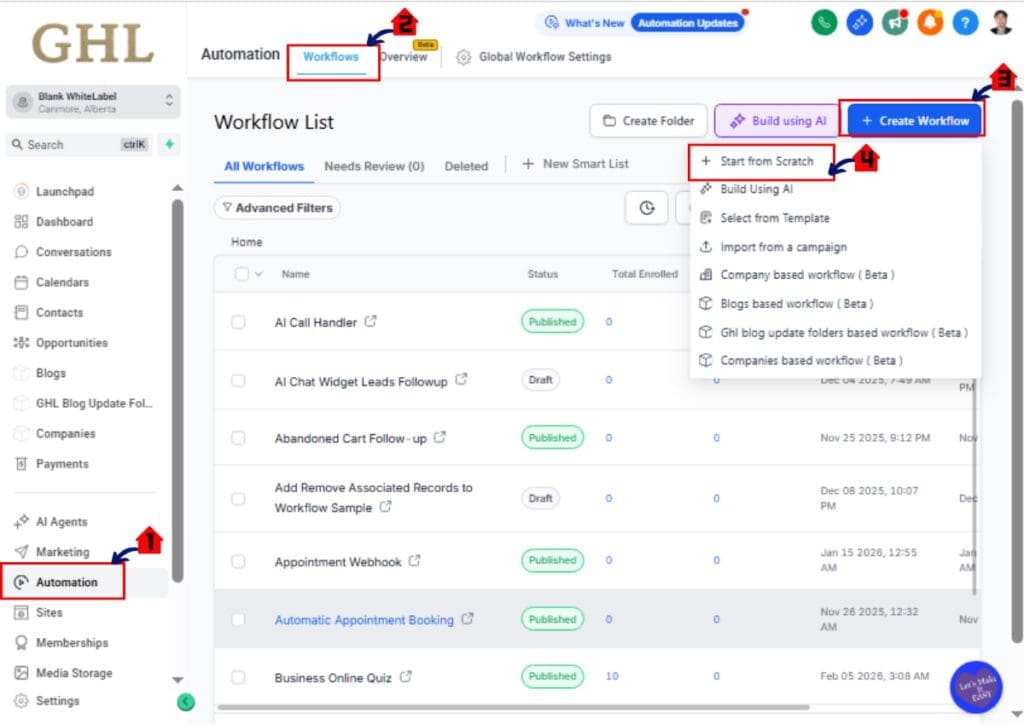
Step 01 – Access the Workflows page of GoHighLevel
- The Main Menu on the left side of your screen has all the main areas that you work in when using GHL.
1.1 Click Automation in the main menu.
- Inside the Automation section you will find Workflows, Overview, and other workflow-related areas.
1.2 Click Workflows in the top menu if the Workflow List page is not already showing.
- The Workflow List page shows all of your current workflows, folders, and workflow options.
1.3 Click the Create Workflow button.
- A workflow setup window will open with different starting options.
1.4 Click Start From Scratch.
- This opens a blank workflow builder so you can build the automation from the beginning.
Step 03 – Add the form submission trigger
Step 02 – Add the form submission trigger
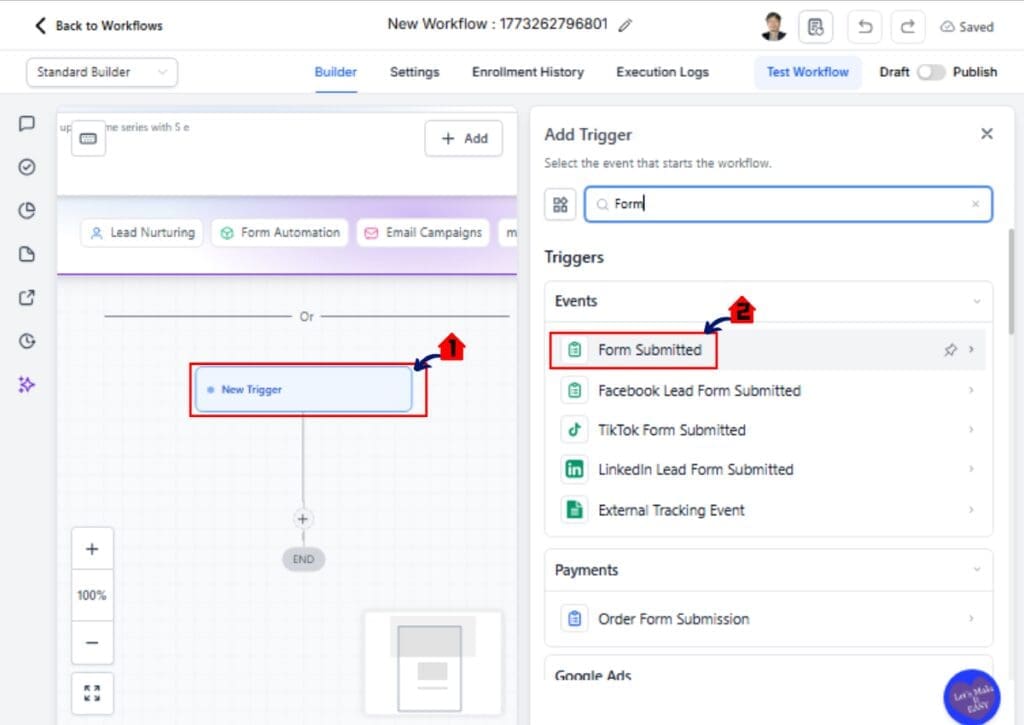
2.1 Click Add New Workflow Trigger.
- The trigger options panel will open.
2.2 Select Form Submitted as the trigger.
- This tells GoHighLevel to start the workflow when a form is completed.
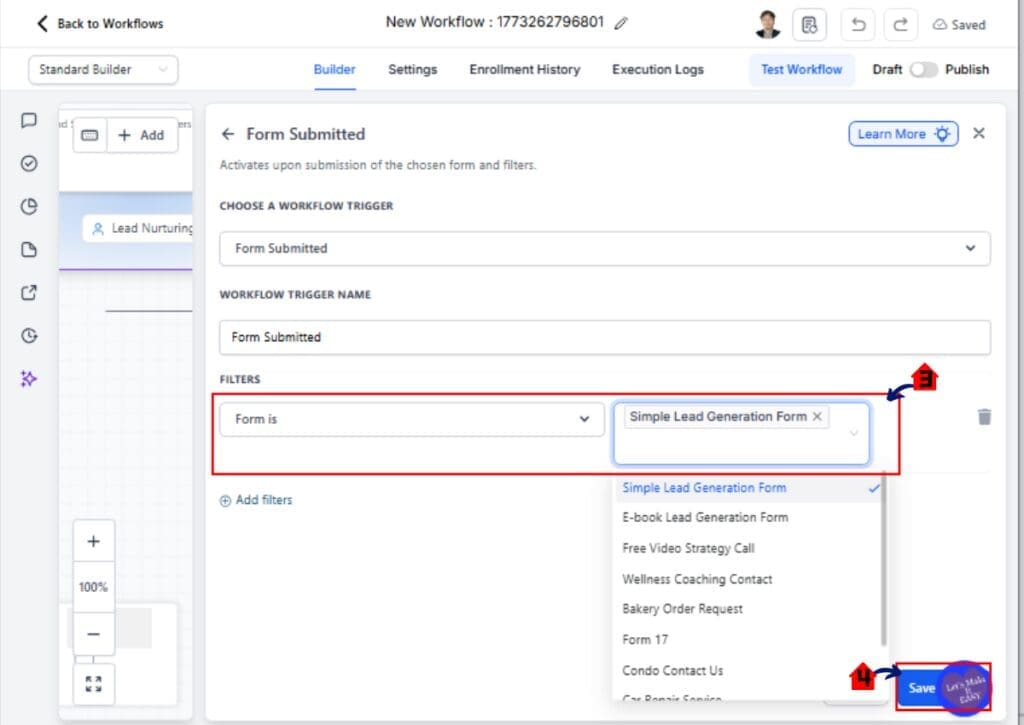
2.3 Choose the correct form if you want this workflow to run only for one specific form. > Click Filter
- If you leave this broad, the workflow may run for more than one form depending on your setup.
2.4 Click Save Trigger.
- The trigger is now added to the top of the workflow.
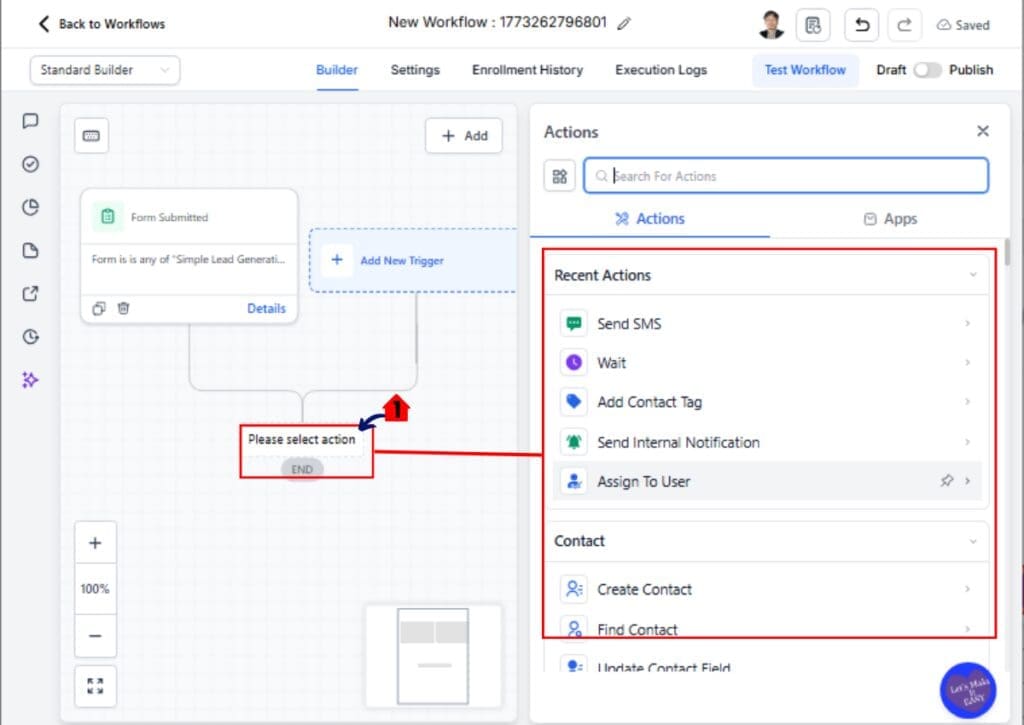
Step 03 – Add Follwing Acion
1.1 Click the + icon below the trigger to add a new action.
- The action menu will open.
- Then Add Action Such As:
- Select Send SMS.
- Add the internal notification action
- Assign to user
- Send Email Etc.
- Then Add Action Such As:
02 – Missed Call Text Back Automation Workflow
Many businesses lose leads because they miss phone calls. People often call when they are ready to buy. If no one answers, they quickly move on.
This is why the Missed Call Text Back workflow is one of the most valuable automation workflows for clients.
When a call is missed, GoHighLevel can send a text message right away. The message lets the caller know the business saw their call.
A simple message works best.
For example, the system might send a text like this:
“Sorry we missed your call. How can we help you today?”
You can also include a booking link so the lead can schedule an appointment.
This workflow keeps the conversation alive even when the team is busy. It also helps businesses recover leads that would normally be lost.
Many agencies add this automation to every client account because it improves response time and captures more opportunities.
03 – New Lead Nurture Automation Workflow
Not every lead is ready to buy right away. Some people need time before they make a decision.
This is where a New Lead Nurture workflow becomes useful.
When a new contact enters the system, the automation workflow begins. Instead of sending only one message, the system sends a series of helpful follow-ups over several days.
For example, the first message may welcome the new lead and thank them for their interest. The next message might share useful information about the service. A later message can invite them to book a call or request a quote.
These messages keep the business in front of the lead without feeling pushy.
A nurture workflow also builds trust. It gives the lead time to learn about the business and understand the value of the service.
Many agencies use this automation workflow to warm up leads before the sales team reaches out. By the time the conversation starts, the lead already knows the brand.
04 – Appointment Reminder Automation Workflow
Missed appointments cost businesses time and money. Many no-shows happen because people simply forget.
An Appointment Reminder workflow helps solve this problem.
When a customer books an appointment, the automation workflow starts. GoHighLevel can send reminder messages before the meeting.
Most businesses send a reminder one day before the appointment. Another reminder can be sent one hour before the meeting.
These reminders can be sent by SMS, email, or both.
The message should be short and clear. It should include the appointment time and a link to reschedule if needed.
This workflow does more than remind people. It also shows that the business is organized and professional.
Agencies often add this automation workflow for service businesses like dentists, salons, and consultants.
When reminder workflows are active, many businesses see fewer no-shows and smoother schedules.
05 – Review Request Automation Workflow
Online reviews help businesses build trust. They also improve local search rankings.
The problem is simple. Most businesses forget to ask for reviews.
A Review Request workflow solves this problem automatically.
When a service is completed or an appointment ends, the workflow starts. GoHighLevel can send a short message asking the customer to leave a review.
The message should be friendly and easy to follow. It should also include a direct link to the review page.
For example, a business might send a text that says:
“Thanks for visiting us today. We would love your feedback. Please leave us a quick review here.”
This workflow helps businesses collect reviews more consistently.
Agencies often use this automation workflow for local service businesses like restaurants, clinics, and home services.
Over time, these reviews build strong social proof. That trust helps businesses attract more customers.
06 – Pipeline Stage Follow-Up Automation Workflow
Leads often move through different stages before they become customers. Many businesses track these stages inside their sales pipeline.
The problem is simple. After a quote or proposal is sent, many leads stop responding.
A Pipeline Stage Follow-Up workflow helps prevent this.
When a lead moves to a new stage in the pipeline, the workflow begins. For example, the stage may be called “Quote Sent” or “Proposal Delivered.”
After a short delay, the system sends a follow-up message. This message checks in with the lead and asks if they have questions.
If the lead still does not respond, another reminder can be sent a few days later.
These gentle follow-ups keep the conversation active without the sales team chasing every lead.
Agencies often use this automation workflow to help clients close more deals. It keeps leads engaged and reduces the number of lost opportunities.
07 – Client Onboarding Automation Workflow
Winning a new client is exciting. But the onboarding process can take a lot of time if it is done by hand.
A Client Onboarding workflow helps make this process smooth and consistent.
When a deal is marked as “Won” in the pipeline, the workflow begins. GoHighLevel can automatically send a welcome email to the new client.
The message may thank them for choosing the business and explain the next steps.
The workflow can also send an onboarding form. This form collects important information from the client before the work begins.
At the same time, the system can create tasks for the internal team. This helps everyone stay organized and ready to deliver the service.
This automation workflow saves time and removes confusion.
Agencies often use onboarding workflows to give clients a better first impression. When the process runs smoothly, clients feel confident they made the right choice.
08 – Re-Engagement Campaign Automation Workflow
Many businesses have old contacts in their database. These people showed interest at some point but never became customers.
Over time, these contacts often get forgotten.
A Re-Engagement Campaign workflow helps bring those leads back.
The workflow starts when a contact has been inactive for a long time. For example, the trigger may activate after 60 or 90 days without activity.
Once triggered, GoHighLevel can send a friendly message to restart the conversation.
The message might ask if the lead still needs help or offer useful information about the service.
Some businesses also include a special offer to encourage action.
This automation workflow gives old leads a second chance to convert. It also helps businesses make better use of the contacts they already have.
Agencies often use re-engagement workflows to generate new opportunities without spending money on new ads.
09 – Abandoned Form Follow-Up Automation Workflow
Sometimes a lead starts filling out a form but never finishes it. This happens more often than most businesses realize.
An Abandoned Form Follow-Up workflow helps recover those lost leads.
The workflow begins when someone submits part of a form but does not complete the process. This action can trigger a reminder message.
GoHighLevel can send a short text or email asking if the person still needs help.
The message should feel friendly and helpful. It might say something like, “We noticed you started filling out our form. Let us know if you need help finishing it.”
A direct link to the form can also be included so the lead can easily return and complete it.
This simple automation gives interested leads another chance to take action.
Agencies often add this workflow to improve conversion rates and recover leads that would normally be lost.
10 – Customer Win-Back Automation Workflow
Many businesses focus on getting new customers. But they often forget about past customers.
A Customer Win-Back workflow helps bring those people back.
The workflow begins when a customer has been inactive for a long time. This might be six months or even one year without a purchase.
Once triggered, GoHighLevel can send a message to reconnect with the customer.
The message should feel friendly and personal. It may thank them for being a past customer and invite them to return.
Some businesses include a special offer or discount. This gives the customer a reason to come back and try the service again.
Win-back workflows are powerful because these people already know the business.
They may simply need a reminder.
Agencies often use this automation workflow to help clients increase repeat business and build stronger customer relationships.
Pro Tips for Building Better Automation Workflows
Automation workflows work best when they stay simple and focused.
Start with one clear goal. Each workflow should solve a specific problem. For example, one workflow may respond to new leads. Another may send appointment reminders.
Avoid adding too many steps at the beginning. Large workflows can become hard to manage. Start small and improve the system over time.
Always test your workflow before using it with clients. Send test messages and check that every step works correctly. This helps prevent mistakes.
Keep messages short and easy to read. Most people respond better to simple text messages than long emails.
It is also helpful to add short delays between messages. This makes the communication feel more natural.
Agencies that build clean and simple workflows usually get the best results. Over time, these small automations can save hours of work and improve client performance.
What This Means for Your Agency
Automation workflows can change how an agency runs day to day.
Instead of doing the same tasks again and again, the system handles them for you. Leads get responses right away. Follow-ups happen on time. Messages are never forgotten.
This helps your agency stay organized and efficient.
Automation workflows also improve results for your clients. Faster responses often lead to more conversations. More conversations often lead to more sales.
Clients notice the difference when their systems run smoothly.
For agencies, this means you can manage more clients without increasing your workload. Your team spends less time on small tasks and more time on strategy and growth.
Over time, these systems become a powerful part of your service.
Agencies that build strong automation workflows often deliver better results. And better results lead to happier clients and long-term partnerships.
Frequently Asked Questions About Automation Workflows
Conclusion – Start Using Automation Workflows Today
Automation workflows can transform how agencies serve their clients.
Instead of handling every message and reminder by hand, GoHighLevel can manage these tasks automatically. Leads receive fast responses. Follow-ups happen on time. Conversations stay active without extra effort from your team.
These systems help businesses stay organized and responsive.
For agencies, the benefits are even bigger. When automation workflows run in the background, your team can focus on strategy, growth, and better service for clients.
The workflows in this guide are a great place to start. They are simple to build and work well in many industries.
Once these automations are active, your clients will notice the difference. Faster communication and better follow-ups often lead to stronger results.
Here at GHL Growth Garage, we recommend building these workflows as reusable templates. This makes it easy to deploy them across multiple client accounts.
Start with one or two workflows, test them, and improve them over time.
Soon you will have a powerful automation system running behind every client campaign.
Scale Your Business Today.
Streamline your workflow with GoHighLevel’s powerful tools.


