- New Summary Tab Metrics Give You Clearer MRR, Reliable KPIs, and Smarter Decisions
- Quick Summary – Accurate Revenue Tracking Essentials
- Accurate Revenue Tracking Now Comes Standard
- Why Accurate Revenue Tracking Helps You Work Smarter
- How to Use the New Accurate Revenue Tracking Tools
- Simple Ways to Use Accurate Revenue Tracking Smarter
- What Accurate Revenue Tracking Means for Your Business
- Results from Using Accurate Revenue Tracking
- Accurate Revenue Tracking Frequently Ask Question
- Make the Most of Accurate Revenue Tracking
New Summary Tab Metrics Give You Clearer MRR, Reliable KPIs, and Smarter Decisions
Accurate Revenue Tracking Starts with Clean Data
Accurate revenue tracking used to be tricky inside the GoHighLevel Agency Dashboard. You’d check the Summary tab, see the numbers, and still wonder if they told the full story.
The problem? The dashboard is used to pull data from all sorts of places. Some numbers came from GHL. Others didn’t. It mixed in sources that weren’t always reliable or consistent. That made it hard to trust what you were seeing and even harder to make decisions based on it.
This new update fixes that. GoHighLevel now shows revenue and MRR based only on what runs through its own systems: SaaS, Reselling, and Rebilling. No more outside noise. No more digging through Stripe or spreadsheets to figure out what’s real.
If you’ve ever wasted time second-guessing your dashboard data, this change is going to make your life easier.

This update to the GHL Agency Dashboard delivers accurate revenue tracking you can trust. By filtering out noisy data, your MRR, revenue, and growth charts now reflect real performance from verified sources SaaS, Reselling, and Rebilling. No more guesswork. Just clean, actionable insights that drive smarter decisions.
Quick Summary – Accurate Revenue Tracking Essentials
Purpose: This update improves accurate revenue tracking in GHL by showing verified revenue from SaaS, Reselling, and Rebilling directly in the Agency Dashboard.
Why It Matters: Mixed data made it hard to trust dashboard numbers. This fix gives you clean, clear revenue data you can actually use.
What You Get: Updated KPI cards, a refined growth chart, and a clear breakdown of revenue streams based only on GHL-supported sources.
Time to Complete: Less than 2 minutes to check your updated Summary tab and review the new data.
Difficulty Level: Very easy. No setup or toggles. It’s already live in your dashboard.
Key Outcome: Trusted revenue metrics, better decisions, and less time spent second-guessing your numbers.
Accurate Revenue Tracking Now Comes Standard
GoHighLevel just made accurate revenue tracking a whole lot easier. The Agency Dashboard now shows revenue and MRR using only data from GHL-backed tools.
That means everything you see in the Summary tab comes from real, traceable sources inside your account. No outside tools. No mixed-up numbers. Just clean and accurate revenue tracking.
Automate marketing, manage leads, and grow faster with GoHighLevel.

Here’s what counts now:
- SaaS subscriptions
- Reselling revenue
- Rebilling activity
These are the only sources used in your updated revenue and MRR totals. This change removes confusion and gives you a clearer picture of how your agency is doing.
The Total Revenue and MRR cards have been updated with this new logic. The Growth Rate chart now matches those numbers, so everything lines up.
You’ll also see a new Revenue Distribution section. It breaks down your earnings by stream, showing exactly how much came from SaaS, Reselling, and Rebilling.
This update doesn’t add new features. It just makes accurate revenue tracking finally work the way it should.
Why Accurate Revenue Tracking Helps You Work Smarter
Accurate revenue tracking isn’t just about numbers looking clean. It’s about knowing your agency is on the right path and making decisions with confidence.
Before this update, you had to guess where some revenue was coming from. You might’ve seen higher totals than expected or mismatched growth trends. It made planning hard and reporting even harder.
Now, with accurate revenue tracking built into the Agency Dashboard, the numbers reflect only what you’ve actually earned through GHL. That makes your data more useful, more consistent, and easier to explain to your team or clients.
You can spot trends faster, focus on real revenue streams, and stop second-guessing your reports. It’s also easier to catch dips early or double down on what’s working.
If you want a dashboard that helps you grow, not just report, this update is a big step in the right direction.
How to Use the New Accurate Revenue Tracking Tools
GoHighLevel now shows clean, accurate revenue tracking in the Agency Dashboard. All updates are in the Summary tab, and it only takes a few clicks to see the new layout.
Here’s how to find and use the improved revenue tracking tools:
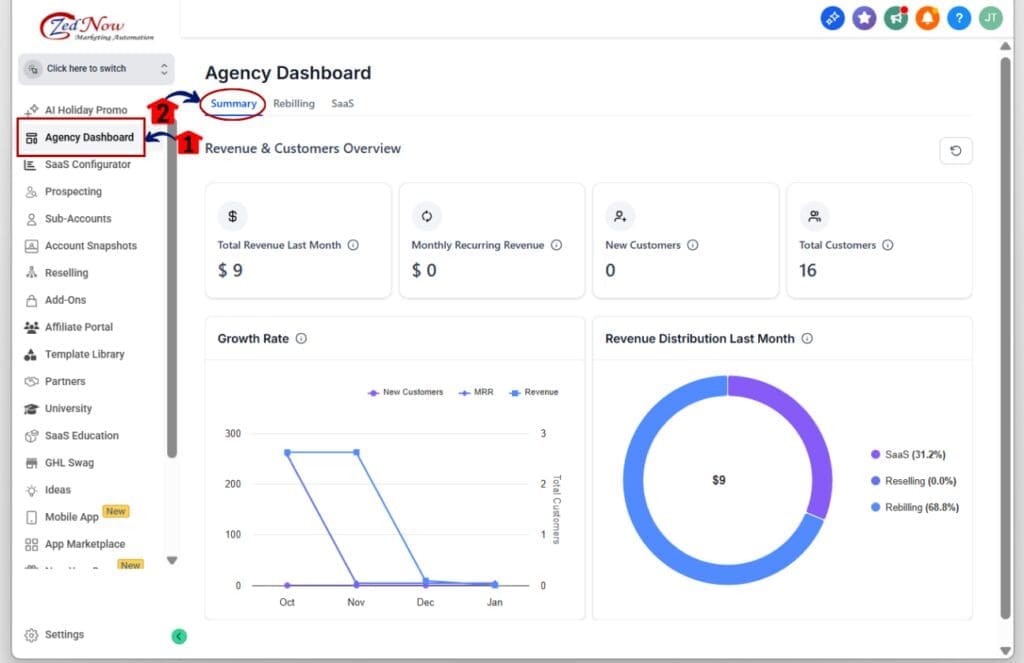
Step 01: Access the Main Left Hand Menu in GoHighLevel
- The Main Menu on the Left side of your screen has all the main areas that you work in when using GHL
1.1 Click on the Agency Dashboard Menu Item.
- Access the ‘Agency Dashboard’ section of GoHighLevel
1.2 Click on the Summary tab
- You’ll now see the updated revenue metrics.
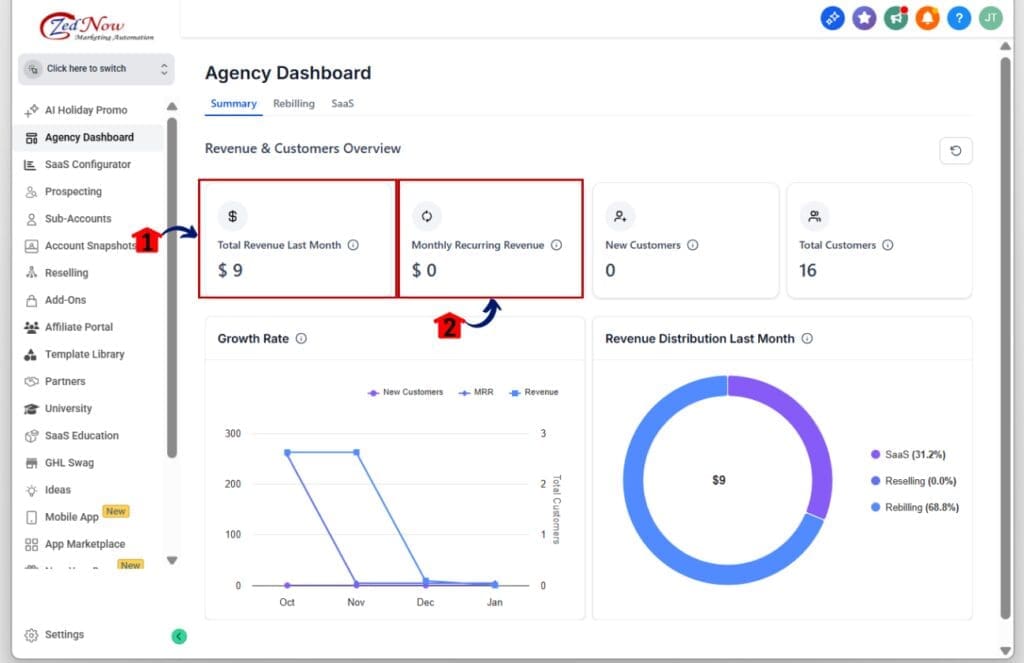
Step 02: Check the Updated Revenue and MRR Cards
- These cards now show verified numbers using only GHL-supported revenue.
2.1 Look at the “Total Revenue (Last Month)” card
- This now reflects only SaaS, Reselling, and Rebilling sources.
2.2 Look at the “Monthly Recurring Revenue (MRR)” card
- Same logic here no external or unsupported numbers included.
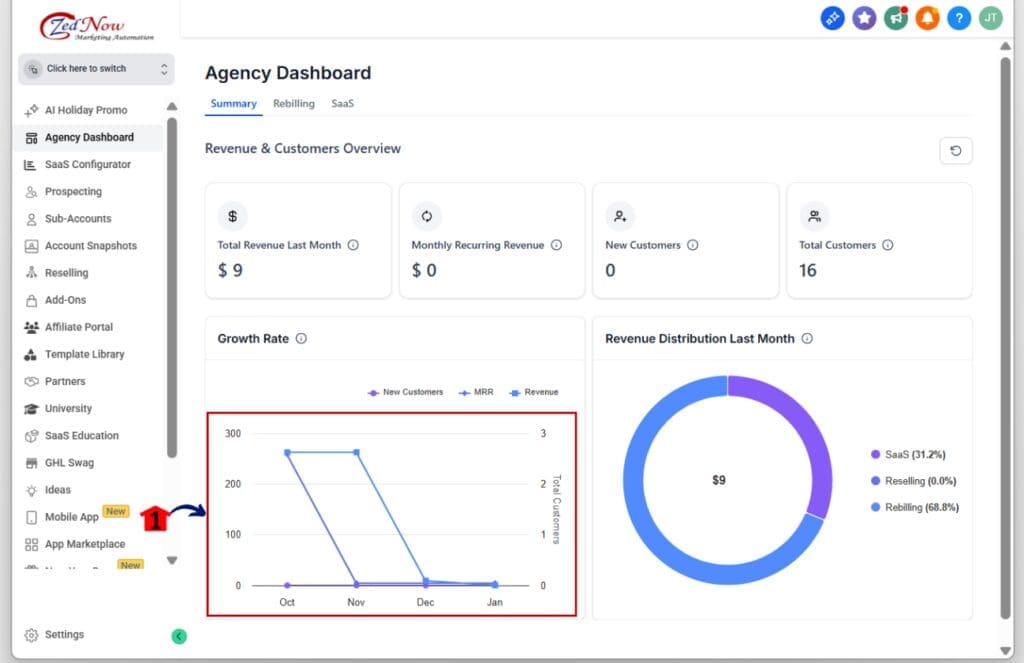
Step 03: Review the Growth Rate Chart
- This visual helps track accurate month-over-month progress.
3.1 Scroll down to the “Growth Rate” section
- You’ll see a clean visual showing how your MRR is changing over time.
3.2 Confirm that the chart aligns with your KPI cards
- This keeps your reporting consistent and trustworthy.
Step 04: Analyze the Revenue Distribution Breakdown
- This section shows where your money is coming from.
4.1 Look for the “Revenue Distribution (Last Month)” section
- You’ll see SaaS, Reselling, and Rebilling clearly labeled.
4.2 Use the breakdown to identify top revenue drivers
- This helps you focus on what’s working and where to improve.

That’s it. With just a few steps, you can use accurate revenue tracking in GoHighLevel to get a clearer view of how your agency is earning and growing.
Simple Ways to Use Accurate Revenue Tracking Smarter
Now that your dashboard has accurate revenue tracking, here are a few simple ways to use it better.
Look at your revenue distribution every month
- The Revenue Distribution section tells you where your money is coming from. Use it to spot trends and shift your focus to the strongest streams.
Track your growth rate after new offers go live
- If you launch something new, check the Growth Rate chart the next month. Accurate revenue tracking helps you see if the offer brought in real results.
Use accurate revenue tracking for monthly team reviews
- Make it part of your routine. Use the updated MRR and revenue numbers as a base for team discussions and planning.
Stop comparing your current data to old reports
- The old numbers included other sources. The new data is cleaner and more consistent. Start fresh and track progress using the new setup.
Use accurate revenue tracking in client reports
- Since the data is now based only on GHL-supported revenue, you can share it without worrying about messy breakdowns or explaining missing numbers.
Accurate revenue tracking helps you focus on the truth behind your numbers. When you trust the data, you can make faster decisions and improve what matters most.
What Accurate Revenue Tracking Means for Your Business
This update is more than just a tweak to the dashboard. Accurate revenue tracking gives your agency a clearer path forward.
You no longer have to sort through mixed data or guess which numbers are real. With this change, what you see in your dashboard is what you’ve actually earned through GoHighLevel tools.
That kind of clarity matters.
It helps you set better goals, track your growth with confidence, and adjust your strategy without hesitation. Whether you’re running a SaaS offer, managing reselling clients, or using rebilling, your revenue insights now show the full picture.
Accurate revenue tracking also saves you time. Instead of exporting reports or cross-checking spreadsheets, you can use one view to guide your decisions.
For SaaS agencies especially, this means fewer surprises and more control. You’ll know what’s working, what’s not, and where to focus next.
Results from Using Accurate Revenue Tracking
When you use accurate revenue tracking in GoHighLevel, you stop guessing and start making decisions based on facts.
You’ll notice a few things right away:
Your MRR and Total Revenue will feel more consistent. You’ll know where the money is coming from, and you won’t need to dig through other tools to explain it.
You’ll save time. No more matching dashboard numbers to outside platforms. You can rely on what you see in one place.
Your team will have fewer questions. With accurate revenue tracking built into the Summary tab, everyone sees the same numbers and speaks the same language.
You’ll start seeing trends that were easy to miss before. The updated Growth Rate chart and Revenue Distribution make it clear what’s rising, what’s flat, and where you should pivot.
You’ll feel more confident sharing your numbers. Whether it’s with a client or your own leadership, the data is now clean and simple to explain.
Accurate revenue tracking makes your business easier to manage. The better your data is, the smarter your choices. That’s what this update delivers.
Accurate Revenue Tracking Frequently Ask Question
Here are some quick answers to common questions about the new accurate revenue tracking in GoHighLevel:
Accurate revenue tracking is now the default. It’s cleaner, simpler, and more useful than before.
Make the Most of Accurate Revenue Tracking
Accurate revenue tracking is now part of your GoHighLevel dashboard. The update brings cleaner numbers, fewer surprises, and more control over how you read your business data.
This change isn’t about adding more features. It’s about giving you better tools to make decisions. With accurate revenue tracking, you can trust what you see and act on it with confidence.
You no longer have to compare outside tools or sort through reports to figure out what’s real. The data in your Summary tab now gives a clear picture of what your agency is earning through SaaS, Reselling, and Rebilling.
Log into your dashboard, check out the changes, and start using accurate revenue tracking to guide your next move. It’s already set up and ready to go.
Clean data means smarter choices. And that’s what helps you grow.
Scale Your Business Today.
Streamline your workflow with GoHighLevel’s powerful tools.