- Find and contact local business leads fast
- Quick Summary – Local Lead Generation Overview
- Video Walkthrough for Local Lead Generation in GHL
- GHL Prospecting feature overview
- Why local lead generation matters
- How to find local lead generation prospects
- Local lead generation tips for beginners
- Local lead generation for business growth
- Results from local lead generation in GHL
- Local lead generation FAQs
- Start using local lead generation today
Find and contact local business leads fast
Local lead generation in GHL Prospecting gives you a simple way to find business leads step by step. You go to Marketing, open Prospecting, enter your industry and location, then run a search. From there, you review the results, select prospects, and generate reports you can use to start outreach.
When you use this feature inside your sub-account, you will notice something quickly. The best opportunities are not always the biggest businesses. In most cases, the smaller ones with weak online presence are easier to close because the problems are clear and easy to show.
Local lead generation still works because many businesses are behind online. Around 60 percent of local businesses either have no website or poor optimization. That means there is no shortage of people who need help and are open to it.
In this guide, you will follow a clear process for local lead generation using GHL Prospecting. You will learn how to find leads fast, understand what to look for, and take action right away so you can start real conversations and create new opportunities.
Quick Summary – Local Lead Generation Overview
Purpose: This guide shows you how to use local lead generation inside GHL Prospecting to find and review real business leads in your area in a simple way.
Why It Matters: Local lead generation helps you stay in control of your pipeline so you are not waiting for leads to come to you.
What You Get: You get a clear process to search for, review, and organize local business prospects using the tools already inside your GHL sub-account.
Time To Complete: You can run your first local lead generation search and build a basic lead list in less than 10 minutes.
Difficulty Level: This is easy to follow and works well if you are new to GHL or just starting with local lead generation.
Key Outcome: You will have a simple system for local lead generation that helps you find leads and start outreach with more confidence.
Video Walkthrough for Local Lead Generation in GHL
Find local business leads fast using simple steps inside GHL. This video shows you how to start without extra tools.
What you’ll see:
Automate marketing, manage leads, and grow faster with GoHighLevel.

- How to open the Prospecting tool in your account.
- How to enter industry, location, and radius.
- How to run a search and view local leads.
- How to build a simple list for outreach.
Clear steps you can follow right away.
GHL Prospecting feature overview
Local lead generation gets a lot easier when you stop guessing who to reach out to. Inside GHL, the Prospecting feature gives you a direct way to find real businesses in your area. You are working with targeted prospects that match your service, not random lists that go nowhere.
When you open the Prospecting tab, the setup is simple and clear. You enter your industry, choose a location, and set a radius. GHL then pulls a list of local businesses in seconds. This saves time and gives you a clean starting point for local lead generation.
Each result gives you a quick look at the business and how they show up online. You can spot gaps fast and decide who is worth your time. For beginners, this makes local lead generation feel more structured and easier to act on.
Here is what the Prospecting feature helps you do:
- Search businesses by industry, location, and radius.
- Find local lead generation opportunities in seconds.
- View key business details in one place.
- Spot businesses with weak online presence.
- Build a simple list of prospects inside GHL.
Why local lead generation matters
Local lead generation gives you more control over how you bring in clients. Instead of waiting and hoping someone finds you, you go out and find businesses that already need help. That simple shift makes your pipeline steadier and easier to manage.
Right now, many local businesses are still behind online. About 25 to 30 percent do not have a website, and many others are not optimized well. This creates a real opportunity for you if you know how to spot the gaps and start the conversation.
When you use local lead generation inside GHL, you are working with clear data, not guesswork. You can focus your time on businesses that are more likely to respond. This helps you stay consistent and build a simple system that brings in new opportunities.
Here is why this matters for you:
- You control your lead flow instead of waiting.
- You focus on businesses that need your help.
- You spend less time on poor leads.
- You build a repeatable process inside GHL.
- You rely less on ads to grow your business.
How to find local lead generation prospects
Finding local lead generation prospects inside GHL is done through the Prospecting tool in your sub-account. You will use this feature to search for businesses by industry and location, then generate a list of potential leads you can review and work with.
In the steps below, you will access the Prospecting section, enter your search details, and run a search to pull local business results. This gives you a clear and simple way to build a list of prospects without using any outside tools.
- Access the Add Prospect button in the Marketing Prospect tab.
- Search for your prospects’ business industry, location, and radius coverage.
- Add the prospects into your Prospect Accounts or library.
- Generate the Marketing Audit Report of a prospect.
- Return back to your GHL Prospect Accounts.
- View the Marketing Audit Report of your prospect.
- Check and generate a file for your prospect’s Marketing Audit Report.
- Check the quick action buttons for the prospect account.
- Send and share your proposal and the prospect’s Marketing Audit Report to them.
To start, make sure you are logged in to your GoHighLevel sub-account.
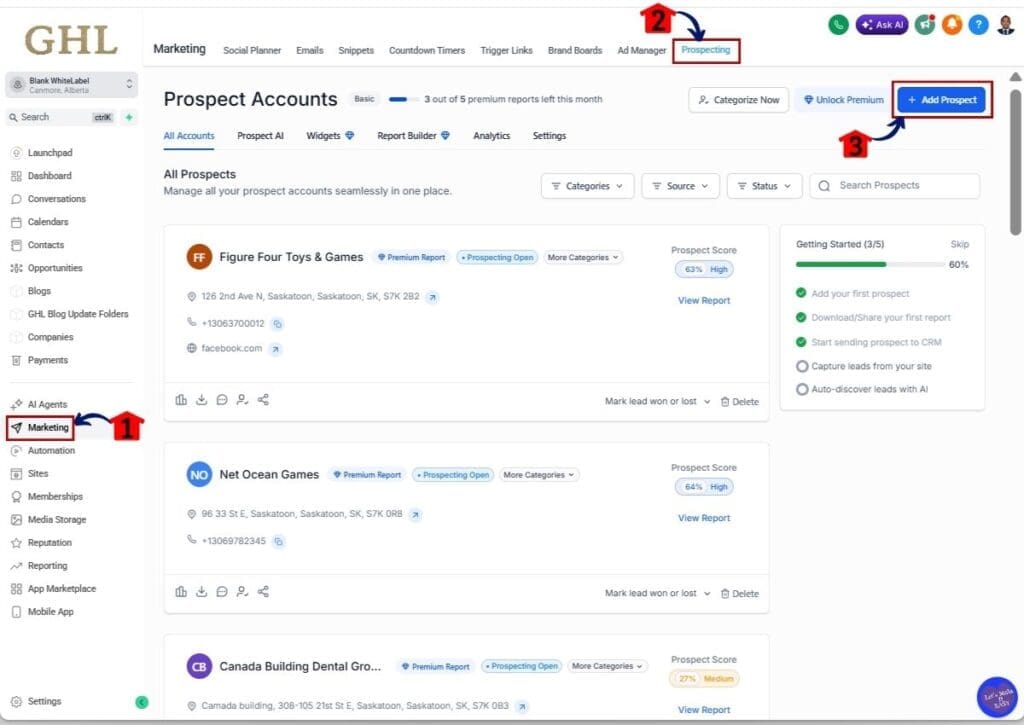
Step 01 – Access the Add Prospect button in the Marketing Prospect tab
- Find leads by adding prospects in the Prospecting tab inside the Marketing section
1.1 Click the Marketing section
- You will now be in the Marketing section, where you can see tabs like Social Planner, Emails, Snippets, Prospecting, and other options
1.2 Click the Prospecting tab
- You will see a list of all prospect accounts you have created
1.3 Click the + Add Prospect button
- You will be taken to the section where you can find and add local lead generation prospects
Step 02 – Search for your prospects’ business industry, location, and radius coverage
- Enter the business industry, location, and radius to find your prospects
2.1 Type in the business industry
- This can be a general industry like plumbers, dentists, or bakery
2.2 Set the location of the search
- Enter the city, state, and country for the location
2.3 Set the Radius coverage
- Choose the radius in kilometers or miles for your search area
2.4 Click the Search button
- You will see a list of prospects based on your filters
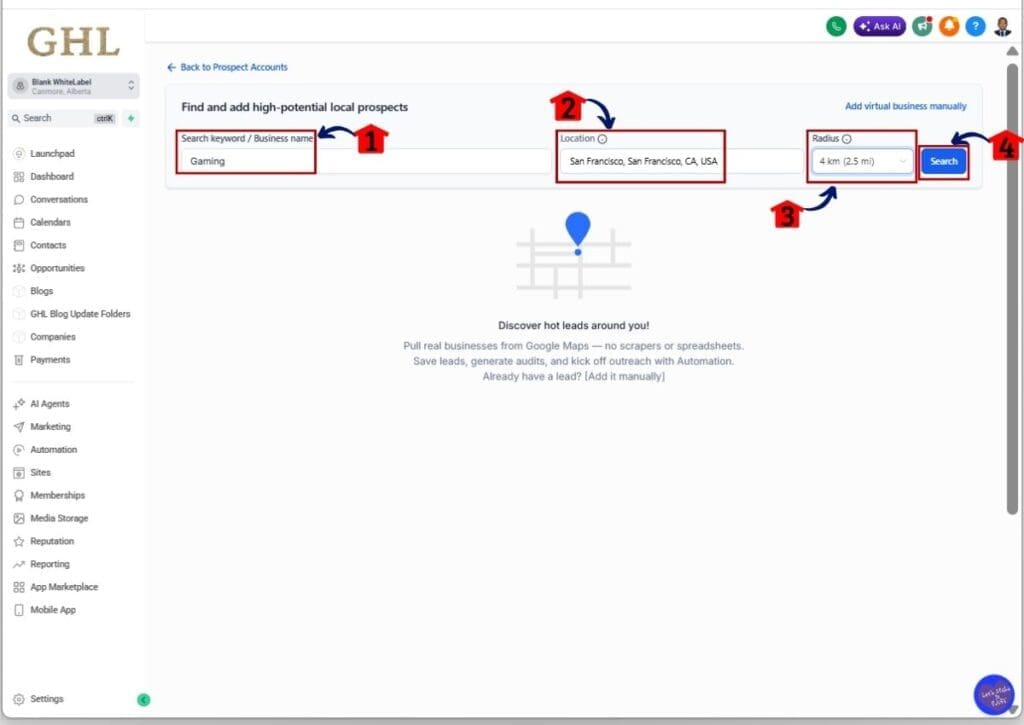
Step 03 – Add the prospects into your Prospect Accounts or library
- Add the prospects you want to target into your GHL Prospect Accounts or library
3.1 Click and sort by the highest Prospect score
- You will see the list reordered. A higher score means a better chance of winning the prospect
- A higher Prospect score means they have a lower Marketing Audit Score, which gives you a clear opportunity to offer your GHL services
3.2 Click the + Add button for that prospect
- You will see a pop-up with the prospect’s details
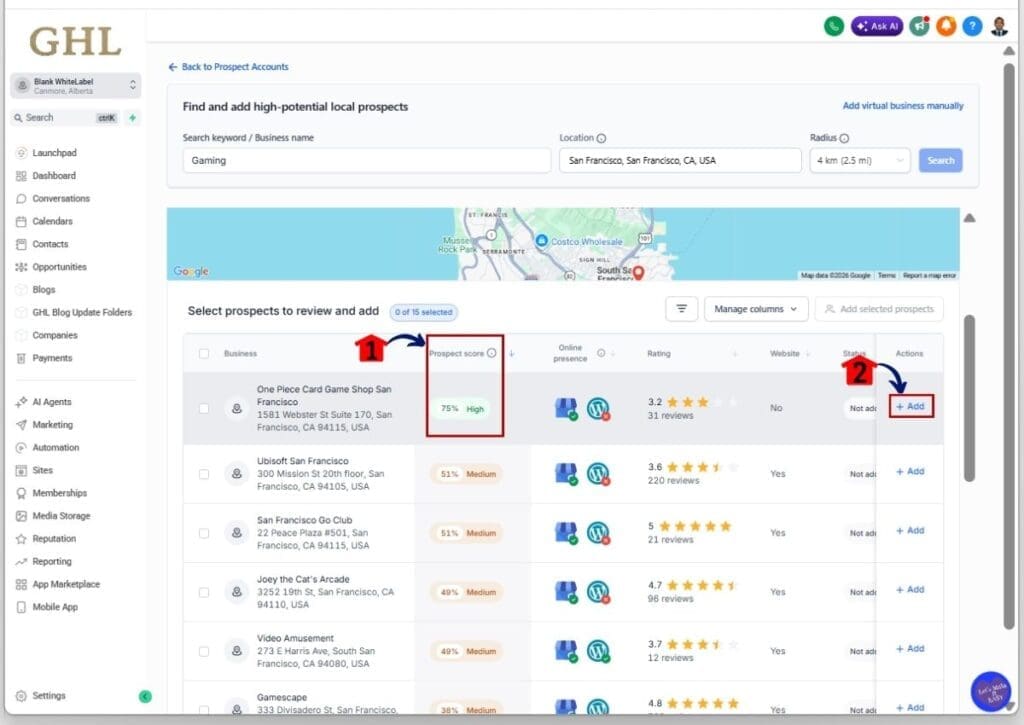
Step 04 – Generate the Marketing Audit Report of a prospect
- Generate the Marketing Audit Report to see what the business is missing
4.1 Click the Generate Report button
- You will return to the local lead generation prospect list in your GHL account
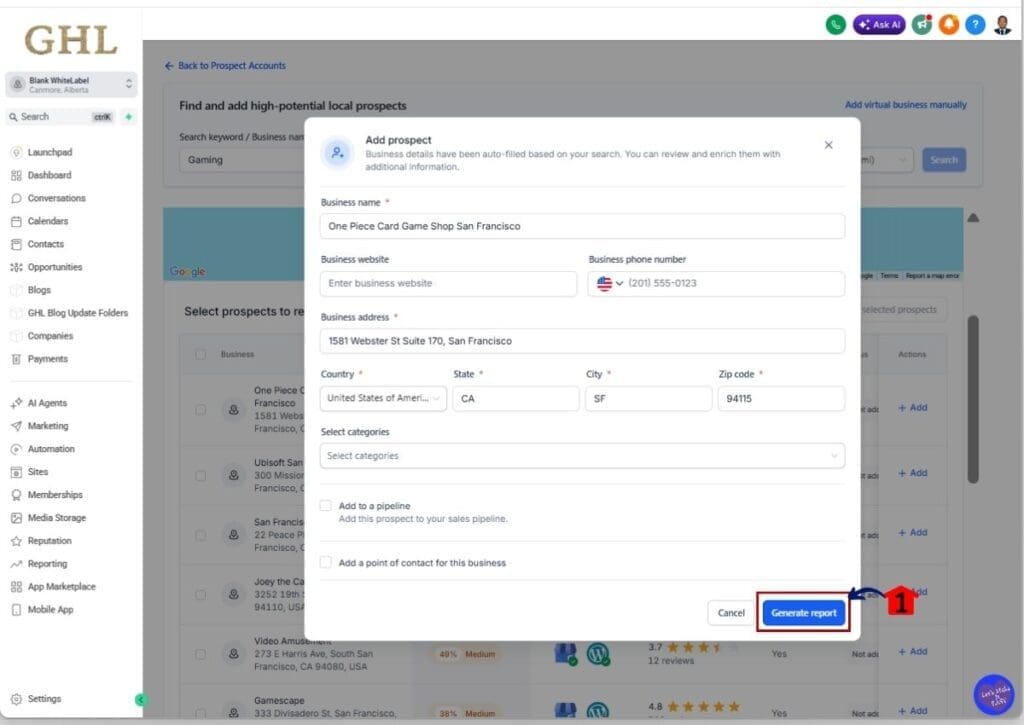
Step 05 – Return back to your GHL Prospect Accounts
- Go back to your Prospect Accounts to view your saved prospects
5.1 Click the Back to Prospect Accounts button
- You will now be in your GHL sub-account Prospect Accounts library
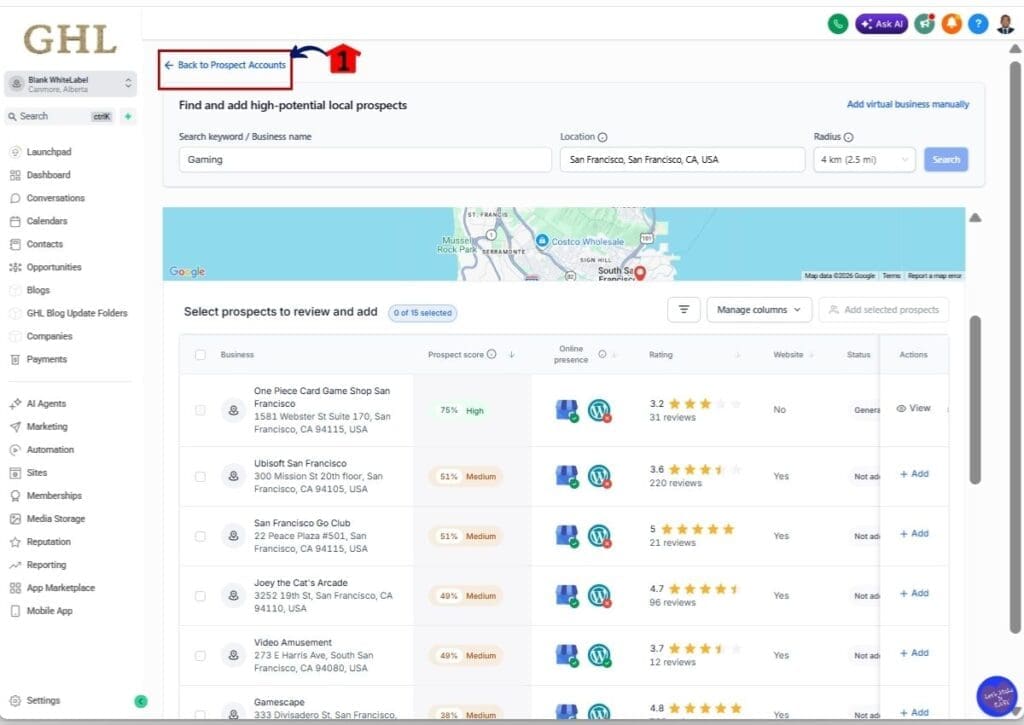
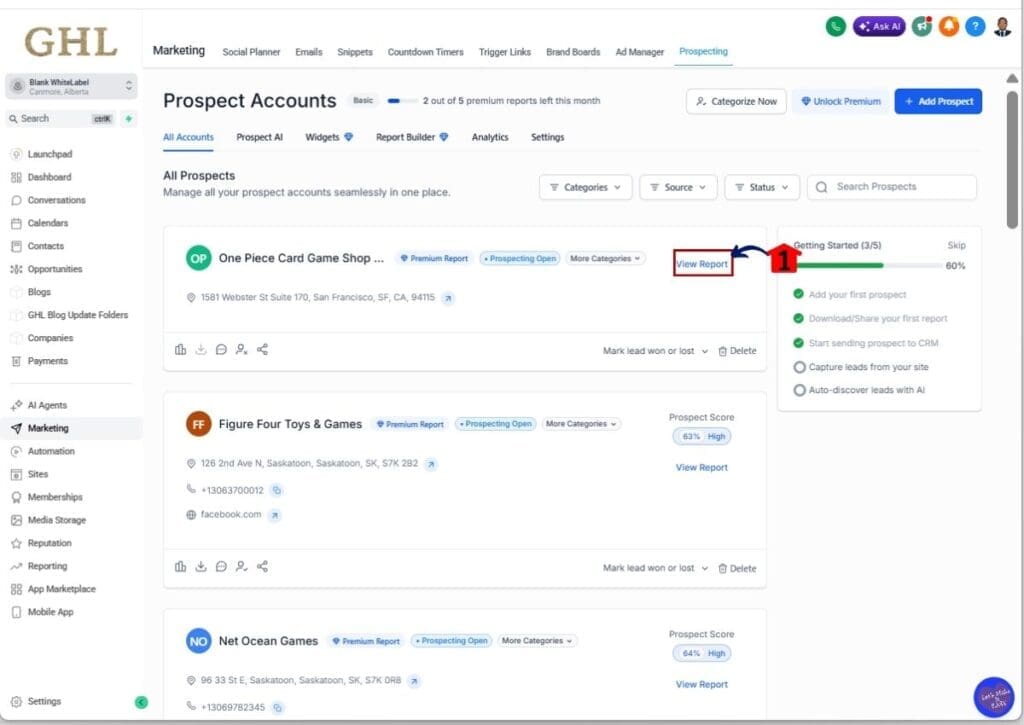
Step 06 – View the Marketing Audit Report of your prospect
- Open and review the Marketing Audit Report to see what the business needs
6.1 Click the View Report button for a prospect
- You will be taken to the Marketing Audit Report, where you can see key insights
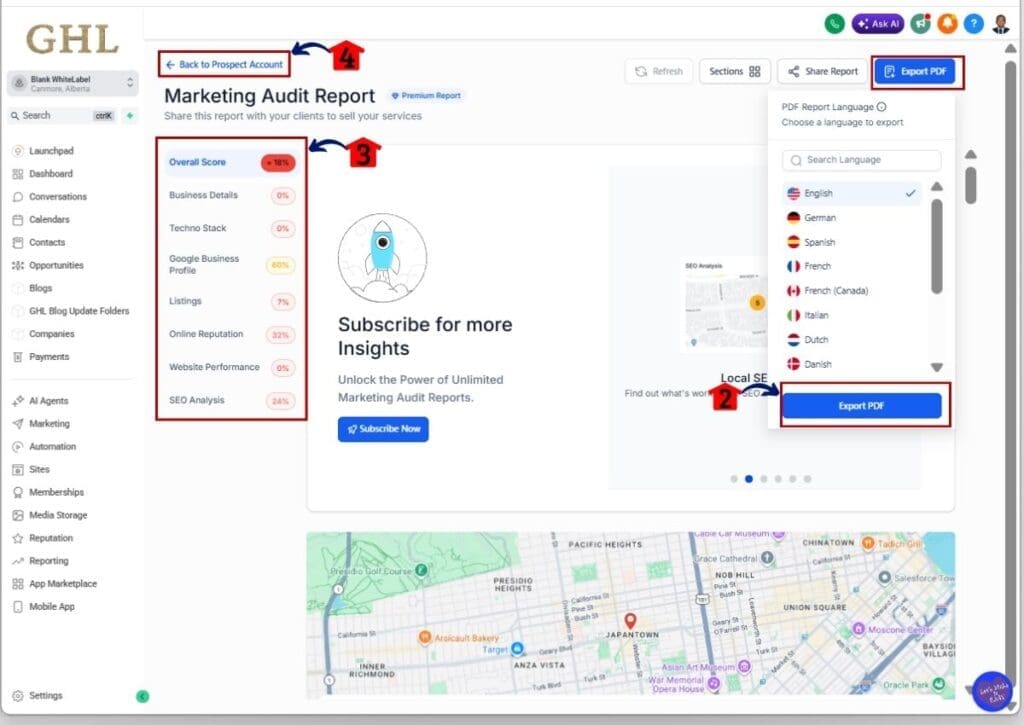
Step 07 – Check and generate a file for your prospect’s Marketing Audit Report
- Download and review the report to understand what services to offer
7.1 Click the Export PDF button
- A dropdown will appear where you can choose the language and export the file
7.2 Click the Export PDF button
- The PDF will be saved to your device’s download folder
7.3 Check the Marketing Audit sections of the report
- This helps you see what the business is missing and what GHL services you can offer
7.4 Click the Back to Prospect Account button
- You will return to your GHL sub-account Prospect Accounts library
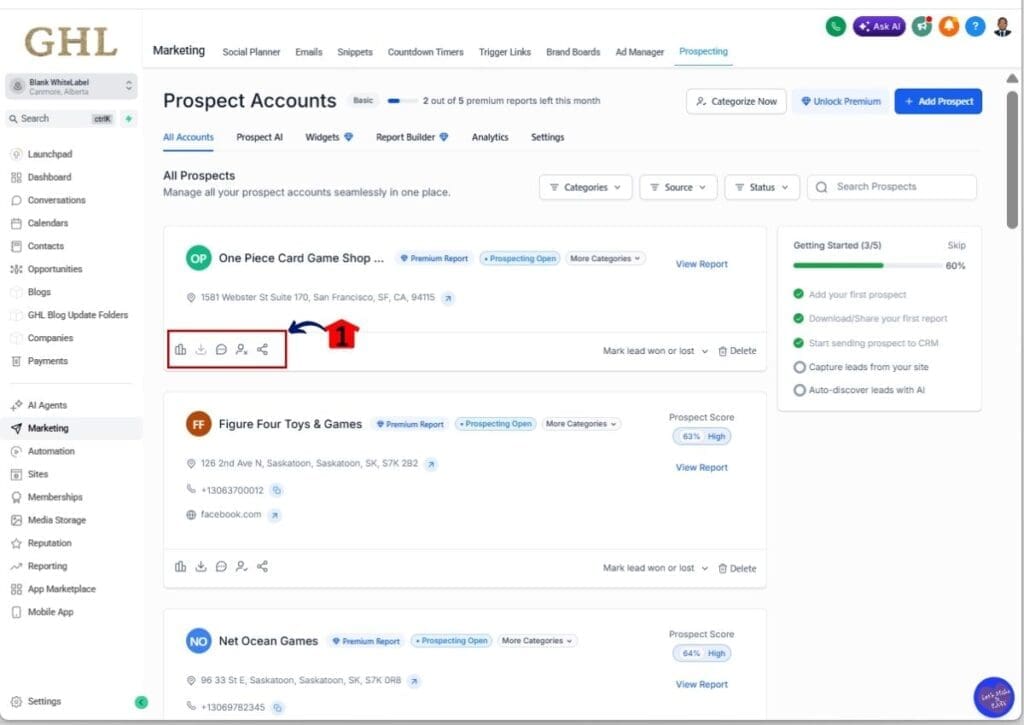
Step 08 – Check the quick action buttons for the prospect account
- Review and choose the action you want to take for the prospect
8.1 Click the Share action button
- A pop-up will appear where you can send your pitch along with the Marketing Audit Report
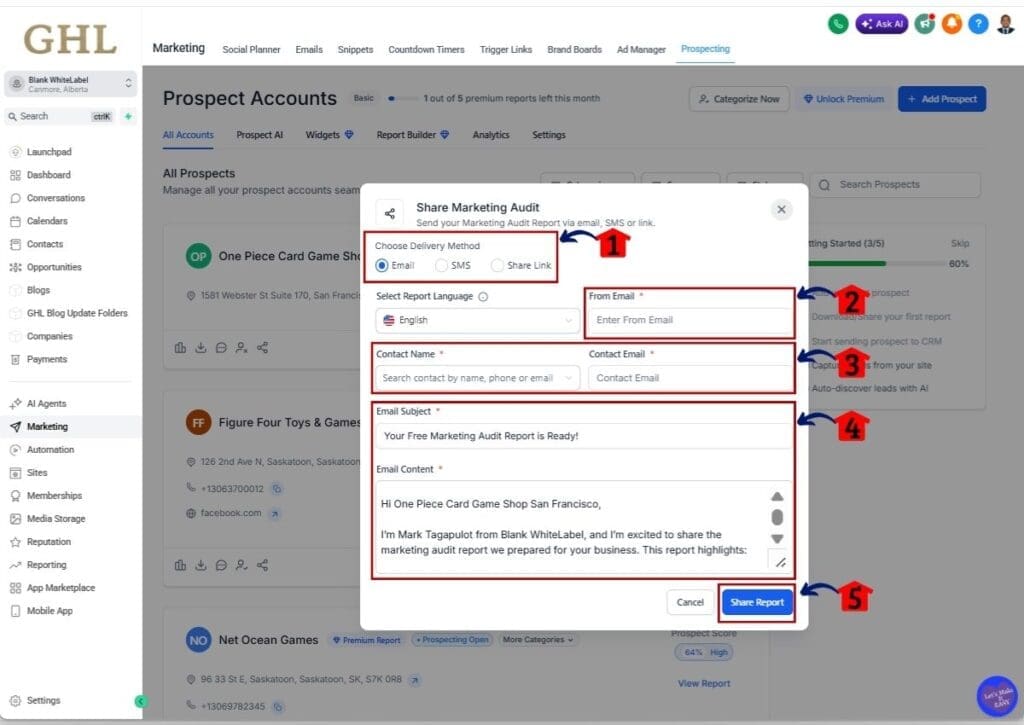
Step 09 – Send and share your proposal and the prospect’s Marketing Audit Report to them
- Send your proposal with the Marketing Audit Report to the prospect
9.1 Choose the Delivery method
- For this example, select the Email option
9.2 Type in your Business Email
- This allows you to send your proposal via email
9.3 Add your Contact Name and Email
- Enter a clear and professional name and email for the prospect
9.4 Type in the Email subject and your proposal content
- Write your email and include details from the Marketing Audit Report
9.5 Click the Share Report button
- Your email will be sent to the prospect
Local lead generation tips for beginners
Local lead generation gets better when you keep your approach simple and steady. You do not need to chase every business or cover a wide area right away. When you stay focused, you get clearer results and avoid wasting time on leads that are not a good fit.
One thing you will notice is that going too broad slows you down. If you search too many industries or large locations, your list becomes hard to manage. It is easier to work through a smaller list where you can actually take action and learn what works.
As you keep using local lead generation inside GHL, you will start to see patterns. You will know which businesses need help and which ones respond faster. That is when your process becomes more natural and easier to repeat.
Here are a few simple tips to help you get better results:
- Focus on one industry at a time.
- Start with a smaller location or radius.
- Look for businesses with weak online presence.
- Keep your prospecting consistent each day.
- Do not try to contact everyone at once.
- Track which businesses respond best.
Local lead generation for business growth
Local lead generation is not just about finding a few leads. It is about building a steady way to bring in new business. When you use GHL Prospecting, you are creating your own pipeline instead of waiting for someone to reach out.
This gives you more control over how your business grows. You decide who to target, when to reach out, and how often you build your list. Over time, this becomes part of your routine and not something you struggle to keep up with.
As you stay consistent with local lead generation, you start to see what works. You notice which industries respond and which ones need more time. That is where your process becomes stronger and easier to repeat.
Here is how this helps your business grow:
- You build a steady flow of new opportunities.
- You rely less on ads or referrals.
- You create a simple process you can repeat.
- You improve your outreach using real data.
- You grow faster as you gain more experience.
Results from local lead generation in GHL
Local lead generation in GHL gives you quick access to real business leads, but your results depend on how often you use it. You can find prospects in minutes, but turning them into clients takes steady effort and follow-up.
When you start, your main focus is building a list you can work from. You will see how fast you can pull local businesses and spot who needs help. This alone gives you direction and saves you from guessing where to look.
As you stay consistent with local lead generation, things start to improve. You get better at choosing the right prospects and your outreach feels more natural. Over time, you build a process that is easier to repeat and manage.
Here is what you can expect:
- Faster lead discovery inside GHL.
- Better targeting of the right businesses.
- More confidence when reaching out.
- Improved responses as you refine your approach.
- A steady flow of new opportunities.
Local lead generation FAQs
Here are some common questions you may have as you start using local lead generation inside GHL. These answers will help you understand how the Prospecting feature works and how to use it with confidence.
Start using local lead generation today
Local lead generation in GHL gives you a clear and practical way to find new business opportunities. You are not waiting for leads to come to you. You are actively building your own list of prospects inside your sub-account.
When you use the Prospecting feature, you can find local businesses, review their situation, and decide who to contact. This keeps your process simple and helps you focus on leads that are more likely to respond.
The key is to stay consistent with your local lead generation. Start small, follow the steps, and build your list over time. As you keep going, your process becomes easier, and your results improve.
If you want a simple way to grow using GHL, this is a strong place to start. Try local lead generation today and see how it fits into your daily workflow.
Scale Your Business Today.
Streamline your workflow with GoHighLevel’s powerful tools.