- Smarter AI Workflow Assistant Support
- Quick Summary – AI Workflow Assistant Essentials
- AI assistant skips unnecessary KB lookups
- From auto-search to context smarts
- Better speed, less clutter in workflow replies
- How to Use It: Smarter AI Workflow Assistant Behavior
- Make the most of the smarter AI assistant
- Your GHL AI workflow assistant questions answered
- What this means for your GHL automations
Smarter AI Workflow Assistant Support
If you’ve ever sent a simple message like “Hi” or “Explain this workflow” to GHL’s AI assistant and waited while it fished through the entire knowledge base… you’re not alone. That’s exactly the kind of delay this new update just wiped out.
GoHighLevel just made the AI workflow assistant smarter, and faster, by teaching it when not to look things up. Sounds small? It’s not. This change clears out the noise and delivers faster replies for the things that really matter.
Whether you’re an agency using AI workflow assistant to automate client onboarding, customer support, or internal ops, this upgrade is a quiet killer: fewer delays, sharper answers, and no more bloated responses from irrelevant KB searches.

The GHL AI assistant now replies faster by skipping unnecessary help doc lookups, especially for simple or already-contextual messages. That means quicker answers and less wait time when you’re building workflows.
Quick Summary – AI Workflow Assistant Essentials
Purpose: Streamline AI responses inside AI workflow assistant by eliminating pointless knowledge base lookups
Why It Matters: Speeds up automation interactions and delivers smarter, context-aware replies
What You Get: Faster response times, fewer distractions, and more relevant AI support
Time to Complete: Instant, feature is live with no setup required.
Difficulty Level: Zero-effort improvement, fully automatic
Key Outcome: A leaner, smarter AI assistant that improves AI workflow assistant productivity
AI assistant skips unnecessary KB lookups
Here’s the core of what changed: the AI assistant now knows when to not bother the knowledge base.
Specifically, two common types of messages will now bypass the usual KB search process:
Automate marketing, manage leads, and grow faster with GoHighLevel.

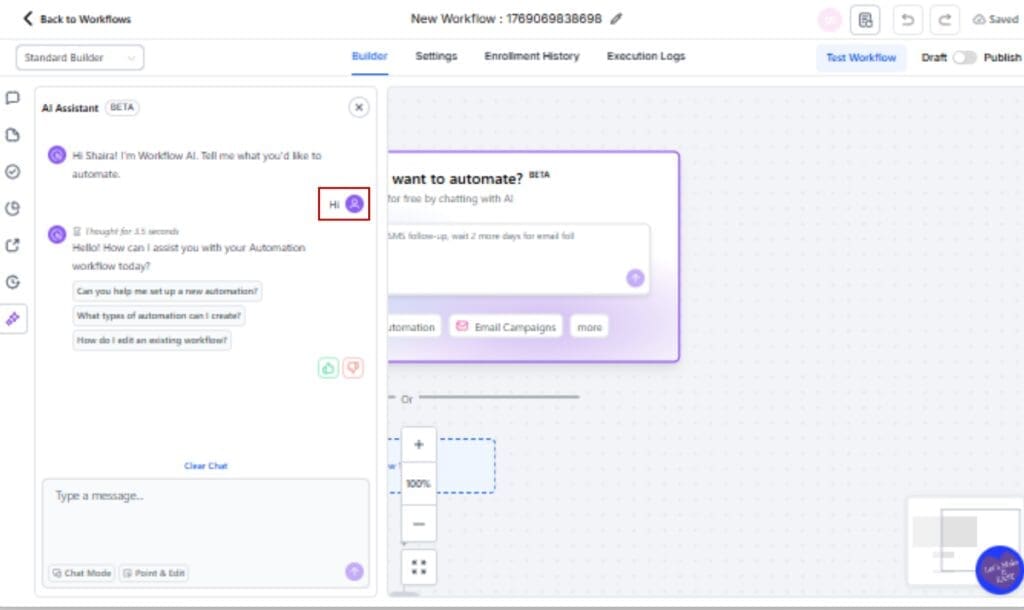
- Conversational Filler – Messages like “Hi,” “Thanks,” or “Hello” won’t trigger unnecessary database lookups. The assistant understands they’re not actual support questions.
- Workflow Analysis Prompts – If you type something like “Analyze my workflow” or “Explain this step,” the AI relies on the context you’re already viewing. It doesn’t go hunting for docs, it processes what’s in front of it.
In other words, GHL’s AI is getting more selective. It understands the difference between a real documentation request and a context-driven prompt. That means fewer slowdowns, less irrelevant info, and a smoother automation experience.
This is all handled behind the scenes, no setup or switches needed. Just smarter AI, doing its thing.
From auto-search to context smarts
Previously, every single user message sent to the AI assistant would trigger a full knowledge base search, even if it wasn’t needed. This included small talk, polite messages, and prompts like “What does this workflow do?” where the answer was already on-screen.
Now, that’s all changed.
The AI assistant uses new logic to determine when a KB lookup is actually useful. If the message is too generic or clearly relates to the current AI workflow assistant canvas, it skips the external search entirely. That saves time, reduces clutter in responses, and makes the assistant feel more “in sync” with your automation-building process.
Under the hood, this update helps the AI stay focused. Instead of wasting effort on unnecessary tasks, it zeroes in on what matters, understanding your AI workflow assistant, answering your questions, and only pulling help docs when they’re actually useful.
This isn’t just a backend tweak, it’s a quality-of-life upgrade you’ll feel every time you engage with the assistant during AI workflow assistantbuilding.
Better speed, less clutter in workflow replies
This change isn’t flashy, but it’s powerful. By skipping irrelevant knowledge base searches, the AI assistant now delivers faster, cleaner replies. That alone can shave seconds, or even minutes, off your workflow-building sessions.
And for agencies? That’s gold.
No more getting bogged down in long, unnecessary explanations pulled from the docs when all you asked was for a workflow breakdown. No more waiting for the AI to finish a lookup that doesn’t even help. Just fast, sharp, contextual answers that keep your team moving.
Now the assistant stays out of the way unless it’s genuinely helpful. That means fewer random links popping up and more time focused on fixing AI workflow assistant or helping your team settle in.
And in a platform like GHL, where speed-to-execution is everything? That’s a win.
How to Use It: Smarter AI Workflow Assistant Behavior
If you’ve ever waited for the AI to respond to a simple message with a giant chunk of unnecessary documentation, this fix is for you. With this update, the GHL AI assistant automatically skips knowledge base lookups when they aren’t needed, no setup required. But if you want to optimize how you interact with the assistant, here’s how to use the new logic like a pro:
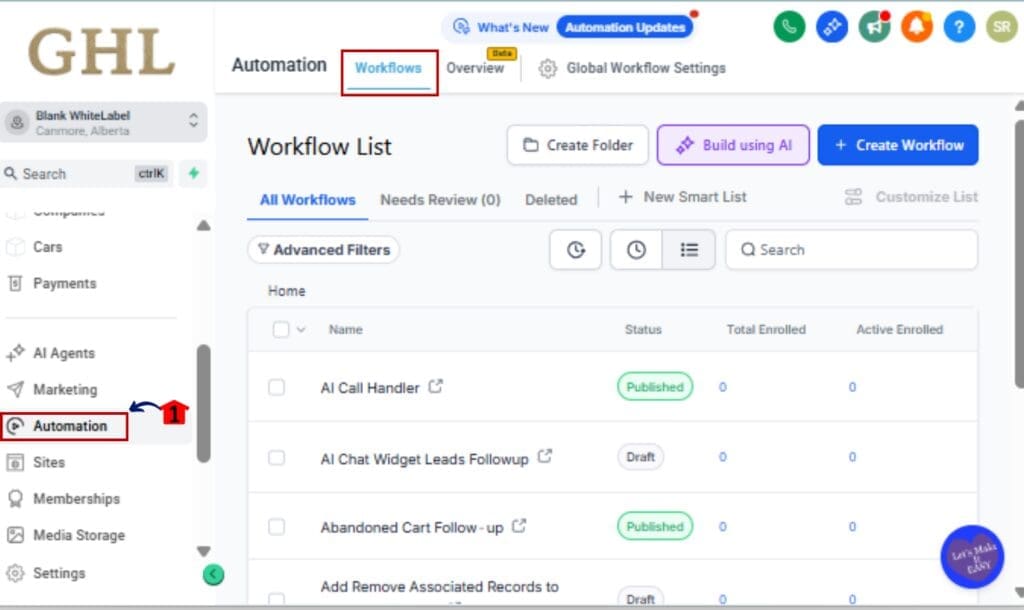
Step 01 – Open the Workflow Builder
1.1 Go to your GHL dashboard.
1.2 On the left side of your screen, find and select “Automation,” then head into “Workflows.”
Step 02 – Use Natural Prompts for Contextual Help
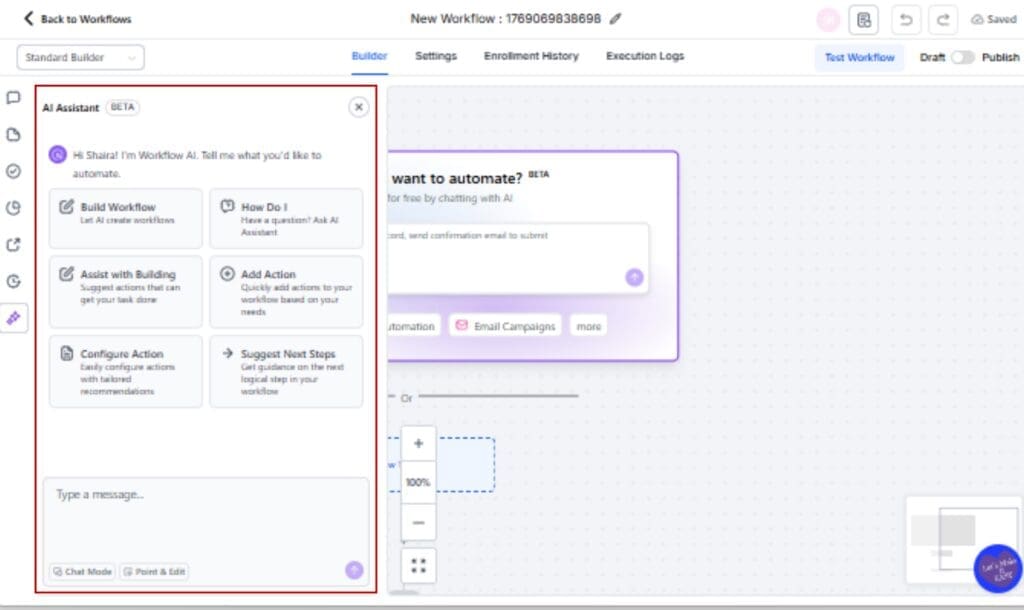
2.1 Inside the AI workflow assistant, select or add an AI assistant action.
2.2 The assistant will now use the current workflow instead of searching the knowledge base.
Step 03 – Avoid Triggering Lookups with Filler Messages
3.1 Keep in mind that messages like “Hi,” “Thanks,” or “OK” will no longer trigger any KB searches.
3.2 These will now receive minimal responses or polite acknowledgments, no documentation noise.
Step 04 – Force a KB Lookup (When Needed)
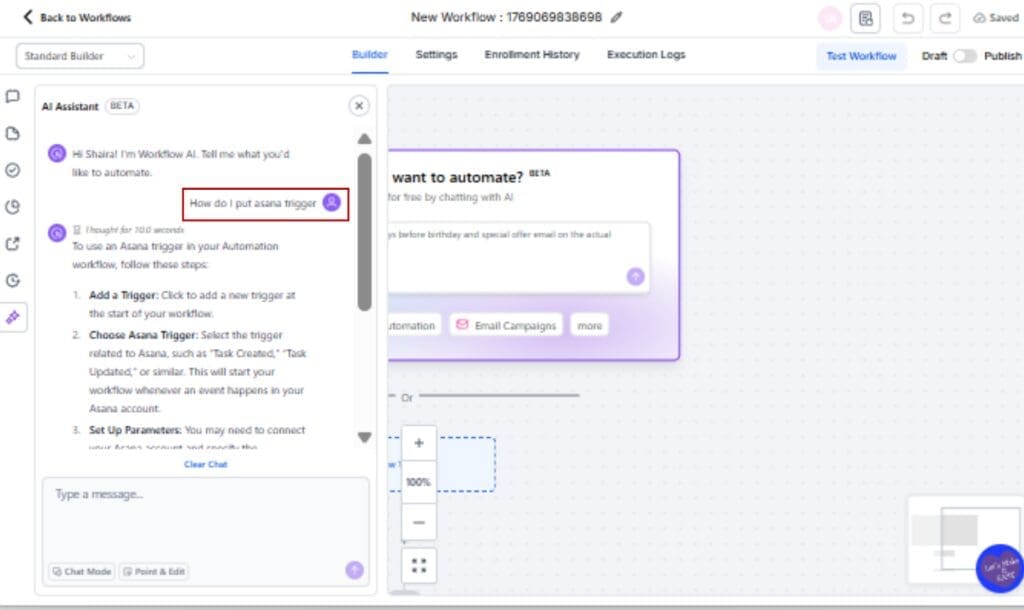
4.1 To intentionally trigger a search, include keywords like “look up,” “find article,” or “search docs” in your prompt.
4.2 This overrides the skip logic and pulls from the knowledge base as usual.
Step 05 – Test It Out
5.1 Try a few message types in your AI workflow assistant step to see how the AI responds.
5.2 Mix context-based and documentation-based prompts to experience the difference.

That’s it. The update works behind the scenes, but now you know how to guide it for better, faster automation support.
Make the most of the smarter AI assistant
Want to squeeze more out of this update? Here are some fast, effective ways to put the new behavior to work in your agency or client accounts:
Lead with context-based prompts
The AI now gets the context. So instead of asking vague stuff like “What is this?”, try something more direct like “What happens in this email step?” or “Is this trigger working right?” You’ll get sharper, more helpful answers.
Use AI for onboarding or team training
Your VA or new team member can type “Explain this workflow” and get a fast, focused response, without being buried in unrelated knowledge base links.
Stack AI steps inside client AI workflow assistant
Combine this smarter assistant with internal notes or prebuilt steps that say, “Now explain what this automation does.” It makes AI workflow assistant more interactive and user-friendly, especially in white-label setups.
Avoid filler prompts unless you need a response
If you’re typing “Thanks,” just know the AI will keep it chill and not dig through docs. But if you want a reply, add context like “Thanks! Now what’s the next best step?”
Teach your clients to use it smartly
If clients are using the assistant for self-service support, tell them what types of messages get the best replies. This reduces support requests and increases satisfaction.
Small change, big impact, especially if you’re scaling.
Your GHL AI workflow assistant questions answered
What this means for your GHL automations
This isn’t just a technical tweak, it’s a shift toward smarter, leaner automation in GoHighLevel.
By skipping unnecessary knowledge base searches, the AI assistant now gives you faster responses, fewer irrelevant suggestions, and a better overall experience when working in AI workflow assistant. It feels more like a teammate and less like a textbook.
For agency owners, this means:
- Quicker builds and faster testing
- Easier onboarding for staff and clients
- Less noise during automation setup
And since it’s already live, you don’t have to lift a finger.
As GHL sharpens its AI systems, you’ll start to notice more helpful, context-aware behavior, all designed to match the way you actually work.
Fast, efficient, no-fluff AI? Yes, please.
Scale Your Business Today.
Streamline your workflow with GoHighLevel’s powerful tools.