- Why bot training automation matters
- Quick Summary – Bot Training Automation
- What’s new with bot training automation
- Say goodbye to manual re-fetching
- Why bot training automation is a must
- How to set up bot training automation in GHL
- Pro tips for smarter bot training automation
- FAQ about bot training automation in GHL
- What bot training automation means for your agency
- Smarter bots, less work, thanks to automation
Why bot training automation matters
If you’re still manually updating the URLs in your Bot Training Automation knowledge base, it’s time for an upgrade.
GoHighLevel just dropped something that will save you time, improve your bot’s accuracy, and eliminate the headache of stale content: bot training automation with scheduled URL refresh. This is a game-changer for any agency using GHL’s AI tools, especially if you’re managing multiple bots, clients, or support topics.
You’ve probably noticed that outdated links can quickly wreck a bot’s ability to answer questions accurately. Clients get frustrated. Your team wastes time fixing stuff manually. And it’s all avoidable.
Now, thanks to this new Labs feature, you can automatically sync your training URLs, daily, weekly, or monthly, with zero manual effort. Your bots will always have the most current information, and you won’t have to lift a finger after setup.
This isn’t just about saving time (though it does that in spades). It’s about giving your clients a better experience, keeping your support smart, and scaling without sacrificing quality.

With GHL’s new bot training automation feature, you can schedule URL refreshes and ensure your AI knowledge base stays accurate without any manual work.
Quick Summary – Bot Training Automation
Purpose: GoHighLevel released a new Auto-Refresh feature that automatically keeps your bot training URLs synced and up-to-date, removing the need for manual updates.
Why It Matters: Agencies and businesses can now maintain accurate AI responses without lifting a finger, saving time, improving customer experience, and reducing errors.
What You Get: Hands-free syncing of external URLs used in bot training, with configurable refresh intervals (daily, weekly, monthly), managed entirely inside Labs.
Time To Complete: Initial setup takes less than 2 minutes. Just enable the feature, pick your schedule, and let GHL do the rest.
Difficulty Level: Beginner-level setup with pro-level benefits, no coding, no complexity, and scalable for multi-client agencies.
Key Outcome: Smarter bots, better answers, and way less busywork, your support automations now stay accurate automatically.
What’s new with bot training automation
GoHighLevel just rolled out a highly requested enhancement, Auto-Refresh for Bot Training URLs, now live in Labs. This feature automates how your bots stay updated by syncing their external training content on a schedule you choose.
Tired of hitting “fetch” every time you tweak your content? With this update, GHL can now re-sync your training URLs for you on a daily, weekly, or monthly schedule, whichever works best for your workflow.
Automate marketing, manage leads, and grow faster with GoHighLevel.

This is perfect for support documentation, client-facing knowledge hubs, pricing pages, product updates, anything you’ve trained your bot on using external URLs. Once set, the system will re-pull the latest content automatically, keeping your bot’s responses accurate and relevant.
It’s not just smart. It’s essential for agencies who rely on AI to handle FAQs, sales support, or onboarding flows without micromanaging content.
Say goodbye to manual re-fetching
Before this update, anytime your external content changed, maybe you updated a blog post, changed a headline, added a pricing tier, you had to remember to go back into GoHighLevel and manually click to re-fetch each training URL for your bot.
That meant:
- Missed updates
- Stale answers
- A lot of “why isn’t my bot saying the right thing?” moments
Now? That’s history.
With scheduled bot training automation, GoHighLevel handles the syncing for you. You just set the frequency once, and the system keeps your knowledge base fresh in the background.
Doesn’t matter if you’re running three links or thirty, GHL keeps them all in check. No more hovering over updates or wondering if the bot’s still accurate.
This change removes the friction and manual work that agencies hate, while adding the reliability and scale that clients love.
Why bot training automation is a must
If you’re running an agency, you already know the pain of scale, more clients, more bots, more content to keep in sync. When your bots start giving outdated or inaccurate answers, it’s not just annoying, it’s a hit to your reputation.
That’s where bot training automation changes the game.
By keeping your knowledge base synced automatically, you get three major advantages:
1. Accuracy Without Effort
Your bots reflect your most up-to-date content. Every time your team updates a help article, pricing doc, or product page, your bot learns it, without you doing anything.
2. Time Back in Your Day
No more logging in, clicking re-fetch, and double-checking updates. For teams juggling multiple clients or complex content ecosystems, that’s hours saved every week.
3. Better Customer Experience
Accurate bots = fewer frustrated users. Whether your AI bot is handling lead questions, client onboarding, or support chats, automation means smoother interactions and happier clients.
The bottom line? It makes your agency look sharp and professional, like you actually have your systems together (because now, you do).
How to set up bot training automation in GHL
If you’re still manually clicking “fetch” every time you update a doc or blog post, this feature is your escape. Bot training automation in GoHighLevel lets you schedule those updates, so your AI bots stay current, without you lifting a finger. You can have it set up in no time, here’s what to do:
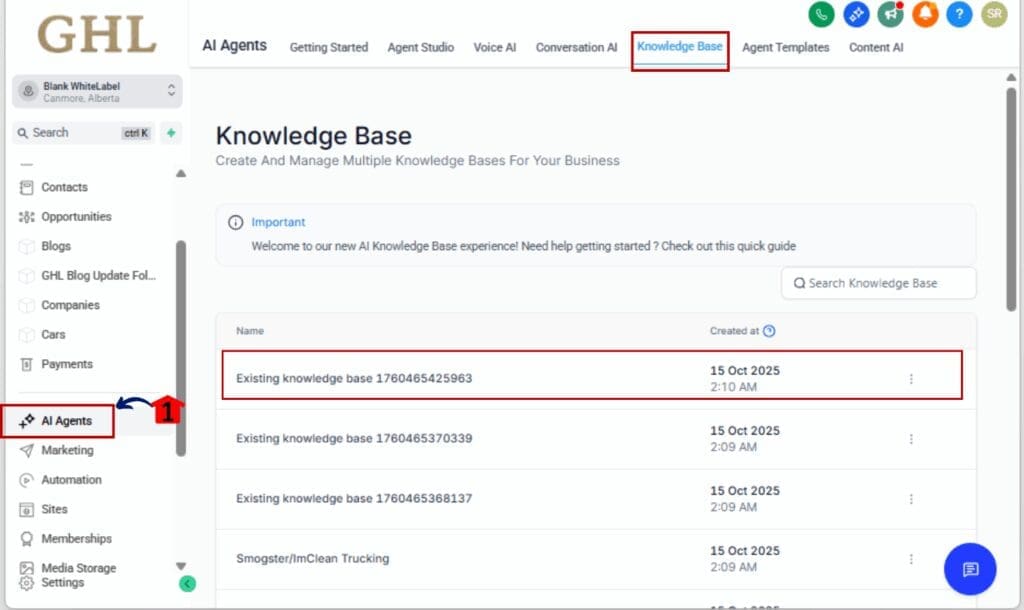
Step 01 – Go to AI Agents
1.1 From your AI Agents, click Knowledge Base
1.2 Select the the existing Knowledge Base
Step 02 – Enable the Auto Refresh Feature
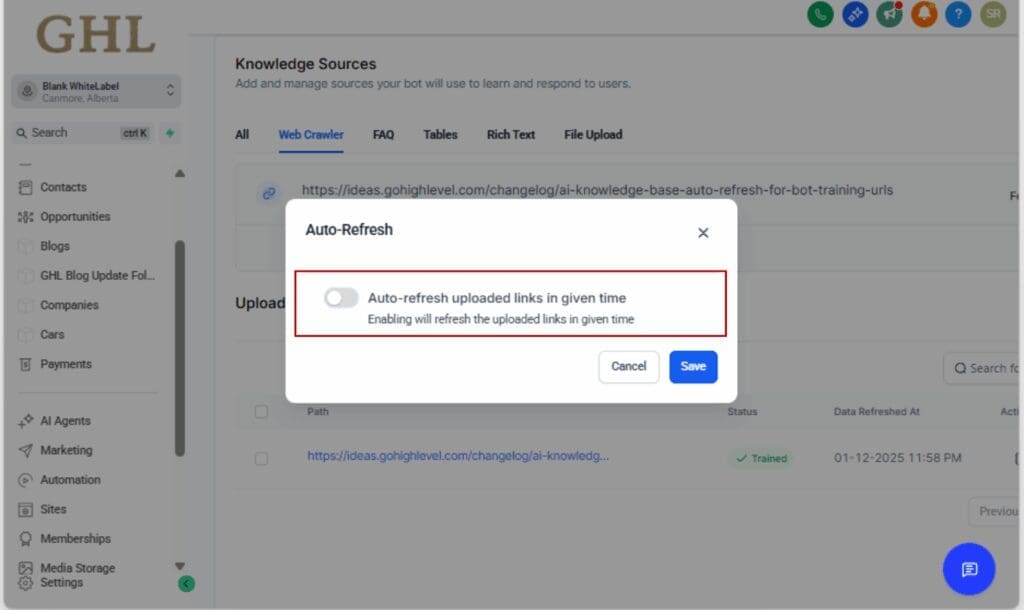
2.1 Scroll to the card titled “Auto Refresh of Knowledge Base Trained Links”
2.2 Toggle the switch ON to activate the feature
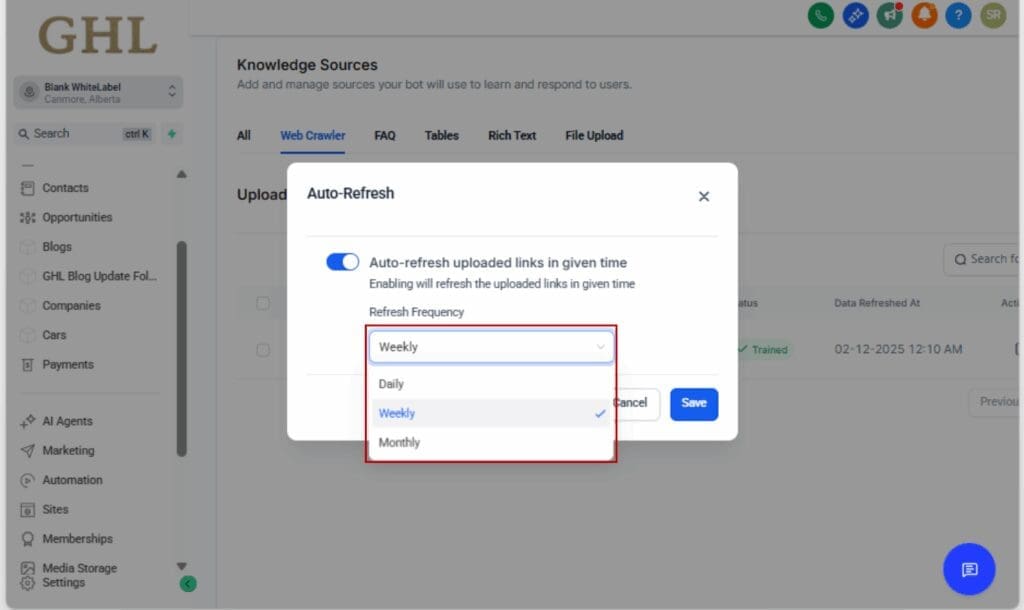
Step 03 – Set Your Refresh Frequency
3.1 Click into the settings or connected URLs
3.2 Choose your preferred schedule:
• Daily
• Weekly
• Monthly
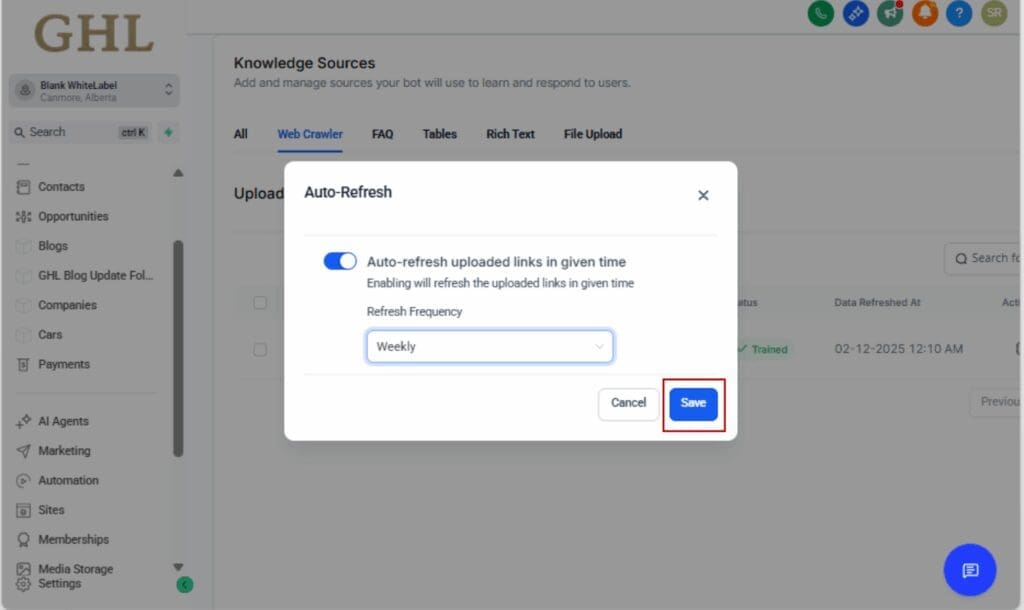
Step 04 – Save Your Settings
4.1 Click Save to lock in your refresh schedule
4.2 GHL will now auto-sync your URLs based on this schedule
Step 05 – Watch the Automation Do Its Thing
5.1 No more manual syncing required
5.2 Your bot stays up-to-date with zero extra effort

That’s it. You’ve just turned a repetitive manual task into a reliable background automation, exactly what smart agencies should be doing.
Pro tips for smarter bot training automation
Already using auto-refresh? Nice. Now let’s talk about a few ways to get even better results from your bots.
Match the Refresh Schedule to the Source Content
- If you’re pulling from a blog that updates daily, don’t use a monthly schedule
- For evergreen FAQs or static support pages, weekly or monthly is ideal
- Fast-changing pages (pricing, product updates, feature docs) = daily
Keep Your Training URLs Organized
- Group URLs by topic or client in a Google Sheet
- Make a habit of reviewing which sources are connected to each bot
- Remove old or irrelevant links to avoid confusion
Test Your Bot After Major Updates
- If you push big changes to your content, test your bot’s responses the next day
- This ensures the auto-refresh picked up the changes as expected
- Use test prompts that mirror real user questions
Document for Your Team or Clients
- If you manage bots for clients, let them know the refresh is automated
- Add this to onboarding so they understand what “auto-sync” means and when it happens
- Bonus: You look even more like a pro
Combine With Other Labs Features
- Use this alongside AI Testing and Feedback to identify weak responses
- You can quickly diagnose whether content or formatting is causing issues
- Then let the next refresh fix it after you update the source
Good automation shouldn’t demand your attention, it should quietly keep things moving while you handle more important tasks. Here’s how to get it running that smoothly.
FAQ about bot training automation in GHL
What bot training automation means for your agency
This isn’t just another convenience update, it’s a shift in how you manage AI at scale.
Bot training automation means your agency can now set it and forget it. No more scrambling to re-sync URLs after every update. No more bots serving old answers or giving clients the wrong info.
Here’s what that unlocks:
More Accuracy, Less Risk
Every time someone uses your bot, they expect it to know what’s current. Auto-refresh handles that behind the scenes, updating your content before things get stale.
Operational Efficiency
Imagine managing 20+ bots across different clients. Now imagine you never have to touch them again after setup. That’s real automation, not just for marketing workflows, but for AI content management, too.
Next-Level Client Experience
Most clients don’t care about the tech behind the scenes, they just want the bot to give the right answer. When it does? You look like you’ve got everything dialed in. And if they ask how you did it? Simple: “It runs on autopilot.”
Agency Differentiation
This is the kind of systemization that helps you stand out in a sea of GHL agencies. You’re not just selling tech, you’re delivering intelligence on autopilot.
In short, this update makes your bots smarter, your team more efficient, and your clients a whole lot happier.
Smarter bots, less work, thanks to automation
With bot training automation now available in GoHighLevel, staying up-to-date no longer has to be manual. You don’t need to remember when content changes. You don’t need to micromanage bot responses. You just set the schedule and let GHL handle the rest.
If you’re running an agency, this is a no-brainer.
Whether you’re managing a single support bot or an entire fleet across client accounts, this update saves time, eliminates human error, and helps your bots deliver better answers, every single day.
Enable the Auto Refresh feature in Labs, set your preferred frequency, and walk away knowing your bots will never go out of sync again.
That’s how smart agencies scale: less clicking, more automating.
Scale Your Business Today.
Streamline your workflow with GoHighLevel’s powerful tools.