

- A Faster Calendar AI Setup
- Quick Summary – Calendar AI Setup
- Here are this week's HighLevel Updates 🚀
- What’s New With Calendar AI Setup
- How Calendar AI Setup Changes the Process
- Why Calendar AI Setup Matters for GHL Users
- How to Use Calendar AI Setup Step by Step
- Quick Tips for Better Calendar AI Setup
- What Calendar AI Setup Means for Your Business
- What’s Next for Calendar AI Setup
- Calendar AI Setup FAQs
- Simplify Your Calendar AI Setup
A Faster Calendar AI Setup
If you’re new to GoHighLevel, getting a booking Calendar AI Setup ready isn’t always as quick as you’d expect. Before you can take that first appointment, there are calendar types to choose from, team members to assign, hours to set, and meeting details to configure.
The new Calendar AI Setup is designed to make that process easier. Instead of working out every setting on your own, you can describe what you need and let Calendar AI recommend and create an appropriate calendar. This gives new users a much clearer starting point.
From there, Calendar AI helps you fill in the important details. You’ll choose your team members, set the hours people can book, decide where meetings take place, and get a live look at the calendar before you finish.
Once everything looks right, you can book a test appointment to check the experience before sending your calendar to real leads or customers. You can also ask Calendar AI questions or choose preset prompts to learn more about what GHL Calendars can do.
For agencies, this could make it much easier to get new calendars configured without needing every user to understand GoHighLevel’s calendar options from day one.
The latest GoHighLevel Changelog includes several other GHL feature updates that round out your daily workflow:
- Wait Action Enhancement: TikTok DM Replies
- India Recurring Mandate Support for Affiliate Indian Signup Pages
- Housecall Pro – More Workflow Actions & Triggers
- Email Services Dashboard for Agencies
- Email Sequences Now Available in Beta Labs
- Group Your Contacts by Source in Dashboards & Reporting
- MMLite Adoption Banner in Conversations
Keep reading for much more on all these updates and a deep dive into the Calendar AI Setup feature!

Quick Summary – Calendar AI Setup
Purpose: Calendar AI Setup helps GHL users create and configure a booking calendar by describing what they need instead of figuring out the right calendar type first.
Why It Matters: It reduces the learning curve for new GoHighLevel users and gives agencies a simpler way to guide clients and team members through calendar setup.
What You Get: You can add team members, configure availability, choose a meeting location, see a live booking calendar preview, and complete a test appointment within the guided setup process.
Time To Complete: A straightforward Calendar AI Setup should only require a short setup session, although the exact time will depend on your team, availability, and booking requirements.
Difficulty Level: Beginner-friendly. Calendar AI is designed to guide users through important setup decisions without requiring them to understand every GHL Calendar option beforehand.
Key Outcome: You finish with a configured GHL booking calendar that you can preview and test before sharing it with real leads or customers.
Here are this week’s HighLevel Updates 🚀
Wait Action Enhancement: TikTok DM Replies
What’s New:
Instead of continuing after a fixed delay, your workflow can pause until someone replies to your TikTok DM.
Where in GHL:
Found in Automation → Workflows using the Wait action after sending a TikTok DM.
Automate marketing, manage leads, and grow faster with GoHighLevel.

Impact:
Your automation responds when someone actually joins the conversation, rather than after a timer runs out.
Recommended For:
Anyone using TikTok DMs to start conversations with potential customers.
India Recurring Mandate Support for Affiliate Indian Signup Pages
What’s New:
Supports recurring payment mandates for Indian affiliates, helping subscriptions comply with local banking requirements.
Where in GHL:
Available on Affiliate Program signup pages for users in India.
Impact:
Creates a smoother signup experience while reducing payment failures for recurring subscriptions.
Recommended For:
Agencies, SaaS businesses, and affiliate programs onboarding customers in India.
Housecall Pro – More Workflow Actions & Triggers
What’s New:
Adds new workflow triggers and actions for the Housecall Pro integration, giving you more ways to automate field service processes.
Where in GHL:
Inside Automation → Workflows when using the Housecall Pro integration.
Impact:
Expands automation possibilities between HighLevel and Housecall Pro, reducing manual work and improving operational efficiency.
Recommended For:
Home service businesses, field service companies, and agencies managing Housecall Pro clients.
Email Services Dashboard for Agencies
What’s New:
Introduces a centralized dashboard where agencies can monitor email services across their accounts.
Where in GHL:
Found in the Agency View under the new Email Services Dashboard.
Impact:
Makes it easier to monitor email health, identify issues, and manage deliverability from one place.
Recommended For:
Agency owners, support teams, and admins managing multiple client email services.
Email Sequences Now Available in Beta Labs
What’s New:
Introduces Email Sequences as a Beta Labs feature, providing another way to create structured email follow-up campaigns.
Where in GHL:
Enable it from Settings → Labs, then access Email Sequences after activation.
Impact:
Cuts down the time spent checking different areas just to see how your email services are performing.
Recommended For:
Marketers, agencies, coaches, and businesses running nurture campaigns or onboarding emails.
Group Your Contacts by Source in Dashboards & Reporting
What’s New:
Lets you organize contact reports based on where your leads originated.
Where in GHL:
Available within Dashboards & Reporting when viewing contact analytics.
Impact:
Makes it easier to compare lead sources and identify which marketing channels are producing the best results.
Recommended For:
Marketing teams, agency owners, and businesses tracking campaign performance across multiple lead sources.
MMLite Adoption Banner in Conversations
What’s New:
Displays a helpful banner inside Conversations to encourage users to adopt the new MMLite messaging experience.
Where in GHL:
Appears within the Conversations module for eligible accounts.
Impact:
Helps users discover and transition to MMLite while highlighting its benefits directly inside the messaging interface.
Recommended For:
Current HighLevel users exploring the latest messaging experience and teams preparing to migrate to MMLite.
What’s New With Calendar AI Setup
GoHighLevel’s new Calendar AI Setup changes how users can create a booking calendar. Instead of starting with calendar types and trying to decide which setup fits your needs, you can start by simply describing what you want the calendar to do.
Calendar AI then uses that information to recommend and create an appropriate calendar. This is especially useful for newer GHL users who know the booking experience they want but may not know which calendar configuration they should choose.
The guided Calendar AI Setup doesn’t stop after creating the calendar. You can add team members, configure availability, and choose the meeting location as part of the setup process. You’ll also get a live preview of the booking calendar, so you can see what customers will experience before you finish.
Once the calendar is configured, you can book a test appointment. That gives you a simple way to check the setup before you start sending leads and customers to your booking calendar.
GHL has also built discovery into Calendar AI. You can ask questions about Calendar capabilities or choose from preset prompts to explore what’s available. This turns Calendar AI Setup into more than a calendar builder. It also gives new users a guided way to learn what they can do with GoHighLevel Calendars.
How Calendar AI Setup Changes the Process
The biggest change with Calendar AI Setup is where the process starts. Instead of asking new users to understand GoHighLevel’s different calendar options first, GHL lets them begin with something much easier: explaining what they need.
You describe your use case, and Calendar AI recommends and creates an appropriate calendar. That removes an early decision that can slow down someone who knows what they want to achieve but doesn’t yet know which GHL calendar setup will get them there.
Calendar AI Setup also brings the main configuration tasks into a guided flow. You can add the right team members, configure when appointments should be available, select the meeting location, and watch the booking calendar take shape with a live preview.
That preview is an important part of the process. Instead of configuring the calendar and hoping everything looks right, you can see the booking experience before you start sharing it. Once setup is complete, you can also make a test appointment to check the process from the customer’s side.
The result is a more guided path from “I need a calendar” to having one ready for bookings. For newer GHL users, that means less time figuring out where to begin and more focus on building the booking experience their business actually needs.
Why Calendar AI Setup Matters for GHL Users
Calendar AI Setup matters because building a booking calendar is often one of those jobs that looks simple until you start configuring it. You need the right calendar setup, the right team members, suitable availability, and the correct meeting location before customers can reliably book.
For new GoHighLevel users, those choices can create unnecessary friction. Calendar AI Setup gives them a more guided starting point. They can explain what they’re trying to achieve instead of first learning every calendar option inside GHL.
This could be handy for agencies too, especially when a new client or staff member is getting started. They don’t need to know their way around every GHL calendar setting right away. Calendar AI helps them work through the basics and get a calendar up and running.
The live preview and test booking are useful here too. You can review the booking experience and run a test appointment before sharing the calendar with leads or customers. That gives you a practical opportunity to spot something that doesn’t look right.
The real value of Calendar AI Setup isn’t simply adding AI to another GHL feature. It’s using AI to reduce the learning curve between needing a booking calendar and getting one configured for your business.
How to Use Calendar AI Setup Step by Step
Calendar AI Setup takes you through the main steps needed to create and configure a new booking calendar in GoHighLevel. You’ll describe the type of calendar you need, add your team members, set your availability, and review the calendar before creating it.
Once your calendar is created, you’ll make a test booking and check the experience from your customer’s point of view. Here are the steps to create and test a booking calendar using Calendar AI Setup in GoHighLevel.
- Access Calendars in GoHighLevel.
- Describe the Calendar You Need.
- Configure Your AI Calendar.
- Preview Your Calendar AI Setup.
- Make a Test Booking in Calendar.
Step 1.0 – Access Calendars in GoHighLevel
- Start inside the GHL sub-account where you want to create the new booking calendar.
1.1 – Open the Calendars area from your GHL sub-account.
- Head to the Calendars section where you normally manage your appointments and booking calendars.
1.2 – Locate the option to begin the Calendar AI Setup experience.
- Look for the Calendar AI option that starts the guided setup and lets you describe the type of booking calendar you need.

Step 2.0 – Describe the Calendar You Need
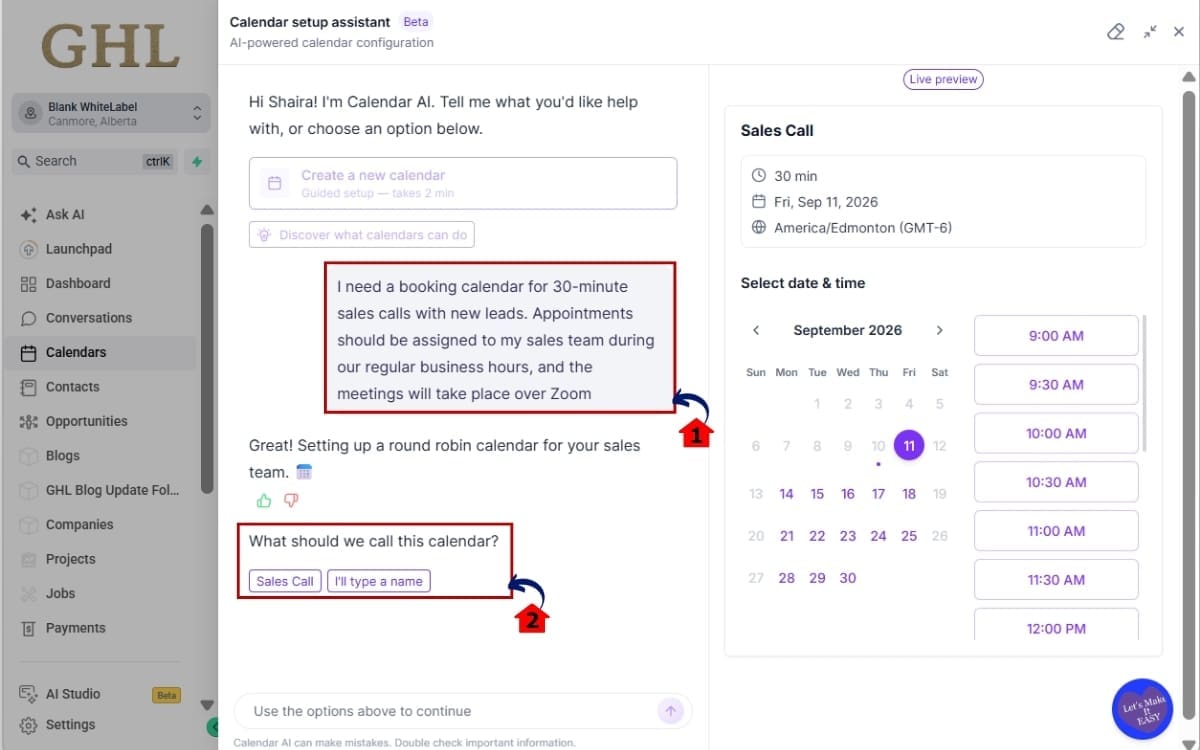
- Tell Calendar AI what you’re trying to accomplish so it has enough information to recommend the right setup.
2.1 – Tell Calendar AI what you want your booking calendar to do. Focus on your actual use case rather than trying to choose the calendar type yourself.
- Describe the booking in plain language, including what the appointment is for, how long it should be, who should take it, and where the meeting will happen.
2.2 – Review the calendar Calendar AI recommends and creates based on your description.
- Check the recommended setup against your original needs before moving forward, making sure it fits the type of appointments you want customers to book.
Step 3.0 – Configure Your AI Calendar
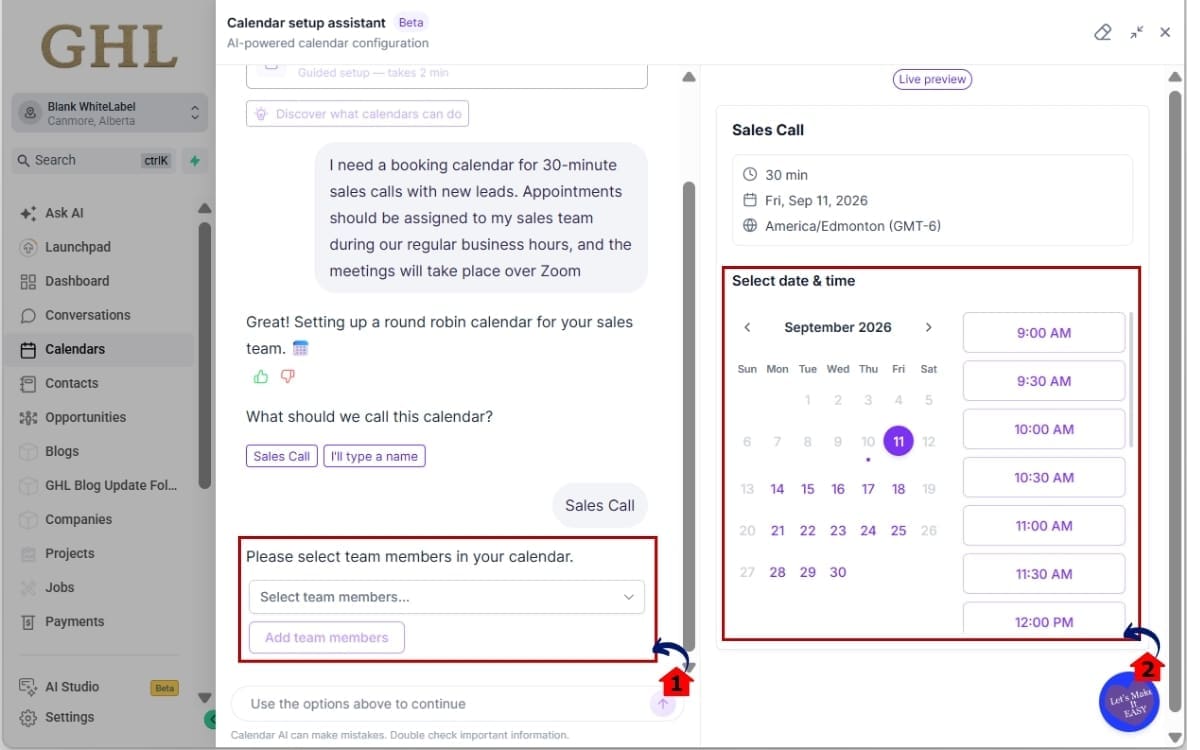
- Now it’s time to fine-tune the calendar by choosing who can take appointments and when customers can book with them.
3.1 – Add the team members who should be connected to the calendar.
- Select the staff members who’ll handle these appointments so the calendar can use the right team availability for bookings.
3.2 – Configure when appointments should be available.
- Set the days and times you want customers to see as available, making sure they match when you or your assigned team members can actually take appointments.
Step 4.0 – Preview Your Calendar AI Setup
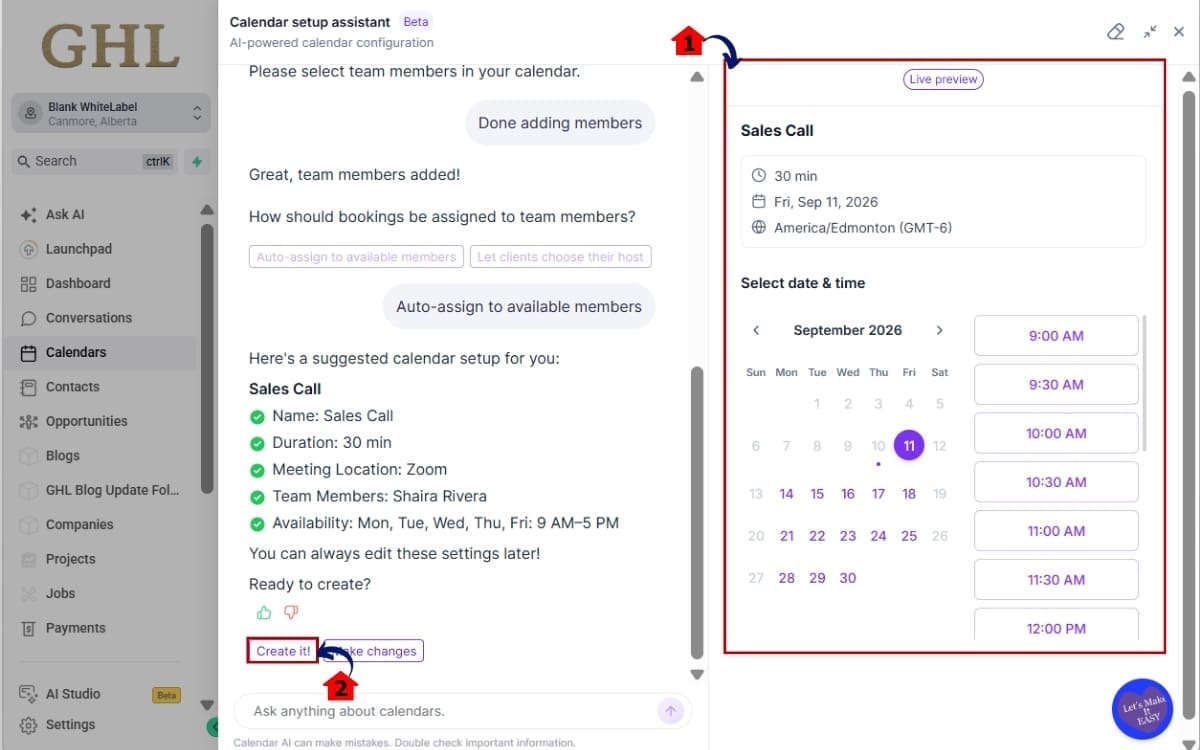
- Before creating the calendar, take a moment to review the setup and make sure the booking experience looks the way you want it to.
4.1 – Check the live preview to see how the booking calendar will appear to customers.
- Look at the calendar from your customer’s point of view and check that the available booking options and overall experience make sense.
4.2 – Review your Calendar AI Setup and make sure the availability, team members, and meeting details match what you need. Then click “Create it.”
- Give the setup one final check for any mistakes or missing details. Once everything looks right, click “Create it” to create your new booking calendar.
Step 5.0 – Make a Test Booking in Calendar
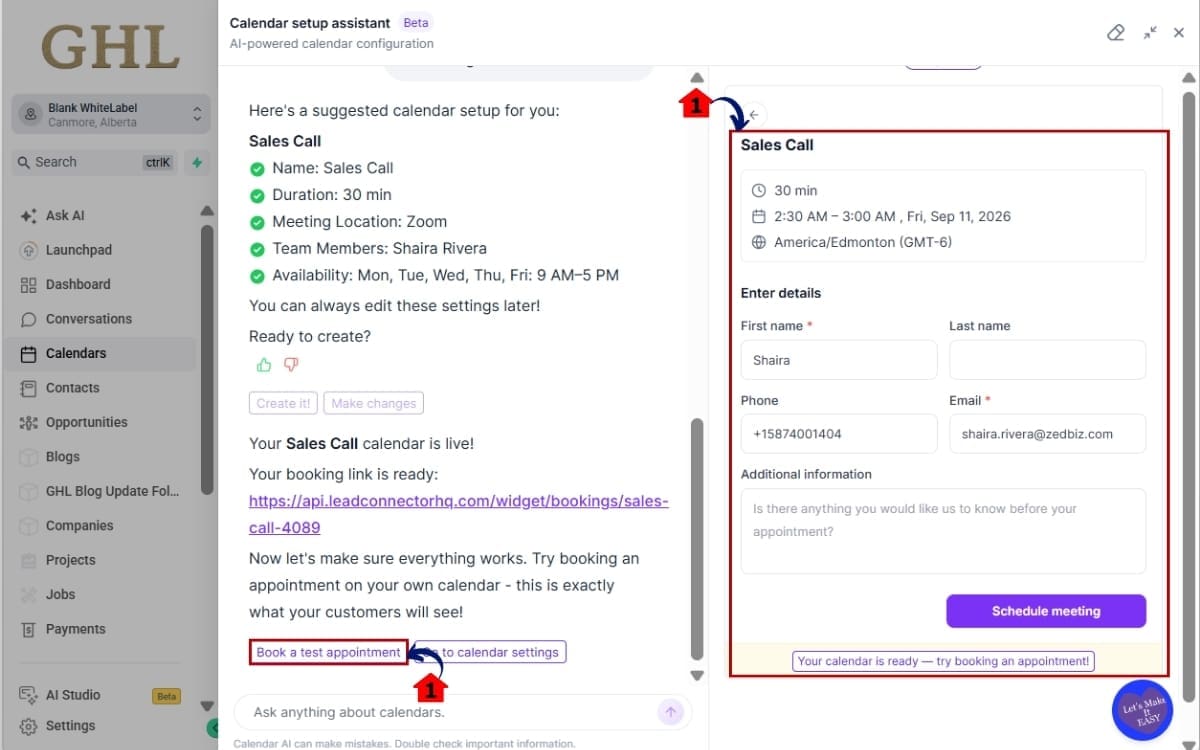
- Before sharing your new calendar with leads or customers, put it through a quick test to make sure the booking process works as expected.
5.1 – Complete your setup and book a test appointment.
- Choose an available time and make a test booking so you can confirm the calendar is ready to accept appointments.
5.2 – Run through the booking experience like a real customer. Check the available times and appointment details before sharing the calendar.
- Look at everything from the customer’s side, including the available time slots and appointment information. If something doesn’t look right, go back and adjust your calendar before sending out the booking link.
You can also ask Calendar AI questions or use its preset prompts to discover more GHL Calendar capabilities as you work.
Note: The changelog describes the capabilities above, but it does not provide the exact button names or every navigation label in the current GHL interface. I’ve intentionally avoided inventing UI instructions that aren’t supported by the supplied update.
Quick Tips for Better Calendar AI Setup
The better your prompt, the better the setup will be. Give Calendar AI the details that actually matter. Who’s taking the appointments? What times should be open? Are you meeting by phone, video, or somewhere else? Give it something useful to work with.
It also helps to know your team requirements before you begin. If multiple team members need to be included, have that information ready. The same goes for availability. Knowing your preferred booking hours makes it easier to move through the guided setup without stopping to make decisions.
Use the live preview before you complete your Calendar AI Setup. Look at the calendar from your customer’s point of view. Check whether the booking experience matches what you expected and whether the information you configured makes sense.
Most importantly, don’t skip the test appointment. A calendar might look ready, but completing a test booking lets you experience the process before sending real leads or customers to it.
Finally, take advantage of the questions and preset prompts available through Calendar AI. They can help you discover more GHL Calendar capabilities while you’re working. For newer GoHighLevel users, this is a simple way to learn the system while actually getting the calendar configured.
What Calendar AI Setup Means for Your Business
Calendar AI Setup can shorten the path between creating a GHL account and having a calendar ready to accept appointments. Instead of spending time working out which calendar setup to use, users can describe what they need and follow a guided configuration process.
For agencies, that can be especially useful when setting up calendars across multiple client accounts. New clients, staff members, or virtual assistants may not understand every GoHighLevel calendar option. Giving them an AI-guided starting point can make the setup process easier to follow without requiring them to learn everything at once.
There’s also a benefit on the customer side. Calendar AI Setup includes a live preview and the option to make a test appointment. That means you can check the booking experience before sending traffic to the calendar. It’s a simple step, but it can help catch configuration issues before real leads start booking.
The bigger opportunity is consistency. When your team has a clearer process for creating, reviewing, and testing calendars, it becomes easier to repeat that process as your business grows.
Calendar AI Setup won’t replace the need to think about your booking strategy. You still need to decide who takes appointments, when you’re available, and where meetings happen. What it can do is make turning those decisions into a working GHL booking calendar much simpler.
What’s Next for Calendar AI Setup
Calendar AI Setup is starting with calendar creation and configuration, but GoHighLevel has already outlined the next step: calendar troubleshooting.
This upcoming capability is designed to help with one of the more frustrating calendar questions: “Why isn’t this specific slot showing on my booking widget?” Instead of manually checking different settings to find the cause, Calendar AI is planned to use the customer’s calendar configuration to investigate the problem.
The goal is for Calendar AI to identify why a particular time slot isn’t available and explain what needs to change. That could make troubleshooting easier, especially for users who don’t yet know which calendar settings may affect available booking times.
For agencies, this could also become a useful support tool. Missing appointment slots can lead to client questions and extra troubleshooting. Giving users a way to ask Calendar AI about a specific availability issue could help them understand their configuration without immediately needing someone else to investigate it.
It’s important to note that this troubleshooting functionality is listed as “Next up” in the changelog. It should not be treated as part of the current Calendar AI Setup release yet.
For now, the focus is on making calendar creation easier. But if GHL delivers the planned troubleshooting experience, Calendar AI could eventually help users both build their calendars and understand why they aren’t behaving as expected.
Calendar AI Setup FAQs
Simplify Your Calendar AI Setup
With Calendar AI Setup, you don’t have to start by digging through the different calendar types in GoHighLevel. Start with what you know: the kind of bookings you need. GHL can use that information to help you build the calendar from there.
From there, you can add team members, configure availability, choose your meeting location, and check the booking experience with a live preview. Once everything looks right, you can make a test appointment before sharing the calendar with real leads or customers.
For agencies, the real value of Calendar AI Setup is reducing some of the friction that comes with getting new clients and team members comfortable with GHL Calendars. They can focus on what the calendar needs to accomplish instead of learning every configuration option before they begin.
And there’s more planned. GoHighLevel says Calendar AI troubleshooting is next, with the goal of helping users understand why specific appointment slots aren’t appearing on their booking widgets. That could make Calendar AI useful beyond initial setup and into ongoing calendar management.
If you’re already using GHL Calendars, give the new guided setup a try and run a test booking before putting it to work.
Keep following GHL Growth Garage for practical guides that help you get more from GoHighLevel without making things more complicated than they need to be.
How could Calendar AI Setup make calendar onboarding easier for your agency or clients?
Scale Your Business Today.
Streamline your workflow with GoHighLevel’s powerful tools.


