- Introduction – Calendar Privacy Controls in GHL
- Quick Summary – Calendar Privacy Controls
- What’s New – Calendar Privacy Controls Update
- What Changed – Login As Behavior Explained
- What Stayed the Same – No Disruption for End Users
- Why This Matters – Privacy, Security, and Trust
- How to Use It – Calendar Privacy Controls with Login As
- Common Scenarios – What to Expect in Real Use
- Pro Tips for Agencies and Admins
- FAQ – Calendar Privacy Controls and Login As
- What This Means Long-Term for GHL Users
- Results Agencies Can Expect
- Conclusion – A Small Change with Big Privacy Impact
Introduction – Calendar Privacy Controls in GHL
Calendar privacy usually isn’t top of mind—until it becomes a problem. For agencies that rely on Login As to support clients, even small visibility gaps can create trust issues fast. That’s why this update to GHL calendar privacy controls is important.
GoHighLevel has strengthened how third-party calendar events are handled when using Login As. Even with elevated access, synced events from tools like Google or Outlook now always appear as Busy. No titles. No details. No accidental exposure. Full event details remain visible only to the event owner.
The best part? Nothing changes for normal users. Existing calendar behavior stays the same, agency workflows aren’t disrupted, and privacy is automatically enforced behind the scenes.
It’s a simple update that adds a serious layer of protection where agencies need it most.
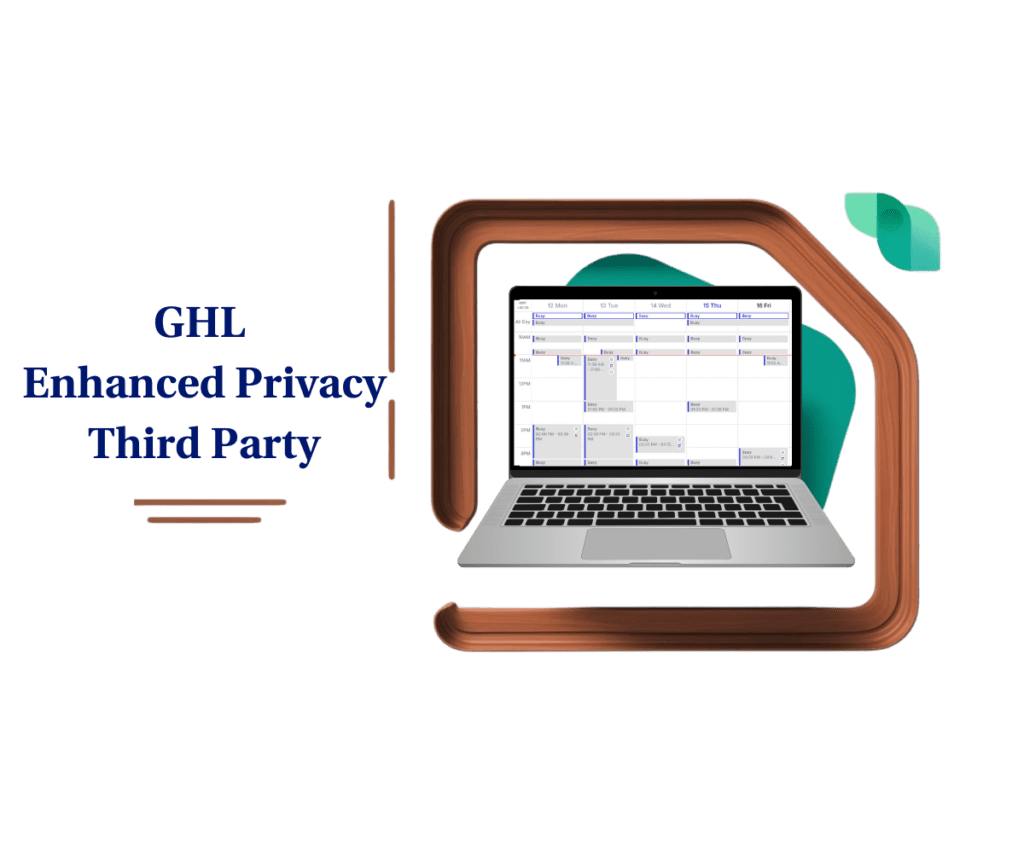
This update to GHL calendar privacy controls ensures third-party events always stay private when using Login As, reducing risk while keeping agency workflows smooth and predictable.
Quick Summary – Calendar Privacy Controls
Purpose: This update strengthens GHL calendar privacy controls by ensuring third-party calendar events stay hidden when agencies use Login As.
Why It Matters: Elevated access should never expose private client data, and this change removes the risk of accidental visibility during support or audits.
What You Get: Third-party calendar events always display as Busy during Login As, with no titles or details visible to anyone except the event owner.
Time to Complete: There is no setup time required because this behavior is applied automatically by GoHighLevel.
Difficulty Level: This is a zero-effort update with no configuration, training, or workflow changes needed.
Key Outcome: Agencies can confidently use Login As while maintaining strict privacy boundaries and stronger client trust.
What’s New – Calendar Privacy Controls Update
This update tightens how GHL calendar privacy controls work when an agency user accesses an account using Login As. The focus is simple but important: third-party calendar events are now fully protected, no matter how the account is accessed.
Logged in as someone else? Events pulled from external calendars will just show up as “Busy”, no names, no notes, no sensitive info. Only the calendar owner can see the full details.
Automate marketing, manage leads, and grow faster with GoHighLevel.

You won’t see the “Hide third-party event details” option in Calendar Settings or My Profile when using Login As, and that’s on purpose. It prevents any mix-ups or accidental changes while you’re in someone else’s account. Privacy is now handled automatically.
Behind the scenes, this ensures GHL calendar privacy controls behave consistently across all access levels. Whether an agency owner, admin, or support staff is logged in, third-party calendar data stays protected by default. No setup. No extra steps. Just safer access.
What Changed – Login As Behavior Explained
Before this update, GHL calendar privacy controls depended heavily on the Hide third-party event details setting. If that toggle was turned ON, all third-party calendar events appeared as Busy for anyone else viewing the calendar. If it was OFF, only events marked as private showed as Busy, while others could display details.
That logic worked fine for standard users, but it created edge cases when Login As was involved. Elevated access could sometimes reveal more information than intended, depending on how the original user had configured their settings. For agencies using Login As frequently, that inconsistency wasn’t ideal.
Now, Login As follows a stricter rule. When you access an account using Login As, third-party calendar event details are never displayed. Period. Every third-party event shows as Busy, regardless of whether the Hide toggle is normally ON or OFF for the user.
It’s important to note that this change only applies while using Login As. Outside of elevated access, calendar behavior works exactly the same as before. The update simply removes ambiguity and locks privacy down when agency-level access is in play.
This makes GHL calendar privacy controls more predictable, more secure, and easier to trust when supporting clients.
What Stayed the Same – No Disruption for End Users
One of the most important parts of this update is what did not change. GHL calendar privacy controls still behave the same way for normal users working inside their own accounts. This update does not affect day-to-day booking, scheduling, or calendar visibility for clients or team members.
When users are not being accessed through Login As, their existing Hide third-party event details setting continues to work exactly as before. If the toggle is ON, all third-party events appear as Busy to others. If it’s OFF, only private third-party events show as Busy while non-private events may display details. Nothing about that logic has been altered.
The person who owns the calendar still sees everything, titles, notes, and full event details, no matter where the event was synced from. Nothing gets hidden from the actual user.
The key takeaway is simple. This change is isolated to elevated access only. It protects privacy during Login As sessions without forcing new rules, retraining, or configuration changes for end users. For agencies, that means stronger safeguards without any disruption to how clients already use their calendars.
Why This Matters – Privacy, Security, and Trust
This update to GHL calendar privacy controls solves a quiet but real problem agencies deal with every day. Login As is incredibly useful, but without strict boundaries, elevated access can introduce risk. Even unintentional visibility into third-party calendar details can chip away at client trust.
By forcing third-party events to always display as Busy during Login As sessions, GHL removes that risk entirely. There’s no chance of an agency admin or support staff seeing information they shouldn’t. Privacy isn’t optional, configurable, or dependent on how a client set their toggle. It’s enforced automatically.
This also aligns with a least-privilege access mindset. Just because someone can access an account doesn’t mean they should see everything inside it. GHL calendar privacy controls now reflect that principle clearly, especially when third-party tools are involved.
For agencies, this is a big win. You can troubleshoot calendars, review bookings, and support clients without worrying about crossing privacy lines. For clients, it reinforces confidence that their personal schedules and synced calendars stay protected, even when support steps in to help.
Strong privacy builds trust. And trust is what keeps clients long-term.
How to Use It – Calendar Privacy Controls with Login As
If you use Login As to support clients, audit calendars, or troubleshoot bookings, this update works automatically in the background. There are no settings to turn on and nothing new to configure. GHL calendar privacy controls are enforced by default whenever elevated access is used. Here’s exactly how it works:
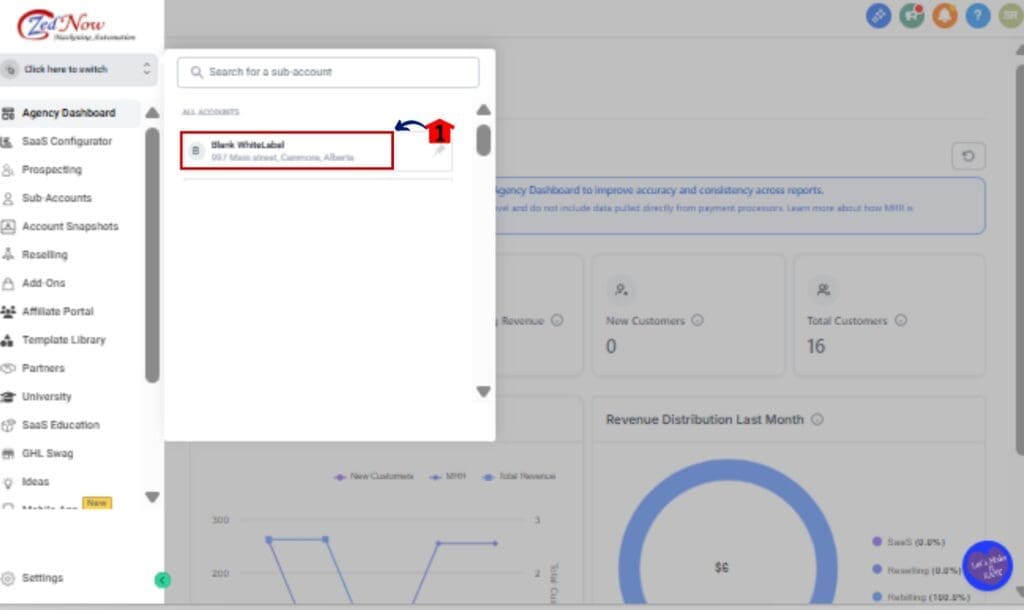
Step 01 – Access the Client Account Using Login As
1.1 From your Agency dashboard, locate the client account you want to access.
1.2 Click the Login As option to enter the account with elevated access.
Step 02 – Open the Calendar View
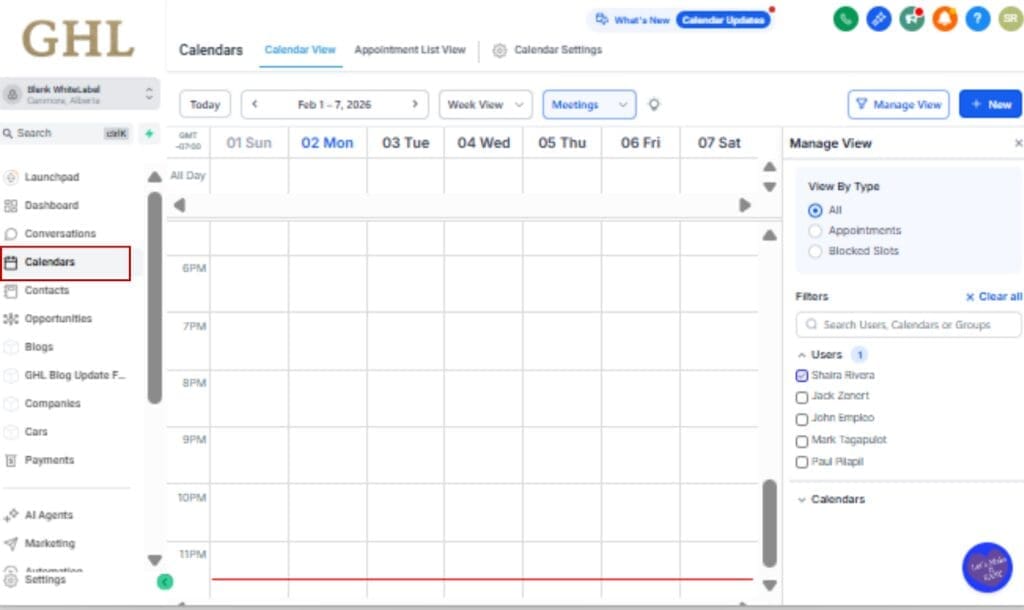
2.1 In the account dashboard, go to the left menu and click Calendars.
2.2 Select a calendar that’s linked to a third-party tool, like Google or Outlook.
Step 03 – View Third-Party Events
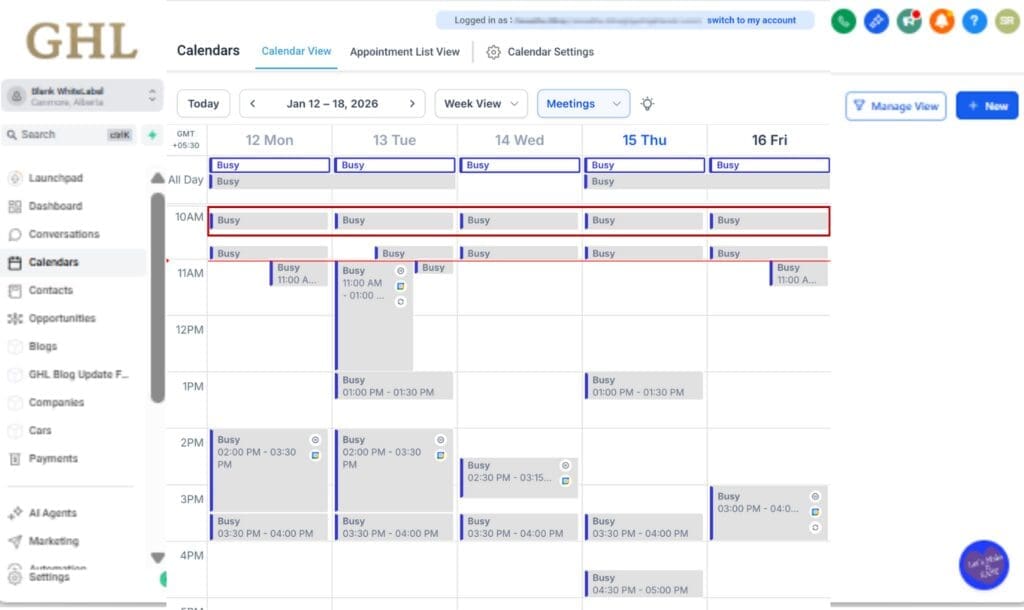
3.1 All third-party calendar events will appear as Busy.
3.2 Event titles, descriptions, and details will not be visible.
3.3 This applies regardless of the client’s Hide third-party event details setting.
Step 04 – Understand What You Can and Can’t See
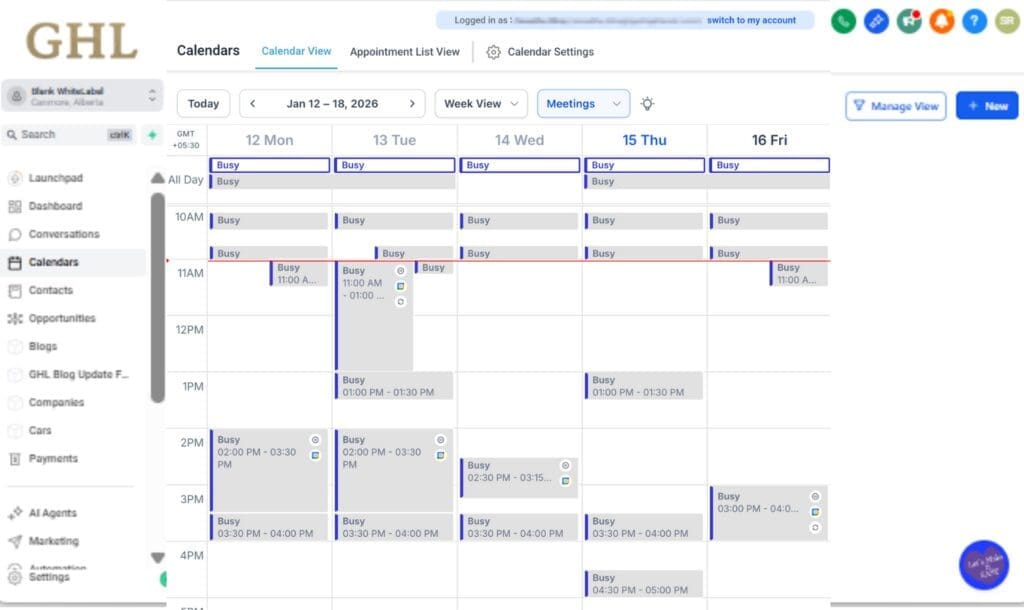
4.1 You can still review availability, gaps, and booking flow.
4.2 You cannot view sensitive third-party event information.
4.3 Full event details remain visible only to the event owner.
Step 05 – Exit Login As When Finished
5.1 Once troubleshooting or review is complete, exit Login As.
5.2 Normal calendar behavior resumes for the client and their team.

That’s it. No setup. No toggles. No risk.GHL calendar privacy controls automatically protect third-party calendar data whenever Login As is used, keeping agency access powerful but privacy-safe.
Common Scenarios – What to Expect in Real Use
This update to GHL calendar privacy controls shows up most clearly in everyday agency workflows. If you’re using Login As regularly, you’ll notice the behavior immediately, but in a good way.
One common scenario is an agency owner checking a client’s calendar to troubleshoot availability issues. You can still see open slots, blocked time, and booking flow without seeing any third-party event details. Everything synced from external calendars simply shows as Busy, keeping private commitments hidden.
Another frequent use case is support or onboarding. When helping a client connect Google or Outlook calendars, support staff can confirm that events are syncing correctly without being exposed to personal meeting information. This keeps the process clean, professional, and privacy-safe.
Compliance reviews are another big win. If you’re auditing setups or reviewing calendar behavior for larger teams, GHL calendar privacy controls ensure that elevated access never crosses privacy boundaries. You get the visibility you need without the risk you don’t.
Even in edge cases, like mixed private and non-private third-party events, the behavior stays consistent. When using Login As, everything external is treated as Busy. No guessing. No exceptions. Just predictable, secure access every time.
Pro Tips for Agencies and Admins
This update to GHL calendar privacy controls is automatic, but how you use Login As still matters. A few simple best practices can help you get the most value from it while keeping client trust strong.
First, set expectations early. Let clients know that when your team uses Login As, third-party calendar events will appear as Busy by design. This reassures them that their personal or internal meetings are never visible to agency staff, even during support or audits.
Second, rely on event owners for details when needed. If troubleshooting requires context around a specific third-party event, ask the client or assigned user to review it directly. GHL calendar privacy controls intentionally prevent admins from seeing that information during elevated access.
It’s also a good idea to document this behavior in your internal SOPs. New team members should understand that Busy events during Login As aren’t sync errors or missing data. They’re a privacy feature working exactly as intended.
You can now use Login As with confidence. This update makes it safe to check availability and support clients, without worrying about stumbling into something private. The privacy rules are built in to keep things secure for everyone.
FAQ – Calendar Privacy Controls and Login As
What This Means Long-Term for GHL Users
This update is a clear signal of where GoHighLevel is heading with privacy and access control. GHL calendar privacy controls are no longer just a user-level preference. They’re becoming a built-in safeguard that applies intelligently based on how the account is accessed.
For agencies, this means Login As is now safer by default. You can continue using it as a core support and troubleshooting tool without worrying about edge cases or inconsistent visibility. Elevated access no longer comes with elevated risk.
It gives clients peace of mind. Even if an agency jumps in to troubleshoot, their synced calendar data isn’t exposed. That level of privacy is crucial now that so much of daily work depends on shared tools and integrations.
Long-term, this also sets a strong foundation for compliance and scale. As teams grow and access expands, predictable privacy behavior becomes critical. GHL calendar privacy controls now behave consistently across access levels, which reduces mistakes, confusion, and trust issues down the road.
In short, this isn’t just a calendar update. It’s part of a broader shift toward smarter, more intentional access control inside GHL.
Results Agencies Can Expect
With this update in place, agencies can use Login As with far more confidence. GHL calendar privacy controls remove the uncertainty that used to come with elevated access and replace it with clear, predictable behavior.
One immediate result is reduced privacy risk. There’s no chance of accidentally seeing sensitive third-party calendar details during support, onboarding, or audits. That alone can prevent awkward conversations and protect long-term client relationships.
Agencies will also notice smoother internal workflows. Team members no longer need to question whether a Busy event is a sync issue or a setting problem. When using Login As, Busy means private. Simple. Consistent. Reliable.
This goes a long way in building trust. Letting clients know you can’t view their third-party calendar info, even when you step in to help, shows that your agency respects their privacy and operates with integrity.
Finally, this update supports scale. As your agency grows and more people rely on Login As, GHL calendar privacy controls ensure that access remains powerful without becoming risky. You get the visibility you need to support clients, without ever seeing what you shouldn’t.
Conclusion – A Small Change with Big Privacy Impact
At first glance, this update to GHL calendar privacy controls might seem minor. No new settings. No buttons to click. No workflows to rebuild. But for agencies that live inside Login As, it solves a real problem that didn’t always show itself until it was too late.
By locking down third-party calendar details during elevated access, GoHighLevel has made privacy predictable. Agencies can support, audit, and troubleshoot without worrying about what might be visible. Clients can feel confident knowing their personal or internal calendar data stays private, even when help is involved.
Most importantly, this change doesn’t get in the way. Everything still works. Bookings still flow. Calendars still sync. The only difference is that the right information stays with the right people.
That’s what good platform updates look like. Quiet. Intentional. And built to protect trust at scale.
Scale Your Business Today.
Streamline your workflow with GoHighLevel’s powerful tools.