

- Conversations UI Update is Live in GHL
- Quick Summary – Conversations UI Update
- New Features in the Conversations UI Update
- Day-to-Day Benefits of the Conversations UI Update
- Why the Conversations UI Update Matters
- How to Use It: Turn on the Conversations UI Update
- Pro Tips to Maximize the Conversations UI Update
- What This Conversations Update Signals for GHL
- Common Questions About the Conversations UI Update
- Get Ahead with the Conversations UI Update
Conversations UI Update is Live in GHL
GoHighLevel just rolled out a slick set of interface upgrades inside the Conversations page, and if your agency juggles dozens of emails, texts, or chat messages daily, this one’s going to make life a whole lot easier.
This new Conversations UI is part of GHL’s CRM Redesign beta, and if you’ve already turned it on in Labs, you’re all set, the changes are already live. No setup needed, just a cleaner look and smoother experience.
Agencies spoke up about messy message logs, confusing email threads, and clunky bulk tools, and GHL actually listened. The result? A total cleanup of the Conversations layout.
This goes beyond looks. It’s all about working smarter, fewer clicks, faster replies, and less digging to get from lead to closed deal.
If you or your team spend hours a day managing conversations, this redesign might be the biggest UI improvement of the year.

This GHL Conversations UI update delivers faster workflows, cleaner visuals, and better message context. It’s a game-changer for agencies juggling high-volume chats.
Quick Summary – Conversations UI Update
Purpose: This update enhances the Conversations page inside GHL, improving how agencies manage daily messages, email threads, and bulk actions.
Why It Matters: The redesigned UI boosts clarity and speed, helping teams respond to leads faster with fewer errors, critical for high-volume agencies.
What You Get: Richer activity logs, improved bulk selection, better snippet handling, clearer threading, and upgraded contrast for easier scanning.
Time to Complete: Less than 1 minute to activate from Labs, zero technical setup required.
Difficulty Level: Beginner-friendly. Just toggle a setting and refresh your page.
Key Outcome: Agencies get a faster, more usable Conversations interface that supports better workflows and team communication.
New Features in the Conversations UI Update
The latest conversations UI update in GHL is more than just eye candy, it’s a bundle of workflow-focused improvements that make every message easier to read, manage, and act on. Here’s what’s new:
1. Richer Activity Logs
You’ll now see way more context at a glance. Activity entries show pipeline names, stages, and related deal info right where you need it, so you’re not guessing why a lead moved or what triggered the update.
Automate marketing, manage leads, and grow faster with GoHighLevel.

2. Better Icon Visibility
Those tiny, vague icons? Gone. GHL boosted the size and clarity of icons across the Conversations layout. This helps you instantly recognize actions like replies, email sends, or incoming SMS, without squinting.
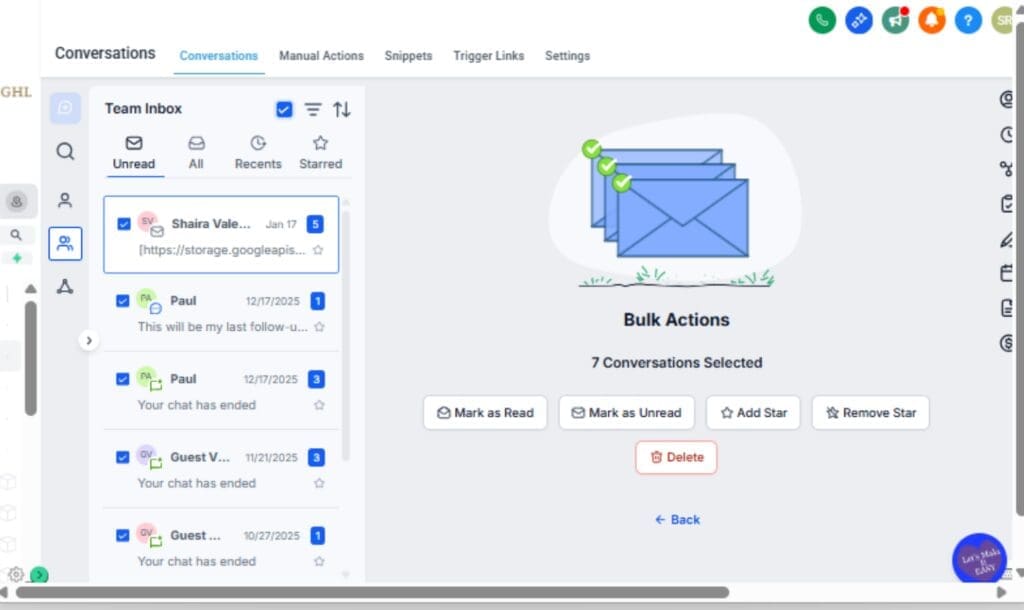
3. Cleaner Bulk Select Flow
Bulk selecting used to feel clunky, like you had to double-check every click. That’s been smoothed out, so now it actually makes sense when you’re working through a heavy inbox.
4. Improved Email Thread Indicators
Emails that include multiple threads now have more prominent visual markers. This makes it easy to spot and expand conversations without digging.
5. Larger Snippet Selector in the Composer
Pre-built snippets are now easier to find and insert. The snippet window has been expanded so you can browse and drop templates into chats without slowing down.
6. Enhanced Visual Contrast
The layout now feels lighter and easier to look at. If you’re in the inbox for hours, these small design fixes actually make a big difference.
7. Improved Translation Support
Missing strings have been fixed. Multi-language users will see more consistency and a smoother experience across non-English interfaces.
Day-to-Day Benefits of the Conversations UI Update
With the conversations UI update now active, you’ll notice a big shift in how fast you can navigate, interpret, and act on messages inside GHL. Here’s how it affects your daily workflow:
Less Guessing, More Context
The new activity logs aren’t just prettier, they give you clarity. When a conversation entry pops up, you’ll immediately see what pipeline or stage it’s tied to. That means fewer clicks into contact records and less second-guessing about what’s actually going on.
Fewer Missteps With Bulk Actions
The new bulk select setup just makes more sense. If you’ve ever paused mid-click wondering if you were about to message the wrong list, that hesitation’s gone now.
Cleaner Composing, Faster Replies
The expanded snippet selector in the message composer lets you find the right reply faster. This alone can shave minutes off every support session or sales follow-up.
Visual Comfort Means Less Fatigue
Font adjustments, better spacing, and improved contrast all come together to reduce eye strain. Whether you’re replying to 5 leads or 50, the new layout helps you stay sharp longer.
Quicker Scans, Fewer Clicks
You’ll move faster. It’s that simple. Between clearer icons and better message threading, everything you need is easier to see and quicker to act on.
If your inbox is always buzzing, you’ll feel how much smoother things run now. It’s those subtle improvements that really tighten up your workflow.
Why the Conversations UI Update Matters
Let’s face it, most of your business runs through Conversations. When that space gets messy or hard to use, things start to drag.
This conversations UI update directly targets the pain points agencies deal with every day:
Faster Reactions = More Conversions
Every extra second spent trying to find the right message, understand a status update, or insert a reply is a chance for a lead to drop off. With cleaner layouts and clearer context, your team can respond faster, and win more.
Less Training, More Doing
New hires or VAs can pick up the workflow faster with the simplified UI. No need to train on tiny icon hover-states or how to find email threads. It’s all just… visible now.
Reduced Inbox Confusion
No more guessing whether that email was part of a thread. No more asking “which pipeline is this from?” All the info shows up without opening multiple tabs.
Cleaner Design = Fewer Mistakes
When the layout’s clearer, it’s easier to catch mistakes before they happen. This redesign helps you avoid wrong bulk sends, missed messages, and old info sneaking in..
Built for Multi-Role Teams
Sales, support, admin, whoever’s in Conversations will find it easier to follow what’s going on. The UI now actually supports team flow.
At the end of the day, this update lets agencies move quicker, stay sharp, and focus on results, instead of fighting with the software.
How to Use It: Turn on the Conversations UI Update
If your Conversations inbox feels clunky or your team’s still dealing with confusing icons and clumsy bulk actions, this UI update is your fast fix. There’s no setup process to worry about, just a simple toggle in Labs. Here’s how to switch it on or confirm it’s already active:
Step 01 – Access Labs in GHL
1.1 Log into your GHL account and click on “Settings” in the left-hand menu.
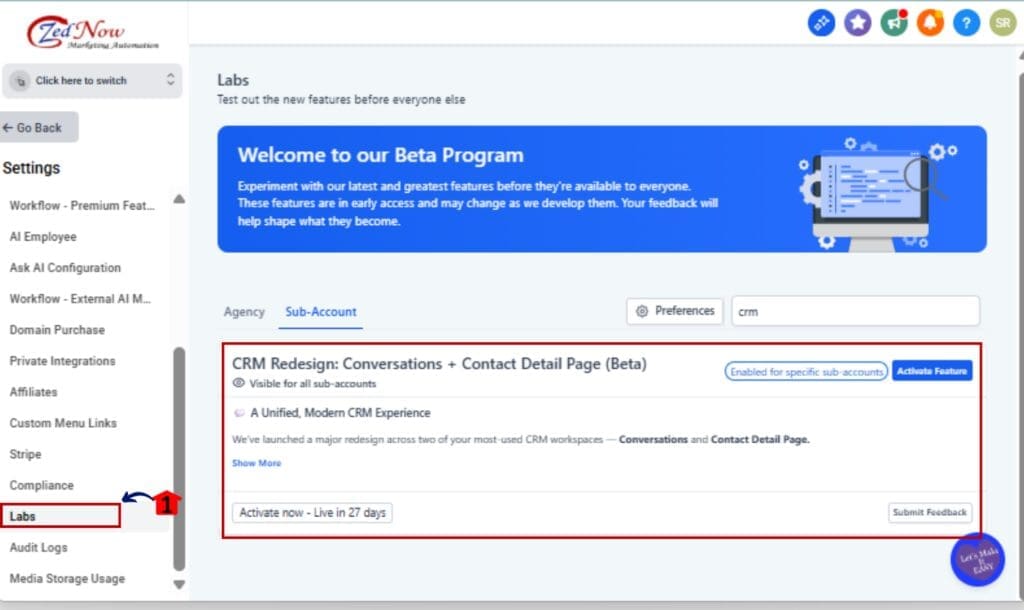
1.2 Scroll down and click on the Labs section.
Step 02 – Locate the CRM Redesign Toggle
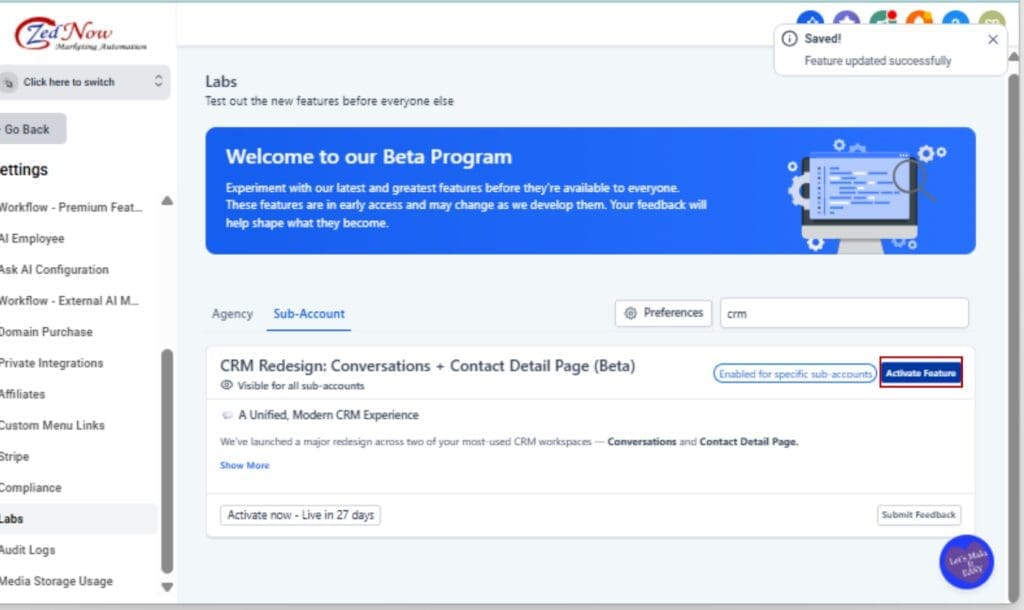
2.1 In Labs, find the toggle labeled CRM Redesign: Conversations + Contact Detail Page (Beta).
2.2 Flip the switch to ON.
Step 03 – Refresh the Conversations Page
3.1 Navigate to your Conversations tab.
3.2 Refresh the page.
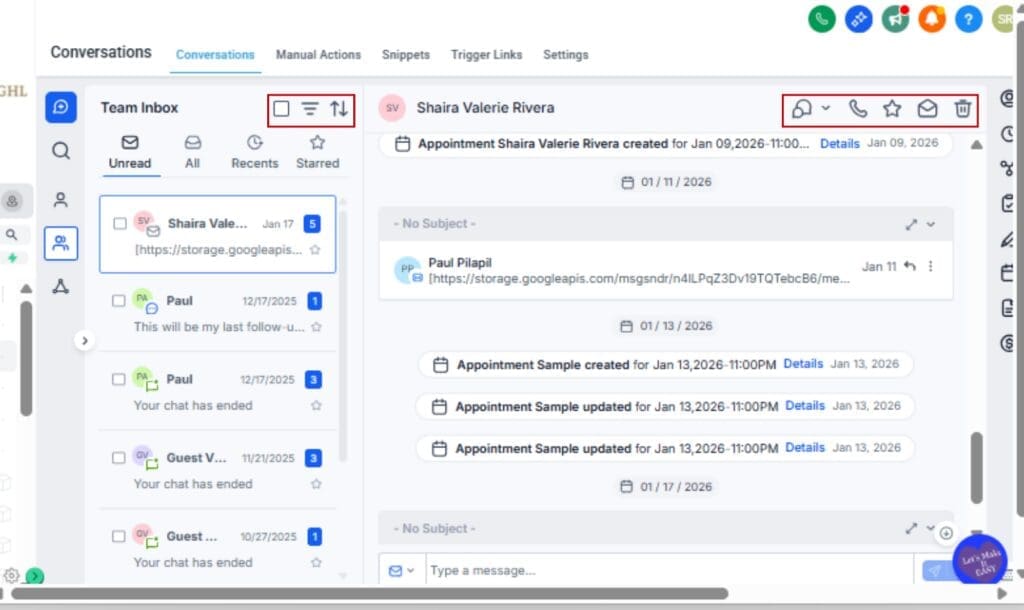
You’ll instantly see the new UI: clearer icons, bigger snippet selector, upgraded activity logs, and more.
Step 04 – Test the New Features
4.1 Click into a contact conversation.
4.2 Hover over messages, use bulk select, or insert a snippet to explore what’s changed.
Step 05 – Loop in Your Team
5.1 Have your team walk through their usual messaging flow.
5.2 Gather quick feedback on readability, icon clarity, and email threading visibility.

That’s it. You’ve just unlocked a faster, cleaner, and more productive messaging experience inside GHL.
Pro Tips to Maximize the Conversations UI Update
With the updated Conversations view live, here’s how you can start using it to save time and simplify your daily routine.
1. Use Snippets Like a Pro
A bigger snippet picker makes it easier to drop in canned replies, great for teams handling support, sales follow-ups, or common questions. Bonus tip: organize your snippets into categories like “Support” or “Sales” to save even more time.
2. Tap into Bulk Select for Lead Management
Use the new bulk select flow to quickly tag, assign, or message leads in batches. It’s cleaner and more intuitive now—no more second-guessing which conversations are selected.
3. Don’t Ignore Activity Logs
Start relying on the improved activity entries for pipeline context. If you see a lead moved to “Hot Lead” or “Proposal Sent,” you’ll know exactly why, without opening another tab.
4. Scan Faster with Icon Visibility
Make a habit of scanning the left margin and top bar for message types and statuses. The enlarged icons help you sort email vs SMS vs missed replies at a glance.
5. Multilingual? Validate the Translation Fixes
If you or your clients operate in multiple languages, double-check your localized UI. Many string translation gaps have been fixed, making life easier across borders.
6. Give Feedback Inside Labs
Since this is still in beta, GHL is actively listening. You can submit your feedback directly in the Labs section, and your input could shape the next round of improvements.
The new UI is designed to feel invisible, you’ll notice it only because things just flow better. Lean into it, and you’ll start saving time without even trying.
What This Conversations Update Signals for GHL
This conversations UI update isn’t just a standalone facelift, it’s part of a bigger shift inside GoHighLevel: building a smoother, smarter, and more scalable CRM for real agency use.
Here’s what this update tells us about where things are headed:
1. GHL Is Listening to Agencies
These changes came directly from user feedback. That means GHL’s not just building features, they’re actively tuning the platform based on how you work. Expect more small, high-impact refinements like this.
2. The CRM Redesign Is Just Getting Started
This update is part of a broader CRM overhaul still unfolding in Labs. Contact Detail Pages are getting revamped. Activity timelines are evolving. What you’re seeing now is just phase one.
3. Conversations Will Get Smarter, Not Just Prettier
As automation and AI tools keep evolving, GHL’s redesign is making sure the Conversations tab keeps up, and works smoothly with things like Conversation AI, not against them.
4. A Unified Experience Is on the Horizon
From managing contacts to sending messages, GHL is giving everything a smoother, more mobile-friendly feel. This update moves things one step closer to a unified experience.
5. Early Adopters Win
If you’re experimenting with new features in Labs now, you’ll be way more prepared when those changes hit everyone else.
Bottom line: This UI refresh is a signal that GHL’s doubling down on usability, and if you care about client communication, this is an upgrade you’ll want to embrace early.
Common Questions About the Conversations UI Update
Get Ahead with the Conversations UI Update
This update to Conversations in GHL isn’t just a fresh coat of paint, it’s a real boost to how you handle messaging every day. From lead replies to team coordination, it’s faster and more intuitive.
From clearer activity logs to cleaner iconography and bulk action flows, every update here was designed with agency use in mind. It’s built for speed, visibility, and real-world workflows.
If you haven’t enabled the CRM Redesign in Labs yet, now’s the time. Test it out. Loop your team in. Collect feedback. This update is already live, and it’s only getting better from here.
And remember, today’s visual improvements are tomorrow’s competitive advantage. Agencies that adopt early adapt faster.
Scale Your Business Today.
Streamline your workflow with GoHighLevel’s powerful tools.

