

- Why Course Content Import Changes Everything
- Quick Summary – Course Content Import Overview
- Here are this weeks HighLevel Updates
- What’s New with Course Content Import in GHL
- What Gets Imported with Course Content Import
- Why Course Content Import Matters for Agencies
- How to Use Course Content Import in GHL
- Pro / Quick Tips for Course Content Import
- What This Means for Your Business
- FAQ About Course Content Import
- Conclusion – Build Once Scale Smarter.
Why Course Content Import Changes Everything
Course Content Import in GHL changes how you build online programs. If you’ve ever duplicated a Course Content Import manually, you know the real slowdown isn’t writing the lessons. It’s rebuilding everything from scratch.
Copying modules. Re-uploading videos. Resetting quizzes. Fixing thumbnails. Reformatting descriptions. It worked, sure. But it wasn’t efficient.
You had to open two courses side by side. Scroll. Copy. Paste. Repeat. Miss something? Go back and fix it. It wasn’t hard. It was just tedious.
GHL just removed the busywork. No more copying lessons one at a time. You can transfer full modules, quizzes, and assignments into another course almost instantly.
No more manual duplication. No more missed media files. No more rebuilding structures that already exist.
For agencies running multiple client programs, coaches launching version 2.0 offers, or SaaS builders standardizing training, this is a serious workflow upgrade.
What used to feel repetitive now feels scalable.
The latest GoHighLevel Changelog includes several other GHL feature updates that round out your daily workflow:
- New QR Code Styling Options: Shapes, Borders, and Rim Text
- Collapse & Resize Pipeline Stages in Kanban View
- Notes just got smarter for the contacts page!
- New Asana actions in workflows – Find Project and Find section
- Email AI + Knowledge Base Integration 🚀
- Dialer: Auto-minimize, Pin & Drag
- Schema Markup Using AI
Keep reading for much more on all these updates and a deep dive into the Course Content Import feature!
Quick Summary – Course Content Import Overview
Purpose: This update allows you to reuse existing lessons, modules, quizzes, and full course structures inside another course using course content import in GHL. It eliminates manual duplication and simplifies course scaling.
Why It Matters: Rebuilding courses wastes time and increases mistakes. Course content import helps agencies, coaches, and SaaS builders duplicate structured training instantly while keeping hierarchy and media intact.
What You Get: You can import individual lessons, full modules, or complete course structures including videos, quizzes, assignments, and thumbnails — all ready for immediate editing.
Time to Complete: Most imports take only a few minutes depending on course size, making it significantly faster than rebuilding manually.
Difficulty Level: Beginner-friendly. If you can open a course and click “Add Content,” you can use course content import.
Key Outcome: Build once inside GHL, reuse across multiple programs, and scale your training systems without increasing your workload.
Here are this weeks HighLevel Updates
New QR Code Styling Options: Shapes, Borders, and Rim Text
What it does:
Lets you stop using boring QR codes. You can now tweak the shape, style the border, and add text around the edge.
Where in GHL:
Accessible via Sites → QR Codes and within QR tools embedded in Funnel and Website builders.
Automate marketing, manage leads, and grow faster with GoHighLevel.

Impact:
Improves visual presentation and brand alignment while increasing scan appeal.
Best suited for:
Agencies that care about branding, small businesses running local promotions, online stores, and teams pushing QR campaigns.
Collapse & Resize Pipeline Stages in Kanban View
What it does:
Lets you hide pipeline stages you’re not actively using and adjust column widths so your board fits the way you work.
Where in GHL:
Inside Opportunities when you’re viewing your pipeline in Kanban mode.
Impact:
No more dragging your screen forever just to find the deals that matter.
Best suited for:
Owners running multi-stage pipelines, reps working deals every day, and anyone fed up with a messy board.
Notes Just Got Smarter for the Contacts Page
What it does:
Upgrades the notes area so it’s easier to write, review, and keep things organized inside a contact record.
Where in GHL:
Found directly within each contact’s profile under Notes.
Impact:
Makes it simpler to see what’s been discussed and who added what — without digging through clutter.
Best suited for:
Teams collaborating on accounts and businesses that document every client touchpoint.
New Asana Actions in Workflows – Find Project & Find Section
What it does:
Lets your workflow check what already exists in Asana before adding anything new.
Where in GHL:
Go to Workflows, add an action, and choose the Asana integration.
Impact:
No more duplicate projects. No more messy task boards. Just cleaner automation.
Best suited for:
Operations teams and agencies that rely on Asana to manage client delivery.
Email AI + Knowledge Base Integration
- What it does:
Allows Email AI to reference your Knowledge Base for smarter, more accurate responses. - Where in GHL:
Found in Conversations → Email composer with AI enabled and Knowledge Base settings under AI configuration. - Impact:
Smarter email suggestions that understand your business and help you reply quicker. - Best suited for:
Support teams, agencies managing inboxes, and businesses scaling communication with AI.
Dialer: Auto-Minimize, Pin & Drag
- What it does:
Lets you auto-minimize the dialer during calls, pin it in place, and drag it anywhere on screen. - Where in GHL:
Found in Conversations → Dialer. - Impact:
Cleaner workspace and easier multitasking during sales or support calls. - Best suited for:
Sales teams, outbound callers, appointment setters, and agencies making daily calls.
Schema Markup Using AI
- What it does:
Generates structured schema markup automatically using AI for SEO enhancement. - Where in GHL:
Found in Sites → Website or Funnel settings within AI or SEO sections. - Impact:
Improves search visibility without manual coding. - This works well for:
Teams building websites that need stronger search visibility, from agencies to small local businesses.
What’s New with Course Content Import in GHL
Course content import introduces a brand-new option inside the Courses Builder that makes duplicating training simple. You no longer need to recreate lessons manually when building a new course.
Inside the Add Content dropdown, you’ll now see an option called “Import from Another Course.” This opens a dedicated import modal where you can browse your existing courses and choose exactly what to bring over.
You are not forced to duplicate everything.
You can select:
- Individual lessons
- Full modules
- Submodules
- Or the entire course structure
That level of control matters. Especially when you only want part of a program reused.
Once you confirm your selections, GHL shows a real-time progress modal so you can track the import. There’s no guessing. No wondering if something failed in the background.
The experience is fast and clean. Your workflow isn’t interrupted. You stay inside the course you’re building, and imported content appears directly in your destination course, ready to edit.
This is not just duplication. This is controlled, flexible course content import built directly into the Courses Builder.
What Gets Imported with Course Content Import
This is where course content import really shines.
It’s not just copying titles. It brings over the full structure and supporting assets that make your course functional.
When you run a course content import inside GHL, here’s what comes with it:
- Lesson titles and structure
- Full module and submodule hierarchy
- Videos and attached media files
- Lesson thumbnails and media thumbnails
- Descriptions and formatted lesson content
- Quiz questions tied to lessons
- Assignments and supporting resources
The structure stays intact. If your original course had organized modules with submodules nested inside, that hierarchy transfers over. You don’t need to reorganize everything manually.
Media files move with the lessons. That means your training videos, downloadable files, and attachments don’t need to be re-uploaded.
Quizzes and assignments also come across connected to their associated lessons. You don’t have to rebuild your assessment flow.
And here’s the important part:
All imported content is fully editable immediately.
Nothing is locked. Nothing is frozen. You can adjust lesson titles, swap videos, rewrite descriptions, or modify quiz questions as soon as the import finishes.
This gives you two huge advantages:
- Speed from duplication
- Flexibility from customization
You get the base structure instantly, then refine it for the new audience, client, or offer. That’s real leverage.
Why Course Content Import Matters for Agencies
If you build more than one course, this is a serious time saver. Before course content import, duplicating a program meant rebuilding structure manually. Even if you copied content, you still had to reset modules, upload media, and reconnect quizzes.
That adds up fast. Now, you build once. Then reuse.
For agencies, that means:
- Standardized onboarding programs for multiple clients
- Replicating industry-specific training fast
- Creating white-labeled versions of the same curriculum
- Launching tiered offers without rebuilding everything
Consistency becomes easy. If you run a SaaS model inside GHL, you can create a master training course and reuse it across multiple sub-offers. Adjust branding. Swap a few lessons. Keep the core structure.
That’s scalable. Coaches benefit too. Launching version 2.0 of your program? Import your original course. Update a few lessons. Add new modules. You’re done in hours instead of days.
It also reduces human error. When you manually rebuild a course, you miss things. A broken quiz link. A missing thumbnail. A lesson out of order. Course content import keeps your structure intact from the start.
This is not just about speed. It’s about building systems that scale without increasing your workload.
How to Use Course Content Import in GHL
Importing content from one course into another happens inside the Courses Builder in your sub-account. You’ll access the destination course first, open the Add Content menu, and then select the course you want to pull content from.
In the steps below, you’ll learn how to choose specific lessons, modules, or a full course structure, review your selections, and complete the import properly without creating clutter.
- Access the Courses Area in Membership of GHL.
- Open the Add Content Menu in the Course.
- Select Your Source Course in the List.
- Choose the Course you want to Import.
- Review the Import in List.
To start, make sure you are logged in to your GoHighLevel sub-account.
Step 01 – Access the Courses Area in Membership of GHL
- In this step, you will navigate to the Courses section inside your GHL sub-account where all your existing training programs are stored and managed.
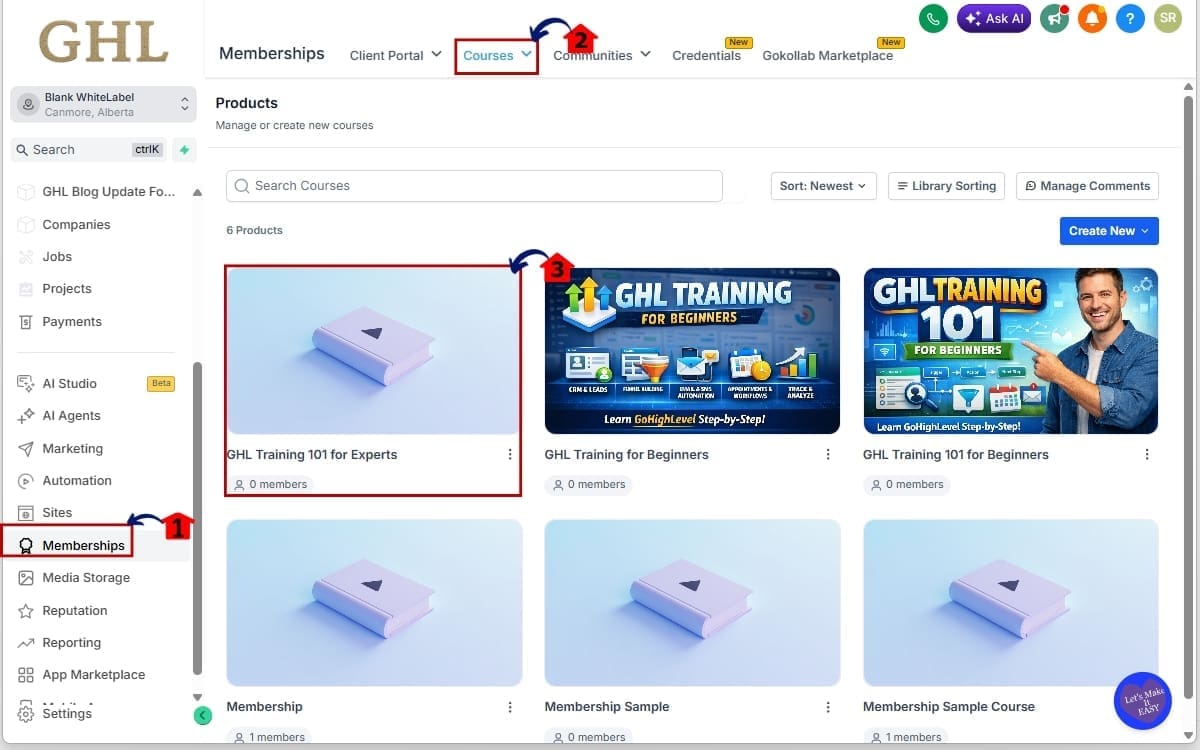
1.1 Click on “Memberships” in the Main Left-Hand Menu
- The Main Menu on the left side of your screen contains all primary areas of GHL.
1.2 Click on “Courses” from the top navigation inside Memberships
- You will now see your list of existing courses.
1.3 Open the Course Where You Want to Import Content
- This will be your destination course. Click on the course name to enter the Course Builder view.
Step 02 – Open the Add Content Menu in the Course
- In this step, you will open the Add Content dropdown inside your selected course to access the import option.
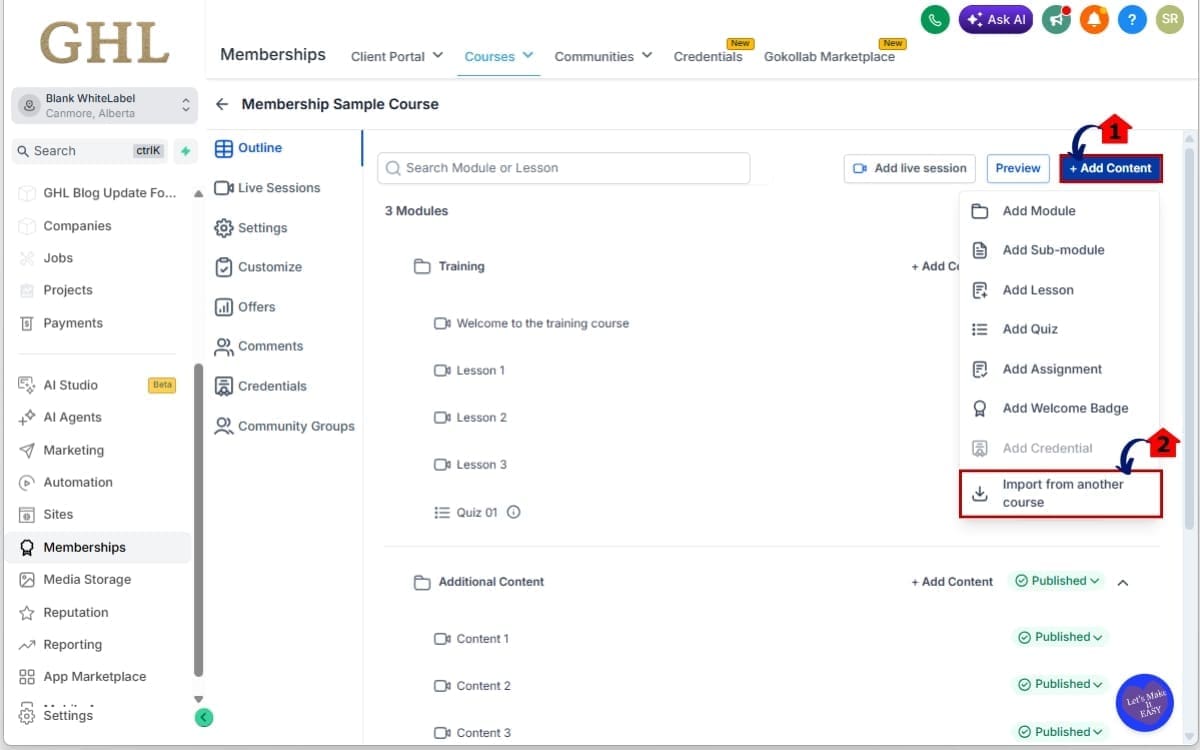
2.1 Inside the destination course, click the “Add Content” button
- This button allows you to create new lessons or modules.
2.2 Select “Import from Another Course”
- A dedicated import modal will now open. This is where course content import begins.
Step 03 – Select Your Source Course in the List
- In this step, you will choose the course that contains the content you want to import.
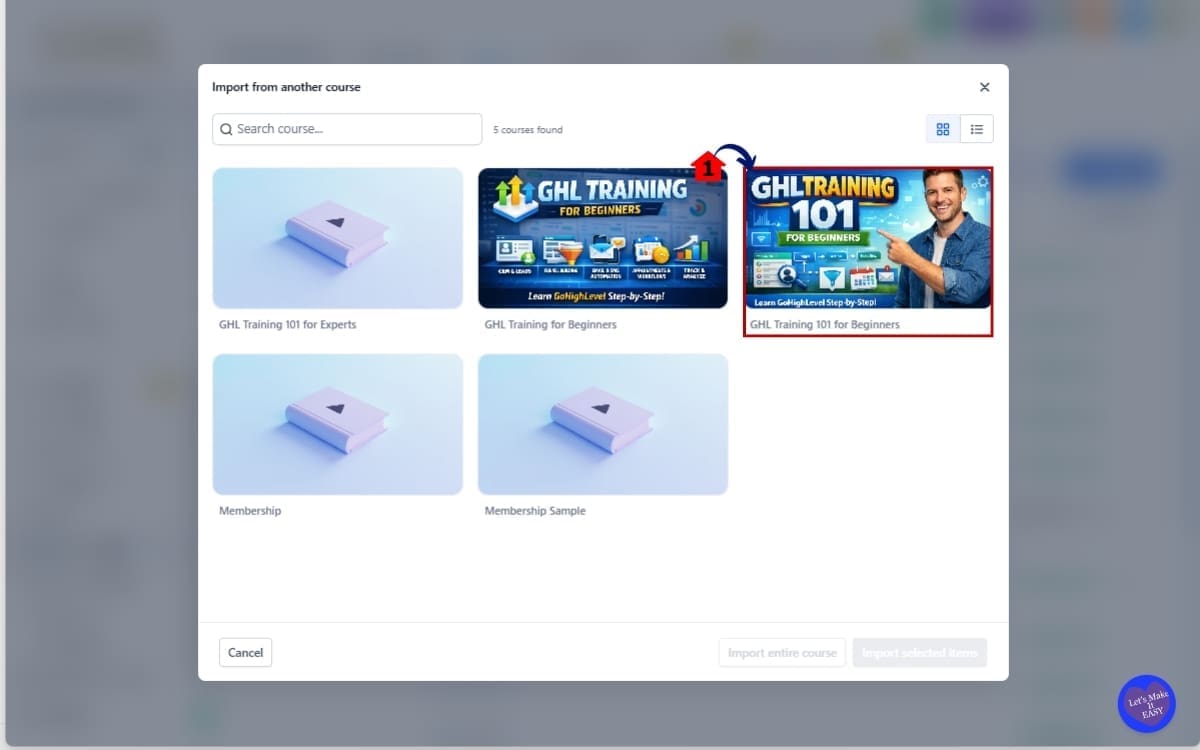
3.1 Browse the list of available courses inside the modal and Click on the course you want to import from
- These are all the courses in your sub-account. The system will load its modules, submodules, and lessons.
Step 04 – Choose the Course you want to Import
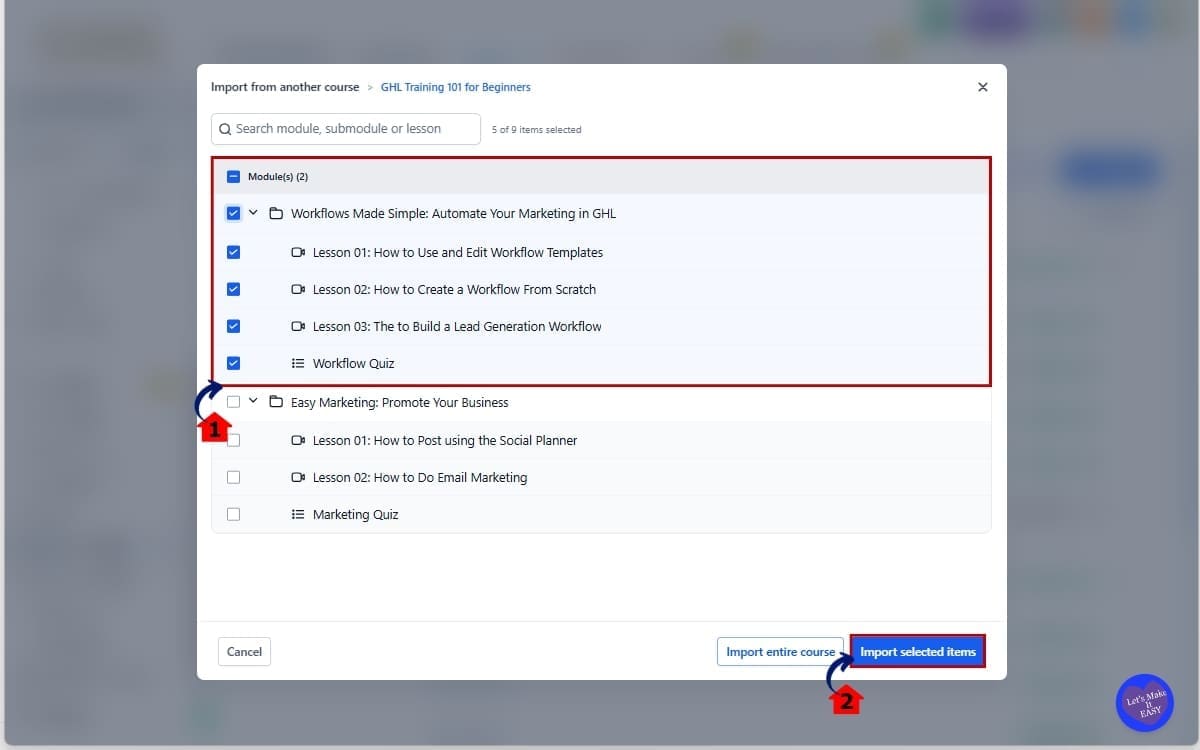
- In this step, you will confirm the course that contains the content you want to bring into your current course.
4.1 Select Submodules (Optional)
- This keeps the structure intact when imported. Double-check you are importing the correct content. This avoids clutter inside your destination course.
4.2 Click import selected items
- Click “Import Selected Items” to begin transferring the chosen lessons or modules into your destination course.
Step 05 – Review the Import in List
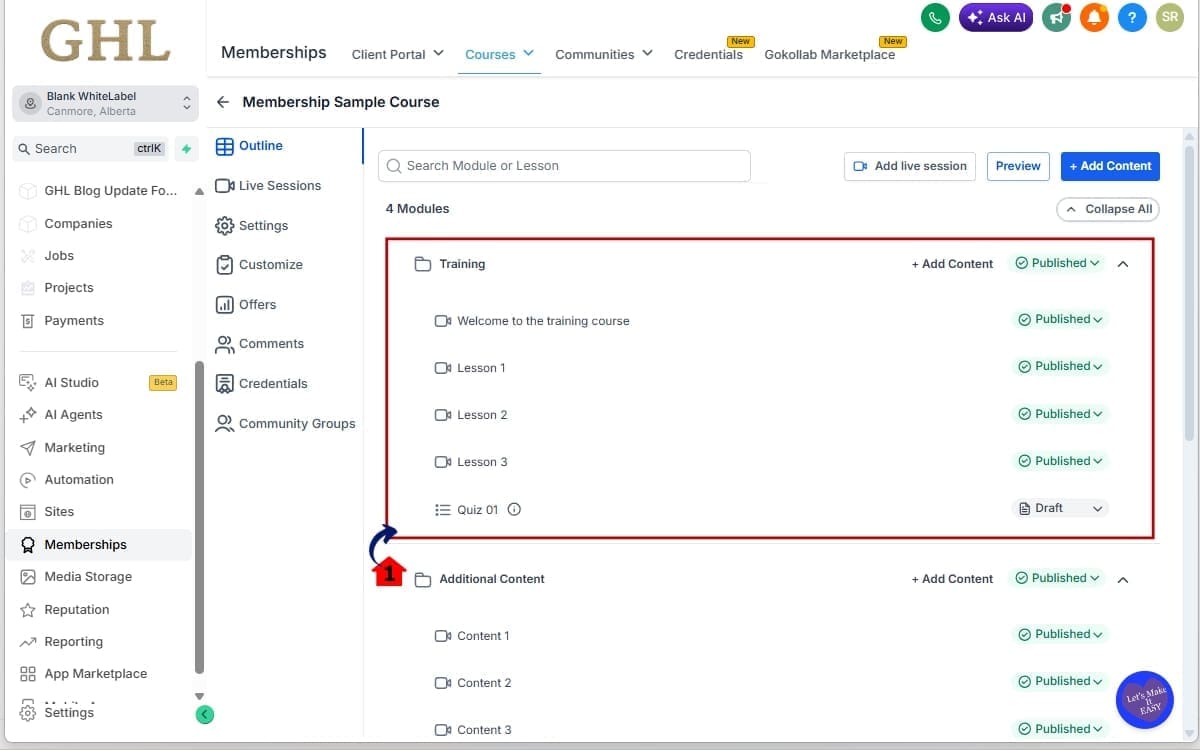
- In this step, you will review the imported lessons and modules to ensure everything transferred correctly.
5.1 Review Imported Content in Your Destination Course
- Once complete, modules and lessons will appear immediately. Structure and hierarchy will match the source course.
That’s it. No manual copying. No rebuilding. No re-uploading media. Course content import turns what used to take hours into minutes.
Pro / Quick Tips for Course Content Import
Course content import is powerful on its own. But if you use it strategically, it becomes a scaling tool, not just a shortcut.
Here’s how to get the most out of it.
Create a “Master Template” Course
Build one clean, structured master course that acts as your foundation. This becomes your reusable framework. When you launch a new program, import from the master instead of starting from scratch.
Keep Your Naming Consistent
Use clear naming for modules and lessons in your base course.
For example:
- Module 01 – Foundations
- Module 02 – Setup
- Module 03 – Advanced Strategy
When you run a course content import, this keeps everything organized and easy to edit.
Review Before You Import
Don’t blindly import everything. If your source course has outdated lessons, remove them before using it as a template. Keep your master clean so every future import stays clean.
Rename Immediately After Import
Once it’s in, tidy it up. Rename what needs renaming. Future you will appreciate not sorting through three courses that all look the same.
Double-Check Quizzes and Assignments
Even though quizzes import correctly, review scoring, wording, and lesson references. Especially if you are creating a niche-specific version of a course.
Avoid Over-Importing
Import only what you need. If you only need one module, don’t bring over the entire course structure. Keep your new course lean and intentional.
Plan Before You Scale
Course content import works best when your curriculum is systemized.
Think in terms of: Build once → Reuse forever → Improve gradually
That mindset turns this feature into a long-term growth lever.
What This Means for Your Business
Course content import is more than a convenience feature. It’s a scaling feature.
If you build training, onboarding, certification programs, or client education inside GHL, this changes how fast you can launch.
Build Once. Reuse Forever. Instead of rebuilding every time you launch a new offer, you create a core structure once. Then you reuse it.
That means:
- Faster course launches
- Faster client onboarding
- Faster niche expansion
- Less repetitive work
For agencies, this is huge. Imagine you serve contractors, realtors, and med spas. You can create one structured onboarding course, then use course content import to create three niche versions.
Change examples. Adjust branding. Update a few lessons. Done. For coaches, this speeds up version upgrades.
Launching a premium version of your program? Import your existing course. Add two advanced modules. Improve the worksheets. Publish. You didn’t rebuild. You refined.
For SaaS builders inside GHL, this helps standardize curriculum across multiple sub-accounts. You create consistent education without recreating it manually for every client.
And here’s the real benefit: Your time shifts from rebuilding to improving.
Instead of doing repetitive setup work, you focus on:
- Enhancing content
- Increasing value
- Improving student outcomes
That’s how you scale without burning out. Course content import doesn’t just save time. It protects your time.
FAQ About Course Content Import
Conclusion – Build Once Scale Smarter.
Course content import inside GHL is one of those updates that looks simple on the surface. But the impact is big.
What used to take hours of rebuilding now takes minutes. What used to feel repetitive now feels scalable. You’re no longer duplicating effort. You’re leveraging structure.
If you build onboarding programs, certifications, client training, or digital courses inside GHL, this feature protects your time and increases your output.
Build once. Reuse strategically. Improve gradually.
That’s how smart agencies scale. If you haven’t tried course content import yet, open one of your existing programs and test it. Duplicate a module. Import a full course. See how fast it works.
You’ll feel the difference immediately. And if you’re serious about building scalable systems inside GoHighLevel, keep checking back with GHL Growth Garage for more step-by-step feature breakdowns like this.
Now I’ll ask you: Have you used course content import yet? Are you duplicating full programs or just specific modules?
Let me know how you’re using it to scale.
Scale Your Business Today.
Streamline your workflow with GoHighLevel’s powerful tools.


