

- External Calendar Sync Keeps GHL Appointments Aligned
- Quick Summary – External Calendar Sync
- Here are this week's HighLevel Updates 🚀
- What’s New With External Calendar Sync
- What Changed With External Calendar Sync
- Why External Calendar Sync Matters
- How to Use External Calendar Sync
- External Calendar Sync and Multi-Service Appointments
- Quick Tips for Better External Calendar Sync
- What External Calendar Sync Means for Your Business
- Results You Can Expect From External Calendar Sync
- FAQs About External Calendar Sync
- External Calendar Sync Helps Keep GHL Bookings on Track
External Calendar Sync Keeps GHL Appointments Aligned
If your team spends most of the day working from Google Calendar or Outlook, this GHL update is worth knowing about. External Calendar Sync now does a better job of keeping single-service appointment changes matched up inside GoHighLevel.
Before this update, changing a service appointment in Google Calendar or Outlook could create a mismatch. The calendar might show the new time or cancellation, while GHL still held onto the old appointment details.
Now, External Calendar Sync works properly for single-service appointments. If you reschedule or cancel one of these appointments from a connected Google or Outlook calendar, that change now syncs back into GoHighLevel and updates the appointment record too.
You’ll also see the correct information across the main appointment areas inside GHL, including the calendar view, appointment list, and appointment details.
For agencies and service businesses, that’s a simple but important improvement. It means less manual checking, fewer mismatched bookings, and a lower chance of creating an accidental double booking because one system was showing outdated information.
The team here at GHL Growth Garage likes updates like this because they fix real day-to-day workflow problems without adding extra setup.
One important limitation remains, though. Multi-service appointments are not included in this improved sync yet, so those should still be managed directly inside GHL.
The latest GoHighLevel Changelog includes several other GHL feature updates that round out your daily workflow:
- Wait Action Enhancement: TikTok DM Replies
- India Recurring Mandate Support for Affiliate Indian Signup Pages
- Housecall Pro – More Workflow Actions & Triggers
- Email Services Dashboard for Agencies
- Email Sequences Now Available in Beta Labs
- Group Your Contacts by Source in Dashboards & Reporting
- MMLite Adoption Banner in Conversations
Keep reading for much more on all these updates and a deep dive into the External Calendar Sync feature!

Quick Summary – External Calendar Sync
Purpose: External Calendar Sync now keeps supported single-service appointments aligned when they are rescheduled or cancelled from connected calendars like Google Calendar or Outlook.
Why It Matters: This reduces mismatched appointment data, lowers the risk of double bookings, and helps staff trust what they see across GHL and their connected calendars.
What You Get: Single-service appointment changes made in a connected third-party calendar can now update the GHL calendar view, appointment list, and appointment details.
Time To Complete: There is no setup required, so you can start using the improved sync immediately once your third-party calendar is connected.
Difficulty Level: Easy. The update works automatically for supported single-service appointments.
Key Limitation: Multi-service appointments are not included yet and should still be rescheduled or cancelled directly inside GoHighLevel.
Key Outcome: Your team can manage supported single-service appointments with cleaner data, less manual checking, and fewer scheduling conflicts.
Here are this week’s HighLevel Updates 🚀
Wait Action Enhancement: TikTok DM Replies
What’s New:
Instead of continuing after a fixed delay, your workflow can pause until someone replies to your TikTok DM.
Where in GHL:
Found in Automation → Workflows using the Wait action after sending a TikTok DM.
Automate marketing, manage leads, and grow faster with GoHighLevel.

Impact:
Your automation responds when someone actually joins the conversation, rather than after a timer runs out.
Recommended For:
Anyone using TikTok DMs to start conversations with potential customers.
India Recurring Mandate Support for Affiliate Indian Signup Pages
What’s New:
Supports recurring payment mandates for Indian affiliates, helping subscriptions comply with local banking requirements.
Where in GHL:
Available on Affiliate Program signup pages for users in India.
Impact:
Creates a smoother signup experience while reducing payment failures for recurring subscriptions.
Recommended For:
Agencies, SaaS businesses, and affiliate programs onboarding customers in India.
Housecall Pro – More Workflow Actions & Triggers
What’s New:
Adds new workflow triggers and actions for the Housecall Pro integration, giving you more ways to automate field service processes.
Where in GHL:
Inside Automation → Workflows when using the Housecall Pro integration.
Impact:
Expands automation possibilities between HighLevel and Housecall Pro, reducing manual work and improving operational efficiency.
Recommended For:
Home service businesses, field service companies, and agencies managing Housecall Pro clients.
Email Services Dashboard for Agencies
What’s New:
Introduces a centralized dashboard where agencies can monitor email services across their accounts.
Where in GHL:
Found in the Agency View under the new Email Services Dashboard.
Impact:
Makes it easier to monitor email health, identify issues, and manage deliverability from one place.
Recommended For:
Agency owners, support teams, and admins managing multiple client email services.
Email Sequences Now Available in Beta Labs
What’s New:
Introduces Email Sequences as a Beta Labs feature, providing another way to create structured email follow-up campaigns.
Where in GHL:
Enable it from Settings → Labs, then access Email Sequences after activation.
Impact:
Cuts down the time spent checking different areas just to see how your email services are performing.
Recommended For:
Marketers, agencies, coaches, and businesses running nurture campaigns or onboarding emails.
Group Your Contacts by Source in Dashboards & Reporting
What’s New:
Lets you organize contact reports based on where your leads originated.
Where in GHL:
Available within Dashboards & Reporting when viewing contact analytics.
Impact:
Makes it easier to compare lead sources and identify which marketing channels are producing the best results.
Recommended For:
Marketing teams, agency owners, and businesses tracking campaign performance across multiple lead sources.
MMLite Adoption Banner in Conversations
What’s New:
Displays a helpful banner inside Conversations to encourage users to adopt the new MMLite messaging experience.
Where in GHL:
Appears within the Conversations module for eligible accounts.
Impact:
Helps users discover and transition to MMLite while highlighting its benefits directly inside the messaging interface.
Recommended For:
Current HighLevel users exploring the latest messaging experience and teams preparing to migrate to MMLite.
What’s New With External Calendar Sync
External Calendar Sync now works both ways for single-service appointments in GoHighLevel.
That means when someone reschedules or cancels a single-service appointment directly from a connected third-party calendar, the change no longer stops at the calendar event. GHL now updates the service appointment record as well.
This applies to connected calendars such as Google Calendar and Outlook.
Before this update, a change made outside GHL could create a mismatch. The external calendar might show one time or status, while the actual appointment record inside GoHighLevel still showed something different.
Now, those supported changes stay aligned.
If a single-service appointment is moved to a new time, GHL reflects the new time. If the appointment is cancelled from the connected calendar, that cancellation is also reflected inside GoHighLevel.
You’ll see the updated information across the main appointment areas, including the calendar view, appointment list, and appointment details.
There’s no extra setting to turn on. The improved External Calendar Sync is live automatically for single-service appointments.
The key thing to remember is that this update does not yet cover multi-service appointments. Those can still fall out of sync if they’re changed directly from a third-party calendar, so they should continue to be managed inside GHL.
What Changed With External Calendar Sync
The biggest change with External Calendar Sync is simple: single-service appointment records now stay connected to changes made in your third-party calendar.
Previously, if someone moved or cancelled a service appointment from Google Calendar or Outlook, the calendar event could update while the actual service appointment inside GHL stayed unchanged.
That created a messy situation.
Your external calendar might show the appointment at 3:00 PM, while GoHighLevel still showed 1:00 PM. Or the calendar event might be cancelled, but the service appointment could still appear active inside GHL.
Now, single-service appointments update properly across the system.
If a single-service booking is moved or cancelled in Google Calendar or Outlook, GHL now carries that update through to the main appointment areas too.
It removes the guesswork. Your team can look at the appointment and know they are working with the latest information.
If your staff mainly work from Google Calendar or Outlook, this change should make things a bit smoother. There’s less need to bounce back into GHL every time an appointment gets moved or cancelled.
The one exception is multi-service appointments. Those still do not fully sync when changed directly from a third-party calendar, so those updates should continue to be handled inside GHL.
Why External Calendar Sync Matters
Nobody wants to check three places just to confirm one appointment.
But that is exactly what teams may end up doing when calendar data does not match.
A reschedule in Google Calendar might not have shown correctly in GHL. A cancellation in Outlook could leave the booking looking active somewhere else.
That creates uncertainty.
And uncertainty in a busy booking calendar can quickly lead to missed appointments, double bookings, or extra client calls.
The new sync behavior reduces that risk for single-service appointments.
It gives your team a cleaner workflow and cuts down on the amount of manual checking needed after routine schedule changes.
How to Use External Calendar Sync
The improved External Calendar Sync in GoHighLevel gives you a more reliable way to manage single-service appointments when your team works from connected calendars like Google Calendar or Outlook.
You can now reschedule or cancel supported single-service appointments directly from the connected third-party calendar, and the change will sync back into GHL. The basic process is simple: confirm the calendar connection, find the correct appointment, make the change in the external calendar, then verify that the update appears correctly inside GoHighLevel.
- Confirm the Calendar Connection.
- Find a Single-Service Appointment.
- Reschedule the Appointment.
- Cancel the Appointment.
- Check in Go High Level Cancel the Appointment.
To start, make sure you are logged in to the correct GoHighLevel sub-account and that the Google Calendar or Outlook calendar used for the appointment is already connected.
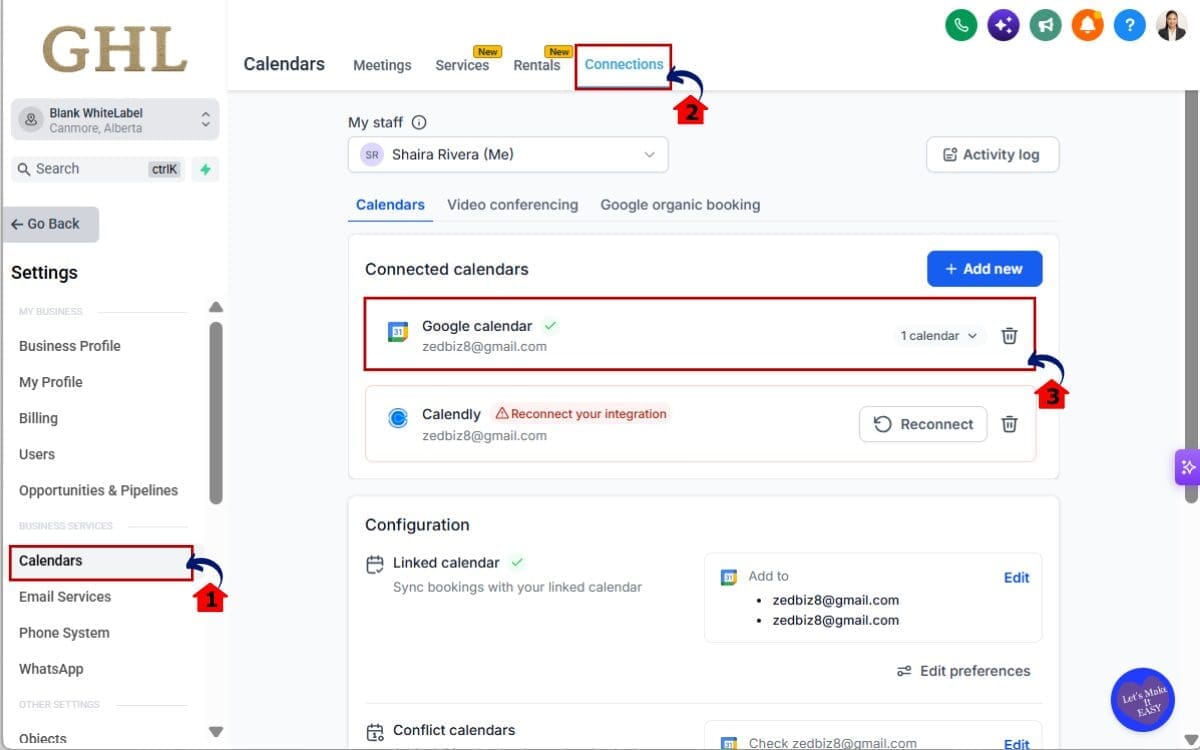
Step 01 – Confirm the Calendar Connection
- Start by making sure the correct external calendar is connected to the GoHighLevel sub-account.
1.1 Open the Calendars area in settings.
- Use the main left-hand menu to access the calendar and appointment tools inside GHL.
1.2 Click connections
- You will view here the connected calendars.
1.3 Review the connected calendar to make sure it’s active.
- Confirm that the correct Google Calendar or Outlook calendar is linked to the account.
Step 2.0 – Find a Single-Service Appointment
- The improved External Calendar Sync currently works with single-service appointments.
2.1 Locate the appointment you want to update.
- Find the correct date, time, and customer before making any changes.
2.2 Check the appointment details.
- Make sure you are editing the correct booking before moving or cancelling it.

Step 3.0 – Reschedule the Appointment
- Open the appointment in Google Calendar or Outlook.
3.1 Change the appointment date or time.
- Select the new time or move the event to the correct date.
3.2 Save the updated event.
- Make sure the calendar accepts and saves the change.

Step 4.0 – Cancel the Appointment
- Single-service appointment cancellations made from the connected calendar can also sync back into GHL.
4.1 Open the appointment in the connected calendar.
- Select the single-service appointment you want to cancel.
4.2 Cancel or delete the calendar event.
- Use the normal cancellation or delete option available in Google Calendar or Outlook.

Step 5.0 – Check in Go High Level Cancel the Appointment
- Return to GoHighLevel. Open the calendar or appointment list inside GHL.
5.1 Review the appointment status.
- Confirm that the cancellation is now reflected in the service appointment record.

External Calendar Sync now works automatically for supported single-service appointment reschedules and cancellations. No additional feature setup is required. However, multi-service appointments should still be managed directly inside GoHighLevel to avoid mismatched appointment information.
External Calendar Sync and Multi-Service Appointments
The new sync works well for single-service appointments, but multi-service bookings still need extra care.
They are not part of this fix yet.
If a multi-service booking is edited from Google Calendar or Outlook, the external event can change without the full appointment record inside GHL following along.
In other words, the same old mismatch can still happen.
The easiest way around that is to make all multi-service changes directly in GoHighLevel.
Reschedule there. Cancel there. Then let the connected calendar follow the change.
That one habit will help keep the booking details cleaner until HighLevel adds fuller support.
Quick Tips for Better External Calendar Sync
The new sync is useful, but it works best when your team follows the same routine.
Start by checking the appointment type. Single-service booking? You can use Google Calendar or Outlook. Multi-service booking? Keep the change inside GHL.
Simple. If something does not update, do not assume the appointment is broken.
First, confirm the calendar is still connected.
Then look at the calendar view, appointment list, and appointment details.
A quick check is better than creating another appointment and making the problem worse.
For bigger teams, it helps to write this process down so everyone handles bookings the same way.
What External Calendar Sync Means for Your Business
For most teams, the value is pretty straightforward: less checking and less repeated work.
If a single-service appointment gets moved in a connected calendar, your staff do not have to remember to update the same booking again in GHL.
That makes the process quicker.
It also reduces the chance of old appointment times hanging around in one system.
For agencies, this creates a cleaner rule that clients and staff can actually remember.
Single-service changes can happen in Google Calendar or Outlook.
Multi-service changes stay in GHL.
That is easier to manage than a workflow full of exceptions.
Results You Can Expect From External Calendar Sync
The biggest improvement is not flashy. It is simply having fewer things go wrong.
Single-service appointments that are moved or cancelled in Google Calendar or Outlook can now stay better aligned with GHL.
That means fewer old times, fewer incorrect statuses, and less confusion.
Your staff should also have less reason to check the same booking in three different places.
For a busy team, that saves time.
It can also reduce the chance of accidentally booking over an appointment because the schedule was out of date.
Clients benefit too because there is less chance of mixed messages around appointment times.
For agencies, that may mean fewer support requests and fewer little problems to clean up.
Multi-service appointments are still outside this update, so keep those changes inside GoHighLevel.
FAQs About External Calendar Sync
External Calendar Sync Helps Keep GHL Bookings on Track
This update makes one part of appointment management a lot less messy.
If a single-service booking is changed in Google Calendar or Outlook, GHL can now keep up with that change.
That gives your team a better chance of seeing the same information everywhere.
It also means less time spent comparing screens or fixing small scheduling errors.
The one thing that has not changed is multi-service bookings. Those should still be updated from inside GoHighLevel.
For teams that rely heavily on single-service appointments, this is a useful improvement to start using right away.
Keep following GHL Growth Garage for more GHL guides and product updates.
How is the new sync working for you so far?
Scale Your Business Today.
Streamline your workflow with GoHighLevel’s powerful tools.


