- GHL marketing templates for faster launches
- Quick Summary – Marketing Templates Essentials
- 21 new GHL marketing templates released
- Why marketing templates give agencies an edge
- How to Use GHL Marketing Templates
- Pro tips to maximize marketing templates
- FAQs about GHL marketing templates
- What results to expect from using GHL templates
- Launch smarter with GHL marketing templates
GHL marketing templates for faster launches
If you’re still starting every client project from a blank page, stop. GoHighLevel just dropped 21 new marketing templates designed to speed up everything from landing pages to ad campaigns. Whether you’re building a financial website, launching a medical funnel, or spinning up real estate social posts, these plug-and-play designs save time, look great, and convert.
This isn’t just a design update, it’s a delivery upgrade. For agencies juggling multiple clients, snapshots, and campaigns, these new templates can shave hours off your workflow and give you an instant head start on client builds.
GoHighLevel’s latest release includes templates for websites, funnels, Facebook and Google Ads, social media, and even a full snapshot for coffee shops. They’re professionally built, easy to customize, and ready to deploy in just a few clicks.

This update brings 21 new marketing templates to GHL, including websites, funnels, social media posts, and ad creatives, giving you a massive head start in building client campaigns and scaling delivery without starting from scratch.
Quick Summary – Marketing Templates Essentials
Purpose: GoHighLevel released 21 new marketing templates designed to speed up client campaign launches, including websites, funnels, ads, and a coffee shop snapshot.
Why It Matters: These templates help agencies save time, scale delivery, and launch high-converting assets faster without needing to start from scratch every time.
What You Get: You’ll gain access to industry-specific templates across five formats: website, funnel, social media, Google Ads, Facebook Ads, plus one full restaurant snapshot.
Time to Complete: You can customize and deploy most templates in under 30 minutes. Full campaign builds can now take hours instead of days.
Difficulty Level: Beginner to Intermediate, No coding or design experience needed. Just plug in your content and go.
Key Outcome: Faster delivery, higher-quality client assets, and streamlined onboarding, giving you a competitive edge in every new project.
21 new GHL marketing templates released
This update brings a massive boost to your template library across multiple channels. Let’s break down what’s included:
1 New Website Template
Automate marketing, manage leads, and grow faster with GoHighLevel.

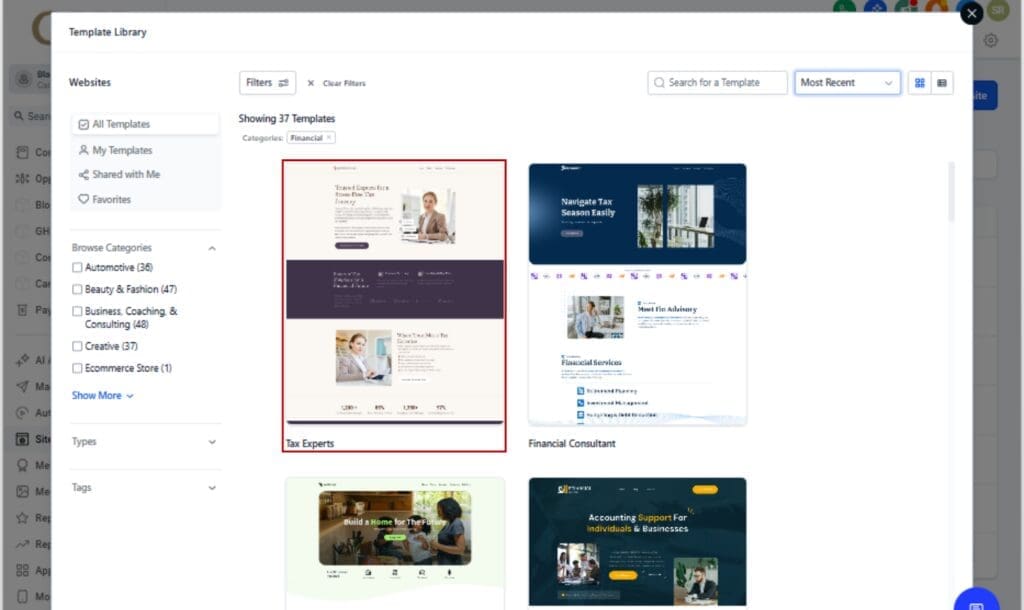
- Financial — A clean, conversion-friendly layout perfect for financial services professionals like advisors, accountants, and consultants. Great for lead generation and trust-building.
7 New Funnel Templates
- Marketing Agency — A polished, high-impact funnel built for agencies pitching services or booked calls.
- Medical — Designed for clinics, practices, or wellness brands, this funnel template helps attract and convert leads with clear call-to-actions.
12 New Social Media Templates
These cover a wide mix of industries. Each template is optimized for engagement, branded visuals, and fast content planning:
- Medical (2)
- Real Estate (2)
- Restaurant and Bar (2)
- Travel & Hospitality (2)
- Automotive (2)
- Other (2)
1 Facebook Ad Template
- Health & Wellness — Whether you’re selling supplements, running a gym, or offering coaching, this ad template gives you a proven structure that’s easy to tailor to your brand.
5 Google Ad Templates
- Yoga Class — Built for local studios or online instructors looking to fill classes fast. This ad setup makes it easy to showcase your offer and drive signups.
- Construction Framing Company (Home Services)
- Life Insurance Plans (Insurance)
- Property Attorney (Legal)
- Influencer Marketing (Marketing Agency)
These are more than templates—they’re pre-built campaign starters that help you go live without the hassle.
1 Snapshot: Coffee Shop (Restaurant & Bar)
From lead capture to follow-up, this setup covers it all for local coffee spots. No tech headaches, just plug it in and launch.
Why marketing templates give agencies an edge
Time is money, especially when you’re running an agency. Every hour you spend designing from scratch is an hour you’re not launching, testing, or closing deals. That’s where these new GHL marketing templates come in. They give you ready-made, high-performing assets across every major campaign touchpoint, without the usual grind.
With one click, you’ve got:
- A funnel that looks pro, converts like crazy, and doesn’t require a designer.
- A website layout that’s client-ready for financial services or healthcare.
- Ads you can launch in hours, not days.
- Social media content tailored by industry, saving your team from Canva overwhelm.
If you’re white-labeling, this is your unfair advantage. Templates and snapshots let you show up polished, deliver faster, and look like a pro, without doing everything from scratch.
What this really gives you is speed. You can take on more clients or launch updates faster, all without burning out your current team.
How to Use GHL Marketing Templates
If you’re spending hours building from scratch, these new marketing templates will change the game. Whether you’re launching funnels, spinning up client websites, or posting ads and social content, GHL now gives you a pre-built head start across nearly every channel. Here’s how to put them to work inside your account:
Step 01 – Use the New Website Template
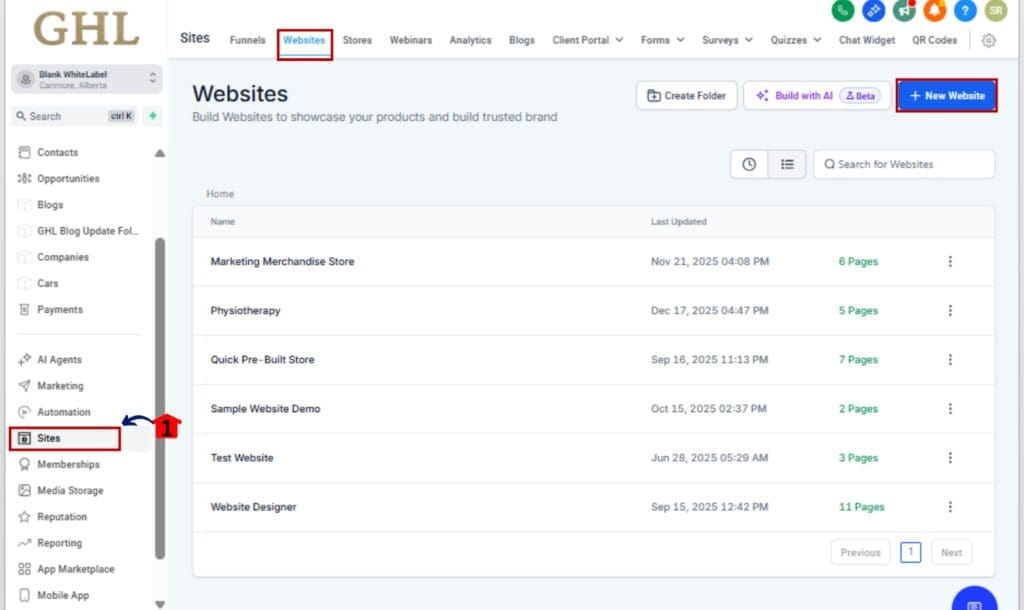
1.1 Go to Sites > Websites
1.2 Click + New Website
1.3 Choose the Financial template
1.4 Customize the design and content
1.5 Click Save & Publish when ready

Step 02 – Launch with Funnel Templates
2.1 Navigate to Sites > Funnels
2.2 Click + New Funnel > Start from Template
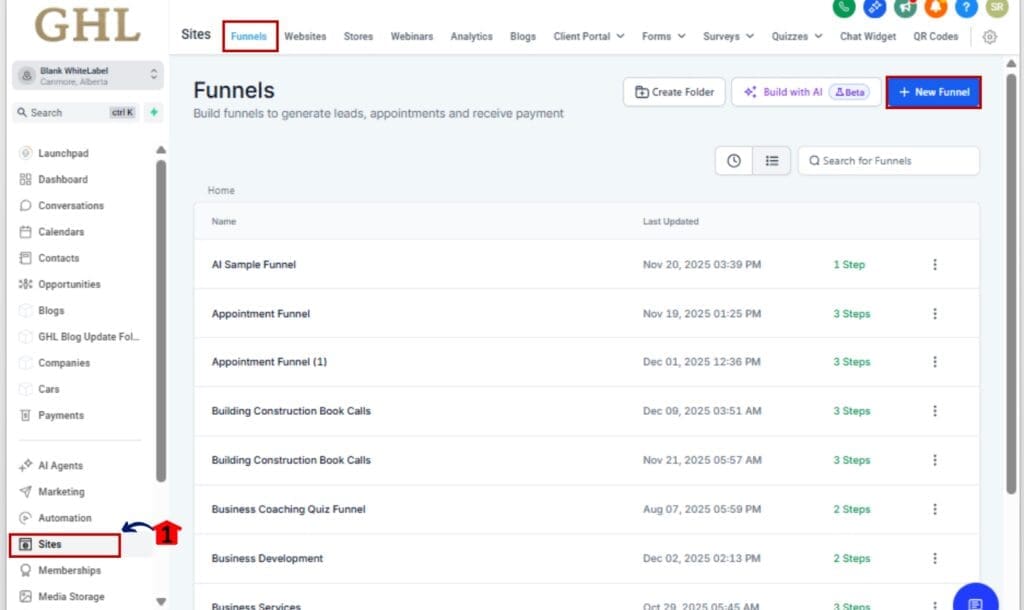
2.3 Filter by Industry: Marketing Agency or Medical
2.4 Select and import the template

2.5 Customize copy, forms, and automation as needed

Step 03 – Deploy Social Media Templates
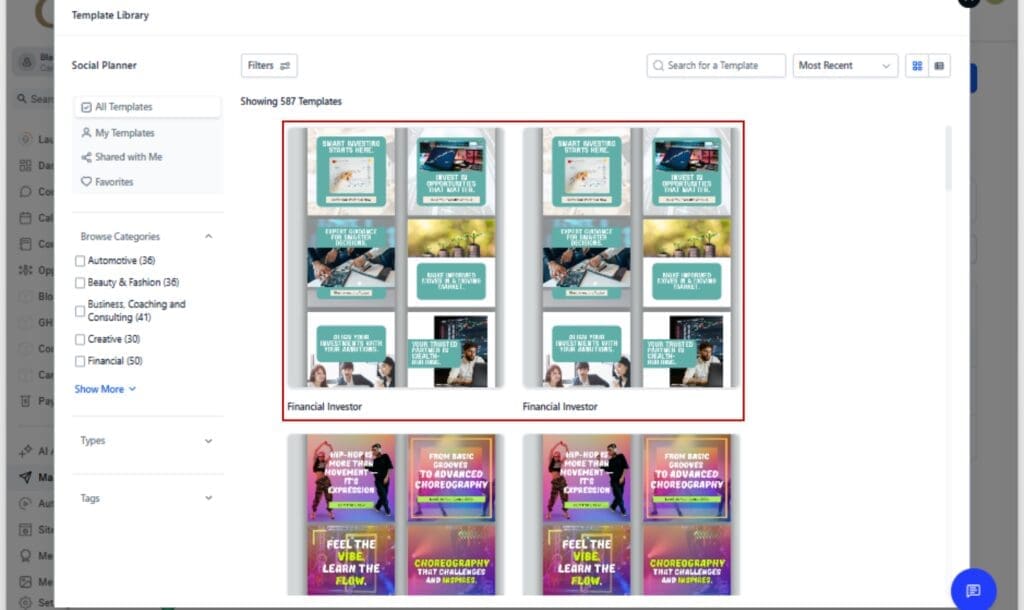
3.1 Go to Marketing > Social Planner
3.2 Click Templates > Create from Template
3.3 Scroll through and pick the category that fits your client—real estate, restaurants, and more.
3.4 Edit text, visuals, and schedule or post immediately
Step 04 – Import the Coffee Shop Snapshot
4.1 Go to Accounts > Snapshots
4.2 Click Import from Library and search “Coffee Shop”
4.3 Review included workflows, funnels, and automations
4.4 Assign to a client sub-account in one click
4.5 Customize and go live

That’s it. With just a few clicks, you can skip the blank page and start from proven frameworks built for speed, scale, and conversions.
Pro tips to maximize marketing templates
You’re already saving time with these, but there are a few ways to squeeze even more out of them, especially if you’re managing several accounts or packaging services for resale.
1. Save your own branded versions
After customizing a template with your fonts, colors, or copy, clone and save it. Now you’ve got an on-brand version ready for every new client. You can even create your own internal template library inside your agency account.
2. Snapshots + Templates = Speed
Combine these templates with GHL snapshots to create instant client systems. Load in a funnel, connect workflows, add your branding, and you’re ready to deliver in under an hour.
3. Use AI to rewrite faster
After you bring a template into your account, use Content AI, or whatever writing tool you like, to quickly adjust the wording so it fits your brand or niche.
4. A/B test ad variations
Start with the ad templates for Google or Facebook, then duplicate and change just the headline or image. Use that in your split tests to find the best performers fast.
5. Train your team to start here first
Make it standard operating procedure: no one starts from scratch. Train your team to always begin with a template, then customize it. This reduces revisions and gets campaigns out the door quicker.
Templates are like power tools, you can still do things the long way, but why would you?
FAQs about GHL marketing templates
What results to expect from using GHL templates
Here’s what you’ll notice once you start putting these new templates to work.
1. Faster client onboarding
You can launch a new client funnel the same day. Just grab a template, make it yours, and hit go, perfect when time’s tight.
2. Higher perceived value
Sharp templates help you stand out. They speed things up and still give your clients that “wow” factor, even if it’s built with the same software as the next guy.
3. Consistent performance
These templates aren’t just pretty, they’re designed with proven structures. The funnels, ads, and social posts are modeled on high-converting layouts that you can customize without killing their effectiveness.
4. Less creative burnout
No more reinventing the wheel for every campaign. With 21 fresh options to pull from, your team can stop burning time (and brain cells) designing from scratch.
5. Better results with less guesswork
The ad templates and social content are especially powerful for agencies running paid media or organic engagement campaigns. Instead of trial and error, you get a head start with assets already built for your niche.
Doesn’t matter if it’s one client or twenty, these templates help you get things done quicker and with less mess.
Launch smarter with GHL marketing templates
Let’s be real, if you’re still starting from zero every time, you’re burning hours and missing out on easier wins. These new GHL templates help you launch faster and look sharp doing it.
Doesn’t matter if you’re flying solo or managing a full crew, these templates give you a solid base to launch funnels, ads, sites, and content without starting from scratch.
Use them to close clients faster. Use them to streamline delivery. Use them to scale.
You’ve now got 21 new ways to work less and grow more, don’t sleep on it.
Scale Your Business Today.
Streamline your workflow with GoHighLevel’s powerful tools.