- Form Submission PDF Just Got a Serious Upgrade
- Quick Summary – Form Submission PDF Layout
- New Options for Submission PDF Attachments
- Where to Find the New PDF Layout Options
- Switch PDF Layouts with One Click
- Send Quiz Submissions and Results as PDFs
- Save Time, Look Professional, and Automate Like a Pro
- How to Use It: Set Up Submission PDF Attachments
- Make Submission PDFs Work Harder for You
- Your Submission PDF Questions—Answered
- What This Submission PDF Update Means for Your Agency
Form Submission PDF Just Got a Serious Upgrade
Let’s face it, PDFs are still the gold standard when it comes to sharing clean, professional documentation. But up until now, downloading or emailing Form Submission PDF from GHL hasn’t exactly looked… slick.
That changes today.
You can now skip the manual downloads and messy formatting. GHL’s updated submission tools let you auto-send polished PDFs from your Form Submission PDF, surveys, and quizzes, making it easier than ever to deliver results that look pro.
No more messy screenshots. No more copy-pasting into Word docs. Just clean, instant, professional PDFs, attached right inside your notification emails.

GHL’s new form submission PDF layout gives you cleaner, more professional documentation, and now you can automatically attach those PDFs to email notifications for Form Submission PDF, surveys, and quizzes. It’s a big upgrade for client communication, record-keeping, and agency workflows.
Quick Summary – Form Submission PDF Layout
Purpose: Automate submission documentation and enhance professionalism
Why It Matters: Makes every submission client-ready and automates PDF delivery
What You Get: Clean PDF layout + instant email attachments for all form types
Time to Complete: 3–5 minutes setup per Form Submission PDF or quiz
Difficulty Level: Easy
Key Outcome: Branded, auto-delivered PDFs for Form Submission PDF, surveys, and quizzes
New Options for Submission PDF Attachments
If you’re using Form Submission PDF, surveys, or quizzes in GHL, you’re going to like this—there are some solid upgrades worth checking out:
- Cleaner PDF Layouts:
The updated layout is clean, simple to follow, and finally something you won’t mind sending to a client. Whether you’re viewing it online or downloading it, it just works. - Legacy vs. New Layout Toggle:
A new dropdown menu in the submission viewer lets you choose between the new PDF layout or the legacy one. Want to keep your old format? You can. Prefer the new style? Switch with one click. - Email Notification Attachments:
A new “Send attachment” toggle appears in form, survey, and quiz notification settings. Once enabled, GHL automatically generates a PDF of the submission and attaches it to outgoing emails. - Quiz PDF Options:
Quizzes now get extra love, with two separate PDF options:
Automate marketing, manage leads, and grow faster with GoHighLevel.

- Send Quiz Submissions as PDF
- Send Quiz Results as PDF
This gives you full control over what recipients see and how it’s delivered.
Everything about handling submission data just got better, less clutter, more control, and way less clicking around.
Where to Find the New PDF Layout Options
First things first, let’s get to the new layout.
To view submissions with the updated PDF format, go here:
- Open the form, survey, or quiz you’re editing
- Then head over to the “Submissions” tab to view the entries.
- Select any individual submission to open the detailed view.
Right away, you’ll see the difference. The submissions are spaced out, easier to read, and finally look good enough to print or download without hassle.
Here’s what else is new in the interface:
- A clean PDF download icon right inside the submission view
- A dropdown selector to choose between “New PDF layout” and “Legacy PDF layout”
- A consistent structure whether you’re reviewing forms, surveys, or quizzes
The new format loads automatically, though you can change it back to the older style any time.
Switch PDF Layouts with One Click
GoHighLevel now gives you a simple but powerful option: choose how your submission PDFs are formatted.
Inside any individual submission view, you’ll see a dropdown selector labeled something like “PDF Format” or “Layout Type.” From here, you can pick:
- New PDF Layout – This is the updated version, with better spacing, cleaner fonts, and overall more professional presentation.
- Legacy PDF Layout – The classic look you’re used to. Works fine, just not as slick.
The best part? You don’t need to tweak or rebuild a thing. Just choose the layout that works best for you, or for your client.
Pro Tip:
Sending PDFs to clients or using them in automations? This new layout gives your emails a more polished, professional feel right away.
Need to keep it old-school for consistency? No problem. The legacy option isn’t going anywhere.
Send Quiz Submissions and Results as PDFs
Form Submission PDF and surveys get the PDF upgrade, but quizzes get an extra layer of control.
Inside the Quiz notification settings, you’ll now find two separate toggles:
- Send Quiz Submissions as a PDF
- This PDF includes the full quiz submission, answers, timestamps, etc.
- Send Quiz Results as a PDF
- This one focuses just on the results, scores, outcomes, or grading logic depending on how your quiz is built.
Why does this matter?
Because now you can:
- Send a submission report to your internal team
- Send results to the quiz taker automatically
- Keep records for compliance or onboarding
Or all of the above.
Here’s a smart use case:
Picture this: you’re collecting responses for a training or hiring quiz. GHL can send the full submission to your team and a clean summary to the applicant, all on autopilot.
And yes, you can enable both toggles at the same time if you want.
Manually sending quiz results is a thing of the past. GHL now sends a clean, ready-to-share PDF without you doing a thing.
Save Time, Look Professional, and Automate Like a Pro
This update might look simple on the surface, but the benefits stack up fast, especially for agencies.
Why this matters:
- Look sharp, every time.
Every submission now gets turned into a clean, branded PDF that looks polished and client-ready. No formatting tweaks needed. Just hit send. - Zero-Hassle Automation
With the new “Send attachment” toggle, your PDFs are delivered instantly. No more logging in, downloading files, attaching them manually, or forwarding emails. - Better Communication
Clients get clear documentation. Teams stay aligned. Submissions and quiz results are easy to track, share, and reference later. - Smarter Compliance & Records
If you’re in healthcare, finance, or anything compliance-heavy, this helps you automatically generate records, without lifting a finger. - It’s Universal
This isn’t limited to just one tool, it applies to all your Form Submission PDF, surveys, and quizzes, making submission handling more consistent everywhere in GHL.
Bottom line: this feature turns your data collection tools into automated delivery machines, perfect for agencies that value speed, clarity, and client satisfaction.
How to Use It: Set Up Submission PDF Attachments
If you’re still manually downloading Form Submission PDF or forwarding quiz results, this feature eliminates all that. GHL’s new form submission PDF setup lets you auto-send clean, professional PDFs as email attachments for forms, surveys, and quizzes. Setup takes just a few steps, and once it’s on, it runs on autopilot.
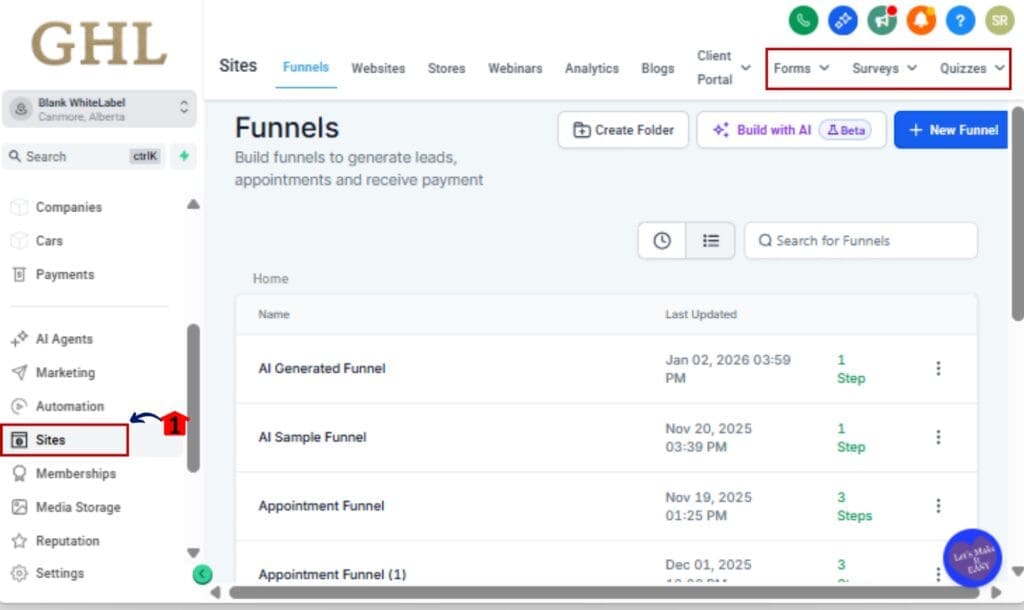
Step 01 – Head into your Form Submission PDF, survey, or quiz editor
1.1 From your GHL dashboard, go to Sites > Forms, Surveys, or Quizzes.
1.2 Click into the form/survey/quiz you want to upgrade.
Step 02 – View a Submission & Choose PDF Layout
2.1 Click the Submissions tab inside the builder.
2.2 Select any submission to open it.
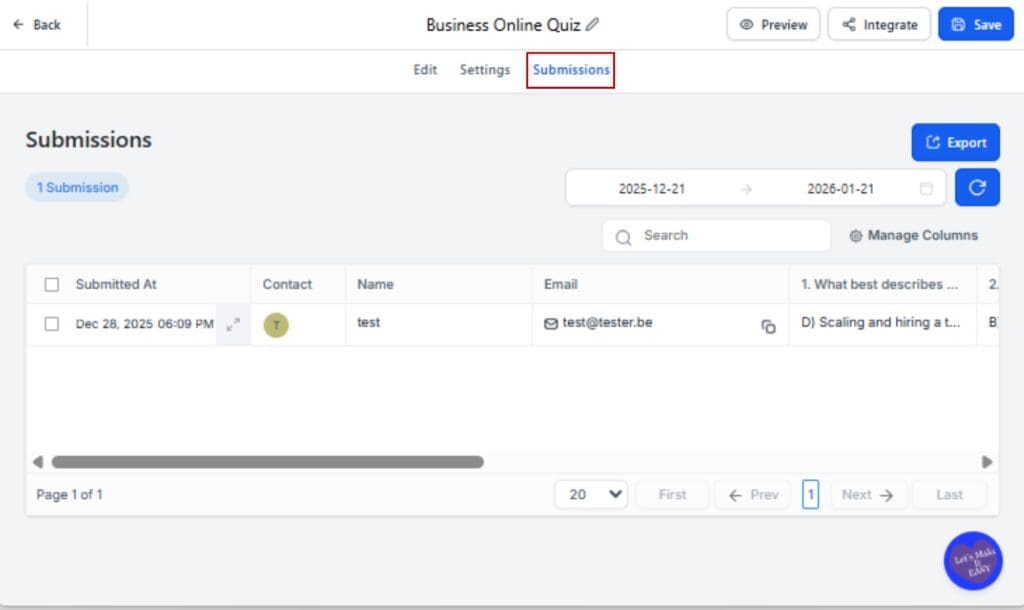
2.3 In the PDF dropdown, select “New PDF Layout” for the updated version or stick with “Legacy” if preferred.

Step 03 – Enable Email Attachment for Submissions
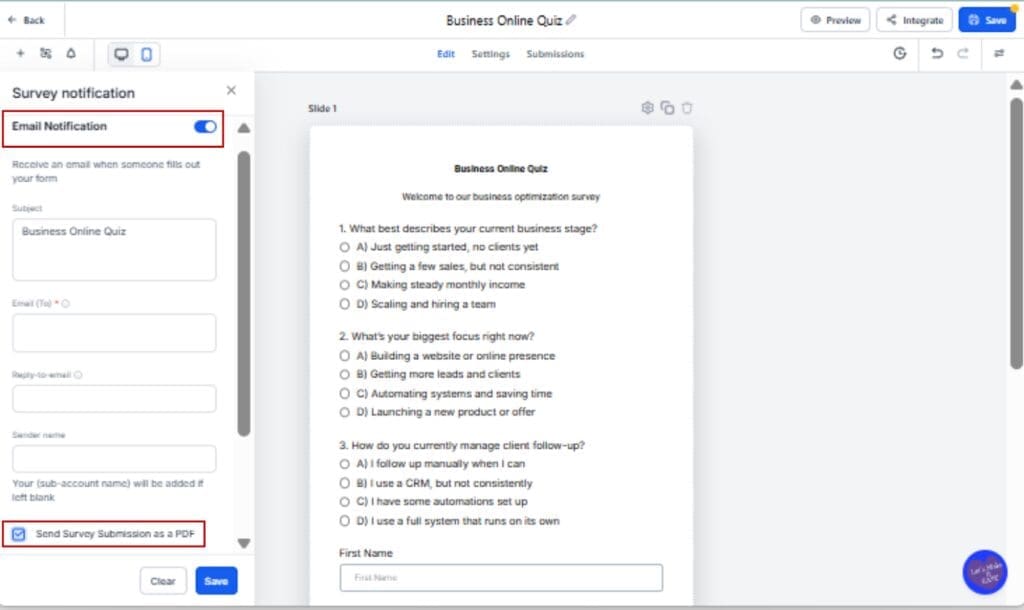
3.1 Go to the Settings tab inside the same Form Submission PDF/survey/quiz.
3.2 Scroll to Notifications.
3.3 Turn ON the toggle labeled “Send Attachment.”
Step 04 – (For Quizzes) Choose Submission vs. Results
4.1 Still in Notifications, locate the two toggles:
• “Send Quiz Submission as PDF”
• “Send Quiz Results as PDF”
4.2 Turn on one or both, depending on what you want emailed.

Step 05 – Save and Test
5.1 Save your changes.
5.2 Submit a test entry to confirm the PDF attachment is included and displays as expected.

That’s it. Submissions now arrive clean, clear, and automatically attached, no extra work required.
Make Submission PDFs Work Harder for You
Now that you’ve got the tech in place, let’s take it further. Here’s how to maximize this new form submission PDF feature in GHL:
1. Brand Your Forms for Branded PDFs
Want those attached PDFs to look like they came straight from your agency? Make sure your Form Submission PDF, surveys, and quizzes include:
- Your logo
- Custom headers or section titles
- Branded colors and fonts where supported
The submission PDF mirrors your live Form Submission PDF layout, so whatever’s on the form gets reflected in the export. Easy win for white-labeling.
2. Use Workflows to Route PDFs Automatically
Now that submissions come with auto-generated PDFs, combine them with workflows:
- Send to different team members based on form type
- Trigger folder uploads using webhooks or zaps
- Auto-tag submissions for follow-up actions
You can even route quiz result PDFs straight into client folders or internal onboarding channels.
3. Send Different PDFs to Different People
Remember: quiz notifications allow both “submission” and “results” PDFs. That means you can:
- Send detailed answers to staff
- Send just the result summary to customers or clients
- Automate both flows without confusion
4. Use in Client Reports or SOPs
Instead of building new documents manually, just include a submission PDF in your client deliverables, audits, or SOPs.
This isn’t just automation, it’s smart presentation. You’re turning raw data into polished proof without spending a minute formatting.
Your Submission PDF Questions—Answered
What This Submission PDF Update Means for Your Agency
This update isn’t flashy, but it’s powerful.
GoHighLevel just took a major step toward making your Form Submission PDF, surveys, and quizzes not just data collectors, but automated documentation machines. Cleaner layouts, instant PDF generation, and automatic attachments mean less work, fewer steps, and better communication.
For agencies, this is huge:
- You save time by not downloading or formatting submissions manually.
- You look more professional with every client-facing email.
- You stay organized with better record-keeping, especially in regulated industries.
From client intake to review requests to lead scoring, these PDFs help you keep things organized, professional, and easy to share.
It’s one of those small changes that unlocks big wins over time.
Still haven’t tried the new layout or attachment option? Go flip the switch. You’ll save yourself (and your team) a lot of headaches later.
Scale Your Business Today.
Streamline your workflow with GoHighLevel’s powerful tools.