- Introduction – GHL Product Title Display Update
- Quick Summary – Product Title Display Overview
- Here are this weeks HighLevel Updates
- What’s New With GHL Product Title Display
- Where Full Product Title Display Now Appears
- What’s Not Included In This Product Title Display Update
- Why This Product Title Display Update Matters
- How To Use GHL Product Title Display
- Pro Tips For Optimizing Your Product Title Display
- FAQ – GHL Product Title Display
- What This Means For Agencies And Store Owners
- Results You Can Expect From Imrpoved Product Title Display
- Conclusion – Small Change, Big Conversion Impact
Introduction – GHL Product Title Display Update
GoHighLevel just improved the Product Title Display across key store and checkout pages, removing truncated product names and replacing them with fully visible titles that automatically wrap without breaking layout alignment.
This GoHighLevel update enhances product clarity at the most critical buying stages, ensuring customers can see complete product names inside carts, checkouts, upsells, and thank you pages without the distracting “…” cutoffs.
What changed: Product Title Display in GHL now shows full product names across the Product Detail Page, Cart Page, Side Cart, Checkout Page, Thank You Page, Upsell Product Element, Collection List Element, and Featured Product Element. Titles dynamically wrap across multiple lines while maintaining pricing alignment and CTA consistency. This update is enabled by default with no configuration toggle.
Who this is for: Agencies managing client stores, online sellers inside GHL, and anyone offering bundles, subscriptions, or multi-option products.
What we’ll demonstrate: Where full product titles now appear, what’s not included in this update, how the Product Title Display behaves across devices, and how to strategically optimize product naming to improve buyer confidence and conversions inside GHL.
The latest GoHighLevel Changelog includes several other GHL feature updates that round out your daily workflow:
- Increase Products Per Page Count in Product List Page
- Conversation AI – Generate Conversation Summary & Transcript
- Kollab App – More Control, Better Playback, Stronger Security
- Configure payment provider by channel ⚙️
- Configure Granular Permissions for Sub-Account Settings
- Communities Learning Tab- Private Course/ Member-Specific Course Access
- Introducing New Templates
- Standard Builder: Drag-and-drop triggers and actions
- OpenRouter Actions & Triggers
- Monday.com actions and triggers
Keep reading for much more on all these updates and a deep dive into the new Product Title Display feature!
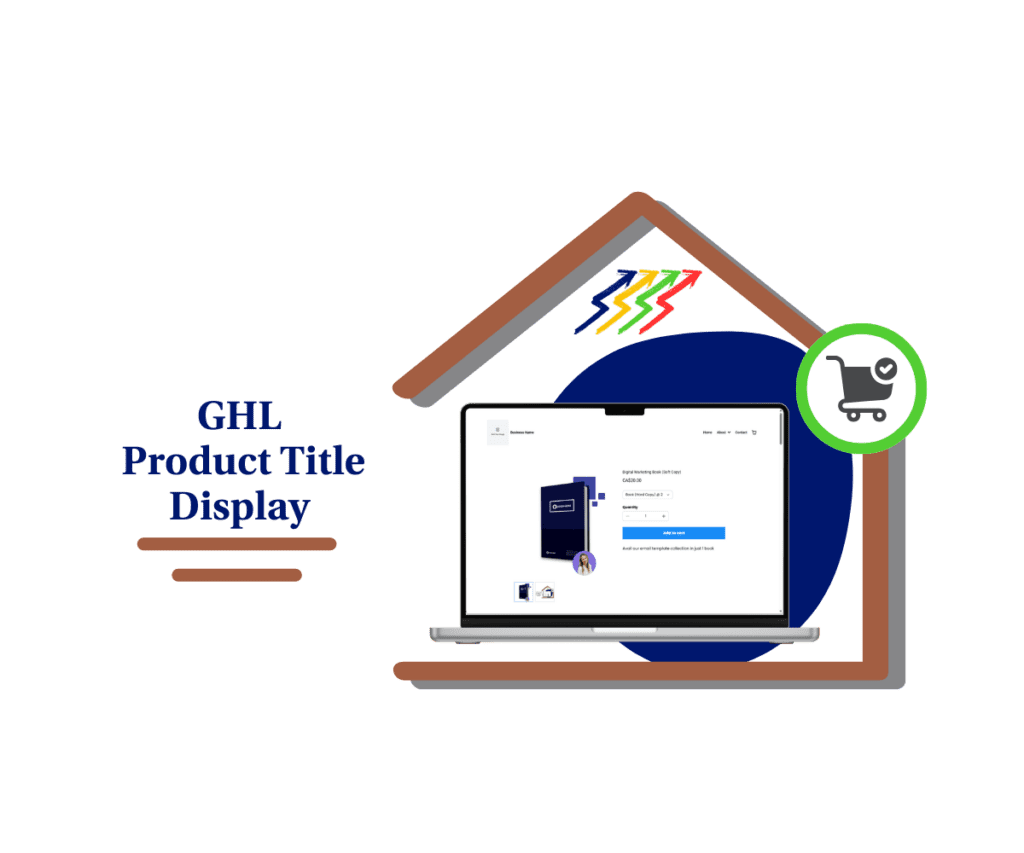
Quick Summary – Product Title Display Overview
Purpose: This update improves Product Title Display in GHL by showing full product names across key purchase stages instead of truncating them with ellipses.
Why It Matters: Clear product titles reduce buyer hesitation during checkout, improve trust, and eliminate confusion at critical conversion points.
What You Get: Full product names now appear on the Product Detail Page, Cart Page, Checkout, Thank You Page, Upsell Product Elements, and more, all without breaking layout alignment.
Time To Complete: No setup required. The feature is automatically enabled across supported elements.
Difficulty Level: Beginner-friendly. Zero configuration. Simply review your product naming strategy to maximize clarity.
Key Outcome: Improved buyer confidence, stronger upsell clarity, and a smoother checkout experience that can increase conversions over time.
Here are this weeks HighLevel Updates
Increase Products Per Page Count in Product List Page
- What it does: Puts more of your products in front of buyers at once instead of hiding them behind extra clicks.
- Where in GHL: Product List Page settings inside your Store and Funnel product listings.
Automate marketing, manage leads, and grow faster with GoHighLevel.

- Who it’s great for: If you’ve got a packed catalog or manage stores with tons of SKUs, this makes browsing a whole lot smoother.
- Impact: Improves browsing efficiency, reduces pagination friction, and increases the likelihood of customers viewing more products per session, leading to higher average order value opportunities.
Conversation AI – Generate Conversation Summary & Transcript
- What it does: Saves you from digging through long message threads by generating a short recap plus the full conversation log.
- Where in GHL: Conversation AI within the Conversations tab and supported communication channels.
- Who this is really for: Teams handling conversations all day, sales reps, support staff, and agencies keeping up with client messages.
- Impact: Saves time reviewing conversations, improves accountability, enhances coaching, and creates clean documentation for client reporting or compliance.
Kollab App – More Control, Better Playback, Stronger Security
- What it does: Enhances Kollab App functionality with improved playback controls, increased user permissions, and stronger security measures.
- Where in GHL: Kollab App within agency or sub-account collaboration environments.
- Who benefits: Shared-account teams that need better permission control.
- Impact: Keeps collaboration smooth while tightening up who can see and change sensitive areas.
Configure Payment Provider by Channel ⚙️
- What it does: Allows businesses to assign specific payment providers to different sales channels.
- Where in GHL: Payment and product settings within your sub-account.
- Who it’s built for: Stores that don’t rely on just one payment processor and need flexibility behind the scenes.
- Impact: Increases flexibility, improves transaction routing, reduces payment failures, and allows smarter financial operations.
Configure Granular Permissions for Sub-Account Settings
- What it does: Enables detailed control over who can access and modify specific sub-account settings.
- Where in GHL: Staff & Team Settings within Sub-Account permissions.
- Who should pay attention: If you’re running a team inside sub-accounts or reselling GHL as SaaS, this gives you better guardrails.
- Impact: Reduces risk, improves operational control, prevents accidental misconfiguration, and strengthens internal security management.
Communities Learning Tab – Private Course / Member-Specific Course Access
- What it does: Allows you to restrict course access to specific members within the Learning Tab of Communities.
- Where in GHL: Communities > Learning Tab > Course access settings.
- Who wins here: Businesses turning education into revenue.
- Impact: Lets you control who sees what, charge for different levels of access, and keep your premium material protected.
Introducing New Templates
- What it does: Adds new pre-built templates to streamline setup across funnels, workflows, and campaigns.
- Where in GHL: Template library inside relevant builders (Funnels, Workflows, etc.).
- Who wins here: Anyone who wants campaigns up and running faster.
- Impact: Gets campaigns live faster with fewer mistakes during setup.
Standard Builder: Drag and Drop Workflows
- What it does: You build workflows by dragging in triggers and stacking actions visually instead of configuring everything line by line.
- Where to find it: Inside Automation > Workflows.
- Who it’s for: Marketers and agencies building automations regularly who want to actually see how everything connects.
- Why it matters: Makes complex workflows easier to understand and faster to launch.
OpenRouter Actions & Triggers
- What it does: Adds OpenRouter integration with native actions and triggers for advanced AI-powered automation.
- Where in GHL: Workflows under Actions & Triggers integrations.
- Who this is for: Agencies and teams building serious AI automations inside GHL.
- Impact: Expands AI automation capabilities, improves customization, and enables advanced AI-driven business logic inside GHL.
Monday.com Actions and Triggers
- What it does: Integrates Monday.com with native workflow actions and triggers inside GHL.
- Where in GHL: Integrations > Workflows > Monday.com triggers and actions.
- Who wins here: Teams using Monday.com as their command center.
- Impact: Keeps your CRM and Monday.com working together so you’re not copying updates back and forth.
What’s New With GHL Product Title Display
GHL didn’t just tweak styling. It fixed a real usability issue.
Previously, long product names were shortened with ellipses (“…”) across several store and checkout pages. That meant customers often saw incomplete product names, especially for bundles, detailed offers, or variant-heavy products.
Now, the Product Title Display shows full product names across most key purchase touchpoints.
Here’s what’s new:
- Product titles no longer truncate on supported pages. Instead of being cut off, they wrap naturally onto multiple lines.
- The layout automatically adjusts to accommodate longer names without breaking alignment.
- Pricing remains clean and properly spaced.
- CTA buttons stay visually consistent.
- Desktop and mobile layouts remain responsive and structured.
This is important.
Because design consistency matters just as much as visibility.
If showing full titles caused layout shifts or messy formatting, it wouldn’t be an upgrade. But GHL handled this properly. The Product Title Display adapts dynamically while maintaining clean structure across devices.
There’s also no setup required.
No toggle. No feature flag. No configuration setting.
The update is automatically enabled across supported elements.
That means your existing stores instantly benefit from improved clarity without touching a single setting.
Simple change. Big usability win.
Where Full Product Title Display Now Appears
This Product Title Display update isn’t limited to one page.
It shows up exactly where purchase decisions happen.
Here’s where full product titles are now visible inside GHL:
- Product Detail Page (PDP)
Customers can now see the entire product name without truncation. This is especially important for products with variants, bundles, or descriptive naming structures.
- Cart Page
Inside the cart, full product titles now appear clearly. No more cut-off names that make buyers double-check what they added.
- Side Cart / Cart Overlay
When customers open the cart preview, they see the complete product name instantly. That means fewer second guesses and better confirmation before checkout.
- Checkout Page
This is the big one. During checkout, clarity is everything. The Product Title Display now ensures full product names are visible before payment is completed.
- Thank You Page
After purchase, customers can clearly see exactly what they bought. This reduces post-purchase confusion and helps prevent unnecessary support tickets.
- Upsell Product Element
When presenting an upsell, full titles matter. Buyers need to understand exactly what they’re adding. Now, long or detailed upsell names wrap naturally and remain fully visible.
- Collection List Element
Product collections now display complete product names instead of shortened versions, giving shoppers more context while browsing grouped offers.
- Featured Product Element
Featured products now show full names where supported, improving clarity when highlighting specific offers.
Across all these areas, the layout remains intact. Titles automatically wrap across multiple lines. Pricing alignment stays clean. CTA buttons remain visually consistent and desktop and mobile responsiveness remain solid.
This isn’t just about removing ellipses. It’s about improving the Product Title Display at every major conversion stage.
What’s Not Included In This Product Title Display Update
As strong as this Product Title Display improvement is, there are two areas where truncation behavior remains.
Product List Page (PLP)
On standard Product List Pages, titles may still follow existing truncation rules. This is intentional.
Why?
Because Product List Pages are designed for grid-style browsing. Showing full multi-line titles on tightly spaced product grids can break visual symmetry and impact scanning behavior.
In browsing environments, shorter titles often improve readability and layout control. That’s why this area continues to use controlled truncation.
Featured Products Element (on certain layouts)
While many featured product placements now support full titles, some layout-specific versions may still follow the existing truncation behavior depending on structure and spacing.
This helps maintain consistent design across tighter layout sections.
There is currently no toggle available to manually switch between truncated and full title behavior.
The update is platform-level and automatically applied only to supported elements.
So if you’re reviewing a store and still see truncated titles on a Product List Page, that’s expected behavior, not a bug.
And in most cases, it makes sense from a UI perspective.
The goal of this Product Title Display update isn’t to remove truncation everywhere.
It’s to eliminate confusion during key buying stages.
Browsing and purchasing are two different behaviors.
GHL optimized for the moment that matters most, when money is about to change hands.
Why This Product Title Display Update Matters
Let’s be honest.
Most conversion leaks don’t come from massive technical failures.
They come from small friction points.
And unclear product names are one of them.
When a buyer sees a truncated product title with “…” in the cart or checkout, it creates hesitation. They pause. They question if they selected the right item. They may even go back a step to double-check.
That moment of doubt is dangerous.
Clarity builds confidence. Confusion creates friction.
This Product Title Display upgrade removes that friction at the exact point where purchasing decisions happen.
Now customers can:
- See the full bundle name.
- Confirm the correct variant.
- Understand exactly what they’re buying.
- Feel confident before clicking “Pay.”
That’s not cosmetic.
That’s psychological.
During checkout, buyers are looking for reassurance. They want confirmation that everything is correct. When the Product Title Display shows the complete name clearly, it reinforces trust.
This especially matters for:
- Long-form offer names
- Bundle products
- Multi-variant products
- Subscription tiers
- High-ticket services
If you sell something detailed, like “12-Month Premium Coaching Program with Bonus Templates”, cutting that off mid-sentence weakens clarity.
Now it stays visible.
Another important impact?
Upsells.
Upsells live or die based on clarity. If the title is cut off, buyers may not fully understand what’s being offered. With full Product Title Display in upsell elements, the value proposition becomes clearer immediately.
That can directly improve upsell conversion rates. And here’s the bigger picture. Professional presentation affects perceived value.
When product titles display cleanly and completely across checkout stages, your store feels more polished. More trustworthy. More intentional.
That perception influences buying behavior more than most people realize.
Small UI changes like this compound over time.
- Fewer confused customers.
- Fewer support questions.
- Stronger checkout confidence.
- Smoother buyer journey.
This is one of those updates that won’t make flashy headlines, but quietly improves revenue performance across stores using GHL.
How To Use GHL Product Title Display
The Product Title Display update is automatically enabled across supported store and checkout pages. There are no settings to turn on. However, you should review how your product names now appear, especially if you sell bundles, subscriptions, or detailed offers.
In this section, you’ll walk through how to check your product titles, test them across cart and checkout, and confirm everything displays clearly on both desktop and mobile inside GoHighLevel.
- Access the Product Settings Page of Go High Level.
- Review Your Product Name.
- Go to the website where the product is embedded.
- Preview on the Product Detail Page.
- Check the full title of the product.
- Add the product to the cart.
- Test the Cart & Checkout Pages.
- Confirm check out Page.
To start make sure you are logged in to your GoHighLevel sub-account.
Step 1.0 – Access the Product Settings Page of Go High Level
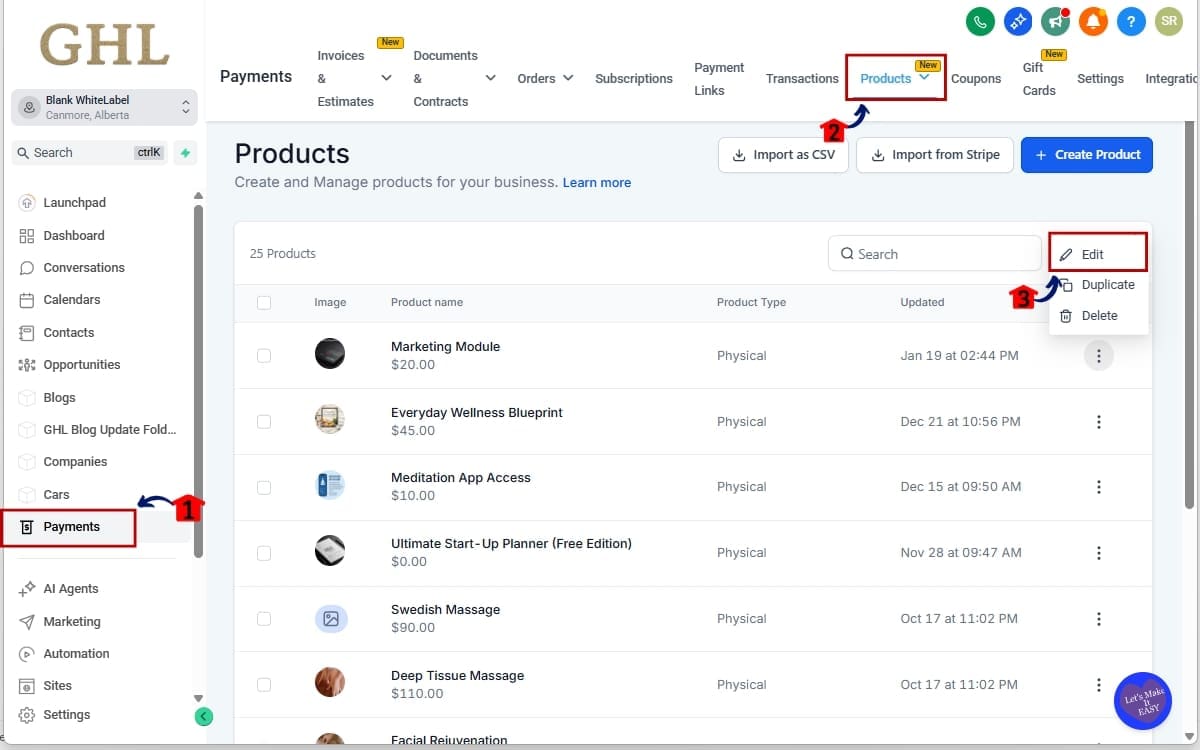
- Use the left-side navigation menu to locate and open the Payments section where product settings are managed.
1.1 Click Payments section.
- From the main left menu, click Payments to open the payment management area for the selected sub-account.
1.2 Click the Products.
- Inside the Payments area, select the Products tab to view the full list of products created in that account.
1.3 Select the product you want to review and click the edit in the on the left side 3 dots.
- Find the product you want to review, click the three dots on the left side of the product row, and select Edit to open the product settings page.
Step 2.0 – Review Your Product Name
- On the product settings page, review the full product title currently saved to confirm it clearly reflects the offer, bundle, or subscription being sold.
2.1 Look at the full product title currently saved.
- Read the entire product name as it appears in the title field and confirm it is accurate, complete, and clearly structured.
2.2 If needed, update the name to be more descriptive now that truncation is removed.
- If the title was previously shortened to avoid truncation, update it to include full descriptive details such as tier, duration, or included bonuses.
2.3 Click Save if you make changes.
- After making any updates to the product name, click Save to apply the changes to your product.
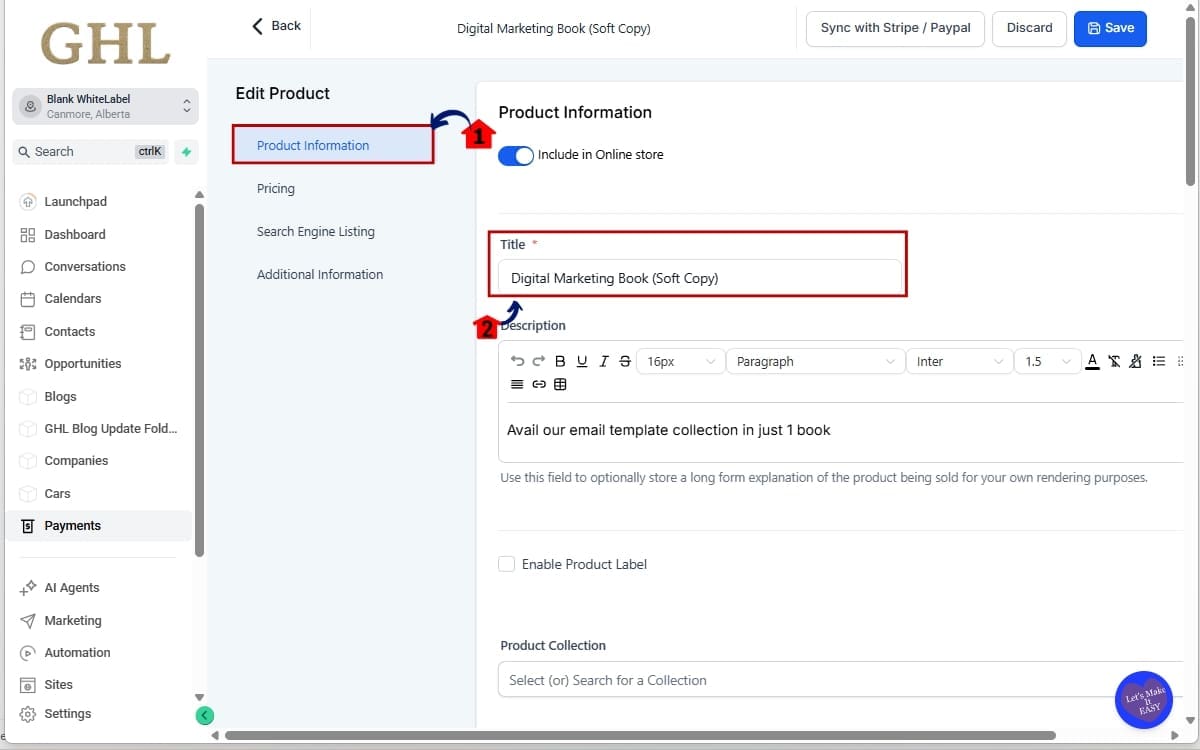
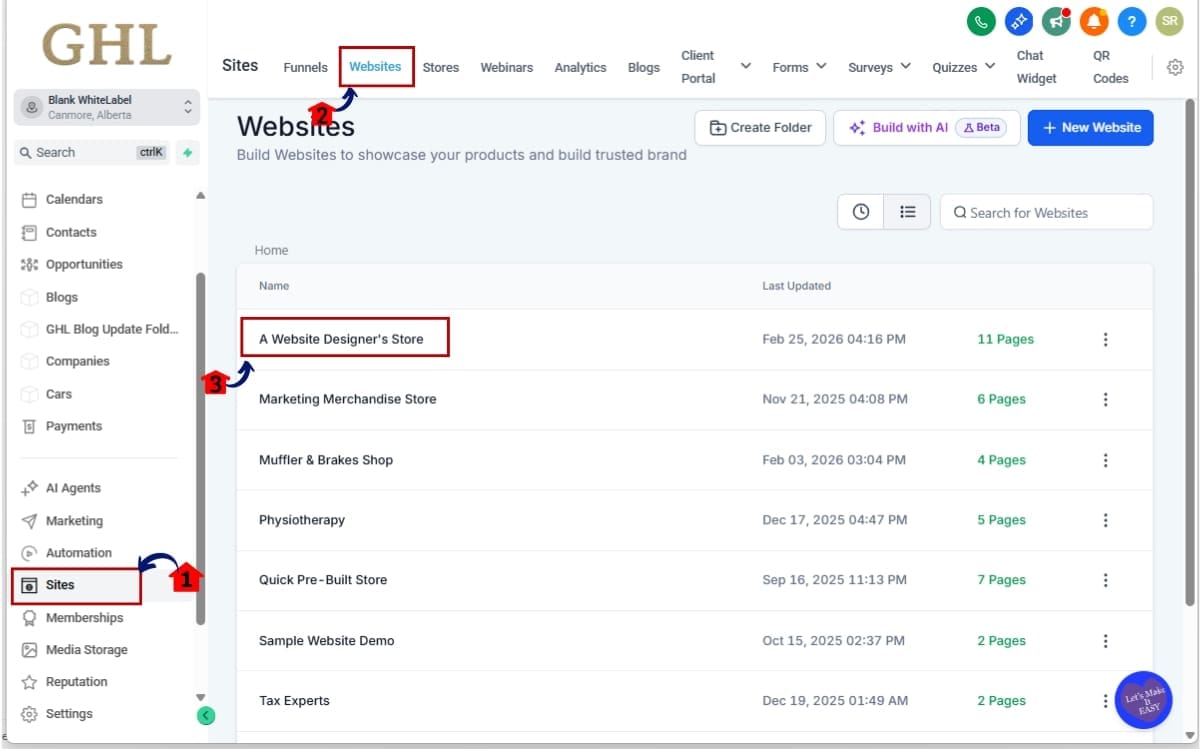
Step 03 – Go to the website where the product is embedded
- Navigate to the site or funnel where the product is connected so you can review how the title displays on the live page.
3.1 Go to sites and click websites
- From the left-side menu, click Sites, then select Websites to access your website list.
3.2 navigate to the website page where the product is embedded.
- Open the specific website (for example, Website Designer’s Store), then locate and open the page where the product is embedded to review its display.
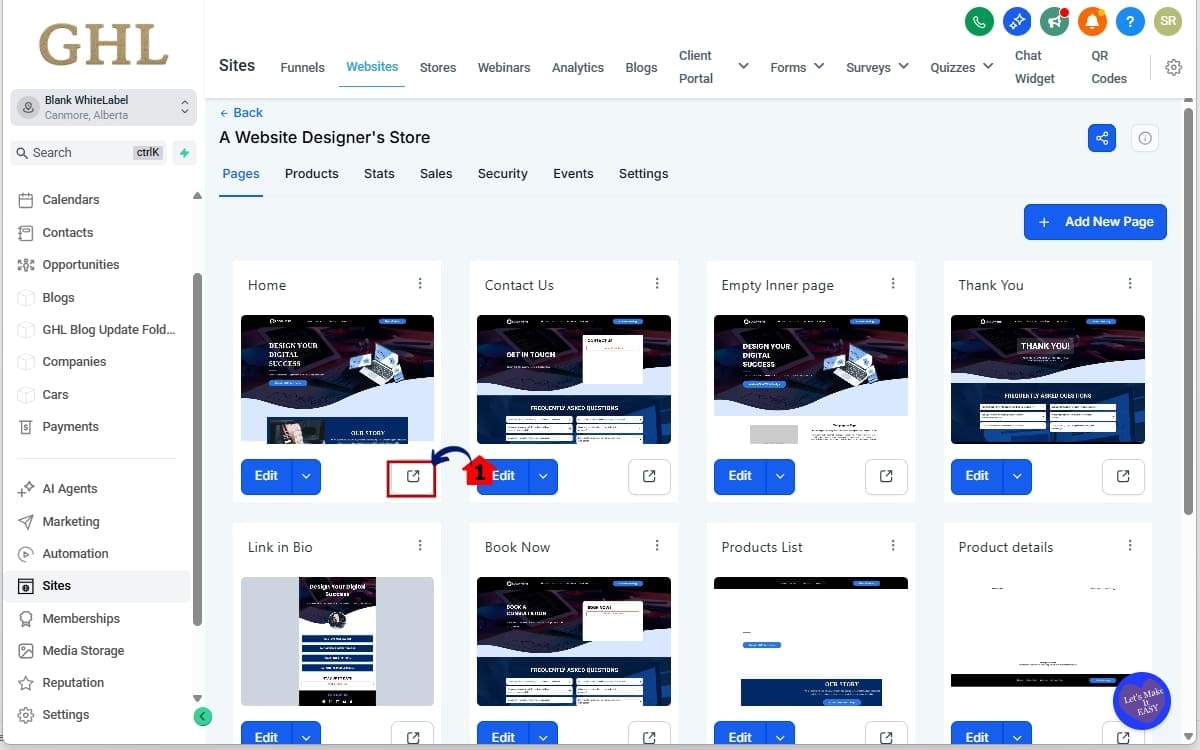
Step 4.0 – Preview on the Product Detail Page
- Open the page where the product is displayed so you can verify how the full product title appears on the Product Detail Page.
4.1 Go to the page where the product is (Home) and click the preview link
- Navigate to the Home page (or the page where the product is embedded) and click the Preview button to view the live version and confirm the full product title displays correctly without truncation.
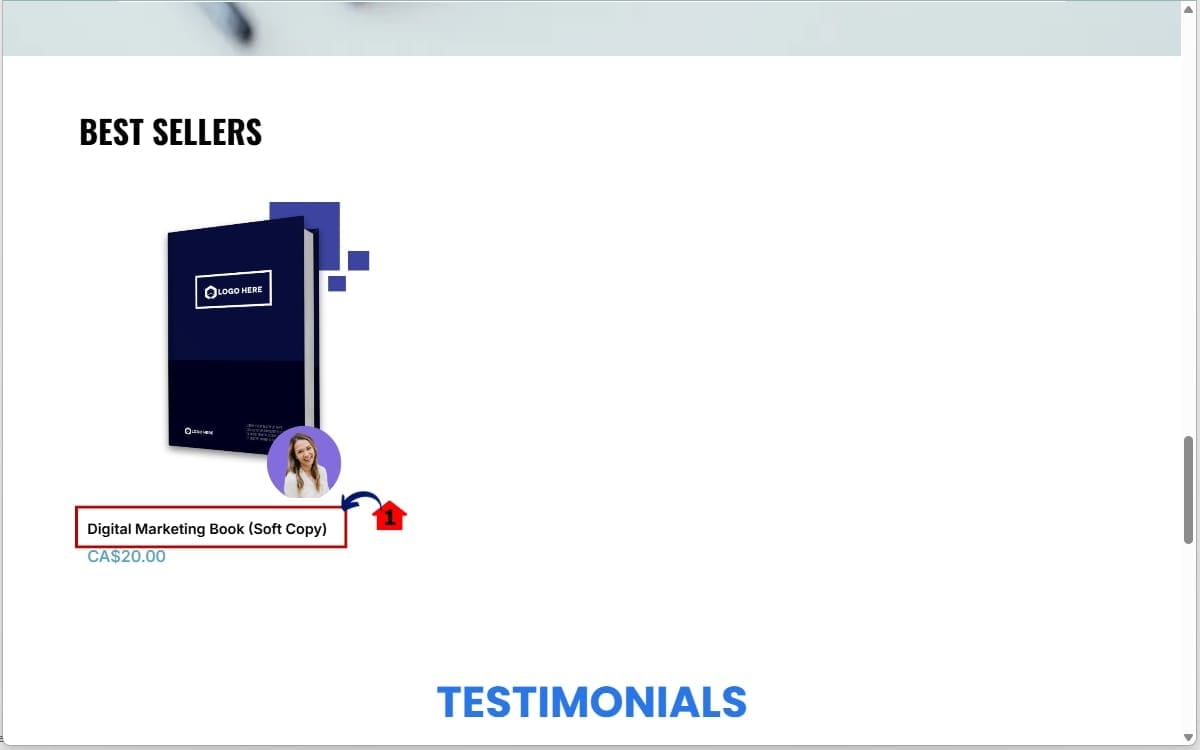
Step 5.0 – Check the full title of the product
- Review the Product Detail Page to confirm the complete product title is displayed without being cut off.
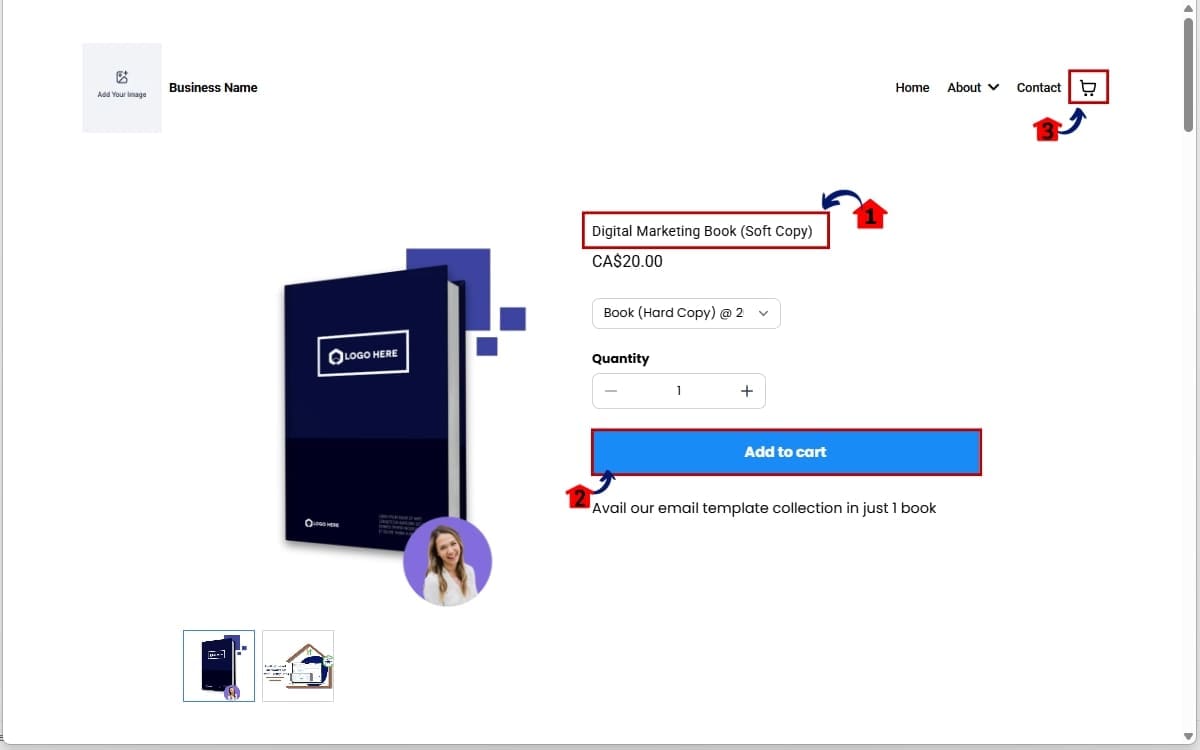
5.1 Scroll down to the product. Confirm the full title is now visible and wrapping properly.
- Scroll down to the product section and confirm the full product name is clearly visible and wrapping properly across multiple lines without breaking the layout.
Step 06 – Add the product to the cart
- Add the product to your cart to test how the full product title appears during the checkout process.
6.1 Confirm the full title is now visible and wrapping properly.
- Before adding to cart, verify again that the full product name is visible and wrapping correctly on the Product Detail Page.
6.2 Add the product to the cart.
- Click the Add to Cart button to place the product into the cart.
6.2 Open the Cart Page or Side Cart overlay.
- Open the Cart Page or trigger the Side Cart overlay to confirm the full product title displays correctly without truncation.
Step 07 – Test the Cart & Checkout Pages
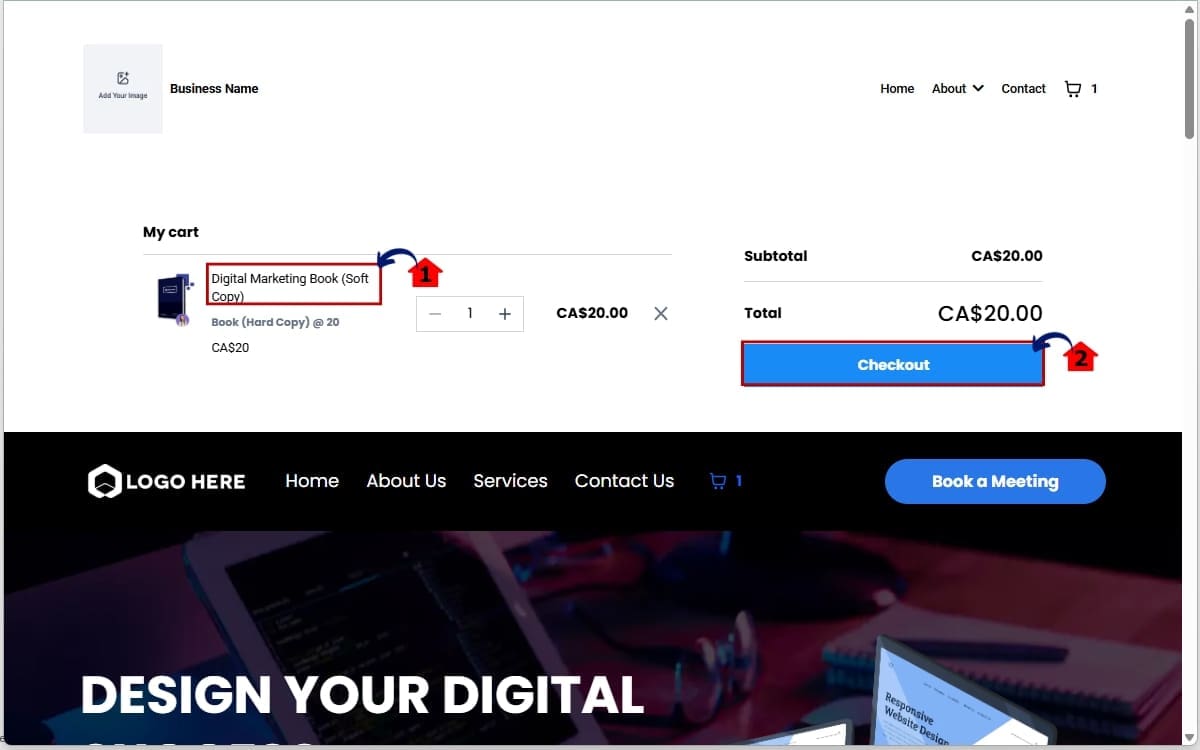
- Proceed through the cart and checkout flow to confirm the full product title remains visible at each stage of the purchase process.
7.1 Confirm the Product Title Display shows the full name without truncation.
- On the Cart Page, verify that the Product Title Display shows the complete product name without truncation and that it wraps properly if the title is long.
7.2 Click check out
- Click the Checkout button and confirm the full product title is clearly displayed on the Checkout Page before completing the purchase.
Step 8.0 – Confirm check out Page
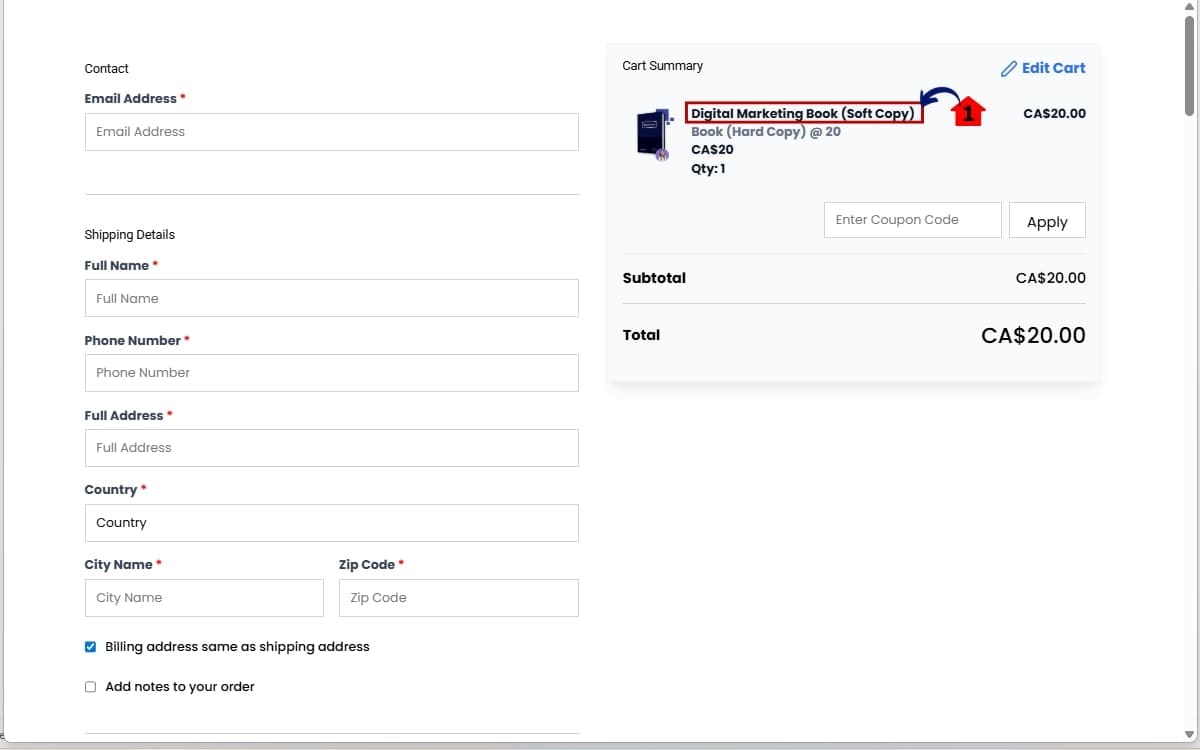
- Review the Checkout Page carefully to ensure the product title displays correctly before finalizing the purchase.
8.1 Confirm the full product name is visible.
- On the Checkout Page, confirm the complete product name is fully visible, wrapping properly if needed, and not cut off with ellipses.
That’s it. No toggle. No feature activation. No extra configuration. The Product Title Display enhancement is live automatically. Your only job is to make sure your product names are clear, professional, and strategically written, because now your customers will actually see them in full.
Pro Tips For Optimizing Your Product Title Display
Now that the Product Title Display shows full names across key buying stages, you have more flexibility.
But more space doesn’t mean more clutter. It means smarter naming.
Here’s how to use this strategically. Be Clear Before Being Clever. Your product title should immediately explain what the buyer is getting. Avoid vague names like “Premium Package” or “Gold Plan.” Instead, be specific. Include duration, tier, or format if it matters.
Example: Instead of: Premium Coaching. Use: 6-Month 1:1 Business Coaching Program
Clarity sells. Add Important Variants in the Title. If size, color, access level, or subscription frequency changes the offer, include it in the title. Now that truncation isn’t cutting things off during checkout, customers can clearly confirm what they selected.
This reduces refund requests and “I picked the wrong one” emails.
Keep It Structured. Long doesn’t mean messy. Use a logical structure: Core Offer + Duration + Bonus (if essential)
For example:
Ecommerce Growth Blueprint – 12 Week Program + Templates
That reads clean even when wrapped across two lines.
Avoid Keyword Stuffing
Just because the Product Title Display shows everything doesn’t mean you should overload it with SEO phrases.
Product titles are for humans first. Clean naming improves conversions more than stuffed keywords ever will.
Audit Your Upsells. This is where this update really shines. Upsell titles must clearly communicate the additional value. If your upsell name was previously getting cut off, revisit it now. You may be able to clarify the offer and increase acceptance rates.
Test High-Ticket Offers. If you sell premium services, detailed naming increases perceived value. A fully visible title reinforces professionalism.
Think: “Annual VIP Marketing Partnership – Strategy + Ads + Automation” That looks serious. Complete. Premium.
Use This as a Mini Conversion Audit. Agencies. this is your moment.
- Review client stores.
- Check product naming consistency.
- Confirm checkout clarity.
Position this update as a conversion enhancement, not just a UI tweak.
Because that’s what it is. The Product Title Display improvement gives you room to communicate better. Use it wisely.
FAQ – GHL Product Title Display
What This Means For Agencies And Store Owners
If you’re an agency, this is more than a visual tweak.
It’s a positioning opportunity.
The improved Product Title Display gives you a legitimate reason to revisit client stores and conduct a quick conversion clarity audit.
Here’s what that looks like:
- Review product naming conventions.
- Check bundle descriptions.
- Test checkout flow.
- Audit upsell clarity.
Then communicate it back to clients as a conversion enhancement.
Because that’s exactly what it is.
Small friction removed at checkout can compound into meaningful revenue gains over time.
For store owners, this means your products now look more professional during the most important buying moments.
- No more cut-off titles during checkout.
- No more half-visible bundle names in the cart.
- No more confusion on thank you pages.
That builds trust.
And trust increases completion rates.
If you sell:
- Subscription tiers
- Coaching programs
- Bundles
- Digital products
- Physical variants
- High-ticket services
You benefit immediately.
This also reduces post-purchase friction.
When customers clearly see the full product name after buying, they feel reassured. That reduces “Did I buy the right thing?” emails and refund requests.
For agencies running SaaS mode or white-label stores inside GHL, this strengthens your platform presentation. The checkout experience now feels more polished and refined, without you doing any extra work.
It’s one of those quiet backend improvements that elevates the overall brand perception of stores built in GoHighLevel.
And brand perception affects revenue more than most people admit.
This Product Title Display upgrade helps you look sharper, cleaner, and more intentional at scale. That’s a win.
Results You Can Expect From Imrpoved Product Title Display
This isn’t a flashy feature.
But it is a measurable one.
When you improve Product Title Display at critical buying stages, you improve clarity. And when clarity improves, friction drops.
Here’s what that typically leads to.
- Fewer Checkout Hesitations
When buyers can clearly read the full product name, they feel confident moving forward. No second-guessing. No jumping back to confirm details.
- Higher Upsell Acceptance
Upsells depend on instant understanding. If the full offer name is visible, customers grasp the value faster. That increases add-on conversions.
- Reduced Support Tickets
Clear post-purchase confirmation on the Thank You Page helps eliminate “Did I buy the right thing?” emails.
- Improved Perceived Professionalism
Stores that show complete product information feel polished. Premium. Intentional. That perception directly influences buying behavior.
- Better Experience for Complex Offers
If you sell bundles, multi-tier subscriptions, or high-ticket services, this matters even more. Detailed titles now remain fully visible during the most important part of the buyer journey.
Small UX improvements compound.
You may not see a dramatic overnight spike.
But across hundreds or thousands of checkout sessions, removing one small friction point can increase completion rates over time.
That’s how smart optimization works.
The Product Title Display enhancement improves clarity at the exact moment money changes hands. That’s where improvements matter most.
Conclusion – Small Change, Big Conversion Impact
Not every powerful update comes with flashing lights and new dashboards.
Sometimes it’s a small fix in the right place.
The improved Product Title Display inside GHL removes a subtle but costly friction point during checkout. Full product names now show clearly across the Product Detail Page, Cart, Checkout, Upsells, and Thank You Page, without breaking layout or requiring configuration.
- No more ellipses.
- No more guessing.
- No more half-visible bundle names.
Just clear, complete product information at the exact moment customers are making buying decisions.
That matters.
Because conversions don’t fail in dramatic ways.
They fail in small moments of doubt.
This update reduces that doubt.
If you’re an agency, use this as a reason to audit client stores and refine product naming strategies. If you’re a store owner, take advantage of the improved Product Title Display by making sure your product names are clear, structured, and value-driven.
You don’t need to activate anything.
It’s already live.
Now it’s up to you to use it strategically.
- Small UI improvement.
- Stronger buyer confidence.
- Smoother checkout experience.That’s how smart growth happens inside GoHighLevel.
Scale Your Business Today.
Streamline your workflow with GoHighLevel’s powerful tools.