- Track margins, cost vs revenue, and profit trends across your resold usage products in GoHighLevel
- Quick Summary – Reselling Profit Analytics Overview
- What’s Improved: Reselling Profit Analytics Widgets in GHL
- Widget Breakdown: Top Products by Margin (Reselling Profit Analytics)
- Widget Breakdown: Product-wise Cost vs Revenue (Reselling Profit Analytics)
- Widget Breakdown: Gross Profit Trends by Product (Reselling Profit Analytics)
- Why This Matters: Reselling Profit Analytics for Agencies
- What You Can Do Now: Use Reselling Profit Analytics in GHL
- How to Use Reselling Profit Analytics Widgets in the Agency Dashboard
- Pro Tips for Reselling Profit Analytics in GHL
- What This Means for Your Business with Reselling Profit Analytics
- Frequently Asked Questions About Reselling Profit Analytics in GHL
- Why Reselling Profit Analytics Matters
Track margins, cost vs revenue, and profit trends across your resold usage products in GoHighLevel
Reselling Profit Analytics in GHL
Reselling Profit Analytics just got a real upgrade in GoHighLevel (GHL). GHL added new widgets inside the Agency Dashboard that show your revenue, costs, and profit for usage-based products in one place.
If you resell things like LC Phone, email, or AI tools, you’ve probably felt this problem. Revenue can look “good” while margins quietly drop. Costs rise, pricing stays the same, and you do not notice until it hurts. Most agencies have been stuck guessing or building spreadsheets to figure out what is actually profitable.
Now you can open the Reselling tab (usage products) and get answers fast. You will see your top products by margin, compare cost vs revenue by product, and track gross profit trends over time. That means better markup decisions, fewer surprises, and more control over your reselling profits.
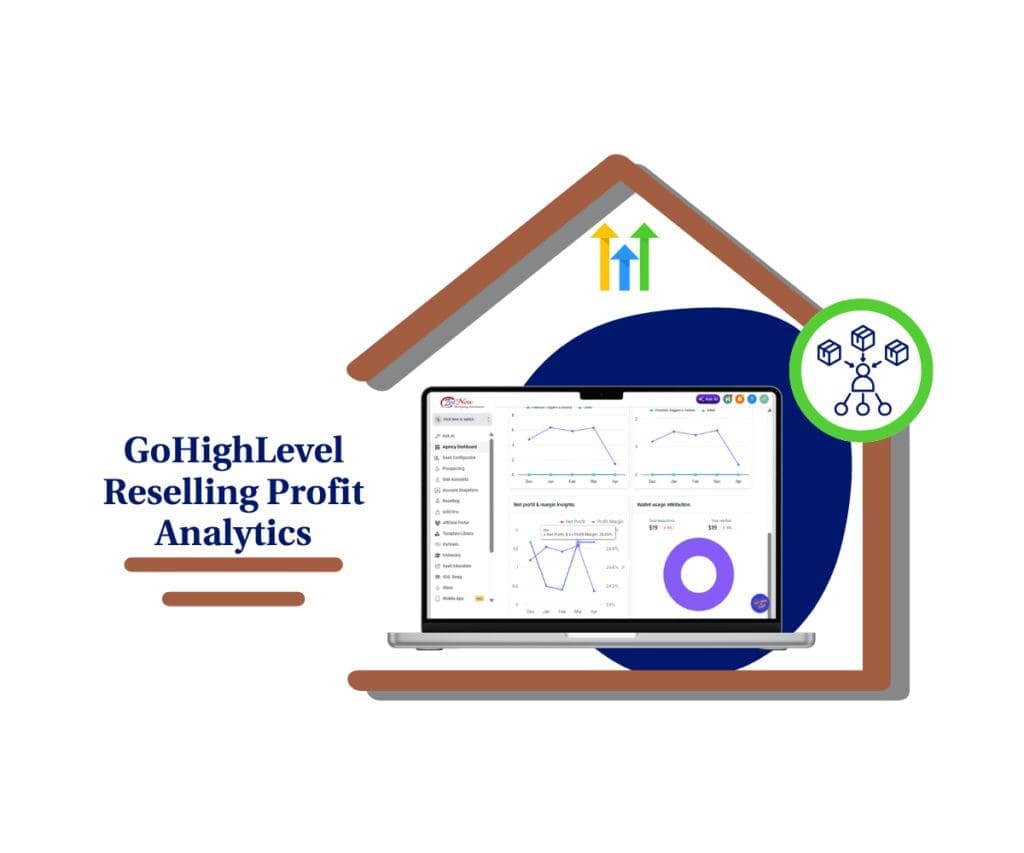
Reselling Profit Analytics makes it easy to see which usage products actually make you money, spot margin leaks fast, and adjust markups with confidence inside GHL.
Quick Summary – Reselling Profit Analytics Overview
Purpose: This guide shows how to use Reselling Profit Analytics widgets in the GHL Agency Dashboard to understand profit, margin, and wallet-driven usage at a glance.
Why It Matters: It helps you stop guessing and start making pricing and markup decisions based on real margin data, not just revenue.
What You Get: You learn where to find the Reselling view, how to read Top Products by Margin, how to spot profit and margin shifts over time, and how to use Wallet usage attribution to focus on what matters most.
Time To Complete: You can review the dashboard and pull clear action items in about 10 to 15 minutes.
Difficulty Level: This is beginner-friendly and does not require reports, exports, or spreadsheet work.
Key Outcome: You will know which products to protect, which ones need a markup or packaging change, and what product type is driving most of your reselling impact.
What’s Improved: Reselling Profit Analytics Widgets in GHL
Reselling Profit Analytics in GHL is now built right into the Agency Dashboard, so you do not have to guess which usage products are paying off. Instead of hunting through numbers, you get clear widgets that show revenue, costs, and profit in a way that is easy to act on.
The big improvement is simple: you can see product-level performance at a glance. GHL now gives you three focused views that help you make smarter reselling choices. You can quickly spot which products bring in the best margins, where costs are catching up to revenue, and how profit changes over time.
Automate marketing, manage leads, and grow faster with GoHighLevel.

Here are the three new widgets you will see inside the Reselling tab (usage products)
- Top Products by Margin: Ranks products by profit margin and shows revenue, profit, and margin percent.
- Product-wise Cost vs Revenue: Compares cost and revenue per product so you can spot low-margin risk fast.
- Gross Profit Trends by Product: Shows profit trends over time so you can catch drops early and plan.
Widget Breakdown: Top Products by Margin (Reselling Profit Analytics)
Top Products by Margin is the widget most agencies will check first. It shows which usage products are giving you the best profit margin, not just the most sales. That matters because high revenue does not always mean high profit.
Inside this widget, you will see three numbers that tell the real story for each product: revenue, profit, and profit margin percent. The list is ranked by margin, so your strongest products float to the top. This makes it easy to see what is truly performing well in your reselling setup.
Here is how to use this in real life with Reselling Profit Analytics. Start by looking at your top 3 products. These are the ones you protect and promote. Then look at products with decent revenue but weak margins. Those are often your best quick wins. A small markup change, a better bundle, or a pricing tier shift can turn a “busy” product into a profitable one.
Widget Breakdown: Product-wise Cost vs Revenue (Reselling Profit Analytics)
Product-wise Cost vs Revenue is the “no excuses” widget. It shows your cost and your revenue side by side for each usage product, so you can tell if a product is actually worth the trouble.
This is where Reselling Profit Analytics gets practical. You can spot two problems fast. First, products that bring in good revenue but have thin margins. Second, products where costs are creeping up and getting too close to revenue. Both situations can cut your profit without you noticing right away.
Here’s how to use it like an agency owner, not a spreadsheet hobbyist. Start by scanning for products where the gap between revenue and cost is small. Those are your risk products. Then check your high-revenue products and make sure the gap is still healthy. If it is not, you have options. You can adjust markups, change packaging, or move the product into a higher tier so it stays profitable.
Widget Breakdown: Gross Profit Trends by Product (Reselling Profit Analytics)
Gross Profit Trends by Product is where Reselling Profit Analytics starts paying you back long-term. It shows how profit changes over time for each usage product, so you are not judging performance from one random week or one strong month.
This widget helps you catch problems early. If a product’s profit is sliding month over month, something is changing. Costs may be rising, usage may be heavier, or your markup may be too tight for the way clients are using the product. It also helps you spot patterns like seasonality, where profit naturally goes up or down at certain times of the year.
Use this like a simple monthly check-in. Pick your top products and look for a steady or improving profit. Then pick any product with a downward trend and investigate before it becomes a bigger issue. If you catch it early, you can adjust pricing, change tiers, or improve how you package that product so your margins stay healthy.
Why This Matters: Reselling Profit Analytics for Agencies
Reselling Profit Analytics matters because reselling is not just “extra revenue” anymore. For many agencies, usage products are a real profit center. But until now, it has been too easy to miss what is happening under the hood. You could have strong sales and still lose margin if costs rise or pricing stays flat.
These new widgets give you clarity at the product level. You can see what is driving profit, what is only driving volume, and what is starting to slip. That means you can stop making pricing decisions based on gut feel. You can make them based on real margin data, product by product.
This also helps you manage growth across sub-accounts. When you know which products have the best margins and which ones are at risk, you can adjust markups, build better packages, and protect profitability as you scale. In short, Reselling Profit Analytics helps you grow reselling revenue without letting profit leak out the side.
What You Can Do Now: Use Reselling Profit Analytics in GHL
Reselling Profit Analytics is only useful if you act on it. The good news is you do not need a full finance system or a complicated process. These widgets are built for quick decisions, so you can tighten up your reselling profits with small, smart moves.
Start with one simple goal: identify what to protect and what to fix. Your top margin products are the ones you should lean into. Your low margin products are the ones you should review right away. This is how you stop profit leaks before they turn into a monthly surprise.
Here are the best actions to take right now:
- Check Top Products by Margin and list your top 3 profitable products.
- Open Cost vs Revenue and flag any product where costs are too close to revenue.
- Review Gross Profit Trends and watch for any product that is trending down month over month.
- Adjust markups or move products into a higher tier if margins are tight.
- Set a monthly 10-minute review to keep margins healthy as you scale.
How to Use Reselling Profit Analytics Widgets in the Agency Dashboard
Reselling Profit Analytics is used inside your Agency Dashboard under the Reselling tab (usage products). You’ll open the Reselling view, then review three widgets that show top margin products, cost vs revenue by product, and gross profit trends over time.
Here are the steps to use Reselling Profit Analytics widgets in GoHighLevel.
- Access the Agency Dashboard and Open Reselling.
- Review Top Products by Margin.
- Review Net Profit and Margin Insights and Wallet Usage Attribution.
- Review Wallet Usage Attribution.
To start make sure you are logged in to your GoHighLevel agency account.
Step 01 – Access the Agency Dashboard and Open Reselling
- The Main Menu on the left side of your screen has all the main areas that you work in when using GHL.
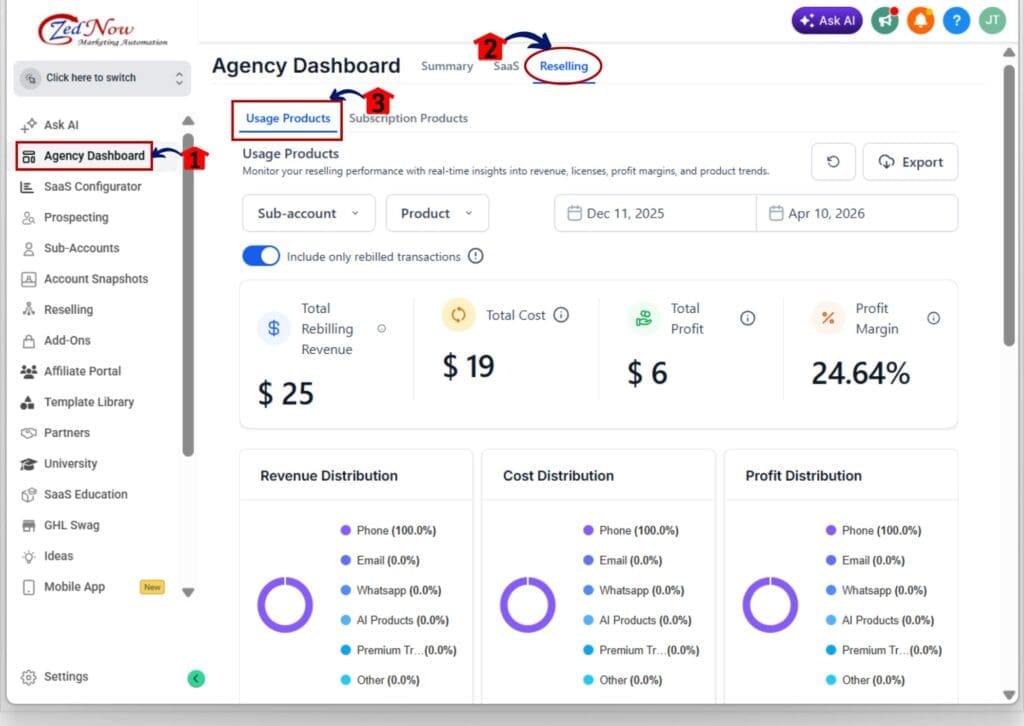
1.1 Click the Agency Dashboard from the main menu.
- This opens the agency-level dashboard where you manage your account and SaaS reporting.
1.2 Click the Reselling tab.
- This opens the reselling area where usage products and related performance data live.
1.3 Open the Usage Products view inside Reselling.
- You should now see the Reselling Profit Analytics widgets on the page.
Step 02 – Review Top Products by Margin
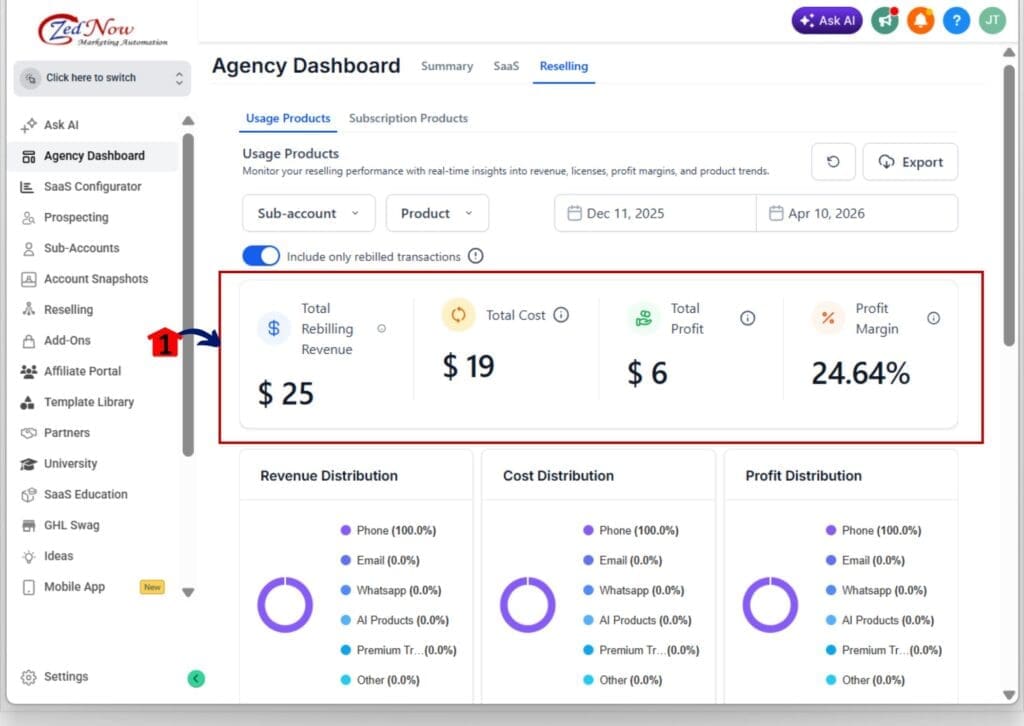
- This widget shows which usage products have the best profit margin.
2.1 Find the Top Products by Margin widget.
2.2 Review the list of products ranked by margin.
2.3 Check the key metrics shown for each product.
- Revenue.
- Profit.
- Profit margin percent.
Step 03 – Review Net Profit and Margin Insights and Wallet Usage Attribution
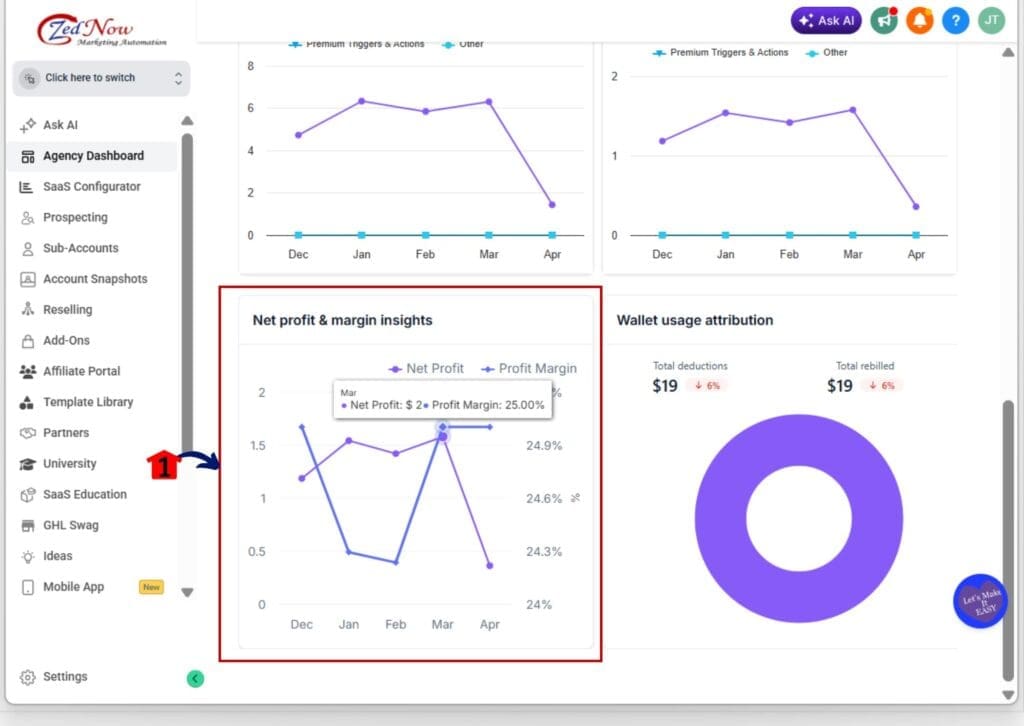
- This section shows whether your growth is actually profitable and what is driving wallet usage.
3.1 Find the Net profit and margin insights chart.
- You should see two lines.
- Net Profit.
- Profit Margin.
3.2 Check the Net Profit line first.
- If Net Profit trends up, you are keeping more profit over time.
- If Net Profit trends down, profit is slipping and needs attention.
3.3 Check the Profit Margin line next.
- If Profit Margin drops, costs may be rising or markup may be too low.
- If Profit Margin is stable, your pricing and costs are holding steady.
3.4 Flag any month where Net Profit drops and Profit Margin drops simultaneously.
- This is a strong warning sign that profitability is getting squeezed.
Step 04 – Review Wallet Usage Attribution
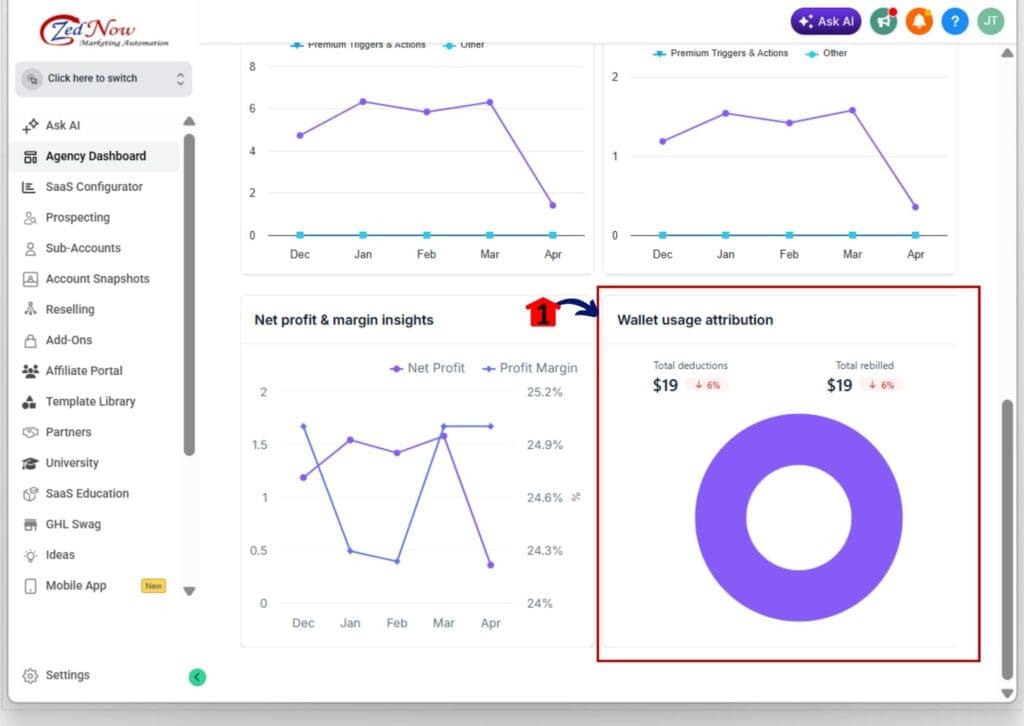
- This widget shows what is driving wallet usage, plus key wallet totals that impact your reselling profits.
4.1 Find the Wallet usage attribution widget.
- You should see Total deductions, Total rebilled, and Current balance.
4.2 Review the attribution chart to see which product type is driving usage.
- This shows whether Phone, Email, AI Products, or another category is the main driver.
4.3 Confirm what is driving the wallet.
- If Phone is near 100%, then Phone usage is the main cost and revenue driver.
- If multiple products show up, your costs are spread across more products.
4.4 Use this to decide what to review first.
- Start with the product type that dominates wallet usage, since that is where most margin impact will happen.
Pro Tips for Reselling Profit Analytics in GHL
Reselling Profit Analytics is only helpful if you use it like a quick check, not a full-time job. The goal is to spot what’s making money, what’s slipping, and what needs a simple fix.
First, do not trust revenue by itself. A product can look busy and still have a weak margin. If your top products by margin list does not match your top revenue products, that is a sign to review your markups and pricing.
Next, watch the trends and the wallet. If net profit drops for a couple of months, something changed, and it is worth a closer look. Then check Wallet usage attribution to see what is driving most of the spend. Start there, make one change at a time, and check again next month.
What This Means for Your Business with Reselling Profit Analytics
Reselling Profit Analytics helps you run your reselling like a real profit line, not a guessing game. You can see which usage products are actually paying you back, and which ones only look good on the surface. That alone makes pricing decisions faster and less stressful.
Here’s a real scenario. Phone revenue might be high, but your margin could be thin if usage is heavy or markup is too low. With these widgets, you spot it early, adjust the markup or move it into a higher tier, and protect profit before it slips further. The same goes for a “quiet” product that has a strong margin. Once you see it, you can promote it more and bundle it with confidence.
If you use Reselling Profit Analytics once a month, you can expect cleaner markups, fewer surprise costs, and more stable profit as you add more sub-accounts. You will also get quicker at knowing what to fix first because wallet usage attribution shows where most of the money is moving.
Frequently Asked Questions About Reselling Profit Analytics in GHL
Why Reselling Profit Analytics Matters
Reselling Profit Analytics gives agencies a much clearer way to manage usage-based products inside GoHighLevel. You can see which products have strong margins, when profit starts to slip, and what is driving wallet usage without digging through messy reports.
That matters because reselling gets harder to manage as you grow. More sub-accounts, more usage, and more moving parts can hide weak margins fast. These widgets help you catch that early and make smarter pricing and markup decisions with less guesswork.
The team here at GHL Growth Garage sees this as one of those updates that makes the Agency Dashboard more useful in a real way. It helps you protect profit, spot problems sooner, and scale with more confidence.
Now the next move is simple. Open the Reselling tab, review your top margin products, check your net profit trend, and confirm what is driving wallet usage. Then make one smart change and review it again next month.
Have you checked the new Reselling Profit Analytics widgets yet? Which product gave you the biggest surprise?
Scale Your Business Today.
Streamline your workflow with GoHighLevel’s powerful tools.