- Score Editor Update Improves CRM Editing
- Quick Summary – Score Editor Update Essentials
- What’s New With Score Editor Cursor Support
- Score Editor Update Fixes a Major Pain Point
- Why the Score Editor Update Is a Big Win for Agencies
- How to Use Cursor Support in GHL Score Editor Update
- Score Editor Update Tips for Speed and Accuracy
- Score Editor Update Empowers Power Users
- Results You’ll See From the Score Editor Update
- Score Editor Update – Frequently Asked Questions
- Final Thoughts on the Score Editor Update
Score Editor Update Improves CRM Editing
Score Editor Update in GoHighLevel used to feel like surgery with a sledgehammer. One wrong move and you’d have to scrap the whole formula to make a simple fix.
Now you can just click where you need to edit, drop the cursor in place, and fix your scoring logic without jumping through hoops.
No more backspacing your way to a mental breakdown.
Whether you’re tweaking lead scoring rules or building complex automation logic, this update saves time, reduces errors, and makes the whole experience feel like a real editor, not a clunky workaround.
This Score Editor update adds full cursor support to boost accuracy and speed in how you build and refine your scoring logic.

This Score Editor update gives you full cursor control, letting you edit mid-expression without deleting everything. Faster edits, fewer mistakes, better CRM logic.
Quick Summary – Score Editor Update Essentials
Purpose: This blog covers the new cursor support added to the GHL Score Editor, allowing users to click and edit any part of a scoring expression without deleting from the end.
Why It Matters: It gives agencies and CRM users a faster, more flexible way to build and fine-tune scoring logic without wasting time or introducing errors.
What You Get: Click-to-position editing, full keyboard navigation, in-line typing and deleting, visual cursor feedback, and smarter insert/delete logic inside scoring expressions.
Time to Complete: You can use this immediately, no setup required. Just open any Score field in a workflow and start editing.
Difficulty Level: Beginner-friendly. If you can build workflows or add scores, you’ll instantly benefit from this editor upgrade.
Key Outcome: Faster edits, fewer mistakes, and more precise scoring logic, all without needing to rebuild your entire expression every time.
What’s New With Score Editor Cursor Support
The latest update brings full cursor support to the GHL Score Editor, and it’s exactly what power users have been waiting for.
Here’s what’s new:
Automate marketing, manage leads, and grow faster with GoHighLevel.

Click-to-Position Editing:
You can now click anywhere within a scoring expression to place your cursor precisely where you want it. No more tapping the arrow key 15 times or retyping entire strings to fix a typo.
Keyboard Navigation Enabled:
Navigation is smooth now, left and right with arrow keys, Home to get to the top, End to jump down. It might sound small, but for detailed logic editing, it’s a huge win.
Inline Typing and Deletion:
Now you can add or remove anything, numbers, symbols, brackets, right where you need to. No more wiping out everything from the end just to tweak one part.
Smart Insert/Delete Logic:
The logic behind insertions and deletions has been improved. When you add or remove characters, the rest of the expression shifts naturally, without breaking the structure.
Improved Visual Feedback:
You’ll notice a blinking cursor now shows your position in the expression. Hover effects and focus indicators also make it clear what you’re editing.This all adds up to one major win: editing scoring logic is now just as intuitive as writing an email or editing a Google Doc.
Score Editor Update Fixes a Major Pain Point
Before this update, the Score Editor had one infuriating flaw: it only let you delete from the end of an expression.
Need to fix a number in the middle of your logic? Tough luck. You had to delete everything after it, make your edit, then rebuild the entire expression piece by piece.
There was no click-to-edit. No arrow key navigation. No ability to type or delete mid-expression. Just one long string you had to handle like a glass sculpture, carefully and slowly.
Let’s take a look at what’s different now:
Old Behavior:
- Cursor defaulted to the end of the string
- You could only backspace from the end
- No mid-expression insert/edit support
- No visual feedback or cursor indicator
New Behavior:
- Click to position your cursor anywhere
- Edit mid-expression without deleting the rest
- Use keyboard arrows, Home/End keys
- Get visual cues for focus and cursor position
This wasn’t just a minor annoyance, it was a serious time waster for agencies managing advanced lead scoring. And now? It’s fixed.
Why the Score Editor Update Is a Big Win for Agencies
Anyone who’s worked on lead scoring in GHL knows the margin for error is tiny. One wrong symbol and the whole thing can fall apart.
That’s why this Score Editor update matters, especially for agencies running multiple sub-accounts or building white-labeled systems at scale.
Here’s what this update unlocks for your agency:
Faster Lead Scoring Setup
No more rebuilding entire expressions. Now you can quickly adjust logic in seconds instead of minutes.
Less Risk of Error
When you can see exactly where you’re making changes, you’re way less likely to mess things up or have to start over.
Smoother Client Workflow Edits
Agencies managing custom workflows for clients often need to adjust scoring logic live. This update makes those on-the-fly changes seamless.
More Professional CRM Experience
Let’s be honest, before, the Score Editor felt half-baked. This change makes it feel like a tool built for serious users. That’s the kind of experience you want to deliver to clients.
Better Team Collaboration
When your team can edit scoring logic without fear of breaking it, you empower junior staff and save senior dev time.
Small fix? Maybe. Big impact? Absolutely.
How to Use Cursor Support in GHL Score Editor Update
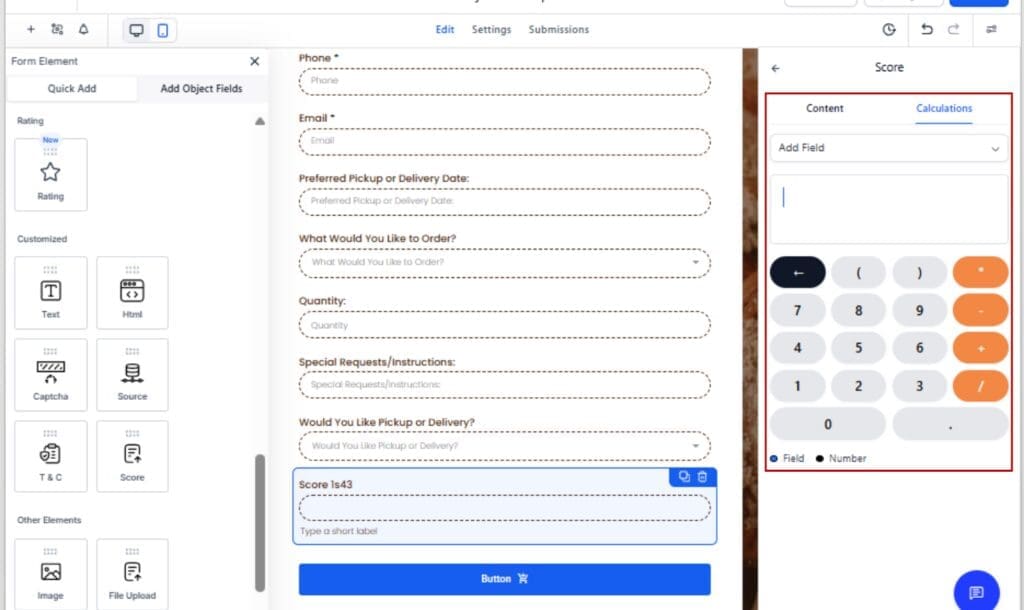
If you’ve ever groaned at having to delete an entire scoring expression just to fix one number, this update is for you. Cursor support in the Score Editor means you can now edit with precision, just like you would in a Word doc or code editor. You can make real-time edits, test logic, and fine-tune scores inside any workflow or contact action field without frustration. Here’s how to use it:
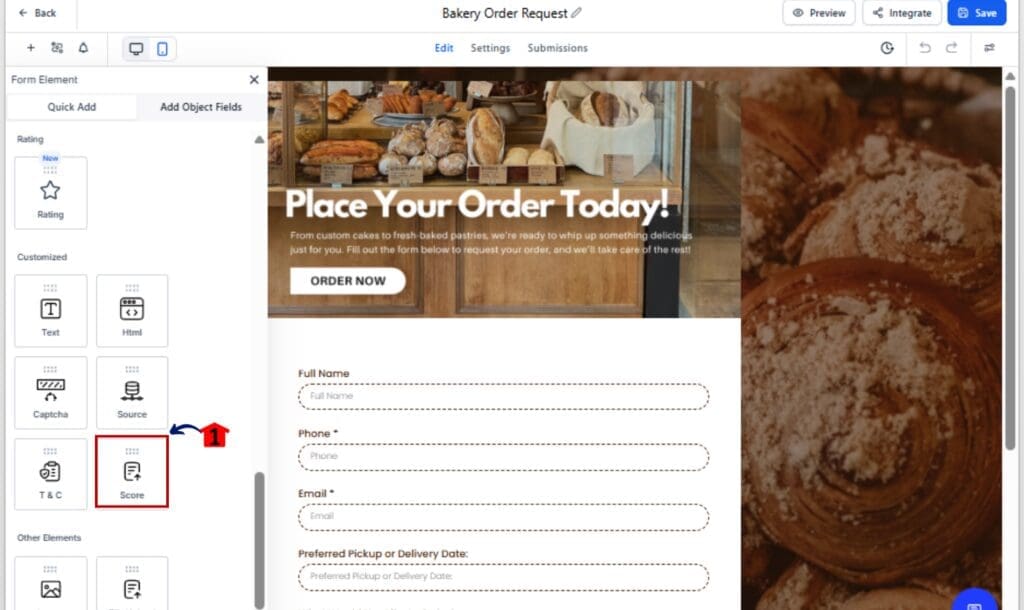
Step 01 – Open the Score Editor
1.1 Go to any Form inside your GHL account
1.2 Find a step where scoring logic is used (e.g., Add to Score action or If/Else condition)
1.3 Click on the Score field to open the editor
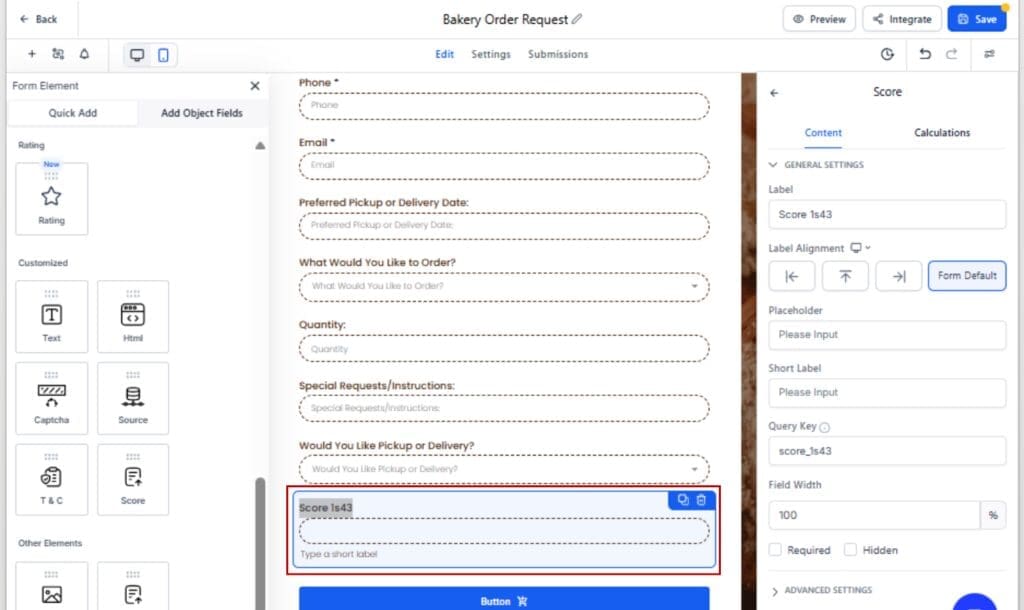
Step 02 – Click Anywhere in the Expression
2.1 Use your mouse to click at any point in the existing expression
2.2 A blinking cursor will appear exactly where you clicked
2.3 You’re now free to type, delete, or adjust any part of the logic
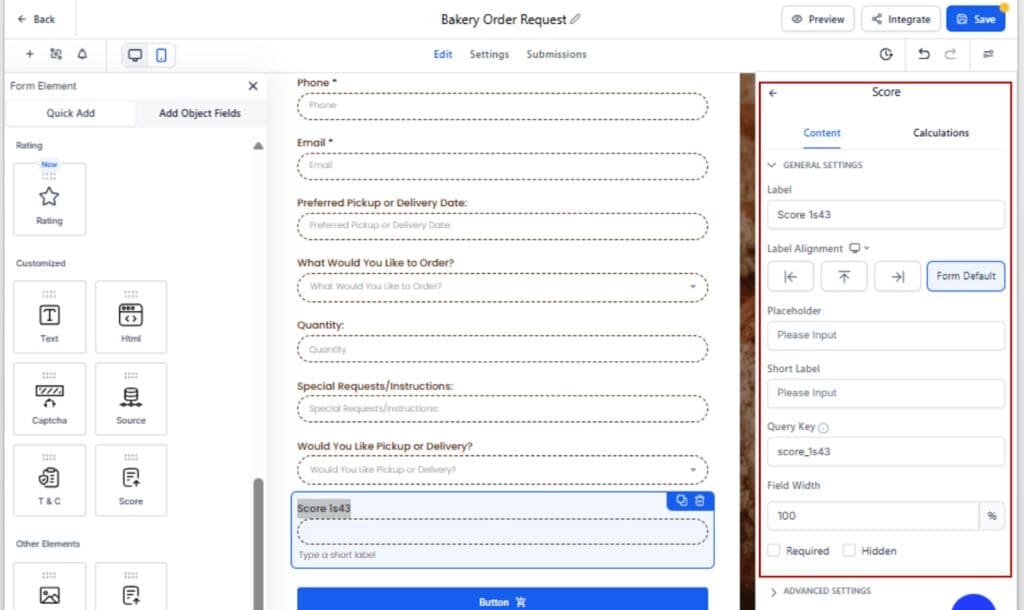
Step 03 – Navigate Using the Keyboard
3.1 Tap the left or right arrow keys to move through the expression
3.2 Press Home to jump to the beginning, End to skip to the last character
3.3 Combine keyboard shortcuts with edits to speed things up
Step 04 – Make Inline Edits
4.1 Type new values (e.g., numbers, operators, or parentheses) at the cursor location
4.2 Use Backspace or Delete to remove just what you need, nothing else gets erased
4.3 Make sure the expression still follows valid syntax before saving
Step 05 – Save and Test Your Changes
5.1 Click “Save” or confirm your logic step in the workflow
5.2 Try running a test contact to make sure everything fires the way it should
5.3 If something looks off, jump back in and tweak the logic

That’s it. No more rigid editing. No more starting over from scratch. This Score Editor update gives you full cursor control so you can build logic faster, and smarter.
Score Editor Update Tips for Speed and Accuracy
Cursor control’s here, and it’s a good time to tighten up how you edit. If you’re running multiple accounts or just tweaking one workflow, these pointers will save you serious time.
Start With a Clear Logic Plan
Don’t dive in blind, write out your logic somewhere first. It’ll make everything smoother once you’re inside the Score Editor.
Use Keyboard Shortcuts Like a Pro
Skip the mouse, arrow keys, Home, and End let you move through your logic fast. Want to clean things up quickly? Add Shift to highlight and delete chunks in one go.
Keep Expressions Clean and Readable
Don’t try to jam everything into one giant expression. Break things up. Simple rules are easier to manage and way easier to troubleshoot later.
Double Check Parentheses
Cursor edits make it easy to add or remove characters, but don’t forget to balance your brackets. A missing parenthesis can still break your logic even if the edit was easy.
Don’t Skip the Test Phase
Now that edits are faster, testing is quicker too. Always run a sample contact through the updated scoring logic to make sure it triggers as expected.
Pro Move:
Clone workflows before making major changes. You’ll always have a backup if something goes wrong.These aren’t just tips, they’re time-savers and sanity protectors. Use them to make the most of the new Score Editor update.
Score Editor Update Empowers Power Users
If you live in workflows and spend hours inside the CRM, this Score Editor update is more than just a nice-to-have, it’s a legit upgrade to your day-to-day operations.
Here’s how it changes the game for high-level users and SaaS agencies:
Editing Feels Like a Real App Now
Before, the Score Editor felt like an early prototype. Now it behaves like the editors you’re used to in pro tools, intuitive, responsive, and flexible.
Fewer Workarounds, More Productivity
No more copying the entire expression into Notepad just to fix a typo in the middle. No more rebuilds from scratch. It’s a simple fix that removes a major workflow blocker.
Easier Delegation to Team Members
Now that editing is safer and more intuitive, you can confidently let junior team members or VAs handle more of the logic building without fear of accidental breakage.
Smarter Scaling Across Sub-Accounts
Agencies working in SaaS Mode will benefit big here. With cursor support, duplicating, editing, and customizing scoring rules across clients becomes a fast, repeatable task.
GHL Becomes a More Serious Dev Environment
Every little UX fix like this signals that GoHighLevel isn’t just adding features, it’s refining the platform for long-term scale and daily usability.
In short: you can now build scoring logic like a pro, without the pain. And that’s a massive win.
Results You’ll See From the Score Editor Update
This update might seem small on the surface, but the ripple effects for your daily workflow are big, especially if you work in CRM logic every week.
Here’s what you can expect once you start using cursor support in the Score Editor:
1. Major Time Savings
No more deleting long expressions just to tweak one part. You’ll shave minutes off every edit, which adds up fast for busy teams and agencies.
2. Higher Scoring Accuracy
The ability to fix specific parts of a formula without breaking the rest means fewer logic errors, better lead segmentation, and smarter automation triggers.
3. Cleaner Workflows
Less trial and error, fewer broken expressions, and a more intuitive editor means your workflows stay tight and clean, no messy workarounds or bloated logic.
4. Better Client Delivery
Being able to adjust scoring without the usual mess means less time fixing errors, and more time focusing on what actually helps your clients.
5. More Confidence for Your Team
Power users will appreciate the pro-level editing experience. And for newer team members, this update removes the fear of “messing something up.”
You’ll spend less time fixing and more time building. And that’s what GoHighLevel should always be about.
Score Editor Update – Frequently Asked Questions
Final Thoughts on the Score Editor Update
Not every update needs to be flashy to matter, this one proves it.
Now that the Score Editor lets you move the cursor freely, making changes is finally quick and hassle-free, whether you’re updating scores or fine-tuning automation.
No more starting over because of one misplaced number. No more clunky backspacing just to fix a tiny mistake.
This update isn’t flashy, but it’s exactly what serious users needed.
So if you haven’t tried it yet, jump into your GHL account and give it a spin. Build smarter scoring logic in less time, with total control at your fingertips.
Scale Your Business Today.
Streamline your workflow with GoHighLevel’s powerful tools.