- Why the Voice Workflow Builder Changes Everything
- Quick Summary – Voice Workflow Builder
- Here are this weeks HighLevel Updates
- What’s New in the Voice Workflow Builder
- Voice Workflow Builder Replaces Manual Setup
- Why Agencies Need the Voice Workflow Builder
- How to Use the Voice Workflow Builder
- Pro Tips for the Voice Workflow Builder
- Agency Use Cases for Voice Workflow Builder
- FAQ – Voice Workflow Builder
- The Future of the Voice Workflow Builder
Why the Voice Workflow Builder Changes Everything
GoHighLevel just upgraded how automations are created inside AI Builder and AI Assistant by introducing the Voice Workflow Builder, allowing users to generate complete workflows simply by speaking instead of typing.
This GHL update removes the friction of manual workflow setup and replaces it with real-time voice-to-automation generation, helping agencies go from idea to live workflow in seconds without complex configuration.
What changed: The Voice Workflow Builder now appears inside the AI Builder prompt box with a built-in microphone icon. Users can click the mic, describe their automation naturally, and GHL transcribes the request and generates the workflow instantly. This feature supports multiple languages and works inside both AI Builder and AI Assistant. There is no additional setup required.
Who this is for: Agencies building client automations, team members who want faster workflow creation, global users who prefer speaking in their native language, and anyone who wants to reduce setup time inside GHL.
What we’ll demonstrate: Where the Voice Workflow Builder appears, how voice-to-workflow creation works step by step, how multi-language dictation performs, what limitations exist, and how agencies can strategically use voice automation to scale faster inside GHL.
The latest GoHighLevel Changelog includes several other GHL feature updates that round out your daily workflow:
- Increase Products Per Page Count in Product List Page
- Conversation AI – Generate Conversation Summary & Transcript
- Kollab App – More Control, Better Playback, Stronger Security
- Configure payment provider by channel ⚙️
- Configure Granular Permissions for Sub-Account Settings
- Communities Learning Tab- Private Course/ Member-Specific Course Access
- Introducing New Templates
- Standard Builder: Drag-and-drop triggers and actions
- OpenRouter Actions & Triggers
- Monday.com actions and triggers
Keep reading for much more on all these updates and a deep dive into the Voice Workflow Builder feature!
Quick Summary – Voice Workflow Builder
Purpose: This update introduces the Voice Workflow Builder inside GHL, allowing users to create complete automations by speaking instead of typing inside AI Builder and AI Assistant.
Why It Matters: It removes friction from workflow creation, speeds up automation builds, and helps agencies move from idea to live execution in seconds.
What You Get: Real-time voice-to-workflow generation, multi-language support, built-in microphone access inside the AI prompt box, and instant workflow structuring with full editing control.
Time to Complete: Most basic automations can now be created in under 60 seconds using voice input.
Difficulty Level: Beginner to Advanced. Anyone can speak a workflow into existence, while power users can refine and expand complex logic.
Key Outcome: Faster automation deployment, reduced setup time, and increased agency productivity inside GHL.
Here are this weeks HighLevel Updates
Increase Products Per Page Count in Product List Page
- What it does: Puts more of your products in front of buyers at once instead of hiding them behind extra clicks.
- Where in GHL: Product List Page settings inside your Store and Funnel product listings.
Automate marketing, manage leads, and grow faster with GoHighLevel.

- Who it’s great for: If you’ve got a packed catalog or manage stores with tons of SKUs, this makes browsing a whole lot smoother.
- Impact: Improves browsing efficiency, reduces pagination friction, and increases the likelihood of customers viewing more products per session — leading to higher average order value opportunities.
Conversation AI – Generate Conversation Summary & Transcript
- What it does: Saves you from digging through long message threads by generating a short recap plus the full conversation log.
- Where in GHL: Conversation AI within the Conversations tab and supported communication channels.
- Who this is really for: Teams handling conversations all day — sales reps, support staff, and agencies keeping up with client messages.
- Impact: Saves time reviewing conversations, improves accountability, enhances coaching, and creates clean documentation for client reporting or compliance.
Kollab App – More Control, Better Playback, Stronger Security
- What it does: Enhances Kollab App functionality with improved playback controls, increased user permissions, and stronger security measures.
- Where in GHL: Kollab App within agency or sub-account collaboration environments.
- Who benefits: Shared-account teams that need better permission control.
- Impact: Keeps collaboration smooth while tightening up who can see and change sensitive areas.
Configure Payment Provider by Channel ⚙️
- What it does: Allows businesses to assign specific payment providers to different sales channels.
- Where in GHL: Payment and product settings within your sub-account.
- Who it’s built for: Stores that don’t rely on just one payment processor and need flexibility behind the scenes.
- Impact: Increases flexibility, improves transaction routing, reduces payment failures, and allows smarter financial operations.
Configure Granular Permissions for Sub-Account Settings
- What it does: Enables detailed control over who can access and modify specific sub-account settings.
- Where in GHL: Staff & Team Settings within Sub-Account permissions.
- Who should pay attention: If you’re running a team inside sub-accounts or reselling GHL as SaaS, this gives you better guardrails.
- Impact: Reduces risk, improves operational control, prevents accidental misconfiguration, and strengthens internal security management.
Communities Learning Tab – Private Course / Member-Specific Course Access
- What it does: Allows you to restrict course access to specific members within the Learning Tab of Communities.
- Where in GHL: Communities > Learning Tab > Course access settings.
- Who wins here: Businesses turning education into revenue.
- Impact: Lets you control who sees what, charge for different levels of access, and keep your premium material protected.
Introducing New Templates
- What it does: Adds new pre-built templates to streamline setup across funnels, workflows, and campaigns.
- Where in GHL: Template library inside relevant builders (Funnels, Workflows, etc.).
- Who wins here: Anyone who wants campaigns up and running faster.
- Impact: Gets campaigns live faster with fewer mistakes during setup.
Standard Builder: Drag and Drop Workflows
- What it does: You build workflows by dragging in triggers and stacking actions visually instead of configuring everything line by line.
- Where to find it: Inside Automation > Workflows.
- Who it’s for: Marketers and agencies building automations regularly who want to actually see how everything connects.
- Why it matters: Makes complex workflows easier to understand and faster to launch.
OpenRouter Actions & Triggers
- What it does: Adds OpenRouter integration with native actions and triggers for advanced AI-powered automation.
- Where in GHL: Workflows under Actions & Triggers integrations.
- Who this is for: Agencies and teams building serious AI automations inside GHL.
- Impact: Expands AI automation capabilities, improves customization, and enables advanced AI-driven business logic inside GHL.
Monday.com Actions and Triggers
- What it does: Integrates Monday.com with native workflow actions and triggers inside GHL.
- Where in GHL: Integrations > Workflows > Monday.com triggers and actions.
- Who wins here: Teams using Monday.com as their command center.
- Impact: Keeps your CRM and Monday.com working together so you’re not copying updates back and forth.
What’s New in the Voice Workflow Builder
The Voice Workflow Builder introduces real-time voice-to-workflow creation directly inside GHL’s AI Builder and AI Assistant.
Instead of typing out your automation logic, you now click the microphone icon inside the AI prompt box and speak your workflow idea naturally. GHL transcribes your speech instantly and generates the corresponding workflow structure for you.
Here’s what that includes:
- Voice-to-Workflow Creation
Tell it what kicks things off, what happens next, and what rules should apply. GHL takes your words and turns them into a working automation.
- Built-In Microphone Access
The mic icon is visible inside the AI Builder prompt box. No add-ons. No separate tool. It’s integrated directly into the workflow creation interface.
- Multi-Language Support
You can dictate in any supported language. The Voice Workflow Builder processes your request and generates the workflow based on your spoken input, making this powerful for global agencies and multilingual teams.
- Works in AI Assistant Too
This voice capability is not limited to workflow creation. You can also use voice input when interacting with AI Assistant for queries, ideas, and automation guidance.
- No Configuration Required
There’s no toggle to enable. No extra setup. The feature works immediately inside supported accounts.
This isn’t just voice typing. It’s structured automation generation powered by conversational input.
Voice Workflow Builder Replaces Manual Setup
Before the Voice Workflow Builder, creating automations inside GHL followed a predictable pattern.
- You opened the workflow builder.
- You typed your idea into AI Builder.
- You adjusted triggers manually.
- You added delays.
- You configured actions.
- You reviewed every step line by line.
It worked. But it required attention, typing, and technical thinking.
Now the process is different.
With the Voice Workflow Builder, you think it… then you say it.
Rather than building each step manually, tap the mic and explain the result you’re after. For example: “When a lead comes in, send a welcome text, wait 10 minutes, follow up with an email, and ping sales.”
GHL handles the structure.
The shift is simple but powerful:
- Old Process: Think → Type → Configure → Adjust → Test
- New Process: Think → Speak → Review → Launch
This reduces friction. It speeds up build time. And it lowers the barrier for team members who aren’t workflow experts.
The Voice Workflow Builder doesn’t remove control. You can still refine, edit, and optimize every step.
It just removes the slow part.
Why Agencies Need the Voice Workflow Builder
Time is your most expensive asset.
Every workflow you build for a client takes minutes. Sometimes hours. And when you multiply that across onboarding, campaigns, reactivations, reminders, review requests, and nurture sequences… it adds up fast.
The Voice Workflow Builder cuts that time down dramatically.
Instead of manually configuring every trigger and action, you can speak the automation into existence. That means faster builds. Faster testing. Faster client delivery.
For agencies managing multiple sub-accounts, this is huge.
You can:
- Build workflows while brainstorming
- Create automations during strategy calls
- Rapidly prototype campaigns
- Reduce training time for new team members
The Voice Workflow Builder also lowers the technical barrier inside GHL. Junior staff, virtual assistants, and account managers can build more confidently without memorizing every workflow action.
And if you serve clients in different countries, the multi-language support makes this even stronger. Your team can speak in their preferred language while GHL handles the structure.
- More speed.
- Less friction.
- Higher output per week.
Agencies that move faster win more.
How to Use the Voice Workflow Builder
If you’ve ever felt slowed down typing out automation logic, this is your shortcut. The Voice Workflow Builder lets you speak your workflow and have GHL generate it instantly. No extra setup. No toggles. Just click and talk.
You can create a voice-powered workflow in just a few steps.
- Go to the Automation and Create or Open a Workflow
- Access AI Builder
- Activate Voice Input
- Speak Your Workflow Instructions
- Let GHL Generate the Workflow
- Review and Refine
- Test and Publish
To start make sure you are logged in to your GoHighLevel sub-account.
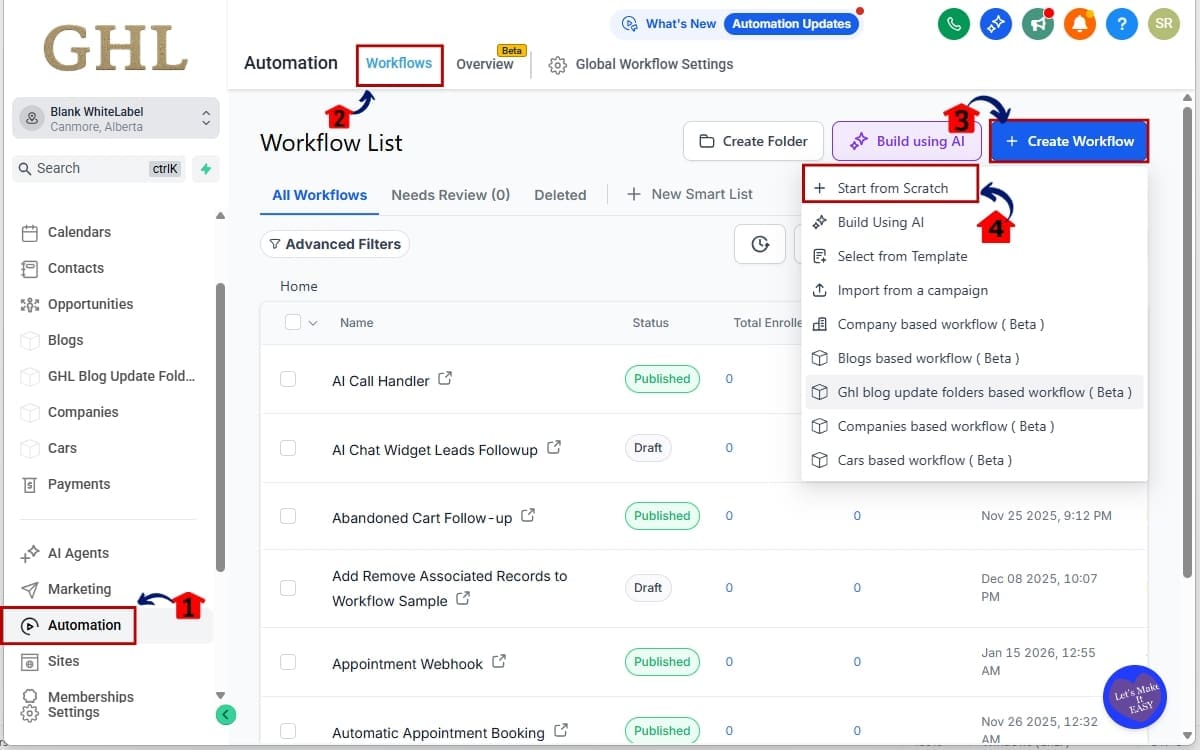
Step 01 – Go to the Automation and Create or Open a Workflow
1.1 From the left menu, go to Automation
1.2 Click workflow
1.3 Click + Create Workflow.
1.4 Click start from scratch.
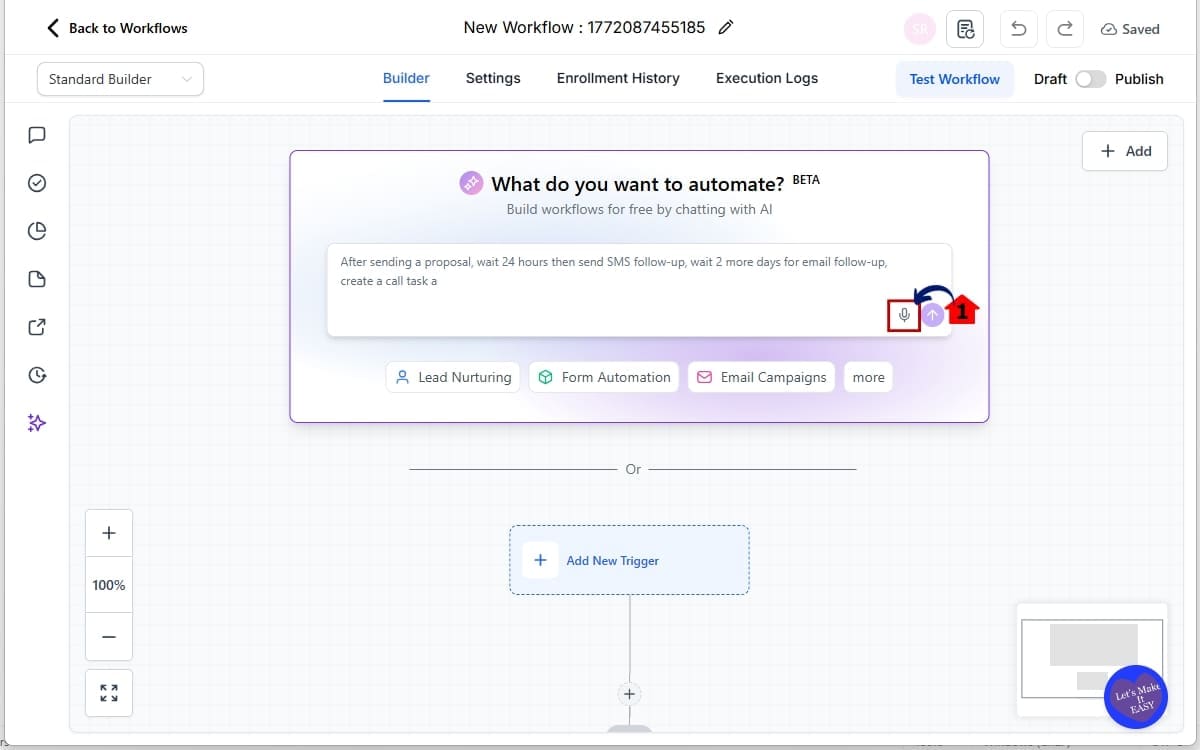
Step 02 – Access AI Builder
2.1 Find the microphone icon is visible inside the prompt field.
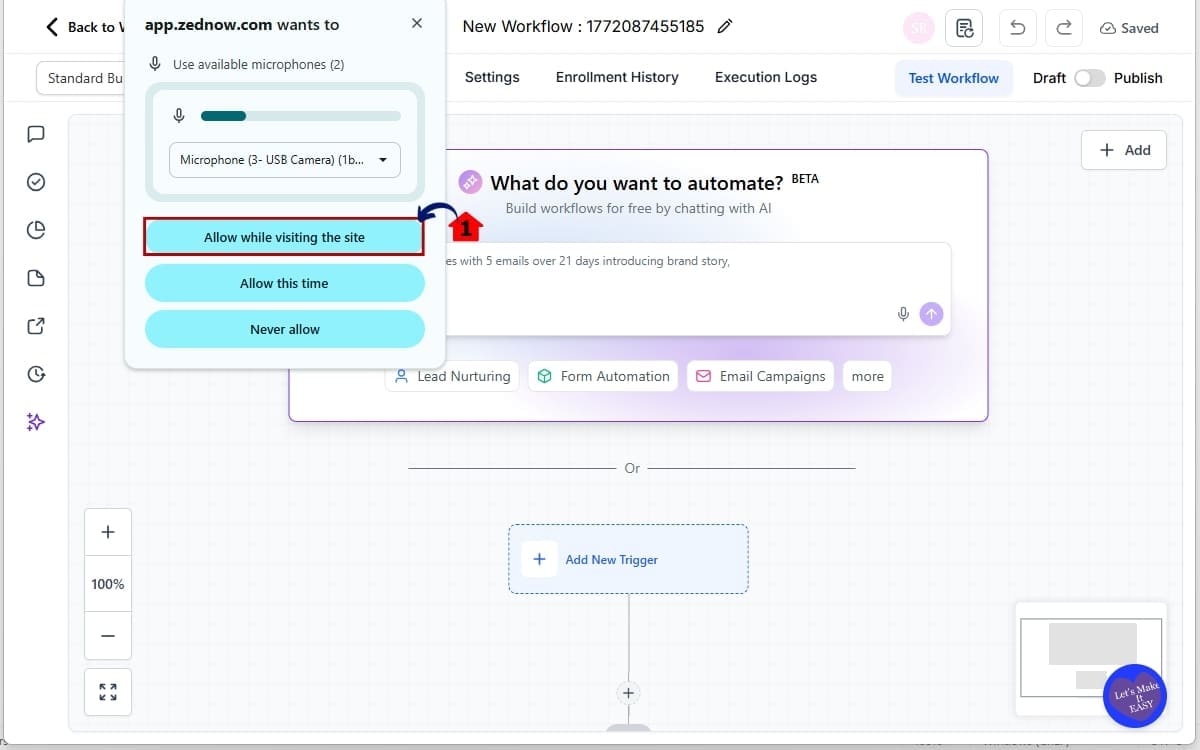
Step 03 – Activate Voice Input
3.1 Allow microphone permissions if prompted by your browser.
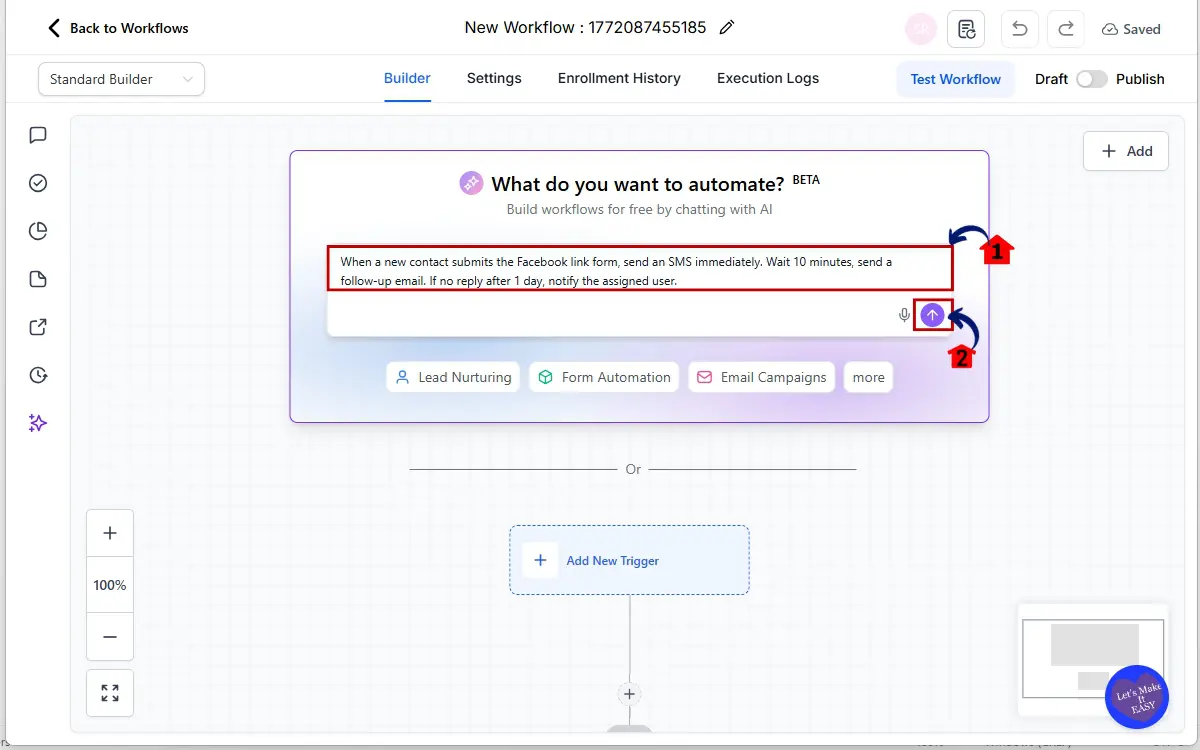
Step 04 – Speak Your Workflow Instructions
4.1 Clearly describe the automation trigger. State the timing delays. Define the actions (SMS, Email, Wait, Notify, Tag, etc.).
Example:
“When a new contact submits the Facebook lead form, send an SMS immediately. Wait 10 minutes. Send a follow-up email. If no reply after 1 day, notify the assigned user.”
4.2 Then click the arrow up (Submit)
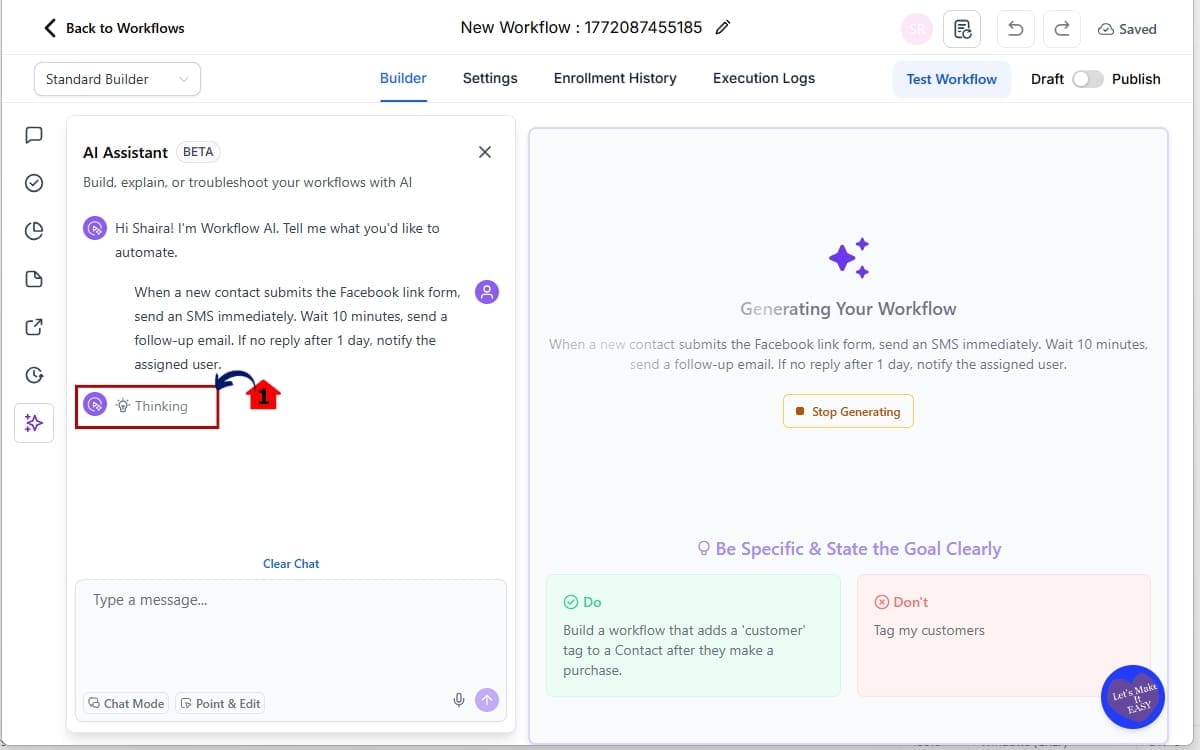
Step 05 – Let GHL Generate the Workflow
5.1 The Voice Workflow Builder transcribes your speech and GHL automatically builds the workflow structure.
Step 06 – Review and Refine
6.1 Confirm the trigger is correct.
6.2 Verify delays and conditions.
6.3 Edit message content if needed.
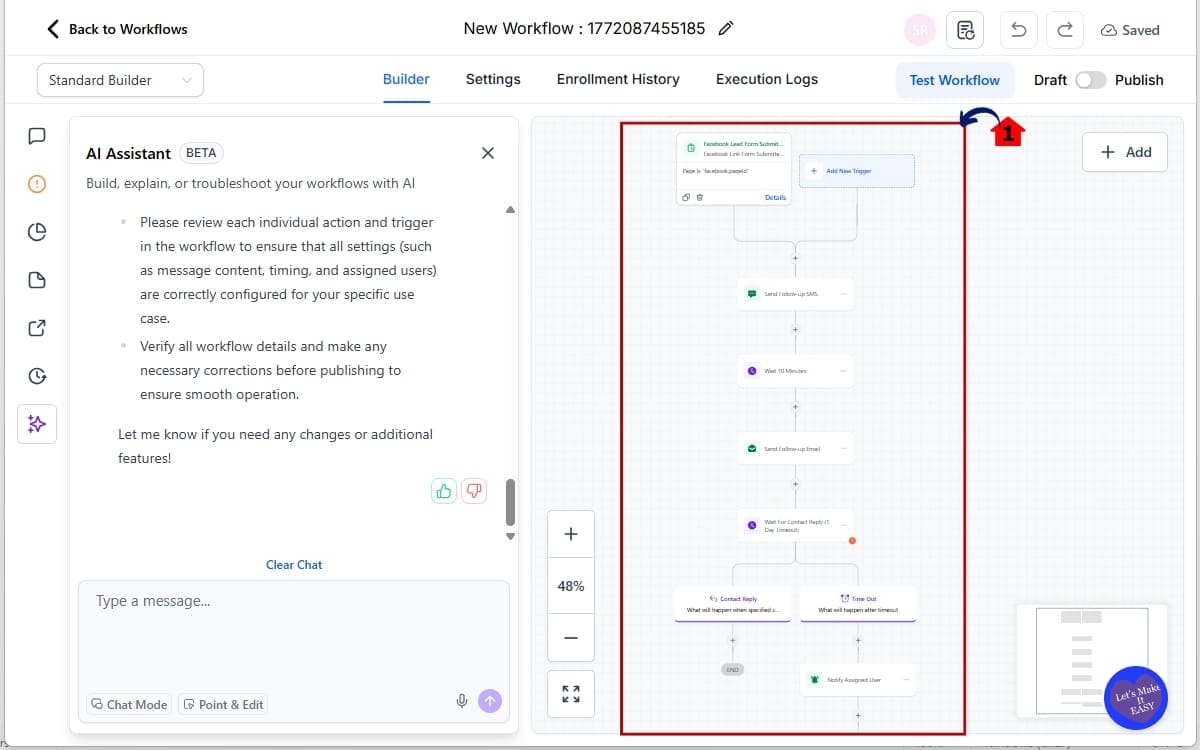
Step 07 – Test and Publish
7.1 Click the test workflow.
7.2 Then click Publish to activate the workflow.
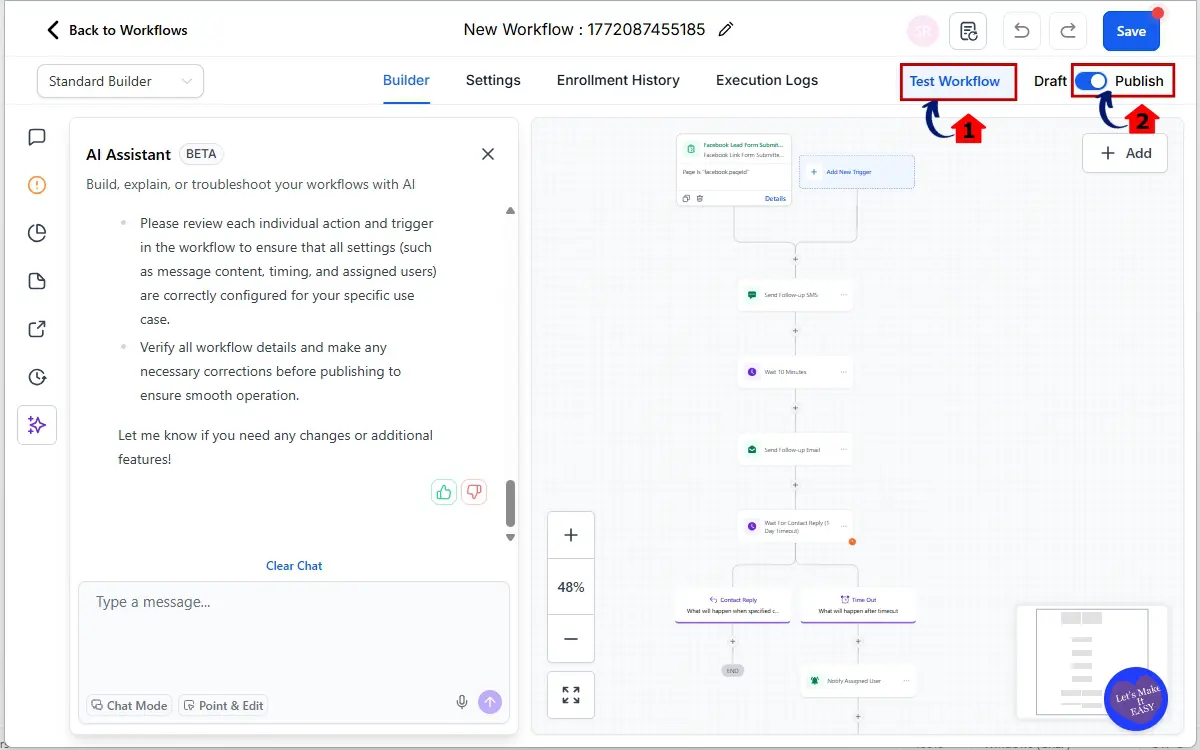
That’s it. You just built a full automation by speaking.
Pro Tips for the Voice Workflow Builder
The Voice Workflow Builder is powerful. But like any AI feature, your results depend on how clearly you communicate.
Here’s how to get cleaner, more accurate workflows every time.
- Be Specific With Triggers
- Don’t say “when a lead comes in.”
- Say “when a contact submits the website contact form” or “when a Facebook Lead Ad is submitted.”
Clear inputs produce better automation outputs.
State Exact Timing. Skip the fuzzy language. Be clear. “Wait 15 minutes” works a lot better than “wait a bit.” Precise timing helps the Voice Workflow Builder structure delays correctly.
Call Out the Channel. Mention the action type clearly:
- Send SMS.
- Send Email.
- Add Tag.
- Create Opportunity.
- Notify Assigned User.
The more defined your language, the better the automation structure.
- Keep It Sequential
- Speak in order.
- Trigger first.
- Then delays.
- Then actions.
Talk it out like you’re showing someone how it works for the first time.
Review Before Publishing
The Voice Workflow Builder generates the structure fast. But you still need to verify message content, links, and logic before going live.
Use It for Brainstorming
You can rapidly test automation ideas just by speaking them out loud. Build fast drafts. Refine after.
Speed creates momentum. Refinement creates results.
Agency Use Cases for Voice Workflow Builder
Real-World Use Cases for Agencies
The Voice Workflow Builder isn’t just a cool feature. It’s a speed multiplier for real agency work.
Here’s where it becomes powerful fast.
- Lead Follow-Up Sequences
- On a strategy call, you decide the follow-up flow. Instead of writing it down and building later, you open GHL and say it.
- Instant draft automation built.
Missed Call Text-Back
Say:
“When a call is missed, send an SMS immediately. If no reply after 1 hour, send another message.”
Done in seconds.
- Appointment Reminders
- Create reminder sequences with specific timing like: “Send reminder 24 hours before. Send reminder 2 hours before. If no confirmation, notify assigned user.”
No manual dragging required.
Review Request Automation
After a pipeline stage changes to Won, automatically send a review request SMS and follow-up email.
Speak it. Generate it. Adjust wording.
Reactivation Campaigns
“Find contacts with no activity in 90 days. Send SMS. Wait 1 day. Send email. Add tag Reactivation Attempt.”
This is where brainstorming turns into execution immediately.
Client Onboarding Workflows
As you map onboarding steps with a client, build the automation live by speaking it.
Internal Team Alerts
Create internal notifications for sales reps, fulfillment teams, or account managers without manually adding each action.
The Voice Workflow Builder helps agencies move from idea to implementation without pause.
Speed isn’t just convenience. It’s competitive advantage.
FAQ – Voice Workflow Builder
The Future of the Voice Workflow Builder
The Voice Workflow Builder is more than a convenience feature.
It signals a shift.
Automation inside GHL is becoming conversational. Instead of learning technical structure first, users can now express outcomes naturally and let AI handle the framework.
That lowers the barrier for new agency owners. It speeds up execution for experienced teams. And it shortens the gap between idea and implementation.
Speed gives you more reps. More reps give you better data. Better data is what separates average agencies from winning ones.
This update also reinforces a bigger direction inside GHL. AI is no longer just assisting with copy or ideas. It’s operational. It’s building. It’s executing.
The agencies that lean into this early will move faster than competitors still manually configuring every workflow step.
Speed compounds.
And this feature adds speed everywhere.
Build Faster With the Voice Workflow Builder
The Voice Workflow Builder inside GHL changes how automations are created.
You no longer have to type every trigger and action manually. You speak your workflow. GHL generates it. You review it. Then you launch.
That’s it.
- Faster builds.
- Less friction.
- More output.
Whether you’re managing multiple client accounts or building internal systems, this feature removes the slowest part of workflow creation.
If you haven’t tested it yet, open AI Builder, click the microphone icon, and speak your next automation into existence.Because the agencies that move fastest usually win.
Scale Your Business Today.
Streamline your workflow with GoHighLevel’s powerful tools.