

- How Deleted AI Studio Projects Now Automatically Disable Preview, Domain, and Published URLs
- Quick Summary – Inactive Project Pages Overview
- What Changed with Inactive Project Pages
- Why Inactive Project Pages Matter to You
- How to Verify and Manage Inactive Project Pages in GoHighLevel
- What Inactive Project Pages Mean for Your Business
- Frequently Asked Questions About Inactive Project Pages
- Conclusion – Why Inactive Project Pages Are a Smart Upgrade
How Deleted AI Studio Projects Now Automatically Disable Preview, Domain, and Published URLs
Inactive Project Pages in GoHighLevel are finally here, and this update fixes a major issue inside AI Studio. If you have ever deleted a project but noticed the preview or live URL was still accessible, you know how risky that could be. Previously, when you deleted an AI Studio project, the system removed it from your dashboard. But the preview link, custom domain, and even published URLs could remain live. There was no direct way to fully disable them.
That created confusion. It also created risk. With this new update, Inactive Project Pages are now automatic. When you delete an AI Studio project in GoHighLevel, every associated link becomes inactive. Preview URLs stop working. Published URLs stop working. Connected domains stop serving content. This is a clean, much-needed improvement to how GHL handles deleted assets. Here at GHL Growth Garage, we love updates that increase control and reduce liability. This one does both. This guide will show you exactly what changed, why it matters, and how to verify that your deleted AI Studio projects are fully inactive.

This Inactive Project Pages update gives you full control over deleted AI Studio projects. Once removed, all preview links, domains, and published URLs automatically shut down, protecting your brand and clients.
Quick Summary – Inactive Project Pages Overview
Purpose
This update ensures that when you delete an AI Studio project in GoHighLevel, all associated preview links, domains, and published URLs automatically become inactive.
Why It Matters
Inactive Project Pages prevent deleted content from staying live. This protects your brand, avoids client confusion, and reduces legal or compliance risk.
What You Get
You get automatic control. Once a project is deleted, GoHighLevel disables every related link without any extra setup or manual action.
Time to Complete
Verifying and deleting a project takes only a few minutes inside AI Studio.
Difficulty Level
Beginner friendly. There are no advanced settings or technical configurations required.
Key Outcome
You gain full control over deleted assets, fewer support issues, and cleaner client accounts using Inactive Project Pages.
What Changed with Inactive Project Pages
Inactive Project Pages now work very differently inside GoHighLevel AI Studio. This update fixes a behavior that caused confusion for many users.
Let’s break it down clearly.
Automate marketing, manage leads, and grow faster with GoHighLevel.

Previous Behavior
Before this update, deleting a project did not fully shut it down.
When you deleted an AI Studio project:
• The project disappeared from your dashboard
• The preview URL could still load
• The published URL could still be live
• The connected domain could still display the page
There was no simple way to force those pages offline.
That meant deleted content could still be visible to the public. For agencies, this created risk. For SaaS users, it created confusion.
New Behavior
Now, GoHighLevel automatically creates Inactive Project Pages the moment you delete a project.
Here’s what happens instantly:
• The project is marked as inactive
• The preview URL stops working
• The published URL becomes inactive
• The connected domain stops serving the deleted content
There is no extra setting to enable.
There is nothing you need to configure.
The system handles it automatically.
Before vs Now Comparison
Before:
Deleting removed the project from your dashboard but left URLs active.
Now:
Deleting a project automatically disables every associated link.
This makes project deletion final and clean.
What You Will Notice in GHL
When you delete a project in AI Studio:
• The project disappears from your list
• The URL will no longer load
• The domain will not display the page
Instead of worrying about leftover links, you now have full control.
Inactive Project Pages make the deletion process secure and predictable.
Why Inactive Project Pages Matter to You
Inactive Project Pages are more than a small fix. This update protects your business in real ways.
When deleted pages stay live, problems happen.
You might have old offers still visible.
You might have test pages indexed by Google.
You might have outdated pricing still online.
That can hurt trust.
Brand Protection
If you manage client accounts in GoHighLevel, this matters even more.
Imagine deleting a draft funnel but the domain still works. A client could find it. A customer could share it. That creates confusion.
Inactive Project Pages remove that risk.
When you delete a project, it is truly gone from public view.
Cleaner Account Management
Agencies often build:
• Test pages
• Demo projects
• Seasonal campaigns
• Redesign drafts
Over time, these stack up.
Now, when you clean up AI Studio, you do not have to worry about hidden live links.
Delete means inactive.
That makes your GHL account easier to manage.
Better for Agencies and SaaS Owners
This update is ideal for:
• Agency owners managing multiple clients
• Virtual assistants cleaning up accounts
• SaaS sub-account admins
• Marketing teams running campaigns
Inactive Project Pages give you predictable control.
No more second guessing.
No more asking, “Is this page still live?”
GoHighLevel now handles it automatically.
That saves time.
It reduces liability.
And it keeps your client accounts clean.
How to Verify and Manage Inactive Project Pages in GoHighLevel
With this update, you are not enabling a new feature. The system now automatically makes deleted AI Studio projects inactive. Your job is to properly delete projects and verify that preview URLs, domains, and published links are no longer live.
In this section, you will access AI Studio, delete a project correctly, and confirm that all associated links are inactive. This ensures your Inactive Project Pages are working exactly as intended.
Here are the steps to verify and manage Inactive Project Pages inside GoHighLevel:
- Access the AI Studio section
- Open the Project List Page
- Delete an AI Studio Project
- Verify Preview URL is Inactive
- Verify Published URL and Domain are Inactive
To start make sure you are logged in to your GoHighLevel sub-account.
Step 1.0 – Access the AI Studio page of GoHighLevel
The Main Menu on the left side of your screen has all the main areas that you work in when using GHL
1.1 Click AI Studio main menu item.
- This opens the AI Studio Project List Page.
- You will see all existing AI Studio projects listed here.

1.2 Review the Project List Page.
- You will see all active and previously created AI Studio projects.
- Each project will have options such as edit, duplicate, or delete.
1.3 Locate the project you want to remove.
- Confirm that this is the correct project before proceeding.
- If unsure, open the project to review its content before deleting.

Step 2.0 – Delete an AI Studio Project
2.1 Click the three-dot menu (⋮) next to the project name.
- A dropdown menu will appear.

2.2 Click Delete from the dropdown options.
- A confirmation pop-up window will open.
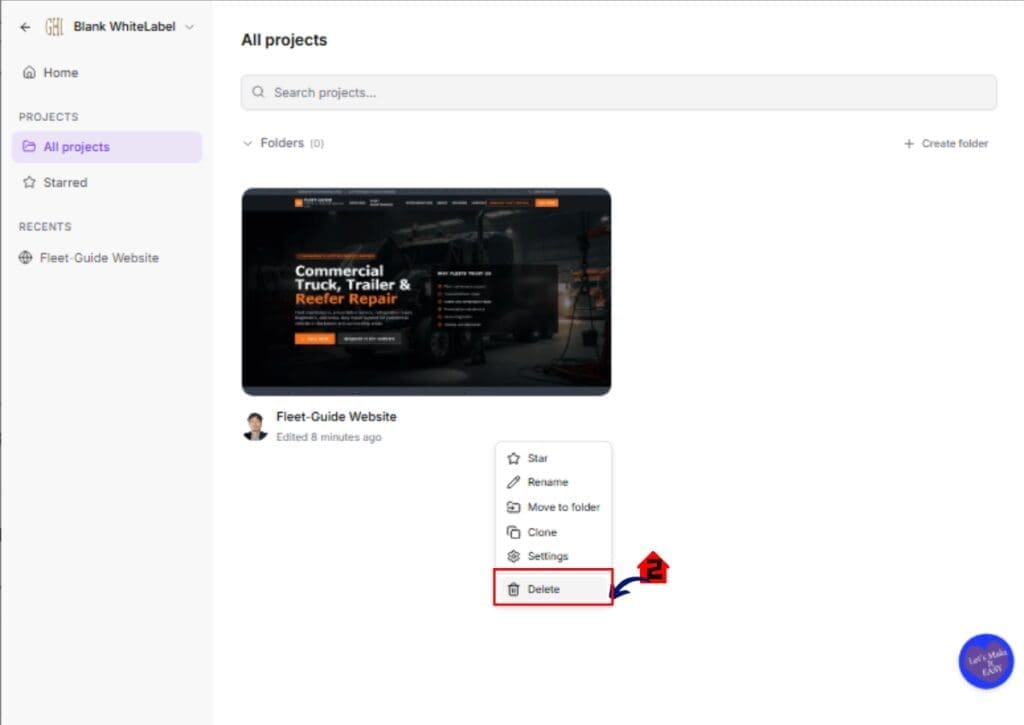
2.3 Click Confirm Delete in the pop-up window.
- The project will immediately disappear from your Project List Page.
- GoHighLevel automatically marks the project as inactive.
- All associated preview URLs and published URLs are disabled.

Step 3.0 – Verify Preview URL is Inactive
3.1 Copy the previous Preview URL if it was saved.
- Paste the Preview URL into your browser.
- Press Enter and attempt to load the page.
- The page should not load successfully.
- You may see an error message or inactive page message.
This confirms the Preview URL is no longer live.

Important Best Practices Before Deleting
• Confirm no active campaigns are using the page
• Check workflows for linked URLs
• Inform clients before removing live content
• Save important assets before deletion
Inactive Project Pages make deletion secure.
But proper workflow checks protect your business even more.
Pro Tips for Managing Inactive Project Pages
Inactive Project Pages work automatically. But smart habits will help you get the most value from this update inside GoHighLevel.
Here are practical tips to keep your AI Studio clean and controlled.
Always Audit Before You Delete
Before removing a project, double-check where it is being used.
• Review active Workflows in the Automation section
• Check email campaigns that may link to the page
• Verify no paid ads are sending traffic to the URL
Deleting is final.
Inactive Project Pages protect you, but traffic can still break if you remove the wrong asset.
Use Clear Naming Conventions
If you build many AI Studio projects, naming matters.
Instead of using generic names like:
• Test Page
• Draft
• Version 2
Use structured names like:
• ClientName_LandingPage_Draft
• ClientName_Offer_Q3_2026
• Demo_Internal_Only
This makes cleanup easier later.
Schedule Monthly Cleanup
Agencies and SaaS users often forget old builds.
Set a reminder once per month to:
• Review unused AI Studio projects
• Delete outdated campaigns
• Confirm Inactive Project Pages are working
A clean account loads faster and reduces confusion.
Avoid Using Live Domains for Testing
Whenever possible:
• Use preview links for draft work
• Avoid connecting production domains too early
• Only publish when approved
Inactive Project Pages now reduce risk. But preventing mistakes is even better.
Communicate With Clients Before Deleting
If you manage client accounts:
• Notify them before removing published pages
• Document the deletion
• Store backups if needed
This builds trust and avoids support tickets.
Inactive Project Pages give you system control.
Good communication gives you business control.
What Inactive Project Pages Mean for Your Business
Inactive Project Pages may seem like a small update. But for agencies and SaaS users, this change has real impact.
First, it gives you control.
Before this update, deleting a project did not fully remove it from the internet. Preview links and published URLs could still work. That created risk.
Now, when you delete an AI Studio project in GoHighLevel, everything shuts down automatically.
That protects your brand.
It protects your clients.
And it protects your reputation.
Reduced Liability
If you manage multiple client accounts, old pages can cause problems.
Imagine:
• An expired promotion still live
• Old pricing still visible
• A draft funnel accidentally shared
Inactive Project Pages remove that exposure.
Delete means inactive.
That makes compliance and client management easier.
Fewer Support Tickets
How many times have you heard:
“Why is this page still live?”
That question should disappear.
With this update, you no longer need to manually check if deleted pages are accessible. GoHighLevel handles it for you.
That saves time for your team.
Cleaner White-Label SaaS Operations
If you run a white-label SaaS using GHL, your sub-account users may delete projects often.
Now you can feel confident that:
• Their deleted preview links are inactive
• Their domains stop serving content
• Their published URLs no longer work
Inactive Project Pages create predictable system behavior.
Predictable systems build scalable businesses.
Real-World Application
Here’s a simple example.
You redesign a client’s landing page.
You delete the old version in AI Studio.
Before this update, you might have had to manually verify the old URL was not live.
Now, it becomes inactive automatically.
That is one less thing to manage.
Small improvements like this compound over time.
And that’s how you build a stronger GoHighLevel operation.
Real-Time Application of Inactive Project Pages for Agencies
Inactive Project Pages are not just a system update. They change how agencies manage risk inside GoHighLevel.
Let’s look at how this works in real situations.
Scenario 1 – Client Website Redesign
You build a new version of a client’s landing page in AI Studio.
Once approved, you delete the old project.
Before this update, the old preview link or domain might still load. That could confuse customers.
Now, the old version becomes inactive immediately.
No overlap.
No confusion.
No manual cleanup.
Scenario 2 – Campaign Cleanup
You launch a seasonal offer.
After the promotion ends, you delete the AI Studio project.
Inactive Project Pages ensure that:
• The preview link no longer works
• The published URL no longer loads
• The connected domain stops showing the content
This keeps expired offers off the internet.
Scenario 3 – Internal Testing Pages
Many agencies build test funnels or draft versions.
Sometimes these drafts get shared by mistake.
With Inactive Project Pages, once deleted, those test pages are fully disabled.
That reduces embarrassment and protects your brand.
Scenario 4 – White-Label SaaS Users
If you run a SaaS on GoHighLevel, your sub-account users may delete projects often.
You do not have to monitor every deletion.
The system now automatically ensures deleted projects are inactive.
That means:
• Fewer support tickets
• Fewer client complaints
• Less technical troubleshooting
Inactive Project Pages create stability.
Stability makes scaling easier.
When your systems behave predictably, your agency grows faster.
Frequently Asked Questions About Inactive Project Pages
Conclusion – Why Inactive Project Pages Are a Smart Upgrade
Inactive Project Pages may look like a small technical change inside GoHighLevel. But for agencies, marketers, and SaaS owners, this update removes a major blind spot.
Before this change, deleting an AI Studio project did not always mean it was fully gone. Preview links could still load. Published URLs could still be visible. Domains could still show outdated content.
Now, deletion truly means inactive.
That gives you:
• More control
• Less risk
• Cleaner account management
• Fewer client issues
• Stronger brand protection
Inactive Project Pages create predictable system behavior. And predictable systems are easier to scale.
If you manage multiple sub-accounts, build client funnels, or run seasonal campaigns, this update makes your workflow safer and simpler.
At GHL Growth Garage, we always look for updates that improve control and reduce manual work. This one does exactly that.
Take a few minutes today to review your AI Studio projects. Clean up unused builds. Remove outdated drafts. Let the system handle the rest.
Have you tested the Inactive Project Pages update yet?
Let us know how it’s working inside your GoHighLevel account.
And check back to the GHL Growth Garage blog for more GoHighLevel feature guides and actionable updates.
Scale Your Business Today.
Streamline your workflow with GoHighLevel’s powerful tools.


