- Schedule GBP posts with GHL in one dashboard
- Quick Summary – Google Post Scheduler Essentials
- What the New Scheduler Does
- What’s Different With This Update
- Why Agencies Should Care
- How to Use the Google Post Scheduler
- Time-Saving Tips for Agencies
- How This Impacts Your Business
- Results You Can Expect
- FAQs About Google Post Scheduler
- Get Started With GHL Posting
Schedule GBP posts with GHL in one dashboard
Google posts are a key part of local SEO. They help businesses stay visible in search results and keep their Google Business Profile active. The more consistent the updates, the better the chances of showing up when nearby customers are searching. That’s why using a tool like a Google post scheduler is a smart move for any agency or business.
Before now, posting to a GBP had to be done manually, one at a time. It was easy to forget, hard to manage across locations, and nearly impossible to scale. That created a gap in visibility, especially for clients competing in local markets.
This is exactly where GoHighLevel steps in with a solution. They’ve added a built-in Google Post Scheduler inside the Social Planner. Now agencies can schedule Google posts ahead of time, use AI to help create the content, and manage multiple locations from one dashboard.
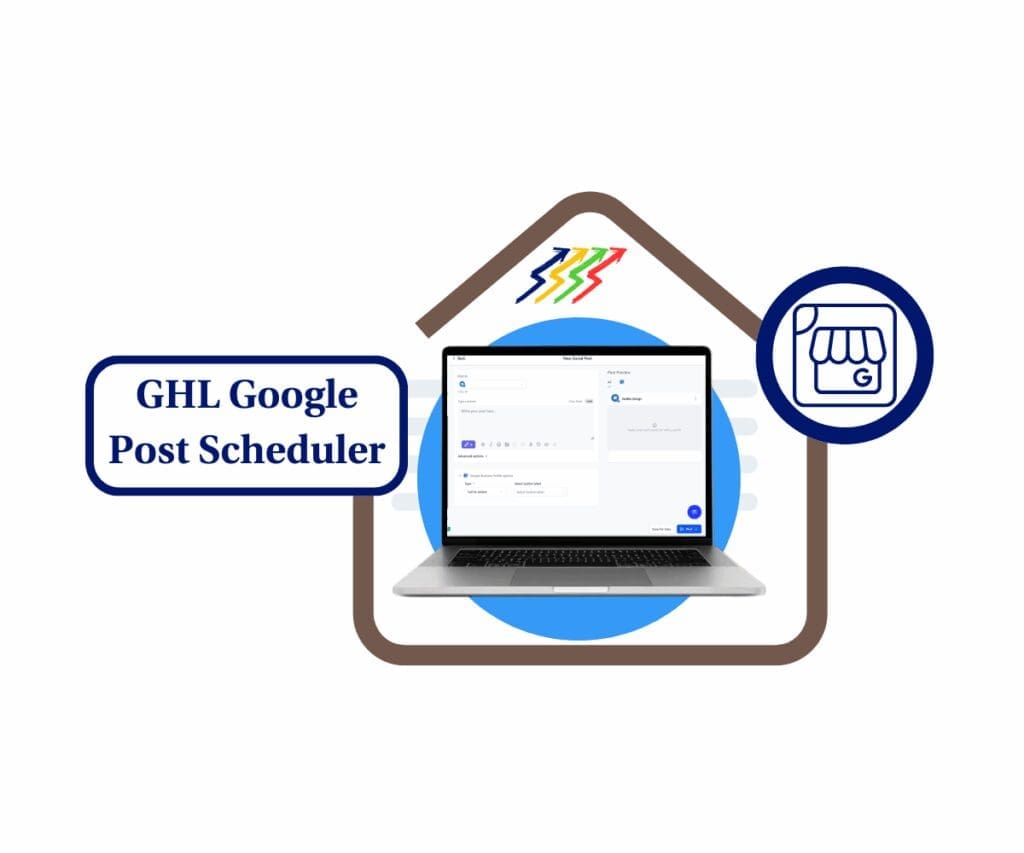
The new Google Post Scheduler inside GHL lets you automate GBP updates, create AI-driven content, and bulk schedule posts for multiple locations all in one place. It’s a time-saver and a smart SEO move for agencies working with local businesses.
Quick Summary – Google Post Scheduler Essentials
Purpose: This feature lets agencies use the Google post scheduler inside GoHighLevel to keep Google Business Profiles active without extra work.
Why It Matters: Consistent Google posting helps improve local search results, keeps profiles up to date, and makes agencies look more reliable.
What You Get: A simple way to write, schedule, and manage Google posts for one or more business locations using the same tools already inside GHL.
Time to Complete: Initial setup takes under 10 minutes. Ongoing posts can be scheduled in one short session each week or month.
Difficulty Level: Easy to use. Anyone on the team can take over once profiles are connected.
Key Outcome: A faster, more reliable way to post on Google that saves time and supports better local SEO.
What the New Scheduler Does
GoHighLevel just made it easier to stay on top of local posting. With the new Google post scheduler now built into the Social Planner, users can plan and publish updates to their Google Business Profile without logging in and out of other tools.
This update gives agencies more control and saves time. Everything happens inside the same dashboard, making it easier to stay consistent and organized.
Automate marketing, manage leads, and grow faster with GoHighLevel.

Here’s what users can do with the new scheduler:
- Plan posts ahead of time. Schedule updates, offers, or events to publish on a specific date and time that fits the business’s needs.
- Post to multiple profiles at once. Select several locations or Google profiles and publish the same content across all of them in one go.
- Get help from built-in AI. Use GoHighLevel’s content assistant to quickly write text and create images for each post.
- Track all scheduled posts in one place. View, edit, or reschedule posts from the GBP Optimization dashboard without needing to start over.
- Work inside GHL, not outside it. There’s no need to jump over to Google. Posting happens right inside GoHighLevel’s Social Planner.
The Google post scheduler helps users treat GBP updates like regular social posts. That keeps things simple and makes it easier to keep every profile active and updated.
What’s Different With This Update
Before this release, there was no direct way to schedule posts to Google inside GoHighLevel. Users had to leave the platform, log into Google, and post one at a time. That made things slow and messy, especially for agencies working with multiple business locations.
Now, with the Google post scheduler fully built into GHL, all of that extra work is gone.
Here’s how it’s different now:
- Google is part of the GHL Social Planner. You can schedule Google Business Profile posts the same way you do for Facebook or Instagram.
- Multiple locations are covered in one step. Post to several GBPs at the same time. No more repeating the process for every client.
- Built-in AI helps with content. You can use GHL’s tools to create the text and images for your posts, which speeds things up.
- Everything is easier to track. You can view all your scheduled Google posts in one dashboard. Make changes anytime without starting over.
The biggest change is that Google posting is now part of the regular flow. The new Google post scheduler brings it all into the same rhythm as other social updates, making it simpler to keep clients’ profiles active and visible.
Why Agencies Should Care
For local businesses, Google posts help them stay visible in search and show up where it counts. But for most agencies, posting regularly to every Google Business Profile can quickly turn into a time drain.
That’s why the new Google post scheduler inside GoHighLevel matters.
Instead of logging into each account one by one, agencies can now create, schedule, and manage all their posts from one spot. This gives teams more time to focus on strategy while still delivering solid results for clients.
Here’s how it helps:
- Cuts down on busywork. Agencies can plan a full month of posts in one go, even for clients with multiple locations.
- Keeps clients more visible. Regular updates help boost local rankings and give Google more reason to show the profile.
- Makes it easier to scale. One post can be reused across different GBPs with minor changes. That saves time and keeps branding on point.
- Reduces content delays. Built-in tools help write posts and create images so teams don’t have to wait on a copywriter or designer.
With the Google post scheduler, agencies can stay consistent on a channel that often gets overlooked. It’s a simple way to keep clients active on Google and help them stay ahead in local search.
How to Use the Google Post Scheduler
Using the Google post scheduler in GoHighLevel is simple. Everything happens inside the platform, and setup only takes a few minutes. Once it’s ready, you can post to one or many Google Business Profiles without leaving your dashboard.
Here’s how to set it up and start posting:
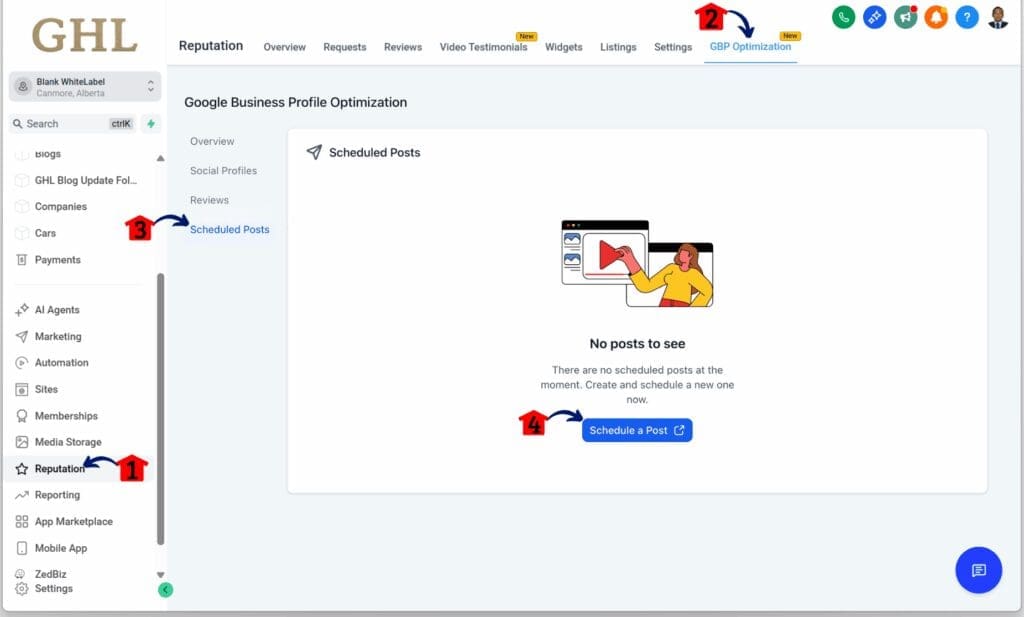
Step 01 – Access the Main Menu in GoHighLevel
- The main menu on the left side of your screen includes all the main areas you work in when using GoHighLevel (GHL).
1.1 Click on the Reputation menu item to access the GBP Optimization section.
- You’ll now be in the Reputation section, where you can access the GBP Optimization tab from the top menu.
1.2 Click the GBP Optimization tab.
- Make sure the Google My Business account is already integrated in the Settings section.
1.3 Click the Scheduled Post sub section.
1.4 Click the Schedule a Post button.
Step 02 – Create and Publish a Google Business Profile Post
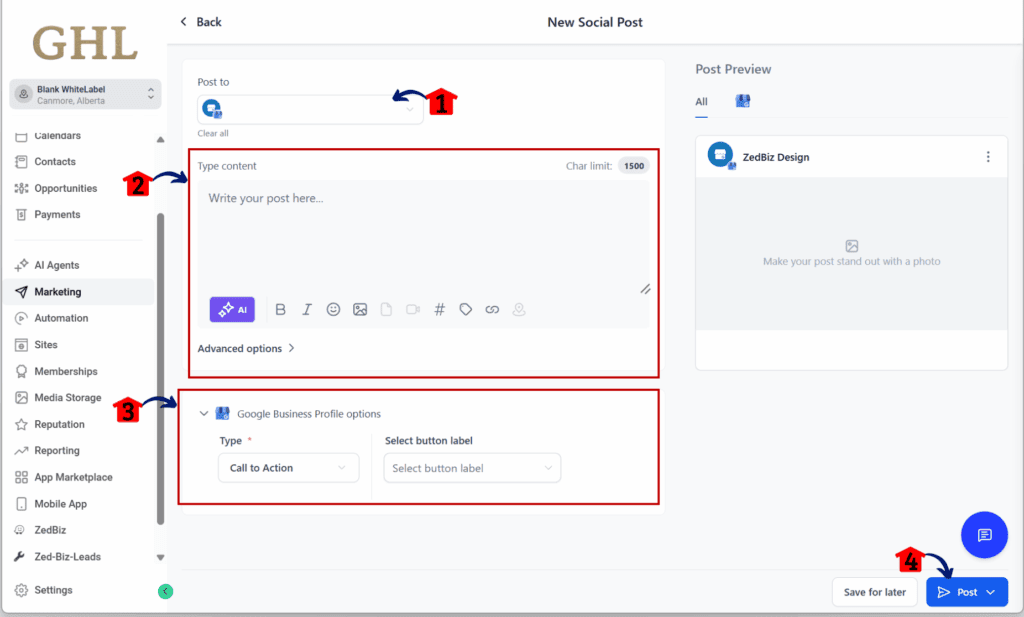
- You should now be redirected to the Social Planner inside GHL.
2.1 Choose the correct Google My Business account.
2.2 Add and upload the text and graphic content.
2.3 Set the call to action for the post.
2.4 Click the Post button.
- You can also schedule the post by clicking the arrow-down icon on this button and then following the scheduling steps.
The Google post scheduler is made to keep things moving. Once you use it a few times, it becomes a quick, repeatable task that fits right into your weekly content flow.
Time-Saving Tips for Agencies
The Google post scheduler in GoHighLevel is built for speed and simplicity. Once it’s set up, agencies can build a repeatable system that takes the pressure off daily posting. With the right habits, this tool can save hours every week.
Here are a few tips to help teams get the most out of it:
- Schedule a full month in one session. Block off time once a month to create and schedule all posts. This keeps your calendar full and avoids last-minute work.
- Let the AI handle the first draft. The AI Assist tool helps get content started. Even if you tweak the final copy, it speeds up the writing process.
- Post on a regular schedule. Aim for days when users are most active. Many businesses see better engagement on Mondays and Thursdays.
- Reuse what works. If a post performs well, save it. Adjust the text or offer slightly, and use it again later.
- Add local touches to each post. Even when posting to multiple profiles, small changes like using the city name or a local reference help make posts feel more personal.
Using the Google post scheduler as part of your routine keeps things organized. It turns posting into a planned task, not something you have to scramble to finish at the end of the day.
How This Impacts Your Business
When agencies handle local posting the old way, it’s easy to fall behind. Posts get delayed, accounts go quiet, and clients start asking why nothing’s showing up. That’s where the Google post scheduler in GoHighLevel makes a difference.
With this update, teams can post more often, stay organized, and keep their clients’ Google Business Profiles active without adding extra work.
Here’s the real-world impact:
- Teams save time by planning posts all at once
- Clients get steady updates that help them show up in search
- Everyone works from the same dashboard so nothing gets missed
- Agencies look more reliable with less effort
The Google post scheduler helps build a routine. It replaces the last-minute scramble with a steady, repeatable process that fits into how agencies already work. That means better results for clients and less stress for the team running the show.
Results You Can Expect
Once the Google post scheduler is in place, most agencies will start to see improvements without needing to change how they work. It keeps the process simple and adds structure to a task that often gets pushed aside.
Here’s what agencies can expect:
- Posts get done faster. Content can be created, scheduled, and published in one sitting. No more bouncing between tools.
- More attention on client profiles. Google rewards consistent updates. That means more views, more clicks, and more local traffic.
- Better search visibility. When posts go out regularly, Google is more likely to show the profile in local results.
- Clients see the work in action. Agencies can point to scheduled and live posts that show progress, not just promises.
The Google post scheduler helps agencies keep their local clients visible. It does the job quietly in the background and makes regular posting feel less like a task and more like part of the plan.
FAQs About Google Post Scheduler
Here are some common questions agencies and users might have about the Google post scheduler inside GoHighLevel:
The Google post scheduler keeps things simple. Whether you’re posting for one business or twenty, it helps keep your updates organized and on time.
Get Started With GHL Posting
Posting to Google is often skipped because it feels like a chore. But now, with the Google post scheduler inside GoHighLevel, it can finally become part of the normal routine.
Everything is right where it needs to be. Users can write posts, schedule them, and manage multiple profiles from the same place they already use for social content. No need to jump between tools or chase down last-minute updates.
For agencies, this makes a big difference. It gives teams a way to offer better local support without stretching their resources. The Google post scheduler makes posting easier to manage, whether you’re working with one client or many.
If your team handles Google Business Profiles, this is a feature worth using. Get it set up, test it on a few accounts, and build a system that saves time while keeping clients visible.
Scale Your Business Today.
Streamline your workflow with GoHighLevel’s powerful tools.